Overview

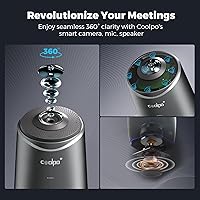
The COOLPO AI Huddle Pana is a premium all-in-one conference camera built for hybrid and remote-first teams who need more than a standard webcam can offer. Unlike panoramic setups that stitch multiple feeds together, this conference camera captures a true 360-degree view in a single, uninterrupted image — no visible seams, no awkward transitions. Plug it in via USB and it is ready to go: no drivers, no IT tickets, no configuration headaches. It works out of the box with Zoom, Google Meet, and Microsoft Teams. Keep in mind it is designed for rooms where participants sit within about 15 feet of the unit.

Features & Benefits

At the heart of this all-in-one meeting cam is a 4K CMOS sensor that delivers crisp video across the full 360-degree field — without the blurring or mismatched exposure you get from stitched panoramic cameras. The MeetingFlex AI speaker tracking identifies who is talking and adjusts the frame automatically, though it works best when participants are not constantly moving around. Eight microphones with a 15-foot pickup range handle most conference room layouts, and noise cancellation does a solid job filtering out HVAC hum and keyboard clatter. All AI processing runs locally on the device itself — your meeting data never touches an external server.

Best For

This conference camera is a strong fit for mid-to-large meeting rooms where coverage matters — think 10 to 15 people seated around a table, not a two-person huddle space. IT managers will appreciate the zero-configuration USB setup; there is nothing to install, update, or troubleshoot remotely. Organizations in healthcare, finance, or legal sectors will find the on-device processing particularly appealing, since no meeting audio or video ever leaves the hardware. Teams that bounce between Zoom, Teams, and Google Meet throughout the day also benefit from how quickly this all-in-one meeting cam switches platforms without any reconfiguration.

User Feedback

Across roughly 185 ratings, the Huddle Pana holds a 4.3-star average — a score that reflects genuine satisfaction with a few consistent caveats. Buyers frequently praise the easy setup experience and speaker tracking accuracy, especially compared to multi-camera room systems they have used before. Where things get more nuanced: some users report that auto-tracking can lag or overshoot when multiple people speak simultaneously, and low-light performance does not quite match dedicated PTZ cameras at this tier. The included 5-foot USB cable also gets flagged as too short for larger installations, which is worth factoring in before you commit.

Pros

  • True 360-degree video coverage means no one at the table is ever off-camera or cut out of the frame.
  • Plug-and-play USB setup works immediately without driver installation or IT configuration.
  • All AI processing runs on-device, keeping meeting audio and video entirely off external servers.
  • Eight-microphone array captures clear voices across a full conference table up to 15 feet away.
  • Compatible out of the box with Zoom, Google Meet, and Microsoft Teams without any reconfiguration.
  • No panoramic image stitching means the video feed looks natural rather than distorted at the edges.
  • Noise cancellation reliably filters steady background sounds like HVAC systems and open-office chatter.
  • The Huddle Pana consolidates camera, microphone, and speaker tracking into one device with a single cable.
  • Stable, wired USB connection eliminates the dropout and latency risks that wireless conference cameras introduce.
  • Speaker tracking works well in structured meetings where participants take clear turns speaking.

Cons

  • Low-light image quality degrades more than expected for a camera at this price point.
  • The included 5-foot USB cable is too short for most real conference room installations.
  • Auto-tracking can lag or jump erratically when multiple people speak at the same time.
  • Firmware update process is poorly documented, making it hard to confirm the device is up to date.
  • The plastic housing feels less premium than the price tag suggests when placed next to enterprise AV gear.
  • Device runs noticeably warm during extended calls, raising some questions about long-term heat management.
  • Manual framing adjustments are not available in real time, leaving users dependent on the AI's judgment.
  • Performance on less common platforms like Webex can require manual audio device overrides.
  • Buyers in very large rooms will likely need supplemental microphones to cover participants beyond 12 feet.
  • Customer support response times on technical questions have drawn inconsistent feedback from long-term owners.

Ratings

The COOLPO AI Huddle Pana has been evaluated by our AI system after analyzing verified buyer reviews from around the world, with spam, bot-generated, and incentivized feedback actively filtered out. What emerges is a clear picture of a capable conference camera that genuinely delivers in several key areas — but also carries a few real-world limitations worth knowing before you commit. Both the standout strengths and the recurring frustrations are reflected honestly in the scores below.
360-Degree Coverage
88%
Buyers consistently highlight how the full-room view eliminates the need to point or angle the camera before a call. In medium-sized boardrooms, remote participants report feeling far more included because everyone at the table is visible without anyone adjusting the setup mid-meeting.
In very large rooms or L-shaped layouts, the 360-degree field can make distant participants appear quite small on screen. A few users noted that the wide-angle perspective slightly distorts faces near the edges compared to a traditional PTZ camera pointed directly at speakers.
AI Speaker Tracking
79%
21%
When one person is speaking clearly, the auto-framing works reliably and saves participants from the awkward experience of watching an empty corner of the room. Teams running structured meetings with clear turn-taking report that the tracking rarely misses its mark.
Crosstalk and overlapping conversations can confuse the tracking algorithm, causing the frame to jump or hesitate noticeably. Several reviewers specifically mentioned that in fast-paced brainstorming sessions, the lag between speaker changes and camera response becomes distracting.
Audio Quality
83%
The eight-microphone array captures voices clearly across a standard conference table, and noise cancellation handles common office distractions like air conditioning hum and hallway noise well. Remote participants rarely need to ask people to speak up, which is a meaningful win for day-to-day calls.
At distances beyond 12 feet, voices start to lose some presence, particularly in rooms with hard floors or high ceilings that create echo. Noise cancellation, while solid for ambient sounds, can occasionally soften voices that are already quiet or accented differently.
Video Resolution & Clarity
81%
19%
In well-lit environments, the 4K output is noticeably sharper than typical USB webcams, and participants on the receiving end frequently comment that the image looks professional and stable. Screen sharing and whiteboard visibility are also much cleaner than on lower-resolution alternatives.
Low-light performance is where the CMOS sensor shows its limits — image quality degrades more than buyers at this price tier might expect, with visible noise in dimly lit rooms after business hours. A few reviewers compared it unfavorably to dedicated PTZ cameras in rooms without dedicated lighting.
Setup & Ease of Use
93%
Plug-and-play USB deployment is genuinely straightforward — multiple IT managers in the reviews mentioned getting it running in under five minutes without touching a single settings menu. No driver downloads, no firmware prompts on first boot, and no account registration required, which matters a lot in managed corporate environments.
Some users found that switching the default audio and video device in meeting software was not as automatic as expected, requiring a brief manual selection the first time. A small number of Teams users also noted occasional recognition issues after Windows updates.
Privacy & Data Security
91%
The on-device AI processing is a genuine differentiator for organizations in regulated industries. Because all tracking and audio processing happens inside the hardware itself, there is no video or audio stream being routed to an external server — something IT and compliance teams actively notice and appreciate.
For buyers who are not technically inclined, the edge computing angle can feel abstract and hard to verify independently. There is no transparent audit log or dashboard to confirm that data stays local, which means organizations relying on third-party compliance certifications may need to do additional vetting.
Platform Compatibility
87%
Verified buyers confirm solid, reliable performance across Zoom, Google Meet, and Microsoft Teams without any custom configuration. Teams that switch between platforms throughout the workday appreciate that there is no reconfiguration needed when jumping from a Teams standup to a Zoom client call.
A handful of reviewers flagged minor inconsistencies with less common platforms like Webex or BlueJeans, where audio device recognition occasionally required a manual override. Compatibility is strong for the mainstream tools but not universally tested across every niche conferencing solution.
Build Quality & Design
76%
24%
The unit has a solid, purposeful feel for a conference room device — it sits flat and stable on a table without wobbling, and the external finish resists fingerprints reasonably well. At 4.28 pounds, it has enough heft to feel substantial without being cumbersome to relocate between rooms.
Some buyers felt the plastic housing does not quite match the premium expectations set by the price point, especially when placed next to higher-end boardroom equipment. A few also noted that the device runs noticeably warm after extended calls, which raised questions about long-term durability.
Included Cable & Connectivity
58%
42%
The physical USB connection is a deliberate security choice, and buyers in IT-managed environments genuinely appreciate not having to deal with Bluetooth pairing or Wi-Fi configuration. The cable works reliably without any latency or dropout issues that wireless connections can sometimes introduce.
The included 5-foot cable is widely criticized as impractically short for any real conference room installation where the host laptop or hub is not sitting directly beside the camera. Multiple reviewers recommend budgeting for a quality USB extension cable as an immediate add-on purchase.
Value for Money
72%
28%
For organizations that need full-room 360-degree coverage without deploying multiple cameras and a dedicated AV mixer, the all-in-one format does consolidate meaningful functionality into a single device. Buyers upgrading from entry-level USB webcams tend to rate the value much higher than those comparing it to enterprise PTZ systems.
At this price tier, buyers have higher expectations around low-light performance and build materials than the Huddle Pana consistently meets. Reviewers familiar with competing premium conference cameras note that some rivals offer stronger image processing or more polished auto-tracking for a similar investment.
Noise Cancellation
77%
23%
Steady background noise — HVAC systems, open-plan office chatter, keyboard typing — is handled well, and remote participants rarely flag audio quality issues in standard office environments. The microphone array's directional sensitivity helps focus on voices rather than ambient room sounds.
In environments with irregular or sudden background noise, like a coffee shop or a shared coworking space, the noise cancellation can occasionally cut out parts of a sentence along with the noise. It is reliable in controlled settings but not quite up to the standard of dedicated noise-canceling speakerphones.
Room Size Suitability
74%
26%
The 15-foot microphone range and 360-degree optics make this conference camera well-suited for rooms accommodating 8 to 15 people seated around a central table. For that specific use case, buyers consistently report that coverage is even and predictable.
Smaller huddle rooms often do not benefit from the full feature set, making the price harder to justify. Larger boardrooms exceeding 20 feet in length expose the camera's audio and video limitations, with users at far ends of the table reporting inconsistent pickup and reduced image clarity.
Intelligent Zoom & Framing
71%
29%
When the intelligent zoom works as intended, it frames active speakers at a natural, comfortable crop that avoids the disorienting effect of extreme wide-angle distortion. In structured presentations where one person leads, the auto-framing genuinely reduces the need for any manual camera management.
The automated framing decisions do not always match what a human camera operator would choose, and in group discussions the zoom level can feel either too tight or too wide without a clear logic. Several buyers wished there was a manual override or app-based adjustment to fine-tune behavior in real time.
Software & Firmware Updates
63%
37%
The plug-and-play nature means the camera does not depend on constant software updates to function, and for many buyers the out-of-box experience has remained stable over time without any intervention needed.
The firmware update process is not well-documented, and several long-term owners reported difficulty confirming whether their unit was running the latest version. Customer service response times on technical questions have drawn mixed feedback, with some buyers waiting several days for useful guidance.

Suitable for:

The COOLPO AI Huddle Pana is a strong fit for businesses that run frequent hybrid meetings and need a single device to cover an entire conference room without complex AV installation. Office managers and IT teams will find the driver-free USB setup particularly appealing — there is nothing to configure, nothing to maintain, and nothing that requires a support ticket to get running. Organizations in regulated industries like healthcare, legal, or finance will value the fact that all AI processing happens inside the device itself, meaning no meeting audio or video is transmitted to an external server for analysis. The 360-degree coverage and 15-foot microphone range make it well-matched to rooms where 8 to 15 people sit around a central table, and the compatibility with Zoom, Google Meet, and Microsoft Teams means teams that switch platforms regularly will not hit any friction. If your current setup is a standard laptop webcam pointed at one corner of a conference table, this all-in-one meeting cam represents a meaningful and practical upgrade.

Not suitable for:

Buyers expecting the image processing and low-light performance of a dedicated PTZ camera system may find the COOLPO AI Huddle Pana falls short at this price tier, particularly in boardrooms that lack proper overhead lighting. The included 5-foot USB cable is a recurring frustration in real-world installations where the nearest hub or laptop is more than an arm's reach away, so factor in additional cabling costs before purchasing. Very large rooms — think auditorium-style spaces or rectangular rooms exceeding 20 feet — will push the microphone pickup range past its reliable limits, and remote participants at the far end of a long table may sound noticeably thinner. The auto-tracking algorithm, while genuinely useful in structured meetings, can struggle in dynamic, fast-paced group discussions where multiple people speak at once, which may frustrate teams whose culture is collaborative and overlapping rather than turn-based. Small huddle rooms with only two or three people also represent a poor value match, since most of the hardware's capabilities would go unused relative to simpler and less expensive alternatives.

Specifications

  • Video Resolution: Captures video at 4K resolution using a CMOS sensor for sharp, detailed image output across the full 360-degree field of view.
  • Field of View: Provides a true 360-degree horizontal field of view without image stitching, delivering a single continuous, uninterrupted video feed.
  • Microphones: Features an array of 8 built-in microphones with noise cancellation designed to capture clear voices from participants up to 15 feet away.
  • Mic Pickup Range: Effective audio capture range extends to 15 feet, making it suitable for mid-to-large conference rooms with participants seated around a central table.
  • AI Tracking: MeetingFlex AI automatically identifies and frames the active speaker using on-device processing, with no data sent to external servers.
  • Processing: All AI algorithms and firmware run via on-device edge computing, meaning no meeting audio or video is transmitted to the cloud for analysis.
  • Connection: Connects via a physical USB cable with true plug-and-play support — no driver installation, software setup, or account registration is required.
  • Included Cable: Ships with a 5-foot USB cable; buyers with larger room installations should plan to source a compatible USB extension cable separately.
  • Video Format: Outputs video in MJPEG format, which is broadly compatible with mainstream conferencing platforms and video recording software.
  • Audio Formats: Supports AAC, FLAC, MP3, OPUS, and WAV audio formats, covering the encoding requirements of all major video conferencing platforms.
  • Platform Support: Verified compatible with Zoom, Google Meet, and Microsoft Teams out of the box, requiring no custom configuration to switch between platforms.
  • Dimensions: The unit measures 11.42 x 4.33 x 11.42 inches, giving it a compact circular footprint suitable for placement at the center of a conference table.
  • Weight: Weighs 4.28 pounds, providing enough stability to sit securely on a table surface without requiring mounting hardware or additional support.
  • Sensor Type: Uses a CMOS photo sensor, which offers good performance in well-lit environments but shows increased noise and reduced clarity in low-light conditions.
  • Focal Length: Maximum focal length is 1.56 millimeters, optimized for wide-angle room coverage rather than telephoto or close-up detail capture.
  • Aperture: Maximum aperture is 0.65 millimeters, which affects light intake and contributes to the camera's performance characteristics in varying lighting conditions.
  • Storage Support: Supports Micro SD flash memory for local storage, though primary use is intended as a live conferencing device rather than a standalone recording unit.
  • Manufacturer: Designed and sold under the COOLPO brand, manufactured by Shanghai LiwCV Co., Ltd., and first made available in September 2020.
  • Model Number: Official model number is DF-HCAM-360, which can be used to verify firmware versions, compatibility documentation, and warranty support requests.
  • Market Ranking: Holds a Best Sellers Rank of #170 in the Webcams category on Amazon, with 185 verified ratings averaging 4.3 out of 5 stars at time of review.

Related Reviews

AI Smart Watch T70-AI
86%
92%
AI ChatGPT Integration
88%
Fitness Tracking Accuracy
90%
Battery Life
85%
Build Quality & Durability
87%
Waterproof Rating (IP68)
More
Shakespeare 5215-AIS 3' VHF AIS Antenna
86%
90%
Build Quality
91%
Durability
88%
AIS Functionality
85%
Ease of Installation
72%
Performance Range
More
ITHUGE AI Smart Glasses
81%
88%
Real-time Translation Performance
82%
Battery Life
75%
Bluetooth Connectivity
70%
Comfort and Fit
85%
Audio Quality
More
Rpbznr AI Voice Recorder 80GB
75%
83%
Transcription Accuracy
78%
Microphone Performance
81%
AI Summary & Notes Generation
74%
Real-Time Translation
71%
Build Quality & Design
More
Ahlirmoy DC310 AI Digital Camera
82%
92%
Value for Money
88%
Ease of Use
93%
AI Features for Learning
84%
Camera Build Quality
89%
Touch Screen Navigation
More
TTQ Chime Note AI Voice Recorder 64GB
74%
78%
Transcription Accuracy
91%
Battery Life
74%
AI Summary Quality
58%
App Stability & Reliability
82%
Audio Recording Quality
More
Amazebra AI Voice Recorder 64GB
86%
91%
Transcription Accuracy
88%
Real-Time Translation
93%
Battery Life
90%
Portability
92%
Data Security
More
Angetube 913AI 4K AI Webcam
86%
91%
Video Quality (4K)
84%
AI Tracking & Auto-Framing
96%
Ease of Setup
85%
Audio Quality (Noise-Canceling Mics)
88%
Build Quality & Design
More
Brhgph Smart Watch with AI Functions
83%
88%
Health Monitoring Accuracy
92%
AI Features (Watch Face & Translation)
89%
Waterproof Durability
80%
Battery Life
85%
GPS Tracking Accuracy
More
Domhong AI Smart Glasses E13
86%
92%
Real-time Translation Quality
85%
Battery Life
80%
Audio Performance
88%
Build Quality & Durability
90%
Ease of Use
More

FAQ

No, and that is genuinely one of its strongest practical advantages. The COOLPO AI Huddle Pana is a true plug-and-play device — connect it via USB and your computer recognizes it immediately. You then just select it as your audio and video source inside Zoom, Teams, or whichever platform you are using, and you are ready to go.

It is best suited for rooms where participants sit within about 15 feet of the device, which typically covers a table seating 8 to 15 people comfortably. Beyond that range, both microphone pickup and video clarity start to drop off. Very large boardrooms or L-shaped rooms may need supplemental audio equipment to get consistent coverage across all seats.

In structured meetings with clear turn-taking, the auto-tracking works well and frames speakers naturally without much noticeable lag. Where it gets inconsistent is in fast-moving group discussions where several people talk at once or interrupt each other — in those situations, the camera can hesitate or briefly frame the wrong person. If your meetings tend to be high-energy and overlapping, it is worth knowing this upfront.

The short answer is yes, at least as far as the AI processing is concerned. Unlike cloud-connected conference cameras that send your audio or video to an external server to run their smart features, this all-in-one meeting cam handles everything internally using on-device processing. Your meeting content stays on the hardware itself and is never transmitted externally for analysis. For organizations in regulated industries, that distinction genuinely matters.

It works reliably with Zoom, Google Meet, and Microsoft Teams without any additional setup. Teams that rotate between all three platforms throughout the workday report no issues switching — you just change which application is running and the camera is recognized automatically. There are occasional reports of minor quirks with less common platforms like Webex, but for the mainstream tools it is consistently solid.

Honestly, for many real-world installations it will not. The 5-foot USB cable works fine if your laptop or docking station happens to sit right next to the camera, but in a typical conference room setup that is rarely the case. Most buyers end up purchasing a quality USB extension cable as an immediate add-on, so factor that into your planning before the device arrives.

In standard office lighting conditions, the 4K output looks clean and sharp enough to satisfy most business use cases. The trouble comes in dimly lit rooms or after-hours meetings where overhead lights are partially off — that is where the CMOS sensor starts to show its limits with increased image noise. If your meeting room has reliable overhead lighting, you should be fine. If it tends to be moody or dim, you may want to add a dedicated lighting source.

The MeetingFlex AI is designed to track the active speaker and adjust the frame accordingly, but it can only meaningfully highlight one focal point at a time. When several people speak simultaneously, the system can get confused and either stay on one person or jump between them. For presentations and structured Q-and-A sessions it handles this well; for free-flowing discussions, it is more of a mixed experience.

Technically it will work, but the value proposition does not hold up well for that scenario. The 360-degree coverage, 8-microphone array, and AI tracking are all designed for larger groups where those features actually make a difference. In a two-person space, a much simpler and less expensive webcam would serve you just as effectively. This all-in-one meeting cam earns its place in rooms where coverage and multi-participant tracking are genuine problems to solve.

This is an area where the experience is less polished than the hardware itself. Several long-term owners have noted that the firmware update process is not clearly documented, and it can be difficult to confirm which version your unit is currently running. If keeping firmware current is a priority for your IT team, it is worth reaching out to COOLPO support directly before purchasing to understand the update workflow and what ongoing support looks like for your deployment.