Overview

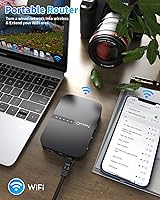
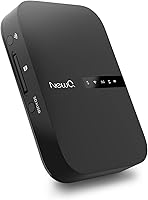
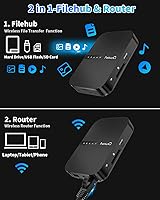
The NEWQ B3 Portable Travel Router and Filehub is one of those rare travel gadgets that genuinely pulls double duty without doing either job halfway. It functions as a compact wireless router — supporting three router modes: Access Point, Router, and Bridge — while also letting you wirelessly browse and transfer files from external storage. A built-in battery means you're not hunting for outlets in a crowded airport lounge. What sets it apart at its price point is that setup requires nothing more than a standard browser; no app install, no account creation. That kind of friction-free access matters when you're tired and just need things to work.
Features & Benefits

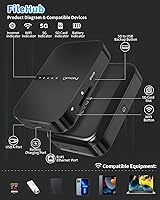
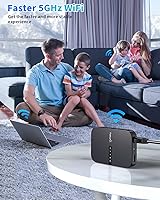
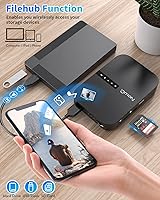
The dual-band AC750 radio — covering both 2.4GHz and 5GHz — gives this travel router a speed advantage over older single-band devices, which is noticeable when streaming or transferring larger files. The filehub function is the real draw for many buyers: plug in a USB drive, slot in an SD card, or connect an external hard drive, and all of it becomes wirelessly accessible to every device on your network. Photographers particularly appreciate the SD card slot, which effectively creates a wireless card reader without any extra hardware. The Ethernet port handles the classic hotel scenario where a wired connection is all that's available. The optional companion app polishes the experience, but the browser interface alone is genuinely capable and gets you up and running in minutes.

Best For

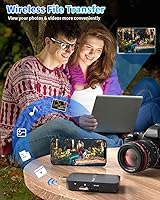
This portable networking gadget isn't a universal buy — it's built for a specific kind of traveler. Photographers and videographers shooting on SD cards will get the most out of it, since offloading footage to a phone or tablet wirelessly, without carrying a laptop, is genuinely useful on a long trip. Hotel guests dealing with wired-only Ethernet connections will also find it indispensable for creating a proper personal Wi-Fi network. Remote workers who bounce between Airbnbs, hotels, and co-working spaces benefit from the multiple router modes, which adapt to different network setups. If you want a single pocket-sized device that handles both networking and wireless file access, this fits the brief well. Pure hotspot hunters don't need it.

User Feedback

Buyers consistently praise how quick and painless the initial setup is — opening a browser and connecting takes only a few minutes, which road-weary travelers genuinely appreciate. The wireless SD card access earns strong marks from photographers who use it to back up shots daily. On the critical side, real-world transfer speeds are the most common complaint; Wi-Fi has overhead, so don't expect USB 3.0-level throughput when moving large video files. The range extension performance also draws mixed responses — it works fine in a standard hotel room but struggles through multiple walls. A handful of users prefer the browser interface over the app, citing occasional connectivity hiccups. Most buyers feel the price is fair given the dual functionality, though those needing only a router may find it excessive.

Pros

  • Browser-based setup works on any device — no app download or account creation required before first use.
  • Three router modes provide genuine flexibility across hotel, Airbnb, and conference room network setups.
  • Wireless SD card access lets photographers review and back up shots directly on a phone or tablet.
  • The built-in battery means the filehub device runs completely cable-free for a full day of moderate use.
  • Dual-band AC750 Wi-Fi reduces interference and provides noticeably faster connections than older single-band travel routers.
  • Ethernet-to-Wi-Fi conversion works reliably in hotel rooms where only a wired port is available.
  • Compact enough to slip into a jacket pocket without adding meaningful weight to a carry-on bag.
  • Files on a connected USB drive or SD card can be shared wirelessly across multiple devices simultaneously.
  • No cloud subscription or internet connection required to access and transfer files between devices.

Cons

  • Real-world wireless transfer speeds are noticeably slower than specs suggest, especially with large RAW or video files.
  • Range extension performance is underwhelming through multiple walls — do not expect whole-suite coverage.
  • The companion app has a history of unexpected disconnections and stale file list displays that require manual refreshes.
  • Printed documentation is too thin to guide non-technical users through the differences between router modes.
  • The plastic casing feels less premium than competitors at a similar price point, particularly the port area over time.
  • Hotel captive portal networks can block the router from obtaining an address, requiring troubleshooting most buyers are unprepared for.
  • Battery drains significantly faster when filehub and Wi-Fi extension are running simultaneously under heavy load.
  • The browser interface, while functional, looks dated on smaller phone screens and lacks responsive design polish.

Ratings

The NEWQ B3 Portable Travel Router and Filehub has been evaluated by our AI system after analyzing thousands of verified global buyer reviews, with spam, bot-generated, and incentivized feedback actively filtered out. Scores reflect the full spectrum of real traveler experiences — from photographers backing up SD cards in remote lodges to remote workers wrestling with hotel Ethernet ports. Both the standout strengths and the frustrating limitations are transparently baked into every number below.
Ease of Setup
88%
Most buyers are up and running within a few minutes using nothing more than a standard browser — no app download, no account registration required. Travelers who have struggled with complicated router firmware in the past consistently call this one of the most approachable setups they have encountered on a portable device.
A small segment of users, particularly those less comfortable with network terminology like SSID or bridge mode, found the initial configuration confusing without a more detailed printed guide. The included documentation could do more to walk first-timers through each router mode step by step.
Filehub & Wireless File Access
83%
The ability to wirelessly browse and pull files from a connected USB drive or SD card is genuinely useful in the field — photographers frequently cite reading card contents directly on an iPhone without a laptop as the single best use case. The multi-device sharing aspect means everyone in a travel group can access the same storage simultaneously.
File management through the browser interface is functional but basic — renaming, organizing, or batch-selecting files feels clunky compared to a native app experience. Users moving large folders report the process requires patience, and folder navigation can become slow when drives contain thousands of files.
Transfer Speed
57%
43%
For light tasks — viewing photos, opening documents, or copying small batches of files — the wireless transfer speed is perfectly adequate and rarely causes complaints. Users transferring JPEGs or small video clips report a smooth enough experience for day-to-day travel backup routines.
Real-world throughput is noticeably slower than what the hardware specs suggest, particularly when transferring large RAW image files or 4K video over Wi-Fi. Buyers expecting USB 3.0-equivalent speeds are routinely disappointed, and moving a full 64GB card wirelessly can take significantly longer than doing so over a wired connection.
Router Versatility
81%
19%
Having three distinct router modes — Access Point, Router, and Bridge — in a device this small is genuinely practical for travelers who stay in a variety of accommodation types. Switching from a hotel Ethernet port to a bridged wireless network requires only a few taps, which remote workers find especially valuable during longer trips.
Mode switching occasionally requires a manual restart to take effect properly, which a portion of users found mildly frustrating in time-sensitive situations. The Bridge mode in particular has drawn complaints about inconsistent connectivity when the upstream signal is weak or congested.
Wi-Fi Range & Extension Performance
61%
39%
In a standard hotel room or small apartment, the range extension capability works reliably enough to improve coverage in a corner or bathroom where the original signal barely reached. For single-room use cases, most buyers find it entirely sufficient.
Performance drops noticeably through multiple walls, and users in larger suites or open-plan spaces report frustratingly inconsistent coverage. Expectations going in should be modest — this is a travel-grade extender, not a replacement for a dedicated home mesh node.
Build Quality & Portability
76%
24%
The device is compact enough to tuck into a jacket pocket or the front pouch of a backpack without any real sacrifice in packing space. The plastic casing feels solid rather than cheap, and most buyers who have carried it through multiple international trips report no physical wear issues.
The casing is all plastic, which does give it a slightly budget feel when held alongside more premium aluminum travel routers. A few buyers noted that the port covers or flaps feel less durable over time with repeated daily use.
Battery Life
72%
28%
The built-in rechargeable battery handles a full day of moderate use — think a long-haul flight plus airport layover — without needing a recharge, which removes the need to occupy a power outlet during setup. For short trips or single-session use, the battery is rarely a limiting factor.
Heavy filehub use, particularly continuous wireless file transfers, drains the battery notably faster than router-only use. Users relying on it as an all-day file server while simultaneously extending Wi-Fi will likely need to top it up mid-afternoon.
App Experience
64%
36%
The optional companion app provides a cleaner, more intuitive interface for file management than the browser alternative, and users who took the time to install it generally prefer it for day-to-day filehub tasks. Push notifications for completed transfers are a small but appreciated touch.
Stability complaints about the app surface regularly — some users report it disconnecting unexpectedly or failing to refresh the file list after inserting a new storage device. Given that the browser interface works without it, many buyers simply abandon the app after one frustrating session.
Browser Interface Usability
74%
26%
The browser-based control panel is a genuine differentiator: it works on any device with a browser, requires no installation, and does not depend on an app store or OS compatibility. Travelers with older phones or tablets that struggle with modern apps particularly appreciate this fallback.
The browser UI looks dated and lacks the responsiveness of a native app, especially on smaller phone screens where tap targets can feel cramped. Advanced users wanting to do anything beyond basic file browsing or mode switching will quickly hit the ceiling of what it offers.
Hotel Ethernet Compatibility
85%
Plugging into a hotel room Ethernet port and broadcasting a personal Wi-Fi network is one of the most practical real-world use cases, and the device handles it reliably across a wide range of hotel network configurations. Buyers who travel frequently for work specifically call this feature out as a must-have.
A small number of users encountered issues with hotel networks that use captive portals or MAC address filtering, which can prevent the router from obtaining an IP address without additional troubleshooting steps that most casual users are not prepared for.
SD Card Reader Function
79%
21%
Photographers using this as a wireless SD card reader on the road consistently rate it as one of the most convenient tools in their kit — inserting a card and browsing photos on an iPad from across the room is a legitimately useful workflow that saves carrying a separate reader or laptop. It supports standard SD cards reliably across tested camera brands.
Speeds when reading high-capacity V60 or V90 cards do not reflect the card's rated performance, since the Wi-Fi bottleneck kicks in regardless of the card's write speed. Users working with very large RAW files from high-megapixel cameras will notice this limitation acutely.
Value for Money
71%
29%
For buyers who actively use both the router and filehub functions, the combination of features at this price point represents solid value compared to buying a travel router and a wireless card reader separately. The dual utility justifies the cost for the right user.
Buyers who only needed a travel router and picked this up for that reason alone often feel it is overpriced relative to simpler, equally capable competitors. The filehub features only feel like added value if you actually intend to use them regularly.
Cross-Device Compatibility
82%
18%
File access works across iPhones, Android phones, and computers without any special drivers or software, which is a practical advantage when you are sharing storage across a mixed-device travel group. Most users report plug-and-play compatibility with the major operating systems out of the box.
Some older Android devices and less common Linux configurations require minor manual adjustments to connect reliably through the browser interface. A small but vocal group of users on niche devices reported that certain file types failed to preview correctly in the browser.
Documentation & Support
53%
47%
The device ships with basic setup instructions that are sufficient for users who are already comfortable with home networking concepts. NEWQ does maintain a support channel that some buyers have used successfully for firmware or connectivity questions.
The printed documentation is thin and does not adequately cover the nuances between router modes, leaving non-technical buyers to figure things out through trial and error. Online support resources are limited compared to more established router brands, which is a real gap when something does not work as expected.

Suitable for:

The NEWQ B3 Portable Travel Router and Filehub is purpose-built for a specific kind of traveler, and it genuinely delivers for that audience. Photographers and videographers who shoot on SD cards will find it especially practical — the ability to wirelessly offload a full card to an iPhone or tablet at the end of a long day, without carrying a laptop, is a workflow that simply was not this accessible before. Frequent business travelers who regularly check into hotels with only a wired Ethernet connection will also get consistent, reliable value out of it, since converting that dead cable into a personal Wi-Fi network takes only a few minutes. Remote workers who move between different accommodation types — hotels, Airbnbs, guesthouses — benefit from the three router modes, which adapt to different network environments without needing to buy separate hardware. If your goal is to consolidate a travel router, a wireless card reader, and a basic NAS-style file sharing device into one pocketable unit, this portable networking gadget fits that brief better than almost anything else at its price point.
Not suitable for:

The NEWQ B3 Portable Travel Router and Filehub is not the right choice for everyone, and being clear-eyed about that will save some buyers real frustration. If you only need a straightforward travel router and have no interest in wireless file access, you will likely find it overpriced compared to simpler, lighter alternatives that do the single job just as well. Anyone planning to use it primarily for moving large video files — 4K footage, large RAW photo batches — will be genuinely frustrated by real-world Wi-Fi transfer speeds, which fall well short of what a wired connection or a direct card reader would deliver. Users hoping it will meaningfully extend Wi-Fi across a large open-plan space or through several walls should look elsewhere; the range extension capability is modest and best suited to single-room scenarios. It also does not suit buyers who want a polished, app-first experience out of the box — the optional app has a history of connectivity hiccups, and those who dislike troubleshooting software issues may find that irritating. Finally, travelers who are not at least somewhat comfortable with basic network concepts like SSID configuration or router modes may struggle without better documentation than what comes in the box.
Specifications

  • Brand & Model: Manufactured by NEWQ under the model designation B3.
  • Wi-Fi Standard: Supports AC750 dual-band Wi-Fi across both 2.4GHz and 5GHz frequency bands for improved speed and reduced interference.
  • Max Speed: Combined theoretical wireless throughput reaches up to 750 Mbps, though real-world speeds will be lower depending on network conditions and connected storage.
  • Router Modes: Operates in three distinct modes — Access Point, Router, and Bridge — to accommodate different network environments encountered during travel.
  • Storage Interfaces: Accepts external storage via a USB port and a dedicated SD card slot, supporting USB flash drives, external hard drives, and standard SD cards.
  • Connectivity: Connects to networks and devices via Ethernet, USB, and Wi-Fi, enabling both wired-to-wireless conversion and direct storage access.
  • Dimensions: The unit measures 4.96 x 3.31 x 2.05 inches, keeping it compact enough to fit in a jacket pocket or small travel pouch.
  • Weight: Weighs 11.6 ounces, which is lightweight enough for daily carry without adding meaningful burden to a travel bag.
  • Battery: Includes a built-in lithium polymer rechargeable battery, eliminating the need for a constant power outlet during portable use.
  • Charging: Charges via the included charging cable; no separate power adapter is included in the box.
  • Compatible Devices: Works with iPhone, Android smartphones and tablets, and computers running standard operating systems, accessible through any modern web browser.
  • App Support: An optional companion app is available for a more refined interface, but the device is fully operable through a standard browser without any app installation.
  • Included Items: The package contains the filehub unit and a charging cable; no external storage device is included.
  • Frequency Bands: Operates on both the 2.4GHz band for range and the 5GHz band for higher-speed, lower-interference connections.
  • ASIN: The Amazon Standard Identification Number for this product is B09T9QKQH7.

Related Reviews
GL.iNet GL-AXT1800 Slate AX
79%
93%
VPN Performance
81%
Wi-Fi Speed & Range
78%
Ease of Setup
86%
Build Quality & Portability
67%
Admin Interface & Usability
More
GL.iNet GL-MT3000 Beryl AX
81%
91%
VPN Performance
93%
Portability & Form Factor
88%
Security Features
67%
Ease of Initial Setup
82%
Wi-Fi Speed & Range
More
GL.iNet GL-SFT1200 Opal
80%
88%
Ease of Setup
84%
VPN Performance
93%
Portability & Form Factor
67%
Wi-Fi Range & Coverage
79%
Build Quality
More
GL.iNet GL-BE3600 Slate 7
84%
91%
Touchscreen Interface
78%
VPN Performance
93%
Portability & Form Factor
74%
Setup & Ease of Use
82%
Wi-Fi Speed & Range
More
TP-Link TL-WR902AC
TP-Link TL-WR902AC
78%
96%
Portability & Form Factor
83%
Setup & Ease of Use
71%
Wi-Fi Performance
88%
Multi-Mode Flexibility
58%
Range & Coverage
More
GL.iNet GL-AR300M16-Ext Mini Travel Router
80%
91%
VPN Setup & Integration
94%
Portability & Form Factor
88%
Hotel & Public Network Bridging
58%
Wi-Fi Speed & Throughput
89%
OpenWrt Customizability
More
GL.iNet GL-MT300N-V2 (Mango)
76%
94%
Portability & Form Factor
89%
VPN Integration
83%
Ease of Setup
58%
Wi-Fi Performance
74%
Build Quality
More
TP-Link TL-WR1502X Travel Router
81%
91%
Ease of Setup
94%
Portability & Form Factor
88%
Captive Portal Handling
79%
Wi-Fi Performance
86%
Multi-Mode Versatility
More
Astrohaus Freewrite Traveler Portable Word Processor
82%
94%
Distraction-Free Focus
89%
Keyboard Quality
92%
Portability
83%
E-Ink Display
91%
Battery Life
More
NETGEAR Trek N300 Travel Router
83%
88%
Value for Money
93%
Portability
79%
Wi-Fi Performance
85%
Ease of Setup
91%
Power Flexibility
More

FAQ

No, and that is genuinely one of its better qualities. You connect your phone or laptop to the device's Wi-Fi network, open any browser, and navigate to the management page from there. The optional app exists and does offer a cleaner interface, but plenty of users never bother installing it and get along just fine with the browser.

Yes, that is one of the most common use cases for this travel router. You plug the Ethernet cable from the wall into the device, set it to Router mode, and it broadcasts its own private Wi-Fi network for your devices. It works reliably with most hotel networks, though you may hit a snag on properties that use captive portal logins or MAC address filtering.

Honest answer: slower than you might hope. The Wi-Fi connection introduces overhead regardless of how fast your SD card is, so transferring a large batch of RAW photos or 4K video clips takes considerably longer than doing it over a wired connection. For JPEGs and smaller files it feels fine, but if you are a high-resolution shooter moving big files daily, temper your expectations going in.

Yes, it works well with iPhones through the browser interface or the companion app. You insert the SD card, connect your iPhone to the device's Wi-Fi, and open the management page to browse and download images. Many travel photographers use exactly this workflow to review and back up shots each evening without needing a laptop.

Access Point mode is for connecting the device to an existing router via Ethernet and adding wireless coverage. Router mode creates a new independent Wi-Fi network from a wired internet source, which is what you want in most hotel rooms. Bridge mode connects wirelessly to an upstream Wi-Fi network and rebroadcasts it — useful in theory, but the range improvement in this mode is modest, so do not expect miracles in large spaces.

It has a built-in lithium polymer battery, so it runs completely untethered when charged. Under moderate use — acting as a router or doing light file browsing — it comfortably lasts through a full travel day. Running both Wi-Fi and heavy file transfers simultaneously will drain it faster, so keeping the charging cable accessible on longer days is worth doing.

Yes, multiple devices can connect to the network and access the attached storage simultaneously. It is useful when traveling as a group and everyone wants to pull photos from the same SD card. Performance does slow down when several people are transferring files at once, but for casual browsing and downloading it holds up reasonably well.

It supports the most commonly used file systems including FAT32, exFAT, and NTFS, so most USB drives and SD cards formatted on a Windows or Mac computer should work without reformatting. If you run into a compatibility issue, FAT32 or exFAT formatting tends to be the most universally reliable option across all connected device types.

It works adequately in a standard single hotel room, but do not expect it to cover a large suite or push a signal through multiple solid walls. The range extension is travel-grade rather than home-grade, meaning it is best used in close proximity to the device you are extending. If your main pain point is a weak signal in a large space, a dedicated range extender would serve you better.

It supports external hard drives as well, connected via the USB port. Keep in mind that bus-powered hard drives draw their power from the USB connection, which may or may not be sufficient depending on the drive — some users find that older spinning hard drives require their own power source to work reliably. Solid-state external drives and USB flash drives tend to be more consistent in this regard.