Overview

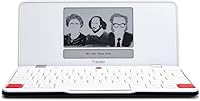
The Astrohaus Freewrite Traveler Portable Word Processor is, at its core, a deliberate act of subtraction — a device built to do one thing well: let you write without interruption. Astrohaus has carved out a specific niche with this machine, positioning it firmly against the distraction-heavy environment of a standard laptop or tablet. Pick it up and the first thing you notice is how surprisingly light it feels — just 1.56 lbs — with a slim, understated build that feels considered rather than cheap. This is not a device for everyone. It is a premium niche tool aimed squarely at writers who have accepted that removing temptation is more effective than resisting it.
Features & Benefits

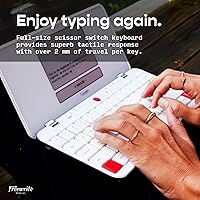
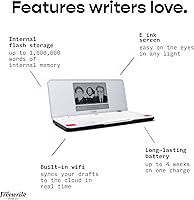
The e-ink display is one of the Freewrite Traveler's most underrated qualities — it reads like paper in direct sunlight, produces no blue light, and never competes with ambient glare the way a backlit LCD would. The full-size scissor-switch keyboard offers genuine tactile feedback, making long writing sessions feel far less fatiguing than typing on a flat membrane. Battery life is exceptional in practice, not just on paper — weeks between charges means this dedicated writing device is always ready. Wi-Fi sync pushes drafts to Google Drive, Dropbox, or Evernote automatically, so your words are safe without any manual file management. There is no browser, no notifications, no temptation — just the cursor and your next sentence.

Best For

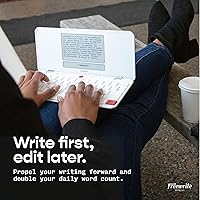
The Traveler makes the most sense for novelists, screenwriters, and journalists who already know distraction is their biggest productivity enemy. It is equally well-suited to commuters or frequent travelers — the device weighs barely more than a hardcover novel and survives weeks without a charge. Writers who love the physical sensation of a responsive keyboard will feel at home immediately. It also works well for morning pages or timed freewriting exercises, where the absence of editing tools actually becomes an advantage rather than a limitation. That said, if your writing workflow depends on constant research, inline editing, or referencing other documents, this dedicated writing device will frustrate rather than help — it drafts, and nothing else.

User Feedback

Writers who stick with the Freewrite Traveler long-term tend to become its most vocal advocates — the keyboard quality and genuine portability consistently earn praise, and many owners report that the device actually changed how they approach first drafts. Critics, however, are not wrong to flag the price: at this level, you are paying for a single function. Earlier units drew complaints about the lack of a backlit display, and some users have noted occasional Wi-Fi sync hiccups, though these appear minor rather than chronic. The Traveler is, frankly, a polarizing purchase — those outside its intended audience will find it hard to justify, while its target users often describe it as indispensable.

Pros

  • The e-ink display is genuinely comfortable to read for hours, with zero glare even in bright outdoor light.
  • Battery life holds up in real-world use — weeks between charges means it is always ready when you are.
  • At 1.56 lbs, the Freewrite Traveler is light enough to carry daily without a second thought.
  • The full-size scissor-switch keyboard feels noticeably better than most thin laptop keyboards.
  • Wi-Fi sync to Google Drive, Dropbox, and Evernote works reliably and requires no manual file transfers.
  • Internal storage holds an enormous volume of text — you will never need to manage or delete draft files.
  • The single-purpose design creates a real psychological shift, making it easier to stay in a drafting mindset.
  • Long-term owners report a strong loyalty to the device, suggesting it delivers on its core promise over time.
  • The slim, minimal build feels premium without unnecessary bulk or fragile components.

Cons

  • The price is difficult to justify for anyone who writes only occasionally or casually.
  • Earlier hardware lacked a backlit display, making low-light writing harder than it should be at this price point.
  • There is no way to edit, reformat, or restructure your writing on the device itself — drafting only.
  • Occasional Wi-Fi sync issues have been reported by some users, though not consistently.
  • No ability to import reference documents or switch between files mid-session.
  • The custom OS means there is no app ecosystem, no future expandability, and no third-party integrations beyond cloud storage.
  • Writers who are not already struggling with distraction may find the single-purpose limitation more annoying than helpful.
  • Compared to simply using a phone or tablet in airplane mode, the value proposition requires a real commitment to the workflow.

Ratings

The scores below reflect an AI-driven analysis of verified global user reviews for the Astrohaus Freewrite Traveler Portable Word Processor, with spam, bot activity, and incentivized submissions actively filtered out before scoring. Each category is weighted against the full spectrum of real buyer experiences — from first-week impressions to long-term ownership — so both the genuine strengths and the frustrations that repeat across thousands of reviews are transparently captured.

Distraction-Free Focus
94%
This is the Traveler's defining quality, and users consistently report it delivers exactly what it promises. Writers who struggled for years with browser rabbit holes and notification spirals describe the device as genuinely changing their drafting habits — not through willpower, but through hardware-level removal of temptation.
A small number of users note that the psychological benefit fades over time as the novelty wears off, and a few found themselves simply reaching for their phone instead. For writers who are already disciplined, the enforced limitation occasionally feels more like a cage than a tool.
Keyboard Quality
89%
The full-size scissor-switch keyboard earns consistent praise from writers who spend hours drafting daily. Compared to the shallow, mushy keys on most thin laptops, the tactile feedback here feels intentional and satisfying — commuters especially appreciate that they can type at full speed without bottoming out uncomfortably.
Some users with larger hands find the key travel shallower than they would prefer for truly long sessions, and a handful of reviewers noted occasional key registration inconsistencies after extended ownership. It is better than average, but not quite at the level of a premium mechanical keyboard.
Portability
92%
At 1.56 lbs, the Freewrite Traveler genuinely disappears into a bag — writers report bringing it on planes, to coffee shops, and on hiking trips where a laptop would have stayed home. The slim profile means it fits in a shoulder bag alongside everything else without adding noticeable bulk.
The device is slim but not ruggedized, and some users wish it came with a protective sleeve or case included at this price point. A few commuters reported minor surface scuffs after regular bag use without additional protection.
E-Ink Display
83%
Writers who work outdoors or near windows are particularly enthusiastic about the e-ink screen — it reads clearly in direct sunlight where a standard LCD would wash out completely. The complete absence of blue light is also frequently mentioned by users who write late at night and notice less eye fatigue compared to a laptop screen.
The screen refresh rate is noticeably slower than any backlit display, which can feel disorienting to new users during fast typing bursts. Earlier hardware units lacked a frontlight entirely, which remains a sore point for buyers who write in dim environments like bedside tables or airplane cabins.
Battery Life
91%
The weeks-long battery life is one of the most consistently praised practical advantages of this dedicated writing device. Travelers especially appreciate never needing to hunt for an outlet — writers who take it on multi-week trips report charging it once and forgetting about it entirely.
Heavy daily users report the battery drains faster than the four-week estimate suggests under real conditions, though it still significantly outlasts any competitor. There is no quick-charge capability, so when it does need a charge, the top-up time is longer than some users expect.
Cloud Sync Reliability
74%
26%
When the sync works smoothly, users love the frictionless experience of opening Google Drive and finding their draft already waiting. The automatic background sync means writers never need to think about saving or transferring files manually, which genuinely reduces cognitive overhead.
Sync reliability is the most commonly cited technical frustration — a notable subset of users report drafts occasionally failing to sync until the device is reconnected to Wi-Fi or restarted. For a device at this price point, occasional data-transfer anxiety is an uncomfortable trade-off.
Value for Money
61%
39%
Writers who are deeply committed to the distraction-free drafting workflow and use the device daily tend to feel the investment pays off over time — they describe it as one of the most impactful writing purchases they have made. For that specific buyer, the cost is absorbed by consistent, meaningful use.
For anyone outside the core target audience, the price-to-feature ratio is genuinely hard to defend — this is a device that does less than a basic laptop by design, yet costs significantly more than many capable notebooks. Casual writers or those unsure about the workflow should approach the purchase carefully.
Build & Durability
78%
22%
The Traveler feels solid and intentionally designed rather than cheaply assembled — most daily users report no hardware failures or structural issues over months of regular travel use. The minimalist construction means there are fewer moving parts to break compared to more complex devices.
The slim form factor sacrifices some structural rigidity, and a few long-term owners note that the chassis shows flex under firm pressure. The lack of any water or dust resistance is also a real concern for writers who work outdoors or in unpredictable environments.
Setup & Onboarding
81%
19%
Most users are up and running within minutes — connecting to Wi-Fi, linking a cloud account, and starting to type requires no technical knowledge and very little configuration. Writers who dread gadget setup find the straightforward onboarding a relief.
The cloud account linking process through the Freewrite web portal feels slightly disconnected from the device itself, and a handful of users found the initial sync configuration confusing without the manual. Updates to the custom OS have occasionally introduced minor bugs that required a restart to resolve.
Writing Experience (Flow)
88%
Writers describe a qualitatively different experience on the Traveler compared to typing on a laptop — the combination of the e-ink screen, tactile keyboard, and enforced simplicity creates a focused mental state that many users say is difficult to replicate elsewhere. Journaling and morning pages routines in particular seem well-served by this environment.
The inability to scroll back and review earlier passages while drafting frustrates writers who naturally reference what they have already written. Some users also find the intentional limitation of not being able to delete large blocks of text mid-session more anxiety-inducing than freeing.
Software & Ecosystem
58%
42%
The custom OS is deliberately stripped down and does its job without crashes or bloat — the device turns on instantly and is always in the same ready state, which experienced users appreciate for its predictability. Astrohaus has pushed firmware updates over time that have addressed some early complaints.
The closed ecosystem means there is no way to add features, install apps, or expand functionality beyond what Astrohaus ships — buyers are locked into the product as designed. Users who hoped for future improvements like a spell-check layer or additional cloud integrations have largely been disappointed by the pace of software development.
Storage Capacity
93%
The internal flash storage effectively removes any concern about running out of space — writers working on multiple simultaneous projects, long-form novels, or years of journal entries never need to think about file management. This is one of those features that becomes invisible in the best possible way.
There is no way to organize drafts into folders or projects directly on the device — everything lives in a flat document structure, which can feel messy once you have accumulated a significant volume of text. The organizational experience only improves once drafts are exported to a cloud service.
Long-Term Owner Satisfaction
86%
The loyalty pattern among Traveler owners is genuinely notable — writers who were initially skeptical or bought it on a whim tend to rate it significantly higher after six months of use than they did in their first week. The device rewards commitment to a specific writing workflow rather than casual or occasional use.
Owners who shift their writing habits or move to a different workflow sometimes find the device sits unused for stretches, making the investment feel wasteful in hindsight. A few long-term users have also noted that Astrohaus customer support response times can be slow when hardware issues arise.

Suitable for:

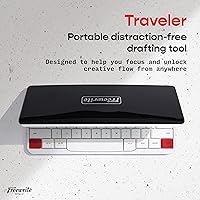
The Astrohaus Freewrite Traveler Portable Word Processor was built for a specific kind of writer — one who already knows that their laptop is working against them. Novelists grinding through a first draft, journalists who need to capture thoughts quickly in the field, and screenwriters who want to get words down without falling into an editing spiral will find this device genuinely useful. It is also a strong match for commuters and frequent travelers, since the featherweight build and weeks-long battery life mean it fits into a bag without adding meaningful weight or requiring a power outlet hunt. Writers who practice daily journaling, morning pages, or timed freewriting exercises will appreciate how quickly the device turns on and how little friction stands between them and the blank page. If your core writing struggle is starting — and staying focused once you do — this dedicated writing device addresses that problem more honestly than most productivity apps ever will.
Not suitable for:

The Astrohaus Freewrite Traveler Portable Word Processor is a drafting tool, and anyone who needs more than that should look elsewhere before committing. Writers who habitually research while writing, switch between reference materials, or rely on inline formatting and style controls will find this device frustrating rather than freeing — there is no browser, no document import, and no real editing environment. Budget-conscious buyers should also think carefully: the price is significant for a device that does far less, on paper, than a basic laptop or even a well-configured tablet in airplane mode. If you are a casual writer who only drafts occasionally, that cost-per-use calculation becomes hard to justify. Students who need a portable writing tool for academic work — where citations, formatting, and research access are non-negotiable — will find the Traveler too limiting for practical day-to-day use.
Specifications

  • Brand: Manufactured by Astrohaus, a company focused exclusively on distraction-free writing hardware.
  • Model: Traveler (AST-01) is the official model designation for this portable word processor.
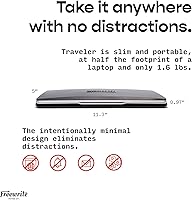
  • Weight: The device weighs 1.56 lbs (approximately 708g), making it one of the lightest dedicated writing tools available.
  • Dimensions: Physical dimensions measure 11.3 x 5 x 0.04 inches, resulting in a slim, notebook-like profile.
  • Display: Features an e-ink screen that produces no blue light and remains clearly readable in direct sunlight without any glare.
  • Keyboard: Full-size scissor-switch mechanism provides tactile feedback and is designed to support extended writing sessions comfortably.
  • Battery Life: A single charge supports up to 4 weeks of typical writing use, powered by an included Lithium Polymer battery.
  • Connectivity: Built-in Wi-Fi enables automatic cloud sync without requiring USB cables or manual file transfers.
  • Storage: Internal flash storage can hold up to 1,000,000 words, eliminating any practical need for file management or deletion.
  • Cloud Sync: Compatible with major cloud services including Google Drive, Dropbox, and Evernote for draft retrieval and archiving.
  • Operating System: Runs a custom lightweight OS developed specifically for this device, with no general-purpose app support or browser access.
  • Power Source: Powered by a rechargeable Lithium Polymer battery that is included in the box at time of purchase.
  • Editing Capability: The device supports drafting only and does not include formatting tools, document import, or inline editing features.
  • Availability: Currently active and not discontinued by the manufacturer as of the latest product listing data.
  • Market Tier: Positioned as a premium niche writing tool, priced to reflect specialized hardware and a purpose-built user experience.

Related Reviews

Celestron Travel Scope 80 Refractor Telescope
73%
83%
Optical Clarity
61%
Build Quality
91%
Ease of Setup
88%
Portability
86%
Value for Money
More
EasyAcc 7-inch Portable Foldable Travel Fan
81%
91%
Battery Life
88%
Noise Level
93%
Portability & Form Factor
62%
Airflow Strength
84%
Speed Control & Usability
More
Celestron Travel Scope 50 Refractor Telescope
75%
74%
Optical Clarity
91%
Portability & Weight
88%
Ease of Setup
58%
Build Quality & Materials
53%
Tripod Stability
More
GL.iNet GL-AXT1800 Slate AX
79%
93%
VPN Performance
81%
Wi-Fi Speed & Range
78%
Ease of Setup
86%
Build Quality & Portability
67%
Admin Interface & Usability
More
Celestron Travel Scope 60DX Portable Refractor Telescope
76%
76%
Optical Performance
63%
Build Quality
91%
Portability
89%
Ease of Setup
54%
Tripod Stability
More
Celestron Travel Scope 70
79%
83%
Optical Clarity
91%
Portability & Weight
67%
Build Quality
93%
Ease of Setup
54%
Tripod Stability
More
cocopar 15.6-inch FHD Portable Monitor
77%
83%
Display Quality
91%
Portability
72%
USB-C Connectivity
76%
Build Quality
81%
Stand & Cover Design
More
GL.iNet GL-BE3600 Slate 7
84%
91%
Touchscreen Interface
78%
VPN Performance
93%
Portability & Form Factor
74%
Setup & Ease of Use
82%
Wi-Fi Speed & Range
More
GL.iNet GL-MT3000 Beryl AX
81%
91%
VPN Performance
93%
Portability & Form Factor
88%
Security Features
67%
Ease of Initial Setup
82%
Wi-Fi Speed & Range
More
GL.iNet GL-SFT1200 Opal
80%
88%
Ease of Setup
84%
VPN Performance
93%
Portability & Form Factor
67%
Wi-Fi Range & Coverage
79%
Build Quality
More

FAQ

No, and that is intentional. The Freewrite Traveler is strictly a drafting tool — you can type forward, but there is no real editing environment, formatting toolbar, or document restructuring capability. The idea is that you draft on the device and then transfer your text to your usual word processor when you are ready to revise.

Once you connect the Traveler to a Wi-Fi network and link your cloud account through the Freewrite app or web portal, your drafts sync automatically in the background. You do not need to press save or manage files — your writing just appears in your connected Google Drive, Dropbox, or Evernote folder. Most users find it reliable, though a small number have reported occasional delays or sync hiccups that resolved after reconnecting to Wi-Fi.

Earlier versions of the Traveler did not include a frontlit display, which was a frequent complaint from buyers who write in low-light conditions. It is worth checking the current hardware revision directly with Astrohaus before purchasing if nighttime writing is important to you, as this detail has been a known limitation of the product line.

Most users find it noticeably better than a typical thin laptop keyboard. The scissor-switch mechanism gives genuine tactile feedback and the full-size layout means there is no adjustment period for touch typists. Writers who spend long hours drafting tend to report less fatigue compared to flat membrane keyboards.

No. The Astrohaus Freewrite Traveler Portable Word Processor uses internal flash storage, which retains all written content even when there is no power. Your drafts are stored locally on the device and are not dependent on battery charge to persist.
It depends on how seriously you take the distraction problem. A phone in airplane mode still has apps, photos, games, and the temptation to switch contexts — the barrier to distraction is low. The Traveler removes those options entirely at the hardware level, which some writers find makes a real psychological difference. That said, if airplane mode genuinely works for you, it is a much cheaper solution.

The four-week battery life figure assumes moderate daily use and appears to hold up well in real-world conditions for most owners. Heavy daily writing sessions will drain it faster, but even in those cases, the battery life is exceptional compared to any laptop or tablet on the market.

Drafts sync as plain text files, which can be opened in virtually any word processor — Google Docs, Microsoft Word, Scrivener, or any other writing app. There is no proprietary format to convert or unlock, which makes the transfer process straightforward.

The slim build is not ruggedized, but owners who use it daily for commuting generally report it holds up well in a bag or sleeve. It is worth pairing with a light protective sleeve to avoid screen scuffs, but the device does not feel fragile in normal use.

The Smart Typewriter is heavier and bulkier, designed more for a dedicated desk or home writing setup. The Traveler trades some keyboard depth for a portable form factor that actually fits in a bag. If you write primarily at home and want the most satisfying keyboard experience, the Smart Typewriter may suit you better — but for writers on the move, the Traveler is the more practical choice.

Where to Buy