
Overview

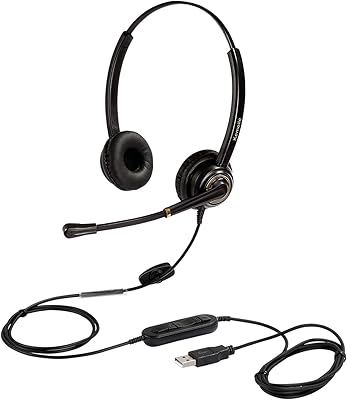
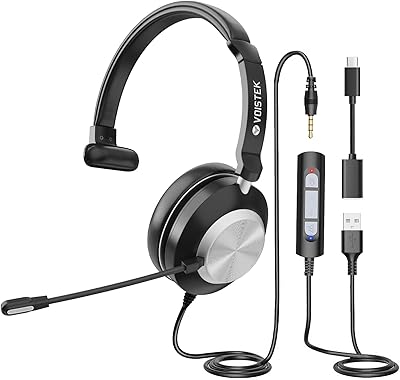
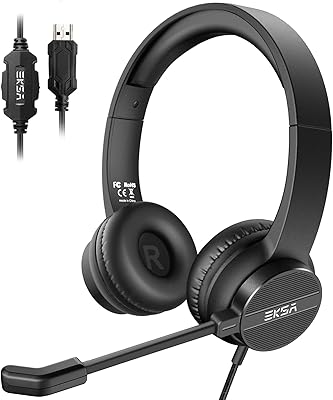
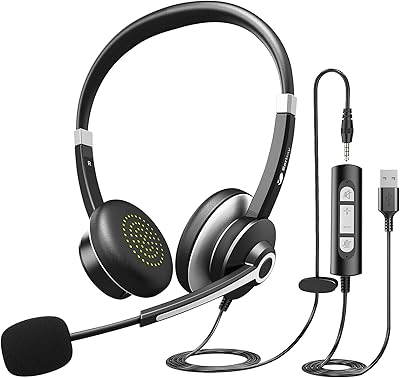
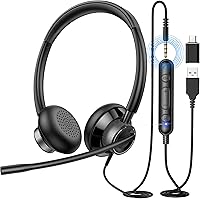
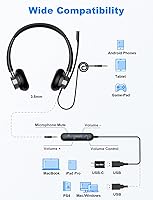
The New Bee H362 USB Headset enters one of the most competitive price brackets in personal audio — the under-$25 wired headset market — and it makes a reasonable case for itself. Plug it into any USB-A or USB-C port and it works immediately, no driver installation required. That simplicity alone wins points with users who just need something functional before their next meeting. At 116 grams, it sits lightly on your head, and the choice of USB, USB-C, or 3.5mm connection means it adapts to most laptops, desktops, or mobile devices without fuss.

Features & Benefits

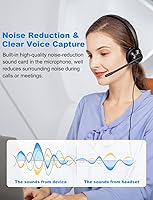
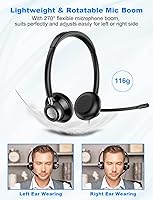
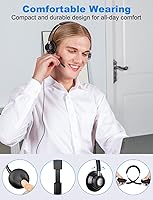
The mic boom rotates a full 270 degrees and switches comfortably between left and right sides — a small detail that matters if you share a desk or just have a preference. New Bee built a noise-reduction sound card directly into the microphone housing, which does a decent job filtering keyboard clicks and background hum during calls. The inline control pod lets you nudge the volume or hit mute without alt-tabbing away from whatever you have open. Ear cushions are soft enough for extended wear, and the metal-reinforced headband holds its adjustment reliably rather than creeping loose mid-call.

Best For

This office headset makes most sense for remote workers and call center agents who spend hours on voice calls and need reliable mic pickup without spending much. Students attending back-to-back online lectures will appreciate the low weight and cushioned fit. It also suits anyone still relying on a laptop's built-in microphone — the jump in call clarity is noticeable. The triple connection options make it practical for people who rotate between a work laptop, personal machine, or tablet. Just keep expectations grounded: this is a voice-first tool, not something you would choose for music or gaming audio.

User Feedback

Across roughly 350 ratings averaging 4.2 stars, the most consistent praise centers on mic clarity for the price — buyers frequently note that callers can hear them clearly, which is the core job. On the downside, a portion of reviewers flag that the plastic construction feels modest over time, and a few mention the ear pads losing their softness after several months of daily use. The mute button gets mostly positive mentions for accessibility, though some users wish it had tactile feedback. Call center workers specifically validate the comfort claim for long shifts, but headband pressure becomes a point of contention for users with larger head sizes.

Pros

  • Plug-and-play setup works immediately on Windows and Mac with zero driver installation required.
  • At 116 grams, this USB headset sits lighter on your head than most wired competitors at this price.
  • The rotating mic boom switches between left and right ear sides — a genuinely useful everyday detail.
  • Mic clarity is strong enough that call recipients rarely complain, even in moderately noisy home environments.
  • USB-A, USB-C, and 3.5mm connection options cover almost every device without needing extra adapters.
  • The inline mute and volume controls are within easy reach and remove the need to alt-tab mid-call.
  • A three-year warranty is unusually generous for a budget wired headset and adds real purchase confidence.
  • The adjustable metal-reinforced headband holds its position reliably instead of creeping loose during calls.
  • Call center and home office users specifically validate the all-day wear claim in real-world feedback.

Cons

  • Ear pads lose softness and breathability noticeably after several months of heavy daily use.
  • The mute button lacks a firm tactile click, making it easy to second-guess your mute status mid-call.
  • Plastic construction on the ear cups and boom arm feels fragile under repeated daily handling.
  • Cable sheathing near the connector shows fraying in a meaningful share of longer-term user reviews.
  • The boom hinge can loosen over time with frequent repositioning, reducing precise placement reliability.
  • Noise filtering struggles in genuinely loud environments like open offices or busy shared households.
  • No software, EQ, or mic sensitivity controls mean you are entirely dependent on OS-level audio settings.
  • Headband clamping pressure becomes uncomfortable for larger head sizes during sessions beyond a few hours.

Ratings

The New Bee H362 USB Headset has been evaluated by our AI rating system after processing verified buyer reviews from multiple global markets, with spam, bot-submitted, and incentivized feedback actively filtered out. The scores below reflect a balanced picture of where this office headset genuinely delivers and where real users have run into friction. Strengths and recurring pain points carry equal weight in every category.

Microphone Clarity
83%
For a wired headset at this price, the mic performance surprises most buyers. The built-in noise-reduction sound card does a credible job suppressing keyboard noise and household ambient sound, and call recipients consistently report hearing the speaker clearly on Zoom and Teams calls.
The noise filtering is not on par with dedicated USB microphones or premium headsets. In louder environments — open offices, households with children — callers still notice background intrusion, and the mic can sound slightly thin on recordings.
Comfort & Wearability
76%
24%
At 116 grams, the H362 sits noticeably lighter than many rivals in its class, and most users report being able to wear it through a full workday without significant fatigue. The adjustable headband accommodates a wide range of head sizes reasonably well.
A recurring theme in longer-term reviews is headband pressure for users with larger heads, and the ear pads — while soft initially — tend to lose their cushioning feel after several months of daily use. Extended sessions beyond four hours surface more complaints.
Build Quality
61%
39%
The metal-reinforced headband adds structural credibility and holds adjustment positions reliably without slipping mid-call. Most buyers acknowledge the construction is adequate for desk use and light daily handling.
The overall plastic feel of the ear cups and mic boom arm reads as budget-tier, and several reviewers note the boom hinge loosening over time with repeated repositioning. Drop resistance and long-term cable integrity are common concern areas in negative reviews.
Value for Money
88%
Few headsets at this price point offer USB plug-and-play convenience, a rotating mic boom, inline controls, and multi-connection options together. For buyers upgrading from a laptop's built-in mic, the jump in call quality feels substantial relative to the outlay.
Buyers who stretch expectations toward professional audio or durability tend to feel the value erodes faster than expected. If the ear pads degrade within six months, the cost-per-use calculation shifts noticeably.
Inline Controls
79%
21%
The inline control pod is positioned conveniently along the cable and lets users mute or adjust volume without breaking focus mid-call. Most buyers find it intuitive within the first day of use, particularly during back-to-back video meetings.
The mute button lacks a firm tactile click, which means users occasionally second-guess whether they are actually muted — a real problem during professional calls. A few reviewers also report the volume wheel feeling slightly loose after extended use.
Audio Playback Quality
58%
42%
Voice reproduction during calls and online lectures is clear and intelligible, which covers the primary use case well. Spoken word content, webinars, and video conferencing audio come through without distortion at moderate volume levels.
This is not a headset to reach for when listening to music or watching films. The dynamic driver is tuned narrowly for voice frequencies, and the lack of bass depth or stereo width becomes obvious the moment you step outside call and conferencing use.
Plug-and-Play Setup
94%
No driver installation, no software, no configuration — plug it in and it is recognized immediately on Windows and Mac. Non-technical users and first-time headset buyers specifically call out this frictionless setup as a genuine plus.
The simplicity does mean there are zero EQ or audio customization options. Users who want to tweak mic sensitivity or playback levels beyond the inline control are entirely dependent on their operating system settings.
Cable & Connectivity
72%
28%
The inclusion of USB-A, USB-C, and 3.5mm options in one package is genuinely useful for buyers juggling multiple devices. Switching from a work laptop to a personal machine requires no additional dongles for most users.
Cable durability is a cited weak point — the sheathing near the USB connector and inline pod shows fraying in a portion of longer-term reviews. The cable length suits static desk setups but offers limited flexibility for users who move around.
Mic Boom Adjustability
81%
19%
The 270-degree rotation and left-right switchability of the boom arm is a practical feature that feels considered rather than just listed on a spec sheet. It works reliably for both left-handed and right-handed desk setups.
The boom arm does not hold micro-adjustments as precisely as higher-end gooseneck designs. Over repeated daily repositioning, the hinge tension can feel less secure, requiring users to find the sweet spot again rather than trusting its memory.
Compatibility
91%
The H362 works across Windows, Mac OS X, iOS, and Android without any configuration. Buyers running older Windows versions, including XP and Vista, confirm it functions without issue — useful in corporate or institutional environments that lag on OS updates.
A small number of users report inconsistent recognition on certain Linux distributions and older Android tablets, requiring manual audio source switching. These are edge cases, but worth noting for users outside the mainstream OS ecosystem.
Headband Adjustability
69%
31%
The sliding adjustment mechanism covers enough range to fit most adult head sizes, and the metal reinforcement means it does not flex or bow under its own weight. Initial fit-out is quick for most users.
Users at the larger end of head size ranges report that even at maximum extension, the headband exerts noticeable clamping pressure after an hour or two. There is no padding on the top strap itself, which some buyers find uncomfortable on longer calls.
Ear Pad Quality
63%
37%
Out of the box, the ear cushions feel soft and breathable enough to justify the all-day wear positioning. Buyers coming from hard plastic earbud-style headsets notice the improvement in contact comfort immediately.
The material shows wear relatively quickly under daily use — flattening and losing breathability within a few months for heavy users. Replacement pads are not officially sold or easy to source, making degradation a real end-of-life concern.
Noise Isolation
67%
33%
The on-ear design combined with the cushioned pads provides a modest level of passive isolation from ambient office or household noise, enough to keep focus during calls in moderately busy environments.
This is on-ear rather than over-ear, so isolation is inherently limited. Open offices, busy households, or any environment with sustained mid-to-high frequency noise will bleed through noticeably during listening.
Warranty & Support
77%
23%
A three-year warranty is genuinely competitive at this price tier and signals a degree of brand accountability. Multiple buyers report responsive customer service exchanges when raising issues directly with New Bee.
Warranty claims require direct brand communication and may involve shipping logistics that some users find cumbersome. The process is not as streamlined as platform-backed returns, and response times vary across regions.

Suitable for:

The New Bee H362 USB Headset was clearly designed with a specific type of buyer in mind, and it delivers best for those who live on voice calls and video meetings throughout the workday. Remote workers joining back-to-back Zoom or Teams sessions will find the lightweight build and cushioned fit easy to tolerate for hours, and the plug-and-play USB connection means there is zero setup friction before a morning standup. Call center agents and customer support staff on a budget get reliable mic pickup and an accessible mute button without asking their employer to spend heavily on hardware. Students attending online classes benefit from the clear voice reproduction and comfortable fit during long lecture blocks. The triple connection options — USB-A, USB-C, and 3.5mm — also make it a practical pick for anyone who rotates between a work laptop, a personal machine, and a tablet without wanting to carry multiple accessories.

Not suitable for:

The New Bee H362 USB Headset is a voice-first tool, and buyers who need it to do anything beyond calls and conferencing are likely to walk away underwhelmed. Anyone expecting to listen to music, watch films, or use it for gaming audio will find the dynamic driver narrow in range — there is limited bass, minimal stereo depth, and no EQ customization available. Content creators or professionals recording podcasts, voiceovers, or client-facing audio will want a dedicated USB microphone instead, as the noise reduction here is functional rather than studio-grade. Users who put hardware through heavy daily wear should also temper expectations on longevity — the plastic construction and ear pad material show fatigue over months of intensive use, and replacement parts are not readily available. If headband clamping pressure is a known sensitivity for you, or you have a larger head size, comfort could become a genuine issue before the warranty period ends.

Specifications

  • Model Number: This headset is manufactured under the model designation H362 by New Bee.
  • Weight: The headset weighs 116 grams, making it one of the lighter options in the wired USB headset category.
  • Connectivity: Three connection options are included: USB-A, USB-C, and a 3.5mm audio jack for broad device compatibility.
  • Driver Type: Audio playback uses a dynamic driver tuned for voice frequency clarity rather than full-spectrum music reproduction.
  • Impedance: The headset operates at 1 Ohm impedance, suited for direct connection to computer USB ports and mobile devices.
  • Microphone Type: The microphone is unidirectional with a built-in noise-reduction sound card integrated directly into the mic housing.
  • Mic Boom: The mic boom rotates 270 degrees and can be positioned on either the left or right side of the headband.
  • Ear Placement: The H362 uses an on-ear design, with soft breathable cushions resting against rather than fully enclosing the ears.
  • Headband: The headband is adjustable and metal-reinforced to maintain structural rigidity and hold size adjustments reliably.
  • Inline Controls: A control pod on the cable includes a volume adjustment wheel and a dedicated mute toggle button.
  • Cable Type: The cable is wired and features a retractable or flexible design intended to reduce desk clutter during use.
  • OS Compatibility: The headset is compatible with Windows 2000, XP, Vista, 7, 8, and 10, as well as Mac OS X, iOS, and Android.
  • Use Cases: Designed primarily for voice calls, video conferencing, online courses, and call center environments.
  • Ear Cushion Material: The ear pads are made from soft, breathable material intended to reduce fatigue during extended wearing sessions.
  • Warranty: New Bee provides a three-year manufacturer warranty, which is notably generous for a headset at this price tier.
  • Package Contents: The box includes the headset unit, a USB-C adapter, and a printed user manual.
  • Product Dimensions: The packaged unit measures approximately 7.8 x 6.7 x 1.9 inches in its retail box configuration.
  • Water Resistance: The H362 carries no water resistance rating and should be kept away from moisture and liquids.
  • Age Recommendation: This headset is intended for adult users and is not specifically designed or tested for children.
  • Noise Control: Passive sound isolation is provided by the on-ear cushion design, supplemented by the microphone-side noise-reduction sound card.

Related Reviews
MAIRDI M805DUC USB Headset
84%
88%
Microphone Clarity
79%
Noise Cancellation
82%
Comfort & Wearability
86%
Build Quality
77%
Audio Playback Quality
More
Logitech H540
Logitech H540
78%
83%
Microphone Clarity
78%
Comfort & Fit
74%
Audio Quality
61%
Build Quality & Durability
94%
Plug-and-Play Convenience
More
Yealink UH37
Yealink UH37
79%
86%
Microphone Clarity
63%
Noise Cancellation
74%
Comfort for Extended Use
81%
Build Quality
91%
USB Compatibility
More
KEMEILE KML02DUSB USB Headset
85%
88%
Audio Quality
91%
Comfort for Long Use
85%
Noise-Cancelling Performance
84%
Microphone Clarity
72%
Build Quality
More
Logitech H390 USB Computer Headset
83%
86%
Microphone Voice Clarity
93%
Value for Money
97%
Ease of Setup
68%
Long-Term Comfort
82%
In-Line Control Tactility
More
Callez C500U2 USB Headset
79%
84%
Microphone Clarity
88%
Wearing Comfort
63%
Build Quality & Durability
71%
Audio Playback Quality
54%
Noise Cancellation (Listener Side)
More
Logitech H570e USB Headset
84%
87%
Audio Quality
91%
Comfort for Long Sessions
88%
Noise-Canceling Microphone Performance
94%
Ease of Setup
82%
Build Quality
More
Sennheiser PC 8 USB Headset
86%
91%
Audio Clarity
88%
Microphone Performance
85%
Noise Cancellation
82%
Comfort & Fit
79%
Build Quality
More
TruVoice VoicePro 10 USB Headset
86%
89%
Audio Quality
91%
Comfort for Extended Use
88%
Noise Cancellation Performance
85%
Compatibility with UC Platforms
90%
Microphone Clarity
More
Yealink UH36
Yealink UH36
79%
84%
Microphone Quality
67%
Comfort & Fit
88%
Call Performance
63%
Build Quality
71%
Sound Quality for Music
More

FAQ

Yes, it is fully plug-and-play. Plug it into a USB port on a Windows or Mac machine and the operating system recognizes it immediately as an audio device. There is no software download or setup process involved, which makes it particularly convenient before a meeting.

Yes, it is compatible with Mac OS X and iOS devices. For MacBooks with USB-C ports only, you can use the included USB-C adapter. On iPads, compatibility depends on the port type available, but the 3.5mm jack option covers older models with a headphone port.

For standard video conferencing, the mic performs well above what you would get from a built-in laptop microphone. The noise-reduction circuit helps in moderately noisy environments. It is not a studio-grade mic, but for daily professional calls it handles the job reliably without complaints from the other end.

Yes, the boom arm rotates 270 degrees and can be set up on either side of the headband. This is a genuinely useful feature if you have a preferred ear or tend to rest your arm on the same side as your mouse.

Most users report being comfortable for two to four hours without much issue. Beyond that, some buyers — particularly those with larger head sizes — notice headband pressure building up. The ear pads are soft initially, but they do not have the depth of over-ear cushions, so your personal comfort threshold will vary.

This is one of the more common frustrations users mention. The mute button works, but it does not have a firm click or LED indicator, so you sometimes have to check your conferencing app to confirm your mute status. It is functional but not as reassuring as buttons with tactile or visual feedback.

Chromebook support is generally solid since it recognizes standard USB audio devices automatically. Linux compatibility is more variable — most distributions handle it without issues, but a small number of users report needing to manually switch audio input and output sources in system settings.

The cable has a flexible design that resists tangling reasonably well during normal desk use. That said, longer-term reviews do flag some fraying near the USB connector end after months of daily plugging and unplugging. If you are frequently connecting and disconnecting, handling the connector end with care will help extend its life.

On-ear headsets can sometimes press the arms of glasses into the side of your head over time. Several buyers who wear glasses mention it is manageable for shorter sessions, but the lack of deep over-ear cushioning means pressure can build during longer calls. Your frame style and temple arm thickness will affect this.

The warranty covers manufacturer defects and is handled directly through New Bee's customer support team. The process involves contacting them via email and describing the issue, after which they typically offer a replacement or troubleshooting support. Response times are generally positive in user reports, though the process is not as instant as a platform-level return.