Overview

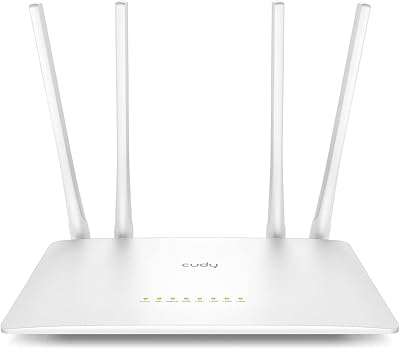
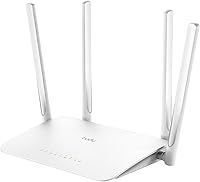
The Cudy WR1300 AC1200 Dual-Band WiFi Router is a straightforward, no-frills networking option from Cudy — a brand that lacks the name recognition of TP-Link or ASUS but has been quietly earning credibility in the budget segment. Launched in 2020 and still actively sold, this dual-band router sits firmly in the entry-level AC1200 tier, competing with similarly priced options from bigger names. It targets home users who want dependable wired gigabit speeds without overspending, and its support for multiple operating modes — Router, AP, Repeater, and WISP — gives it more real-world flexibility than you might expect from a router at this price point.
Features & Benefits

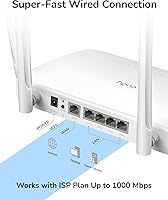
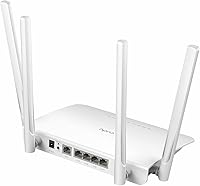
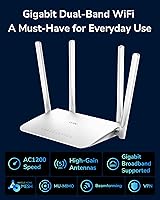
The WR1300 stands out in a couple of ways that matter. Most competing AC1200 routers ship with Fast Ethernet ports — this Cudy router gives you five full Gigabit ports instead, which makes a real difference if your internet plan delivers 300 Mbps or more over a wired connection. Beamforming and MU-MIMO on the 5 GHz band help focus wireless signals toward active devices rather than spraying them in every direction. There is also built-in support for OpenVPN and WireGuard as a VPN client — a rare inclusion at this price, though it is client-only and cannot act as a VPN server. A guest network option lets you keep visitor traffic off your main network without any complicated setup.

Best For

This dual-band router is a natural fit for renters, students, or anyone furnishing a small apartment or home office on a tight budget. If you are coming from a basic ISP-provided combo unit, the jump in wired port performance alone will feel like a meaningful upgrade. The Access Point mode is practically useful too — if you have a wired drop in a secondary room, you can deploy the WR1300 there to extend wireless coverage without touching your primary router. Remote workers who rely on a commercial VPN service will find the built-in client convenient. Just temper expectations for larger, multi-story homes; comfortable wireless coverage realistically spans one to two floors.

User Feedback

Buyers consistently praise how quick and painless the initial setup is, with the web interface described as clean and intuitive — not a given with budget networking hardware. The Gigabit LAN ports surface repeatedly in reviews as an unexpected highlight for users who did not anticipate finding them at this price. On the downside, a portion of users report that Wi-Fi stability can get shaky after several days of continuous uptime, suggesting the occasional reboot may become routine. Five GHz range also attracts criticism from people in larger spaces. Sitting at roughly 4.1 out of 5 stars across hundreds of purchases, the consensus is broadly positive — solid value, with a few rough edges worth knowing about before you buy.

Pros

  • Full Gigabit LAN ports on all four wired connections — genuinely uncommon at this price tier.
  • Built-in OpenVPN and WireGuard client support saves the cost of a separate VPN-capable device.
  • Supports four operating modes, including AP and Repeater, making it versatile beyond basic router use.
  • Setup is quick and the web interface is clean enough for non-technical users to navigate confidently.
  • MU-MIMO on the 5 GHz band keeps multiple streaming devices from stepping on each other.
  • Guest network support lets you isolate visitor devices without any complicated configuration.
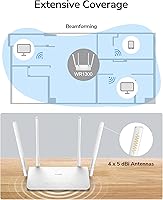
  • Four external antennas with Beamforming help focus signal toward active devices in smaller spaces.
  • The WR1300 is still actively sold and supported, with no discontinuation on the horizon.

Cons

  • Wireless range on the 5 GHz band falls short in larger homes or across multiple floors.
  • Some users report Wi-Fi connectivity becoming unstable after several days of continuous operation.
  • VPN functionality is client-only — you cannot use this dual-band router to host your own VPN server.
  • Only 64 MB of RAM limits headroom when many devices are connected simultaneously.
  • Cudy has a shorter support and firmware update history compared to established networking brands.
  • No Wi-Fi 6 support means it will feel dated sooner than newer-generation budget alternatives.
  • No dedicated USB port, ruling out basic NAS or printer-sharing functionality.
  • The 8 MB of flash storage leaves very little room for advanced third-party firmware options.

Ratings

Our AI-driven scoring for the Cudy WR1300 AC1200 Dual-Band WiFi Router was built by processing hundreds of verified global user reviews, with spam, bot submissions, and incentivized feedback actively filtered out before any score was calculated. The results reflect a balanced picture — genuine strengths in wired performance and value, alongside real frustrations around wireless range and long-term stability. Every category below captures what actual buyers experienced, not what the marketing copy promises.
Value for Money
88%
Buyers consistently feel they get more hardware than the price suggests, particularly because of the full Gigabit LAN ports that most rival AC1200 routers skip. For someone replacing an ISP-provided unit, the step up in wired speed feels disproportionately good for what they paid.
A handful of users noted that as Wi-Fi 6 budget routers have become more affordable, the WR1300 feels slightly less exceptional value than it did at launch. The price is still fair, but the competitive landscape has tightened since 2020.
Wired Port Performance
91%
The four Gigabit LAN ports are the single most praised hardware feature across reviews. Users running NAS devices, gaming consoles, or smart TVs via Ethernet reported consistently fast, stable wired throughput that matched their ISP plan speeds without throttling.
There is no USB port, so you cannot use the router for basic network storage or printer sharing over USB — a small but real omission that users expecting NAS-lite functionality discovered only after purchase.
Wireless Range
58%
42%
In compact living spaces like studio apartments and single-floor homes under 800 square feet, the four antennas with Beamforming deliver adequate coverage for everyday streaming and browsing. Users in those environments rarely complained about dead spots.
In larger homes, two-story layouts, or spaces with thick walls, the 5 GHz band drops off noticeably. Several reviewers in 1,500-plus square foot homes reported that devices on the far end of the house struggled to maintain a stable 5 GHz connection.
Setup & Ease of Use
86%
The initial setup process earned consistent praise from non-technical users. The web interface is clean, the quick-start guide is practical, and most people reported being fully online within 10 to 15 minutes of opening the box — no app required.
Advanced configuration options, while present, are not always well-documented in the manual. Users trying to fine-tune QoS settings or configure WireGuard for the first time found that Cudy's support documentation could be more thorough.
Wi-Fi Stability
62%
38%
Under normal daily conditions — a handful of devices browsing, streaming, or on video calls — the router runs steadily without obvious interruptions. Most users in smaller households reported no significant issues during the first weeks of use.
A recurring complaint across reviews involves Wi-Fi dropping or slowing down after several days of continuous uptime, requiring a manual or scheduled reboot to restore normal performance. This is not universal, but it is consistent enough to be a genuine concern.
5 GHz Performance
71%
29%
Within a reasonable distance from the router, the 5 GHz band handles 4K streaming and video conferencing without dropping frames or buffering. MU-MIMO helps when two or three devices are pulling bandwidth simultaneously on that band.
The 5 GHz band is sensitive to distance and obstructions. Users even one or two rooms away sometimes saw speeds fall below what their internet plan should deliver, particularly in homes with plaster or brick interior walls.
2.4 GHz Performance
74%
26%
The 2.4 GHz band holds up well for smart home devices, casual browsing, and lower-bandwidth tasks. Its longer range compared to 5 GHz makes it a practical fallback for devices farther from the router.
At 300 Mbps theoretical maximum, the 2.4 GHz band is the bottleneck for anyone on a faster ISP plan. Users trying to stream 4K or run large file transfers over 2.4 GHz will notice the ceiling.
VPN Client Functionality
77%
23%
For a router at this price, having native OpenVPN and WireGuard client support is a meaningful bonus. Remote workers who route all home traffic through a commercial VPN found the feature genuinely useful and stable once configured correctly.
The client-only limitation disappointed users hoping to self-host a VPN server for remote home access. The initial configuration also requires some technical comfort; it is not a one-click process, and Cudy's guidance for WireGuard setup in particular is sparse.
Multi-Device Handling
68%
32%
For households running four to seven devices — phones, laptops, a smart TV, and a few smart home gadgets — the WR1300 manages traffic without obvious slowdowns. MU-MIMO on 5 GHz helps prevent the bottlenecking that plagues cheaper single-stream routers.
Push the connected device count toward double digits with active usage on each, and the 64 MB of RAM starts to become a constraint. Users in larger households reported sluggishness and occasional dropped connections when many devices were active simultaneously.
Build Quality
66%
34%
The physical construction is clean and tidy for an entry-level router. The four antennas are firmly attached, the plastic shell feels reasonably solid, and the unit stays cool under normal operating conditions.
The all-plastic housing and lightweight feel do give the impression of cost-cutting. A few users noted the base is not particularly stable, and the lack of wall-mount holes or a vertical stand option limits placement flexibility.
Guest Network Feature
81%
19%
The guest network works as advertised — visitors get internet access without any visibility into the main network devices. Setting it up takes under two minutes from the admin panel, which is exactly what most home users need.
The guest network options are basic. There is no bandwidth throttling per guest, no time-based access scheduling, and no granular control over what guests can or cannot reach — features that more advanced routers in the next price tier typically include.
Operating Mode Versatility
83%
Having Router, AP, Repeater, and WISP modes in a single affordable device gives buyers real flexibility. The AP mode in particular is frequently praised by users who deployed this Cudy router as a secondary wireless point in a room with a wired Ethernet drop.
Switching between modes requires a factory reset in some cases, which caught a few users off guard. The transition between modes is not as fluid as on more polished hardware, and the documentation around WISP mode is particularly limited.
Firmware & Software Updates
57%
43%
Cudy does release periodic firmware updates for the WR1300, and several users noted that updates improved stability over time. The update process through the admin panel is simple and does not require technical knowledge.
The update cadence is slower and less predictable than what TP-Link or ASUS delivers for comparable hardware. Long-term users expressed uncertainty about how many years of active firmware support remain, which is a fair concern for a lesser-known brand.
Brand Reliability Perception
61%
39%
Among buyers who took a chance on an unfamiliar brand, most came away satisfied enough to recommend it to others. The hardware performs close to what is advertised, and the warranty process has not generated widespread complaints.
Cudy simply does not carry the same trust weight as established networking brands. First-time buyers expressed hesitation, and some purchasers mentioned they would have preferred a TP-Link alternative if the price had been similar — brand confidence is still a work in progress for Cudy.

Suitable for:

The Cudy WR1300 AC1200 Dual-Band WiFi Router is a strong match for renters, students, and first-time router buyers who need reliable home networking without a large budget commitment. If you are upgrading from the sluggish combo unit your ISP handed you, the jump to full Gigabit LAN ports alone makes this Cudy router worth considering. It works well in apartments, small homes, and single-floor layouts where the wireless range does not need to stretch far. Remote workers who subscribe to a commercial VPN service will appreciate the built-in OpenVPN and WireGuard client support, which many routers at this price simply do not include. The Access Point mode is also genuinely useful for people who want to add wireless coverage to a room that already has a wired Ethernet drop, without buying a separate device.
Not suitable for:

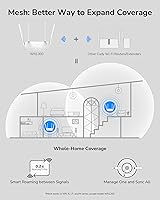
The Cudy WR1300 AC1200 Dual-Band WiFi Router is not the right choice for anyone networking a large home, a multi-story house, or an environment where consistent long-range 5 GHz coverage is critical. With 64 MB of RAM and a modest chipset, this dual-band router is not built to handle 15 or 20 simultaneous heavy-use devices without showing strain. Power users who need a full VPN server — to host their own WireGuard or OpenVPN endpoint at home — will hit a hard wall, since the WR1300 supports VPN client mode only. Buyers who prioritize brand trust and long-term firmware support may also feel uneasy, as Cudy does not have the same established support track record as TP-Link or ASUS. If your home network demands Wi-Fi 6, a tri-band setup, or any form of mesh expansion, this router sits well outside that territory.
Specifications

  • Wi-Fi Standard: The router operates on Wi-Fi 5 (802.11ac), with backward compatibility for 802.11n and older standards.
  • Frequency Bands: Dual-band operation covers both the 2.4 GHz band (up to 300 Mbps) and the 5 GHz band (up to 867 Mbps).
  • Max Wi-Fi Speed: Combined theoretical maximum throughput is 1200 Mbps across both bands simultaneously.
  • WAN Port: One Gigabit WAN port supports internet connections up to 1000 Mbps from your ISP modem.
  • LAN Ports: Four Gigabit LAN ports allow wired device connections at speeds up to 1000 Mbps each.
  • Antennas: Four fixed external antennas are equipped with Beamforming technology to focus wireless signals toward connected devices.
  • MU-MIMO: MU-MIMO is supported on the 5 GHz band, enabling multiple devices to receive data streams at the same time without queuing.
  • RAM: The router is equipped with 64 MB of RAM to handle routing tasks and connected device management.
  • Flash Storage: 8 MB of onboard ROM stores the firmware and configuration data.
  • Operating Modes: Supports four modes: standard Router, Access Point (AP), Range Extender (Repeater), and WISP for wireless ISP bridging.
  • VPN Support: Built-in VPN client supports OpenVPN and WireGuard protocols; server-mode VPN hosting is not supported.
  • Guest Network: A dedicated guest Wi-Fi network can be enabled to isolate visitor traffic from the main home network.
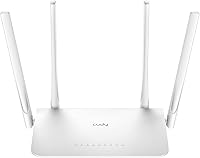
  • Color: The unit is finished in white and designed to sit on a flat surface or be positioned upright.
  • Item Weight: The router weighs approximately 2.2 pounds including antennas and housing.
  • Manufacturer: Designed and produced by Shenzhen Cudy Technology Co., Ltd., based in China.
  • Model Number: The official model identifier is WR1300, used across Cudy documentation and firmware downloads.
  • Release Date: The WR1300 was first made available for purchase in March 2020 and remains in active production.
  • Warranty: Cudy typically provides a one-year limited hardware warranty; buyers should confirm current terms directly with the seller.

Related Reviews

TP-Link Archer A6 AC1200 WiFi Router
76%
74%
WiFi Speed & Performance
67%
WiFi Range & Coverage
88%
Setup & Ease of Use
71%
Build Quality & Design
91%
Wired Port Performance
More
NETGEAR WAX202 WiFi 6 Dual-Band Router
84%
88%
WiFi Performance
93%
Setup & Installation
85%
App Usability
89%
Speed & Coverage
90%
Device Connectivity
More
Asus RT-AC1200 Wireless Dual-Band Router
83%
85%
Wi-Fi Performance
91%
Ease of Setup
78%
Coverage Range
88%
Parental Controls
81%
Streaming & Gaming Performance
More
Cudy WR1200 AC1200 Dual-Band WiFi Router
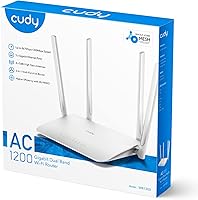
74%
88%
Value for Money
83%
Setup & Ease of Use
76%
Wireless Performance
54%
Wired Port Performance
72%
Range & Coverage
More
Cudy WR11000 WiFi 7 Tri-Band Router
74%
88%
Value for Money
76%
Wireless Performance
91%
Wired Port Quality
84%
Setup & Ease of Use
79%
Mobile App Experience
More
Linksys RE6350 AC1200 Dual-Band WiFi Extender
86%
91%
Setup & Installation
88%
Wi-Fi Performance
89%
Coverage Area
85%
Dual-Band Performance
84%
Streaming & Gaming
More
ASUS RT-ACRH13 AC1300 Dual Band Gigabit Router
78%
91%
Ease of Setup
72%
Wi-Fi Range
84%
Connection Stability
67%
Multi-Device Performance
83%
Value for Money
More
ASUS RT-AX5400 WiFi 6 Dual-Band Router
80%
84%
WiFi Speed & Throughput
71%
Coverage & Range
88%
Setup & Ease of Use
91%
Built-in Security (AiProtection)
83%
Parental Controls
More
ASUS RT-AX1800S
ASUS RT-AX1800S
79%
88%
Value for Money
79%
WiFi Speed & Performance
74%
Coverage & Range
83%
Setup & Ease of Use
67%
Router App Experience
More
ASUS ZenWiFi BD4 Dual-Band WiFi 7 Mesh Router
86%
93%
Wi-Fi Performance
89%
Setup & Installation
91%
Security Features
88%
Gaming & Streaming Performance
84%
Value for Money
More

FAQ

Not at all. Most users get it running in under 15 minutes by following the quick-start guide included in the box. You connect it to your modem, open a browser, and the setup wizard walks you through the rest. The interface is straightforward enough that technical experience is not required.

Yes, it is compatible with virtually any ISP that provides a standard modem or modem-router combo with an Ethernet output. It supports the most common connection types including DHCP, PPPoE, Static IP, L2TP, and PPTP, so switching providers should not require a new router.

In AP mode, the WR1300 takes a wired Ethernet connection and converts it into a wireless network. This is handy if your main router is in one room but you have a wired drop in another — you plug this Cudy router into that outlet and it broadcasts Wi-Fi in that area without creating a separate network conflict.

No, and this is an important distinction. The built-in VPN support is client-only, meaning it can connect to an existing VPN service like NordVPN or ProtonVPN on your behalf. It cannot act as a VPN server that you host yourself for remote access into your home network.

In practical terms, it handles four to eight actively streaming or browsing devices comfortably. MU-MIMO on the 5 GHz band helps manage simultaneous connections, but with 64 MB of RAM the router will start to show strain if you push well beyond ten devices with heavy usage.

It depends on the layout and construction of your home. In a standard single-floor apartment or small home, coverage is generally solid. In a two-story house, signal on the upper floor can be noticeably weaker, especially on the 5 GHz band. For larger multi-story spaces, a mesh system or a second access point would serve you better.

It supports 802.11ac, which is Wi-Fi 5 — the generation before Wi-Fi 6. For everyday browsing, HD and 4K streaming, and video calls, Wi-Fi 5 handles the job well. If you have Wi-Fi 6 devices and want to future-proof your setup, you would need to step up to a newer router.

Yes. The guest network feature lets you create a separate SSID with its own password. Devices connected to the guest network can access the internet but are isolated from your computers, printers, and smart home devices on the primary network.

Cudy is a smaller brand that does not have the same long track record as TP-Link or ASUS. That said, user feedback for the WR1300 is broadly positive, and the router has been on the market since 2020 without being discontinued. The main risk with a lesser-known brand is longer-term firmware support, so if that matters to you, it is worth keeping in mind.

A small number of users have reported intermittent instability after extended uptime. If you experience this, a scheduled automatic reboot — which can be set up through the router's admin panel — often resolves it. Keeping the firmware updated to the latest version from Cudy's website is also a good habit and may address stability issues over time.

Where to Buy