Overview

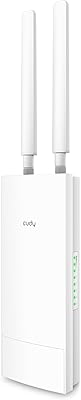
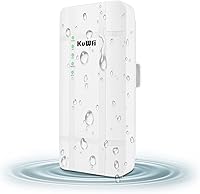
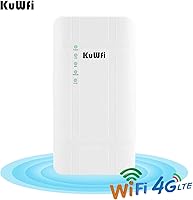
The KuWFi QC300K-L Outdoor 4G LTE Router is a mid-range cellular CPE built for places where cable or fiber internet simply is not an option. It mounts outdoors on a wall, pole, or eave, draws power through a POE adapter, and pulls internet directly from a SIM card. The cylindrical housing is weatherproofed for year-round exposure, so there is no need to build a separate protective enclosure around it. Band support covers B2, B4, B12, B13, and B71, meaning T-Mobile and AT&T users across the US are well covered. On the market since 2019 and still selling steadily, it has clearly found a real audience in rural and small-business settings.
Features & Benefits

The POE power delivery is one of the most practical things about this outdoor LTE router — run a single Ethernet cable from your switch or POE injector to the mount point, and you are done. No outlet hunting, no weatherproof extension cords. Four built-in antennas (two for LTE, two for WiFi, all at 5dBi) give it more reach than a typical indoor unit placed near a window. The Cat4 modem supports up to 150 Mbps download and 50 Mbps upload, though real-world speeds depend entirely on your carrier's local signal strength. Up to 32 devices can connect simultaneously over the single 2.4 GHz band, and one LAN port allows direct wired connections when needed.

Best For

This cellular WiFi router makes the most sense for anyone without fixed broadband options. Think rural homeowners, small farms, remote cabins, or job sites where running cable is not practical. It is also a strong pick for outdoor IP camera setups — mount it near the cameras, insert a SIM, and you have a dedicated local network without routing traffic back through your main building. RV parks, boat docks, and pop-up event spaces can use it to push WiFi coverage further into open areas. Just confirm your carrier supports the right bands, particularly B12 or B71, if you are in a rural fringe area where low-band LTE signals tend to travel farther and penetrate better.

User Feedback

The KuWFi CPE unit holds a 4.1-star average across close to 100 reviews, and the pattern is fairly consistent. Buyers are happy with the physical installation — the POE setup and included mounting hardware make getting it onto a wall or pole straightforward, and many note real signal improvement over indoor routers once the unit is elevated. Where people run into friction is APN configuration: a meaningful number of buyers needed to contact their carrier or manually enter APN settings before the device would connect at all. IoT SIM cards and virtual SIMs are not supported, and occasional drops in fringe coverage zones are mentioned, though most users rightly attribute that to carrier signal rather than the hardware itself.

Pros

  • POE power delivery means a single Ethernet cable handles both data and power at the mount point.
  • Outdoor weatherproof housing eliminates the need for a separate protective enclosure.
  • LTE band support covers T-Mobile and AT&T networks, including rural-friendly low-band B12 and B71.
  • Elevated outdoor placement consistently improves signal reception compared to indoor routers near windows.
  • Supports up to 32 simultaneous WiFi connections, suitable for small teams or multi-device setups.
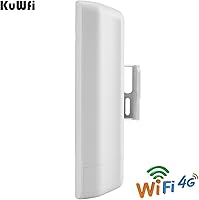
  • Included mounting hardware and stand holder make physical installation straightforward.
  • Cat4 modem delivers adequate speeds for video calls, streaming, and remote work in low-congestion areas.
  • The 1-year warranty and 30-day money-back guarantee provide a reasonable safety net for the price.
  • Compact cylindrical form factor is unobtrusive and easy to mount on poles, walls, or eaves.

Cons

  • APN configuration is required for most carriers and catches many buyers off guard at first setup.
  • IoT SIM cards, virtual SIMs, and roaming SIMs are explicitly unsupported, limiting flexibility.
  • Single 2.4 GHz band only — no 5 GHz option means more interference and lower peak throughput indoors.
  • Real-world speeds depend entirely on local carrier signal; the 150 Mbps ceiling is rarely reached in practice.
  • No gigabit Ethernet port, which can become a bottleneck if wired speeds ever exceed 100 Mbps.
  • Users in rural fringe areas report occasional disconnects that require manual troubleshooting or reboots.
  • Admin interface and documentation are functional but sparse, with limited guidance for non-technical users.
  • No dual-band or band-steering capability, which limits performance as the number of connected devices grows.

Ratings

The KuWFi QC300K-L Outdoor 4G LTE Router has been scored by our AI system after analyzing verified global buyer reviews, with spam, bot activity, and incentivized feedback actively filtered out. Scores reflect the full spectrum of real-world experiences — including the friction points that manufacturers rarely highlight. Both where this cellular CPE earns its keep and where it falls short are transparently captured below.
Ease of Installation
83%
The physical setup wins consistent praise — the included POE adapter, RJ45 cable, and stand holder mean most buyers have the unit mounted and powered within an hour. Running a single Ethernet cable to the mount point instead of hunting for an outdoor outlet is a genuine time-saver for farm, job site, and camera installs.
The hardware setup is the easy part; the software side is where things slow down. A meaningful portion of buyers hit a wall at the APN configuration step and needed to contact their carrier or dig through forums before the router would actually connect to the internet.
LTE Band Compatibility
79%
21%
Coverage of bands B2, B4, B12, B13, B71, and others puts this outdoor LTE router in a strong position for T-Mobile and AT&T customers across the continental US. Low-band B12 and B71 support is especially useful in rural areas where those frequencies travel farther and penetrate terrain more effectively.
Band compatibility is carrier-specific, and buyers who do not verify their SIM against the supported band list before purchasing often end up disappointed. Certain regional carriers and some MVNOs operate on bands not covered here, leaving those users without a working connection despite an active SIM.
Real-World Data Speeds
66%
34%
In areas with solid 4G LTE coverage, users report speeds that are more than adequate for video calls, remote desktop sessions, and HD streaming on multiple devices simultaneously. The Cat4 modem handles everyday rural internet tasks without much complaint when the carrier signal is cooperative.
The 150 Mbps ceiling is rarely approached in practice — most rural deployments land in the 10 to 40 Mbps range depending on tower distance and network congestion. Buyers expecting urban-level speeds in low-signal areas will be let down, and the single 2.4 GHz band adds an extra ceiling on WiFi distribution speeds.
Signal Reception & Antenna Performance
77%
23%
Mounting this cellular WiFi router at elevation — on a roofline, pole, or high wall — makes a tangible difference compared to placing an indoor router near a window. The 5dBi antennas on both the LTE and WiFi sides give the unit a meaningful reach advantage in open outdoor environments like fields and yards.
In genuine fringe coverage zones, even well-positioned antennas cannot fully compensate for a weak carrier signal. Some buyers in rural dead-zone peripheries report the router struggling to maintain a stable connection, which creates frustration even though the hardware is performing as designed.
Build Quality & Weatherproofing
81%
19%
The cylindrical plastic housing holds up well through rain, wind, and seasonal temperature swings based on multi-season buyer reports. Users who have had the KuWFi CPE unit mounted outdoors for over a year note no visible degradation in the casing or connector points under normal conditions.
There is no published IP rating on the product page, which makes it harder for buyers to assess suitability for more extreme environments like coastal salt air or very high UV exposure. A small number of long-term users have flagged eventual connector corrosion in particularly harsh climates.
APN & Initial Configuration
51%
49%
Once the APN is correctly configured, the router holds its settings reliably across reboots and power cycles. Buyers who are comfortable with basic router admin panels and already know their carrier APN string can get through setup in under fifteen minutes without any outside help.
For buyers who have never configured a router manually, the APN setup step is a genuine obstacle. There is no auto-detection, and the included documentation does not walk through carrier-specific examples, which means a significant share of users had to call carrier support or search online before getting their first connection.
WiFi Coverage Range
74%
26%
Outdoors and at elevation, the 2.4 GHz signal reaches comfortably across a typical residential yard, small parking lot, or farm outbuilding cluster. Users deploying this for outdoor IP camera coverage find the range adequate for setups within roughly 100 to 150 feet of the router.
The single 2.4 GHz band limits throughput and is more susceptible to interference from neighboring networks and household devices. Buyers expecting 5 GHz speed or dual-band flexibility will need to look elsewhere, as there is no upgrade path within this unit.
SIM Card Compatibility
58%
42%
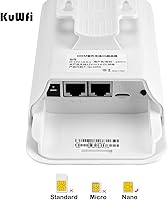
Standard physical SIM cards from major US carriers and many MVNOs slot in cleanly and are recognized by the device without issues. The slot accepts a regular SIM with no adapter required in most cases, keeping the initial hardware setup clean.
IoT SIMs, virtual SIM services, and roaming-only SIM cards simply do not work, and this catches a notable share of buyers off guard. Some data-only MVNOs issue SIM cards that are technically classified as IoT type on the backend, causing connection failures that are difficult to diagnose without carrier confirmation.
Value for Money
76%
24%
For buyers who need outdoor LTE coverage and do not want to pay for enterprise-grade CPE hardware, the price-to-capability ratio is reasonable. The included POE adapter, mounting hardware, and cable mean there are minimal additional accessories to purchase on day one.
The value proposition weakens if you end up in a weak-signal area or run into SIM compatibility issues — in those scenarios, you have paid mid-range money for a device that underdelivers. Buyers who needed to return or exchange the unit also noted that the process added friction to an already niche purchase.
Port & Network Flexibility
69%
31%
Having both a LAN and WAN port allows the router to be used in bridging mode, feeding a downstream router or switch — a setup that works well for small business deployments where the CPE is just the cellular uplink and a separate router handles internal traffic.
The absence of a gigabit Ethernet port caps wired throughput at 100 Mbps, which becomes a bottleneck if cellular speeds ever improve in a given area. Two ports total is also limiting for more complex setups that require multiple wired device connections at the mounting point.
Device Capacity
72%
28%
Support for up to 32 simultaneous WiFi clients is more than enough for a typical small business, outdoor event, or multi-camera security setup. Buyers running eight to twelve connected devices at a time report stable connections without noticeable degradation in per-device throughput.
With all 32 slots filled and a moderate LTE signal, the shared bandwidth across devices thins out quickly. The 2.4 GHz single-band architecture means heavy users will notice slower speeds and occasional congestion during peak usage periods — this is not a device built for high-density crowds.
Setup Documentation
53%
47%
The printed manual covers the physical installation steps clearly enough, and the admin panel interface is logically organized once you are inside it. Buyers with basic networking experience find the layout familiar and navigable without needing external help.
The documentation lacks carrier-specific APN examples and does not adequately explain what to do when a SIM connects but data does not flow — which is exactly the scenario most buyers encounter. KuWFi support is reachable but response times and depth of guidance vary significantly by user report.
Long-Term Reliability
75%
25%
Buyers who have used the unit continuously for twelve months or more generally report stable operation once initial configuration hurdles are cleared. The hardware itself does not appear to develop firmware bugs or performance degradation over time in typical outdoor conditions.
A subset of users mention intermittent disconnects that require a manual reboot to resolve, particularly in areas with fluctuating carrier signal. There is no automatic failover or watchdog reboot feature built in, so a drop in a remote location may go unnoticed until someone physically checks on the device.
Warranty & Support
68%
32%
A one-year manufacturer warranty and a 30-day money-back window provide a reasonable backstop, especially for buyers who are experimenting with cellular connectivity for the first time. The guarantee gives some room to test real-world performance before fully committing.
Technical support quality is inconsistent based on buyer accounts — some users received prompt, knowledgeable help with APN issues, while others reported slow or generic responses that did not resolve their problem. The warranty period is also shorter than what some competing brands offer in the same price tier.

Suitable for:

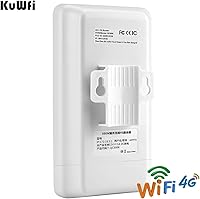
The KuWFi QC300K-L Outdoor 4G LTE Router was built for a specific problem, and it solves that problem well: getting reliable internet to places where running cable is not realistic. Rural homeowners who depend on T-Mobile or AT&T cellular data will appreciate the low-band LTE band support (B12 and B71 in particular), which travels farther and holds up better in open or wooded terrain. Small business owners running security cameras on the far side of a property will find the POE-powered outdoor mounting especially practical — one Ethernet cable handles both data and power, keeping the installation clean. Job site managers, farm operators, and anyone setting up temporary connectivity at a remote cabin or event space will also find it fits the bill, provided they have a compatible SIM and a usable carrier signal on site. It is not a luxury device, but for the right situation, it does exactly what it promises.
Not suitable for:

The KuWFi QC300K-L Outdoor 4G LTE Router is a poor fit for anyone expecting a zero-configuration, plug-and-play experience. If you are not comfortable logging into a router admin panel and manually entering APN settings — or calling your carrier to get those details — the initial setup could become a real source of frustration. It also will not work with IoT SIM cards, virtual SIM providers, or roaming SIMs, which rules out a meaningful slice of buyers who assume any active SIM will work. The single 2.4 GHz band limits throughput compared to dual-band or Wi-Fi 6 routers, so anyone hoping to stream 4K video or run bandwidth-heavy applications across many devices simultaneously will likely hit a ceiling. And if your location sits in a cellular dead zone or weak fringe area, no amount of outdoor antenna gain will compensate for a fundamentally poor carrier signal — that is a network problem, not something hardware alone can fix.
Specifications

  • Brand & Model: Manufactured by KuWFi under the model designation QC300K-L, targeting the US outdoor cellular router market.
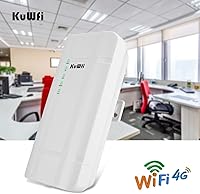
  • Form Factor: Compact cylindrical CPE (Customer Premises Equipment) housing designed for permanent outdoor mounting on walls, poles, or eaves.
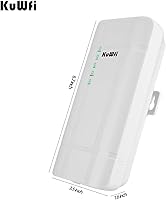
  • Dimensions: The unit measures 1.97 x 1.18 x 7.87 inches and weighs 13.4 ounces, making it lightweight enough for single-person installation.
  • LTE Category: Cat4 modem supporting theoretical maximum download speeds of 150 Mbps and upload speeds of 50 Mbps.
  • LTE Bands: Supports FDD-LTE bands B2, B4, B5, B12, B13, B14, B66, and B71, covering the primary frequency ranges used by T-Mobile, AT&T, and compatible MVNOs in the US.
  • 3G Support: Falls back to WCDMA 3G on bands B2, B4, and B5 when 4G LTE signal is unavailable in a given area.
  • WiFi Standard: Single-band 2.4 GHz 802.11n network with a maximum WiFi throughput of 300 Mbps between connected devices.
  • Max Clients: Supports up to 32 simultaneous WiFi client connections, suitable for small teams, camera arrays, or multi-device setups.
  • Antenna Config: Equipped with four built-in antennas — two dedicated to LTE and two to WiFi — each rated at 5dBi gain for extended outdoor range.
  • Ports: Includes one LAN port and one WAN port, allowing the unit to function as a bridge, access point, or primary router depending on network configuration.
  • SIM Slot: Standard SIM card slot accepts physical SIM cards from compatible carriers; IoT SIMs, virtual SIMs, and roaming SIMs are not supported.
  • Power Method: Powered via POE (Power over Ethernet) using the included adapter, so only a single Ethernet cable is needed at the outdoor mount point.
  • Weather Rating: Weatherproof casing is designed for year-round outdoor exposure, eliminating the need for a separate protective enclosure in most climates.
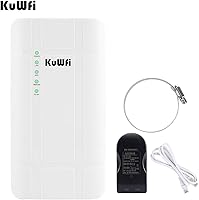
  • In-Box Contents: Package includes the outdoor CPE router, POE power supply, one RJ45 Ethernet cable, a stand holder for mounting, and a printed user manual.
  • Warranty: Backed by a 1-year manufacturer warranty and a 30-day money-back guarantee, with KuWFi technical support available for configuration assistance.

Related Reviews

Cudy LT700 Outdoor 4G LTE Modem Router
78%
83%
Build Quality & Weatherproofing
76%
Cellular Signal Performance
81%
Antenna System & Upgradability
78%
Installation & Setup
71%
Carrier & Band Compatibility
More
Teltonika RUT955 4G/LTE Router
85%
90%
Performance and Reliability
70%
Ease of Setup
88%
Connectivity Options
93%
Dual SIM Failover
85%
Software and Remote Management
More
Cudy LT700E 4G LTE Modem Router
72%
78%
LTE Connectivity
71%
Wi-Fi Performance
83%
Setup & Ease of Use
86%
VPN Functionality
81%
Value for Money
More
Yeacomm YF325 Dual-SIM Industrial 4G LTE Router
74%
83%
Build Quality
87%
Connectivity Reliability
89%
Dual SIM Failover
58%
Setup & Configuration
47%
Web Management Interface
More
Cudy LT500 4G LTE Modem Router
76%
88%
Ease of Setup
82%
4G LTE Signal Performance
79%
WiFi Coverage & Speed
74%
VPN Functionality
71%
Carrier Compatibility
More
Wiflyer WE826-T 4G LTE Router
69%
83%
Build Quality
71%
LTE Connectivity
88%
TTL Feature
62%
Setup & Ease of Use
57%
Wi-Fi Performance
More
LIWAN TC18 4G Solar Outdoor Security Camera
73%
88%
Ease of Setup
72%
Cellular Connectivity
67%
Solar Power Reliability
83%
Video Quality
79%
Night Vision
More
TP-Link TL-MR6400 4G LTE Router
82%
88%
Setup & Installation
91%
4G LTE Performance
83%
Wi-Fi Speed & Reliability
85%
Portability
82%
Bandwidth Management (QoS)
More
KuWFi L100EU 4G LTE Mobile Hotspot
69%
83%
Band Compatibility
58%
Ease of Setup
61%
Wi-Fi Performance
63%
Battery Life
88%
Portability
More
NETGEAR Orbi LBR20 4G LTE WiFi Router
71%
71%
Cellular Connectivity
74%
WiFi Coverage
86%
Setup Experience
58%
Value for Money
78%
Mesh Expandability
More

FAQ

In most cases, yes. The KuWFi QC300K-L Outdoor 4G LTE Router supports the key LTE bands those carriers use in the US, including B12 and B71 for T-Mobile and B14 for AT&T. That said, you will still need to manually configure the APN settings before it connects — the router will not automatically detect them. Your carrier's website or customer support can provide the correct APN details for your account type.
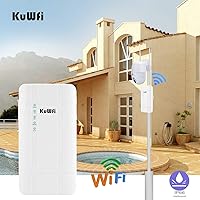
Most people handle the physical installation themselves without any specialized help. The unit comes with a stand holder and mounts cleanly on a pole or wall. The POE adapter handles power over the same Ethernet cable that carries data, so you just need to run a cable from your indoor POE injector or switch to the outdoor mount point — no separate power outlet needed outside.

APN stands for Access Point Name — it is essentially the gateway address your router uses to connect to your carrier's data network. Unlike a phone, which often configures this automatically, this outdoor LTE router requires you to enter it manually in the admin panel. If you skip this step or enter it incorrectly, the router will not get online even if the SIM card is active and the signal is strong. Check your carrier's website or call them to get the correct APN string for your plan.

Many prepaid and MVNO SIMs work fine, as long as the carrier operates on a compatible band and the SIM is a standard physical card. However, IoT SIMs, virtual SIMs, and SIM cards intended for connected devices (like those sold by some data-only MVNO plans for machines) are explicitly not supported. If you are unsure, check with your MVNO whether the SIM is classified as an IoT or machine-type SIM before buying.

Range will vary based on terrain, obstructions, and interference, but the 5dBi antennas give it a meaningfully longer reach than a typical indoor router when mounted at elevation. In open outdoor environments — a yard, a parking lot, a field — you can realistically expect usable coverage at 100 to 200 feet. Dense vegetation, walls, and other obstructions will reduce that.

Yes, and this is actually one of the most common uses for this cellular WiFi router. You mount it near the cameras, insert a SIM, and it creates a local WiFi network that your IP cameras connect to. Just note that the router itself is powered by POE — it does not pass POE power to cameras. You will need a separate POE switch or injector if your cameras also require POE.

Weak carrier signal is the single biggest factor limiting performance, and no hardware fix fully compensates for it. The 5dBi antennas help, and mounting the unit higher off the ground typically improves reception. That said, if your location is in a genuine dead zone or very deep fringe coverage, you may experience frequent disconnects that are not related to the router hardware itself. Checking carrier coverage maps before purchasing is a smart first step.

No — this is a single-band 2.4 GHz only device. There is no 5 GHz band option. The 2.4 GHz band travels farther and penetrates obstacles better, which suits outdoor use cases well, but it does mean you will see more interference in congested environments and lower peak speeds compared to a dual-band setup.

The casing is purpose-built for outdoor exposure and handles rain and general weather without requiring any additional housing. Buyer reviews confirm it survives through seasons without obvious weather-related failures. Extreme cold or prolonged direct summer sun in very hot climates could theoretically stress the hardware over time, but for typical North American outdoor conditions it performs as expected.

KuWFi offers a 30-day money-back guarantee and a 1-year manufacturer warranty. If you discover within the first month that your SIM is incompatible or the device does not perform as expected in your location, you have a return window to work with. It is worth contacting KuWFi support before giving up — they can often walk you through APN or configuration issues that might be blocking a working connection.

Where to Buy