Overview

The NETGEAR FS728TP 24-Port PoE Managed Switch is a rackmount layer-2 switch built for small-to-medium business networks that need organized, controllable infrastructure without enterprise-level complexity. First available in December 2006, this is not a new product — but age does not automatically mean obsolete. NETGEAR's ProSAFE line carries a long track record, and the lifetime hardware warranty with next-business-day replacement is a genuine differentiator that still holds real value. One thing to be clear about upfront: the 24 access ports run at Fast Ethernet speeds (100Mbps max), while only the uplink ports reach Gigabit. Know that distinction before you buy.
Features & Benefits

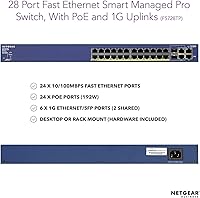
The FS728TP packs 24 PoE-enabled Fast Ethernet ports into a 1U chassis, sharing a 192W power budget across all of them. That matters in practice — if you are powering a mix of IP cameras and VoIP handsets simultaneously, you will hit budget limits well before filling every port at full draw. Four Gigabit copper ports and two shared SFP uplinks handle backbone connectivity where speed actually counts. The web-based GUI with SNMP management is straightforward enough for a competent IT generalist to configure VLANs and QoS policies without a steep learning curve. It also runs notably quietly, which matters in open-office or light-closet installations.

Best For

This managed switch is a strong fit for small offices, schools, or non-profits that need to power a modest number of IP cameras, wireless access points, or desk phones over a single cable run. If your team needs VLAN and QoS controls but cannot justify a high-end enterprise switch budget, the FS728TP fills that gap reliably. The rackmount form factor suits anyone with a proper wiring closet, though the desktop option keeps it accessible in tighter spaces. Network admins who value long-term vendor support will appreciate the no-expiry warranty most. Just keep the 100Mbps port speed in mind if gigabit throughput to workstations is a priority.

User Feedback

With 67 reviews averaging 4 out of 5 stars, the sample size is small enough that individual opinions carry real weight here. Long-term owners consistently highlight hardware reliability — several buyers report running this unit for many years without failure, which reflects well on build quality. PoE performance for IP cameras and access points draws consistent praise. The recurring criticism, though, is the 100Mbps speed cap: buyers who later upgraded to gigabit workstations found this NETGEAR PoE switch becoming a bottleneck. A handful of users also noted the management interface feels dated, and sourcing firmware updates can be more effort than expected. Solid overall, but the trade-offs are real.

Pros

  • Proven hardware reliability — many owners report years of uninterrupted operation in production environments.
  • ProSAFE lifetime warranty with next-business-day replacement is a rare and genuinely valuable commitment.
  • 24/7 access to NETGEAR expert support adds real insurance for small IT teams without deep internal resources.
  • Web-based GUI with SNMP support gives IT admins meaningful control over VLANs, QoS, and network monitoring.
  • Whisper-quiet fan design makes this managed switch a good fit for open offices or lightweight server rooms.
  • Dual SFP uplink ports allow fiber backbone connectivity where high-speed uplinks matter most.
  • Flexible deployment — ships with all hardware needed for both rackmount and desktop placement.
  • 24 PoE ports on a single unit simplifies cabling for camera and VoIP deployments significantly.
  • The FS728TP holds a strong 4-star average, with long-term owners consistently citing durability as a highlight.

Cons

  • All 24 access ports are capped at 100Mbps — a hard bottleneck for any gigabit-hungry device on the network.
  • The 192W shared PoE budget runs thin fast if multiple high-draw devices are connected simultaneously.
  • Management interface feels visually and functionally dated compared to modern alternatives in this category.
  • Firmware updates are increasingly difficult to source, which raises legitimate concerns for security-focused deployments.
  • With only 67 reviews, the available user feedback pool is too small to draw broad, confident conclusions.
  • The product launched in 2006, meaning its hardware design predates many current networking standards and expectations.
  • SFP uplink ports are shared with Gigabit copper ports, limiting simultaneous use of both connection types.
  • No advanced Layer 3 routing features — buyers needing inter-VLAN routing will require an additional device.

Ratings

The scores below reflect an AI-driven analysis of verified buyer reviews for the NETGEAR FS728TP 24-Port PoE Managed Switch, sourced globally and filtered to exclude incentivized, duplicate, and bot-generated submissions. Each category is scored to honestly represent where this managed switch earns its reputation — and where real users have run into genuine frustrations. Both the strengths that keep buyers loyal and the trade-offs that prompt returns are transparently captured here.

Hardware Reliability
88%
Long-term owners consistently report that the FS728TP keeps running without issues for years, even in always-on business environments. Several reviewers noted the unit had been in active service for five or more years without a single port failure or power supply issue, which is meaningful for a network device that rarely gets powered down.
A small subset of buyers reported early unit failures within the first year, suggesting some variation in manufacturing consistency across production batches. Given the product's age, sourcing a replacement outside of NETGEAR's warranty program can also be difficult.
PoE Performance
82%
18%
For typical PoE deployments — IP cameras, wireless access points, and VoIP desk phones — the 192W budget covers most real-world setups without issue. Users running eight to fourteen standard PoE cameras reported stable power delivery with no drops or renegotiations during normal operation.
The 192W shared budget becomes a genuine constraint when deploying higher-draw devices like PTZ cameras or dual-radio access points across many ports simultaneously. Admins who did not pre-calculate their total PoE draw occasionally found themselves scrambling to reprioritize port power allocation.
Port Speed & Throughput
47%
53%
For the specific use cases this switch was designed for — powering cameras, phones, and access points — 100Mbps per port is technically sufficient, and many smaller deployments never saturate that bandwidth in practice.
The 100Mbps Fast Ethernet ceiling is the single most recurring complaint across user reviews, and for good reason. As networks have upgraded to gigabit workstations and high-resolution camera streams, this hard speed limit has forced many buyers to retire the FS728TP earlier than they expected, making it a frustrating bottleneck in modernized environments.
Management Interface
63%
37%
The web-based GUI is functional and covers the core managed switch tasks — VLAN setup, QoS rules, port monitoring, and SNMP configuration — without requiring command-line expertise. IT generalists managing small networks found it accessible enough to configure without vendor training.
The interface design reflects its era and feels noticeably dated compared to modern managed switch dashboards. Reviewers pointed out that navigation is unintuitive in places, and a few noted that certain configuration changes required full page reloads or browser compatibility workarounds that added unnecessary friction.
Warranty & Support Value
91%
The ProSAFE Lifetime Warranty with next-business-day hardware replacement is genuinely exceptional for a switch at this price tier. Network admins managing small-business infrastructure with no spare hardware on-site cited this as a primary reason for choosing the FS728TP over comparable alternatives.
A few users reported that navigating NETGEAR's warranty claim process took longer than the next-business-day promise implied, particularly for buyers in less urban locations. The 24/7 chat support quality was described as variable, with some interactions resolving quickly and others requiring escalation.
Noise Level
84%
The whisper-quiet fan design earned consistent praise from buyers who installed the switch in open-plan offices, reception areas, or light wiring closets where loud cooling fans would have been disruptive. Most users described the ambient noise as barely perceptible from a meter away.
The switch is not fully fanless, so in completely silent environments — like a home office at night — some users noticed a faint but persistent hum. It is quieter than most rackmount switches in this class, but not as inaudible as passively cooled desktop units.
Setup & Installation
76%
24%
Physical installation is straightforward: the box includes rackmount brackets and all necessary hardware, so getting the unit into a rack requires no additional shopping. The web management interface is reachable within minutes of powering on, which reduces initial deployment friction considerably.
First-time managed switch buyers found the initial configuration of VLANs and QoS to be a steeper learning curve than the interface implied. Documentation quality has also declined over time as the product aged, and some online guides reference firmware versions that no longer match the current build.
Build & Fit Finish
71%
29%
The chassis feels solid for a plastic-bodied unit, and port connectors showed no signs of loosening or degrading even in long-term deployments described by veteran users. The form factor fits cleanly into standard 19″ racks without alignment issues.
The plastic construction does feel less premium than metal-bodied competitors at a similar price point, and a few buyers noted cosmetic wear on port labels after extended use. It is a functional build, but buyers used to higher-end rack equipment may find it underwhelming in person.
VLAN & QoS Capability
74%
26%
For a small business or school deployment, the VLAN and QoS feature set covers the practical essentials: traffic segmentation between guest and staff networks, voice traffic prioritization, and basic multicast control for camera streams all work as expected.
The feature depth falls short of more recent smart managed switches in the same category, which now offer more granular policy control and easier template-based configuration. Network admins managing complex multi-VLAN environments may find the available options limiting over time.
Value for Money
68%
32%
When weighed against the lifetime warranty and the breadth of managed features for a PoE switch at this tier, the FS728TP has historically represented solid value for buyers whose networks run primarily on Fast Ethernet PoE devices. For legacy-compatible deployments, the total cost of ownership math often works in its favor.
In today's market, gigabit managed PoE switches with similar port counts are available at comparable or lower prices, which makes the Fast Ethernet speed ceiling harder to justify as a value proposition. Buyers comparing current-generation options will likely find better throughput per dollar elsewhere.
Firmware & Long-term Support
44%
56%
The switch received regular firmware updates during its active support window, and users who kept it current during that period reported a stable, bug-free experience across several years of production use.
Active firmware development has effectively stalled given the product's age, which is a real concern for security-aware IT teams. Finding the latest supported firmware on NETGEAR's portal requires persistence, and the absence of recent security patches makes this managed switch a questionable choice for networks with compliance obligations.
Compatibility
78%
22%
The FS728TP works reliably with a wide range of standard PoE devices — any 802.3af-compliant camera, phone, or access point will power up and negotiate correctly without manual intervention. SFP uplink compatibility with common third-party fiber modules was also reported positively by multiple reviewers.
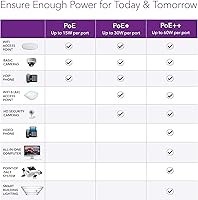
Compatibility with very modern PoE standards like 802.3bt (PoE++) is not supported, meaning newer high-power devices may not receive adequate power or may not connect at all. This is a hardware limitation with no software workaround available.
Port Density
79%
21%
Twenty-four PoE ports in a single 1U unit is a practical density for small-business wiring closets, consolidating what might otherwise require multiple switches and added complexity. Users managing camera networks of ten to twenty devices found the port count more than adequate.
The four Gigabit ports feel sparse for environments where several high-throughput devices need dedicated fast connections, and the shared SFP arrangement limits uplink flexibility. Buyers needing more than two independent Gigabit uplinks will need an additional switch in the topology.

Suitable for:

The NETGEAR FS728TP 24-Port PoE Managed Switch is a practical choice for small-to-medium businesses that need to power and manage a collection of IP cameras, VoIP desk phones, or wireless access points from a single central switch. If your environment runs on devices that draw modest power and connect at Fast Ethernet speeds — which covers most surveillance cameras and VoIP handsets in use today — this managed switch delivers exactly what you need without overcomplicating things. IT administrators who want VLAN segmentation, QoS prioritization, and SNMP monitoring in a web-managed interface will find the feature set genuinely useful. Schools, non-profits, and small offices with a wiring closet will appreciate the rackmount form factor and whisper-quiet fan, and the ProSAFE lifetime warranty with next-business-day replacement gives budget-conscious organizations meaningful long-term protection. Network admins who have been burned by switches that fail out of warranty will find real peace of mind here.
Not suitable for:

Buyers who need gigabit throughput to workstations, servers, or modern high-bandwidth devices should look elsewhere — the NETGEAR FS728TP 24-Port PoE Managed Switch caps all 24 PoE access ports at 100Mbps, and no configuration change will fix that hardware ceiling. Organizations scaling up to high-density PoE deployments should also do the math carefully: the 192W shared power budget means that running many high-draw devices simultaneously will force tradeoffs, and some ports may need to go unpowered. Buyers expecting a modern management interface will find the GUI dated compared to current-generation smart switches from any major vendor. Anyone building a network that will need to grow quickly in terms of port speed or PoE headroom is likely to outgrow this managed switch sooner than they expect. Firmware availability has also become increasingly limited given the product's age, which is a real concern for security-conscious IT teams.
Specifications

  • PoE Ports: The switch provides 24 Fast Ethernet ports with Power over Ethernet, allowing connected devices to draw electrical power directly through the network cable.
  • PoE Budget: Total PoE power is capped at 192W shared across all 24 ports, so simultaneous high-draw devices will require careful power planning.
  • Port Speed: All 24 PoE access ports operate at 10/100Mbps (Fast Ethernet), with a maximum throughput of 100Mbps per port.
  • Uplink Ports: Four dedicated Gigabit Ethernet copper ports and two shared 1G SFP fiber uplink ports handle high-speed backbone or inter-switch connections.
  • SFP Uplinks: The two SFP ports are shared with two of the Gigabit copper ports, meaning each pair supports only one active connection at a time.
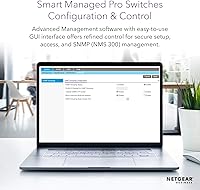
  • Management: Network administrators can manage the switch through a web-based graphical interface and via SNMP using NETGEAR's NMS 300 management software.
  • Form Factor: The unit ships as a 1U rackmount device and also supports flat desktop placement, with all necessary mounting hardware included in the box.
  • Dimensions: The chassis measures 22.44 x 12.48 x 3.66 inches, fitting standard 19″ equipment racks used in most wiring closets and server rooms.
  • Weight: The switch weighs 9.83 pounds, which is typical for a 24-port rackmount unit of this class and requires standard rack support rails.
  • Case Material: The outer housing is constructed from plastic, which keeps weight manageable while providing adequate protection in controlled indoor environments.
  • Fan Design: The switch uses a whisper-quiet fan configuration designed to minimize audible noise in open-office settings or lightly enclosed installations.
  • Warranty: NETGEAR covers this switch under its ProSAFE Lifetime Limited Hardware Warranty, which carries no expiration date for the original purchaser.
  • Replacement Policy: In the event of a hardware failure, NETGEAR provides next-business-day replacement to minimize network downtime for business users.
  • Support Access: Buyers receive access to 24/7 live chat with NETGEAR product experts, available for the lifetime of the device.
  • Interface Types: The switch supports PoE and SFP interface types, covering both copper twisted-pair and fiber optic connectivity options for uplinks.
  • Release Date: The FS728TP was first made available in December 2006, making it a mature, long-established product in the NETGEAR ProSAFE lineup.
  • Total Ports: The switch provides 28 total ports: 24 Fast Ethernet PoE ports, 4 Gigabit copper ports, and 2 shared SFP uplink slots.
  • Data Transfer Rate: The maximum data transfer rate across the Fast Ethernet access ports is 100 Megabits per second under IEEE 802.3 standards.

Related Reviews
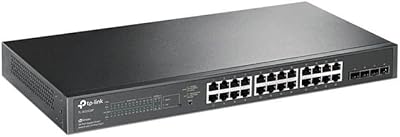
TP-Link TL-SG2428P Jetstream 24-Port Gigabit Smart Managed PoE Switch
84%
89%
Value for Money
70%
Ease of Setup
93%
PoE+ Performance
85%
Security Features
92%
Network Management (Omada SDN)
More
YuLinca 6-Port Gigabit PoE Switch with 4 PoE+ Ports
87%
95%
Ease of Installation
88%
PoE Functionality
91%
Build Quality
87%
Performance and Speed
94%
Fanless Operation (Noise)
More
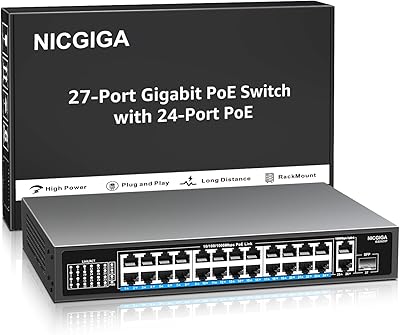
NICGIGA GS2421P 24-Port PoE+ Gigabit Switch
77%
91%
Value for Money
93%
Ease of Setup
78%
PoE Performance
84%
Build Quality
62%
Thermal Management
More
NETGEAR GS116PP 16-Port PoE+ Gigabit Switch
83%
96%
Ease of Setup
93%
PoE Port Coverage
68%
Power Budget Adequacy
88%
Build Quality
97%
Noise Level
More
NETGEAR GS324 24-Port Gigabit Ethernet Switch
84%
97%
Ease of Setup
94%
Silent Operation
89%
Build Quality
92%
Port Performance & Stability
67%
Thermal Management
More
NETGEAR GS316P 16-Port PoE+ Gigabit Switch
77%
97%
Ease of Setup
94%
PoE Port Coverage
61%
PoE Power Budget
88%
Build Quality
96%
Noise Level
More
NETGEAR GS308EP
NETGEAR GS308EP
81%
88%
PoE+ Performance
91%
Ease of Setup
74%
Build Quality
82%
Network Management Features
93%
Value for Money
More
NETGEAR GS305E 5-Port Gigabit Managed Switch
76%
93%
Value for Money
84%
Setup & Ease of Use
81%
Build Quality & Durability
88%
Network Performance & Throughput
97%
Silent Operation
More
Linksys LGS124P 24-Port Gigabit Unmanaged PoE Switch
90%
91%
Ease of Setup
88%
Build Quality
93%
PoE Performance
85%
Durability
89%
Energy Efficiency
More
NETGEAR GS305EP 5-Port PoE Gigabit Switch
79%
91%
Ease of Setup
78%
PoE Performance
97%
Noise Level
67%
Management Interface
72%
Build Quality
More

FAQ

Yes, and that is honestly one of the strongest use cases for the FS728TP. Most standard IP cameras draw between 5W and 15W each, so the 192W shared budget can comfortably handle a dozen or more cameras running simultaneously. Just tally up your expected power draw before deployment so you do not hit the budget ceiling unexpectedly.

Fast Ethernet ports max out at 100Mbps, while the Gigabit ports can handle up to 1000Mbps — ten times faster. The 24 PoE access ports on this switch are all Fast Ethernet, which is fine for IP cameras, VoIP phones, and access points, but not ideal for workstations or servers that benefit from full gigabit throughput. The four Gigabit ports are best used for uplinks or connecting your highest-bandwidth devices.

It supports both options. The switch ships with all the hardware needed for 1U rackmount installation in a standard 19″ rack. If you do not have a rack, it sits flat on a desk or shelf without any additional accessories required.

Not simultaneously at maximum draw, no. The 192W is a shared pool across all 24 ports, so if every device draws at its maximum rated wattage, you will run out of budget before filling every port. In real deployments with typical cameras and VoIP phones, most users find the budget sufficient for 12 to 18 devices running concurrently, depending on device types.

It has a web-based interface that is accessible without deep technical knowledge for basic tasks like enabling ports or checking device status. That said, features like VLAN configuration and QoS tuning do require some networking background to use effectively. If you are new to managed switches, NETGEAR's 24/7 expert chat support is genuinely useful during initial setup.

NETGEAR's ProSAFE Lifetime Warranty is typically tied to the original purchaser and does not transfer to secondary owners. If you are buying this managed switch used, you should assume warranty coverage will not apply to you and factor that risk into your decision.

NETGEAR designed this switch with a whisper-quiet fan specifically to reduce noise in non-datacenter environments. Most users report it is barely audible in a normal office setting. It is not silent, but it will not be a distraction in a typical open-plan workspace or small wiring closet.

The SFP slots are shared with two of the Gigabit copper ports, so each pair is either-or — you can use the SFP or the copper port on a shared pair, but not both simultaneously. This is worth planning around if you need both fiber uplinks and all four copper Gigabit ports active at the same time.

This is a legitimate concern. The FS728TP launched in 2006, and active firmware development from NETGEAR has slowed significantly. Security-conscious organizations should check NETGEAR's support portal directly for the latest available firmware version and assess whether it meets their current requirements. For networks with sensitive data or strict compliance needs, the lack of recent updates is worth taking seriously.

An unmanaged switch just moves data between devices with no configuration options at all — plug it in and it works, but you have no control over traffic. A managed switch like the FS728TP lets you create separate VLANs to isolate network traffic, set QoS rules to prioritize voice calls over file transfers, and monitor the network through SNMP. For small businesses with mixed device types or any security requirements, that level of control is worth the added cost.

Where to Buy