Overview

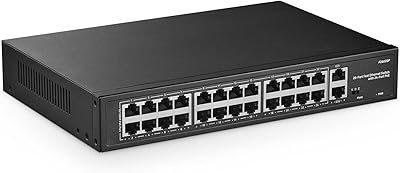
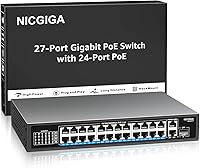
The NICGIGA GS2421P 24-Port PoE+ Gigabit Switch sits in an interesting spot — it's a 27-port unit (24 PoE+, 2 gigabit uplink RJ45, plus one SFP slot) priced where most competitors offer plastic enclosures and fewer ports. NICGIGA has been building a following among cost-conscious buyers who want real metal hardware without paying enterprise prices. What you get here is a straightforward, unmanaged switch — no web interface, no CLI, no VLANs beyond the built-in support. That simplicity is a feature for many buyers, but if you need traffic shaping or port mirroring, you'll want to look elsewhere. Expectations set correctly, this is a capable workhorse for the right deployment.
Features & Benefits

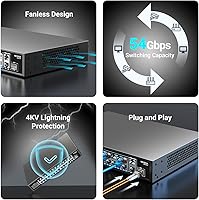
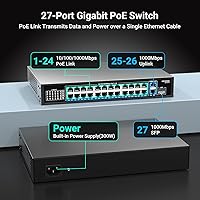
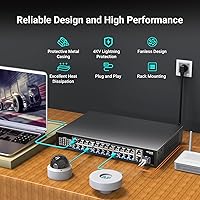
The 300W PoE budget sounds generous until you do the math: spread evenly across all 24 ports, that works out to roughly 12.5W each — fine for most IP cameras and VoIP phones, but worth planning if you're mixing in power-hungry access points that draw 25W or more. The per-port ceiling of 30W keeps you covered for standard 802.3at devices. The 54 Gbps backplane means no port is ever waiting on another, which matters when you have 20-plus devices all streaming or transmitting at once. The SFP slot is a quiet but useful addition — run a fiber uplink to another building or a core switch without adapters. And the 4KV surge protection is genuinely useful in outdoor camera installs or buildings with unstable power.

Best For

This unmanaged PoE switch is a strong fit for anyone deploying 10 to 20 IP cameras, wireless access points, or VoIP handsets who doesn't need a management interface. Think small retail shops, dental offices, warehouses, or home security setups — places where someone needs solid connectivity without a dedicated IT team to maintain it. The rack-mount form factor makes it a natural fit for a server closet or AV rack, and the metal build means it won't feel out of place alongside more expensive gear. It's also a natural next step for anyone outgrowing an 8- or 16-port PoE switch who doesn't want to spend three times the price for managed features they'll never use.

User Feedback

Buyers of the NICGIGA 24-port switch generally land in a positive place, with the most consistent praise going to the build quality and how easy it is to get running. Pulling it out of the box and having everything just work — no drivers, no software, no surprises — seems to resonate particularly with installers who do repeat deployments. On the flip side, some users note the unit can run warm under heavy PoE load, so ventilation around the switch matters. Fan noise is occasionally flagged in quieter environments. Warranty and support responsiveness appear mixed in available feedback — adequate for most, but not the kind of white-glove experience you would expect from a Cisco or Netgear.

Pros

  • 27 total ports — 24 PoE+, 2 uplink RJ45, and 1 SFP — offer real flexibility for growing networks.
  • Plug-and-play setup means non-technical installers can have devices online in minutes with no software.
  • Metal housing feels durable and rack-mount ready, which is rare at this price point.
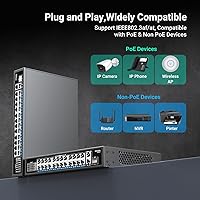
  • IEEE 802.3af/at compliance ensures broad compatibility with virtually any standard PoE device.
  • The SFP slot lets you run a fiber uplink without needing an external media converter.
  • 4KV surge protection adds a layer of reliability for outdoor camera installs or unstable power environments.
  • 54 Gbps backplane prevents bottlenecks even when most ports are active simultaneously.
  • Built-in VLAN support provides basic network segmentation without needing a managed switch.
  • Auto MDI/MDIX means you never have to worry about using the wrong cable type.
  • The overall value-to-port ratio is strong for budget-conscious small business deployments.

Cons

  • No management interface means zero visibility into per-port traffic, power draw, or device status.
  • 300W shared across 24 ports averages only about 12.5W per port under full load — plan your device mix carefully.
  • The unit can run noticeably warm under heavy PoE loads, so airflow around the switch is not optional.
  • Fan noise has been flagged by some users, which matters in quiet office or home environments.
  • NICGIGA is a relatively newer brand, so long-term firmware support and warranty service are less proven.
  • No advanced QoS means you cannot prioritize VoIP or video traffic over bulk data transfers.
  • Customer support responsiveness appears inconsistent based on available buyer feedback.
  • No port mirroring or SNMP support makes network troubleshooting harder when issues arise.
  • This gigabit PoE+ unit tops out at 1Gbps per port — not suitable for 2.5G or 10G device upgrades.
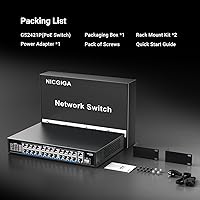
  • No rack ears are included in the base package, which may require a separate purchase for clean rack installations.

Ratings

The NICGIGA GS2421P 24-Port PoE+ Gigabit Switch scores below were generated by AI after analyzing verified buyer reviews from global marketplaces, actively filtering out incentivized, spam, and bot-generated feedback to surface genuine user sentiment. The ratings reflect both where this unmanaged PoE switch consistently delivers and where real buyers have run into friction — nothing is glossed over.
Value for Money
91%
Most buyers are genuinely surprised by what they get for the price — a metal-bodied, 24-port PoE+ switch with an SFP slot is not something you typically find at this tier. Installers running small camera deployments repeatedly cite it as the most cost-effective way to scale without touching enterprise pricing.
A small segment of buyers feel the value equation weakens slightly if they encounter reliability issues post-warranty, since the brand's support infrastructure is less established than legacy networking vendors and replacements add unplanned cost.
Ease of Setup
93%
Plug-and-play really does mean plug-and-play here — users consistently report having IP cameras and access points online within minutes of unboxing, with zero software interaction required. Non-technical small business owners specifically call out how stress-free the installation experience is.
A handful of users who expected at least a basic status LED per port or a simple web dashboard for monitoring found the complete absence of any feedback mechanism frustrating, particularly when diagnosing a device that would not come online.
PoE Performance
78%
22%
For typical camera and VoIP deployments pulling between 8W and 15W per device, the switch handles the load reliably and without reported drops. The 802.3af/at auto-detection works as advertised across a wide range of tested devices from multiple manufacturers.
The 300W shared budget becomes a real constraint when buyers try to run 20-plus high-draw devices simultaneously — a deployment of 24 Wi-Fi 6 access points at 25W each would exceed the total budget by a wide margin, and several buyers learned this the hard way after purchasing.
Build Quality
84%
The all-metal chassis draws consistent praise from buyers who expected a plastic shell at this price point — it feels solid in hand and sits confidently in a rack alongside more expensive gear. Port connectors feel well-fitted and do not show looseness after repeated cable swaps.
A few buyers note that the finish and edge machining do not quite match the precision of established brands like Netgear or TP-Link at a similar tier, with minor cosmetic imperfections occasionally appearing out of the box, though these are largely superficial.
Thermal Management
62%
38%
Under light to moderate loads — say, 10 to 14 cameras in a typical small office security install — the switch runs acceptably warm without causing concern, and the metal chassis does help dissipate heat passively in well-ventilated spaces.
Under heavier PoE loads the unit gets noticeably hot, and buyers who installed it in enclosed cabinets without airflow have reported performance issues. Thermal management is arguably the most consistent concern across negative reviews, making ventilation planning non-optional.
Port Density & Layout
88%
Having 24 PoE+ ports plus 2 uplink RJ45 ports and an SFP slot on a single 1U unit is a strong layout for the target audience — it means most small deployments can run everything off one device without daisy-chaining. Port spacing is adequate for standard RJ45 connectors.
Users running thick or booted patch cables in dense configurations report that adjacent connectors can feel cramped, and the lack of any port numbering illumination makes physical identification in a dark rack more tedious than it should be.
Fan Noise
61%
39%
In lighter-load deployments or installations inside server rooms where ambient noise is already present, the fan noise is largely a non-issue and most buyers in those environments do not mention it as a concern at all.
In quiet office environments or open-plan spaces where the switch is installed in an accessible cabinet, fan noise is a recurring complaint — some buyers describe it as more audible than expected for a unit at this size, especially under sustained PoE load.
Network Throughput
86%
The 54 Gbps non-blocking backplane means the switch does not create bottlenecks even when most ports are simultaneously active, and buyers running video surveillance streams from multiple cameras concurrently report smooth, stable throughput with no frame drops attributable to the switch.
At 1Gbps per port maximum, the NICGIGA 24-port switch is not future-proof for buyers who are already considering 2.5G or 10G device upgrades — it is a gigabit-only unit and that ceiling is fixed by design.
Compatibility
89%
Broad IEEE 802.3af/at support combined with auto MDI/MDIX means the switch plays well with virtually any standards-compliant PoE device on the market — cameras, phones, access points, and intercoms from a wide range of brands connect without issues in reported real-world use.
A small number of users have noted that certain proprietary high-power PoE devices or non-standard legacy hardware did not negotiate power correctly, which is a known risk with any unmanaged switch lacking per-port power override controls.
Rack Mount Experience
71%
29%
The chassis dimensions fit cleanly into a standard 1U rack space, and buyers who work in server closets or AV racks appreciate having a proper metal unit that looks and feels like it belongs alongside other rack gear rather than a consumer-grade plastic box.
Multiple buyers report that rack-mount ears are not reliably included in the package, which introduces an unexpected additional cost and a delay for anyone doing a planned rack installation — this inconsistency in packaging is a recurring frustration.
Surge & Lightning Protection
83%
The 4KV surge protection is a genuinely useful feature for buyers installing outdoor IP cameras in regions with frequent electrical storms — it provides a meaningful layer of protection that cheaper plastic switches at this price typically omit entirely.
While the built-in protection is a welcome addition, it covers the switch itself rather than guaranteeing downstream device protection, and a few buyers in high-lightning regions still recommend adding external surge arrestors on cable runs for maximum safety.
Brand Reliability
67%
33%
A growing number of repeat buyers indicate they have deployed multiple units across different sites with consistent results, which is a positive early signal for a brand that is still building its track record in the networking space.
NICGIGA lacks the long-term reliability data that comes with a decade of market presence, and buyers who have experienced unit failures report that the warranty and returns process can be inconsistent — this is a tangible risk for mission-critical deployments.
SFP Uplink Utility
74%
26%
For buyers who need to bridge two buildings over a fiber run, or connect to a fiber-backbone core switch, the SFP slot saves them from buying a separate media converter and keeps the rack footprint tight — those users consistently highlight it as a useful bonus.
The SFP slot goes entirely unused by the majority of buyers in simple single-location deployments, and a small number of users report compatibility questions around which SFP transceivers are confirmed to work, since NICGIGA does not publish a comprehensive compatibility list.
After-Sales Support
54%
46%
Some buyers report that NICGIGA responded promptly to pre-sale technical questions and, in a subset of cases, honored replacement requests for defective units without excessive back-and-forth, which is a positive sign for a value-tier brand.
Post-purchase support is the weakest area in user sentiment — response times vary widely, warranty terms are not always clearly communicated upfront, and buyers who needed hands-on troubleshooting help found the level of support noticeably below what established networking brands typically offer.

Suitable for:

The NICGIGA GS2421P 24-Port PoE+ Gigabit Switch is purpose-built for small business owners, security integrators, and prosumer network builders who need to power a lot of devices without a complicated setup. If you are deploying a mix of IP cameras, wireless access points, and VoIP phones across a retail shop, small office, or warehouse, this switch covers most real-world needs without requiring anyone to touch a configuration interface. IT installers who handle repeat deployments will appreciate that it is genuinely plug-and-play — run the cables, power it on, and you are done. The metal chassis and rack-mount compatibility make it at home in a server closet or AV rack alongside more expensive hardware. Anyone upgrading from a smaller 8- or 16-port PoE switch and wanting to scale up without a steep price jump will find this gigabit PoE+ unit hits a practical sweet spot.
Not suitable for:

The NICGIGA GS2421P 24-Port PoE+ Gigabit Switch is a poor fit for anyone who needs granular network control. If your environment requires port-based VLANs for guest network isolation, QoS prioritization for latency-sensitive traffic, SNMP monitoring, or port mirroring for security audits, an unmanaged switch simply cannot deliver those features regardless of brand or price. Network administrators managing multi-tenant buildings, larger enterprise floors, or compliance-sensitive environments should budget for a managed alternative. The 300W total power budget also deserves careful scrutiny in dense deployments — if you plan to fill all 24 ports with high-draw devices like Wi-Fi 6 access points pulling 25W each, you will hit the ceiling fast and need to plan power allocation carefully. And if long-term brand support and warranty assurance are critical factors in your purchase decision, a more established networking vendor may offer greater peace of mind.
Specifications

  • PoE Ports: 24 auto-sensing 10/100/1000Mbps ports support both IEEE 802.3af and 802.3at PoE+ standards for powering connected devices.
  • Uplink Ports: Two dedicated 1000Mbps RJ45 uplink ports connect this switch to a router or core network switch.
  • SFP Slot: One 1000Mbps SFP slot supports a fiber transceiver for longer-distance or inter-building network connections.
  • PoE Budget: Total shared PoE power output is 300W across all 24 PoE ports, averaging roughly 12.5W per port at full load.
  • Max Per-Port Power: Each individual PoE port can deliver up to 30W, which covers the majority of standard 802.3at-compliant devices.
  • Backplane Bandwidth: The 54 Gbps non-blocking backplane ensures full-wire-speed throughput is available to all ports simultaneously without internal bottlenecks.
  • Surge Protection: Built-in 4KV lightning and surge protection guards connected equipment against transient voltage spikes and adverse weather conditions.
  • Management: This is a fully unmanaged switch with no software, web interface, or CLI — it operates entirely plug-and-play out of the box.
  • VLAN Support: Basic VLAN functionality is supported, allowing a limited degree of network segmentation without a managed interface.
  • Cable Compatibility: Auto MDI/MDIX on all ports means the switch automatically adjusts to straight-through or crossover cables with no manual configuration.
  • Chassis Material: The enclosure is constructed from metal, providing durability and passive heat dissipation suitable for rack or desktop environments.
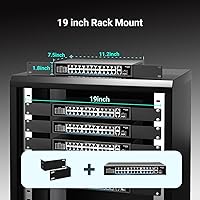
  • Mounting Options: The unit supports both desktop placement and standard rack mounting, fitting into a 1U rack space in server closets or AV racks.
  • Dimensions: The switch measures 11.2 x 7.5 x 1.7 inches, making it compact enough for tight rack installations or small equipment shelves.
  • Weight: The unit weighs 3.75 lbs, which is light enough for single-person rack installation without additional support hardware.
  • Total Port Count: The switch provides 27 total ports: 24 PoE+ RJ45, 2 standard gigabit RJ45 uplinks, and 1 SFP fiber slot.
  • PoE Standard: Complies with IEEE 802.3af (up to 15.4W) and IEEE 802.3at (up to 30W), automatically detecting and matching the power requirement of each connected device.
  • Data Transfer Rate: All RJ45 ports operate at up to 1000Mbps (1 Gbps) full-duplex, supporting high-throughput connections for cameras, phones, and access points.
  • Model Number: The official model designation is GS2421P, as listed by NICGIGA in their product documentation and packaging.

Related Reviews

YuLinca 6-Port Gigabit PoE Switch with 4 PoE+ Ports
87%
95%
Ease of Installation
88%
PoE Functionality
91%
Build Quality
87%
Performance and Speed
94%
Fanless Operation (Noise)
More
NICGIGA GS4802P 48-Port Gigabit PoE+ Switch
85%
89%
Value for Money
85%
Performance
92%
Setup & Installation
90%
Power Delivery for PoE Devices
87%
Build Quality & Durability
More
Linksys LGS124P 24-Port Gigabit Unmanaged PoE Switch
90%
91%
Ease of Setup
88%
Build Quality
93%
PoE Performance
85%
Durability
89%
Energy Efficiency
More
YuLinca F2602GP 24-Port PoE Switch with 2 Gigabit Uplinks
86%
95%
Setup and Installation
90%
Power Over Ethernet Range
86%
Build Quality and Durability
92%
Value for Money
87%
Performance and Reliability
More
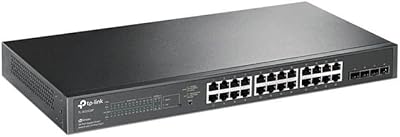
TP-Link TL-SG1428PE 24-Port Gigabit PoE Switch
86%
89%
Performance
92%
Value for Money
87%
Ease of Setup
93%
PoE Power Output
84%
Build Quality
More
TP-Link TL-SG2428P Jetstream 24-Port Gigabit Smart Managed PoE Switch
84%
89%
Value for Money
70%
Ease of Setup
93%
PoE+ Performance
85%
Security Features
92%
Network Management (Omada SDN)
More
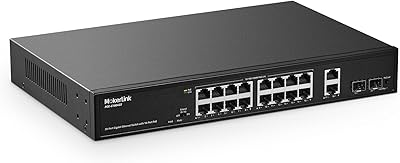
MokerLink POE-G1604GS 20-Port Gigabit PoE Switch
85%
88%
Performance
93%
Ease of Setup
90%
Build Quality
89%
PoE Power Budget (200W)
91%
Noise Level
More
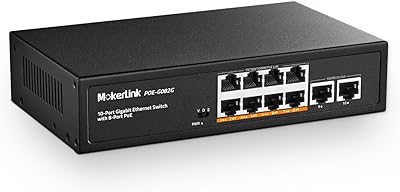
MokerLink POE-G082G 10-Port Gigabit PoE Switch
78%
94%
Ease of Setup
88%
PoE Reliability
83%
Build Quality
91%
Value for Money
71%
Thermal Management
More
MokerLink POE-G041GO Outdoor Gigabit PoE Switch
81%
93%
Ease of Setup
84%
PoE Power Delivery
78%
Build Quality
76%
Weather Resistance
88%
Value for Money
More
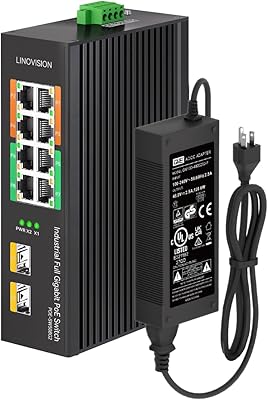
LINOVISION POE-SW508G Industrial 8-Port PoE++ Switch
77%
91%
Power Delivery
88%
Build Quality
93%
PoE Watchdog
84%
Installation Ease
86%
Thermal Performance
More

FAQ

No, not at all. The NICGIGA GS2421P 24-Port PoE+ Gigabit Switch is completely unmanaged, which means you just plug it in and connect your devices. There is no setup wizard, no app, and no browser interface to configure. Power it on and it works.
Yes, each port supports up to 30W under the 802.3at standard, so a 25W access point is within spec. Just keep in mind the total 300W budget is shared across all 24 ports, so if you are running many high-draw devices simultaneously you will want to add up your expected power consumption before committing all ports.

Yes, it is backward compatible with both 802.3af and 802.3at. The switch automatically detects which standard each device needs and delivers the appropriate power level, so older cameras and newer devices can coexist on the same switch without any issues.

For most small office or home deployments, the SFP slot will sit unused, and that is perfectly fine. It becomes useful if you need to uplink to another building over a fiber run, or if you want to connect to a core switch in a larger network that has a fiber backbone. If neither applies to you, just ignore it.

Under light to moderate PoE load it stays reasonably cool, but when many ports are actively powering devices the metal chassis does get noticeably warm. Make sure there is adequate airflow around the unit — do not stack equipment directly on top of it or stuff it into a fully enclosed cabinet without ventilation.

Basic VLAN tagging is supported, but because this is an unmanaged switch you cannot configure those VLANs through any interface. In practice, meaningful network isolation requires a managed switch where you can assign ports to specific VLANs. If guest network separation or camera isolation is a priority, you would be better served by a managed option.

This is worth confirming with the seller before purchasing, as included accessories can vary. Some buyers have reported that rack ears are not included in the base package, which would require a separate purchase for a clean rack installation. Check the current product listing or contact NICGIGA directly to confirm what ships in the box.

If your cameras draw around 10W each, 20 of them would consume 200W total — well within the 300W ceiling. The remaining 100W gives you headroom for a few access points or additional devices. Problems arise if you try to fill all 24 ports with high-draw devices simultaneously, so doing a quick power budget calculation before deployment is always worth the five minutes it takes.

Some users report audible fan noise, particularly under heavier loads, while others say it is quiet in their deployments. The inconsistency in feedback suggests it may vary by unit or load conditions. If absolute silence is a requirement, it would be worth testing the unit in your environment before committing to a permanent install.

NICGIGA is a relatively newer brand compared to established names in networking, so the long-term warranty and support experience is less proven. Warranty terms should be confirmed directly on the current product listing, as these details can change. Buyer feedback on support responsiveness is mixed, so if reliable after-sale support is important to your purchase decision, factor that into your evaluation alongside the attractive price point.