Overview

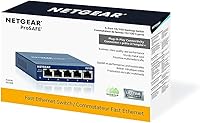
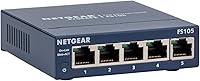
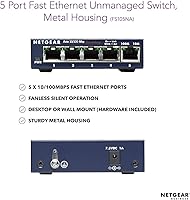
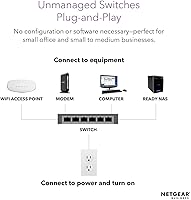
The NETGEAR FS105 5-Port Unmanaged Network Switch is exactly what it sounds like — a no-fuss box that gives you more wired ports without any setup headaches. Plug it in, connect your devices, and you are done. No login portal, no configuration menu, no IT background required. The compact unit sits discreetly on a desk or mounts to a wall if you prefer a cleaner look. What sets it apart in a crowded category is the ProSAFE lifetime warranty, which includes next-business-day hardware replacement — not something commonly offered here. Worth stating plainly upfront: this is a Fast Ethernet device, capped at 100Mbps per port, not Gigabit.
Features & Benefits

This 5-port switch runs on a simple philosophy: connect it and forget it. All five ports auto-negotiate between 10 and 100Mbps, so older and newer devices coexist without issues. The fanless design is a practical win — in a quiet home office or bedroom, even the faint hum of a small fan becomes noticeable over time, and this unit produces none. It supports IEEE 802.3az Energy Efficient Ethernet, which scales back power draw when ports go idle. At under four inches on its longest side, this desktop switch tucks away easily behind a monitor or under a desk. Should something fail, next-business-day replacement keeps downtime short.

Best For

This 5-port switch earns its place in specific situations rather than all of them. If your router has one free port but you need to connect a desktop, a printer, and a NAS at the same time, this handles it without you touching a single setting. It fits especially well in noise-sensitive spaces — a home recording room, a bedroom workstation, a small library — where fan noise would be a genuine problem. If your internet plan runs well below 100Mbps, the speed ceiling is a non-issue. Where it becomes harder to recommend is for users moving large files locally or streaming 4K across a network, where Gigabit throughput actually matters.

User Feedback

Long-term owners of the NETGEAR FS105 tend to return with the same two words: still works. Many report running this desktop switch for five-plus years without a failure — a point the lifetime warranty backs up in a meaningful way. Silent operation earns consistent praise from buyers in quiet home environments. Criticism, when it shows up, focuses squarely on the 100Mbps ceiling. Users who later upgraded to faster internet found themselves wishing they had gone Gigabit from the start. A fair number also flag the pricing, noting that competing Gigabit switches land at comparable cost. Reliability is a genuine strength here, but long-term value hinges entirely on your speed needs.

Pros

  • Plug-in setup takes under a minute with zero software, drivers, or configuration screens involved.
  • The fanless design means truly silent operation — no noise, ever, regardless of network load.
  • ProSAFE lifetime warranty with next-business-day replacement is genuinely rare at this price tier.
  • Compact enough to hide behind a monitor or mount flush to a wall without cluttering a workspace.
  • Energy Efficient Ethernet support lowers idle power draw, keeping long-term running costs low.
  • Auto-negotiation across all five ports means older and newer devices connect without any manual adjustment.
  • Long-term owners consistently report years of trouble-free operation with no hardware failures.
  • 24/7 NETGEAR expert support is available if anything unexpected does come up.
  • Wall-mount capability gives installation flexibility that budget alternatives often skip entirely.

Cons

  • The 100Mbps speed ceiling will frustrate users who later upgrade to faster internet plans or move large local files.
  • Comparable Gigabit switches exist at a similar price point, making the value case harder to defend for most buyers.
  • Only five ports — anyone needing more than four connected devices simultaneously will need additional hardware.
  • No management interface at all means zero visibility into traffic, port status, or bandwidth usage.
  • Cannot prioritize traffic types, which matters for mixed environments with VoIP phones or video conferencing.
  • The blue casing is a purely aesthetic issue, but it may look out of place in clean, minimal desk setups.
  • No link-speed indicator lights on individual ports, so diagnosing a slow connection requires external tools.
  • Buyers in regions with inconsistent shipping may find next-business-day replacement less reliable in practice.

Ratings

The scores below reflect an AI-driven analysis of verified global buyer reviews for the NETGEAR FS105 5-Port Unmanaged Network Switch, with spam, bot-generated, and incentivized feedback actively filtered out before scoring. Each category is weighted against real usage patterns reported by home users, small office buyers, and long-term owners across multiple retail platforms. Both the genuine strengths and the recurring frustrations are reflected honestly in every number you see here.

Ease of Setup
97%
Buyers across all technical skill levels consistently report that setup takes under two minutes — unbox, plug in power, connect an Ethernet cable from the router, and it works. There are no apps to download, no accounts to create, and no blinking configuration screens to navigate. This is the single most praised aspect of the switch.
A small number of buyers were briefly confused by which port to use as the uplink from the router, since all five ports are functionally identical and unlabeled. This is a one-time learning moment, not a recurring issue, but first-time switch buyers occasionally mention it.
Noise Level
94%
The fanless design delivers on its promise completely. Users who set this desktop switch up in bedrooms, home recording studios, and quiet office spaces specifically call out the silence as a deciding factor that kept them from returning it. Under full network load it remains inaudible.
A very small number of buyers reported hearing faint electrical interference from nearby power strips or chargers interacting with the unit, though this appears to be an installation environment issue rather than a hardware defect. It is not a widely reported concern.
Build Quality
83%
The housing feels solid for its weight class — not flimsy or hollow-sounding when handled. Long-term owners who have run the NETGEAR FS105 continuously for five or more years report no physical degradation, port loosening, or housing warping, which speaks to build consistency.
The plastic casing does not inspire premium confidence when picked up, and the blue color reads as functional rather than refined. A few buyers who mounted it visibly on a desk found the aesthetic dated compared to newer matte-black alternatives from competing brands.
Reliability & Uptime
91%
Multi-year ownership reviews are overwhelmingly positive on this front. Buyers routinely describe running this switch 24/7 for three, five, or even seven years without a single dropout, reboot, or port failure. For a device that is expected to run invisibly in the background, this track record is its strongest real-world credential.
A small percentage of buyers have reported early failures within the first six to eighteen months, typically affecting one port. While these cases appear to be manufacturing outliers, they do exist — and they reinforce why the lifetime warranty and next-business-day replacement policy actually matter.
Network Speed Performance
58%
42%
Within its 100Mbps design envelope, the switch performs cleanly and consistently. For tasks like printing, web browsing, and connecting a router to a few office machines, the throughput is perfectly adequate and buyers in those scenarios report zero frustration with speeds.
This is where the most meaningful buyer regret surfaces. Users who upgraded their internet plan to 200Mbps or higher, or who started moving large files locally between NAS drives and computers, found the 100Mbps ceiling a real and daily frustration. Comparable Gigabit switches exist at similar price points, making this limitation harder to overlook in hindsight.
Value for Money
62%
38%
The lifetime warranty genuinely changes the value equation for buyers who factor in long-term reliability. Knowing that a failed unit gets replaced the next business day — without paying for a new one — is a concrete financial benefit that budget alternatives simply do not offer.
At its current price, the NETGEAR FS105 sits in uncomfortable territory: Gigabit unmanaged switches from reputable brands are available for roughly the same investment. Buyers who discover this after purchase are notably the most vocal critics, and it is a fair point that is difficult to argue against.
Port Configuration
79%
21%
Five ports is the right number for the most common home and small office expansion scenario — a router with one spare port feeding a cluster of nearby devices. The auto-negotiation between 10 and 100Mbps means older hardware and newer devices share the switch without any manual intervention.
For buyers whose needs grow quickly — adding a second printer, a media server, and a work laptop at the same desk — five ports feels like it runs out fast. There is also no dedicated uplink port, which means one of the five usable ports is always consumed by the connection back to the router.
Energy Efficiency
86%
IEEE 802.3az compliance means the switch actively reduces its power draw when connected devices go idle or sleep overnight. Buyers running this around the clock appreciate that it does not add meaningfully to electricity bills, and the fanless design contributes to that low overall power profile.
There is no hard power consumption figure published on the packaging that buyers can easily reference, which frustrated a handful of energy-conscious reviewers who wanted to calculate running costs precisely. This is a minor documentation gap rather than a performance issue.
Mounting Flexibility
81%
19%
Both desktop and wall-mount options are supported out of the box, with mounting hardware included. Buyers who wall-mounted this switch in a home office or behind a TV entertainment unit specifically praise how flush and clean the installation looks once cables are tidied.
The mounting slots are minimal and do not accommodate standard rack-mount configurations, which limits options in more organized server or AV rack setups. For a purely desktop or wall application it works fine, but it is not adaptable to professional equipment racks.
Warranty & Support
89%
The ProSAFE lifetime warranty with next-business-day replacement is one of the most generous hardware guarantees in this product category. Buyers who have actually used the replacement process report that it worked as described — a refreshing experience in consumer networking hardware.
A portion of international buyers found the next-business-day replacement commitment less reliable outside major metropolitan areas, with fulfillment times sometimes running longer than advertised. The 24/7 chat support quality also received mixed marks, with some buyers reporting generic scripted responses for nuanced technical questions.
Compatibility
93%
Every buyer who tested this desktop switch across mixed-device environments — Windows, macOS, Linux, network printers, NAS units, IP cameras limited to 100Mbps — reported flawless compatibility. The truly hardware-agnostic nature of an unmanaged switch means there are virtually no edge cases to worry about.
Buyers expecting PoE support for devices like IP cameras or wireless access points were caught off guard — this switch supplies no power over its ports. It is not marketed as a PoE switch, but the omission is worth flagging clearly for buyers researching network camera or access point installations.
Physical Footprint
88%
At under four inches on its longest edge, this switch disappears easily behind a monitor base, under a desk shelf, or inside a media cabinet. Buyers in tight spaces — dorm rooms, compact home offices, reception desks — specifically chose it because it does not demand dedicated real estate.
The short cable clearance around the ports can make cable management slightly awkward when all five ports are in use simultaneously, particularly with thicker or stiffer Ethernet cables. In tightly packed desk setups, getting a clean bend radius on five cables at once requires some patience.

Suitable for:

The NETGEAR FS105 5-Port Unmanaged Network Switch is a natural fit for anyone who needs a handful of wired connections added to their network without any technical involvement whatsoever. If your router has one spare port and you need to connect a desktop, a printer, and a NAS simultaneously, this handles it in under a minute. It works especially well in quiet environments — home offices, bedrooms, recording spaces — where even a low-pitched fan hum becomes an ongoing irritant. Small businesses that need a reliable, set-it-and-forget-it switch for a back office or reception desk will appreciate both the zero-maintenance operation and the ProSAFE lifetime warranty, which covers next-business-day hardware replacement if anything ever goes wrong. For anyone whose internet connection or daily tasks fall comfortably under 100Mbps — basic web use, printing, light file sharing — the speed ceiling here is simply not a real-world problem.
Not suitable for:

The NETGEAR FS105 5-Port Unmanaged Network Switch is a harder sell for buyers whose needs have grown beyond what Fast Ethernet can deliver. If you regularly move large files between local machines, stream high-bitrate video across your network, or run a NAS that handles multiple simultaneous backups, the 100Mbps per-port limit will become a genuine bottleneck you notice every day. Power users who want to segment traffic, set port priorities, or monitor bandwidth have no options here — unmanaged means exactly that, with zero configuration access of any kind. Households or offices that have already upgraded to Gigabit internet will also find this switch a mismatch, since incoming speeds can outpace what the switch itself can pass through. Given that Gigabit switches from reputable brands are available at comparable price points, anyone with even moderate throughput demands should weigh that alternative carefully before committing.
Specifications

  • Model Number: This switch carries the official NETGEAR model designation FS105.
  • Port Count: The unit provides five RJ-45 ports, each supporting 10/100Mbps Fast Ethernet speeds.
  • Switch Type: Fully unmanaged operation means no configuration interface, login portal, or software of any kind is required.
  • Max Speed: Each port auto-negotiates at either 10Mbps or 100Mbps depending on the connected device.
  • Dimensions: The housing measures 3.7 x 3.98 x 1.06 inches, making it one of the more compact desktop switches in its class.
  • Weight: The unit weighs 9.7 oz (275g), light enough to mount on a wall without heavy-duty anchoring.
  • Cooling: A fanless, passive-cooling design means the switch operates in complete silence under all network load conditions.
  • Mounting: Supports both flat desktop placement and wall mounting, with mounting hardware included.
  • Energy Standard: Compatible with IEEE 802.3az Energy Efficient Ethernet, which reduces power consumption during periods of low network activity.
  • Warranty: Covered by NETGEAR ProSAFE Lifetime Limited Hardware Warranty, including next-business-day hardware replacement.
  • Support Access: Buyers receive access to 24/7 live chat support with NETGEAR technical experts for the lifetime of the product.
  • Compatible Devices: Works with any Ethernet-enabled device including desktops, laptops, printers, and servers.
  • Setup Requirement: No drivers, software installation, or network configuration is needed — the switch is operational immediately upon connection.
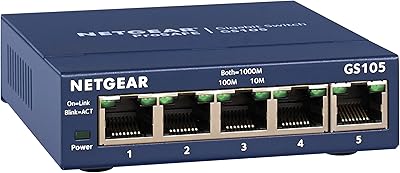
  • Color: The unit ships in a solid blue finish with NETGEAR branding on the top panel.
  • Manufacturer: Designed and warranted by NETGEAR, a networking hardware company founded in 1996 and headquartered in San Jose, California.
  • Power Input: The switch is powered via an external AC adapter included in the box; no PoE (Power over Ethernet) output is supported.

Related Reviews

NETGEAR GS105NA 5-Port Gigabit Unmanaged Switch
85%
97%
Ease of Setup
93%
Network Performance
88%
Build Quality
96%
Noise Level
91%
Value for Money
More
NETGEAR XS505M 5-Port 10G Multi-Gigabit Ethernet Unmanaged Switch
87%
91%
Performance
94%
Setup and Installation
88%
Build Quality
85%
Energy Efficiency
93%
Fanless Operation (Noise Level)
More
NETGEAR GS305E 5-Port Gigabit Managed Switch
76%
93%
Value for Money
84%
Setup & Ease of Use
81%
Build Quality & Durability
88%
Network Performance & Throughput
97%
Silent Operation
More
VIMIN 6-Port 2.5G Unmanaged Network Switch
83%
88%
Throughput Performance
84%
Build Quality
93%
Setup & Ease of Use
67%
SFP+ Port Usability
96%
Fanless Noise Level
More
NETGEAR GS108 8-Port Gigabit Ethernet Switch
82%
97%
Ease of Setup
93%
Reliability & Longevity
88%
Build Quality
91%
Value for Money
89%
Port Performance
More
NETGEAR GS348 48-Port Gigabit Unmanaged Switch
74%
97%
Noise Level
94%
Ease of Setup
89%
Build Quality
93%
Long-Term Reliability
86%
Value for Money
More
NETGEAR MS105 5-Port Multi-Gigabit Unmanaged Switch
76%
96%
Plug-and-Play Setup
88%
Multi-Gig Port Performance
91%
Build Quality & Materials
94%
Fanless & Noise Level
67%
Value for Money
More
NETGEAR GS305EP 5-Port PoE Gigabit Switch
79%
91%
Ease of Setup
78%
PoE Performance
97%
Noise Level
67%
Management Interface
72%
Build Quality
More
TRENDnet TEG-S350 5-Port 2.5G Network Switch
78%
88%
Value for Money
91%
Network Performance
94%
Ease of Setup
86%
Build Quality
97%
Noise Level
More
NETGEAR GS305P v2 5-Port Gigabit Ethernet PoE Switch
87%
93%
Ease of Setup
89%
PoE Power Delivery
94%
Noise Level (Fanless Design)
85%
Build Quality
91%
Energy Efficiency
More

FAQ

No, nothing at all. Plug the power adapter in, run an Ethernet cable from your router to any port on the switch, then connect your devices to the remaining ports. The switch handles everything automatically with no setup steps on your end.

For most home internet plans, no. If your internet service delivers speeds below 100Mbps, you will not notice any difference. If your plan runs faster than that, the switch becomes the limiting factor, since each port tops out at 100Mbps. Worth keeping in mind before you buy.

Yes, as long as you run an Ethernet cable between the room with your router and the room where the switch sits. The switch itself just expands the number of wired ports available at that endpoint. It does not extend Wi-Fi or work wirelessly.

Completely silent. There is no fan inside the NETGEAR FS105 5-Port Unmanaged Network Switch — it uses passive cooling only. Even in a very quiet room, you will hear nothing from it under any network load.
If the hardware fails for any reason covered under the warranty, NETGEAR will ship a replacement unit to you by the next business day. That is a meaningful commitment compared to the one- or two-year warranties typical in this category. You also get ongoing access to 24/7 chat support for the life of the product.

Yes, this is called daisy-chaining or cascading switches. Simply connect one port on this desktop switch to a port on your second switch using an Ethernet cable. Keep in mind that the total bandwidth shared between the two switches is still limited to 100Mbps on that uplink connection.

Yes, fully compatible with all of them. Since the switch is unmanaged and requires no software, your operating system is completely irrelevant. Any device with an Ethernet port will connect and work without any configuration on the computer side.

It supports both options. The unit has wall-mount slots built into the housing, and NETGEAR includes the necessary mounting hardware in the box. If you want a clean installation with cables managed neatly, wall mounting works well for this switch.

Yes, it will. Traffic passing through this switch between two locally connected devices is capped at 100Mbps per port. If you regularly transfer large files between computers on your network or use a high-throughput NAS, a Gigabit switch would be a more practical choice. For general web browsing and printing, though, the difference is not noticeable day to day.

No. This switch does not supply Power over Ethernet on any of its ports. Devices that require PoE to operate, such as IP cameras, VoIP phones, or wireless access points that rely on PoE power, will need a dedicated PoE switch or a separate power injector.

Where to Buy