Overview

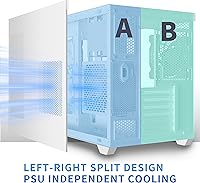
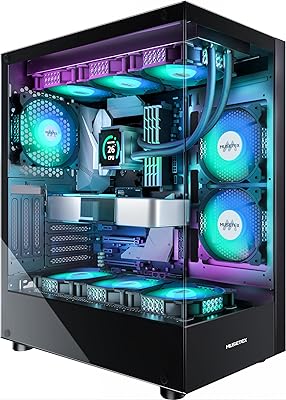
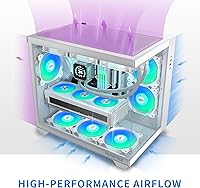
The MUSETEX Y6 Mid-Tower ATX PC Case arrived in mid-2023 and has quietly built a loyal following among builders who want their rig to look as good as it performs. What makes this white mid-tower stand out immediately is the 270° dual tempered glass design — two wide panels that wrap around the chassis and expose far more of your build than most competing cases at this price. Six ARGB fans come pre-installed, which is genuinely useful rather than a throwaway perk. That said, it is fair to say the Y6 case leans aesthetic-first; buyers chasing raw thermal performance above all else may want to look elsewhere.
Features & Benefits

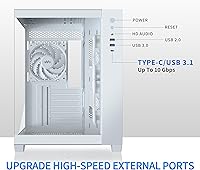
Six 120mm PWM ARGB fans are included straight out of the box, and the layout is thoughtfully arranged — three on top, one at the rear, and two along the side. Those side fans are worth noting: they use a reverse-blade design that pulls air inward differently than a standard fan, which both improves the intake angle and creates an interesting visual effect through the glass. Hardware clearance is generous enough for most modern builds — long GPUs, tall air coolers, and even a full 360mm AIO on top all fit without cramped workarounds. The front I/O panel covers USB 3.2 and Type-C, which keeps things practical alongside the lighting spectacle.

Best For

This ARGB-ready enclosure is a natural fit for first-time builders who would rather not hunt down compatible fans separately — everything needed for a colorful, well-lit build is already inside the box. If you are pairing a high-end GPU with a 360mm liquid cooler, the Y6 case handles both without requiring creative modifications. The wide glass panels make it an obvious pick for anyone who wants their components — a sleek motherboard, RGB RAM, or a custom cable set — to actually be seen. It is less suited for workstation or productivity builds where aesthetics take a back seat, or for builders who prefer a clean, minimal look.

User Feedback

Buyers are largely positive about this white mid-tower, and not just because of the looks. The most consistent praise centers on easy assembly and the quality of the out-of-box lighting, which many describe as more vivid and controllable than expected at this price point. Build quality draws favorable comparisons to cases that cost noticeably more. On the other hand, a recurring thread among critics points to tight cable management space behind the motherboard tray — not a dealbreaker, but something to plan around. A handful of buyers also noted that the fan controller feels like the weakest component, and a few wished the glass panels were thicker. Overall, the satisfaction rate is high and well-earned.

Pros

  • Six ARGB fans included out of the box — a rare value at this price that saves real money on fan sourcing.
  • The 270° dual tempered glass layout exposes more of your build than nearly any competitor in this segment.
  • Compatible with flagship-length GPUs and full 360mm AIOs, so your upgrade path is not boxed in.
  • The white mid-tower ships with a genuinely clean, premium-looking finish that holds up well in person.
  • Front I/O includes Type-C and USB 3.2, covering modern peripherals without reaching around to the back.
  • Magnetic dust filters on top and bottom snap off in seconds — maintenance that actually gets done.
  • First-time builders consistently praise how intuitive and well-organized the internal layout is to work with.
  • ARGB lighting syncs with major motherboard ecosystems right away, with no extra software setup required.
  • Ten expansion slots offer plenty of flexibility for multi-GPU setups or PCIe add-in cards.
  • The steel chassis is solid and does not flex during installation, even when handling heavy components.

Cons

  • Cable management space behind the motherboard tray is tight and becomes genuinely frustrating with thick modular cables.
  • The side panel vents have no dust filtration, which accelerates interior dust buildup in real-world conditions.
  • At full fan speed under load, the combined noise from six fans is louder than the sleek exterior suggests.
  • The included standalone RGB controller reverts to basic modes after a power cycle on some units.
  • Tempered glass panels feel thinner than expected and a few buyers reported chips or cracks arriving from shipping.
  • Choosing a 360mm AIO on top means removing the three pre-installed top fans, reducing the out-of-box fan value.
  • The side fans contribute less airflow than a conventional front-intake configuration under thermal stress.
  • Plastic trim pieces and the top mesh flex noticeably and feel inconsistent with the solid steel body.
  • The power button feel is plasticky and imprecise compared to competing cases at a similar price point.
  • White surfaces show fingerprints prominently and require consistent wiping to maintain a presentable appearance.

Ratings

The scores below for the MUSETEX Y6 Mid-Tower ATX PC Case were generated by our AI engine after analyzing verified purchase reviews from buyers worldwide, with spam, bot activity, and incentivized feedback actively filtered out. Each category reflects the real distribution of satisfaction and frustration reported by builders across a range of skill levels and use cases. Both the standout strengths and the friction points are represented transparently so you can make a genuinely informed decision.
Aesthetic Design
93%
The wraparound tempered glass treatment is the single most praised aspect across the entire review pool. Builders consistently describe the white finish as clean and premium-looking in person, and many note that the case photographs exceptionally well for desk setup posts and build showcases.
A small but vocal group finds the all-white exterior shows fingerprints and smudges more than darker cases, requiring frequent wiping to maintain that showroom look. Those who prefer a subtler or industrial aesthetic may find the design leans too heavily into gaming-rig territory.
Tempered Glass Quality
84%
Most buyers are genuinely impressed by how clear and distortion-free the panels are straight out of the box. The dual-panel configuration gives an unusually wide viewing angle that lets you appreciate the full interior layout, including cable runs and lighting, without craning around the case.
A recurring complaint is that the panels feel thinner than expected for a case at this price, and a handful of buyers reported minor chips or cracks arriving from shipping. The mounting mechanism also drew criticism for feeling slightly imprecise, requiring careful alignment to avoid rattling during operation.
Pre-Installed Fan Quality
78%
22%
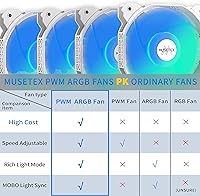
Getting six ARGB fans included without paying extra is a meaningful advantage for first-time builders who would otherwise spend comparable money on fans alone. The lighting output is vivid and syncs well with major motherboard RGB ecosystems, which buyers consistently highlight as a strong out-of-box experience.
The fans themselves are functional rather than exceptional — at higher RPMs they generate audible noise that some users describe as a light hum that becomes noticeable in a quiet room. Several experienced builders chose to replace them with premium aftermarket fans relatively quickly, suggesting the included units are better suited for casual use than demanding workloads.
Airflow & Thermal Performance
71%
29%
The fan layout — three on top exhausting, two on the side drawing in, one at the rear — creates a reasonably logical airflow path for a mid-range build. Builders running mid-tier GPUs and standard air coolers report comfortable component temperatures under typical gaming loads.
Buyers running high-TDP GPUs or pushing the system hard in warm environments noted that temperatures climb more than expected, particularly near the GPU. The side intake fans, while visually interesting with their reverse-blade design, appear to contribute less measurable airflow than a standard front-intake configuration would.
Build & Installation Experience
88%
First-time builders are a surprisingly vocal positive demographic here — many describe the installation process as intuitive and well-organized, with enough internal space to work comfortably. The pre-routed cable paths and clearly labeled mounting points reduce the guesswork that often frustrates new builders.
The space behind the motherboard tray for cable management is tighter than the spacious interior might suggest, and builders with thicker modular PSU cables reported having difficulty closing the rear panel cleanly. A few users also noted that some standoffs required re-tightening after initial installation.
Cable Management
62%
38%
The case includes velcro straps and a reasonable number of routing cutouts that cover basic cable management needs for a standard ATX build. Builders who kept their wiring minimal reported clean results with manageable effort.
This is one of the more consistently flagged weak points. The rear shroud area is shallow, and users with full modular power supplies or thick cable extensions frequently ran out of room. Achieving a truly clean build requires planning and patience that the case does not fully support structurally.
Hardware Compatibility
91%
The clearance figures here are genuinely competitive — flagship-length graphics cards, tall tower coolers, and full-size 360mm AIOs all fit without requiring removal of drive cages or creative workarounds. Builders pairing the case with high-end components report a surprisingly drama-free installation.
Mini-ITX users gain little from the extra internal volume and may find the case unnecessarily large for their needs. There were also isolated reports of the GPU support bracket being awkward to position with certain card designs, though this appears to be an edge case rather than a systemic issue.
Radiator & Liquid Cooling Support
86%
Support for a 360mm radiator on top is a genuine differentiator at this price tier, and builders who planned AIO cooling from the start report clean, uncomplicated installation. The top mount accommodates thick radiators without conflicting with standard RAM heights on most ATX boards.
Builders who tried mounting a 360mm radiator while also keeping all six included fans active hit space conflicts, as the top fan slots are shared between the radiator and the fan mounts. Choosing a full AIO setup effectively means removing the three top fans, which limits the pre-installed fan value for those buyers.
Front I/O Panel
82%
18%
Having both a USB Type-C and a USB 3.2 port on the front panel is a legitimately useful combination for a case in this segment, and users who frequently plug in external drives, controllers, or headsets appreciate not routing cables around to the rear. The HD audio jack is clear and consistent across tested configurations.
The overall button feel on the power and reset switches drew mixed comments — a few buyers described them as plasticky or imprecise compared to cases at a similar price point. The USB 2.0 addition feels like a legacy inclusion that takes up front-panel real estate without adding much practical value.
Dust Filtration
79%
21%
Magnetic dust filters on both the top and bottom panels are a genuinely convenient long-term maintenance feature — pulling them off for cleaning takes seconds and requires no tools. Builders who have owned the case for several months report that the filters catch a meaningful amount of dust before it reaches components.
The side panel vents lack any filtration, which is a noticeable gap given that the side fans actively draw air through those openings. In dusty environments, builders may need to clean inside the case more frequently than the filtered sections alone would suggest.
Structural Rigidity
74%
26%
The main chassis feels solid and does not flex during handling or component installation, which is reassuring when working around heavy GPUs or AIO setups. At nearly 18 lbs, the case has enough mass to feel stable on a desk rather than lightweight and hollow.
Some of the plastic trim pieces and the top panel mesh feel noticeably thinner than the steel body, and a few buyers reported minor flexing in the top section when pressing down. The glass panel latches, while functional, introduced slight wobble on some units that required manual adjustment.
RGB & Lighting Control
83%
When synced through a compatible motherboard — whether ASUS Aura, MSI Mystic Light, or Gigabyte Fusion — the six-fan ARGB setup produces a cohesive and visually striking light show that fills the case interior well. Buyers describe the default lighting modes as genuinely impressive with no software setup required.
Users without a compatible motherboard header are limited to a basic standalone controller that offers fewer modes and no fine-grained customization. The included controller also drew complaints about inconsistent behavior, with some units defaulting back to a static mode after a power cycle.
Noise Levels
67%
33%
At low to moderate fan speeds the case runs quietly enough for office or bedroom use, and buyers who set custom fan curves through their motherboard software report comfortable acoustic results during light workloads and general browsing.
Under full load, with all six fans running at maximum speed, several buyers described the combined noise as noticeably louder than expected for a case marketed partly on its calm appearance. The tempered glass panels do little to dampen fan noise, and there is no sound-dampening material lining the interior.
Value for Money
87%
The combination of six pre-installed ARGB fans, a panoramic dual tempered glass design, Type-C front I/O, and wide hardware compatibility makes the Y6 case a genuinely strong package at its price point. Buyers repeatedly note that sourcing equivalent fans separately would cost nearly as much as the case itself.
Buyers who prioritize pure thermal engineering or cable management flexibility over aesthetics may find better-optimized options at a similar price. The value calculation shifts if you end up replacing the included fans or investing in cable extensions to achieve the clean look the glass panels demand.

Suitable for:

The MUSETEX Y6 Mid-Tower ATX PC Case is an excellent match for builders who want their setup to look intentional and polished without spending hours hunting down compatible fans and lighting hardware. First-time builders in particular will appreciate that the case arrives ready to impress — six ARGB fans pre-installed, a striking white finish, and wide tempered glass panels that make even a modest build look like it belongs in a desk setup feature. If you are pairing a current-generation GPU with either a tower air cooler or a 360mm AIO, the internal clearances are generous enough that compatibility will rarely be a concern. Enthusiasts who enjoy showing off their components — RGB RAM, custom cables, a premium motherboard — will find the panoramic glass design genuinely rewarding to look at every day. It also suits builders who want to future-proof their front connectivity, since the Type-C and USB 3.2 ports cover modern peripherals without adapters.
Not suitable for:

The MUSETEX Y6 Mid-Tower ATX PC Case is a harder sell for builders whose priorities are purely functional rather than visual. If you are running a high-TDP CPU and GPU combination in a warm room and need the best possible thermals, the side-intake fan configuration is not as thermally efficient as a front-intake design, and you may be disappointed by temperatures under sustained load. Hardcore cable management enthusiasts will likely find the shallow rear tray frustrating, especially if they are using thick modular cables or premium sleeved extensions — the case does not offer the depth to hide everything cleanly. Buyers who prefer a quiet workspace will also want to check their expectations, as running all six fans at higher speeds produces noticeable noise with no acoustic lining inside the panels to absorb it. Mini-ITX builders get very little from the extra chassis volume, and the case may feel unnecessarily large for compact builds. Finally, anyone who dislikes regular cleaning will find that the open side vents bypass the filtered sections, meaning dust accumulates inside faster than the magnetic filters alone would suggest.

Specifications

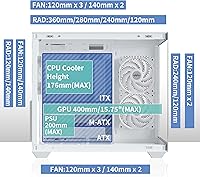
  • Form Factor: Mid-Tower ATX chassis compatible with ATX, Micro-ATX, and Mini-ITX motherboards.
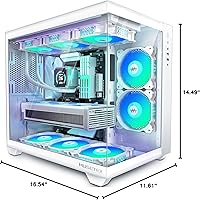
  • Dimensions: The case measures 11.61 x 16.54 x 14.49 inches (L x W x H), occupying a standard mid-tower footprint on a desk.
  • Weight: Shipping weight is approximately 23.38 lbs; the case itself weighs 17.77 lbs without components installed.
  • Panel Material: Two tempered glass panels provide approximately 270° of wraparound visibility into the chassis interior.
  • Pre-Installed Fans: Six 120mm PWM ARGB fans are included — two on the side with reverse-blade design, three on top, and one at the rear.
  • Radiator Support: The top of the case supports radiators up to 360mm or 280mm wide; the rear supports a single 120mm radiator.
  • Max GPU Length: Graphics cards up to 420mm (approximately 16.54″) in length can be installed without removing drive cages.
  • Max CPU Cooler: Tower air coolers up to 178mm (approximately 7″) in height fit within the chassis without contacting the side panels.
  • Max PSU Length: Power supply units up to 238mm (approximately 9.37″) in length are supported in the bottom-mounted PSU bay.
  • Drive Bays: Storage support includes three 2.5″ SSD bays and two 3.5″ HDD bays for a total of five drive mounting positions.
  • Expansion Slots: Ten rear expansion slots accommodate multi-GPU configurations and a wide range of PCIe add-in cards.
  • Front I/O: The front panel includes one USB 3.2 port, one USB Type-C port, one USB 3.0 port, and a standard HD audio combo jack.
  • Dust Filters: Magnetic dust filters are installed at both the top and bottom of the case and remove without tools for quick cleaning.
  • Fan Size: All six pre-installed fans are 120mm in diameter and operate via standard PWM speed control headers.
  • RGB Standard: Fans use the ARGB (addressable RGB) standard, compatible with major motherboard lighting ecosystems including ASUS Aura Sync, MSI Mystic Light, and Gigabyte RGB Fusion.
  • Body Material: The main chassis is constructed from steel, with plastic used for trim elements and the top mesh section.
  • Color: The case is finished in pure white across the steel body, plastic accents, and exterior trim panels.
  • Model Number: The official model designation is Y6-N5-W, which identifies this specific white variant within the MUSETEX Y6 lineup.

Related Reviews

MUSETEX K2
MUSETEX K2
80%
93%
Aesthetic Design
74%
Build Quality & Materials
78%
Cooling Performance
61%
Fan Noise Levels
91%
Hardware Compatibility & Clearance
More
SAMA S40 Mid Tower ATX PC Case
79%
88%
Airflow Performance
83%
Included Fan Quality
79%
Build Quality & Finish
92%
GPU Compatibility
61%
Cable Management
More
darkFlash DS900 ATX Mid-Tower PC Case
84%
89%
Cooling Performance
88%
Build Quality
91%
Ease of Installation
85%
Design & Aesthetics
92%
Value for Money
More
Zalman S4 Mid-Tower ATX PC Case
81%
88%
Airflow and Cooling
80%
Build Quality and Materials
92%
Ease of Installation
60%
Acrylic Panel Durability
70%
Cable Management
More
SZSKYING ATX Mid-Tower PC Gaming Case
85%
92%
Cooling Performance
85%
Build Quality
88%
Aesthetic Design
74%
Cable Management
78%
Ease of Setup
More
Vetroo AL800 Mid Tower ATX PC Case
76%
78%
Build Quality
84%
Tempered Glass Panel
76%
Airflow Performance
61%
Fan Included & Expandability
69%
Cable Management
More
Zalman S2 ATX Mid-Tower PC Case
83%
88%
Cooling Performance
80%
Build Quality
85%
Ease of Setup
70%
Cable Management
92%
Value for Money
More
Zalman S3 ATX Mid-Tower PC Case
74%
83%
Value for Money
71%
Build Quality
58%
Airflow & Cooling Performance
86%
Ease of Assembly
67%
Acrylic Side Panel
More
KEDIERS K4 ATX Mid Tower PC Case
80%
91%
Value for Money
93%
Aesthetic Design
74%
Build Quality
72%
Cooling Performance
84%
Ease of Assembly
More
darkFlash DRX70 ATX Mid-Tower PC Case
74%
83%
Value for Money
78%
Airflow Performance
89%
Ease of Assembly
67%
RGB Lighting
71%
Build Quality & Materials
More

FAQ

No — the MUSETEX Y6 Mid-Tower ATX PC Case ships with six 120mm ARGB fans already mounted and ready to use. For a standard gaming build, that is enough cooling to get up and running right away. If you later upgrade to a high-end CPU or GPU and start chasing lower temperatures, you might consider swapping in higher-performance aftermarket fans, but it is absolutely not necessary out of the box.
Most likely yes. The Y6 case accommodates GPUs up to 420mm in length, which covers virtually every current consumer graphics card including triple-fan flagship models. Just measure your card before buying if you are unsure — anything under about 16.5 inches should clear with room to spare.

Not exactly. The three top fan mounts double as the 360mm radiator mount, so installing a full-size AIO at the top means swapping out those three pre-installed fans for the radiator. You keep the two side fans and the rear fan, giving you three active fans plus the AIO. It is worth planning your layout before you start the build.

The case includes a standalone RGB controller as a fallback. It lets you cycle through preset lighting modes using a physical button, so the fans will still light up without any motherboard header. The trade-off is that you get fewer modes and no software control — and some users have reported that the controller can reset to a default mode after a power cycle, which is mildly annoying.

It is manageable, but you will need to plan ahead. The area behind the motherboard tray is on the tighter side, especially if you are using a full modular power supply with thick cables. Routing everything neatly takes a bit of patience. If you want that showroom look through the glass panels, consider using slimmer cables or a cable extension kit — just budget some extra time for it.

The two side fans have their blades angled in the opposite direction compared to a standard fan, which changes how they draw air across the side vents. In practice it means they pull air into the case laterally rather than pushing it straight through, which has a visual payoff as well as a slight airflow benefit for components near the side panel. It is more noticeable as a design detail than a dramatic thermal upgrade, but it does contribute meaningfully to side intake.

Very easy. The top and bottom filters are magnetic, so they just lift off — no screws, no clips. A quick rinse or wipe and they go straight back on. The one thing to keep in mind is that the side panel vents do not have filters, so dust can still find its way in through those openings over time. A regular wipe-down inside the case every couple of months is worth adding to your maintenance routine.

More than a black case would, yes. The white exterior is a fingerprint magnet, particularly on the steel sections near the glass panels. A microfiber cloth handles it quickly, but if you are someone who touches their case often or keeps it in a dusty room, expect to wipe it down regularly to keep it looking sharp.

At full throttle with all six fans spinning, the noise is noticeable — not jet-engine loud, but definitely present in a quiet room. In practice most builders will never run all fans at 100%, and setting a custom fan curve through motherboard software brings the noise down considerably during everyday use. The tempered glass does not absorb much sound, so there is no acoustic dampening to help at high RPMs.

It is a solid pick for a first build, especially if aesthetics matter to you. The interior is spacious enough to work in comfortably, the fan mounting points are clearly laid out, and having the lighting already installed removes one common source of confusion for new builders. The cable management area is a bit tight, but with some patience it is entirely manageable — and the end result looks genuinely impressive for a first-time build.