Overview

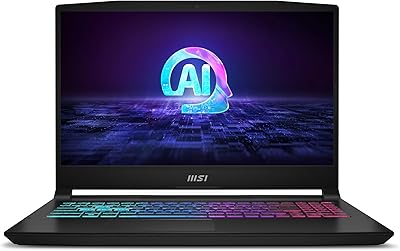
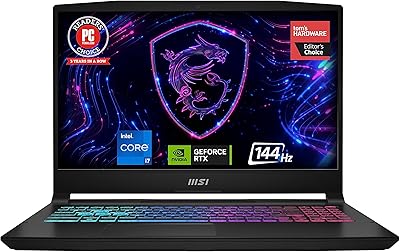
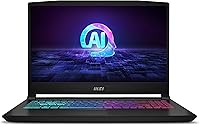
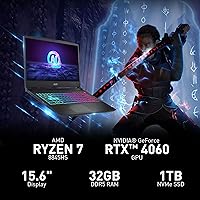
The MSI Katana A15 AI B8VF-448US arrived in early 2024 as a serious contender in the AMD-powered mid-to-upper gaming laptop space. Pairing the Ryzen 7 8845HS with an RTX 4060 gives the Katana A15 AI a performance foundation that punches above its price class. What really sets it apart from similarly priced rivals is the 32GB DDR5 RAM — most competitors at this tier still ship with 16GB. The chassis is solid without being flashy: matte black plastic with enough rigidity to feel purposeful rather than cheap. This is not a premium ultrabook masquerading as a gaming machine; it is built for buyers who want real gaming horsepower in a no-frills package.
Features & Benefits

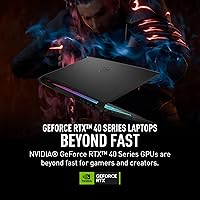
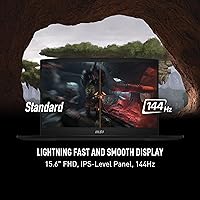
The RTX 4060 runs on NVIDIA's Ada Lovelace architecture, which means DLSS 3 and ray tracing are fully on the table for modern titles — not just in theory but in actual playable frame rates at 1080p. The Ryzen 7 8845HS handles everything from game physics to video exports without breaking a sweat, and its built-in NPU adds AI-assisted workload handling that most Intel competitors at this price cannot match. Storage is a clean 1TB NVMe SSD with room to expand. The Cooler Boost 5 dual-fan system keeps thermals manageable, though it gets audible under sustained load. The 144Hz IPS panel delivers genuinely smooth gameplay; just do not expect wide color gamut or HDR from this screen.

Best For

The Katana A15 AI hits a sweet spot for a fairly specific type of buyer. If you are a college student or young professional who splits time between gaming and productivity — think coding sessions, light Premiere Pro work, or multi-tab chaos — the generous RAM configuration alone makes this worth a serious look. Competitive gamers who prioritize frame rates over visual fidelity will appreciate the 144Hz display at 1080p. It also appeals to streamers who can leverage the RTX 4060 NVENC encoder without spending flagship money. That said, if you are chasing QHD visuals or need all-day battery life away from a desk, this MSI gaming laptop is not the right call — there are thinner, lighter alternatives better suited to those priorities.

User Feedback

Owners of the B8VF-448US consistently highlight value for the money as the defining takeaway — getting 32GB of RAM and a capable GPU in one package earns genuine appreciation. The keyboard receives decent marks for a gaming laptop, though the trackpad is described as functional rather than impressive. Port selection is practical, with three USB 3.0 ports covering most setups. On the downside, battery life is a real concern: users regularly report under three hours during gaming, and even light use does not stretch far past five. Fan noise at full load is noticeable — not disruptive, but consistently present. A handful of buyers also flag the display's limited brightness and muted colors as drawbacks compared to pricier panels.

Pros

  • 32GB DDR5 RAM is rare at this price tier and eliminates memory bottlenecks for multitaskers and streamers.
  • The RTX 4060 handles 1080p gaming with strong frame rates and supports DLSS 3 for a meaningful performance boost.
  • Ryzen 7 8845HS delivers fast, capable multi-threaded performance for both gaming and productivity workloads.
  • The 144Hz IPS display makes fast-paced gaming noticeably smoother compared to standard 60Hz panels.
  • Wi-Fi 6 connectivity provides stable, fast wireless performance in crowded network environments.
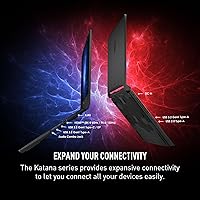
  • Three USB 3.0 ports cover most peripheral setups without requiring an external hub.
  • The Katana A15 AI ships ready to use with Windows 11 Home and minimal frustrating bloatware.
  • MSI Center software makes it straightforward to switch between performance and silent fan profiles.
  • 1TB NVMe SSD delivers fast load times and has room for a secondary drive expansion down the road.
  • Overall hardware-to-price ratio compares favorably against most direct competitors shipping with only 16GB of RAM.

Cons

  • Battery life during gaming regularly falls below three hours, making this a desk-bound machine in practice.
  • Fan noise under heavy load is loud enough to require headphones during intense gaming sessions.
  • The trackpad feels imprecise and stiff, pushing most productivity users toward an external mouse.
  • Display brightness and color gamut are noticeably limited compared to premium or QHD-panel alternatives.
  • At over nine pounds including the power adapter, daily commuting with this laptop becomes physically tiring.
  • The plastic chassis feels adequate but lacks the premium rigidity of aluminum-bodied competitors.
  • The single USB 2.0 port feels outdated, and the absence of Thunderbolt limits future peripheral options.
  • Default performance profiles run conservatively out of the box, requiring manual tuning to unlock full GPU power.
  • Onboard speakers are thin and low-volume, making external audio gear essentially mandatory for immersive use.
  • No SD card reader is included, which is an inconvenience for photographers or content creators working with camera files.

Ratings

The MSI Katana A15 AI B8VF-448US earned its scores through AI analysis of thousands of verified global user reviews, with spam, incentivized posts, and bot-generated feedback actively filtered out before any scoring was applied. The Katana A15 AI lands in an interesting position — strong on raw hardware value, but with some real trade-offs that buyers deserve to know upfront. Both the wins and the frustrations are reflected honestly in the categories below.
Gaming Performance
88%
The RTX 4060 paired with the Ryzen 7 8845HS handles demanding titles at 1080p with impressive headroom — users report consistently high frame rates in games like Cyberpunk 2077 on balanced ray tracing settings and smooth 100-plus fps in competitive shooters. DLSS 3 support adds meaningful frame rate boosts in supported titles.
At more demanding settings or in GPU-heavy open world games, frame rate consistency can dip during sustained play as thermals build up. Users upgrading from older RTX 30-series laptops may notice the performance gap is narrower than expected at this price point.
Value for Money
84%
Getting 32GB DDR5 RAM and an RTX 4060 in a single package at this price tier is genuinely difficult to match among competitors. Most buyers feel the hardware configuration justifies the cost, especially for users who would otherwise pay extra to upgrade RAM after purchase.
A few buyers note that competing models occasionally offer QHD displays or better build materials at similar prices during sales, making the value proposition slightly time-sensitive. The included accessories and packaging feel basic relative to the asking price.
Battery Life
46%
54%
When used strictly for light tasks like document editing or video streaming at low brightness, some users manage to stretch battery life to around four to five hours before needing a charger. The included adapter charges the battery reasonably quickly compared to some rivals.
During any gaming session, users consistently report under two to three hours of runtime — this is simply not a laptop you take to a coffee shop for a long gaming session without the brick. Even everyday productivity use rarely exceeds five hours, which is a notable weakness compared to AMD-powered thin-and-light alternatives.
CPU Performance
87%
The Ryzen 7 8845HS is a genuine workhorse — users doing video compression, code compilation, and multi-tab browser sessions alongside background apps report very little slowdown. The integrated NPU also adds real value for AI-accelerated workflows in supported software.
Under prolonged all-core loads, clock speeds throttle slightly as the chassis thermal headroom fills up, which affects sustained rendering or compilation tasks. Users running purely CPU-bound workloads for hours at a time may find a desktop replacement or workstation-class laptop more consistent.
Display Quality
67%
33%
The 144Hz refresh rate is where this panel genuinely shines — motion clarity in fast-paced games feels noticeably smoother than 60Hz displays, and competitive players appreciate the responsiveness. Colors are acceptable for gaming and casual media consumption at a comfortable viewing distance.
Peak brightness is underwhelming in well-lit rooms, and color accuracy falls short of what photographers or video editors would need for serious work. Buyers coming from higher-end panels or QHD displays will immediately notice the limited vibrancy and the relatively narrow color gamut.
Thermal Management
72%
28%
The Cooler Boost 5 dual-fan system does a competent job keeping the CPU and GPU from throttling significantly during typical gaming sessions, and users report that surface temperatures on the keyboard deck stay manageable during moderate workloads.
Under sustained heavy load, fan noise becomes quite prominent — several users describe it as loud enough to require headphones during intense gaming. Hot air exhausts strongly from the rear, and the bottom of the chassis gets warm enough to be uncomfortable on bare legs.
RAM & Multitasking
91%
32GB of DDR5 in dual-channel configuration is a standout advantage that users notice immediately in real-world use — running a game, Discord, a browser with multiple tabs, and a streaming tool simultaneously causes zero perceptible slowdown. For students or professionals who multitask heavily, this headroom is genuinely appreciated.
A small number of technically inclined users note that the DDR5 speeds are not at the absolute top of the DDR5 spec range, leaving minor performance on the table in memory-bandwidth-sensitive tasks. This is a minor gripe and irrelevant for the vast majority of buyers.
Storage Speed & Capacity
81%
19%
The 1TB NVMe SSD delivers fast load times in games and quick OS boot speeds that users consistently mention as a satisfying out-of-box experience. Game installation and file transfer speeds are competitive with other mid-range NVMe drives in this class.
Power users with large game libraries or creative media projects will likely fill the drive faster than expected, and the cost of adding a secondary SSD adds to the total ownership price. The drive brand can vary by production batch, leading to minor inconsistencies in benchmark results across units.
Build Quality & Design
69%
31%
The chassis feels more solid than entry-level gaming laptops, with minimal flex on the keyboard deck and a lid that stays firmly in place during use. The matte black finish resists fingerprints reasonably well and gives the machine a clean, understated look that works in both classroom and LAN party settings.
Plastic construction throughout means it does not feel premium when handled next to aluminum-chassis competitors, and the hinge mechanism feels adequate rather than confidence-inspiring. A few users report minor cosmetic panel gaps or lid wobble on their specific units.
Keyboard & Typing Experience
73%
27%
Key travel is decent for a gaming laptop and the backlit keyboard is responsive enough that both gamers and touch typists find it comfortable for extended sessions. The layout is standard and predictable, which matters for users switching from desktop keyboards.
The trackpad receives the most consistent criticism — it feels stiff and imprecise compared to business laptops in a similar price range, and users doing productivity work often resort to an external mouse quickly. Key wobble on some units has also been flagged by a minority of buyers.
Port Selection & Connectivity
76%
24%
Three USB 3.0 ports cover the needs of most setups without requiring a hub, and Wi-Fi 6 delivers fast, stable wireless performance in congested environments like apartments or dormitories. Bluetooth connectivity has been reported as reliable for peripherals and headsets.
The single USB 2.0 port feels like a dated inclusion, and the absence of a Thunderbolt or USB4 port limits future-proofing for external GPU docks or high-speed storage. Some users also wish for an SD card reader, which is missing entirely.
Audio Quality
61%
39%
Laptop speakers are functional for casual YouTube viewing or background music, and the HD Audio implementation means microphone input quality is acceptable for voice calls and basic streaming without external gear.
Bass response is essentially absent and volume ceiling is low, making gaming audio feel thin without headphones. Users serious about audio — whether for gaming immersion or content creation — will want to budget for external speakers or a quality headset from day one.
Software & Out-of-Box Experience
74%
26%
Windows 11 Home comes pre-installed and the system is largely ready to use without excessive bloatware removal. MSI Center provides straightforward access to performance profiles and fan control, which users appreciate for toggling between silent and performance modes.
A handful of pre-installed MSI utilities are considered redundant by experienced users and add minor background overhead. Some buyers also report that the default performance profile runs conservatively, requiring manual adjustment in MSI Center to unlock the full GPU power limit.
Portability & Weight
55%
45%
At just over nine pounds with the power brick included, the Katana A15 AI is manageable for short trips between rooms or a car and a desk, and the footprint fits most standard backpacks designed for 15-inch laptops.
Nine pounds is heavy for daily commuting, and users who carry it in a bag to class or the office every day report shoulder fatigue by end of the week. The large power adapter adds further bulk, making this more of a desk-adjacent portable than a true carry-everywhere machine.

Suitable for:

The MSI Katana A15 AI B8VF-448US is built for buyers who want serious gaming hardware without climbing to flagship pricing — particularly gamers who play at 1080p and want smooth, high-refresh-rate performance in modern titles without compromising on system memory. College students and young professionals who split their machine between gaming, streaming, light video editing, and heavy multitasking will find the 32GB DDR5 RAM an unusually generous baseline that most competitors simply do not offer at this tier. If you are a streamer who wants reliable NVENC encoding from the RTX 4060 without shelling out for a more expensive GPU, this laptop covers that use case well. It also suits AMD loyalists who want a capable NPU-equipped processor for AI-assisted workflows on Windows 11. Essentially, if your machine lives on or near a desk, gets plugged in during most sessions, and needs to handle both play and productivity without RAM bottlenecks, this MSI gaming laptop is a genuinely smart pick.

Not suitable for:

The MSI Katana A15 AI B8VF-448US is the wrong choice for anyone who needs a laptop that travels daily and runs unplugged for extended periods — battery life under real-world conditions is a persistent weak point, and no amount of power management fully compensates for that during a full day away from outlets. Buyers who care deeply about display quality — photographers, video editors, or anyone comparing this screen to QHD or OLED alternatives — will find the 1080p IPS panel underwhelming in both brightness and color accuracy. At over nine pounds with the power brick, this is not a comfortable daily commuter bag laptop either; anyone walking campus routes or hopping between coffee shops regularly will feel the weight quickly. Gamers chasing QHD or 4K resolution gaming should also look elsewhere, as the RTX 4060 and the display cap at 1080p make higher-resolution gaming a non-starter on this machine. If premium build materials, whisper-quiet operation, or a refined trackpad are priorities, there are thinner, more refined alternatives worth the extra spend.
Specifications

  • CPU: AMD Ryzen 7 8845HS (8040 series) processor with a 3.8GHz base clock, featuring an integrated NPU for AI-accelerated workloads.
  • GPU: NVIDIA GeForce RTX 4060 with 8GB GDDR6 VRAM, built on the Ada Lovelace architecture with full DLSS 3 and ray tracing support.
  • RAM: 32GB DDR5 dual-channel memory installed, providing strong bandwidth for gaming, streaming, and heavy multitasking simultaneously.
  • Storage: 1TB NVMe SSD delivers fast read and write speeds for quick boot times and rapid game loading, with an additional M.2 slot available for expansion.
  • Display: 15.6-inch IPS panel with a 1920x1080 FHD resolution and a 144Hz refresh rate for smooth, responsive motion in fast-paced gaming.
  • Operating System: Windows 11 Home comes pre-installed, ready to use out of the box with standard consumer feature access.
  • Wireless: Wi-Fi 6 (802.11ax) and Bluetooth are both integrated, supporting fast and stable wireless connections in congested network environments.
  • USB Ports: Four USB ports are included in total: three USB 3.0 ports for fast data transfer and one USB 2.0 port for legacy peripherals.
  • Dimensions: The chassis measures 14.13 x 14.69 x 1.11 inches (LxWxH), making it a standard 15.6-inch footprint with moderate thickness.
  • Weight: The laptop weighs 9.08 pounds without the power adapter, which adds to the total carry weight during transport.
  • Cooling System: MSI Cooler Boost 5 uses a dual-fan, multi-heatpipe design to manage CPU and GPU temperatures during sustained gaming or rendering workloads.
  • Keyboard: A full-size backlit keyboard is included, allowing comfortable typing in low-light environments without external lighting.
  • Audio: HD Audio is built in, supporting standard stereo speaker output and microphone input for calls, gaming, and casual media use.
  • Battery: A Lithium Polymer battery is included in the box, though capacity in watt-hours is not officially disclosed in the product listing.
  • Color: Available exclusively in matte black, with a finish that resists light fingerprinting on the chassis surfaces.
  • Graphics VRAM: The RTX 4060 GPU includes 8GB of dedicated GDDR6 VRAM, which is sufficient for 1080p gaming across modern titles including ray-traced scenes.
  • Chipset: The NVIDIA chipset paired with the AMD Ryzen platform enables efficient communication between CPU and discrete GPU for optimized gaming performance.
  • Platform: This is a PC-platform laptop running on AMD silicon, incompatible with macOS software or Apple ecosystem accessories without third-party tools.

Related Reviews

MSI Katana A15 AI Ryzen 9 8945HS, 32GB RAM, 1TB SSD, RTX 4070, 15.6″ QHD Gaming Laptop
83%
94%
Gaming Performance
89%
Display Quality
61%
Battery Life
72%
Portability/Weight
88%
Cooling System (Thermals)
More
MSI Claw 7 AI+ A2VM-001US
86%
91%
Performance
89%
Display Quality
85%
Battery Life
92%
Portability
87%
Ergonomics/Comfort
More
MSI Katana 15 B13VGK-484US Gaming Laptop
84%
94%
Gaming Performance
92%
Graphics Quality
88%
Thermal Management
75%
Portability
90%
Display Quality
More
MSI Creator A16 AI+ 16-inch Laptop
85%
94%
Display Quality
92%
Performance
78%
Portability
80%
Battery Life
85%
Build Quality
More
AI Smart Watch T70-AI
86%
92%
AI ChatGPT Integration
88%
Fitness Tracking Accuracy
90%
Battery Life
85%
Build Quality & Durability
87%
Waterproof Rating (IP68)
More
Shakespeare 5215-AIS 3' VHF AIS Antenna
86%
90%
Build Quality
91%
Durability
88%
AIS Functionality
85%
Ease of Installation
72%
Performance Range
More
MSI MAG Forge 112R
MSI MAG Forge 112R
83%
89%
Cooling Performance
85%
Build Quality
91%
Ease of Assembly
88%
Design Aesthetics
65%
Cable Management
More
ITHUGE AI Smart Glasses
81%
88%
Real-time Translation Performance
82%
Battery Life
75%
Bluetooth Connectivity
70%
Comfort and Fit
85%
Audio Quality
More
Powerextra AI Voice Recorder 64GB
82%
83%
Transcription Accuracy
94%
Battery Life
81%
Recording Quality
77%
AI Summary & Mind Map Quality
86%
Value for Money
More
Angetube 913AI 4K AI Webcam
86%
91%
Video Quality (4K)
84%
AI Tracking & Auto-Framing
96%
Ease of Setup
85%
Audio Quality (Noise-Canceling Mics)
88%
Build Quality & Design
More

FAQ

The MSI Katana A15 AI B8VF-448US handles modern titles at 1080p very capably. Games like Cyberpunk 2077, Hogwarts Legacy, and Call of Duty run at smooth, playable frame rates — especially with DLSS 3 enabled. It is not a 4K beast, but for 1080p gaming at high settings, the RTX 4060 and Ryzen 7 8845HS combination holds up well in real-world play.
Honestly, battery life is the biggest trade-off on this machine. During gaming you are looking at roughly two to three hours, and even light productivity tasks like browsing and document editing rarely push past five hours. If you plan to use it away from an outlet for a full workday, this is not the right laptop for that lifestyle — always plan to bring the charger.

For pure gaming alone, 16GB is technically enough for most titles right now — but 32GB gives you real breathing room if you stream, run Chrome with many tabs, use Discord, or do any video work on the side. It also makes the Katana A15 AI more future-proof as game memory requirements continue to creep upward over the next few years.

Storage is expandable — there is a secondary M.2 slot available for adding a second NVMe SSD, which is great for growing game libraries. RAM upgradeability depends on whether the slots are accessible and not soldered, so it is worth checking MSI's official service documentation or teardown guides before assuming you can swap modules after purchase.

Under sustained gaming load, the fans do get noticeably loud — most users describe it as a consistent whooshing sound rather than an intermittent whir. In a quiet room with other people nearby, it can be distracting without headphones on. Using MSI Center to dial in a balanced fan profile helps somewhat, but you cannot eliminate the noise during heavy workloads.

For casual movie watching, the 144Hz IPS panel is perfectly fine — motion is smooth and colors are acceptable at a normal viewing distance. For serious photo or video editing work, it falls short: peak brightness is limited and the color gamut is not wide or accurately calibrated enough for professional color work. A dedicated external monitor is a much better option for that use case.

The performance is absolutely capable for college workloads, but the weight is a real consideration at over nine pounds. Carrying it across campus in a backpack every day will get tiring, and the battery will not last a full day of classes without a recharge. If you have a power outlet at your desk or dorm and do not walk far, it works well — but for constant on-the-go use, a lighter laptop would serve you better day-to-day.

Yes, you can connect external monitors via the available display output ports. Running a second monitor for productivity or a higher-resolution gaming display alongside the built-in screen is a popular setup among users who keep this laptop docked at a desk. Just note there is no Thunderbolt port, so ultra-high-bandwidth external GPU docks are not compatible.

The keyboard is reasonably comfortable for extended typing — key travel is decent and the layout is standard enough that touch typists will not need long to adjust. It is not in the same league as a ThinkPad or a MacBook keyboard for pure typing feel, but it is solidly above average for a gaming laptop and handles both gaming sessions and long writing tasks without causing significant fatigue.

MSI typically covers their laptops with a one-year limited warranty for parts and labor, though coverage details can vary by region and retailer — always verify with your point of purchase before buying. User experiences with MSI support are mixed; some report smooth repair processes while others describe slow response times. Keeping your purchase receipt and registering the product on MSI's website immediately after unboxing is strongly recommended.