Overview

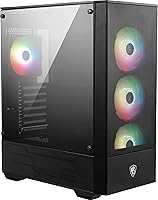
The MSI MAG Forge 112R Mid-Tower PC Case makes a strong first impression for anyone building a gaming rig without wanting to spend a fortune. It sits in MSI's MAG lineup as a value-conscious pick that doesn't look cheap — the mesh front panel and symmetrical design give it a clean, modern profile. Four ARGB 120mm fans come included, which is genuinely rare at this price tier. The tool-less tempered glass side panel is a thoughtful touch, and broad motherboard support across ATX, M-ATX, and ITX formats makes it flexible enough for most standard builds. Nearly 400 Amazon ratings averaging 4.5 stars backs up the hype.
Features & Benefits

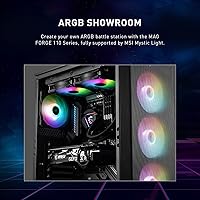
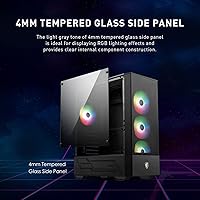
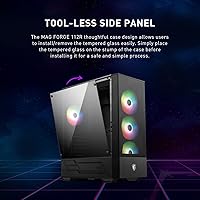
Having four ARGB fans pre-installed is probably the headline here — you can actually power on your build and have a lit-up interior without spending extra. The 4mm tempered glass panel snaps in without tools, which sounds minor until you're swapping components at midnight. Liquid cooling support up to a 240mm radiator covers the majority of popular AIO options on the market, so mainstream cooling setups drop right in. Cable management benefits from the bottom-mounted PSU shroud, keeping the visible chamber tidy. Two USB 3.0 ports handle day-to-day peripherals, though the lack of a USB-C front port is worth noting if that matters to your setup.

Best For

This MSI mid-tower is a natural fit for first-time PC builders who want that glowing, window-into-the-build aesthetic without assembling a separate fan shopping list. It pairs well with mid-range CPUs and GPUs where the budget is better spent on performance than on the enclosure itself. Builders planning a 240mm AIO will appreciate the confirmed radiator clearance. That said, if you need a 360mm radiator, extensive 3.5-inch drive bays, or a front USB-C port, this gaming case will feel limiting. It's built for clean, straightforward mid-range builds — not workstation setups or high-end custom loops.

User Feedback

Buyers consistently praise the fan count and lighting quality relative to what they paid, with many noting it removes a common budget-build headache entirely. The tempered glass latch gets mixed reviews — most find it sturdy enough, but a few report the mechanism feels less solid than expected over time. Cable management behind the motherboard tray is workable for modular PSUs but tight, so thicker cable sets may require patience. Fan noise is occasionally flagged at higher speeds, and not all ARGB controllers sync flawlessly with every motherboard header. Overall, the consensus lands firmly on strong value — with honest acknowledgment that premium cases do exist at higher price points.

Pros

  • Four ARGB 120mm fans come pre-installed, saving meaningful extra cost right out of the box.
  • The tool-less tempered glass panel makes component swaps and cable checks genuinely quick.
  • Broad ATX, M-ATX, and ITX motherboard support gives flexibility across most standard build configurations.
  • The mesh front panel provides better passive airflow than solid-panel alternatives at this price.
  • Bottom PSU shroud keeps cable clutter hidden, making the interior look cleaner with minimal effort.
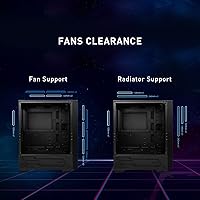
  • Confirmed 240mm radiator support covers the vast majority of popular AIO coolers on the market.
  • ARGB lighting through the glass panel produces a vivid, finished look without any additional investment.
  • The all-black symmetrical design reads modern without being aggressively styled or polarizing.
  • Nearly 400 verified ratings averaging 4.5 stars reflects consistent real-world satisfaction at this tier.
  • Assembly is approachable enough that first-time builders rarely report getting stuck during the process.

Cons

  • No USB-C front port, which feels like an oversight for a case released in 2023.
  • The tempered glass latch mechanism lacks the solid, confidence-inspiring feel of more expensive cases.
  • Front mesh panel has no dedicated removable dust filter, leading to faster interior dust buildup.
  • Cable management space behind the motherboard tray is tight with thicker or fully modular PSU cables.
  • Fan noise at higher speeds is noticeable and there is zero acoustic dampening material anywhere in the build.
  • ARGB sync can be unreliable when connecting to non-MSI motherboards outside the Mystic Light ecosystem.
  • Hard drive bay count is limited, making this a poor fit for storage-heavy or multi-HDD setups.
  • Maximum 240mm radiator support is a hard ceiling with no upgrade path for larger cooling hardware.
  • Minor cosmetic blemishes on arrival have been reported often enough to suggest inconsistent quality control.
  • The included ARGB controller offers only basic functionality with limited customization outside MSI software.

Ratings

The MSI MAG Forge 112R Mid-Tower PC Case earns its reputation as one of the more compelling value picks in the crowded mid-tower segment, and these scores reflect that reality in full. Our AI has analyzed verified global buyer reviews, actively filtering out incentivized, bot-generated, and spam submissions to surface what real builders actually experienced. Both the genuine strengths and the recurring frustrations are reflected here without sugarcoating.
Value for Money
91%
Buyers consistently single out the four included ARGB fans as the clearest indicator of strong value — that alone would cost extra on competing cases at a similar price. Most reviewers feel they got more than they paid for, especially first-time builders stretching a limited build budget.
A small segment of experienced builders note that the savings come with trade-offs in fit and finish that become more obvious once you've handled premium enclosures. For those comparing it directly against cases from Fractal or Lian Li, the gap in perceived quality is real.
Included Fan Quality
83%
Getting four ARGB 120mm fans out of the box is genuinely useful — reviewers report the lighting is vibrant and syncs well with MSI's own Mystic Light ecosystem. For a standard gaming build, many users never felt the need to swap them out at all.
Fan noise at full speed draws recurring complaints, with some builders describing a noticeable hum during intensive workloads. A handful of users also report inconsistent ARGB sync when pairing with non-MSI motherboard headers, requiring manual workarounds.
Airflow Performance
74%
26%
The mesh front panel does a reasonable job of pulling air into the case under normal gaming loads, and with four fans running, temperatures stay manageable for mid-range components. Builders pairing it with a 240mm AIO reported solid CPU thermals during extended sessions.
Several reviewers flag that the front mesh, while better than solid-panel alternatives, still restricts airflow more than open-mesh designs from competitors. Dust filtration coverage is limited, and a few users noticed dust accumulation inside the case faster than expected without regular cleaning.
Build Quality & Materials
71%
29%
The steel chassis feels appropriately solid for the price tier, and most builders appreciated that nothing rattled or flexed noticeably during assembly. The overall rigidity held up well for standard component installations without any panel-warping complaints.
The tempered glass latch mechanism is the most commonly cited weak point — reviewers describe it as functional but lacking the confidence-inspiring click of higher-end cases. A few units reportedly arrived with minor cosmetic blemishes, suggesting quality control is not perfectly consistent.
Tempered Glass Panel
82%
18%
The 4mm tool-less glass panel is a genuine convenience during builds and component swaps, and the clarity is excellent for showcasing lit-up internals. Most reviewers found it easy to remove and reseat without any special tools or frustration.
The latch system, while convenient, feels less robust than traditional thumbscrew designs under repeated use. A minority of reviewers reported the panel becoming slightly looser over time, which creates minor rattling at high fan speeds.
Cable Management
67%
33%
The bottom PSU shroud does a solid job of hiding the power supply and lower cable runs, giving the visible chamber a cleaner look than the price would suggest. Builders using semi-modular PSUs with thinner cables generally reported a tidy end result.
The space behind the motherboard tray is tight, and users with fully modular PSUs and thick cable sets described the routing process as genuinely frustrating. A few reviewers noted insufficient tie-down points, making it harder to achieve a truly clean build.
Radiator & Cooling Support
78%
22%
Support for a 240mm radiator in the front covers the most popular AIO options on the market, and builders running coolers from Corsair, NZXT, or DeepCool confirmed straightforward fitment. For a mid-range build, it handles cooling hardware without asking for compromises.
The 240mm ceiling is a hard limit — anyone eyeing a 360mm AIO will need to look elsewhere, and this case offers no path to upgrade that constraint later. Builders with larger radiators or custom loop ambitions should factor this in early.
Front Panel Connectivity
58%
42%
Two USB 3.0 ports cover the basics for plugging in flash drives, external drives, or peripherals during a session. For everyday use cases, most buyers found the ports responsive and solidly built into the panel.
The absence of a USB-C front port is a recurring frustration in reviews, particularly among buyers pairing this case with modern motherboards that include a Type-C header. As USB-C peripherals become more common, this omission feels increasingly dated for a case released in 2023.
Ease of Assembly
86%
First-time builders repeatedly praised how approachable the interior layout is, with clear spacing around the motherboard tray and enough room to maneuver during installation. The tool-less glass panel and pre-installed fans reduce the number of steps needed to get a build running.
A few more experienced builders found the motherboard standoff placement slightly fiddly, and the manual could be clearer on radiator mounting orientation. Nothing is prohibitively difficult, but it is not the most refined assembly experience at this price.
ARGB Lighting & Sync
77%
23%
The ARGB output from the included fans is genuinely attractive — colors are vivid and the lighting effect through the glass side panel gives the build a polished, finished look without any additional investment. MSI Mystic Light users reported smooth integration.
Sync reliability drops noticeably when connecting to non-MSI motherboards, with some buyers reporting that only basic static colors worked reliably outside the MSI ecosystem. The included ARGB controller is basic and lacks granular customization options.
Dust Filtration
53%
47%
There is a bottom filter for the PSU intake, which catches the most common dust entry point and is removable for cleaning. Builders in cleaner environments reported the case staying reasonably clean over several months of use.
The front mesh panel lacks a dedicated removable dust filter, which is a notable omission given how much air the front fans pull through. Reviewers in dustier rooms or households with pets flagged noticeably faster internal dust buildup compared to filtered alternatives.
Aesthetic Design
88%
The symmetrical front panel and clean, understated exterior styling hold up well against cases costing significantly more. The all-black finish with the glowing interior visible through the glass strikes a tone that reads modern without being garish.
Design preferences are personal, but some buyers found the exterior a touch plain compared to more aggressively styled competitors. The MSI branding on the front is subtle, which most reviewers appreciated, though a few felt it lacked distinctive character.
Motherboard Compatibility
93%
Support for ATX, M-ATX, and ITX boards in a single enclosure makes this a flexible pick for a wide range of build configurations. Buyers confirmed clean fitment across all three form factors without any clearance surprises.
While the compatibility range is broad, the interior dimensions do not leave much breathing room for E-ATX or extended ATX boards, which are officially unsupported. Builders planning high-end multi-GPU configurations will find the layout constraining.
Noise Dampening
55%
45%
At low fan speeds, the case runs quietly enough for a living room or bedroom setup, and many casual users reported no bothersome noise during everyday computing or light gaming tasks.
There is no acoustic foam or noise-dampening material anywhere in the build, which shows at higher fan speeds or under sustained load. Builders sensitive to system noise who run demanding workloads will likely want to swap the included fans for quieter aftermarket options.
Storage Options
62%
38%
The case accommodates standard 2.5-inch SSDs and 3.5-inch hard drives, covering the most common storage configurations for a mid-range gaming build. Mounting points are accessible and reasonably straightforward to use.
Drive bay count is limited compared to cases designed with storage-heavy builds in mind, which matters for anyone holding onto multiple HDDs from a previous system. Reviewers building NAS-adjacent or media storage rigs noted the layout quickly becomes restrictive.

Suitable for:

The MSI MAG Forge 112R Mid-Tower PC Case is purpose-built for builders who want a visually polished gaming setup without padding the budget with fan purchases on top of everything else. It makes particular sense for first-time builders who find the component selection process overwhelming enough without adding case fans to the list — four ARGB fans pre-installed means one fewer decision to make. Mid-range builds centered around mainstream CPUs and GPUs sit comfortably in this enclosure, and anyone planning to run a 240mm AIO cooler will find the radiator support confirmed and straightforward. The broad motherboard compatibility across ATX, M-ATX, and ITX formats also makes it a reliable pick for builders who haven't finalized every component yet. If your priority is a clean, windowed build that looks great on a desk without a premium price tag, this MSI mid-tower is a genuinely smart starting point.
Not suitable for:

The MSI MAG Forge 112R Mid-Tower PC Case has real limits that matter depending on what you're building. If your cooling plans involve a 360mm radiator, stop here — the case tops out at 240mm and there is no workaround. Enthusiast builders planning custom water loops or high-airflow configurations with multiple thick radiators will quickly find the interior constraining. The lack of a USB-C front port is a growing frustration for anyone using modern peripherals daily, and builders who rely on several 3.5-inch hard drives for storage-heavy setups will run out of bay space faster than expected. Anyone with noise sensitivity who runs their PC under sustained load should also factor in the absence of any acoustic dampening material and the fan noise that accompanies higher speeds. If you are comparing this gaming case directly against premium enclosures from Fractal Design or be quiet!, the difference in fit, finish, and long-term build quality will be tangible.

Specifications

  • Case Type: The MAG Forge 112R is a mid-tower enclosure designed for standard desktop gaming and workstation builds.
  • Motherboard Support: Compatible with ATX, Micro-ATX, and Mini-ITX motherboard form factors.
  • Included Fans: Four pre-installed ARGB 120mm fans are included in the box, ready to run on first boot.
  • Side Panel: A 4mm tempered glass side panel is fitted tool-lessly via a latch mechanism for easy access.
  • Front Panel: The front face uses a mesh panel design to promote active and passive airflow into the chassis.
  • Radiator Support: Supports liquid cooling radiators up to 240mm, mountable at the front of the chassis.
  • PSU Mounting: The power supply mounts at the bottom of the case behind a full-length shroud to conceal cables.
  • Front I/O Ports: The front panel includes two USB 3.0 Type-A ports and a combined 3.5mm audio jack.
  • Cooling Methods: Supports both air cooling with standard fan mounts and liquid cooling with AIO radiator configurations.
  • Fan Size: All included and supported fan positions accommodate 120mm fans as the standard format.
  • Case Color: Available in an all-black finish covering both the exterior panels and internal chassis.
  • Case Weight: The assembled case weighs approximately 33 pounds, reflecting the steel chassis and glass panel construction.
  • Glass Thickness: The tempered glass side panel measures 4mm thick, providing a balance of clarity and impact resistance.
  • Drive Bays: The interior accommodates 2.5-inch SSDs and 3.5-inch hard drives via dedicated mounting points inside the chassis.
  • Lighting System: The four included fans use ARGB (Addressable RGB) LEDs compatible with standard 5V 3-pin ARGB headers.
  • Brand & Series: Manufactured by MSI under the MAG (Gaming) product line, model designation MAG FORGE 112R.
  • Release Date: The Forge 112R was first made available in May 2023 according to its original product listing date.
  • Expansion Slots: The case provides standard PCIe expansion slot covers on the rear panel to accommodate full-size graphics cards and add-in cards.

Related Reviews
MSI MAG Forge 321R Airflow Mid-Tower Case
81%
91%
Airflow Performance
78%
Build Quality
74%
Included ARGB Fans
88%
Lighting & ARGB Ecosystem
87%
Cooling Flexibility
More
MSI MPG SEKIRA 100R Mid Tower Gaming PC Case
86%
94%
Cooling Performance
89%
Build Quality
91%
Ease of Installation
88%
Aesthetics & RGB Lighting
90%
Airflow & Ventilation
More
SAMA V60 Mid Tower PC Case
80%
93%
Out-of-Box Cooling Value
78%
Airflow Performance
91%
AIO & Radiator Flexibility
88%
Tempered Glass & Aesthetics
71%
Build Quality & Materials
More
Vetroo AL800 Mid Tower ATX PC Case
76%
78%
Build Quality
84%
Tempered Glass Panel
76%
Airflow Performance
61%
Fan Included & Expandability
69%
Cable Management
More
KEDIERS K4 ATX Mid Tower PC Case
80%
91%
Value for Money
93%
Aesthetic Design
74%
Build Quality
72%
Cooling Performance
84%
Ease of Assembly
More
SZSKYING ATX Mid-Tower PC Gaming Case
85%
92%
Cooling Performance
85%
Build Quality
88%
Aesthetic Design
74%
Cable Management
78%
Ease of Setup
More
ANSAITE W9 Mid-Tower Gaming PC Case
84%
89%
Cooling Performance
92%
Build Quality
85%
Cable Management
90%
Aesthetics
75%
Size/Space
More
AMANSON H9 Mid-Tower ATX Gaming PC Case
76%
88%
Value for Money
81%
Airflow Performance
67%
Pre-Installed Fan Quality
63%
Build Quality
79%
Tempered Glass Panels
More
SAMA NEVIEW 4503 Mid Tower PC Case
76%
91%
Value for Money
78%
Build Quality
83%
Airflow Performance
76%
ARGB Lighting
82%
Hardware Compatibility
More
SAMA V Mesh Mid Tower PC Case
86%
94%
Cooling Performance
88%
Build Quality
91%
Airflow Efficiency
89%
Ease of Maintenance
87%
Compatibility with Components
More

FAQ

For most mid-range builds, the four included ARGB 120mm fans are enough to get started without buying anything extra. They provide reasonable airflow for standard gaming components, and the lighting looks great through the glass panel right out of the box. If you're pushing a high-end CPU or GPU under sustained load, you might consider adding or upgrading fans later, but the majority of builders never feel the need.

Yes, the front of the chassis supports up to a 240mm radiator, which covers the most popular AIO options from brands like Corsair, NZXT, and DeepCool. Just keep in mind this is the upper limit — a 360mm radiator will not fit, so if your cooler is larger than 240mm you will need a different enclosure.

It does not. The front I/O is limited to two USB 3.0 Type-A ports and a combined audio jack. This is one of the more commonly noted limitations for a case released in 2023, so if you rely on USB-C for peripherals or fast external storage, that is worth factoring into your decision.

Yes, it uses a tool-less latch system so you can pop the panel off without a screwdriver. Most builders find it convenient during assembly, though the latch feels less solid than the screw-fastened panels on more expensive cases. It functions well under normal use, but handle it with reasonable care to avoid loosening the mechanism over time.

At moderate speeds they are fairly quiet and should not be distracting in a typical room. At full speed under heavy load, however, the fans produce a noticeable hum that some users find bothersome — particularly if the PC is in a bedroom or quiet workspace. There is no noise-dampening material inside the chassis, so the sound does carry.

It depends on your motherboard. The fans use a standard 5V 3-pin ARGB header, so any motherboard with that connector can control them. Software sync works best within the MSI Mystic Light ecosystem, and some users on non-MSI boards report limited functionality or basic static lighting only. Checking your motherboard's ARGB software compatibility beforehand is a smart move.

Unfortunately, no. The front mesh panel does not have a removable dust filter behind it, which means dust gets pulled straight through by the intake fans. The bottom PSU vent does have a filter, but the front is unprotected. If you live in a dusty environment or have pets, plan on cleaning the interior more regularly than you might with a filtered case.

Cable management is workable but not generous. The space behind the motherboard tray is on the tighter side, and builders using fully modular PSUs with thicker aftermarket cables describe the routing process as requiring patience and some creative tucking. If you use the stock cables that came with your PSU, most people get an acceptable result, but do not expect the same level of room you would find in a premium enclosure.

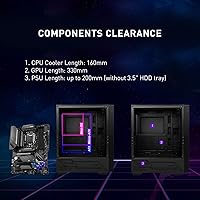
MSI specifies support for graphics cards up to approximately 330mm in length, which covers the vast majority of mainstream and high-end GPUs on the market. If you are running an exceptionally long triple-fan card, it is worth measuring and cross-referencing with the official MSI spec sheet for the Forge 112R before committing.

It is actually one of the more beginner-friendly options at this price point. The tool-less glass panel, pre-installed fans, clear interior layout, and broad motherboard compatibility remove a lot of the friction that trips up first-time builders. The assembly process is straightforward enough that most people following a standard build guide will not hit unexpected roadblocks.

Where to Buy