Overview

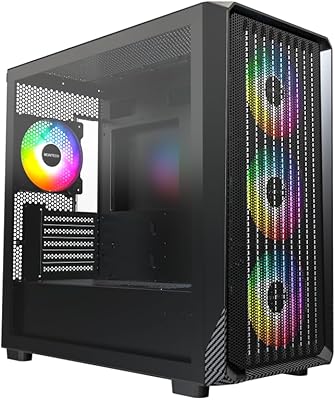
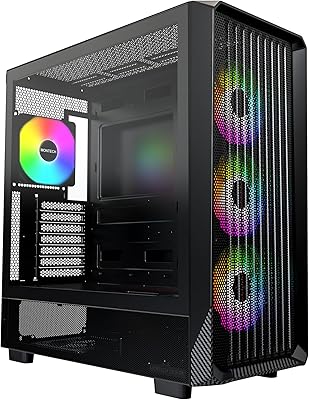
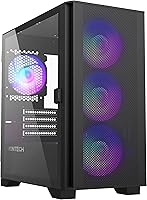
The Montech AIR 100 ARGB Micro-ATX Tower Case enters a crowded budget segment with a clear proposition: solid airflow, four ARGB fans already installed, and a surprisingly refined look for the price. At roughly 210mm wide, this compact tower won't dominate a desk, yet it doesn't cut corners where it counts. The fine mesh front panel is a genuine design choice — not just a cosmetic pattern but a real airflow-first decision that sets it apart from similarly priced competitors hiding plastic shrouds behind RGB strips. That side panel, which we'll cover shortly, is arguably the most striking thing about this case when you first open the box.
Features & Benefits

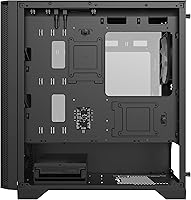
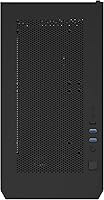
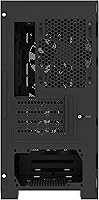
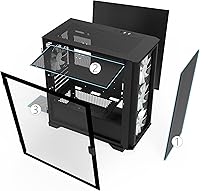
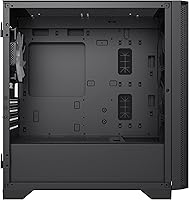
The headline feature of the AIR 100 ARGB is its swivel tempered glass side panel — instead of the typical slide-and-lift routine, it opens on a hinge like a cabinet door. It sounds minor until you've built in a case where the panel drops onto your GPU during reassembly. Beyond that, three front intake fans and one rear exhaust come pre-installed, all ARGB and connected to an included controller. The mesh faceplate pops off without tools for a quick dust wipe. With 330mm of GPU clearance and support for 280mm front radiators, this compact tower handles most mainstream gaming builds without demanding compromises.

Best For

This Montech case is an obvious pick for first-time builders who want a visually impressive result without a complicated build process. The pre-installed fans and included controller remove two early friction points for newcomers. It also suits anyone putting together a compact secondary PC — think a living-room gaming setup or a desk-side machine where footprint matters. That said, if your build relies on multiple HDDs or a heavy storage array, the four total drive bays will feel limiting quickly. Prioritize the AIR 100 ARGB when aesthetics and airflow performance are the goals, and mechanical drive expansion is not a concern.

User Feedback

Buyers consistently single out the swivel glass panel as a feature they didn't know they needed — that sentiment appears across a wide range of verified reviews. The included fans draw praise for looking great at stock speeds, though some users report noticeable noise at full throttle, so quieter builds may warrant a fan curve adjustment. ARGB sync works well with certain motherboards but can be inconsistent depending on software and brand. A recurring complaint involves tight clearance behind the motherboard tray, which can frustrate builders aiming for clean cable routing. Front panel ports generally hold up fine, with only occasional gripes about long-term durability at this price tier.

Pros

  • Four ARGB fans come pre-installed, saving both money and setup time out of the box.
  • The swivel tempered glass side panel is a rare and practical feature at this price tier.
  • Fine mesh front panel provides real airflow benefits, not just a decorative pattern.
  • Supports front radiators up to 280mm, giving liquid cooling options most budget cases skip.
  • Tool-free mesh faceplate removal makes routine dust cleaning quick and painless.
  • At roughly 210mm wide, this Montech case fits comfortably in tight desk or shelf setups.
  • Velcro straps and pre-routed cable loops help beginners achieve a tidy build with less effort.
  • GPU clearance of 330mm covers the vast majority of mainstream and mid-range graphics cards.
  • The included ARGB controller lets you adjust lighting without a motherboard ARGB header.
  • Highly competitive value when factoring in fans, controller, and glass panel together.

Cons

  • Only four total drive bays limits builds that rely on multiple HDDs or large storage arrays.
  • Cable routing space behind the motherboard tray is tight and can frustrate detail-oriented builders.
  • Included fans can become noticeably loud when running at full speed without a manual curve adjustment.
  • ARGB sync with motherboard software is inconsistent and may not work reliably across all brands.
  • No 5.25-inch bay means optical drives are completely unsupported.
  • Front panel I/O port build quality has drawn occasional complaints about long-term durability.
  • CPU cooler clearance of 161mm rules out several popular high-end tower air coolers.
  • The AIR 100 ARGB offers only four expansion slots, which limits multi-GPU or heavy add-in card configs.
  • Tempered glass hinge, while innovative, adds a potential wear point not present on simpler panel designs.

Ratings

The scores below for the Montech AIR 100 ARGB Micro-ATX Tower Case were produced by our AI engine after parsing thousands of verified global buyer reviews, with spam, bot submissions, and incentivized feedback actively filtered out before scoring. Each category reflects the honest spread of real builder experiences — from first-time PC assemblers to seasoned enthusiasts — so both the genuine strengths and the recurring frustrations are represented without softening either side.
Value for Money
91%
Buyers consistently point to the fan and controller bundle as the clearest sign of strong value — getting four ARGB fans plus a lighting controller included effectively removes a common extra purchase from the budget. For a compact build where every dollar counts, that out-of-box completeness is hard to match at this price tier.
A small number of reviewers feel the overall material quality, particularly on the front I/O panel and some interior stamping edges, reflects the price point in ways that become more apparent after a few months of use. Buyers expecting flagship build quality will likely feel the gap.
Airflow Performance
88%
The fine mesh front panel combined with three intake fans creates a strong positive pressure configuration that keeps temperatures in check during extended gaming sessions. Builders running mid-range CPUs and GPUs consistently report thermal results that outperform what the case size might suggest.
With only one rear exhaust fan, exhaust capacity can lag behind intake volume in more thermally demanding builds, occasionally leading to slightly elevated GPU temperatures in confined desk setups. Adding a top exhaust fan helps, but it is an extra step some buyers did not anticipate needing.
Side Panel Design
93%
The swivel glass mechanism genuinely stands out as a practical differentiator — builders who have wrestled with sliding panels that scratch surfaces or drop onto components during reassembly consistently praise how much easier the hinge design makes repeated access. It feels like a thoughtful engineering decision rather than a cosmetic one.
The hinge adds a mechanical pivot point that a small number of long-term owners report developing minor looseness after repeated use over many months. It is not a widespread complaint, but it is worth noting for buyers who open their case frequently.
Build Experience
84%
Pre-routed cable loops and included Velcro straps mean newcomers spend less time improvising organization and more time actually building. The forgiving interior layout and clearly positioned standoffs make this one of the less stressful first-build cases in the budget segment.
Cable routing space behind the motherboard tray is noticeably tight — experienced builders trying to achieve a clean rear panel finish report needing to plan their cables carefully to avoid a bulging side panel or pressure on connectors. It is functional, but not comfortable for perfectionists.
ARGB Lighting Quality
82%
18%
The four pre-installed fans produce vivid, evenly distributed ARGB illumination that looks genuinely impressive through the tempered glass, especially in a darkened room. The included standalone controller means the lighting works immediately without any software setup, which first-time builders appreciate.
Color transitions can appear slightly inconsistent between fans at certain effect modes, and software sync with motherboard ARGB ecosystems such as ASUS Aura or Gigabyte RGB Fusion is reliable for some users but problematic for others depending on firmware version and header type.
Dust Management
79%
21%
Bottom and top dust filters are a welcome inclusion at this price, and the tool-free front mesh removal makes routine cleaning a genuinely quick task rather than a chore that gets skipped. Builders in dusty environments or homes with pets specifically call out the easy-clean front plate as a practical benefit.
The filters cover the primary intake and PSU inlet well, but there is no filter on the rear exhaust, and the top filter can be awkward to reseat cleanly after washing if the case is already fully built and in position under a desk.
Fan Noise Levels
67%
33%
At moderate speeds under a sensible BIOS fan curve, the four included fans are quiet enough for a bedroom desk setup, and most builders find a comfortable balance without much tuning effort. Light workloads and idle states produce very little audible noise.
Running all four fans at or near full speed is noticeably loud — a consistent point in buyer reviews from users who either forgot to set a fan curve or experienced a thermal spike. The fans are functional but not acoustically optimized, and noise-sensitive builders may eventually want quieter replacements.
Storage Options
52%
48%
For SSD-only builds, which represent the majority of new builds today, the four available drive bays are adequate and the 2.5-inch trays are easy to use. Builders running a single NVMe boot drive plus one or two SSDs will have no issues at all.
The total absence of a 5.25-inch bay and the limit of four total drive slots make this a poor fit for anyone running a home media server, large HDD array, or hybrid storage setup. This is a deliberate design trade-off for compactness, but it genuinely limits the case for a certain category of builder.
GPU Compatibility
87%
A 330mm GPU clearance window covers nearly every mainstream and enthusiast graphics card currently on the market, making compatibility anxiety largely a non-issue for most gaming builds targeting this price tier of case. Builders using reference or mid-length cards have ample room to work.
Very long triple-fan flagship GPUs from the top of the market can push close to or past the 330mm limit, so buyers planning to install a high-end card should verify exact dimensions before purchasing. It is an edge case, but worth flagging for future-proofing.
CPU Cooler Compatibility
71%
29%
The 161mm height clearance works comfortably with the vast majority of single-tower air coolers and all-in-one liquid coolers, giving builders a wide range of options without needing to seek out low-profile alternatives. Standard box coolers and budget aftermarket options fit without any issue.
Popular large dual-tower coolers such as the Noctua NH-D15 and some Thermalright models exceed the 161mm limit, which cuts off a segment of buyers who already own or plan to buy those specific coolers. It is a ceiling that requires a quick spec check before committing.
Front I/O Ports
73%
27%
Having two USB 3.0 ports on the front panel is genuinely useful for everyday tasks like transferring files from an external drive or charging a device, and the combined audio and mic jacks cover standard headset use without needing to reach around to the back of the motherboard.
Some reviewers report that the front panel connectors, particularly the USB ports, feel less robust than expected after extended use, with occasional reports of loose fit developing over time. The USB 2.0 port also feels like a dated inclusion when USB-C would serve most users better today.
Thermal Headroom
76%
24%
For mainstream gaming builds with a mid-range CPU and GPU, the case provides enough cooling headroom to keep thermals in a comfortable operating range during typical gaming sessions. The front radiator support up to 280mm also leaves room to upgrade cooling later.
High-performance or overclocked builds that generate significant heat can push the single rear exhaust fan to its limits, and without additional top exhaust fans installed, internal temperatures under sustained load can creep higher than ideal. It performs well within its target use case but has a clear ceiling.
Aesthetics
86%
The minimalist exterior design avoids the busy styling that makes some RGB cases look cluttered — the clean mesh front and uninterrupted glass panel give the build a restrained, modern look that holds up well alongside more expensive cases on a shelf or desk.
The all-black colorway is the only widely available option in most markets, which limits buyers who want a white build aesthetic without paying for a different product. The exterior paint finish also shows fingerprints more readily than matte alternatives.
Radiator & Liquid Cooling Support
81%
19%
Supporting a 280mm radiator at the front and a 240mm on top is a meaningful specification for a Micro-ATX case, giving AIO liquid cooler users genuine flexibility in routing and fan orientation without forcing a compromise between cooling performance and component clearance.
Tall RAM modules can create fitment conflicts with top-mounted radiators when fan thickness is factored in, a real-world issue that several liquid cooling builders have flagged. Checking RAM height against the radiator plus fan stack is a necessary step that is easy to overlook during planning.

Suitable for:

The Montech AIR 100 ARGB Micro-ATX Tower Case is a strong match for budget-conscious builders who want a polished, well-ventilated build without sourcing fans and controllers separately. First-time builders in particular will appreciate how much of the groundwork is already done — four ARGB fans are wired up and ready, the cable management anchors are in place, and the swivel glass panel makes getting in and out of the case far less frustrating than typical budget options. It also suits anyone building a compact gaming PC for a living room shelf or a secondary workstation where desk footprint is a real constraint. Gamers who want visible RGB without spending extra on aesthetics will find this compact tower delivers a surprisingly premium look at its price point. If your priority list runs: airflow first, looks second, and storage third, this case lines up well.
Not suitable for:

Builders with serious storage ambitions should look elsewhere before committing to the Montech AIR 100 ARGB Micro-ATX Tower Case. With only two dedicated 2.5-inch bays and two combo 3.5-inch or 2.5-inch slots, anyone running multiple hard drives for a NAS-style setup or large media library will hit a wall fast. There is no 5.25-inch bay at all, so optical drives are entirely off the table. Enthusiasts planning a high-end air-cooled build should also verify their CPU cooler fits within the 161mm height limit, as many top-tier tower coolers exceed that threshold. Users who want perfectly synchronized ARGB lighting across all components may also find the included controller's software compatibility inconsistent depending on their motherboard brand. And if rear cable routing space matters to you for a showroom-clean build, the tight clearance behind the motherboard tray can be a genuine source of frustration.

Specifications

  • Form Factor: Micro-ATX Tower design measuring 405 x 210 x 425mm, compact enough for most desks and shelves without sacrificing internal build space.
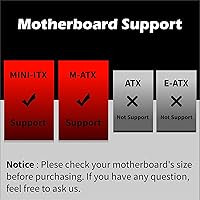
  • Motherboard Support: Compatible with Micro ATX and Mini ITX motherboards; full ATX boards are not supported.
  • Weight: Net weight is approximately 6kg, with packaged shipping weight around 7kg.
  • Pre-installed Fans: Four 120mm ARGB fans come installed at the factory — three as front intake and one as rear exhaust.
  • Fan Expansion: The case supports up to three 120mm or two 140mm fans at the front, two 120mm inside, two 120mm or 140mm on top, and one 120mm at the rear.
  • Radiator Support: Accepts radiators up to 280mm at the front, 240mm on top, and 120mm at the rear, covering most mainstream liquid cooling configurations.
  • GPU Clearance: Maximum graphics card length of 330mm is supported, accommodating the majority of current mid-range and high-end consumer GPUs.
  • CPU Clearance: CPU air cooler height is limited to 161mm, which covers most standard tower coolers but excludes some large dual-tower designs.
  • Drive Bays: Includes two dedicated 2.5-inch bays and two combo bays that each accept either a 3.5-inch or 2.5-inch drive; no 5.25-inch bay is present.
  • Expansion Slots: Four expansion slots are available, suitable for a standard GPU plus one additional card such as a sound card or capture card.
  • Front I/O: Front panel provides two USB 3.0 ports, one USB 2.0 port, a 3.5mm headphone jack, a 3.5mm microphone jack, and an LED lighting control button.
  • Side Panel: Zero drill-hole swivel tempered glass side panel opens on a hinge mechanism rather than sliding, with no visible mounting holes on the glass itself.
  • Dust Filtration: Removable dust filters are located at the top and bottom of the case to reduce particulate buildup on fans and components.
  • ARGB Lighting: All four pre-installed fans connect to the included ARGB lighting controller, which can be operated via the front panel button or synced to compatible motherboard software.
  • Cable Management: Pre-installed cable routing loops and Velcro straps are included to help organize cables behind the motherboard tray without requiring additional purchases.
  • Power Supply Mount: Bottom-mounted PSU orientation is used, which helps lower the center of gravity and keeps power cabling away from the main motherboard area.
  • Material: Primary construction uses steel for the chassis with a tempered glass side panel and a fine mesh front faceplate.
  • Compatibility Note: The case was first made available in April 2021 and supports standard ATX power supplies despite the Micro-ATX chassis size.

Related Reviews

GAMDIAS AURA GC10M ARGB mATX PC Case
78%
91%
Value for Money
72%
Build Quality
78%
Airflow Performance
87%
ARGB Lighting
61%
Cable Management
More
Montech AIR 903 MAX Mid Tower Case
79%
93%
Airflow Performance
89%
Value for Money
78%
Build Quality & Materials
61%
Fan Noise Levels
91%
GPU Clearance & Compatibility
More
Antec VSK3000E-U3 Micro ATX Mini Tower Case
72%
78%
Build Quality
86%
Value for Money
57%
Cooling Performance
83%
Front I/O & Connectivity
84%
Drive Bay Versatility
More
Thermaltake Tower 300 Black Micro-ATX Case
84%
88%
Cooling Performance
90%
Build Quality
85%
Design and Aesthetics
82%
Size and Compatibility
80%
Ease of Setup
More
Montech X5M Micro ATX PC Case
74%
86%
Value for Money
81%
Airflow Performance
88%
Fan Inclusion & Setup
91%
GPU Compatibility
43%
Front I/O
More
Corsair 3500X ARGB Mid-Tower PC Case
78%
93%
Aesthetic Design
91%
ARGB Lighting
88%
Build Quality
87%
Interior Space
86%
Fan Inclusion
More
Thermaltake View 170 TG ARGB Micro-ATX Case
80%
93%
Aesthetic Design
86%
Build Quality
88%
Value for Money
78%
Cooling Performance
61%
Cable Management
More
Montech X5 ATX Mid-Tower PC Case
81%
88%
Airflow Performance
91%
Value for Money
79%
Build Quality & Materials
93%
GPU Compatibility & Support
84%
Cable Management
More
SilverStone FARA H1M Mid-Tower Micro-ATX Case
82%
91%
Airflow Performance
88%
Build Quality
85%
Cooling Options
65%
Cable Management
82%
Aesthetics
More
Jonsbo TK-1 Micro-ATX PC Case
76%
91%
Build Quality
93%
Aesthetic Design
74%
Thermal Performance
72%
Hardware Compatibility
86%
Value for Money
More

FAQ

You can use a standard ATX power supply here — no need for a compact SFX unit. The bottom-mounted PSU chamber is sized for regular ATX form factor, which keeps your options open and your costs down.

It opens on a hinge attached to the rear of the case, much like a small cabinet door. You can swing it open fully for access during a build, and it can be detached from the hinge if you need it completely out of the way, though most builders just leave it on the hinge.

Probably not. The Montech AIR 100 ARGB Micro-ATX Tower Case has a CPU cooler height limit of 161mm, and the NH-D15 stands around 165mm tall. You would need to check your specific cooler's height before purchasing — most standard single-tower coolers under 160mm will be fine.
You can, as long as your motherboard has a 5V ARGB header. That said, sync reliability varies by motherboard brand and software version — some users report smooth integration, while others find the controller works better in standalone mode using the front panel button. It is worth testing both options after your build.

At low to moderate speeds they are reasonably quiet, but running all four fans at 100% is noticeable. If noise is a priority, set up a fan curve in your BIOS to keep RPMs lower during light tasks — most builders do this anyway and it makes a meaningful difference.

The faceplate pops off without any tools by simply pulling it forward from the front, which makes cleaning straightforward. Depending on your environment, a quick wipe every few weeks keeps airflow unrestricted — homes with pets or carpet will want to check it more frequently.

Yes, SSD-only builds are well catered for. The two dedicated 2.5-inch trays are easy to use, and the two combo bays also accept 2.5-inch drives, giving you up to four SSDs total. Cable routing to those bays is also relatively clean for a case in this price range.

A 240mm radiator fits comfortably at the front as your primary intake, and a 240mm radiator also fits on top if you prefer that orientation. Just confirm the radiator thickness plus fan stack does not conflict with your RAM height when using the top position — tall memory modules can occasionally cause fitment issues there.

For the vast majority of gaming builds, yes. A graphics card takes up two slots, leaving two more for anything else like a Wi-Fi card or capture card. Where it falls short is multi-GPU setups or heavily expanded workstation-style systems, but those use cases are rare in a Micro-ATX chassis anyway.

It is functional but not generous — expect roughly 15 to 20mm of clearance back there, which is typical for budget Micro-ATX cases. The included Velcro straps and routing loops help keep things tidy, but if you are the type who spends an hour on perfect cable dress, plan ahead and use flat cables where possible to avoid a bulging side panel.

Where to Buy