Overview

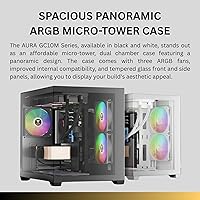
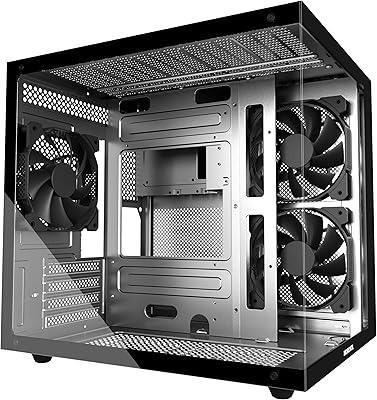
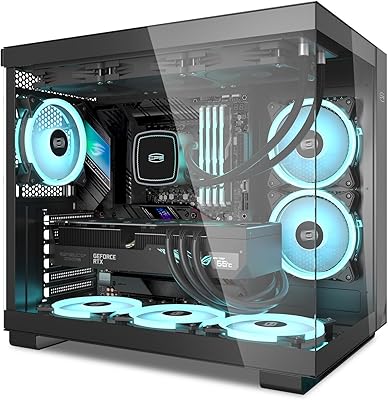
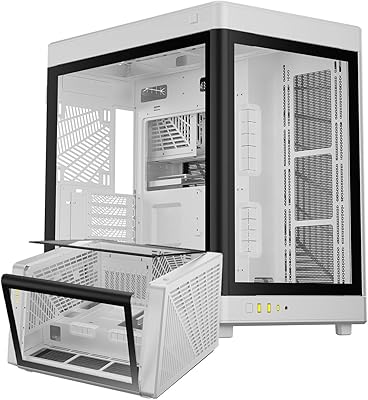
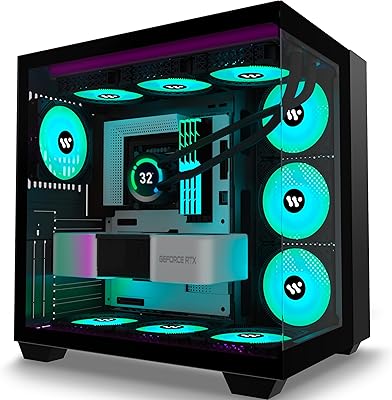
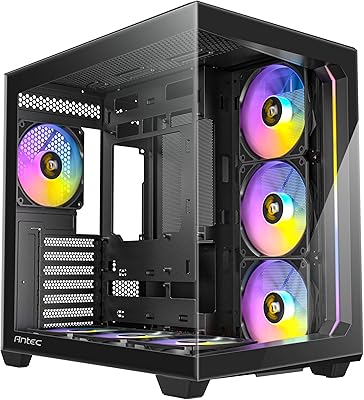
The GAMDIAS AURA GC10M ARGB mATX PC Case arrived in early 2025 as a compact, RGB-forward option aimed squarely at builders who want visual impact without overspending. GAMDIAS sits comfortably in the budget-to-mid gaming space — not competing with Lian Li or Fractal on fit and finish, but consistently punching above its weight on value. The full-view tempered glass panel is the first thing you notice, and it genuinely looks sharp sitting on a desk. Go in with realistic expectations: this is a capable mid-range chassis, not a boutique build platform. For the price, it covers a lot of ground.
Features & Benefits

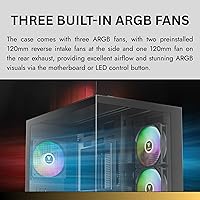
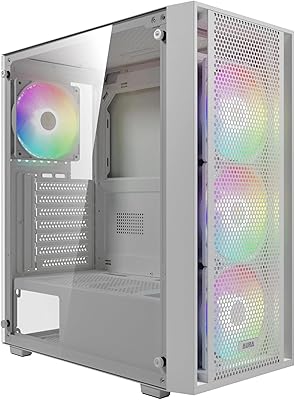
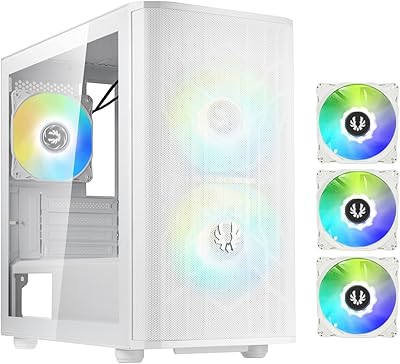
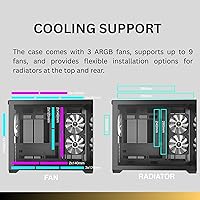
The AURA GC10M ships with three 120mm ARGB fans already installed, meaning you get functional lighting and decent baseline airflow right out of the box — no immediate add-on spending required. The case can house up to nine fans total and fit a full 360mm radiator, giving builders serious cooling flexibility for an mATX footprint. GPU clearance reaches 400mm, so even a triple-slot card fits without drama. The tool-free drive bays and magnetic dust filters are genuinely useful touches, especially for first-time builders. Cable management space is workable, though tight — expect to spend extra time routing if you are running a modular PSU with thick cable bundles.

Best For

This compact RGB chassis makes the most sense for first-time PC builders who want that glowing, showcase-worthy aesthetic without committing to a high-end case budget. It is also a solid pick for gamers building a space-efficient desk setup — the compact tower footprint does not dominate your workspace, but the glass panel still turns heads. If you are pairing a mid-range CPU and GPU without exotic cooling demands, this case handles the job cleanly. Builders who need liquid cooling support but assumed mATX meant compromising on radiator space will appreciate the 360mm front mount option. It is less ideal for experienced builders expecting premium build quality or extensive interior modding room.

User Feedback

Sitting at 4.4 stars across over 400 ratings, the AURA GC10M has earned its reputation fairly. Buyers consistently praise how straightforward assembly is and how striking the ARGB lighting looks in person — particularly through the glass panel in a darkened room. That said, a few recurring gripes are worth knowing. Several reviewers note the cable routing area gets cramped once you factor in a full set of power cables, making a truly tidy build harder to achieve. Some users also wish the included fan control offered finer adjustment. Against similarly priced Cooler Master options, most buyers feel this mATX gaming case holds its own on overall value, even if the interior finishing is not quite as refined.

Pros

  • Three ARGB fans included out of the box means you skip a common and immediate post-purchase expense.
  • Full-view tempered glass panel looks genuinely premium for the price tier.
  • A 400mm GPU clearance fits virtually every modern graphics card without compromise.
  • Supports a 360mm front radiator — rare and genuinely useful in a compact mATX chassis.
  • Tool-free drive bays make the assembly process friendlier for first-time builders.
  • Magnetic dust filters on intake areas simplify routine maintenance considerably.
  • Broad motherboard support — ATX, Micro-ATX, and Mini-ITX — adds long-term flexibility.
  • Bottom-mounted PSU and a dedicated shroud keep the cable bulk out of sight effectively.
  • The AURA GC10M holds its own against similarly priced Cooler Master options on overall feature count.
  • At 11.15 pounds, the case is light enough to move and reposition without hassle.

Cons

  • No front USB-C port is a meaningful omission for a case released in early 2025.
  • Cable routing behind the motherboard tray gets genuinely tight with thick or non-modular PSU cables.
  • Stock fans ramp up audibly under load with no noise-dampening material anywhere in the chassis.
  • Interior steel edges are sharp enough to require careful handling during component installation.
  • The plastic front panel feels noticeably cheaper compared to the glass side, breaking the visual consistency.
  • Limited fan controller options make fine-tuned RPM adjustment difficult without a compatible motherboard header.
  • Total drive bay count is modest, which will frustrate builders planning multi-drive storage configurations.
  • PCIe slot covers require a screwdriver to remove, which interrupts the otherwise tool-light build process.
  • Fitting a 360mm radiator up front while managing GPU clearance requires careful planning and leaves little margin for error.
  • Tempered glass panel uses thumb screws rather than a latch system, making frequent interior access more tedious.

Ratings

The GAMDIAS AURA GC10M ARGB mATX PC Case scores below are generated by AI after analyzing verified global user reviews, with spam, bot activity, and incentivized feedback actively filtered out. This compact RGB chassis earned a strong 4.4-star average across hundreds of real-world builds, and these ratings reflect both where it genuinely delivers and where it asks buyers to make compromises. Nothing here is softened — the wins and the friction points are weighted equally.
Value for Money
91%
Buyers consistently point to this as one of the best-equipped cases at its price tier, noting that getting three ARGB fans, a tempered glass panel, and magnetic dust filters bundled in — without paying extra — makes the purchase feel like a genuine deal. First-time builders especially appreciated not needing to budget separately for fans.
A handful of reviewers noted that a few finishing details, such as sharp interior edges and slightly thin steel panels, remind you this is not a premium chassis. For builders stepping up from a sub-50-dollar case, the value still lands well, but those comparing it to Fractal or Corsair at a slightly higher spend may feel the gap in material quality.
Build Quality
72%
28%
The metal frame feels adequately rigid for a mid-range mATX tower, and most builders reported no flexing or panel alignment issues straight out of the box. The tempered glass side panel in particular impressed users — it felt noticeably more solid than expected given the price point.
Some users flagged thin steel walls and interior edges that required extra care during installation to avoid minor cuts. The plastic front panel feels noticeably less substantial than the glass side, and a few long-term reviewers mentioned the front panel clips showing wear after multiple removals for cleaning.
Airflow Performance
78%
22%
With three pre-installed front intake fans and multiple additional fan mounting positions, builders running mid-range CPUs and GPUs reported reasonable thermals in real-world gaming sessions. The front mesh design allows adequate fresh air in, and users pairing it with an additional rear exhaust noted meaningfully lower GPU temps.
The three included fans, while functional, are not high-static-pressure units, and builders running power-hungry hardware found temperatures higher than expected without adding fans or upgrading to aftermarket options. The airflow ceiling advertised by nine total fan slots is real on paper, but fully populating those slots adds cost that buyers should factor in.
ARGB Lighting
87%
The pre-installed ARGB fans produce a vibrant, even glow that looks genuinely impressive in a darkened room, especially viewed through the full-view glass panel. Buyers frequently mentioned the lighting as a highlight in photos and praised the color accuracy and smooth transitions when synced to a compatible motherboard header.
The included fan hub offers limited control without a compatible ARGB motherboard header, and users without one found the standalone lighting modes basic and not particularly customizable. A few reviewers also noted that the ARGB connectors used a 3-pin ARGB standard, which may not be universally compatible depending on the motherboard brand.
Cable Management
61%
39%
The case does include dedicated routing cutouts and a PSU shroud that helps hide the bulk of power cables from view. Builders using slim or modular PSUs reported achieving a reasonably tidy result, and the bottom PSU mount keeps the heaviest cable runs away from the main motherboard area.
The space behind the motherboard tray is tighter than many builders expected, and routing a full set of thick non-modular PSU cables cleanly took significantly more effort. Multiple reviewers admitted they had to force the side panel closed after cabling, which is a recurring frustration in this price and size bracket that the AURA GC10M does not fully solve.
Ease of Assembly
84%
Tool-free drive bays and clearly accessible panel mounts made the initial build process smooth for most users, including those attempting their first PC build. Several reviewers highlighted that the interior layout is intuitive enough to follow without needing to reference the manual repeatedly.
While straightforward for standard components, builders adding a 360mm radiator up front noted that the process becomes tighter and requires removing the front panel and fans first, which adds steps. A few users also wished for more pre-installed standoffs or clearer labeling on the motherboard tray for alignment.
GPU Compatibility
88%
A 400mm GPU clearance is genuinely generous for an mATX tower, and builders fitting triple-slot cards from NVIDIA and AMD reported no clearance issues whatsoever. This was a frequent positive callout from users who assumed a compact form factor would force them to downgrade their GPU choice.
Very long graphics cards — particularly older blower-style reference cards with extended PCB lengths — may require cable routing adjustments near the front of the case. A small number of users also noted that the PCIe slot covers require a screwdriver to remove, which breaks the otherwise tool-light assembly experience.
Cooling Headroom
81%
19%
Supporting a full 360mm radiator in an mATX chassis is not a given, and buyers planning AIO liquid cooling setups appreciated having that option without needing to upsize to a mid-tower. The top and rear fan positions give additional flexibility for exhaust configuration.
Fitting a 360mm radiator up front does consume all three front fan slots and requires careful planning around GPU length to avoid clearance conflicts. Users who tried to simultaneously run a large AIO and additional case fans reported that the build becomes quite tight and cable management suffers further.
Dust Filtration
79%
21%
Magnetic dust filters on the intake areas were consistently praised as a practical feature that makes routine cleaning quick and genuinely painless. Builders in dusty environments noted the filters snapped back into place firmly and showed no sagging or misalignment after repeated removal.
The top panel filter coverage is limited, and builders running the case in particularly dusty rooms noted some accumulation near the top exhaust area over time. The filters themselves are functional but not especially fine-meshed, so very fine particulate can still find its way through during extended use.
Motherboard Compatibility
86%
Support for ATX, Micro-ATX, and Mini-ITX motherboards gives this case meaningful flexibility across build types, and users repurposing it for a second build with a different board reported no fitment surprises. The standoff positions were accurate and well-threaded across all tested form factors.
Full ATX boards fit in theory, but the interior becomes noticeably crowded with a full-size ATX layout, leaving very little breathing room for cable management or additional storage. Builders using Mini-ITX boards noted the interior feels underutilized but appreciated the option for future upgrades.
Front I/O & Connectivity
67%
33%
The two USB 3.0 ports on the front panel cover daily use adequately for most desktop builders, and users reported solid, snug connections with no wobble after extended use. The power button and audio jacks functioned reliably across all reported builds.
The absence of a USB-C port on the front panel is a noticeable omission for a case released in early 2025, and several buyers specifically called this out as a shortcoming compared to similarly priced competitors. For builders who regularly transfer files or charge devices via USB-C, this requires inconvenient workarounds.
Noise Levels
73%
27%
At lower RPMs during light workloads, the three included ARGB fans run quietly enough that most users found the system unobtrusive in a home office or bedroom setup. Builders who replaced the stock fans with quieter aftermarket options reported excellent results given the strong airflow foundation.
Under full load, the stock fans ramp up audibly and generate a noticeable hum that a few users described as distracting during late-night gaming sessions. There is no noise-dampening material inside the case, so vibration from higher-RPM fan operation does transmit lightly through the metal chassis.
Storage Options
69%
31%
The case accommodates both 2.5-inch SSDs and 3.5-inch HDDs, which covers the storage needs of most modern mid-range builds. Tool-free installation for drives made swapping storage during the build process genuinely convenient.
The total number of drive bays is limited compared to mid-tower competitors, which may frustrate builders planning multi-drive NAS-adjacent setups or those keeping older HDDs alongside newer SSDs. The mounting positions are also somewhat awkwardly placed relative to cable routing, adding extra cable length requirements.
Tempered Glass Panel
83%
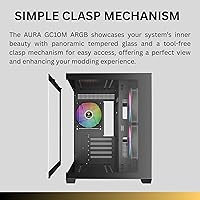
The full-view tempered glass panel was one of the most consistently praised elements across all verified reviews — users noted it provided an unobstructed, clean view of the interior lighting and components. For the price tier, the quality of the glass and its hinge mechanism impressed buyers accustomed to acrylic panels.
The panel attaches via thumb screws rather than a hinged latch system, which some builders found fiddly when accessing the interior frequently for upgrades. A few users also reported minor smudging and fingerprint visibility was higher than expected, requiring regular cleaning to maintain the showcase look.
Packaging & Unboxing
77%
23%
The case arrived well-protected in double-layer foam padding across the majority of orders, and buyers reported no damage-on-arrival issues in the bulk of reviews. Accessories like screws and cable ties were organized in a clearly labeled bag, which first-time builders appreciated.
A small number of buyers noted that the tempered glass panel had minor surface scratches from factory packaging, suggesting the protective film could be thicker or better adhered. The included documentation is minimal, with assembly instructions that are functional but lack detail for non-standard configurations.

Suitable for:

The GAMDIAS AURA GC10M ARGB mATX PC Case is a natural fit for first-time and early-stage PC builders who want a visually striking setup without stretching their budget into premium territory. If you are putting together a mid-range gaming rig — think a Ryzen 5 or Core i5 paired with a mid-tier GPU — this case gives you the airflow foundation, the glass showcase panel, and included RGB fans to make the build feel complete right away. Compact desk setups benefit particularly well here, since the mATX tower footprint keeps things tidy without forcing you to sacrifice liquid cooling options — a 360mm radiator fits up front if you ever want to go that route. Budget-conscious builders who keep an eye on total build cost will appreciate that the bundled fans and dust filters remove two common add-on purchases from the list. It also works well for builders who plan to upgrade incrementally, since the broad motherboard compatibility means the case can survive a platform change down the road.

Not suitable for:

The GAMDIAS AURA GC10M ARGB mATX PC Case is not the right choice for experienced builders who prioritize interior craftsmanship, premium material quality, or a deeply refined building experience. If cable management is something you obsess over — routing every wire flat, hiding every connector — the tight clearance behind the motherboard tray will test your patience, especially with a non-modular PSU. Builders planning a high-wattage, thermally demanding system with a flagship GPU and a top-tier CPU should look at cases with better-optimized airflow channels, since the stock fans alone will not keep those components adequately cool under sustained load. The lack of a front USB-C port is a genuine functional gap for anyone who regularly connects modern peripherals or external drives directly to the case. Enthusiasts comparing this side-by-side with brands like Fractal Design or be quiet! in a similar spend range will notice the difference in panel thickness, interior edge finishing, and overall build confidence — and for those buyers, that gap will matter.
Specifications

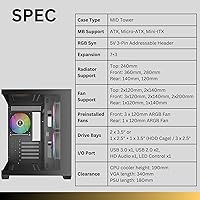
  • Form Factor: Micro-ATX tower designed to house ATX, Micro-ATX, and Mini-ITX motherboards within a compact desktop footprint.
  • Dimensions: The case measures 16.54 x 14.37 x 11.22 inches (L x W x H), keeping the desktop presence modest without sacrificing internal volume.
  • Weight: Shipping weight comes in at 11.15 pounds, making it manageable to move and position on a desk or shelf during and after the build.
  • Material: The chassis is constructed from steel with a full-view tempered glass side panel and a plastic front fascia.
  • Included Fans: Three 120mm ARGB fans are pre-installed at the front intake position, providing baseline airflow and lighting straight out of the box.
  • Max Fan Support: The case accommodates up to nine 120mm fans distributed across front, top, and rear mounting positions.
  • Radiator Support: A 360mm radiator can be mounted at the front, with smaller radiator options supported at the top and rear positions.
  • GPU Clearance: Maximum graphics card length clearance is 400mm, comfortably fitting most modern dual- and triple-slot GPUs.
  • CPU Cooler Height: Tower air coolers up to 165mm tall are supported, covering the majority of popular aftermarket CPU cooling solutions.
  • PSU Clearance: The bottom-mounted PSU bay accepts power supply units up to 160mm in length, covering standard ATX PSU sizes.
  • Side Panel: A frameless full-view tempered glass panel is secured via thumb screws on the left side, providing an unobstructed view of internal components.
  • Dust Filters: Magnetic dust filters are installed on the front intake and bottom PSU intake areas for tool-free removal and cleaning.
  • Front I/O: The top front I/O panel includes two USB 3.0 Type-A ports, a 3.5mm headphone jack, a 3.5mm microphone jack, and a power button.
  • Drive Bays: The case supports multiple 2.5-inch SSD and 3.5-inch HDD mounting positions with tool-free installation for 3.5-inch drives.
  • PSU Mount: The power supply mounts at the bottom of the chassis behind a full-length shroud that conceals cable bulk from view.
  • ARGB Standard: The pre-installed fans use a 3-pin 5V ARGB connector, compatible with addressable RGB headers on most modern motherboards.
  • Expansion Slots: The case provides seven expansion slot positions on the rear, supporting standard PCIe card installations including multi-slot GPU configurations.
  • Color & Finish: Available in black with a matte-finish steel exterior and matching black interior paneling throughout.

Related Reviews

GAMDIAS AURA GC2 Elite Mid Tower Case
75%
91%
Value for Money
88%
Aesthetics & Visual Design
67%
Build Quality & Materials
74%
Airflow Performance
58%
Cable Management
More
PCCOOLER C3T500 ARGB Mid Tower PC Case
78%
88%
Value for Money
71%
Build Quality
79%
Cooling Performance
91%
Ease of Assembly
93%
Aesthetics & Lighting
More
MOROVOL V3 Micro-ATX Tower PC Case
78%
88%
Tempered Glass Quality
76%
Airflow & Thermal Performance
61%
Cable Management
73%
Build Quality & Materials
91%
Value for Money
More
GAMDIAS NESO P1 Full Tower PC Case
79%
93%
Design & Aesthetics
88%
Build Quality & Materials
86%
Dual-Chamber Layout
81%
Orientation Flexibility
69%
Cable Management
More
Jonsbo C6 Mini MATX Mesh PC Case
84%
91%
Airflow Performance
95%
Ease of Assembly
87%
Build Quality
88%
Cooling System Customization
65%
Cable Management
More
AMANSON H9 Mid-Tower ATX Gaming PC Case
76%
88%
Value for Money
81%
Airflow Performance
67%
Pre-Installed Fan Quality
63%
Build Quality
79%
Tempered Glass Panels
More
BitFenix Nova Mesh mATX Case ARGB Edition
85%
90%
Cooling Performance
88%
Build Quality
92%
Airflow Design
85%
Installation Ease
87%
Aesthetics
More
Corsair 2500X Tempered Glass mATX PC Case
85%
91%
Build Quality
88%
Cooling Performance
85%
Ease of Setup
92%
Cable Management
72%
Component Fit & Space
More
PCCOOLER C3D310 BK ARGB Mid Tower PC Case
86%
87%
Build Quality
91%
Ease of Installation
90%
Airflow Performance
85%
Design and Aesthetics
89%
Cooling Options (Air & Water)
More
Corsair 3500X ARGB Mid-Tower ATX PC Case
84%
92%
Cooling Performance
87%
Build Quality
90%
Design & Aesthetics
85%
Ease of Installation
89%
Airflow Support
More

FAQ

Technically yes, the AURA GC10M does support standard ATX boards, but it is worth knowing the interior gets noticeably crowded when you go that route. Cable management space shrinks considerably, and you will have less room to work during the build. If ATX is your plan, a modular PSU is strongly recommended to keep things manageable.

The fans use a standard 3-pin 5V ARGB connector, which is compatible with ARGB headers on boards from ASUS, MSI, Gigabyte, ASRock, and most other major manufacturers. If your motherboard does not have an ARGB header, you can still use the fans, but lighting control will be limited to whatever standalone modes the included hub offers.

Yes, a 360mm radiator mounts in the front of the case, but you will want to check your GPU length before committing to this configuration. With a very long graphics card installed, clearance between the radiator and GPU can get tight. Cards up to around 310-320mm in length generally coexist with a front 360mm radiator without issue, but anything longer warrants careful measurement before purchasing.

Honestly, it requires more patience than the marketing implies. The behind-the-motherboard-tray space is functional but not generous, and if you are using a non-modular PSU with thick cable bundles, getting the side panel closed cleanly is a real challenge. With a slim or fully modular PSU and some zip ties, most builders get to a tidy result — but do not expect the experience you would get from a Fractal or Corsair case at a higher price point.

It uses thumb screws rather than a hinged or latch mechanism, so removal takes a few extra seconds compared to tool-free designs. It is not a dealbreaker, but if you frequently access your internals for upgrades or cleaning, that minor friction adds up. The glass itself feels solid and does not rattle once secured.

At idle or during light tasks, the three included fans are quiet enough that most users will not notice them. Under sustained gaming load when they ramp up, they do become audible — noticeable but not disruptive in a typical room environment. There is no sound-dampening foam inside the chassis, so the sound signature is fairly open. Replacing the stock fans with quieter aftermarket options is a straightforward upgrade if noise is a priority.

Yes, this is actually one of the strengths of the GAMDIAS AURA GC10M ARGB mATX PC Case for new builders. The tool-free drive bays, pre-installed fans, and accessible panel layout make the initial build process relatively approachable. The main area where beginners sometimes struggle is cable routing, so budgeting for a modular PSU will save a lot of frustration.

The magnetic filters cover the front intake and the bottom PSU intake, which addresses the two highest-dust-accumulation areas. The top panel does not have a filter, so if you are running top exhaust fans in a dusty environment, some dust accumulation there over time is expected. The front and bottom filters are easy to pop off, rinse, and reattach — a genuinely useful maintenance feature.

For the price, this mATX gaming case is competitive on feature count — the included ARGB fans, tempered glass, and radiator support are strong value items. Where established brands like Fractal pull ahead is interior finishing quality: slightly smoother edges, better cable routing channels, and a more refined overall build feel. If aesthetics and value are your priorities, this case holds its own well. If build quality and interior craftsmanship are what you care about most, spending a bit more on a brand with deeper case engineering experience is worth considering.

There is nothing stopping you from using the AURA GC10M for a productivity build — the compact footprint actually suits a desk setup nicely. The ARGB lighting can be turned off or set to a static color if you prefer a more understated look. The case is sturdy, functional, and the glass panel is optional to care about. For a quiet office environment, consider pairing it with quieter aftermarket fans since the stock ones prioritize airflow over acoustics.