Overview

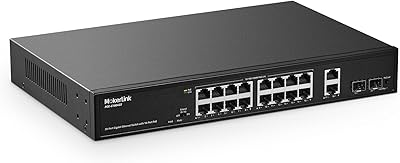
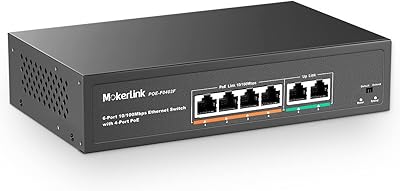
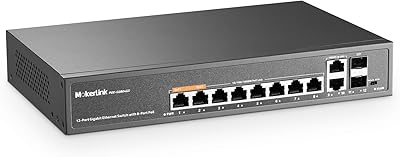
The MokerLink POE-F092F 11-Port PoE+ Network Switch is a no-frills, budget-conscious option for anyone building a small IP camera system or wireless access point setup without the complexity of a managed switch. It gives you 9 active PoE+ ports plus 2 dedicated uplink ports for connecting a router or NVR, all housed in a compact, fanless metal enclosure that runs quietly enough to tuck into a utility closet or AV cabinet. One thing worth stating clearly upfront: this unmanaged PoE switch tops out at Fast Ethernet speeds — 100Mbps, not Gigabit. If your workflow demands higher throughput, look elsewhere. But for camera feeds and access points, that ceiling rarely matters.

Features & Benefits

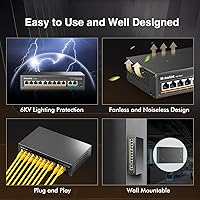
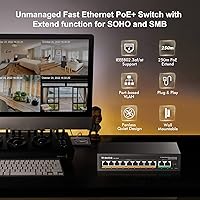
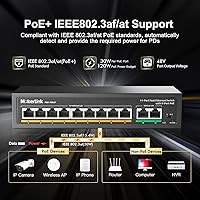
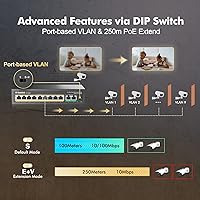
The POE-F092F supports IEEE 802.3af and 802.3at standards, meaning each port can push up to 30W — enough for most IP cameras, VoIP phones, or wireless access points without needing a separate power injector. The total PoE budget is 120W, which in practice comfortably covers something like four outdoor cameras drawing 15W each and two access points at 10W apiece, with headroom to spare. Flip the DIP switch into extend mode and you can stretch a PoE run out to 250 meters, though at the cost of dropping to 10Mbps and isolating ports from each other. Auto-detection handles mixed PoE and non-PoE devices automatically. One firm limitation: passive 24V PoE is not supported, so older Ubiquiti gear will not work here.

Best For

This unmanaged PoE switch is a natural fit for home security setups — think a handful of IP cameras scattered across a property, all centralized through a single switch rather than individual power adapters everywhere. Small businesses running a few wireless access points across a floor will find it equally useful, especially when cable runs push toward or beyond 100 meters and extend mode becomes relevant. Installers who need an affordable, reliable secondary distribution switch will appreciate the pricing. That said, this MokerLink switch is not the right tool if you need VLAN support, Gigabit throughput, or any form of managed configuration. It is also a poor match for anyone still running passive PoE hardware.

User Feedback

Across several hundred ratings, the POE-F092F holds a solid 4.5-star average, and the positive themes are consistent: buyers highlight easy out-of-box setup, sturdy metal construction, and dependable PoE delivery to cameras over long periods. The criticism is equally consistent — buyers who assumed Gigabit speeds are disappointed, which speaks more to an expectation mismatch than a product defect. A handful of users also report that the unit runs noticeably warm under full PoE load, so placing it somewhere with decent airflow is wise. Long-term reliability feedback trends positive for the price tier, with many users running these in always-on camera systems for a year or more without issues. Not a flawless switch, but a dependable one.

Pros

  • Nine active PoE+ ports in a single compact unit eliminates the need for multiple power injectors.
  • Full 802.3af/at compliance means broad compatibility with cameras, VoIP phones, and wireless access points.
  • The 120W power budget comfortably handles real-world mixed deployments without constant load calculations.
  • Extend mode pushes PoE runs out to 250 meters — a genuine advantage for large properties or outbuildings.
  • Completely plug-and-play with no configuration interface to navigate, even for non-technical users.
  • Auto-detection handles mixed PoE and non-PoE devices on the same switch without manual adjustment.
  • Fanless metal housing runs silently, making it easy to install in living spaces or quiet office environments.
  • Compact enough to fit inside most AV enclosures or wall-mount boxes without dominating the space.
  • Strong long-term reliability reported by users running it continuously in always-on camera systems.
  • Backed by a one-year warranty and lifetime technical support, which is reassuring at this price point.

Cons

  • Fast Ethernet tops out at 100Mbps — buyers expecting Gigabit speeds will be caught off guard.
  • Passive 24V PoE devices are completely unsupported, which is a real problem for legacy Ubiquiti hardware.
  • Extend mode reduces port speed to 10Mbps and isolates ports, limiting its usefulness in some setups.
  • No management interface means zero visibility into port activity, traffic, or connected device status.
  • The unit runs noticeably warm under full PoE load, requiring thoughtful placement with adequate airflow.
  • A 2K MAC address table is tight for environments with many networked devices or frequent network changes.
  • No rack-mount ears or included mounting hardware, which can complicate clean installations in some enclosures.
  • Only two uplink ports limits flexibility when connecting to multiple upstream devices simultaneously.
  • No VLAN, QoS, or traffic prioritization of any kind, ruling it out for mixed-use professional networks.

Ratings

The scores below were generated by our AI engine after systematically analyzing verified buyer reviews for the MokerLink POE-F092F 11-Port PoE+ Network Switch from multiple global marketplaces, with spam, incentivized, and bot-flagged submissions actively filtered out before scoring. Each category reflects the real consensus — where users are genuinely satisfied and where frustrations surface repeatedly. Nothing has been softened or inflated to flatter the product.
Ease of Setup
93%
This is where the POE-F092F earns its loudest praise. Users across skill levels — from first-time DIYers to experienced installers — consistently describe a setup process that takes under five minutes: plug in power, connect devices, done. No drivers, no web portal, no surprises.
The only friction point some users report is understanding the DIP switch for extend mode, as there is no digital interface to confirm which mode is active. A clearer printed label on the chassis would help less technical buyers.
PoE Reliability
89%
Users running this unmanaged PoE switch in always-on camera systems report steady, uninterrupted power delivery over months of continuous use. The auto-detection feature reliably identifies PoE and non-PoE devices without intervention, which makes mixed installations genuinely painless.
A small subset of users reports occasional port instability when devices draw close to the 30W per-port ceiling simultaneously alongside other high-draw ports, suggesting the 120W shared budget can get tight in fully loaded deployments.
Build Quality
84%
The all-metal fanless chassis punches well above its price tier in perceived durability. Users installing it in utility closets and wall-mount enclosures note that it feels solid and shows no flex or rattling, which builds confidence in long-term deployment.
The finish scratches fairly easily during installation, and the port labeling is small enough to require a phone flashlight in dim spaces. For a device often installed in tight enclosures, slightly larger port markings would be a practical improvement.
Value for Money
91%
For a 9-port PoE+ switch with a 120W budget at this price point, the value proposition is hard to argue with. Users frequently note that a comparable port count from established enterprise brands would cost several times more, making this a smart choice for cost-conscious small deployments.
The value equation only holds if buyers go in knowing this is a Fast Ethernet device. Those who purchased expecting Gigabit speeds feel the value proposition collapses entirely, even though the hardware performed exactly as specified.
Port Speed & Throughput
58%
42%
For IP cameras streaming at 1080p or 4MP resolution, the 100Mbps port speed is adequate in practice — most cameras draw well under that bandwidth ceiling per channel, and users running eight-camera setups report no buffering or frame drops under normal conditions.
This is the single most common source of buyer disappointment. The 100Mbps Fast Ethernet ceiling is a hard limit, and users expecting to push NVR footage or large file transfers at Gigabit speeds are flatly out of luck. It is not a flaw per se, but the mismatch between expectation and reality keeps this score grounded.
Extend Mode Performance
74%
26%
Users with cameras or access points in outbuildings, long driveways, or across large single-story properties find extend mode genuinely useful — it solves a real cable-run problem that would otherwise require additional hardware like a repeater or second switch.
The 10Mbps speed reduction in extend mode is steep, and port isolation means devices on PoE ports cannot communicate directly with each other — only with the uplink. For users who did not read the specs carefully, this behavior feels like a malfunction rather than a deliberate design trade-off.
Thermal Management
67%
33%
The fanless design means the switch operates in complete silence, which is a real benefit in home installations where fan noise in a living room or bedroom closet would be intrusive. Users in moderate climates running partial PoE loads report no heat-related issues.
Under full PoE load, the metal chassis gets noticeably warm — warm enough that a few users initially suspected a fault. Deployments in poorly ventilated enclosures or warm environments like sun-facing outdoor cabinets have produced intermittent reliability concerns in long-term use reports.
PoE Device Compatibility
76%
24%
Broad IEEE 802.3af/at support means this MokerLink switch is compatible with the vast majority of modern IP cameras, VoIP handsets, and wireless access points without any configuration adjustments. Auto-detection handles the heavy lifting.
The hard exclusion of passive 24V PoE is a genuine compatibility wall for users with older Ubiquiti hardware or other legacy passive PoE devices. This is not a minor edge case — it affects a meaningful segment of the small-business networking audience.
Physical Footprint
88%
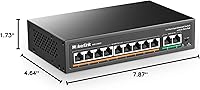
At roughly 8 x 4.6 x 1.7 inches, the switch fits comfortably in standard AV enclosures, shallow wall boxes, and equipment shelves. Installers appreciate being able to tuck it alongside other components without dedicating significant rack or shelf space.
There are no rack-mount ears included in the box, so users wanting a clean rack installation need to source a compatible bracket separately. The power cord entry point placement can also make cable management slightly awkward in tightly packed enclosures.
Long-Term Durability
81%
19%
Users who have been running this unmanaged PoE switch continuously for over a year in camera systems report consistent uptime with no port failures or power degradation. For an always-on device in a security application, that track record carries real weight.
The sample size of very long-term owners is still relatively small given the product's age, so durability confidence beyond two years of full-load operation is not yet well established in buyer feedback. Caution is warranted for mission-critical permanent installations.
LED Indicator Clarity
72%
28%
Front-panel LEDs for power and per-port link activity give users a quick visual confirmation that devices are connected and active, which is handy during initial setup and when troubleshooting a suspected cable issue without needing any software tool.
The LEDs convey only basic link status — there is no indication of PoE power delivery versus data-only operation, and no traffic activity light beyond link state. Users trying to diagnose why a device is not receiving power have limited visual feedback to work with.
Port Count vs. Price
87%
Nine active PoE+ ports plus two dedicated uplinks in a single unmanaged unit at this price tier is a genuinely competitive configuration. Users upgrading from 4- or 6-port units find that this switch covers a full small-site deployment without needing a second switch.
The two uplink ports are both Fast Ethernet, which means the uplink path to a router or NVR also tops out at 100Mbps each. In aggregate-traffic scenarios where multiple cameras stream simultaneously, the uplink can become a bottleneck before the PoE ports do.
Documentation & Support
69%
31%
For a device this simple, the included documentation covers the basics adequately — port layout, DIP switch positions, and power specs are all present. MokerLink also offers lifetime technical support, which provides some reassurance for less experienced buyers.
The printed manual is thin and the extend mode explanation in particular lacks the detail that some users need to understand its trade-offs before flipping the switch. Several reviewers noted they had to search online forums to fully understand port isolation behavior in extend mode.

Suitable for:

The MokerLink POE-F092F 11-Port PoE+ Network Switch is built for people who need centralized PoE power delivery without the overhead of a managed switch — and who know exactly what that means. It hits a practical sweet spot for homeowners running four to eight IP cameras across a property, where a single switch replaces a tangle of individual power adapters and keeps the install clean. Small businesses deploying wireless access points across a single floor will also get solid value here, particularly when cable runs push past 100 meters and the extend mode becomes useful. Low-voltage installers and AV integrators will recognize this unmanaged PoE switch as a dependable secondary distribution device that earns its place in a panel without inflating project costs. If your devices draw moderate power, your data needs are modest, and you just want something that works the moment you plug it in, the POE-F092F checks those boxes reliably.
Not suitable for:

Anyone expecting Gigabit throughput should stop here — the MokerLink POE-F092F 11-Port PoE+ Network Switch is a Fast Ethernet device, capped at 100Mbps, and no firmware update will change that. If you are running high-resolution video streams across multiple channels simultaneously or transferring large files between networked storage devices, that bandwidth ceiling will become a real bottleneck. Network administrators who need VLAN support, port mirroring, QoS controls, or any form of remote management will find this unmanaged switch completely inadequate for their environment. Users with older Ubiquiti gear or any hardware that relies on passive 24V PoE should also walk away — the POE-F092F only supports active 802.3af/at standards, and connecting passive PoE devices can cause equipment damage or simply fail to power them. Finally, installations in poorly ventilated spaces or high-ambient-temperature environments may see reliability issues under sustained full PoE load.
Specifications

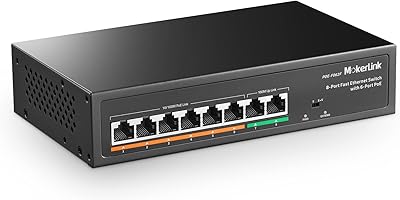
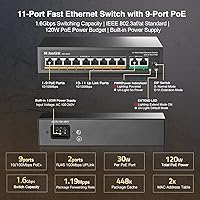
  • Total Ports: The switch provides 11 ports in total: 9 PoE+ data ports and 2 dedicated Fast Ethernet uplink ports for connecting to a router or NVR.
  • PoE Standard: Supports IEEE 802.3af (up to 15.4W per port) and IEEE 802.3at (up to 30W per port) active PoE standards.
  • PoE Budget: The total shared PoE power budget across all 9 active ports is 120W.
  • Data Rate: All ports operate at 10/100Mbps (Fast Ethernet); Gigabit speeds are not supported on any port.
  • Switching Capacity: The switch fabric supports a total switching capacity of 1.6Gbps with a forwarding throughput of 1.488Mpps.
  • Extend Mode: A physical DIP switch activates extend mode, stretching PoE transmission distance to 250 meters at a reduced rate of 10Mbps with port-to-port isolation enabled.
  • Management: Fully unmanaged and plug-and-play; no software, web interface, or configuration is required for operation.
  • PoE Detection: Auto-detection identifies whether connected devices are PoE-capable or standard Ethernet, allowing mixed installations without manual adjustment.
  • Passive PoE: Passive 24V PoE is explicitly not supported; only active IEEE 802.3af/at devices should be connected to the PoE ports.
  • Housing: The chassis is constructed from metal with a fanless thermal design, making it silent during operation.
  • Dimensions: Physical dimensions measure 200mm x 118mm x 44mm (approximately 7.87″ x 4.64″ x 1.73″).
  • Weight: The unit weighs approximately 0.7kg (roughly 2.11 lbs), making it easy to mount or relocate.
  • Input Voltage: Accepts a wide AC input range of 100–240V, suitable for use in most countries without an external adapter.
  • Operating Temp: Rated for operating temperatures between -20°C and 50°C, with a working humidity range of 10–90% non-condensing.
  • Max Altitude: The unit is rated for deployment at altitudes up to 10,000 feet above sea level.
  • MAC Table: Supports a MAC address table of up to 2,000 entries, sufficient for small to medium device counts.
  • Packet Buffer: Onboard packet buffer capacity is 448K, which handles burst traffic adequately in low-volume environments.
  • Jumbo Frames: Supports jumbo frames up to 2,048 bytes, covering standard Ethernet payloads for typical surveillance and access point traffic.
  • LED Indicators: Front-panel LEDs include a power indicator and per-port link and activity lights to confirm device connectivity at a glance.
  • Warranty: Covered by a 30-day money-back guarantee and a one-year manufacturer warranty, with lifetime technical support included.

Related Reviews

MokerLink POE-F062F 8-Port PoE Switch
86%
91%
Value for Money
88%
Performance Stability
95%
Ease of Installation
85%
PoE Power Output
82%
Build Quality
More
MokerLink POE-F1602G 16-Port PoE Switch
88%
91%
Setup and Installation
93%
Power Output Reliability
88%
Build Quality
87%
Network Stability
90%
Performance for Surveillance Systems
More
MokerLink POE-G1604GS 20-Port Gigabit PoE Switch
85%
88%
Performance
93%
Ease of Setup
90%
Build Quality
89%
PoE Power Budget (200W)
91%
Noise Level
More
MokerLink POE-G082G 10-Port Gigabit PoE Switch
78%
94%
Ease of Setup
88%
PoE Reliability
83%
Build Quality
91%
Value for Money
71%
Thermal Management
More
MokerLink POE-G041GO Outdoor Gigabit PoE Switch
81%
93%
Ease of Setup
84%
PoE Power Delivery
78%
Build Quality
76%
Weather Resistance
88%
Value for Money
More
MokerLink 6-Port 78W PoE+ Network Switch
83%
96%
Ease of Setup
78%
PoE Compatibility
88%
Build Quality
93%
Value for Money
61%
Port Speed & Throughput
More
YuLinca 6-Port Gigabit PoE Switch with 4 PoE+ Ports
87%
95%
Ease of Installation
88%
PoE Functionality
91%
Build Quality
87%
Performance and Speed
94%
Fanless Operation (Noise)
More
MokerLink 26-Port Gigabit Unmanaged PoE Switch
79%
91%
Value for Money
88%
Port Count & Layout
73%
PoE Power Budget
93%
Ease of Setup
86%
Build Quality & Chassis
More
MokerLink POE-G162G 18-Port Gigabit PoE Switch
77%
88%
Value for Money
93%
Port Density
94%
Ease of Setup
79%
Build Quality
76%
PoE Reliability
More
MokerLink 5-Port Gigabit POE Switch
86%
94%
Ease of Setup
88%
Performance
85%
Build Quality
75%
PoE Power Output
91%
Fanless Design (Noise Level)
More

FAQ

No, nothing like that is required. This unmanaged PoE switch is entirely plug-and-play — you connect power, plug in your devices, and it works. There is no configuration interface of any kind.

It depends on which Ubiquiti hardware you have. Newer Ubiquiti devices that use standard 802.3af or 802.3at PoE will work fine. However, older Ubiquiti gear that relies on passive 24V PoE is not compatible with the POE-F092F — connecting passive PoE devices could result in them simply not powering on, or in some cases, potential hardware damage.

That depends on how much power each camera draws. With a 120W total PoE budget and 9 available ports, you could comfortably run eight cameras drawing around 12–13W each and still stay within budget. If your cameras support PoE+ and draw closer to 25–30W, plan for fewer simultaneous devices. Always add up your device wattages before assuming you can fill all 9 ports.

This is a common source of confusion. The 1.6Gbps figure refers to the internal switching fabric capacity — not the port speed. Every individual port on this switch is Fast Ethernet, meaning 100Mbps maximum. There are no Gigabit ports on this device. For most IP cameras and access points that is plenty, but it is worth knowing before you buy.

Extend mode is useful when a camera or other PoE device is located more than 100 meters from the switch — farther than standard Ethernet typically supports. Flipping the DIP switch into extend mode pushes that limit out to 250 meters. The trade-off is real though: port speed drops to 10Mbps and the PoE ports can no longer communicate with each other, only with the uplink port. It is a niche feature but genuinely useful for outbuildings, parking lots, or sprawling single-story properties.

Yes, the two uplink ports are independent Fast Ethernet connections, so you can connect both a router and an NVR simultaneously. This is actually a common setup for small camera systems where camera footage routes directly to the NVR while the router handles internet access.

Yes, it is expected behavior, especially under heavy PoE load. Since the MokerLink POE-F092F 11-Port PoE+ Network Switch is fanless, it dissipates heat passively through the metal chassis. The unit is rated to operate up to 50°C, so warmth by itself is not a problem. That said, avoid placing it in a sealed enclosure with no airflow, stacking it directly under other heat-generating equipment, or deploying it in an already hot environment like a sun-exposed outdoor cabinet.
Absolutely. The switch auto-detects whether a connected device is PoE-capable or not. If you plug in a standard Ethernet device like a laptop or desktop, it will receive data connectivity without being sent any PoE power. No manual adjustment is needed.

No. This is a fully unmanaged switch, which means there are no VLAN settings, no QoS controls, no port mirroring, and no traffic management of any kind. All devices share the same network segment. If you need traffic segmentation or prioritization, you will need a managed switch instead.

MokerLink covers this unmanaged PoE switch with a one-year warranty against defects, a 30-day money-back window if you decide it is not the right fit, and lifetime technical support. In practice, lifetime support from a smaller brand typically means email or chat assistance rather than a dedicated phone line, but for a device this simple, most issues can be resolved without much back-and-forth.

Where to Buy