Overview

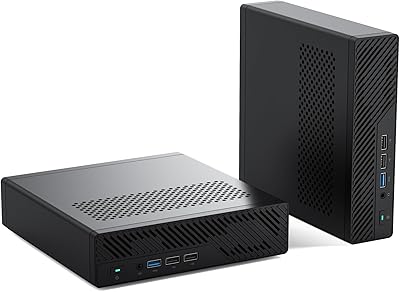
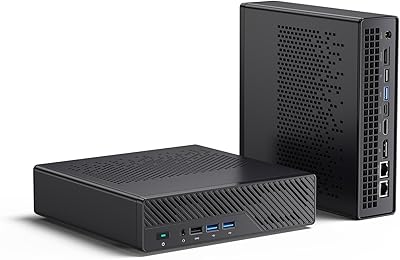
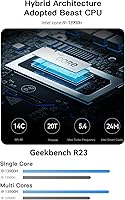
The Minisforum MS-01 Mini Workstation (Core i9-13900H, Barebone) is one of the more ambitious mini PCs to land in the home lab and power-user space in recent memory. Built around Intel's 14-core i9-13900H, it punches well above its physical size — but before getting excited, understand what barebone actually means here: no RAM, no storage, no OS included. You are buying a chassis and motherboard, nothing more. That is a deliberate design choice aimed at buyers who want to spec the machine themselves, but it will catch casual shoppers off guard. The real hook is a networking stack that belongs in a rack, not on a desk.
Features & Benefits

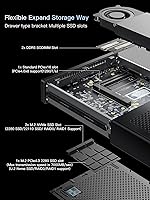
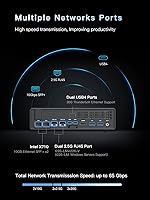
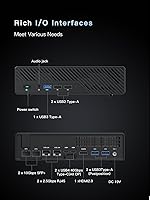
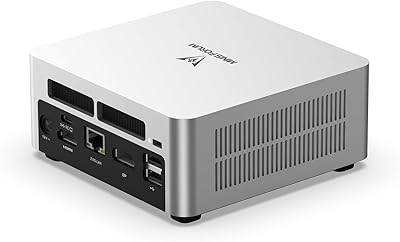
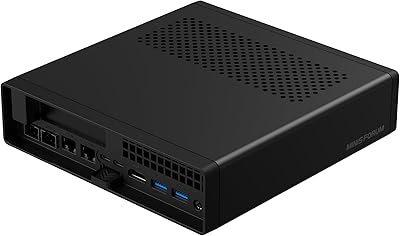
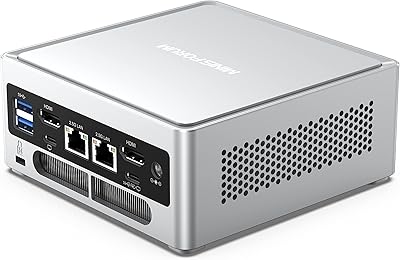
The networking alone sets the MS-01 apart. It ships with dual 10G SFP+ ports — SFP+ being a fiber/DAC cable interface common in enterprise switches — plus two 2.5G RJ45 ports for standard Ethernet, giving you a combined throughput potential most mini PCs cannot touch. Storage is equally flexible: three SSD slots support RAID configurations, and the primary M.2 slot can accommodate U.2 enterprise drives up to 15TB-plus via an included adapter. There is also a PCIe 4.0 x16 slot, though it runs at x8 electrically, worth knowing if you plan to add a discrete GPU. Triple display output, DDR5-5200 memory support, and Wi-Fi 6 round things out.

Best For

This barebone mini PC was built for a specific kind of buyer. Home lab enthusiasts running Proxmox, TrueNAS, or Docker stacks will find the 10G networking and triple SSD bays genuinely useful rather than speculative. IT professionals needing a compact virtualization node or NAS brain will appreciate the density. Content creators who want a small editing workstation with room to add a GPU later have a credible path here too. Trading desks needing multi-monitor output and fast LAN throughput fit the profile as well. What it is not is a plug-and-play machine for someone who just wants a small Windows desktop without the assembly work.

User Feedback

Owners tend to praise the build quality and thermals, noting the chassis handles sustained workloads without throttling badly, and the sheer density of ports earns consistent compliments. The 10G SFP+ ports have performed well in real NAS and home lab setups when paired with a compatible switch. On the critical side, a recurring frustration is buyers who did not fully grasp the barebone nature before purchasing — a reminder to read carefully. GPU compatibility beyond the tested RTX 3050 remains a grey area, with mixed results reported. Fan noise at idle is described as low, but under heavy CPU load it becomes audible, which is reasonable given the hardware inside.

Pros

  • Dual 10G SFP+ ports deliver enterprise-class networking that no comparably sized mini PC can match.
  • Three SSD slots with RAID support enable serious, scalable storage configurations in a tiny footprint.
  • The i9-13900H handles multi-threaded workloads — transcoding, virtualization, parallel containers — without flinching.
  • A PCIe x16 slot means you can add a discrete GPU later as your workload demands grow.
  • DDR5-5200 dual-channel memory keeps the platform modern and genuinely fast for bandwidth-heavy tasks.
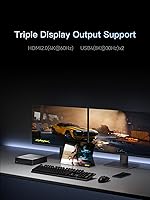
  • Triple display output across HDMI and two USB4 ports covers multi-monitor setups without a dedicated GPU.
  • Wi-Fi 6 and USB4 with Thunderbolt Ethernet give the MS-01 flexible connectivity for varied deployment environments.
  • Solid metal chassis construction feels durable and premium, holding up well under continuous always-on operation.
  • Choosing your own RAM and storage lets you tailor the build precisely to your workload and budget.
  • At idle and light loads, fan noise is low enough for open office or home office deployment without distraction.

Cons

  • No RAM, SSD, or OS included — total build cost rises sharply once components and a Windows license are added.
  • GPU compatibility beyond the tested RTX 3050 is inconsistent, with clearance and power delivery issues reported.
  • SFP+ driver setup on Linux distributions sometimes requires manual intervention, which trips up less experienced users.
  • Fan noise becomes clearly audible under sustained CPU load, a real issue in quiet or recording environments.
  • Official documentation for edge cases like advanced RAID config or non-Windows networking is thin and hard to find.
  • The external power brick is bulkier than average, complicating cable management in tight or minimalist setups.
  • Only two USB 2.0 ports on the main I/O panel; connecting multiple peripherals will likely require a hub.
  • Customer support response times have been reported as inconsistent, a meaningful concern during a complex barebone build.
  • Thermal headroom under all-core sustained stress is limited, with some throttling reported during extended encoding jobs.

Ratings

The scores below reflect AI-synthesized analysis of verified global user reviews for the Minisforum MS-01 Mini Workstation (Core i9-13900H, Barebone), with spam, bot-generated, and incentivized feedback actively filtered out before scoring. Ratings capture the full picture — what real buyers praised after weeks of daily use and what genuinely frustrated them. Both the standout strengths and the recurring pain points are reflected transparently in every category.

Networking Capability
94%
Home lab users and NAS builders consistently describe the dual 10G SFP+ ports as the single biggest reason they chose this machine over competing mini PCs. Real-world throughput in direct-attach cable setups to 10G switches has been reported as rock-solid, with link aggregation working reliably across NAS and virtualization workloads.
Getting the most out of the SFP+ ports requires owning a compatible 10G switch, which adds meaningful cost. A handful of users found driver setup on Linux distributions needed extra steps, and the 2.5G RJ45 ports, while useful, can feel like an afterthought given the rest of the networking spec.
Build Quality & Chassis
88%
Owners frequently describe the chassis as surprisingly solid for a machine this small — metal construction, tight panel fits, and a premium feel that holds up after months of continuous operation. The included accessories like the U.2 adapter and SSD heatsink also reflect thoughtful packaging rather than a bare-minimum approach.
A few users noted the chassis runs warm to the touch during sustained workloads, and the overall footprint, while compact, is noticeably larger than entry-level mini PCs. The screw set for internal expansion, while included, can be fiddly during initial assembly.
CPU Performance
91%
The i9-13900H's hybrid 14-core architecture handles multi-threaded workloads like video transcoding, container orchestration, and parallel virtual machines without breaking a sweat. Users running Proxmox with multiple VMs simultaneously report snappy responsiveness even under sustained load scenarios.
Sustained all-core workloads do push the thermal system hard, and some users report mild throttling during extended encoding sessions without additional cooling consideration. As a mobile-class processor, it is not quite a desktop i9 — performance expectations should be set accordingly.
Storage Expandability
89%
Three SSD slots with RAID support give this barebone mini PC a storage flexibility profile that most machines twice its size cannot match. The U.2 compatibility via the included adapter is a genuine bonus for users who already own enterprise-grade SSDs, enabling multi-terabyte configurations in a very small footprint.
The RAID functionality, while supported in hardware, requires some configuration knowledge — less experienced builders have reported confusion during initial setup. Also, with no storage included, the total build cost climbs quickly once you factor in quality NVMe drives across all three slots.
Barebone Setup Experience
58%
42%
Experienced builders and enthusiasts genuinely appreciate the freedom to choose their own DDR5 RAM, NVMe drives, and OS — there is no paying for bundled components you did not want. The manual is reasonably clear, and the community around Minisforum products has grown enough that guides are available online.
This is the most divisive aspect in user reviews. Buyers who did not read the listing carefully arrived expecting a working computer and found an empty shell. Even for those who understood the barebone format, sourcing compatible DDR5-5200 SO-DIMMs and a supported OS adds friction that some found frustrating given the overall price point.
Thermal Management
76%
24%
At idle and light loads, the MS-01 runs quietly and stays cool enough to deploy in open office or home office environments without drawing attention. Users running it as an always-on home server report stable temperatures over days-long uptime with no unexpected shutdowns.
Under heavy all-core CPU stress or when a discrete GPU is installed and active, fan noise becomes clearly audible. A few users flagged that the stock thermal solution leaves limited headroom for overclocking scenarios, and thermal paste quality at the factory has been questioned in a small number of long-term reports.
GPU Expansion Potential
67%
33%
Having a PCIe x16 slot in a machine this size is genuinely rare and appreciated by users who want to grow the system over time. The tested RTX 3050 configuration has been confirmed to work, and for light GPU compute or secondary rendering tasks, the slot opens up real possibilities.
The slot runs at PCIe 4.0 x8 electrically, not the full x16 bandwidth, which limits performance headroom for more demanding cards. Compatibility beyond the RTX 3050 is inconsistently reported — some users have had success with other low-profile cards while others hit power delivery or physical clearance issues.
Display Output
83%
Triple monitor support via HDMI and two USB4 ports covers multi-screen trading desks, creative workstations, and digital signage deployments without needing a discrete GPU. Users running three 4K displays simultaneously report a stable, flicker-free experience for productivity and media work.
8K output capability, while listed, requires a USB4 display or adapter that many users do not own, making it a theoretical benefit for most. A couple of users noted that initial display detection across all three outputs required a reboot to stabilize after connecting monitors in a specific order.
Connectivity & Ports
86%
The combination of USB4, USB 3.0, USB 2.0, Wi-Fi 6, and multiple Ethernet options means this machine adapts easily across very different deployment scenarios — from a compact desktop to a headless server node. Wi-Fi 6 performance in real home environments has been described as reliable and fast.
With only two USB 2.0 ports and three USB 3.0 ports on the standard I/O panel, power users connecting multiple peripherals will likely need a hub. The absence of a front-facing USB-C port for quick device connections is a minor but recurring complaint in longer reviews.
Value for Money
72%
28%
For users who specifically need enterprise networking in a compact form factor, the MS-01 represents strong value relative to building a comparable solution from rack-mounted components. The hardware specifications at this price tier are difficult to match from any comparable competitor in the mini PC space.
Once you add quality DDR5 RAM, two or three NVMe SSDs, and a Windows license, the total system cost climbs substantially above the barebone price. Buyers comparing it against fully configured mini PCs from other brands may find the all-in cost harder to justify unless the 10G networking is a firm requirement.
Software & OS Compatibility
74%
26%
Windows 11 installation is straightforward for experienced users, and Minisforum provides driver packages that cover most hardware without hunting across manufacturer sites. Linux compatibility for core functions like networking and storage has generally been reported as solid by home lab users running Debian and Ubuntu.
Out-of-the-box Linux support for the SFP+ ports has required manual driver work in some distributions, which is a real barrier for less experienced users. There is no bundled OS recovery option since no OS is included, so first-time builders without a Windows license or bootable USB will face an extra hurdle.
Noise Level
71%
29%
During typical office workloads — web browsing, document editing, light VM usage — the fan profile keeps the MS-01 quiet enough to sit on a desk without distraction. Users deploying it as a home server in a living space have reported acceptable noise at modest utilization levels.
Push the CPU hard with encoding or large compilation jobs and the fan ramps up noticeably. It is not loud by workstation standards, but users who expected near-silent operation under all conditions have been disappointed, particularly when running the machine in a bedroom or quiet recording environment.
Documentation & Support
62%
38%
Minisforum has an active community forum and a growing number of YouTube walkthroughs that make initial assembly less intimidating for first-time builders. The included manual covers the basics of RAM and SSD installation adequately for most configurations.
Official documentation for edge cases — specific GPU compatibility, advanced RAID setup, or SFP+ driver troubleshooting on non-Windows systems — is thin. Customer support response times have been described as inconsistent in user reviews, which is a meaningful concern when dealing with a barebone build that has no OS to fall back on.
Size & Form Factor
85%
Weighing around 2.2 lbs and fitting on a standard shelf or rack tray, the MS-01 punches well above its weight in terms of capability per cubic inch. IT professionals have praised its ability to slot into tight server closets and under-desk deployments without the footprint of a traditional workstation.
It is noticeably larger and heavier than ultra-compact mini PCs like Intel NUC-class devices, so users expecting something palm-sized may be surprised. The external power brick is also bulkier than average, which can complicate cable management in tight installations.

Suitable for:

The Minisforum MS-01 Mini Workstation (Core i9-13900H, Barebone) was built for a specific kind of technically confident buyer, and it rewards them well. Home lab enthusiasts running Proxmox, TrueNAS, or similar platforms will find the dual 10G SFP+ ports and triple SSD bays genuinely transformative rather than aspirational — this is a machine where those features get used daily, not just listed. IT professionals who need a compact virtualization node or network-attached storage brain that fits in a tight shelf or server closet will appreciate how much capability is packed into roughly 2.2 lbs. Content creators who want a powerful editing base today with the option to bolt on a discrete GPU later have a credible upgrade path through the PCIe slot. Small office environments and trading desks that need reliable multi-monitor output and fast local network throughput without a full tower will also find this machine fits their workflow unusually well. Crucially, all of these buyers share one trait: they are comfortable sourcing their own DDR5 RAM, NVMe storage, and operating system, and they see that flexibility as a feature rather than an inconvenience.
Not suitable for:

The MS-01 is a poor fit for anyone expecting a ready-to-use computer straight out of the box — the barebone format means no RAM, no storage, and no OS are included, and that distinction matters enormously at the point of purchase. Casual home users who want a compact Windows desktop for browsing, streaming, or light productivity would find the assembly requirement, additional component costs, and OS licensing hassle far more trouble than the hardware benefits are worth. Buyers on a tight all-in budget should also pause: once you add quality DDR5-5200 SO-DIMMs, two or three NVMe drives, and a Windows license, the total investment climbs well beyond the barebone price. The PCIe GPU expansion slot, while genuinely useful, runs at x8 bandwidth electrically, so anyone planning to run a demanding discrete GPU as a primary compute resource will hit a real ceiling. Linux users with limited command-line experience may also struggle with driver setup for the SFP+ ports on some distributions. In short, if you do not have a specific need for enterprise-grade networking in a compact chassis, there are simpler and cheaper ways to get a capable mini PC.

Specifications

  • Processor: Intel Core i9-13900H with 14 cores (6 P-cores + 8 E-cores), 20 threads, and a maximum boost frequency of 5.4 GHz using hybrid architecture.
  • Memory Slots: Two DDR5-5200 SO-DIMM slots, both user-supplied; no RAM is included in the barebone configuration.
  • Primary Storage: One M.2 2280 PCIe 4.0 slot compatible with standard NVMe drives and U.2 enterprise SSDs via the included conversion adapter.
  • Additional Storage: Two supplementary M.2 NVMe slots support standard 2280 and enterprise 22110 form-factor SSDs, all user-supplied.
  • RAID Support: RAID 0 and RAID 1 configurations are supported across the SSD slots for performance or redundancy setups.
  • 10G Networking: Two SFP+ ports each support up to 10 Gbps throughput with link aggregation capability for high-speed LAN, NAS, and server connections.
  • Standard Ethernet: Two 2.5G RJ45 ports provide conventional wired Ethernet connectivity for home and office network environments.
  • USB4 Ports: Two USB4 ports support 20 Gbps Thunderbolt Ethernet, display output up to 8K at 30 Hz or 4K at 144 Hz, and data transfer.
  • Display Output: Triple display output is supported via one HDMI port at 4K 60 Hz and two USB4 ports capable of 4K at 144 Hz or 8K at 30 Hz.
  • PCIe Expansion: One PCIe 4.0 x16 physical slot operates at x8 electrical bandwidth (128 GT/s) and supports discrete GPU installation such as an RTX 3050.
  • Integrated Graphics: Intel Iris Xe Graphics with a frequency of 1.5 GHz is built into the i9-13900H and handles display output without a discrete GPU.
  • Wireless: Wi-Fi 6 (802.11ax) is integrated for wireless connectivity in home and office network environments.
  • USB Ports: Five additional USB ports are provided: two USB 2.0 and three USB 3.0, covering standard peripheral connections.
  • Operating System: No operating system is included; the machine is compatible with Windows and supports standard Linux distributions.
  • Weight: The unit weighs approximately 2.2 lbs (1 kg), making it practical for shelf, desk, or compact rack deployment.
  • Package Dimensions: The package measures approximately 9.09 x 9.09 x 4.8 inches, reflecting the compact workstation form factor.
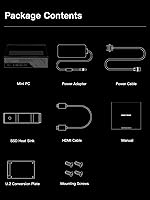
  • Included Accessories: Box contents include a U.2-to-M.2 conversion adapter, power adapter, power cord, SSD heatsink, HDMI cable, screw set, and manual.
  • Color & Material: The chassis is finished in black and constructed with a metal housing designed for durability under continuous operation.
  • Availability Date: The product was first made available in January 2024, positioning it as a current-generation platform with modern component support.
  • Barebone Format: This is a barebone system — processor and chassis are included, but RAM, SSD storage, and operating system must be purchased separately.

Related Reviews

MINISFORUM MS-01 Mini Workstation Core i9-12900H
85%
91%
Performance for Demanding Tasks
68%
Setup & Installation
94%
Networking & Connectivity
87%
Design & Build Quality
85%
Expandability & Customization
More
MINISFORUM MS-A1 Mini Workstation, 32GB RAM, 1TB SSD
87%
90%
Performance
93%
Multitasking Ability
85%
Build Quality
88%
Cooling Efficiency
91%
Display Support
More
MINISFORUM UN1290 (32GB/512GB)
77%
89%
CPU Performance
63%
Thermal Management
91%
Multi-Monitor Support
86%
RAM & Expandability
84%
Storage Performance
More
MINISFORUM UN1290 Mini PC Core i9-12900HK 32GB RAM 1TB SSD
88%
93%
Performance
88%
Build Quality
89%
Ease of Setup
91%
Multitasking Efficiency
67%
Cooling & Thermals
More
MINISFORUM MS-A2 AMD Ryzen 9 9955HX Mini PC
85%
91%
Performance
85%
Build Quality
65%
Setup/Installation
89%
Cooling Efficiency
88%
Expandability
More
KOOSMILE Mini PC Core i9-12900HK 32GB RAM 1TB SSD
86%
94%
Performance
90%
Cooling System
91%
Multitasking Capability
88%
Display Support
86%
Connectivity (WiFi/Bluetooth)
More
ASUS Vivobook 17X 2023, Intel Core i9-13900H, 16GB RAM, 1TB SSD
84%
91%
Performance
87%
Display Quality
72%
Portability
88%
Value for Money
89%
Build Quality
More
MINISFORUM NAB6 Lite Mini PC Core i5-12600H 16GB RAM 500GB SSD
85%
92%
Performance
87%
Value for Money
88%
Build Quality
90%
Network Connectivity
89%
Multi-Display Setup
More
GMKtec NucBox K10 Mini PC (Intel Core i9-13900HK, 32GB DDR5, 1TB SSD)
79%
88%
CPU Performance
67%
Thermal Management & Cooling
82%
RAM Speed & Capacity
91%
Storage Performance
89%
Multi-Monitor Support
More
GEEKOM MEGAMINI G1 Mini PC (i9-13900HK, RTX 4060, 32GB DDR5, 2TB SSD)
80%
88%
Thermal Management
83%
Gaming Performance
91%
CPU Responsiveness
86%
Build Quality & Design
89%
Connectivity & Port Selection
More

FAQ

You need to buy them separately. The Minisforum MS-01 Mini Workstation (Core i9-13900H, Barebone) ships with the processor and chassis only — no RAM, no SSD, and no operating system are included. You will need DDR5-5200 SO-DIMM modules and at least one M.2 NVMe drive before you can boot the machine.
It uses DDR5-5200 SO-DIMM modules across two slots. Minisforum has not published a hard ceiling, but based on the DDR5 platform and SO-DIMM slot count, 64 GB (2x32 GB) is a well-tested and widely used configuration. Stick with reputable DDR5 SO-DIMM kits rated at 5200 MHz or lower for reliable compatibility.

You do need a compatible switch or NIC on the other end. SFP+ ports use fiber or direct-attach copper (DAC) cables rather than standard RJ45 Ethernet, so a regular home router will not connect directly to them. If you pair the MS-01 with a 10G SFP+ switch or a server with a matching SFP+ port, you will get full 10 Gbps throughput — which is the main reason home lab and NAS users are drawn to this machine.

Minisforum has tested and confirmed the RTX 3050, but other low-profile and compact cards have been reported to work with varying results. Keep in mind the slot runs at PCIe 4.0 x8 electrically rather than the full x16, which caps bandwidth for more demanding cards. Power delivery constraints are also a real factor, so high-TDP cards are risky. If you plan to add a GPU, stick to low-power options and check community forums for confirmed compatibility before buying.

Yes, and it is one of the strongest use cases for this barebone mini PC. The i9-13900H handles multiple simultaneous virtual machines without issue, and the 10G networking is a genuine asset for VM traffic or shared storage access. Many users in the home lab community run Proxmox or VMware ESXi on it continuously with good stability results.

At idle or light workloads — browsing, media playback, light server tasks — the fan is quiet enough that you would not notice it in a typical room. Under sustained heavy CPU loads like video encoding or large compilation jobs, it becomes clearly audible but is not excessively loud by workstation standards. If you plan to use it in a bedroom or recording space at high utilization, that is worth factoring in.

Yes. The integrated Intel Iris Xe graphics supports triple display output using the HDMI port and both USB4 ports simultaneously. This covers productivity, trading desk, and digital signage setups without any additional hardware. For demanding graphical workloads, you would want a discrete GPU, but for multi-monitor desktop use the integrated graphics handles it fine.

It works with Linux, and many users run Debian, Ubuntu, and Proxmox on it without major issues. The main caveat is the SFP+ ports — driver support on some Linux distributions requires manual setup rather than plug-and-play detection. If the 10G networking is critical to your Linux use case, budget some time for driver configuration before assuming everything will work out of the box.

U.2 is a connector format used by enterprise-grade SSDs that can reach very high capacities — 7.68 TB or even 15 TB on a single drive. The included adapter converts a U.2 drive to fit the primary M.2 PCIe 4.0 slot in the MS-01, letting you use those large enterprise SSDs if you already own them or want maximum single-drive capacity for a NAS or storage-heavy workload.

Honestly, it is probably more machine than you need, and the barebone format adds real friction — you will spend extra time and money sourcing components and installing an OS before you can do anything. For straightforward everyday computing, a pre-configured mini PC from Minisforum or another brand would give you a ready-to-use system for less total cost and effort. The MS-01 shines for technical users with specific networking or storage requirements, not as a general-purpose desktop replacement.