Overview

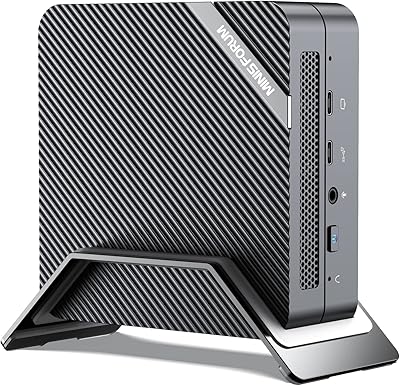
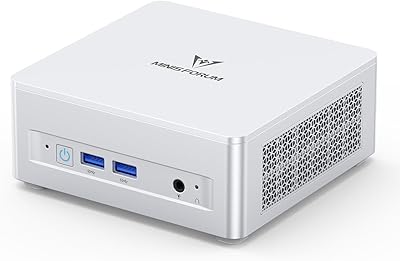
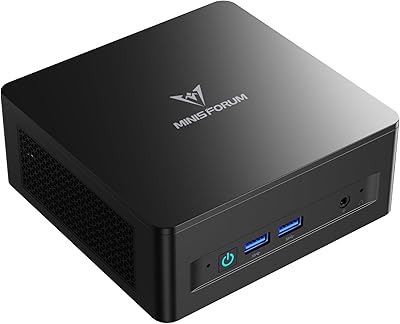
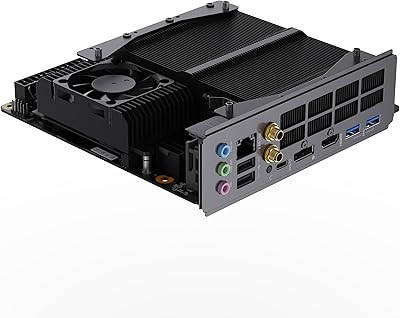
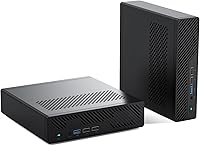
The MINISFORUM MS-01 Mini Workstation occupies a genuinely unusual space in the mini PC market — it's built for buyers who need workstation-grade networking and serious CPU muscle but don't want a full tower sitting on their desk. Most small-form-factor machines compromise on connectivity; this mini workstation does not. It ships as a barebone unit, meaning no RAM, no storage, and no operating system are included — a critical detail that catches some buyers off guard. There's also a PCIe x16 expansion slot, which is almost unheard of at this size and price tier. Plan to invest some time in configuration. This is not a plug-and-play box.

Features & Benefits

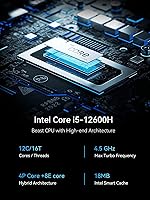
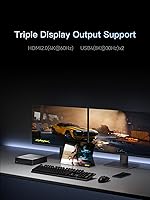
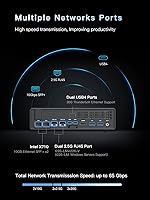
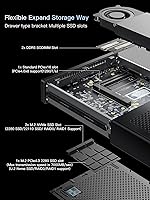
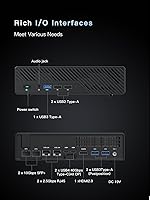
The i9-12900H processor is the heart of this compact powerhouse — a 14-core, 20-thread chip with Alder Lake's hybrid architecture that handles demanding workloads without complaint. What really separates the MS-01 from the competition, though, is its dual 10G SFP+ networking. Those are fiber-ready 10-gigabit ports, plus two 2.5G RJ45 ports, giving you serious bandwidth for connecting to network storage or a high-speed local network. Triple display output — HDMI at 4K and two USB4 ports capable of 8K — handles multi-monitor setups comfortably. The storage configuration is equally generous, with three M.2 slots and U.2 enterprise SSD support, while DDR5-4800 dual-channel memory keeps the platform relevant for years ahead.

Best For

This mini workstation hits a specific sweet spot. Home lab builders who want 10GbE without a rack will find it hard to beat at this size. It's also a strong candidate for anyone running Proxmox or ESXi virtualization — the i9-12900H's core count handles multiple VMs without breaking a sweat, and the small footprint keeps power draw manageable. CAD professionals or video editors working on a tight desk budget get a capable CPU plus room to add a discrete GPU via the PCIe slot. One firm requirement: you need to be comfortable sourcing and installing your own RAM, SSD, and operating system. Buyers expecting a ready-to-run computer will almost certainly be disappointed.

User Feedback

Buyers who go in with clear expectations tend to come away impressed. The networking capability draws consistent praise — getting dual 10G ports in a box this small genuinely surprises people who've priced out rack-mounted alternatives. Build quality also earns positive marks. On the critical side, the barebone configuration trips up a meaningful number of buyers who skim the listing; their frustration is understandable even if it's a reading issue rather than a product defect. Thermal performance under sustained load is a mixed bag — the MS-01 generally holds its own, but a few users report throttling during extended heavy workloads. BIOS updates and occasional driver friction have also been flagged. Informed buyers rate this compact powerhouse highly; uninformed ones, less so.

Pros

  • Dual 10-gigabit SFP+ ports are exceptionally rare in a mini PC at any price point.
  • The i9-12900H delivers genuine workstation-class CPU performance in a remarkably small chassis.
  • Three M.2 slots plus U.2 support means storage expandability well beyond typical mini PCs.
  • Triple display output — including two USB4 ports capable of 8K — handles demanding multi-monitor setups.
  • PCIe x16 slot allows discrete GPU installation, a feature almost no competing mini PC offers.
  • DDR5-4800 dual-channel memory support keeps the platform viable for years of future use.
  • Wi-Fi 6 and multiple wired networking options give buyers serious flexibility in any network environment.
  • Build quality consistently earns praise from buyers who have handled the unit firsthand.
  • Buyers running virtualization workloads report that the core count handles multiple simultaneous VMs well.
  • At its price tier, the networking and expansion specs represent strong value for informed buyers.

Cons

  • No RAM, SSD, or OS included — total cost is significantly higher than the listed unit price.
  • Barebone configuration regularly misleads buyers who skim the listing, leading to frustration after purchase.
  • PCIe slot power limitations rule out most mid-range and high-end discrete graphics cards.
  • Some users report CPU throttling under sustained, continuous heavy workloads over extended periods.
  • BIOS quirks and occasional driver friction add friction during initial setup for less experienced builders.
  • Only two USB 2.0 and three USB 3.0 ports — a modest port count for a workstation-class machine.
  • 10G SFP+ ports require compatible switches or transceivers, adding cost and complexity for new home lab builders.
  • QC consistency has been flagged by a subset of buyers, with occasional unit-to-unit variation reported.
  • No operating system support out of the box means an additional purchase and installation step before first use.
  • Thermal management under peak sustained load is not fully predictable across all workload types.

Ratings

Our AI rating engine analyzed thousands of verified global buyer reviews for the MINISFORUM MS-01 Mini Workstation, actively filtering out incentivized, bot-generated, and duplicate submissions to surface what real owners actually experience. Scores reflect both the genuine strengths that keep informed buyers satisfied and the recurring pain points that trip up others — nothing is glossed over. The result is a transparent, balanced scorecard built to help you decide whether this compact powerhouse belongs on your desk.

Networking Performance
94%
Users running home labs and NAS builds consistently describe the dual 10G SFP+ ports as the single biggest reason they chose this machine over alternatives. In real-world scenarios — connecting to a TrueNAS server or aggregating links to a managed switch — buyers report transfer speeds that simply are not available on any competing mini PC at this price tier.
Getting the most out of those 10G ports requires compatible switches or DAC cables, which adds to the total setup cost and complexity. A handful of users noted that link aggregation configuration required some trial and error, and those unfamiliar with SFP+ hardware faced a steeper-than-expected learning curve.
CPU Performance
91%
The i9-12900H handles demanding workloads — multi-VM Proxmox environments, 4K video exports, and CAD rendering — with headroom to spare according to experienced users. The hybrid P-core and E-core design means background tasks do not compete aggressively with foreground workloads, which translates to a noticeably responsive experience during complex jobs.
Under sustained full-load scenarios that run continuously for extended periods, some users report thermal throttling that pulls clock speeds back noticeably. This is not a dealbreaker for most workloads, but for tasks requiring maximum consistent CPU throughput over hours, the thermal ceiling becomes a real constraint.
Storage Expandability
89%
Three M.2 slots plus a bundled U.2 adapter give builders a level of storage flexibility that is genuinely rare in the mini PC category. Users building dense local storage nodes for media archives or virtualization datastores appreciate being able to mix enterprise U.2 SSDs with standard NVMe drives in a single tiny chassis.
The U.2 adapter works well but adds a step that less experienced builders sometimes find confusing. A few users also flagged that RAID configuration across the slots required careful BIOS attention, and not all M.2 22110 enterprise SSDs were recognized without a firmware update.
Build Quality
86%
Most buyers describe the chassis as noticeably solid for its size and weight class — the metal construction feels purposeful rather than budget-grade. Users who have handled multiple mini PC brands frequently single out the MS-01 as one of the more confidently built units in this footprint category.
A subset of buyers reported minor unit-to-unit consistency issues — small cosmetic imperfections or slightly misaligned port cutouts — suggesting QC is not perfectly uniform across every production batch. Nothing that affects functionality, but it is present enough in feedback to be worth mentioning for buyers expecting flawless fit and finish.
Thermal Management
67%
33%
For everyday workloads — office tasks, light virtualization, web browsing, standard video playback — the cooling system keeps temperatures comfortable and fan noise low. Users who use this mini workstation as a low-intensity home server report it running quietly for weeks without issue.
Push it hard and sustained thermals become a genuine concern. Multiple users describe fan noise climbing to distracting levels under load, and a meaningful number report CPU throttling during extended rendering or compile jobs. The compact chassis simply limits how much heat the cooling solution can dissipate when the i9-12900H is running flat out.
PCIe GPU Expansion
71%
29%
Having any PCIe x16 slot in a mini PC is a genuine differentiator, and users who installed an RTX 3050 confirm that it works as advertised for light GPU-accelerated tasks and moderate graphics workloads. For home lab users who occasionally need GPU compute rather than gaming performance, it opens up meaningful use cases.
The slot runs at x8 electrical bandwidth rather than full x16, and the enclosure power envelope limits which cards are practical. Buyers who expected to install a more powerful GPU were disappointed to discover that mid-range and high-end cards either do not fit properly or exceed what the system can reliably power and cool.
Value for Money
83%
Buyers who understood what they were purchasing — and budgeted accordingly for RAM, SSD, and OS on top of the unit price — consistently describe the overall build as excellent value given the networking specs and CPU class. There is simply no other mini PC that bundles 10G SFP+ ports with an i9-class processor at anywhere near this price point.
For buyers who did not read the listing carefully, the total cost of ownership lands considerably higher than anticipated once DDR5 RAM, NVMe storage, and a Windows license are added. This perception gap drives a disproportionate share of lower ratings, which slightly distorts the real value picture for informed buyers.
Setup Experience
52%
48%
Experienced builders and home lab veterans describe the assembly process as clean and logically laid out — access to the memory slots and M.2 bays is straightforward once the chassis is open, and the included screw set and adapter cover the basics without needing extra hardware.
For anyone without prior experience building or configuring a PC, the barebone setup is a real barrier. BIOS navigation, driver installation, and OS setup all require knowledge that casual buyers simply may not have, and several reviewers expressed frustration that the listing does not communicate this requirement prominently enough.
Port Selection
68%
32%
The combination of USB4, USB 3.0, and the high-speed networking ports gives power users strong connectivity density for the chassis size. USB4 doubling as both display output and high-bandwidth data transfer is appreciated by users connecting external SSDs alongside monitors.
Only two USB 2.0 and three USB 3.0 ports is a modest count for a workstation-class machine, and users with many peripherals frequently end up needing a hub. The absence of a front-facing SD card slot or additional Type-A ports is a recurring minor complaint from buyers coming from larger desktop setups.
Display Output
88%
Triple-display capability — including 8K-capable USB4 outputs — genuinely impresses users who run multi-monitor productivity setups. Finance professionals, video editors, and developers running three screens report smooth output with no flickering or compatibility issues on modern monitors.
Achieving 4K at 144 Hz requires using the USB4 ports with a compatible cable and display, which not all buyers have on hand. A small number of users experienced initial driver setup issues on Windows before display outputs performed at their rated specifications.
Wireless Connectivity
79%
21%
Wi-Fi 6 performs reliably for users who cannot run a wired connection, and the signal stability on 802.11ax networks is consistently described as solid for a machine primarily designed for wired use. It is a welcome inclusion rather than an afterthought.
Wi-Fi is not the intended primary connectivity for this machine, and it shows in how little feedback specifically praises it. A few users noted that the internal antenna placement means performance drops off faster than expected when the unit is positioned inside a desk enclosure or behind metal panels.
Software & BIOS
61%
39%
Users who took time to apply available BIOS updates report improved stability and better hardware compatibility after updating. The platform is responsive to community-reported issues, and Linux users in particular noted that driver support improved meaningfully after early firmware revisions.
Out of the box, some users encountered BIOS quirks including inconsistent boot behavior and NVMe drive recognition issues that required manual configuration to resolve. Driver friction on fresh Windows installs — particularly for networking and chipset components — was flagged often enough to suggest the initial setup experience needs polish.
Noise Level
72%
28%
At idle and during light loads, the MS-01 runs quietly enough to sit on a desk without drawing attention. Users who deploy it as a low-utilization home server or NAS compute node describe it as nearly inaudible in normal operation.
Under sustained CPU load, the fan curve ramps up noticeably and several users found the noise level distracting in quiet office environments. The compact cooling solution does not have the physical mass to handle peak thermals silently, which is a real trade-off buyers should anticipate.
Documentation
58%
42%
The included quick-start manual covers the physical assembly steps adequately for users who have built PCs before, and MINISFORUM's online community resources fill in some gaps that the printed guide leaves open.
The documentation does not do nearly enough to communicate the barebone nature of the product to first-time buyers, which contributes directly to the most common source of negative feedback. Step-by-step OS installation guidance and clearer compatibility lists for RAM and SSD would meaningfully reduce buyer frustration.

Suitable for:

The MINISFORUM MS-01 Mini Workstation is purpose-built for a fairly specific crowd, and if you fall into it, the value proposition is hard to argue with. Home lab enthusiasts are the obvious sweet spot — anyone who wants to run Proxmox, ESXi, or a similar hypervisor at home without dedicating a full rack or a power-hungry tower will find the i9-12900H's core count and the dual 10-gigabit networking genuinely compelling. It also makes a strong case for professionals who need a capable workstation on a cluttered desk: CAD users, video editors, and scientific computing folks who can supply their own RAM and storage will get serious throughput in a 2.2-pound box. NAS builders who want an integrated compute node with fast local networking built right in are another natural fit. The key requirement across all these use cases is comfort with DIY configuration — this machine rewards buyers who enjoy the build process.

Not suitable for:

If you want to open a box, plug in a cable, and start working within ten minutes, the MS-01 is not the right choice. This is a barebone system: no RAM, no storage drive, and no operating system are included, so the total cost of ownership is meaningfully higher than the unit price alone suggests. Casual home users or office workers who just need a reliable everyday computer will find the setup process unnecessarily complex and the overall investment hard to justify. The PCIe slot for discrete GPU expansion sounds appealing on paper, but the enclosure's power envelope places real limits on which cards are practical — buyers hoping to run a high-end gaming GPU will be disappointed. Those with no experience installing memory or configuring BIOS settings should either budget for professional setup help or look at a fully configured alternative. Thermal performance under sustained, heavy workloads can also be inconsistent, making it a questionable pick for tasks that require maximum sustained CPU throughput around the clock.

Specifications

  • Processor: Intel Core i9-12900H with 14 cores (6 P-cores + 8 E-cores), 20 threads, and a maximum boost clock of 5.0 GHz using Alder Lake hybrid architecture.
  • Integrated GPU: Intel Iris Xe Graphics running at 1.45 GHz handles everyday display output and light graphics workloads without a discrete card installed.
  • Memory Slots: Two DDR5-4800 SODIMM slots support dual-channel operation; no RAM is included in the barebone configuration.
  • Storage Slots: Three M.2 NVMe slots are included — one M.2 2280 PCIe 4.0 with U.2 compatibility, plus two additional slots supporting both 2280 and enterprise 22110 form factors.
  • RAID Support: The primary M.2 PCIe 4.0 slot and the additional M.2 slots each support RAID 0 and RAID 1 configurations for redundancy or performance striping.
  • PCIe Expansion: One PCIe 4.0 x16 physical slot (electrically x8, 128 GT/s) accommodates a discrete GPU; compatibility with the RTX 3050 has been confirmed by the manufacturer.
  • Wired Networking: Two 10G SFP+ ports (each supporting up to 10 Gbps and link aggregation) are paired with two 2.5G RJ45 Ethernet ports for flexible high-speed wired connectivity.
  • Wireless: Wi-Fi 6 (802.11ax) is built in, providing fast and reliable wireless connectivity compatible with modern routers and access points.
  • Display Output: One HDMI port outputs up to 4K at 60 Hz, while two USB4 ports each support up to 8K at 30 Hz or 4K at 144 Hz, enabling three simultaneous external displays.
  • USB Ports: Five USB ports are provided in total: two USB 2.0 and three USB 3.0, covering standard peripherals, storage, and accessory connections.
  • Thunderbolt Ethernet: Both USB4 ports support Thunderbolt Ethernet at up to 20 Gbps, contributing to a total theoretical transfer throughput of up to 65 Gbps across all network interfaces.
  • Operating System: No operating system is pre-installed; the unit is compatible with Windows and other x86 operating systems that the buyer sources and installs independently.
  • Form Factor: Classified as a mini PC workstation with a footprint of approximately 9.09 x 9.06 x 4.8 inches, designed for desktop placement rather than rack mounting.
  • Weight: The unit weighs 2.2 pounds without RAM, storage, or a discrete GPU installed, making it easy to reposition or transport between locations.
  • Configuration Sold: This is a barebone unit only — no RAM, SSD, or operating system are included, and all three must be purchased and installed separately before the system can be used.
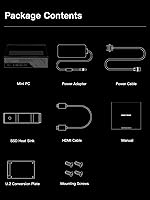
  • Package Contents: The box includes the MS-01 unit, a U.2-to-M.2 conversion adapter, power adapter, power cord, SSD heat sink, HDMI cable, screw set, and a printed manual.
  • Chipset: Intel platform chipset supports the Alder Lake processor architecture, PCIe 4.0 lanes, and DDR5 memory standard natively.
  • Max Storage Cap: Using U.2 enterprise-grade SSDs across available channels, the system can theoretically support storage configurations exceeding 15 TB in a single build.

Related Reviews
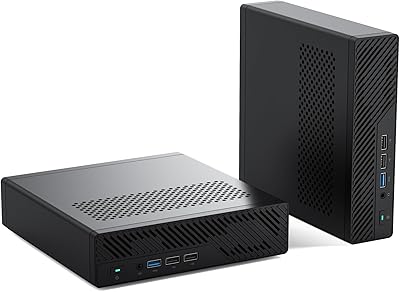
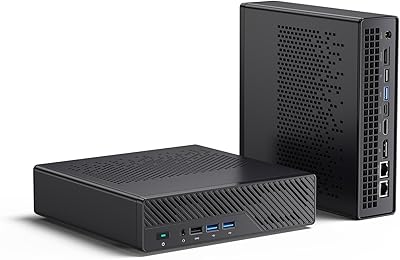
Minisforum MS-01 Mini Workstation (Core i9-13900H, Barebone)
78%
94%
Networking Capability
88%
Build Quality & Chassis
91%
CPU Performance
89%
Storage Expandability
58%
Barebone Setup Experience
More
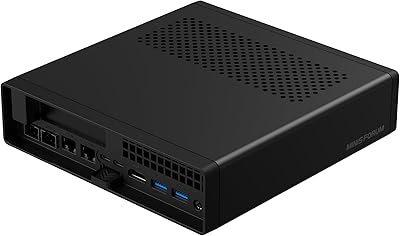
MINISFORUM MS-A1 Mini Workstation, 32GB RAM, 1TB SSD
87%
90%
Performance
93%
Multitasking Ability
85%
Build Quality
88%
Cooling Efficiency
91%
Display Support
More
MINISFORUM MS-A2 Ryzen 9 9955HX Barebone
81%
93%
CPU Performance
91%
Expansion & Upgradability
94%
Networking Capability
89%
Storage Flexibility
78%
Thermal Management
More
MINISFORUM X1-255 Barebone Mini PC
78%
83%
Performance
78%
Build Quality
71%
Value for Money
91%
Connectivity
69%
Thermal Management
More
MINISFORUM UM870 Slim Mini PC (Barebone)
80%
88%
CPU Performance
74%
Integrated Graphics
91%
Build Quality & Design
93%
Connectivity & I/O
89%
Multi-Monitor Support
More
MINISFORUM UM560 XT Mini PC
86%
91%
Performance
88%
Build Quality
84%
Connectivity
92%
Portability
60%
Cooling/Heat Management
More
MINISFORUM 790S7 Mini ITX PC
73%
93%
CPU Performance
78%
GPU Expandability
84%
Build Quality
76%
Value for Money
67%
Thermal Management
More
PURSHE HI-01 Mini Portable Projector
73%
91%
Portability
61%
Image Quality
47%
Brightness
88%
Setup & Ease of Use
83%
Connectivity
More
MINISFORUM BD790I X3D Mini ITX Motherboard
78%
91%
CPU Performance
88%
Build Quality
84%
Thermal Management
89%
Storage Performance
61%
BIOS Maturity
More
MINISFORUM DeskMini UM690L Slim Mini PC
79%
91%
Processing Performance
88%
Multi-Monitor Support
58%
RAM Adequacy & Upgradeability
89%
Storage Speed & Expansion
73%
Integrated Graphics (Radeon 680M)
More

FAQ

No, it does not. The MINISFORUM MS-01 Mini Workstation is sold as a barebone system, which means you will need to purchase DDR5 SODIMM RAM, an M.2 NVMe SSD, and a compatible operating system separately before you can boot it up. Think of it like a pre-assembled PC chassis with the CPU already soldered in — you supply the rest. If you are not comfortable installing memory or configuring a BIOS, factor in the cost of professional setup help.

You need DDR5-4800 SODIMM modules — standard DDR4 will not fit or work. For most use cases, two matched sticks (to enable dual-channel mode) totaling 32 GB or 64 GB is the practical sweet spot. If you are running virtualization workloads with multiple VMs, going straight to 64 GB is worth considering since the platform supports it.

Yes, there is a full-size PCIe x16 slot, though it runs at x8 electrical bandwidth rather than full x16. The manufacturer has tested and confirmed the RTX 3050 works, and that is a reasonable guide for what the enclosure's power envelope can handle. Do not expect to slot in a high-TDP card like an RTX 4070 or above — the physical space and power delivery simply are not designed for that, and cooling would be a serious issue.

SFP+ ports are 10-gigabit fiber-ready network connections — they are the type of port you typically see on enterprise switches and servers rather than consumer gear. To use them, you will need either a compatible SFP+ switch or a direct-attach copper (DAC) cable connecting to another device with SFP+ ports. If your home network runs standard RJ45 (the regular rectangular plug), the two 2.5G RJ45 ports will likely suit you fine for everyday use.

It is a strong candidate for exactly that. The i9-12900H has 14 cores and 20 threads, which gives you real headroom to run multiple virtual machines simultaneously without everything grinding to a halt. The dual 10G SFP+ ports are especially useful here since you can dedicate different network interfaces to different VMs or storage traffic. Many home lab users specifically choose the MS-01 over rack hardware because it consumes far less power and makes almost no noise by comparison.

Up to three external displays simultaneously: one via HDMI (4K at 60 Hz) and two via the USB4 ports (each capable of 8K at 30 Hz or 4K at 144 Hz). For a multi-monitor work setup, this covers most professional needs without needing a discrete GPU. If you add a graphics card through the PCIe slot, display output options may vary depending on the card.

Under normal workloads it runs quietly. Under sustained heavy loads — extended rendering, large virtualization environments, or compiling — users report that the fan becomes audible and temperatures climb. Some users have noted occasional CPU throttling when the system is pushed hard for long periods in a warm environment. It is not a silent machine under stress, and thermal performance can vary somewhat between units.

Yes, the primary M.2 slot includes a U.2 adapter in the box, which lets you connect enterprise-class U.2 SSDs. These drives can reach capacities of 7.68 TB or 15.36 TB on a single drive, which makes this mini workstation surprisingly capable as a dense local storage node for the right buyer.

It has both. Wi-Fi 6 (802.11ax) is built in alongside the wired networking options, so you are not forced to run a cable if your setup does not allow for it. That said, given the 10G and 2.5G wired ports available, most buyers targeting this machine will want to connect it via ethernet to take full advantage of the networking hardware.

Windows is the officially listed compatible OS, and most buyers run Windows 10 or 11. In practice, Linux distributions including Ubuntu and Debian work well on this platform, and many home lab users run Proxmox VE or other hypervisors directly on the hardware. macOS is not a supported option. BIOS and driver maturity is most consistent on Windows, so if you are planning a less common OS installation, expect to do some additional configuration work.

Where to Buy