Overview

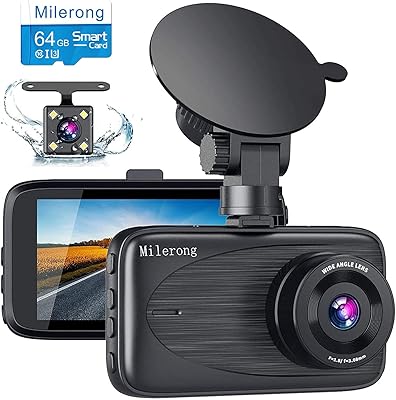
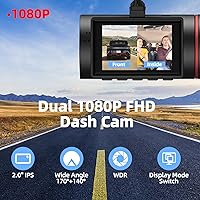
The Milerong X25 Dual Dash Cam is a straightforward, no-frills rideshare camera built around one practical idea: record the road ahead and your passengers at the same time, without spending a lot. Both channels capture full 1080P footage simultaneously, and a 64GB card is included right in the box — no separate trip to the store required. The 2-inch IPS screen lets you check the live feed quickly, and the suction cup mount means you can move it between vehicles without any drilling or permanent hardware. It deliberately skips Wi-Fi, GPS, and Bluetooth, which we will get to shortly.

Features & Benefits

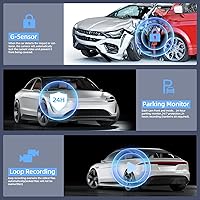
The front lens covers 170 degrees while the cabin lens handles 140 degrees, together giving you a thorough view of what is happening both on the road and inside the car. Low-light performance leans on an F1.8 aperture and four infrared LEDs, which matters when you are driving passengers late at night with the cabin lights off. The built-in G-sensor locks any clip captured during a sudden impact so loop recording will not overwrite it. Loop intervals — one, two, or three minutes — are easy to configure. Night vision can be toggled between color and infrared grayscale mode through the Shooting Sound setting in the menu.

Best For

This rideshare camera is tailor-made for Uber, Lyft, and taxi drivers who want reliable, documented coverage of both the road and the passenger compartment without a complicated setup. If you would rather press a button and drive than configure an app, this is that kind of device. The included memory card means you can start recording immediately without sourcing accessories separately. Fleet owners covering multiple vehicles will appreciate the low per-unit cost. That said, the parking monitor only triggers on detected shock — it is a reactive feature, not true round-the-clock surveillance. Full 24-hour parking coverage requires a separate hardwire kit, sold independently.

User Feedback

Buyers consistently point to two strengths: how quickly the X25 is up and running, and how well the infrared cabin camera holds up on night rides when the interior is almost completely dark. The footage is genuinely useful for dispute situations, which is exactly what rideshare drivers need. On the downside, the absence of Wi-Fi means no wireless file transfer — you will need to pull the card or connect via USB to review clips. A handful of users also flag the 64GB storage cap; heavy daily drivers may find themselves managing files more often than they would like. Overall, day-to-day reliability is well-regarded for the price point.

Pros

  • Both front and cabin channels record at full 1080P simultaneously, giving you complete coverage in a single device.
  • A 64GB memory card is included out of the box — no additional purchase needed before your first drive.
  • The infrared cabin camera performs well in near-total darkness, which is critical for late-night rideshare shifts.
  • Setup takes minutes: mount the suction cup, plug into the cigarette lighter, and it starts recording automatically.
  • The G-sensor locks collision clips instantly, so important footage is never accidentally overwritten by loop recording.
  • Wide-angle coverage — 170 degrees up front and 140 degrees inside — leaves very little out of frame.
  • Loop recording keeps storage managed automatically without you ever touching the settings mid-shift.
  • The shock-triggered parking monitor adds a basic layer of protection while the car sits unattended.
  • At well under fifty dollars all-in, the X25 offers genuine dual-channel functionality at a price most drivers can justify.

Cons

  • No Wi-Fi or app support means reviewing footage always requires a USB cable or physically removing the memory card.
  • Storage is hard-capped at 64GB and cannot be expanded, which may frustrate high-mileage drivers on long daily schedules.
  • There is no GPS, so footage carries no location data or speed overlay — a limitation for insurance documentation.
  • The parking monitor only captures a 31-second clip on detected shock; continuous overnight monitoring requires a separate hardwire kit purchase.
  • Front camera image quality is solid for its price tier but may fall short in challenging conditions like heavy rain or glare-heavy highways.
  • The night vision toggle is buried under a setting called Shooting Sound, which is not intuitive and can confuse first-time users.
  • The 2-inch screen is functional but small, making detailed footage review directly on the unit impractical.
  • Long-term card reliability has been flagged by some users, suggesting periodic formatting and card health checks are necessary.

Ratings

The Milerong X25 Dual Dash Cam has been scored by our AI system after analyzing thousands of verified global buyer reviews, with spam, bot-generated, and incentivized submissions actively filtered out before any scoring was applied. The ratings below reflect what real rideshare drivers, fleet operators, and everyday commuters actually experienced — strengths and frustrations included, with nothing glossed over.
Value for Money
91%
Buyers consistently flag the included 64GB card as a standout value, since most competing cameras in this price bracket sell the card separately. Getting a ready-to-record dual-channel system for well under fifty dollars is considered exceptional by the majority of rideshare drivers who purchased it as a professional tool.
A small number of buyers felt the value proposition weakened after factoring in the cost of a separate hardwire kit for proper parking surveillance, which essentially raises the real-world price for a complete setup. Those who needed GPS or Wi-Fi found no budget-tier workaround within the same ecosystem.
Cabin Night Vision
84%
Late-night Uber and Lyft drivers repeatedly single out the infrared cabin camera as the reason they chose this rideshare camera over alternatives. In near-total darkness — no dome light, no streetlights — the four IR LEDs produce footage clear enough to identify faces and movement, which holds up well in dispute scenarios.
The automatic switch to grayscale IR mode catches some users off guard the first time it activates, and the Shooting Sound toggle label is genuinely confusing for new users trying to find the setting. In vehicles with heavily tinted rear windows, IR bounce can reduce clarity slightly at the edges of the frame.
Ease of Installation
88%
The suction cup mount is one of the most praised aspects of the X25 among buyers who drive multiple vehicles or who rent cars for rideshare work, since it can be repositioned in under a minute with no tools. The cigarette lighter power connection means there is nothing to wire, splice, or hide — it genuinely is plug-and-record.
A handful of buyers reported the suction cup losing grip in extreme summer heat when the windshield surface becomes warm and slightly oily. In vehicles with very curved windshields, getting a fully flush seal sometimes requires a few repositioning attempts before the lock clicks properly.
Dual-Channel Coverage
82%
18%
Having simultaneous 170-degree front and 140-degree cabin recording on a single compact unit is genuinely useful for professional drivers who need both road and passenger documentation without running two separate devices. Most buyers found the combined field of view wide enough to cover the full cabin of a standard sedan or midsize SUV.
In larger vehicles like minivans or full-size vans, the 140-degree cabin lens leaves the rear corners outside the frame, which is a limitation worth knowing before purchase. The two channels also share processing load, and a few users noted occasional brief sync stutters between the front and cabin feeds during longer recording sessions.
Daytime Front Footage
74%
26%
Under normal daylight conditions on city streets and highways, the front camera produces clear, readable footage with good lane detail and adequate license plate legibility at moderate distances. WDR processing handles transitions between shaded underpasses and bright open roads better than many buyers expected at this price point.
At highway speeds above 65 mph, fine detail like distant license plates can become slightly soft, and some buyers noted the front image looks compressed compared to more expensive alternatives. Direct low-angle sun glare can also wash out a portion of the frame in a way the WDR does not fully compensate for.
Nighttime Front Footage
67%
33%
In well-lit urban environments with street lighting, the front camera handles nighttime recording competently enough for general documentation purposes. The F1.8 aperture does pull in more light than cameras with narrower lenses, giving city drivers a usable image most of the time.
On unlit rural roads or dark suburban streets, the front footage loses sharpness and introduces noticeable noise, which limits its usefulness for capturing fine detail in poor-light incidents. Buyers coming from mid-range dash cams with larger sensors noticed the gap in low-light front performance fairly quickly.
Loop Recording Reliability
78%
22%
The automatic loop recording system works consistently for the vast majority of buyers, cycling through 1, 2, or 3-minute segments without gaps or dropped clips during normal daily use. Drivers who do multi-hour rideshare shifts report the storage management runs in the background without any intervention needed.
A subset of long-term users reported occasional loop recording interruptions after several months of daily use, which some traced back to card degradation rather than a firmware issue. Milerong recommends formatting the card periodically, and buyers who skipped this step tended to encounter more consistency problems over time.
G-Sensor Performance
79%
21%
The G-sensor lock works as described — clips captured during hard braking or a collision are automatically protected from overwrite, which is the core use case most buyers care about. Drivers who have actually needed this feature in real incidents report the locked footage was available and intact when they needed it.
Some buyers found the default G-sensor sensitivity too high, causing minor road bumps or speed humps to trigger unnecessary locks and gradually fill protected storage. Dropping the sensitivity to the Low setting — as recommended in the setup guide — resolves this for most users, but the default calibration out of the box is not ideal.
Parking Monitor
58%
42%
For drivers who simply want a basic deterrent and a record of any parking lot impacts while they are away, the shock-triggered 31-second clip offers a reasonable safety net without any additional setup cost. It activates and records autonomously, which means no driver action is required to enable it after initial configuration.
The 31-second clip window is brief, and the reactive-only design means anything that happens without a detectable vibration goes completely unrecorded. Buyers who wanted true around-the-clock parking surveillance were disappointed to discover that a separately purchased hardwire kit is required to maintain continuous power and enable that level of coverage.
Menu & Button Usability
63%
37%
Once drivers learn the interface, day-to-day operation is straightforward — the camera turns on with the ignition and records automatically, so most users never need to touch the menu after initial setup. The physical button layout is simple enough that drivers can navigate settings without referring to the manual after the first use.
The initial learning curve trips up a meaningful number of buyers, particularly around the locked-button behavior during recording and the misleadingly named Shooting Sound toggle for night vision. The 2-inch screen makes menu text small and slightly difficult to read in bright sunlight, adding to the first-time friction.
Build & Hardware Quality
69%
31%
The unit feels solid enough for daily professional use, and the lightweight 2.72-ounce body does not put stress on the suction cup mount even over bumpy roads. Most buyers report no physical issues with the camera body itself over months of continuous use.
The suction cup bracket has drawn complaints about long-term durability, with some buyers noting the locking mechanism becomes less reliable after extended exposure to heat cycles in a parked car. A small number of users also reported the included charging cable feeling undersized relative to the device quality.
Storage Management
66%
34%
For drivers doing typical rideshare shifts of four to eight hours, 64GB is generally sufficient to retain a full day of dual-channel footage before older clips begin cycling out. The automatic overwrite system keeps the card from filling up and causing recording to stop, which is the most important behavior for a working driver.
The hard 64GB ceiling with no expansion option is a genuine constraint for full-time drivers doing ten-plus hour days who want to retain several days of footage without manually backing up files. There is no cloud backup, no wireless transfer, and no way to add capacity — if 64GB is not enough for your workflow, there is no path to upgrade within this system.
Connectivity & Integration
41%
59%
For buyers who specifically want a standalone, offline camera with no app dependencies or network vulnerabilities, the complete absence of wireless connectivity is exactly the feature they were looking for. There is nothing to pair, update remotely, or configure through a third-party platform.
For the majority of modern buyers accustomed to reviewing footage on their phone or sharing clips instantly, the lack of Wi-Fi is a significant daily friction point. Every clip review requires physically removing the card or connecting a USB cable to a computer, which is cumbersome for professional drivers who need to pull footage quickly after an incident.
Setup & First-Use Experience
77%
23%
The physical mounting and power connection steps take most buyers under fifteen minutes, and the camera begins recording automatically once the car starts — there is no activation process, pairing step, or account creation involved. First-time dash cam buyers in particular appreciate how little friction there is between unboxing and actually recording.
The recommended first-use steps — formatting the card and charging the unit for a full hour before use — are buried in the manual rather than prominently flagged in the box, and buyers who skip these steps sometimes encounter early reliability issues. A clearer quick-start card in the packaging would eliminate a portion of the negative first-use experiences reported.

Suitable for:

The Milerong X25 Dual Dash Cam is purpose-built for rideshare and taxi drivers who want reliable, simultaneous front-road and cabin documentation without a steep learning curve or a complicated setup process. If your priority is liability protection — having clear footage of both a potential road incident and what is happening inside your vehicle — this rideshare camera delivers exactly that at a price point that makes sense for drivers treating it as a professional tool. The included 64GB card means you can mount it, plug it into the cigarette lighter, and be recording on your first trip without spending another dollar. Fleet operators running several vehicles will also find the straightforward button-only interface an asset, since there is no app ecosystem to manage or update across devices. Drivers who have previously been burned by overly complex dash cam setups will appreciate that this one simply works when the car starts.
Not suitable for:

The Milerong X25 Dual Dash Cam is not the right choice for drivers who want to review or share footage remotely via a smartphone, since it has no Wi-Fi, Bluetooth, or companion app of any kind — you will need to physically remove the card or connect a USB cable every time you want to pull a clip. Tech-forward buyers who rely on GPS route overlays stamped onto footage for insurance purposes will need to look elsewhere entirely, as there is no location tracking built in. The 64GB storage ceiling is also a real constraint; it cannot be expanded, so high-mileage drivers doing long daily shifts may find themselves cycling through footage more frequently than they would like. Anyone expecting true 24-hour parking surveillance should know upfront that the shock-triggered parking mode is reactive and brief — full overnight monitoring requires a separately purchased hardwire kit that adds to the total cost. Finally, drivers who want crisp, highly detailed front-camera footage for challenging conditions like heavy rain or fast highway driving may find the image quality adequate but not exceptional at this price tier.

Specifications

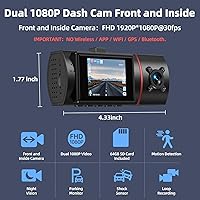
  • Front Resolution: The front camera records at 1920x1080 at 30 frames per second, delivering full HD clarity for road-facing footage.
  • Cabin Resolution: The interior cabin camera also captures at 1920x1080 at 30 frames per second, matching the front channel in resolution.
  • Front Field of View: The front lens covers a 170-degree wide angle, minimizing blind spots across lanes and road shoulders.
  • Cabin Field of View: The cabin-facing lens spans 140 degrees, capturing the full interior of most standard passenger vehicles in a single frame.
  • Aperture: An F1.8 large aperture allows more light into the sensor, improving image quality in low-light and nighttime driving conditions.
  • Infrared LEDs: Four built-in infrared LEDs illuminate the cabin in complete darkness, enabling the camera to capture clear passenger footage without visible light.
  • Night Vision Mode: Night vision can be toggled between color mode and infrared grayscale mode via the Shooting Sound setting in the on-device menu.
  • Display: A 2-inch IPS screen is built into the unit for live monitoring and basic menu navigation directly on the device.
  • Included Storage: A 64GB microSD memory card is included in the package, ready to use without any additional purchase.
  • Max Storage: The device supports a maximum of 64GB storage capacity and cannot be expanded beyond this limit with a larger card.
  • Loop Recording: Footage is recorded in continuous loops of 1, 2, or 3 minutes, with the oldest unlocked clips automatically overwritten when storage is full.
  • G-Sensor: A built-in G-sensor detects sudden shocks or collisions and automatically locks the relevant clip to prevent it from being overwritten during loop recording.
  • Parking Monitor: When the vehicle is parked and the camera is in standby, a detected shock triggers a 31-second video clip before the unit powers back down.
  • Connectivity: This camera has no wireless connectivity — there is no Wi-Fi, Bluetooth, GPS, or companion app of any kind.
  • Power Source: The unit draws power from the vehicle's cigarette lighter port via the included charger, turning on and off automatically with the ignition.
  • Mount Type: Installation uses a suction cup bracket that attaches to the front windshield without any adhesive, drilling, or permanent modification.
  • Item Weight: The camera unit weighs 2.72 ounces, making it lightweight enough to stay securely mounted on the suction cup without stressing the windshield.
  • WDR Technology: Wide Dynamic Range processing is applied to footage to balance exposure between bright and dark areas of the frame in real time.

Related Reviews

Thinkware Q200 2-Channel Dash Cam
76%
84%
Front Camera Clarity
67%
Rear Camera Clarity
72%
Night Vision Performance
76%
Parking Mode
63%
GPS Alert Accuracy
More
Ecomoment S70 Dual Dash Cam
71%
88%
Value for Money
84%
Daytime Video Quality
61%
Night Vision Performance
91%
Ease of Installation
82%
Display & Playback
More
70mai A410 Dual Dash Camera
78%
88%
Daytime Video Clarity
71%
Night Vision Performance
74%
Rear Camera Quality
67%
App & Wi-Fi Experience
84%
GPS Accuracy & Data Logging
More
ORSKEY S800 Dual Dash Cam
73%
88%
Value for Money
82%
Front Camera Video Quality
53%
Rear Camera Video Quality
61%
Night Vision Performance
91%
Ease of Installation
More
COOAU D20S Dual Dash Cam
76%
84%
Front Camera Quality
81%
Interior Night Vision
77%
App Experience
79%
GPS Accuracy
62%
Parking Mode
More
Thinkware U3000 4K Dual Dash Cam
78%
88%
Night Vision Quality
91%
Video Clarity
82%
Parking Protection
63%
App & Connectivity
86%
GPS Accuracy
More
Kingslim D6 4K Dual Dash Cam
84%
91%
4K Video Quality
88%
Night Vision Performance
84%
Ease of Setup
89%
WiFi & GPS Functionality
82%
Build Quality & Durability
More
IIWEY N2 4K Dual Dash Cam
83%
92%
Video Quality
84%
Ease of Use
89%
Durability
60%
Installation Process
90%
Wi-Fi Functionality
More
Sarmert M572 4K Dual Dash Camera
75%
84%
Video Clarity (Daytime)
71%
Night Vision & Low Light
63%
App Experience
58%
Parking Mode
89%
Supercapacitor Reliability
More
AZDOME M01 Pro Dual Dash Cam
64%
76%
Video Quality (Front)
54%
Video Quality (Rear)
67%
Night Vision
88%
Ease of Installation
58%
ADAS Performance
More

FAQ

No separate purchase needed — a 64GB card comes included in the box. Just insert it, format it once through the menu as recommended, and you are ready to record on your first drive.

Unfortunately, no. The Milerong X25 Dual Dash Cam has no Wi-Fi, Bluetooth, or app support of any kind. To review your footage, you will need to either remove the memory card and use a card reader, or connect the included USB cable directly to a computer or laptop.
Surprisingly well for this price tier. The four infrared LEDs kick in automatically and can illuminate passengers in near-complete darkness. The image shifts to grayscale in IR mode, but faces and movement are clearly visible, which is exactly what rideshare drivers need for liability documentation on late-night trips.

The infrared LEDs are not visible to the human eye, so there is no obvious red glow that would alert passengers. That said, laws around recording inside vehicles vary by state and country, so it is worth checking local regulations before relying on cabin footage for any legal purpose.

No. The built-in G-sensor detects the sudden impact and immediately locks that clip so loop recording cannot overwrite it. You can also manually lock clips yourself by pressing the appropriate button. Locked files stay protected until you manually delete them.

Not quite. The parking monitor is shock-triggered, meaning it only activates when the camera detects a vibration or impact while the car is parked. When triggered, it records a 31-second clip and then powers back down. If you need true continuous overnight surveillance, you would need to purchase a separate hardwire kit to maintain constant power to the unit.

No — this rideshare camera is capped at 64GB maximum storage. Inserting a larger card is not supported and may cause recording errors. If you do long shifts and want more footage retained before overwriting, you would need to manually back up clips more frequently.

It is genuinely easy. You clean the windshield, press the suction cup firmly into place, rotate the lock button until you hear a click, and run the power cable to the cigarette lighter port. Most drivers have it mounted and recording within ten to fifteen minutes. No tools, no wiring, no professional installation required.

No, it does not. There is no GPS built into this camera, so your footage will not include location overlays, speed stamps, or route data. If GPS tracking is important for insurance purposes or fleet management, you would need a different model that specifically includes a GPS module.

This is a common stumbling block. If the camera is actively recording, the buttons are locked out until you pause recording first by pressing the OK button. Once recording is paused, all buttons become responsive and you can enter the menu to adjust settings. It is an easy thing to miss when you first set it up.