


Overview

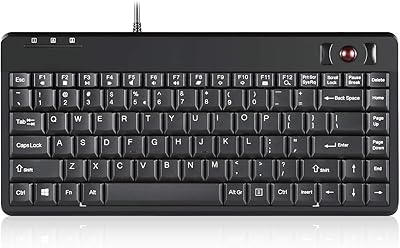
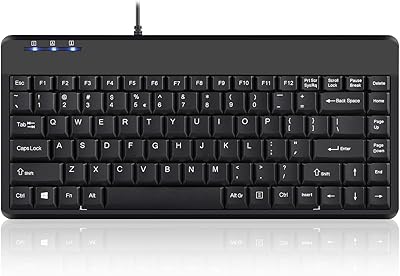
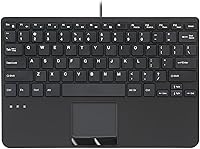
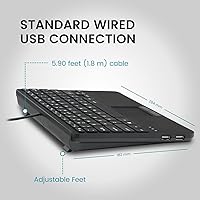
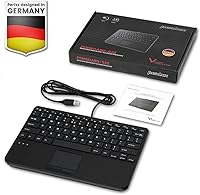
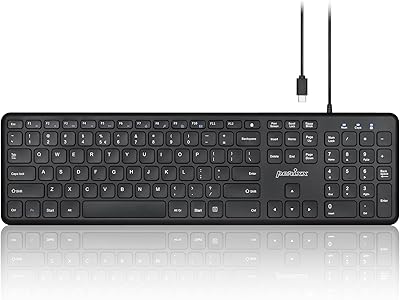
The Perixx PERIBOARD-525 is a wired mini keyboard that packs an integrated touchpad into a footprint small enough to fit where most keyboards simply cannot. Designed with industrial and professional environments in mind, this compact keyboard addresses a real problem: limited desk space where a separate mouse is simply impractical. It sits in a mid-range price bracket that signals genuine build intent — not a throwaway peripheral. The 5.9-foot cable gives you enough reach without excessive slack, and the overall package weighs just 1.2 pounds, making it easy to mount or reposition. For a keyboard launched in early 2023, its consistent sales ranking speaks to steady, practical demand.

Features & Benefits

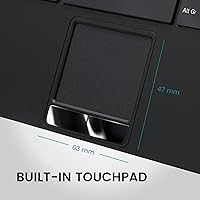
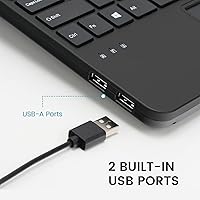
This all-in-one input device runs on 78 scissor-switch keys that sit notably low to the surface, giving a crisp, quiet typing feel with rated durability of up to 10 million keystrokes. The built-in touchpad — roughly 2.5 by 1.85 inches — handles pointing, scrolling, and pinch-to-zoom, so day-to-day navigation rarely requires leaving the keyboard. Two USB 2.0 hubs are built into the chassis, handy for plugging in a dongle or USB drive without hunting for a port on your machine. Worth noting: USB 2.0 means these hubs suit peripherals and small transfers, but not fast large-file moves. ABS keycaps with abrasion-resistant printing keep the legends readable after extended daily use.

Best For

This compact keyboard is particularly well-suited for industrial and point-of-sale setups where space is at a premium and running a separate mouse simply is not practical. Think panel-mounted terminals, warehouse workstations, or server room carts — environments where a single input device covering both typing and cursor control is far more efficient. Home office users with cluttered desks or media center builds also find real value here. IT professionals who rotate between machines appreciate the plug-and-play USB connection and broad Windows compatibility, from Windows 7 through 11. If you regularly need a spare port at arm's reach, the built-in hubs add genuine everyday convenience.

User Feedback

Verified buyers generally praise the solid build quality and the fact that the touchpad responds well enough for routine tasks right out of the box. The scissor keys draw consistent approval for their quiet, confident feel — something users upgrading from mushy membrane boards tend to notice quickly. On the critical side, a recurring theme is touchpad sensitivity calibration: some users find default settings either too sluggish or too twitchy, requiring a visit to Windows pointer settings to dial it in. A few long-term owners report that keycap legends on the most-used keys show fading after a year of heavy use. Overall sentiment leans positive, but touchpad size expectations should be set realistically.

Pros

  • Combines keyboard and touchpad in one unit, eliminating the need for a separate mouse entirely.
  • Scissor switches are quiet enough for shared workspaces and professional environments.
  • Plug-and-play setup works instantly across Windows 7 through 11 — no software needed.
  • Two built-in USB hubs add handy port access right at the keyboard without extra cables.
  • Solid chassis construction holds up well in industrial and high-rotation professional settings.
  • The nearly 6-foot cable reaches comfortably under desks or to wall-mounted terminals.
  • Compact footprint frees up meaningful desk space compared to a keyboard-plus-mouse combo.
  • Touchpad supports scrolling and zoom gestures for smoother everyday navigation.
  • Lightweight at 1.2 pounds, making it easy to carry for field service or IT work.

Cons

  • Touchpad sensitivity often needs manual adjustment in Windows settings straight out of the box.
  • The touchpad surface is too small for extended cursor-heavy tasks or creative workflows.
  • ABS keycap legends show wear on heavily used keys after roughly 12 to 18 months.
  • USB hubs are limited to USB 2.0, making large file transfers noticeably slow.
  • No companion software means zero customization for sensitivity, macros, or key remapping.
  • The cable exits at a fixed point, which can complicate routing in certain workspace layouts.
  • Touchpad behavior on macOS and Linux is unreliable and not officially supported.
  • Compact layout repositions some keys, causing a brief but real adjustment period for touch typists.

Ratings

Our AI-generated scores for the Perixx PERIBOARD-525 are based on a deep analysis of verified global user reviews, with spam, incentivized, and bot-generated feedback actively filtered out before scoring. The ratings below reflect both what buyers genuinely appreciate and where real frustrations surface — nothing is glossed over. Every category score is calibrated to give prospective buyers an honest, transparent picture of how this compact keyboard performs in real-world conditions.

Build Quality
83%
Most users describe the chassis as noticeably solid for a peripheral in this class — it does not flex when typing and feels like it can survive the bumps of a workshop or server room cart. The key mechanism itself holds up well, and the overall assembly feels deliberate rather than cost-cut.
A handful of reviewers note that the plastic surround around the touchpad shows fine scuff marks after extended daily use. It is not a structural issue, but the finish is less scratch-resistant than the keycap surface itself.
Typing Experience
78%
22%
The low-profile scissor switches strike a good balance between quiet operation and tactile feedback — users coming from laptop keyboards tend to feel right at home immediately. The key spacing is well thought out for a compact layout, with fewer misstrikes than typical mini keyboards.
Compared to a full-size desktop keyboard, the travel distance feels shallow to some users, particularly those accustomed to mechanical switches. A few reviewers mention the spacebar has a slightly different resistance feel from the rest of the keys.
Touchpad Responsiveness
71%
29%
For routine tasks — clicking through menus, scrolling documents, navigating a media library — the built-in touchpad handles daily workloads without requiring a separate mouse. Scrolling and basic gestures work reliably right out of the box on Windows 10 and 11.
Out-of-the-box sensitivity is hit or miss: some users find the cursor too slow, others too jumpy, and both groups end up in Windows pointer settings to compensate. The physical size of the pad — under 2.5 inches wide — limits comfort during extended cursor-heavy sessions.
Touchpad Size & Usability
63%
37%
For industrial terminals and point-of-sale setups where touchpad use is intermittent, the pad size is adequate. Users who primarily type and only occasionally reposition a cursor report no real complaints about the dimensions in those specific contexts.
Anyone comparing this to a laptop touchpad or a standalone trackpad will find the usable surface noticeably cramped. Creative work or extended file navigation using the touchpad alone becomes fatiguing, and this is a consistent sore point in longer reviews.
USB Hub Functionality
74%
26%
Having two USB ports built directly into the keyboard is genuinely practical for workstations where reaching around to a tower is inconvenient. Users regularly plug in a USB drive for quick file transfers or a wireless receiver for a secondary device without any fuss.
The hubs are USB 2.0, so anyone attempting to transfer large files will feel the bandwidth ceiling fairly quickly. A small number of users report occasional device recognition delays when both hubs are loaded simultaneously, though this appears intermittent rather than systematic.
Keycap Durability & Legibility
69%
31%
In short-to-medium term use — say, the first year of daily operation — the ABS keycap legends hold up respectably. Users in professional environments where multiple people rotate through the same terminal report the printing staying clear longer than on budget-tier alternatives.
Verified long-term owners, particularly those who type heavily on a fixed set of keys, begin reporting legend fading after 12 to 18 months of intensive use. ABS inherently wears faster than PBT under prolonged finger contact, and that limitation shows up in this keyboard eventually.
Cable Quality & Length
81%
19%
The nearly 6-foot cable is one of the more appreciated practical details in user feedback — it reaches comfortably from a tower under a desk or a wall-mounted panel without requiring an extension. The cable itself feels adequately sheathed and resists tangling during repositioning.
A minor but recurring note from users is that the cable exits from a fixed position on the unit, which can create awkward routing depending on the workspace layout. There is no cable management channel or clip on the keyboard body.
Plug-and-Play Setup
91%
No driver installation, no software, no pairing ritual — users across a wide range of Windows versions report the keyboard and touchpad being recognized within seconds of plugging in. This is particularly valued in IT environments where quick deployment across machines matters.
Compatibility is Windows-only per official specs, and a small number of macOS and Linux users who tried it anyway report inconsistent touchpad behavior. The keyboard keys generally work, but the touchpad gestures outside of Windows are unreliable.
Compact Footprint
88%
At just over 11 inches wide, this all-in-one input device genuinely frees up significant desk real estate, and users in cramped environments — industrial carts, bedroom media setups, tight home office corners — consistently call out the size as a primary reason for choosing it.
The compact layout means some punctuation and function keys are repositioned from their standard locations, which creates a short adjustment period for touch typists. Users who switch frequently between this and a full-size keyboard sometimes find the muscle memory conflict mildly frustrating.
Value for Money
76%
24%
Buyers who need the specific combination of wired reliability, integrated touchpad, and USB hubs in one unit generally find the price fair given the alternatives. The build quality backs up the mid-range positioning better than many comparable all-in-one input devices at lower price points.
Users who primarily want a basic keyboard and do not have a pressing need for the touchpad or hubs tend to feel the premium is harder to justify. Direct competitors with slightly larger touchpads exist at comparable prices, making the value case more dependent on specific use-case fit.
Noise Level
86%
The scissor-switch design keeps keystroke noise low enough for shared workspaces, open-plan offices, and quiet industrial control rooms. Multiple reviewers specifically note that they switched to this keyboard to reduce noise complaints from colleagues.
It is not silent — the bottom-out click is audible in a quiet room, and a few users sensitive to keyboard noise still found it distracting at night. Compared to a mechanical keyboard it is dramatically quieter, but not at the level of a dedicated silent peripheral.
Portability & Weight
79%
21%
At 1.2 pounds, the Perixx touchpad keyboard is light enough to tuck into a bag for field service work or move between stations without effort. IT technicians and on-site support staff who carry it regularly cite the weight as a non-issue.
The fixed, non-detachable cable adds bulk when packing the keyboard for transport. Without a carrying case or cable wrap solution included in the box, the cord becomes the main inconvenience for users who move it frequently.
Windows Compatibility Range
89%
Support stretching back to Windows 7 is a genuine asset in industrial and legacy IT environments where older operating systems are still actively running on embedded or specialized hardware. Users managing mixed OS fleets appreciate not having to verify compatibility per machine.
The broad backward compatibility comes at the cost of any advanced software features or customization options. There is no companion app, no macro configuration, and no sensitivity adjustment utility — everything has to be managed through the OS itself.

Suitable for:

The Perixx PERIBOARD-525 is purpose-built for anyone who needs a single input device to handle both typing and cursor control in a confined or demanding environment. Industrial workstations, point-of-sale terminals, and panel-mounted setups are where this compact keyboard earns its keep — situations where a separate mouse would simply get in the way or fall off the desk entirely. IT professionals who move between machines regularly will appreciate the zero-setup USB connection and the fact that it works reliably on everything from Windows 7 to Windows 11 without touching a driver. Home office users with genuinely cramped desks, or anyone building a tidy media center PC setup, will also find real day-to-day value in having the touchpad baked right in. The two built-in USB hubs are a quiet but practical bonus for keeping a USB drive or receiver plugged in without hunting for a port on the back of a tower.

Not suitable for:

Buyers who do heavy cursor work — graphic editing, detailed spreadsheet navigation, or extended file management — should think carefully before committing to this all-in-one input device, because the touchpad surface is genuinely small and will feel limiting during long sessions. The Perixx PERIBOARD-525 is also not the right pick for anyone who relies on macOS or Linux, since touchpad gesture support outside of Windows is inconsistent at best. Users who transfer large files frequently should know the built-in USB hubs max out at USB 2.0 speeds, which becomes a real bottleneck with anything beyond small documents or peripheral receivers. Mechanical keyboard enthusiasts or anyone who wants deep key travel and a tactile thump will find the low-profile scissor switches underwhelming by comparison. Finally, buyers who want long-term keycap durability should be aware that ABS printing on the most-used keys can begin to fade after a year or more of intensive daily use.

Specifications

  • Dimensions: The keyboard measures 11.18″ long by 7.17″ wide by 1.1″ tall, making it genuinely compact for desk or panel mounting.
  • Weight: The unit weighs 1.2 pounds, light enough to carry between workstations or mount without structural concerns.
  • Cable Length: A fixed wired USB cable runs 5.9 feet (1.8 m), providing comfortable reach from most desktop tower positions.
  • Key Count: The layout includes 78 keys covering the full alphanumeric set, function row, and essential navigation controls.
  • Key Type: Low-profile scissor switches are used throughout, offering a quieter, flatter keystroke compared to standard membrane or mechanical designs.
  • Switch Durability: Each key switch is rated for up to 10 million keystrokes, supporting years of regular professional use before wear becomes a concern.
  • Keycap Material: Keycaps are made from ABS plastic with abrasion-resistant legend printing to slow the fading typical of heavy-use keyboards.
  • Touchpad Size: The integrated touchpad measures 2.48″ wide by 1.85″ tall, suitable for basic navigation but compact relative to standalone trackpads.
  • Touchpad Gestures: Supported gestures include standard pointing, two-finger scrolling, and pinch-to-zoom, all handled natively through Windows drivers.
  • USB Hubs: Two USB 2.0 ports are built into the keyboard body, allowing direct connection of peripherals or USB storage devices.
  • Hub Speed: The built-in USB hubs operate at USB 2.0 speeds (up to 480 Mbps), appropriate for peripherals but not high-speed file transfers.
  • Connection Type: The keyboard connects to the host computer via a single wired USB-A connector with no wireless option available.
  • OS Compatibility: Official support covers Windows 7, 8, 10, and 11; no driver installation is required on any of these platforms.
  • Layout: The keyboard uses a standard US English layout with black keycaps and white legends throughout.
  • Color: The entire unit is finished in matte black, consistent across the chassis, keys, and touchpad surface.
  • Warranty: Perixx includes a 12-month limited warranty covering manufacturing defects from the date of purchase.
  • Manufacturer: The keyboard is designed and sold by Perixx Computer GmbH, a German peripheral manufacturer specializing in input devices.
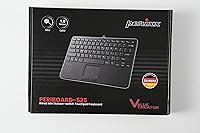
  • Package Contents: The retail box includes the keyboard unit itself and a printed user manual; no additional accessories or adapters are bundled.

Related Reviews
Perixx PERIBOARD-512B Wired Ergonomic Keyboard
83%
87%
Ergonomics & Comfort
84%
Key Layout & Typing Experience
82%
Build Quality & Durability
91%
Wrist Support
95%
Setup & Installation
More
Perixx PERIBOARD-517 Wired Washable USB Keyboard
85%
88%
Durability & Build Quality
93%
Ease of Cleaning
76%
Typing Comfort
90%
Water & Dust Resistance (IP65 Rating)
80%
Ergonomics & Key Design
More
Perixx Periboard-612B Wireless Ergonomic Split Keyboard
84%
88%
Ergonomics & Comfort
91%
Wireless Connectivity
85%
Ease of Use
76%
Key Travel & Typing Experience
82%
Build Quality
More
Perixx PERIBOARD-835BL Wireless Ergonomic Mechanical Keyboard
82%
88%
Ergonomics and Comfort
85%
Typing Experience
82%
Connectivity and Multi-Device Support
87%
Build Quality
90%
RGB Customizability
More
Perixx PERIBOARD-536B Wired Ergonomic Compact Keyboard
85%
89%
Ergonomics
91%
Comfort
85%
Build Quality
78%
Typing Experience
92%
Design/Compactness
More
Perixx PERIBOARD-210C Wired USB-C Keyboard
84%
88%
Typing Experience
83%
Build Quality
91%
Quietness of Keys
87%
Compatibility
85%
Portability
More
Perixx PERIBOARD-624B Wireless Ergonomic Split Keyboard
85%
89%
Ergonomics & Comfort
91%
Wireless Connectivity
76%
Key Response & Travel
84%
Build Quality
80%
Typing Experience
More
Perixx PERIBOARD-332
81%
83%
Typing Comfort
74%
Build Quality
69%
Backlighting Quality
91%
Compact Design & Portability
67%
Cross-Platform Compatibility
More
Perixx PERIBOARD-317R Wired Backlit USB Keyboard
83%
88%
Ease of Use
85%
Typing Comfort
77%
Backlighting Performance
92%
Value for Money
90%
Key Visibility
More
Perixx PERIBOARD-505H Wired Mini Keyboard with Trackball
86%
92%
Value for Money
87%
Trackball Performance
85%
Ease of Use
80%
Build Quality
91%
Compact Design
More

FAQ

It works immediately on any supported Windows machine — just plug it in and the keyboard and touchpad are recognized automatically. No driver downloads, no setup wizard, nothing to configure before you can start using it.

Officially, it is only supported on Windows 7 through 11. The keyboard keys will generally function on macOS and Linux since they use standard HID protocols, but the touchpad behavior becomes unreliable and gesture support breaks down. If you are primarily on a non-Windows system, this is a real limitation worth factoring in.

Yes, but the adjustment has to be done through your operating system rather than any software bundled with the keyboard. On Windows, go to Settings, then Bluetooth and Devices, then Touchpad or Mouse, and tweak the pointer speed from there. Most users find a comfortable setting within a minute or two of experimenting.

They work fine for connecting a USB drive, a wireless receiver, or a standard peripheral, but keep in mind these are USB 2.0 ports, not USB 3.0. Charging a phone will work at a slow rate, and small file transfers are fine, but moving large files like videos or disk images will feel noticeably sluggish compared to a modern USB 3.0 hub.

The scissor switches feel closer to a good laptop keyboard than a desktop keyboard — the travel is shorter and the feedback is softer than most office membrane boards. Most users adapt quickly, especially if they already type on a laptop. If you are used to a mechanical keyboard with deep travel, the adjustment will be more noticeable.

For intermittent use — clicking through menus, occasional scrolling, navigating a file browser — the touchpad is workable. It is genuinely compact at under 2.5 inches wide, so anyone doing extended cursor-heavy work like editing or detailed spreadsheet navigation will likely still want a mouse on hand. It is best thought of as a convenience feature rather than a full mouse replacement.

In the short to medium term the legends hold up well, but ABS keycaps are known to wear over time under heavy finger contact. Users who type intensively on the same keys every day start noticing fading after roughly 12 to 18 months. For most professional or industrial use cases where multiple users rotate through the keyboard, this timeline is extended considerably.

The compact and flat form factor suits panel or bracket mounting well, and the 5.9-foot cable gives enough slack for most mounting positions. There are no dedicated mounting holes in the chassis, so you would need adhesive mounts or a bracket designed for the keyboard dimensions, but many industrial users manage this without issues.

There is no dedicated number pad — the 78-key layout is tenkeyless, which is exactly why the footprint is so compact. If you regularly enter numeric data in bulk, this is worth considering carefully, as there is no numpad option or switchable numlock layer that replicates one.

Perixx covers the keyboard with a 12-month limited warranty against manufacturing defects. For warranty claims or support, you would contact Perixx Computer GmbH directly. User feedback generally describes the build as reliable enough that warranty claims are uncommon, but it is reassuring to have the coverage in place for a work-critical peripheral.