Logitech Signature Slim MK625 Wired Combo




Overview
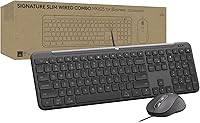
The Logitech Signature Slim MK625 Wired Combo is built squarely for organizations that need reliable, interference-free peripherals — think hospital workstations, bank teller desks, or IT-managed office fleets where wireless simply is not an option. Plug the USB-C cable in and you are working; no drivers to install, no Bluetooth pairing headaches. The keyboard sits low and flat, borrowing its profile from the kind of laptop keyboards that touch typists already know well. Aesthetically, the muted graphite finish fits into professional environments without drawing attention. Within Logitech's business lineup, this wired combo lands at a mid-range price that reflects genuine functionality rather than premium branding.
Features & Benefits
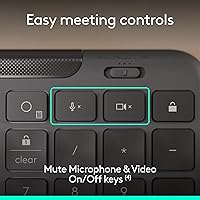
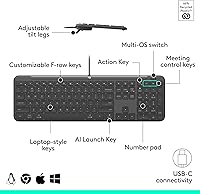
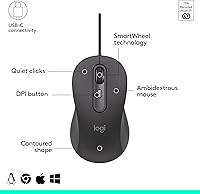
The low-profile membrane keys have a gentle scoop that guides fingers naturally, making the transition from a laptop keyboard to a desktop setup feel almost effortless for touch typists. Key travel is shallow — that's intentional — and the typing experience is noticeably quiet compared to most desktop keyboards. The mouse features SmartWheel scrolling, letting you flick between rapid free-spinning and controlled line-by-line precision without hunting through settings. A simple physical toggle handles OS switching across Windows, macOS, and ChromeOS, which IT teams will appreciate during deployment. The keyboard also includes an AI launch key, meeting controls, and an Action Key customizable through Logi Tune — though customization requires software access that not all managed-environment users will have.
Best For
This wired combo is a natural pick for IT administrators who need to standardize peripherals across large, compliance-sensitive organizations — the wired connection removes wireless policy concerns entirely. Employees in healthcare or finance who work on restricted networks will find the plug-and-play setup particularly frictionless. Touch typists who spend their days on a laptop but dock at a desk will adjust quickly to the flat keyboard profile. Procurement teams with sustainability requirements will appreciate that the plastic housing is built substantially from post-consumer recycled material — not a token gesture. The multi-OS toggle also makes it a solid choice for environments running mixed Mac and Windows machines side by side.
User Feedback
Launched in June 2025, this business keyboard-and-mouse set has gathered a modest but largely positive early response. The prevailing praise centers on typing comfort and how little effort the initial setup takes — users consistently note the clean, no-fuss experience. That said, a few buyers have flagged the mouse as feeling slightly small for larger hands, and those coming from mechanical keyboards find the membrane feel underwhelming. Cable length has come up occasionally as a limitation for deeper desk setups. With only a few dozen ratings collected so far, it is too early to draw firm conclusions, but the overall tone suggests the MK625 is delivering on its core promise for its intended audience.
Pros
- USB-C plug-and-play means zero setup time — ideal for high-turnover or large-scale IT deployments.
- The low-profile keyboard genuinely suits laptop users transitioning to a desk without relearning their typing posture.
- SmartWheel scrolling lets you switch between fast document skimming and precise line-by-line control with a single flick.
- A physical OS toggle makes switching between Windows, macOS, and ChromeOS practical without touching software settings.
- The wired connection eliminates wireless interference concerns entirely, a real advantage in RF-sensitive environments.
- Recycled plastic construction gives sustainability-focused procurement teams a concrete, verifiable attribute to document.
- Early buyers consistently praise the quiet key action and clean graphite aesthetic for professional office settings.
- Power consumption is meaningfully lower than previous-generation models, which adds up in large-scale deployments.
- The ambidextrous mouse design works for both left- and right-handed users without requiring a separate SKU.
Cons
- Membrane key feel will disappoint anyone coming from a mechanical keyboard — there is limited tactile feedback.
- The mouse runs small and may cause hand fatigue for users with larger grips over extended work sessions.
- Cable length is fixed and may fall short on deeper desks or setups where the computer sits further from the user.
- Logi Tune customization is off-limits in many managed corporate environments where employees lack admin privileges.
- The review pool is still small given the mid-2025 launch date, making it harder to assess long-term durability.
- No wireless option exists for users who occasionally need flexibility — this is strictly a tethered solution.
- The AI Launch Key and meeting controls add little value in environments where Logi Tune cannot be installed.
- Users who prefer a traditional, higher-profile keyboard may find the flat layout tiring over very long typing sessions.
Ratings
The scores below for the Logitech Signature Slim MK625 Wired Combo were produced by our AI review engine after analyzing verified buyer feedback from global markets, with spam, bot-generated, and incentivized submissions actively filtered out. Each category reflects the honest balance of what real users praised and where they ran into frustration. Nothing has been softened to protect brand reputation — the pain points are here alongside the strengths.
Ease of Setup
Typing Comfort
Mouse Ergonomics
SmartWheel Scrolling
Multi-OS Compatibility
Build Quality
Key Travel & Feedback
Cable & Connectivity
Productivity Features
Value for Money
Aesthetic & Design
Sustainability Credentials
Mouse Button Layout
Long-Term Reliability
Suitable for:
The Logitech Signature Slim MK625 Wired Combo is purpose-built for organizations where wireless peripherals are not an option — hospitals, financial institutions, and government offices where network security policies or RF interference concerns make a corded solution the only practical choice. IT administrators will find the USB-C plug-and-play setup a genuine time-saver when rolling out dozens of workstations, since there is nothing to configure and the physical OS toggle can be preset before the combo ever reaches an employee's desk. Touch typists who spend most of their day on a laptop keyboard but need a desktop setup will adapt quickly to the flat, low-profile key layout without a significant relearning curve. Procurement teams with sustainability targets will also find the recycled plastic construction a credible, documentable attribute rather than a vague marketing claim. If your priority is a clean, reliable, no-fuss wired combo that works across multiple operating systems out of the box, this set covers the basics well.
Not suitable for:
The Logitech Signature Slim MK625 Wired Combo is not a strong fit for users who prefer the tactile feedback and audible click of mechanical keys — the membrane switches here are quiet and flat by design, and no amount of adjustment will change that. People with larger hands may find the mouse uncomfortably compact during long workdays, particularly if they are used to full-size ergonomic mice. The USB-C cable, while tidy, has a fixed length that can feel restrictive on deeper or multi-monitor desk setups where the tower sits further away. Anyone hoping to heavily customize button behavior or remap keys through Logi Tune should also know that software access may be restricted in managed corporate environments where admin privileges are locked down. And despite appearing on some general-purpose listings, this combo is not designed for gaming — the mouse lacks the precision sensor, polling rate, and programmability that even casual gaming demands.
Specifications
- Connectivity: The combo connects via a single wired USB-C cable, requiring no drivers, receivers, or pairing steps on any supported operating system.
- OS Compatibility: A physical toggle switch on the keyboard supports Windows, macOS, ChromeOS, and Linux without any software installation.
- Keyboard Type: Full-size membrane keyboard with low-profile, laptop-style keycaps featuring a subtle concave scoop designed to guide finger placement naturally.
- Key Layout: Includes a dedicated AI Launch Key, meeting control keys, and one Action Key that can be remapped through Logi Tune software where admin access is available.
- Mouse Scrolling: The ambidextrous mouse uses Logitech SmartWheel technology, allowing the user to switch between rapid free-spin scrolling and controlled line-by-line precision with a single flick.
- Mouse Buttons: The mouse has 4 physical buttons total, with 2 of those configurable through Logi Tune software for custom actions.
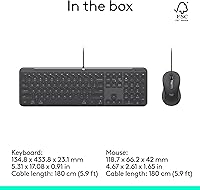
- Dimensions: The keyboard measures approximately 17.08″ long, 5.31″ deep, and 0.91″ tall, offering a slim desktop footprint suited to tight workstation layouts.
- Combined Weight: The keyboard and mouse together weigh approximately 1.79 pounds, keeping the combo lightweight enough for easy relocation between workstations.
- Color: Available in Graphite, a muted dark grey finish appropriate for professional office and institutional environments.
- Power Source: Both the keyboard and mouse draw power directly through the USB-C wired connection, eliminating the need for batteries or separate charging cables.
- Energy Efficiency: The combo is engineered to consume significantly less power than previous Logitech wired business models, benefiting organizations monitoring energy usage across large hardware fleets.
- Recycled Materials: The plastic components throughout the keyboard and mouse are made from a minimum of 66% post-consumer recycled content, a verifiable sustainability attribute for procurement documentation.
- Mouse Handedness: The mouse body is symmetrically designed, making it equally usable for left-handed and right-handed users without requiring a separate product variant.
- Software: Optional compatibility with Logi Tune and Logitech Sync allows key remapping and device management, though full functionality requires admin-level software installation privileges.
- Adjustable Tilt: The keyboard includes adjustable height feet, allowing users to tilt the typing surface to a preferred angle for comfort during extended sessions.
- Model Number: The official Logitech model identifier is 920-013303, useful for IT procurement, warranty registration, and bulk ordering through business channels.
Related Reviews
Logitech Signature Slim Wired K620 for Business
Logitech Signature Slim MK955 for Business
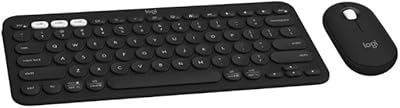
Logitech Slim Bluetooth Combo
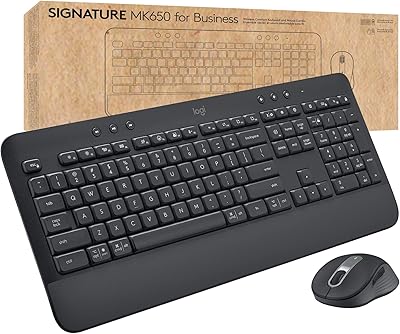
Logitech MK650 for Business
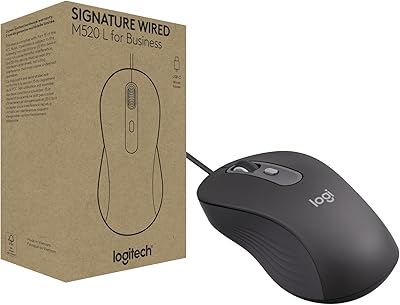
Logitech Signature Wired M520 L for Business
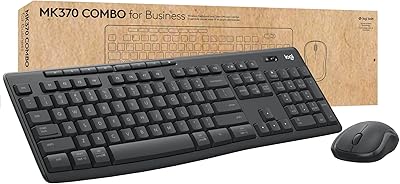
Logitech MK370 Combo for Business
Logitech MK520 Wireless Keyboard Mouse Combo
Logitech Zone Wired
Logitech POP ICON Combo