Overview

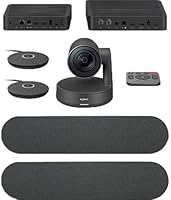
The Logitech Rally Plus arrived in late 2018 as an enterprise-grade answer to a real problem: large conference rooms that consistently look and sound terrible on video calls. This conferencing system bundles a 4K PTZ camera, modular speaker pods, beamforming microphones, and a central hub into one cohesive package. It connects via USB plug-and-play, meaning no custom AV firmware and no integrator required — just plug into a PC, Mac, or Chromebox and go. That simplicity is deliberate. The target audience is IT buyers and facilities teams, not home office workers, and the engineering reflects that priority — robust, room-scale hardware built to run daily without babysitting.

Features & Benefits

The camera is where this room camera kit genuinely earns attention. Its AI-powered auto-framing — built on Logitech's RightSense platform — tracks participants and adjusts pan, tilt, and zoom without anyone touching a remote. In a room of 20 people, that matters; presenters can move freely without worrying about walking out of frame. The 4K CCD sensor produces sharp, color-accurate images that hold up well on large displays. Audio is handled by modular speaker pods paired with a beamforming microphone array, a combination that keeps distant voices intelligible without requiring everyone to crowd a central table. Platform support covers Zoom, Microsoft Teams, and Google Meet with no driver headaches.

Best For

This conferencing system makes the most sense in large boardrooms and training rooms where 15 to 25 people regularly gather. It suits organizations rolling out a standardized AV setup across multiple locations — once an IT team has configured one unit, replicating the deployment is straightforward. Any environment where audio clarity at distance is non-negotiable will benefit from the speaker pod layout. The auto-framing removes the need for a dedicated AV operator, which helps justify the investment for rooms in heavy daily rotation. Conversely, if your team meets in small huddle spaces or the room sits idle most of the week, simpler alternatives will likely serve just as well at a fraction of the cost.

User Feedback

The Rally Plus holds a 3.7-out-of-5-star average across 52 ratings — not a ringing endorsement, but the breakdown is telling. Satisfied buyers most consistently cite the auto-framing reliability and genuine room-grade audio as features that justify the price. Critical reviews, however, surface two recurring complaints: occasional tracking lag when a participant moves quickly across the room, and awkward cable management during initial installation. A segment of buyers also stress that the cost only makes sense for rooms in frequent heavy use — spaces that sit empty half the week make the math difficult to defend. Solid performance when conditions fit, but careful pre-purchase planning is strongly advised.

Pros

  • AI-powered auto-framing tracks participants naturally, removing the need for a manual camera operator.
  • 4K CCD sensor produces sharp, color-accurate footage that holds up well on large boardroom displays.
  • Modular speaker pods deliver genuine room-filling audio, not the thin sound typical of camera bars.
  • USB connectivity means IT teams can deploy without proprietary drivers or AV contractor involvement.
  • Works out of the box with Zoom, Microsoft Teams, and Google Meet without reconfiguration.
  • Beamforming microphone array keeps distant voices intelligible without a separate speakerphone on the table.
  • Multi-year users report stable day-to-day performance with no significant hardware degradation.
  • Standardizing across multiple rooms is straightforward once the first unit is configured.
  • The Rally Plus has a clean, professional design that fits naturally into modern boardroom environments.

Cons

  • Auto-framing can lag noticeably when multiple participants move across the room simultaneously.
  • Cable management between the hub and speaker pods is tedious in rooms without existing cable infrastructure.
  • The value proposition collapses in rooms used only a few times per week.
  • Remote control without Logitech's companion software feels limited compared to competing enterprise systems.
  • Firmware updates have occasionally altered auto-framing behavior, requiring recalibration after the fact.
  • Speaker pod echo suppression can struggle in rooms with hard, reflective surfaces like glass walls.
  • The hub unit is bulky and visually obtrusive when surface-mounted rather than rack-integrated.
  • Non-standard or L-shaped room layouts may require a supplementary camera, adding unexpected cost.
  • Setup documentation leaves gaps that can frustrate facilities staff without an AV background.

Ratings

The Logitech Rally Plus scores below are generated by AI after analyzing verified buyer reviews from global sources, with spam, bot-submitted, and incentivized feedback actively filtered out. This conferencing system drew strong opinions across both enterprise IT teams and facilities managers, and the ratings reflect that honestly — strengths and frustrations carry equal weight here.

Auto-Framing Intelligence
83%
In large rooms where presenters move frequently, the AI-driven PTZ tracking is a genuine operational advantage — nobody has to manage a remote or ask IT to re-frame the shot mid-meeting. Reviewers in training room environments specifically praised how natural the transitions feel during active discussions.
When multiple participants move simultaneously or someone crosses the room quickly, the tracking can lag noticeably before catching up. A handful of enterprise buyers flagged this as disruptive in fast-paced, high-stakes meetings where smooth video continuity matters.
Video Quality
88%
The 4K CCD sensor delivers sharp, color-accurate footage that holds up well on large wall displays and dual-screen boardroom setups. Users running this on Zoom and Teams consistently noted that remote participants could read whiteboard content and see facial expressions clearly, even from across a large room.
The 4K output only fully pays off when the display chain and conferencing platform can handle it end-to-end. A few buyers noted that in compressed video call environments, the practical difference over a good 1080p system was harder to justify given the price gap.
Audio Clarity
86%
The modular speaker pods produce genuinely room-filling sound without the hollow or tinny quality common in all-in-one bars. Multiple reviewers in rooms seating 20 or more noted that voices from the far end of the table remained clearly intelligible without anyone needing to lean toward a mic.
Cable routing between the speaker pods and the hub can get untidy in rooms where the table is not centrally placed, and a few users reported that echo suppression occasionally struggled when the room had hard reflective surfaces like glass walls or uncarpeted floors.
Ease of Deployment
79%
21%
USB plug-and-play was consistently cited as a major selling point by IT managers rolling this out across multiple rooms. No proprietary drivers, no AV integrator required — plug into a laptop or room PC and the system is ready within minutes, which significantly reduces rollout time at scale.
While the initial connection is simple, the physical installation tells a different story. Cable management for the hub, speaker pods, and camera mount was described as tedious in several reviews, particularly in rooms where cable channels or ceiling runs were not already in place.
Value for Money
58%
42%
For organizations running daily, high-attendance meetings in large rooms, the all-in-one nature of the system and its low maintenance overhead make the premium price easier to rationalize. IT teams avoiding repeated AV service calls see a real total-cost-of-ownership argument here.
The price point is a recurring complaint in mixed and negative reviews. Buyers who deployed this in rooms used only a few times per week found it difficult to defend the expenditure compared to capable mid-range alternatives. The math only works when room utilization is consistently high.
Build Quality & Durability
82%
18%
The physical hardware feels enterprise-grade — the camera unit and speaker pods have a substantial, well-constructed feel that matches the expectations set by the price. Users with multi-year deployments reported no hardware degradation in day-to-day operation under normal meeting room conditions.
At 17 pounds for the full setup, it is not a lightweight system, and a few reviewers noted that mounting options in non-standard room configurations required additional hardware not included in the box. Permanent installation is straightforward, but ad-hoc setups are impractical.
Platform Compatibility
91%
Compatibility with Zoom, Microsoft Teams, and Google Meet out of the box is a practical strength for organizations that have not fully standardized. IT teams managing mixed environments appreciated that the same hardware works without reconfiguration when switching between platforms.
A small number of reviewers reported minor firmware update issues when the system was used with certain Chromebox configurations, requiring manual intervention. These were isolated cases, but in large enterprise rollouts even occasional compatibility friction adds to support overhead.
Camera Range & Coverage
77%
23%
The pan-tilt-zoom range is well-suited to rooms in the 15-to-25-person range the system targets. The optical accuracy and maximum focal length give the camera enough reach to keep distant participants in a recognizable, well-framed shot without digital zoom degradation.
In unusually wide or L-shaped rooms, the camera's coverage has limits that auto-framing cannot fully compensate for. A few buyers with non-standard room layouts found they needed to supplement with a secondary camera, which added unexpected cost and complexity.
Microphone Performance
81%
19%
The beamforming array does a solid job picking up voices distributed around a large table without requiring a separate speakerphone in the center. Reviewers noted it handled cross-talk and overlapping voices reasonably well in structured meeting formats.
In informal, free-roaming sessions where participants moved around the room frequently, the microphone pickup was less consistent. Voices from participants standing near the walls or windows were occasionally reported as lower in volume or slightly muffled compared to those seated at the table.
Setup Documentation
67%
33%
The quick-start documentation covers the standard use case clearly enough for an experienced IT technician to complete installation without external help. The USB-centric design keeps the core setup logic simple and the component count manageable.
For less technical installers or facilities staff without AV backgrounds, the documentation gaps around cable routing and hub placement created confusion. Several reviewers wished for clearer guidance on optimal speaker pod positioning relative to room dimensions.
Remote Management & Control
63%
37%
For organizations using Logitech's device management tools, remote monitoring and configuration of deployed units adds real operational value at scale. IT teams managing rooms across multiple floors or buildings found centralized oversight helpful.
Buyers not invested in the Logitech software ecosystem found remote management options limited and less intuitive compared to competing enterprise systems. Manual control without the companion software felt underdeveloped, which was a recurring point of frustration in critical reviews.
Long-Term Reliability
74%
26%
Users with deployments stretching beyond two years generally reported stable day-to-day performance with no major hardware failures. For a system running in a heavily used boardroom five days a week, that kind of reliability track record matters more than any spec on paper.
Firmware updates occasionally introduced minor behavioral changes to the auto-framing algorithm that required recalibration, and a few users reported that older units showed gradual degradation in auto-tracking responsiveness over time without obvious hardware cause.
Aesthetics & Room Presence
76%
24%
The clean, professional industrial design of the camera unit and speaker pods fits naturally into a modern boardroom without looking like consumer electronics. Several reviewers mentioned that clients and executives reacted positively to the polished appearance during in-person visits.
The size and weight of the full system means it has a visible physical footprint that some minimalist office environments found obtrusive. The hub unit in particular was noted as bulky when surface-mounted rather than integrated into a rack or credenza.

Suitable for:

The Logitech Rally Plus is built for a specific problem in a specific context, and it solves that problem well: large conference rooms where 15 to 25 people meet regularly and video quality actually matters. IT managers tasked with rolling out a standardized AV solution across multiple corporate locations will find the USB plug-and-play approach refreshingly simple compared to traditional AV infrastructure. Organizations that have eliminated dedicated AV operators will especially appreciate the AI-driven auto-framing, which keeps the camera on the action without anyone managing a remote or tripod. Training rooms, executive boardrooms, and large collaboration spaces that run back-to-back meetings throughout the week get the most mileage out of this system — the hardware is built for that kind of sustained, daily load. Companies already invested in Zoom, Microsoft Teams, or Google Meet will find the out-of-the-box compatibility removes one more variable from an already complex deployment.

Not suitable for:

If your team works in a small huddle room, a home office, or a space that seats fewer than ten people, the Logitech Rally Plus is almost certainly more system than you need — and the price will feel especially hard to justify. The value equation depends heavily on room utilization; buyers who deploy this in spaces used only two or three times a week consistently report that cheaper alternatives would have served them just as well. The physical footprint and 17-pound weight make it impractical for flexible or portable setups where the camera needs to move between rooms. Organizations without a reasonably organized cable management infrastructure will find the multi-component setup — hub, speaker pods, camera mount — more cumbersome than the plug-and-play reputation suggests. Budget-conscious buyers or small businesses without a dedicated IT function should look at simpler systems that do not require the same level of installation planning.

Specifications

  • Video Resolution: The camera captures footage at 4K Ultra HD, delivering sharp, detail-rich video suitable for large display setups in boardrooms and training rooms.
  • Camera Type: Pan-tilt-zoom (PTZ) motorized camera with automated movement driven by AI-based participant tracking.
  • Auto-Framing: RightSense AI technology uses human perception algorithms to detect participants and adjust framing, exposure, and color balance in real time.
  • Image Sensor: CCD sensor optimized for accurate color reproduction and consistent performance under typical indoor conference room lighting conditions.
  • Connectivity: USB plug-and-play connection to host PC, Mac, or Chromebox — no proprietary drivers or dedicated AV hardware required.
  • Compatible OS: Fully supported on Windows, macOS, and ChromeOS without additional software installation for basic operation.
  • Platform Support: Works out of the box with Zoom, Microsoft Teams, Google Meet, and other major USB-based video conferencing platforms.
  • Speaker System: Modular ultra-low distortion speaker pods designed to deliver room-filling audio coverage across large meeting spaces.
  • Microphone: Beamforming microphone array captures voices from distributed participants around a large table with directional noise filtering.
  • Audio Formats: Supports AAC, MP3, and PCM audio formats for broad compatibility across conferencing software and playback scenarios.
  • Dimensions: The full system measures 18.2 x 9.2 x 28.8 inches, reflecting a hardware footprint suited to permanent boardroom installation rather than portable use.
  • Weight: Complete system weighs 17 pounds, making it a fixed-installation solution rather than one intended for frequent relocation.
  • Room Size Target: Engineered specifically for large conference rooms accommodating 15 to 25 participants, where single-camera and single-speakerphone solutions fall short.
  • Model Number: Official Logitech model number is 960-001398, useful for procurement, warranty registration, and enterprise volume purchasing.
  • Availability: First made available in September 2018 and remains an active, non-discontinued product in Logitech's enterprise conferencing lineup.
  • Focal Length: Maximum focal length of 3 millimeters supports the optical zoom range needed to frame participants across a large room accurately.
  • Maximum Aperture: Lens aperture reaches a maximum of f/5.6, calibrated for controlled indoor lighting environments typical of corporate meeting spaces.
  • Storage Slot: Includes a Micro SD card slot, though primary operation relies on USB streaming to a connected host computer.

Related Reviews
Logitech StreamCam Plus Webcam
87%
92%
Video Quality
95%
Ease of Setup
87%
Microphone Performance
90%
Auto-Focus Accuracy
91%
Portability
More
Logitech Pure-Fi Express Plus Speaker Dock
85%
88%
Sound Quality
93%
Portability
85%
Ease of Use
80%
Alarm Clock Functionality
78%
Battery Life
More
Logitech M750 L
Logitech M750 L
85%
93%
Ergonomics & Comfort
86%
Scroll Wheel (SmartWheel)
91%
Click Noise (SilentTouch)
88%
Multi-Device Connectivity
94%
Battery Life
More
Logitech Pebble M350
88%
88%
Build Quality
85%
Ergonomics & Comfort
94%
Battery Life
90%
Connectivity Reliability
87%
Tracking Precision
More
Logitech Wireless Touchpad
84%
80%
Performance
85%
Ease of Use
88%
Wireless Connectivity
83%
Build Quality
82%
Ergonomics
More
Logitech ERGO K860
Logitech ERGO K860
81%
93%
Ergonomic Comfort
89%
Wrist Rest Quality
84%
Typing Feel & Accuracy
67%
Adjustment Period
81%
Build Quality & Materials
More
BuddyPhones Explore Plus
90%
94%
Comfort & Fit
91%
Build Quality
88%
Sound Clarity
97%
Volume Limiting Safety
90%
Portability
More
Logitech POP Mouse
Logitech POP Mouse
82%
93%
Silent Click Performance
89%
SmartWheel Scrolling
87%
Multi-Device Connectivity
91%
Battery Life
71%
Ergonomics & Hand Fit
More
Logitech X-530
Logitech X-530
75%
82%
Sound Quality
80%
Bass Performance
86%
Dialogue / Center Channel
84%
Surround Imaging
75%
Build Quality
More
TourBox Elite Plus
TourBox Elite Plus
87%
94%
Ergonomics & Comfort
91%
Workflow Efficiency
88%
Software Integration
90%
Programmability & Customization
85%
Build Quality
More

FAQ

You do not have to choose — the system connects via USB and is recognized as a standard video and audio device by your computer, so you can use it with Zoom one meeting and Teams the next without any reconfiguration. Switching between platforms is as simple as selecting the camera and microphone inputs inside whichever app you open.

The core connection is straightforward, but running cables cleanly between the hub, speaker pods, and camera mount can be genuinely tedious if your room lacks cable channels or conduit. Most IT teams handle it fine, but budget extra time for a clean install — this is not a 20-minute job in a bare room. Having a cable raceway or floor box already in place makes a meaningful difference.

For structured meetings where participants are mostly seated, the tracking works very reliably. Where it occasionally shows its limits is in informal sessions with people moving quickly or multiple participants shifting positions at once — you may notice a brief lag before the camera catches up. It is not a dealbreaker for most rooms, but worth knowing if your meetings are particularly dynamic.

For a standard rectangular boardroom seating around 20 people, the included speaker pod configuration typically provides adequate coverage. Very long or irregularly shaped rooms may benefit from the expanded Rally Plus configuration with additional pods, which Logitech supports through its modular design — extra pods can be daisy-chained to extend coverage without replacing the core system.

It works on macOS without any additional driver installation — plug in via USB and the operating system recognizes it as a standard camera and audio device. The same applies to Windows and ChromeOS, so mixed-device meeting rooms are not a problem.

The beamforming microphone does a reasonable job in most rooms, but echo suppression can be challenged by heavily reflective environments like glass-walled boardrooms or rooms with no soft furnishings. Adding acoustic panels or soft seating can help considerably. It is not a unique flaw of this system — most room-grade microphones share this sensitivity.

Logitech does allow firmware management through its Sync device management software, and IT teams with administrator access can control update timing rather than accepting automatic pushes. Rolling back to a prior firmware version is technically possible through Logitech support channels, though it is not a self-service process for most users.

Practically speaking, this room camera kit is harder to justify for low-utilization rooms. The hardware is built for daily, heavy use and the value proposition is strongest when that is the actual scenario. For rooms that meet infrequently, a capable mid-range system will likely serve just as well at significantly lower cost.

The camera and hub draw power through the dedicated Logitech Rally system connection rather than directly from a standard USB port on the host computer — the hub has its own power supply, which then distributes power to the connected components. You will need an accessible power outlet near the installation point.

The speaker pods are designed for table-top placement and work best positioned along the conference table where participants are seated. They connect to the hub via cable, so placement is limited by cable length rather than wireless range. Logitech sells extension cables for rooms where the standard cable length does not reach the preferred pod positions.