
Overview

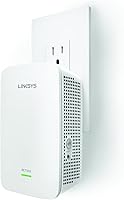
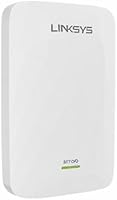
The Linksys RE7000 AC1900 WiFi Range Extender sits in an interesting spot — it's not the cheapest option on the shelf, but it's also not asking you to rebuild your entire network the way a mesh system would. It plugs directly into a wall outlet and, crucially, has a pass-through outlet so you don't lose that socket entirely. Linksys claims coverage up to 2,500 sq. ft., which is realistic in open floor plans but shrinks fast in older homes with thick walls or awkward layouts. Think of this range extender as a solid middle-ground fix — capable enough for most households, but with a few conditions attached that are worth knowing before you buy.

Features & Benefits

The RE7000 runs on dual-band WiFi 5, splitting its bandwidth between the 2.4GHz band for range and the 5GHz band for speed — the 5GHz side handles tasks like 4K streaming and online gaming without breaking a sweat. MU-MIMO technology means the extender can serve multiple devices at once rather than taking turns, which matters a lot when three people are on video calls while someone else streams. A Gigabit Ethernet port on the back is a welcome addition at this price tier — plug in a smart TV or game console and you'll get a noticeably more stable connection than WiFi alone. The Spot Finder app feature helps you nail placement before you commit.

Best For

This Linksys booster makes the most sense for homeowners running a single router who keep losing signal in a detached garage, a back bedroom, or the backyard during summer. If your household regularly has multiple people streaming or gaming at the same time, the dual-band setup handles that load better than most basic extenders. One important note: the automatic roaming feature — where your devices switch to the strongest signal as you move around — only works if you already own a compatible Linksys Max-Stream router. Without one, this range extender still extends your WiFi perfectly well, but you'll handle the manual network switching yourself when moving between rooms.

User Feedback

Across more than 3,700 ratings, this range extender holds a 3.9 out of 5 — respectable, but it tells a story of mixed experiences. The most consistent praise is straightforward: dead zones get fixed, and the setup process is quick, especially with WPS push-button pairing. The Gigabit Ethernet port keeps getting mentioned as a genuine plus that similar extenders at this price often skip. On the other side, a recurring frustration is that some users expect roaming to work universally, only to find it is locked to specific Linksys hardware. A smaller but notable group also reports the unit needing occasional manual reboots after extended use — not a dealbreaker, but worth flagging.

Pros

  • Effectively eliminates dead zones in garages, backyards, and far bedrooms without touching router settings.
  • The pass-through outlet design means you do not sacrifice a wall socket to gain coverage.
  • MU-MIMO support handles multiple simultaneous streams without the devices taking turns for bandwidth.
  • A Gigabit Ethernet port lets you hardwire a console or smart TV for rock-solid connection stability.
  • WPS push-button setup takes under two minutes for most users — no app or browser required.
  • Spot Finder Technology helps you identify the best placement location before you commit to a spot.
  • Dual-band operation keeps slower 2.4GHz devices from clogging the faster 5GHz traffic.
  • Compatible with any existing router brand right out of the box, no reconfiguration needed.
  • Compact wall-plug form factor tucks neatly out of the way without blocking neighboring outlets.
  • Over 3,700 real-world reviews provide a reliable signal about what to expect in everyday home use.

Cons

  • Automatic device roaming only works when paired with a compatible Linksys Max-Stream router — a significant caveat buried in the fine print.
  • Actual coverage drops noticeably in older homes with thick walls or multi-floor layouts.
  • Some long-term owners report needing to manually reboot the unit periodically to restore a stable connection.
  • Running as a traditional extender creates a second network name, which can cause friction for devices that cling to a weaker signal.
  • The RE7000 is aging hardware in a market where WiFi 6 extenders are increasingly available near this price point.
  • No dedicated backhaul channel means the extender shares bandwidth with client devices, which can reduce effective throughput.
  • The companion app experience has drawn mixed reviews, with some users finding it unreliable during initial setup.
  • Buyers expecting mesh-level performance will be disappointed without the matching Linksys router ecosystem in place.

Ratings

The scores below reflect an AI-driven analysis of thousands of verified global reviews for the Linksys RE7000 AC1900 WiFi Range Extender, with spam, bot-generated, and incentivized submissions actively filtered out to ensure accuracy. Each category is scored on real buyer experiences, weighing both the praise and the frustrations that show up consistently across long-term users. Nothing has been smoothed over — the strengths and the genuine shortcomings are reflected equally.

Dead Zone Elimination
84%
For the majority of buyers, this is the core reason they purchased the RE7000 — and it delivers. Users in single-story homes with a garage, backyard, or far bedroom consistently report going from near-zero bars to a usable, streaming-capable connection without touching their router configuration.
Results vary significantly in multi-story homes or properties with older construction featuring plaster or concrete walls. Several reviewers noted the coverage ceiling of 2,500 sq. ft. is a best-case figure that does not always translate to real-world layouts with obstacles.
Setup Experience
81%
19%
The WPS push-button pairing is the clear favourite among buyers — most report it takes under two minutes from plugging in to having an active extended network. The Linksys app adds a Spot Finder feature that helps newcomers avoid the common mistake of placing the extender too close to the router.
A recurring minority of users ran into issues when relying on the browser-based setup interface, particularly on newer devices with updated browser security settings. The app itself has received mixed feedback, with some finding it slow or prone to losing connection mid-configuration.
Connection Stability
67%
33%
Under normal conditions — casual browsing, HD streaming, a few devices connected — the RE7000 holds its connection reliably and without noticeable hiccups. Users in apartments or smaller homes particularly noted stable day-to-day performance during the first several months of use.
Long-term users are the ones who surface this product's most consistent pain point: periodic disconnects that require a manual reboot to resolve. This is not a daily occurrence for most, but it is frequent enough across reviewers to suggest the firmware or hardware has a stability ceiling during sustained heavy use.
Roaming & Handoff
54%
46%
Within a native Linksys Max-Stream ecosystem, the automatic device handoff works as intended — users moving from a living room to a backyard reported video calls staying connected without manually switching networks, which is exactly what this feature promises.
The problem is that most buyers do not own a Linksys Max-Stream router, and the marketing does not make this dependency obvious enough. For those users, there is no automatic roaming at all — just two separate network names to manage, which is a significant disappointment given how prominently the feature is advertised.
Multi-Device Performance
78%
22%
MU-MIMO support means the extender serves multiple devices simultaneously rather than cycling through them one at a time, which makes a real difference in households where two people are on laptops while a TV is streaming. Buyers with four to six connected devices in the extended zone generally report smooth performance.
When the number of active simultaneous connections climbs higher — think eight or more devices during peak evening hours — throughput per device starts to degrade more noticeably than the spec sheet implies. The shared bandwidth between the extender and router also contributes to this ceiling.
Wired Ethernet Port
91%
The Gigabit Ethernet port is one of the most frequently praised features in user reviews, and for good reason — it lets buyers hardwire a gaming console or smart TV directly to the extender for a much more stable connection than WiFi alone can provide at distance from the router.
There is only one Ethernet port, so users hoping to wire up both a game console and a streaming device simultaneously are out of luck without adding a small switch. This is a minor limitation, but one that comes up in reviews from users with media-room setups.
Physical Design
86%
The wall-plug form factor is compact and unobtrusive, and the pass-through outlet on the front is a thoughtful detail that prevents users from sacrificing a socket just to extend their WiFi. It sits flush against most outlet styles without blocking the neighboring plug on a standard duplex socket.
In tight outlet configurations — behind furniture, inside entertainment unit cavities, or on power strips with closely spaced sockets — the body can still create a fit issue. A small number of reviewers also noted the unit runs warm during extended operation, which makes enclosed placement less ideal.
Streaming Quality
79%
21%
For 4K and HD video streaming specifically, the 5GHz band delivers more than enough throughput when the extender is well-positioned. Users who previously dealt with buffering mid-episode or resolution drops during peak hours report a clear improvement after installing this Linksys booster.
Streaming quality is heavily placement-dependent — users who install the extender too close to the router, or who have significant wall interference between the extender and their TV, report noticeably worse results. The extended network also introduces slightly higher latency than a direct router connection.
Gaming Performance
72%
28%
Casual and mid-level online gamers benefit from both the improved signal in dead zones and the option to use the Ethernet port for a wired connection to a console — many reviewers specifically call out the difference this makes for reducing lag spikes during competitive play.
Serious competitive gamers are likely to be frustrated by the latency overhead inherent to any WiFi extender, and the RE7000 is no exception. The bandwidth sharing between client devices and the router backhaul also means that peak ping times can be inconsistent during heavy household internet use.
Router Compatibility
83%
As a basic range extender, the RE7000 connects to any WiFi router without configuration changes — buyers using ISP-provided equipment from Comcast, Verizon, or AT&T report no issues getting it up and running with standard WPS or browser setup.
The compatibility story gets complicated once advanced features enter the picture. Seamless roaming is locked to Linksys Max-Stream hardware, and some users with older or non-standard router configurations reported inconsistent WPS pairing behaviour that required falling back to browser-based setup.
Value for Money
71%
29%
For users who genuinely need to fix a specific dead zone and want something better-equipped than a budget single-band extender, the RE7000 represents reasonable value — the MU-MIMO support, Gigabit port, and dual-band capability collectively justify the mid-range price compared to bare-bones alternatives.
Given that WiFi 6 extenders are increasingly available in a similar price bracket, the RE7000 feels like ageing hardware for buyers who are planning ahead. Users who do not have a Linksys ecosystem also lose a meaningful slice of what they are paying for, reducing the value proposition considerably.
App & Software
61%
39%
The Spot Finder feature within the Linksys app is genuinely useful for first-time extender buyers who are unsure where to place the unit — it provides signal strength feedback at different locations before you commit, which reduces the common trial-and-error placement process.
Beyond placement, the app experience draws consistent criticism. Several users report the app losing communication with the extender mid-setup, requiring a restart, and the overall interface has been described as feeling dated compared to competitor apps. Firmware update management through the app has also been flagged as unreliable.
Long-Term Reliability
63%
37%
A meaningful portion of reviewers have used the RE7000 for two or more years without hardware failure, suggesting the physical build quality is adequate for everyday plug-in use. It does not run excessively hot under normal operating conditions when placed in open air.
The periodic disconnect issue reported by long-term users remains the most credible reliability concern — and while rebooting resolves it temporarily, the pattern suggests a firmware-level issue that Linksys has not fully addressed. Buyers who cannot tolerate occasional intervention may find this frustrating over time.

Suitable for:

The Linksys RE7000 AC1900 WiFi Range Extender is a strong fit for homeowners who have a decent router already but keep losing signal in specific corners of the house — a back bedroom, a detached garage, or a patio where the kids watch videos on tablets. If your household regularly has four or five devices competing for bandwidth at the same time — a gaming console, a couple of laptops, a streaming TV — the MU-MIMO support means those devices get served more efficiently than with a basic single-band extender. It also works well for renters or homeowners who want to fix a coverage problem quickly without reconfiguring their entire network or spending significantly more on a full mesh system. Existing Linksys Max-Stream router owners get the most out of it, since the automatic device-switching feature actually works within that ecosystem. For a practical, low-fuss coverage fix in a home up to roughly 2,000 to 2,500 square feet with standard construction, this range extender punches well above the budget tier.

Not suitable for:

The Linksys RE7000 AC1900 WiFi Range Extender is not the right call if you are hoping for true mesh networking without already owning a compatible Linksys Max-Stream router — the automatic roaming that the marketing highlights simply will not activate, and you will be manually switching between two separate network names as you move around your home. Buyers in multi-story homes or properties with dense concrete, brick, or plaster walls should also temper their expectations, since real-world coverage often falls well short of the 2,500 sq. ft. ceiling figure in those conditions. If long-term stability without intervention is a priority — say, for a home office setup where a dropped connection mid-call is genuinely disruptive — the occasional disconnect reports from long-term users are worth taking seriously. Anyone ready to invest in a proper whole-home mesh system will find that spending a bit more gets them a more consistent, unified network experience without the compatibility caveats this booster carries.

Specifications

  • WiFi Standard: Operates on the 802.11ac (WiFi 5) standard, also backward compatible with 802.11a, 802.11b, 802.11g, and 802.11n devices.
  • Speed Class: Rated AC1900, combining up to 600Mbps on the 2.4GHz band and up to 1300Mbps on the 5GHz band for a theoretical combined throughput of 1.9Gbps.
  • Frequency Bands: Dual-band operation runs both the 2.4GHz and 5GHz bands simultaneously to balance range and speed across connected devices.
  • Coverage Area: Rated for up to 2,500 sq. ft. under ideal open-plan conditions; real-world coverage will vary based on wall materials, interference, and layout.
  • MU-MIMO: Supports Multi-User Multiple-Input Multiple-Output technology, allowing the extender to communicate with several devices at the same time rather than sequentially.
  • Ethernet Port: Includes one Gigabit Ethernet port for wired connections to devices such as smart TVs, gaming consoles, or Blu-ray players.
  • Beamforming: Uses beamforming to direct the WiFi signal toward connected devices rather than broadcasting equally in all directions, improving signal consistency.
  • Cross Band: Cross Band Technology routes traffic intelligently across both frequency bands to reduce congestion and maintain higher throughput during heavy use.
  • Roaming: Supports automatic device roaming between the router and extender, but this feature requires a compatible Linksys Max-Stream router to activate.
  • Spot Finder: Spot Finder Technology, accessible through the Linksys app, helps users identify the optimal wall placement for the extender before installation is finalized.
  • Setup Methods: Can be configured using WPS push-button pairing, the Linksys smartphone app, or a standard web browser on any laptop or tablet.
  • Design: Compact wall-plug form factor with a built-in pass-through outlet, allowing the socket directly above it on a standard duplex outlet to remain fully usable.
  • Dimensions: Measures 1.81 x 3.18 x 4.96 inches, making it small enough to plug into most outlet positions without obstructing surrounding fixtures.
  • Weight: Weighs 6.2 oz, making it a lightweight unit that draws no attention once plugged in and positioned on a wall.
  • Compatibility: Works as a standard range extender with any WiFi router brand; advanced roaming features are exclusive to compatible Linksys Max-Stream routers.

Related Reviews
Linksys RE7310 WiFi 6 Range Extender
64%
83%
Ease of Setup
61%
Signal Coverage
67%
Speed Performance
38%
Device Handoff & Roaming
74%
Multi-Device Handling
More
Linksys RE7350 WiFi 6 Wireless Range Extender
84%
88%
WiFi Performance
84%
Coverage Area
93%
Setup Ease
87%
Build Quality
82%
Speed Consistency
More
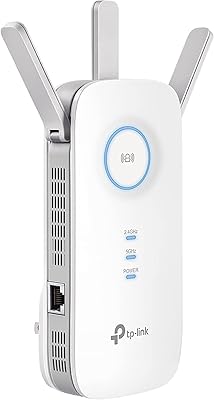
TP-Link RE550 Wi-Fi Range Extender
78%
86%
Coverage & Range
91%
Setup & Installation
62%
Throughput & Speed Performance
78%
Build Quality & Design
88%
Gigabit Ethernet Port
More
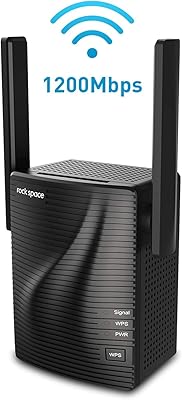
rockspace AC1200 WiFi Range Extender
72%
79%
Value for Money
88%
Ease of Setup
71%
Signal Coverage
57%
Real-World Speed
61%
Connection Stability
More
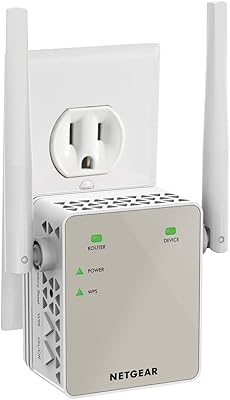
NETGEAR EX6120 WiFi Range Extender
74%
83%
Ease of Setup
76%
Signal Coverage
61%
Connection Speed
79%
Value for Money
58%
5GHz Band Performance
More
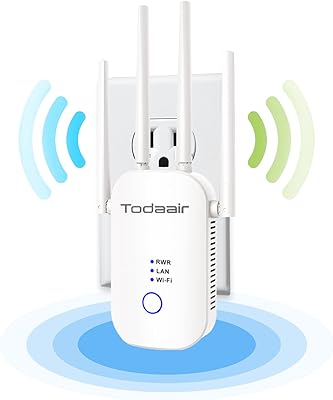
TODAAIR AC1200 WiFi Range Extender
80%
81%
Signal Range & Coverage
87%
Setup & Installation Ease
72%
Dual-Band Speed Performance
66%
Connection Stability
77%
Device Capacity
More
NETGEAR EX6250 WiFi Mesh Range Extender
81%
89%
WiFi Coverage
85%
Ease of Setup
84%
Speed and Performance
91%
Device Compatibility
87%
Build Quality
More
Netgear EX6400 WiFi Mesh Range Extender
73%
83%
Signal Coverage
61%
Throughput & Speed Performance
88%
Setup & Installation
58%
Smart Roaming Performance
86%
Wired Ethernet Connectivity
More
Surncest WIFI6 AX3000 WiFi 6 Range Extender
76%
81%
Signal Range & Coverage
84%
Setup & Ease of Use
83%
5 GHz Performance
58%
Bandwidth Trade-off (Repeater Mode)
78%
2.4 GHz Device Coverage
More
ingabis M-A25 AX3000 WiFi 6 Range Extender
77%
91%
Ease of Setup
78%
Signal Coverage
82%
WiFi Speed Performance
88%
Gigabit Ethernet Port
79%
Multi-Device Handling
More

FAQ

The RE7000 works as a range extender with virtually any router brand, including those from ISPs like Xfinity, AT&T, and Spectrum. The one catch is that the automatic device-roaming feature — where your phone or laptop switches to the strongest signal as you walk around — only activates when paired with a compatible Linksys Max-Stream router. With any other router, it still extends your WiFi coverage just fine; you just manage network switching manually.

Seamless roaming means your device automatically connects to whichever signal is strongest — your router or the extender — as you move around your home, without you needing to switch networks manually. In practice, most people in average-sized homes do not notice the absence of this feature day-to-day, since devices tend to hold a connection unless you physically move far away. If you frequently move around while on video calls or streaming, it becomes more relevant.

Setup is genuinely straightforward for most users. The quickest method is WPS: plug the extender into a wall outlet within range of your router, hold the WPS button on your router for a few seconds, then press the button on the extender. They pair automatically within a minute or two. If your router does not support WPS, the Linksys app or a browser-based setup at extender.linksys.com walks you through it step by step.

Midway between your router and the dead zone is the standard rule of thumb, but the Linksys app includes a Spot Finder feature that actively helps you test signal strength at different locations before you settle on one. Avoid placing it too close to the router — that defeats the purpose — and keep it away from thick concrete walls, microwaves, and other sources of interference.

Yes, that is one of the more practical design choices on the Linksys RE7000 AC1900 WiFi Range Extender — it includes a pass-through outlet on the front, so the socket above it on a standard duplex wall outlet remains fully accessible. You do not lose a plug just to gain better WiFi coverage.

Every extender introduces some overhead because it has to receive and then re-broadcast the signal, which typically reduces throughput compared to a direct router connection. In real-world use, most people find speeds in the extended zone are noticeably better than the near-zero signal they had before, which is the point. For the most demanding use — like competitive online gaming — running an Ethernet cable from the extender's Gigabit port to your device sidesteps most of that speed loss.

A handful of long-term users report needing to reboot the unit periodically to restore stability, which is a known inconsistency. If you are experiencing this, try repositioning the extender slightly to see if interference is the cause. Keeping the firmware updated through the Linksys app also helps, as Linksys has pushed stability fixes over time. If reboots are happening frequently, plugging it into a different outlet away from other electronics often helps.

Absolutely — this Linksys booster has a Gigabit Ethernet port on the side specifically for this purpose. Running a cable from the extender to a smart TV, PlayStation, or Xbox delivers a much more stable connection than WiFi alone, especially for 4K streaming or online gaming where a fluctuating signal causes visible stuttering or lag.

For most homes, yes. The 5GHz band handles 4K streaming without issues, and MU-MIMO support means the extender can serve multiple devices simultaneously rather than making them wait in line. That said, the actual result depends on your underlying internet plan speed and your router. If your ISP package cannot deliver enough bandwidth for multiple 4K streams, the extender will not change that.

A mesh system gives you a single unified network name, true automatic roaming across nodes, and generally more consistent performance throughout a large home — but it costs significantly more and often requires replacing your existing router. The RE7000 is a more affordable fix for a specific problem: one or two dead zones in an otherwise well-covered home. If dead zones affect most of your house or you regularly stream on many devices across multiple floors, the investment in a mesh system is worth serious consideration.