Overview

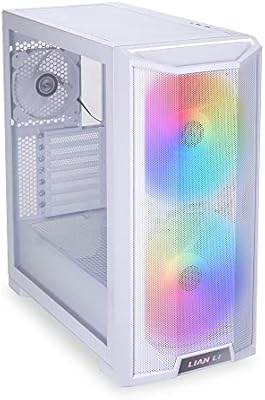
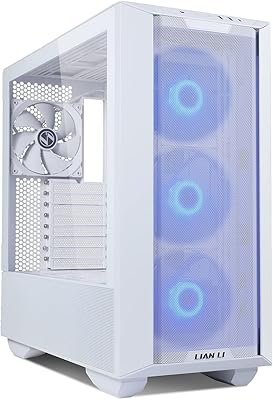
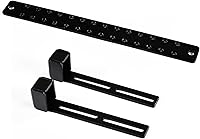
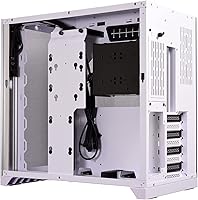
The Lian Li O11 Dynamic Mid-Tower PC Case has earned a firm spot in the enthusiast PC building world, and it's not hard to see why. Its defining characteristic is a dual-chamber layout that separates the motherboard area from the PSU and cable routing space — a fundamental departure from how most conventional mid-towers are designed. This version ships with the GB002 anti-sag bracket included, a small but practical bonus for anyone running a heavy GPU. The white colorway is genuinely appealing for builders chasing a clean, minimal look. At its price point, this Lian Li chassis is targeting builders who treat the finished rig as much a display piece as a working machine.

Features & Benefits

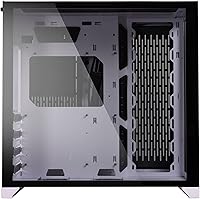
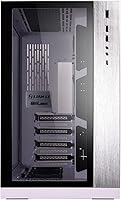
The dual-chamber design is the centerpiece here. The main chamber keeps your motherboard, GPU, and cooling hardware fully visible, while the second chamber tucks away the PSU, cables, and storage — the result is a cleaner interior than you can realistically pull off in a standard case. Both the front and left side panels are tempered glass, giving a wide, unobstructed view into the build. Aluminum exterior panels add noticeable rigidity and a refined feel that steel-only cases at lower price points simply don't match. Radiator mounts are available at the top, side, and bottom, making the O11 Dynamic a strong platform for custom water-cooling. The bottom-mount PSU keeps airflow paths unobstructed and out of the eye line.

Best For

The O11 Dynamic is built for a specific kind of builder — someone who wants the inside of their PC to look as considered as the outside. If you're running a heavy triple-fan GPU, the included bracket helps prevent the card from sagging under its own weight over time, which is a real concern with larger modern cards. It's also a natural fit for custom water-cooling setups, thanks to the flexible radiator placement options throughout the chassis. Builders going all-white will find this dual-chamber case pairs well with matching GPU shrouds and components. That said, if you're new to building, split-chamber cable routing requires genuine patience and some planning to execute cleanly.

User Feedback

Owners of this Lian Li chassis consistently highlight build quality as a standout — the aluminum panels and glass fit together with the kind of precision that feels earned at this price. The anti-sag bracket gets mentioned regularly as a thoughtful inclusion rather than an afterthought, which is always a good sign. On the flip side, cable management trips up a lot of first-time O11 Dynamic builders; the split-chamber system is genuinely different from routing cables in a conventional case and takes more planning than most people expect. A smaller number of buyers flag the front-panel I/O as underwhelming for the asking price. Still, once the build is complete and lit up, satisfaction levels are about as high as they come.

Pros

  • Aluminum exterior panels feel genuinely premium and add real structural rigidity compared to all-steel competitors.
  • Dual-chamber layout keeps cables and the PSU completely hidden, making clean builds far easier to achieve.
  • Tempered glass on both the front and left side panels provides a wide, unobstructed view of the entire build.
  • Multiple radiator mount positions across the top, side, and bottom make this an excellent platform for custom water-cooling.
  • The included GB002 anti-sag bracket supports up to two graphics cards, saving buyers from a separate accessory purchase.
  • Bottom-mount PSU placement keeps the power supply out of the visual field and maintains tidy airflow routing.
  • The white colorway is consistent and well-executed, coordinating naturally with white GPU shrouds and matching components.
  • Build satisfaction among owners is exceptionally high once the system is assembled and illuminated.
  • ATX compatibility ensures broad motherboard support without any unusual fitting constraints.

Cons

  • Cable management in the split-chamber layout has a steep learning curve that regularly catches first-time O11 Dynamic builders off guard.
  • Front-panel I/O is limited to two USB 3.0 ports, which feels restrained given the premium asking price.
  • The chassis weighs 26.5 pounds, making it cumbersome to transport or reposition once a full build is installed.
  • The dual-chamber design requires significantly more planning and build time than a conventional mid-tower layout.
  • Builders on a tight budget will find the price hard to justify if aesthetics and showcase presentation are not primary priorities.
  • Smaller or budget component setups can look underwhelming inside such a large, display-oriented interior.
  • The white finish, while attractive, can show dust and fingerprints more readily than darker alternatives.
  • No tool-free panel removal on all sections, which adds minor friction during iterative builds or upgrades.

Ratings

Our rating scores for the Lian Li O11 Dynamic Mid-Tower PC Case were generated by AI after analyzing thousands of verified buyer reviews from global markets, with spam, incentivized responses, and suspected bot activity actively filtered out before scoring. The O11 Dynamic has built a remarkably consistent feedback record — strong praise for build quality and visual impact on one side, and recurring frustration around cable routing complexity and front-panel I/O on the other. Every score below reflects that full picture, including the pain points that real-world builders genuinely encounter.

Build Quality
93%
The aluminum exterior panels and tempered glass feel immediately substantial when you first unbox this chassis — not hollow or flex-prone like comparable steel-and-plastic cases. Builders consistently report that panel fitment is tight and precise, with no rattling or misaligned edges even after extended use and multiple component swaps.
The premium material choices do add considerable weight — at 26.5 pounds empty, moving the chassis around a desk or transporting it to a LAN event is a genuine workout. A few reviewers also note that the aluminum panels, while durable, can develop fine surface scratches from regular handling over time.
Aesthetic Design
96%
The dual tempered glass panels deliver a genuinely impressive showcase effect — when RGB components and clean cable routing come together inside the O11 Dynamic, the result looks more like a display piece than a work machine. The white colorway pairs naturally with white GPU shrouds and matching fans, making coordinated themed builds easier to pull off.
The white exterior shows dust and fingerprints more readily than darker cases, which can make a pristine build look unkempt after just a few days without cleaning. Some builders also feel the exterior styling has become so widely imitated that the O11 Dynamic no longer feels as visually distinctive as it did at launch.
Cable Management
71%
29%
When executed well, the dual-chamber cable routing system produces some of the cleanest interior presentations available in any mid-tower at this price tier. The secondary chamber provides generous space to bundle and hide cables completely out of sight from the glass panels, making the finished build look professionally assembled.
First-time O11 Dynamic builders consistently flag cable management as the single most frustrating part of the experience — the split-chamber layout requires pre-planning the cable path before components are installed, and retrofitting cables after the fact is genuinely awkward. There are also fewer routing cutouts than some competitors offer at a similar price point.
Cooling Flexibility
91%
The ability to mount 360mm radiators at three separate positions — top, side, and bottom — puts this chassis among the most capable mid-towers for custom water-cooling builds. Whether you are running a single large radiator or a dual-loop setup, the interior geometry accommodates serious thermal configurations without requiring major compromises.
Air-only builders get considerably less out of this case's cooling infrastructure, since the layout heavily favors liquid setups and the lack of included fans means additional upfront cost regardless of cooling approach. Without careful fan placement, some builders report slightly warmer component temperatures in pure air-cooled configurations compared to more airflow-focused competitors.
Value for Money
74%
26%
The combination of aluminum panels, dual tempered glass, and a bundled anti-sag bracket delivers a tangible quality advantage over steel-and-acrylic cases at lower price points. For builders who genuinely prioritize build presentation and plan to keep their system on display for years, the premium feels justified by what you actually get in hand.
Budget-focused builders and those primarily interested in raw airflow performance will find capable alternatives at significantly lower prices that match or exceed the cooling results. The limited front-panel I/O in particular makes the asking price harder to justify for buyers who expect feature parity with the cost of entry.
Interior Layout
88%
The dual-chamber concept genuinely solves the clutter problem that plagues conventional cases — by physically isolating the PSU and cables from the display area, the main chamber stays clean and unobstructed. Builders with large GPU and radiator combinations appreciate having dedicated real estate for each component without competing for the same space.
The overall footprint is larger than many mid-towers as a direct result of the split layout, which can be an issue for builders with limited desk space. Smaller builds with compact components also tend to look underwhelming in such a wide-open interior unless the available space is intentionally filled out.
Ease of Assembly
67%
33%
Experienced builders familiar with dual-chamber or open-layout cases will find the build process largely intuitive — panel removal is straightforward, component mounting points are sensibly placed, and the secondary chamber provides generous room to maneuver PSU cables without crowding the motherboard area. Thumbscrew-based panel fasteners also speed up iterative builds noticeably.
Newcomers consistently underestimate how different the dual-chamber assembly workflow is compared to a standard mid-tower — it is effectively a two-stage build, and mistakes in the first stage often require partial disassembly to fix. Build time for a first-time O11 Dynamic builder typically runs considerably longer than most people expect.
GPU Support
86%
Support for cards up to 446mm in length without the drive cage covers virtually every consumer GPU currently available, and the included GB002 anti-sag bracket provides genuine structural relief for owners of heavy triple-fan models. Having the bracket bundled in rather than sold separately is a practical touch that builders consistently notice and appreciate.
Installing the anti-sag bracket requires careful alignment within the PCIe slot area, and some builders with unusually shaped or asymmetric GPU shrouds report needing to adjust positioning before it sits flush. The bracket also does not support vertical GPU mounting configurations, which is an increasingly popular option among showcase-oriented builders.
Front Panel I/O
52%
48%
The two USB 3.0 ports on the top panel are solidly constructed and positioned conveniently for everyday desktop access, and the combined audio jack functions reliably without the ground-loop interference issues that plague cheaper panel implementations. The panel layout itself is clean and unobtrusive, consistent with the minimalist exterior design language.
Two USB 3.0 ports is a notably modest offering at this price tier — competing cases in a similar range frequently include USB-C, additional USB-A ports, or both. For builders who rely on front-panel connectivity for external drives, headsets, or frequent device charging, this limitation becomes a recurring daily frustration.
Tempered Glass Quality
89%
Both glass panels are thick and feel genuinely premium — not the thin, flex-prone material found on budget cases. Panel fitment is precise enough that there is no vibration or rattle at normal system operating volumes, which makes a real difference during long overnight sessions with fans running at sustained speeds.
The glass panels have no oleophobic or anti-smudge coating, so fingerprints from routine panel removal accumulate quickly and are visible under strong lighting. A cracked panel is also a costly replacement given the custom sizing, and parts availability has been inconsistent in some regions outside major markets.
Noise Dampening
58%
42%
The aluminum exterior panels add inherent rigidity that reduces panel resonance compared to thin steel cases, preventing the low-frequency buzz that rattles through cheaper chassis during fan spin-up. This modest dampening effect is genuinely noticeable during high-load periods when fans ramp up under sustained gaming sessions.
There is no acoustic dampening material anywhere in the chassis — no foam lining, no rubber gaskets on large panel openings — so fan and GPU noise passes through the tempered glass essentially unimpeded. Builders seeking a quiet workstation experience will find this dual-chamber case significantly less suited to that goal than noise-focused alternatives.
Storage Options
72%
28%
With two 3.5-inch and four 2.5-inch drive bays, this Lian Li chassis covers the storage needs of most modern gaming and workstation builds — particularly those that lean on NVMe SSDs for primary storage and add a couple of spinning drives or SATA SSDs for bulk media. Drive mounting hardware is included and straightforward to install.
Content creators or storage-heavy builds that depend on four or more large hard drives will quickly exhaust the available bays, with limited expansion options without modifying the interior. Drive trays for the 3.5-inch bays also occupy space in the secondary chamber that some builders would prefer to reserve for additional cable routing room.
Airflow Performance
83%
The open-bottom intake combined with multiple radiator positions creates strong positive-pressure airflow potential when fans are properly configured, keeping CPU and GPU thermals competitive with more airflow-oriented cases at a similar price. Builders using liquid cooling in particular report excellent thermal headroom with well-tuned fan curves.
Air-only configurations require more deliberate fan placement planning than in a conventional case, because the dual-chamber layout can create dead zones if intake and exhaust paths are not carefully matched. Without pre-installed fans guiding the setup, first-time builders occasionally end up with suboptimal airflow until they revisit their configuration.
Component Accessibility
77%
23%
Once a build is complete, reaching the motherboard and primary components is relatively painless — both glass panels lift away cleanly, and the open main chamber avoids the obstructing internal frames that make component swaps frustrating in more cramped cases. RAM and GPU upgrades in particular are easy to perform without disturbing the rest of the build.
Accessing components routed through or near the secondary chamber — including the PSU itself and any cabling connected to it — requires opening the back panel and often disturbing tidily managed cable bundles. Builders who upgrade their PSU or add drives frequently will find this workflow more disruptive than in a conventional single-chamber case.

Suitable for:

The Lian Li O11 Dynamic Mid-Tower PC Case is purpose-built for enthusiast builders who treat their PC as a showcase, not just a tool. If you are planning a high-end build with a large GPU, custom water-cooling loops, or an all-white aesthetic theme, this chassis was essentially designed with you in mind. The dual-chamber layout rewards builders who are willing to invest time in clean cable routing, delivering an interior presentation that standard cases simply cannot match. Experienced builders running heavy triple-fan graphics cards will also appreciate the bundled GB002 anti-sag bracket, which addresses real long-term PCIe slot stress without requiring a separate purchase. Anyone committed to a white-themed rig will find the aluminum and tempered glass exterior a natural anchor for coordinated components and RGB lighting.

Not suitable for:

The Lian Li O11 Dynamic Mid-Tower PC Case is not the right choice for first-time builders or anyone who wants a straightforward, plug-and-play build experience. The split-chamber layout introduces a cable management process that is genuinely more complex than in a conventional mid-tower, and without prior experience it can become a frustrating obstacle rather than an aesthetic advantage. Budget-focused builders will also find it difficult to justify the premium price unless aesthetics and build quality are top priorities, since the core hardware compatibility is no different from less expensive alternatives. Those who need a compact footprint or plan to move their system frequently should also think twice, as this chassis is heavy and physically substantial. If your front-panel I/O demands are high, the limited USB port selection may also feel like a compromise at this price tier.

Specifications

  • Case Type: Mid-tower form factor designed for standard ATX desktop system builds.
  • Motherboard Support: Compatible with ATX, Micro-ATX, and Mini-ITX motherboard form factors.
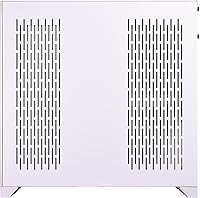
  • Exterior Materials: Outer panels combine aluminum construction with tempered glass on the front and left side.
  • Panel Configuration: Tempered glass panels on the front and left side provide a wide view of internal components.
  • Interior Layout: Dual-chamber design separates the main component bay from the PSU and cable management compartment.
  • Dimensions: Chassis measures approximately 272mm wide, 513mm tall, and 446mm deep.
  • Weight: Fully unloaded chassis weighs 26.5 pounds, reflecting substantial aluminum and glass construction.
  • GPU Clearance: Accommodates graphics cards up to 446mm in length without the hard drive cage installed, or up to 395mm with it in place.
  • GPU Bracket: Bundled GB002 anti-sag bracket supports up to two graphics cards to prevent PCIe slot droop over time.
  • Radiator Mounts: Supports up to 360mm radiators at the top, side, and bottom positions for flexible water-cooling configurations.
  • CPU Cooler Height: Accepts tower-style CPU air coolers up to 167mm in height.
  • PSU Mounting: Power supply mounts at the bottom of the secondary chamber, keeping it hidden from the main display area.
  • Front I/O: Top panel provides two USB 3.0 ports and a combined 3.5mm audio jack.
  • Drive Bays: Supports two 3.5-inch hard drives and four 2.5-inch solid-state drives simultaneously.
  • Color: Ships in white with a coordinated white interior finish; model code PC-O11DW-GB002.
  • Release Date: First made available in October 2021 as part of the established O11 Dynamic product line.

Related Reviews
Lian Li O11 Dynamic EVO XL Case
82%
93%
Build Quality
91%
Cooling Performance
88%
Cable Management
94%
Radiator & Liquid Cooling Support
89%
Motherboard Compatibility
More
Lian Li O11 Vision Compact
80%
91%
Build Quality
94%
Aesthetic Design
89%
Back-Connect Motherboard Support
86%
Cooling Performance
74%
Cable Management
More
Lian Li Lancool III RGB White Mid-Tower Case
88%
94%
Cooling Performance
88%
Build Quality
92%
Design and Aesthetics
85%
Ease of Installation
91%
Airflow Optimization
More
Lian Li LANCOOL 215 X White Mid Tower Case
84%
89%
Cooling Performance
92%
Build Quality
88%
Aesthetic Appeal
75%
Cable Management
91%
Motherboard Compatibility
More
Lian Li LANCOOL 217
Lian Li LANCOOL 217
81%
91%
Airflow Performance
88%
Noise Levels
93%
Build Quality
94%
Aesthetic Design
86%
Cable Management
More
SAMA V60 Mid Tower PC Case
80%
93%
Out-of-Box Cooling Value
78%
Airflow Performance
91%
AIO & Radiator Flexibility
88%
Tempered Glass & Aesthetics
71%
Build Quality & Materials
More
Zalman S4 Mid-Tower ATX PC Case
75%
72%
Build Quality
88%
Value for Money
91%
Ease of Assembly
67%
Airflow Performance
63%
Cable Management
More
SAMA NEVIEW 4503 Mid Tower PC Case
76%
91%
Value for Money
78%
Build Quality
83%
Airflow Performance
76%
ARGB Lighting
82%
Hardware Compatibility
More
darkFlash DS900 ATX Mid-Tower PC Case
75%
76%
Build Quality
83%
Cooling Potential
91%
Aesthetics & Visibility
88%
Value for Money
74%
Cable Management
More
SZSKYING CMSVB-1 Mid-Tower PC Gaming Case
74%
91%
Value for Money
88%
Included Fans
86%
Aesthetics & RGB
61%
Build Quality
74%
Airflow Performance
More

FAQ

It supports all three — ATX, Micro-ATX, and Mini-ITX. That said, the wide dual-chamber interior is clearly optimized for full ATX builds, so smaller boards will leave a noticeable amount of open space unless you plan your layout carefully.

It takes more planning than a conventional case. Cables route through the back secondary chamber and feed into the main area through grommeted openings, which looks great when done well but can be disorienting on the first attempt. Budget extra time, and watching a build guide specific to the O11 Dynamic before starting is genuinely worthwhile.

The O11 Dynamic accepts up to 360mm radiators at the top, side, and bottom positions. This gives it exceptional flexibility for custom water-cooling loops, and you can run multiple radiators simultaneously if your setup demands it.

The GB002 bracket is designed to work with the standard PCIe slot spacing inside the main chamber and supports up to two cards. It fits the vast majority of dual- and triple-fan GPUs, though cards with unusually shaped shrouds may need minor positional adjustment.

Both panels are secured with thumbscrews and lift free without any tools once loosened. The front panel slides off cleanly after the screws are removed. Handle the glass on a soft surface during removal — tempered glass is resilient, but not worth testing unnecessarily.

Correct, it ships without fans. This is standard for premium showcase cases aimed at enthusiast builders, most of whom prefer to select their own fans or build a custom water-cooling loop rather than work around pre-fitted options.

Yes, noticeably more so. The white aluminum panels pick up fingerprints and settled dust more visibly, particularly under direct lighting or RGB illumination. A quick wipe with a microfiber cloth handles it easily, but in a dusty environment you will be cleaning it more frequently than a darker chassis.

It accommodates CPU tower coolers up to 167mm in height, which covers most large 120mm and 140mm tower designs. If you are running a particularly tall cooler, it is worth confirming the measurement before committing to a build.

It works perfectly fine with an air-cooled setup, and the dual-chamber layout still delivers excellent cable management and aesthetics. Practically speaking, though, much of what makes this chassis special goes unused without a liquid cooling loop. If a clean air build is all you need, there are capable cases at lower price points that would serve you just as well.

Not meaningfully, when configured correctly. The main chamber handles all active cooling for the CPU, GPU, and motherboard, while the secondary chamber is entirely passive and just contains the PSU and cabling. Intake typically runs along the bottom or side, exhaust exits from the top, and the layout keeps hot air moving in a predictable direction as long as fan placement is thought through.

Where to Buy