Overview

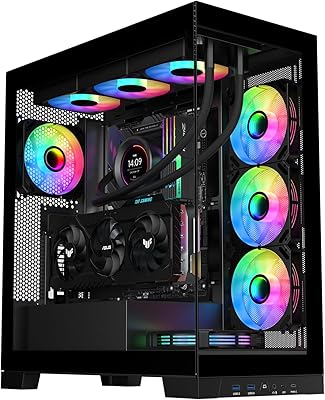
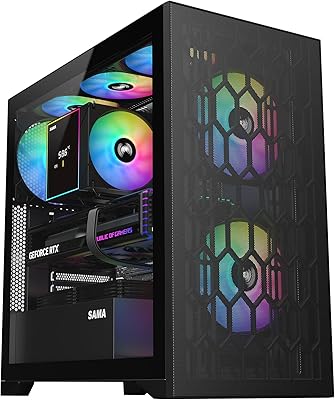
The Lian Li LANCOOL 207 Digital Mid-Tower PC Case arrived in February 2025 and wasted no time climbing to the top 10 in its category — a strong signal for any recently launched enclosure. What separates it from the crowd is an unusual combination: a front-mounted PSU, an offset motherboard tray, and a built-in LCD display, all packed into a mid-tower footprint. This is not a case designed for casual builders. It targets enthusiasts who care about clean cable routing and sustained thermal performance in equal measure, without needing to step up to a bulkier full-tower chassis.
Features & Benefits

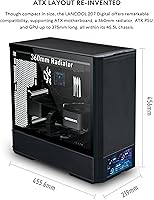
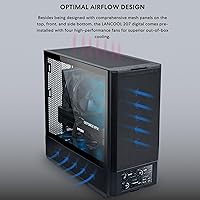
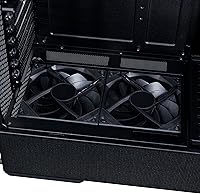
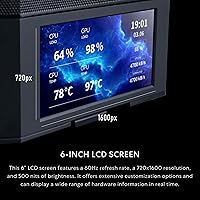
The standout is the 6-inch LCD panel — a 720x1600px display managed through L-Connect 3 that can show live system stats or function as a secondary monitor. Practical? Genuinely, yes. On the cooling side, the LANCOOL 207 Digital ships with dual 140x30mm front fans producing a combined 109.3 CFM, plus two 120mm bottom fans placed directly under the GPU — a deliberate layout made possible by the offset motherboard position. The mesh front and side panels keep airflow unrestricted, and the case accommodates radiators up to 360mm and graphics cards up to 375mm, covering virtually any high-performance build.

Best For

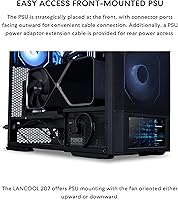
This mid-tower build makes the most sense for builders who want substance over style — someone running a hot GPU who needs real bottom-up airflow without liquid cooling. The front-mounted PSU with outward-facing connectors is a genuine time-saver during the build process, though it requires a short mental adjustment if you have never worked with that layout before. Micro-ATX and ATX users both fit comfortably. If you are already in the Lian Li ecosystem and use L-Connect 3, the transition is straightforward. Those chasing purely cosmetic builds may find the LCD more exciting than useful, but for performance-focused builders, it checks real boxes.

User Feedback

With a 4.7-star average across nearly 1,800 ratings, the reception for this Lian Li case has been notably strong for a product barely a few months old. Buyers consistently praise build quality and out-of-the-box fan performance, and most find the LCD panel a fun, functional addition rather than a gimmick. That said, some users report a learning curve with the L-Connect 3 software setup, and the front PSU orientation trips up first-time builders who expect a rear-mount layout. A handful of reviewers comparing it to the LANCOOL 216 note this case runs cooler thanks to the bottom fan placement. Long-term impressions are largely positive.

Pros

  • Four pre-installed fans — including two 140mm front units — provide strong airflow right out of the box without extra purchases.
  • The built-in 6-inch LCD screen doubles as a live stats panel or secondary monitor, offering real utility beyond aesthetics.
  • Bottom fans positioned directly under the GPU deliver targeted cooling where high-end graphics cards need it most.
  • The front-mounted PSU with outward-facing connectors makes cable management noticeably cleaner once the layout clicks.
  • Supports radiators up to 360mm and GPUs up to 375mm, so this mid-tower build accommodates serious hardware without compromise.
  • Mesh front and side panels allow passive airflow even at lower fan speeds, keeping temperatures in check during light workloads.
  • A 4.7-star average from nearly 1,800 ratings is a rare early-adoption signal — buyers are clearly satisfied with what they received.
  • Alloy steel construction feels solid and premium, with no flex or rattle reported by the majority of long-term users.
  • The offset motherboard tray is a thoughtful engineering choice that enables the bottom fan alignment — not just a visual quirk.
  • Existing L-Connect 3 users can integrate the LCD display into their existing fan and lighting ecosystem with minimal extra effort.

Cons

  • The front-mounted PSU orientation is unfamiliar territory for most builders and requires patience to get right on a first build.
  • L-Connect 3 software setup for the LCD screen has a noticeable learning curve that some users find frustrating out of the box.
  • Only two USB 3.0 ports on the front panel feels limited for a case aimed at enthusiast-tier builds in 2025.
  • Mini-ITX builders are fully excluded — the case only supports Micro-ATX and ATX form factors.
  • At 23.2 pounds, this is a heavy enclosure that can be cumbersome to move or transport once components are installed.
  • The LCD display, while functional, requires ongoing software management — it is not a plug-and-play experience for everyone.
  • Users coming from conventional tower layouts may need to re-learn their cable routing habits entirely due to the PSU repositioning.
  • Fan noise at full speed has been flagged by some reviewers as higher than expected — manual curve tuning is likely needed for quiet builds.

Ratings

The Lian Li LANCOOL 207 Digital Mid-Tower PC Case earns one of the stronger consensus scores we have seen for a case launched this recently, with our AI-driven analysis combing through nearly 1,800 verified global reviews and actively filtering out incentivized and bot-generated feedback. Scores below reflect both what buyers genuinely love and where real frustrations surfaced — nothing has been smoothed over to protect the product's reputation.
Airflow Performance
93%
Builders running high-TDP graphics cards consistently report lower GPU temperatures compared to their previous cases, crediting the bottom fan placement directly beneath the GPU slot. The mesh front and side panels allow air to move freely at even modest fan speeds, which means thermals stay manageable without cranking the fans to full tilt.
A small number of users noted that the bottom fan positioning creates a slight dead zone near the rear exhaust if a third-party rear fan is not added. For ultra-compact or heavily populated builds, maximizing airflow still requires some deliberate cable routing to avoid blocking intake paths.
Build Quality
91%
The alloy steel construction feels reassuringly solid — no panel flex, no rattle during transport, and tight panel fitment that reviewers frequently compare favorably to cases costing significantly more. Long-term owners report that nothing loosens or degrades after months of regular use, including the mesh panels and their retention clips.
A handful of reviewers pointed out minor sharp edges on interior metal near the PSU shroud area, which caused nicks during installation. The issue is not widespread, but it is consistent enough across independent reviews to be worth mentioning if you build without gloves.
LCD Screen Functionality
78%
22%
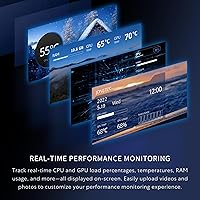
When configured properly through L-Connect 3, the 6-inch display is a genuine talking point — live GPU and CPU stats on a sharp 720x1600px panel look polished in a finished build, and the option to push custom images or use it as a second monitor adds real versatility beyond novelty.
Getting the LCD to display what you actually want takes a meaningful time investment in the software, and a portion of buyers admitted they left it on a default screen rather than digging into configuration. The display is also only as good as L-Connect 3 stability, which has occasional hiccups on certain chipsets.
Cable Management
86%
The front-mounted PSU with outward-facing connectors genuinely shortens the cable runs needed to reach the motherboard, and the offset tray creates usable routing channels that keep the interior clean without heroic effort. Builders who have completed the layout once typically call it one of the tidiest builds they have done at this price tier.
The first build in this case takes considerably longer than expected if you are used to rear-mount PSU layouts — some users spent an extra hour simply planning cable paths before touching a single component. The learning curve is real, and there are limited community guides specific to this exact PSU orientation compared to conventional cases.
Fan Performance Out of the Box
89%
Four pre-installed PWM fans — including the thick 30mm front units pushing a combined 109.3 CFM — mean most builders do not need to purchase additional fans immediately, which is a meaningful cost-of-ownership advantage. The fans spin smoothly with no bearing noise reported at standard operating speeds.
At maximum RPM, the front 140mm fans are audible enough to be distracting in a quiet room, so some fan curve tuning through L-Connect 3 or the BIOS is needed to find the right balance between noise and cooling. Users who prioritize silence above all else may want to swap in lower-noise aftermarket fans.
PSU Mounting Design
74%
26%
Once adapted to the front-mount orientation, builders find that connector access is actually more ergonomic during installation — reaching PSU ports from the front of the case is easier than contorting around a rear-mount unit. Experienced builders who embrace the layout often call it a design they wish other cases would adopt.
The front PSU orientation is a polarizing design choice — a consistent minority of reviewers found the layout so unfamiliar that they actively regretted not researching it before purchasing. There is also a hard constraint on PSU length compatibility that requires checking before purchase to avoid fitment surprises.
Compatibility & Hardware Support
88%
Supporting GPUs up to 375mm and radiators up to 360mm means this mid-tower build accommodates virtually every mainstream high-performance component without forcing compromises. ATX and Micro-ATX motherboards both install without clearance issues, and the case handles dual-slot and triple-slot GPU designs cleanly.
Mini-ITX builders are entirely excluded, which limits the case's appeal for small-form-factor enthusiasts who might otherwise be drawn to its feature set. There is also no E-ATX support, so builders with flagship workstation motherboards will need to look elsewhere.
Software Experience
67%
33%
L-Connect 3 offers genuine depth for users willing to explore it — fan curves, LCD content management, and system monitoring are all consolidated in one place, which experienced Lian Li users will find familiar and efficient. Regular software updates from Lian Li have addressed several early bugs reported after the case launched.
For users new to the Lian Li ecosystem, L-Connect 3 has a steeper learning curve than its interface suggests, and some users on non-mainstream chipsets have reported instability or limited feature availability. Several reviewers gave up on the LCD customization entirely due to software friction, leaving a premium feature essentially unused.
Value for Money
84%
Factoring in four pre-installed fans, the integrated LCD display, and the quality of the steel construction, the LANCOOL 207 Digital delivers a strong bundle for its price tier — buying equivalent fans alone would cost a meaningful fraction of the case price. Reviewers consistently rate perceived value as high relative to competitors at similar price points.
Buyers who have no interest in the LCD display may feel they are paying a premium for a feature they will ignore, particularly when simpler mesh cases offer comparable airflow for less. If the display is not part of your appeal, the value equation becomes less clear-cut.
Ease of Assembly
71%
29%
Beyond the PSU orientation adjustment, the interior layout is well-organized and component installation follows a logical sequence once the PSU cables are routed. Standoff placement is pre-threaded correctly for ATX boards, and the drive mounting points are accessible without removing other components first.
The combination of the offset motherboard tray, front PSU, and LCD cable management creates a more complex build sequence than a standard tower, and first-time builders reported noticeably longer build times. Instructions included in the box are functional but sparse on detail for the PSU routing section specifically.
Front I/O & Connectivity
62%
38%
The front I/O panel is clean and well-positioned, and the USB 3.0 ports deliver full transfer speeds without issue during everyday use such as copying large game files or backup drives.
Only two USB 3.0 ports is a real limitation for an enthusiast-tier case in 2025, where four ports has become the expectation at this price point. There is no USB-C port on the front panel, which is an increasingly common omission complaint among younger builders who use USB-C peripherals daily.
Thermal Design Innovation
88%
The decision to offset the motherboard tray specifically so bottom fans can align with the GPU is a purposeful engineering choice that pays off in practice — it is not a marketing claim, and temperature benchmarks from independent reviewers back it up under sustained gaming and rendering workloads.
The innovation is GPU-centric, which is exactly right for gaming builds, but users with workloads that stress the CPU more than the GPU — such as heavy video encoding — found that the front fan placement is better suited to GPU-heavy thermal profiles than balanced CPU-GPU loads.
Aesthetics & Exterior Design
81%
19%
The mesh-forward exterior avoids the plasticky, heavily paneled look of older ATX towers and presents a clean, industrial aesthetic that holds up well in both open-desk and enclosed setups. The integrated LCD adds a distinctive visual element that separates it immediately from lookalike cases in the same tier.
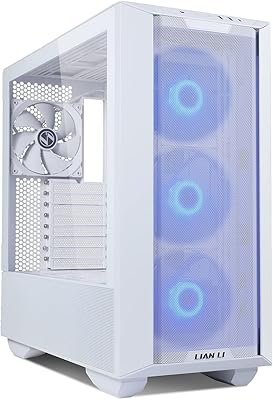
The all-black colorway is the only currently available option, which limits buyers who want a white or other alternative finish to match their build theme. Some users also found the exterior mesh edges accumulate dust visibly within a few weeks and require more frequent cleaning than solid-panel alternatives.
Long-Term Durability
83%
Users who have owned the case for several months report no degradation in panel fitment, fan bearing noise, or LCD panel brightness, which suggests the build quality holds up beyond the initial unboxing impression. The alloy steel frame shows no signs of warping even in environments with moderate temperature fluctuation.
The long-term reliability of the LCD panel specifically is still an open question given the case only launched in early 2025 — there is simply not enough owner data beyond six to eight months to make a confident durability claim. Early indicators are positive, but this is a watch-and-see category for now.

Suitable for:

The Lian Li LANCOOL 207 Digital Mid-Tower PC Case is a strong fit for PC enthusiasts who want a high-airflow build without the bulk of a full-tower chassis. If you are running a powerful discrete GPU — especially one that runs hot under sustained load — the bottom fan placement directly beneath the graphics card is a practical advantage that translates into real thermal headroom. Gamers building mid-to-high-end rigs and workstation users who need consistent cooling during long rendering or compute sessions will appreciate the mesh-forward design and the four pre-installed fans. The front-mounted PSU and offset motherboard layout also reward builders who care about a tidy interior, since the outward-facing connectors genuinely reduce cable clutter once you adjust to the layout. Existing Lian Li users who already run L-Connect 3 will find the LCD integration especially smooth to set up and configure. Anyone who wants a functional display element — live CPU and GPU stats, custom visuals — rather than another row of RGB strips will find this case a refreshing alternative at its price point.
Not suitable for:

The Lian Li LANCOOL 207 Digital Mid-Tower PC Case is not the right call for every builder, and it is worth being honest about where it falls short. If you have never worked with a front-mounted PSU before, expect a real learning curve — the layout is counterintuitive coming from conventional rear-mount designs, and first-time builders have reported confusion during the cable routing phase. The LCD screen, while genuinely functional, requires software configuration through L-Connect 3, which adds a setup step that more casual builders may find unnecessary or frustrating. Mini-ITX motherboard users are simply out of luck here, as the case only supports Micro-ATX and ATX. Those building a purely quiet, low-noise system may also find the included fans more aggressive than ideal without additional fan curve tuning. If your budget is tight and the LCD display holds no appeal for you, there are simpler mesh cases at lower price points that deliver comparable airflow without the added complexity.
Specifications

  • Form Factor: Mid-Tower chassis compatible with Micro-ATX and ATX motherboards.
  • Dimensions: The case measures 20.27″ deep, 20.9″ wide, and 11.18″ tall.
  • Weight: Fully assembled unit weighs 23.2 pounds before components are installed.
  • Material: Primary construction uses alloy steel for rigidity with mesh panel inserts for airflow.
  • LCD Screen: A 6-inch display with 720x1600px resolution is integrated into the front panel and managed via L-Connect 3 software.
  • Front Fans: Two 140x140x30mm PWM fans come pre-installed at the front, delivering a combined airflow of 109.3 CFM.
  • Bottom Fans: Two 120x120x25mm PWM fans are pre-installed at the bottom, rated at a combined 71.1 CFM and positioned directly beneath the GPU slot.
  • Radiator Support: The case supports liquid cooling radiators up to 360mm in length.
  • GPU Clearance: Maximum supported graphics card length is 375mm, accommodating most flagship single and dual-slot GPUs.
  • PSU Mounting: Power supply mounts at the front of the case with outward-facing connectors for easier cable access.
  • USB Ports: Two USB 3.0 ports are located on the front I/O panel.
  • Fan Controller: L-Connect 3 software handles fan speed, LCD content, and system monitoring for the entire build.
  • Color: Available in Black with a mesh-forward exterior finish.
  • PSU Compatibility: Supports standard ATX power supply units; front-mount orientation requires PSU cables routed toward the front of the chassis.
  • Cooling Design: Offset motherboard tray positions the two bottom fans directly under the GPU for targeted thermal management.
  • Panel Design: Both the front and side panels use open mesh construction to maximize passive and active airflow with minimal restriction.
  • Sales Rank: Ranked number 8 in the Computer Cases category on Amazon as of early 2025, with a 4.7-star average from nearly 1,800 ratings.

Related Reviews

Lian Li LANCOOL 215 X White Mid Tower Case
84%
89%
Cooling Performance
92%
Build Quality
88%
Aesthetic Appeal
75%
Cable Management
91%
Motherboard Compatibility
More
Lian Li Lancool III RGB White Mid-Tower Case
88%
94%
Cooling Performance
88%
Build Quality
92%
Design and Aesthetics
85%
Ease of Installation
91%
Airflow Optimization
More
Lian Li LANCOOL 217
Lian Li LANCOOL 217
81%
91%
Airflow Performance
88%
Noise Levels
93%
Build Quality
94%
Aesthetic Design
86%
Cable Management
More
Lian Li LANCOOL 216 E-ATX PC Case
86%
94%
Cooling Performance
92%
Airflow Design
89%
Cable Management
85%
Ease of Installation
91%
GPU Compatibility
More
Lian Li O11 Vision Compact
80%
91%
Build Quality
94%
Aesthetic Design
89%
Back-Connect Motherboard Support
86%
Cooling Performance
74%
Cable Management
More
SAMA V60 Mid Tower PC Case
80%
93%
Out-of-Box Cooling Value
78%
Airflow Performance
91%
AIO & Radiator Flexibility
88%
Tempered Glass & Aesthetics
71%
Build Quality & Materials
More
SAMA NEVIEW 4503 Mid Tower PC Case
76%
91%
Value for Money
78%
Build Quality
83%
Airflow Performance
76%
ARGB Lighting
82%
Hardware Compatibility
More
SAMA S40 Mid Tower ATX PC Case
79%
88%
Airflow Performance
83%
Included Fan Quality
79%
Build Quality & Finish
92%
GPU Compatibility
61%
Cable Management
More
KEDIERS K4 ATX Mid Tower PC Case
80%
91%
Value for Money
93%
Aesthetic Design
74%
Build Quality
72%
Cooling Performance
84%
Ease of Assembly
More
Zalman S4 Mid-Tower ATX PC Case
81%
88%
Airflow and Cooling
80%
Build Quality and Materials
92%
Ease of Installation
60%
Acrylic Panel Durability
70%
Cable Management
More

FAQ

It is genuinely functional. The 6-inch panel can display live system stats like CPU temperature, GPU load, clock speeds, and RAM usage through L-Connect 3. You can also push custom images or use it as a secondary monitor. That said, setting it up takes some time with the software, so it is not plug-and-play out of the box.

There is a real adjustment period if you are coming from a conventional rear-mount layout. The connectors face outward toward the front of the case, which changes how you route cables. Most builders get comfortable with it after the first build, but expect to spend extra time planning your cable runs the first time around.

Full ATX boards fit fine. The case supports both ATX and Micro-ATX form factors, so you have flexibility there. Mini-ITX is not supported, however.

Yes, the Lian Li LANCOOL 207 Digital Mid-Tower PC Case supports radiators up to 360mm, so a 360mm AIO will fit. Just confirm your specific radiator dimensions before purchase since thick radiators paired with thick fans can sometimes create tight clearance near the motherboard.
At maximum RPM, the 140mm front fans are noticeable — not obnoxiously loud, but audible. Most users find that dialing back the fan curve through L-Connect 3 brings noise to a comfortable level without sacrificing much thermal performance.

That is one of the strongest selling points of this mid-tower build. The two bottom 120mm fans sit directly beneath the GPU slot, pushing cool air up into the graphics card rather than relying solely on side intake. Builders with thermal-heavy GPUs consistently report better temperatures compared to cases with conventional front-only intake.

L-Connect 3 is only required if you want to control the LCD display and manage fan curves through the software interface. The case functions perfectly well without it — the fans will run at a default speed profile, and you can control them through your motherboard BIOS instead.

The LANCOOL 216 is a slightly larger case focused purely on airflow with a traditional PSU layout. The LANCOOL 207 Digital trades some internal volume for the LCD feature and the unique front-PSU design. If maximum airflow with no software complexity is your priority, the 216 is simpler. If you want the display and cleaner cable routing, the 207 Digital wins on those fronts.

The LANCOOL 207 Digital includes drive mounting provisions for standard 2.5-inch SSDs and 3.5-inch HDDs, which covers most builds. If you are planning a storage-heavy NAS-style system with many drives, this case is not the right fit given the front PSU layout and its focus on GPU-centric builds.

The case features a side panel that allows visibility into the interior, letting you see your components and the overall build. The mesh-centric design means some panels prioritize airflow over pure aesthetics, so check the specific panel configuration if a fully windowed showcase build is your main goal.

Where to Buy