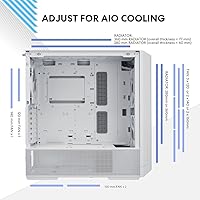
Overview

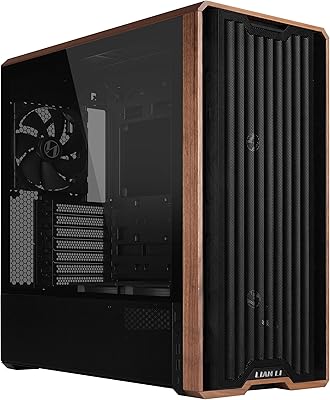
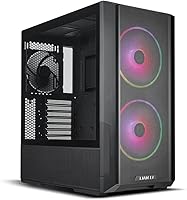
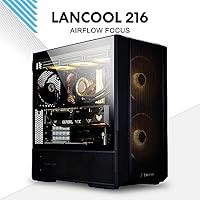
The Lian Li LANCOOL 216 Mid-Tower PC Case sits in an interesting spot — priced firmly in the mid-range, it punches closer to premium territory in terms of build quality and thoughtful design. Lian Li built this one with airflow as the central priority, covering the front, top, and PSU shroud side in fine mesh rather than the partially sealed panels you see on many competitors. That philosophy makes a real difference in practice. It also ships with fans pre-installed, which is a genuine convenience for first-time builders who don't want to budget separately for cooling right out of the gate.

Features & Benefits

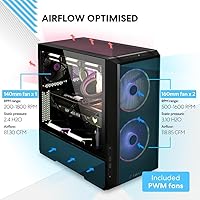
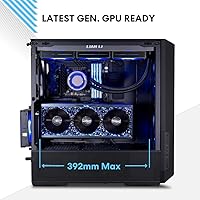
The all-around mesh design isn't just cosmetic — mesh on the front, top, and PSU shroud side means air moves freely in and out without fighting the chassis. The LANCOOL 216 comes loaded with two 160mm ARGB fans at the front and a 140mm at the rear; the 160mm sizing is non-standard, so keep that in mind if you plan to swap them out later. The rear PCIe fan bracket is a clever inclusion that lets you push additional airflow directly toward the GPU — a feature typically reserved for pricier cases. A modular I/O tray lets you reposition the motherboard for air or liquid cooling setups, and GPU clearance up to 392mm means even current flagship cards fit without drama.

Best For

This airflow-focused chassis is a natural fit for builders running demanding hardware — think RTX 4080 or 4090-class cards that generate serious heat and need a case that can keep up. It's also a smart pick for intermediate builders who want room to grow: there's support for up to 360mm radiators, multiple drive bays, and enough internal flexibility to reconfigure things as your build evolves. The pre-installed ARGB fans mean RGB is ready on day one without extra purchases. That said, if quiet operation is your top priority, this chassis may fall short — all that mesh means fan noise travels out just as freely as heat does.

User Feedback

Across more than 1,800 ratings, this Lian Li case holds a 4.7 out of 5 — a score that reflects genuinely consistent satisfaction rather than a handful of outliers. Buyers frequently call out lower system temperatures compared to previous cases, and the steel-and-glass build earns respect for feeling solid at this price point. Cable management behind the motherboard tray gets specific praise for being actually workable, not just technically present. On the flip side, two complaints come up with enough frequency to take seriously: the 160mm fans are non-standard and annoying to source replacements for, and full-load fan noise is noticeable. Neither is a dealbreaker, but both are worth knowing going in.

Pros

  • Exceptional out-of-box airflow thanks to mesh panels on the front, top, and PSU shroud side.
  • Ships with three fans pre-installed, including two ARGB units — no extra fan budget needed on day one.
  • Fits GPUs up to 392mm long, covering even the largest current-generation graphics cards without modification.
  • The rear PCIe fan bracket is a genuinely useful feature rarely found in this price bracket.
  • Supports E-ATX motherboards up to 280mm wide, giving builders more platform flexibility than most mid-towers.
  • Modular I/O tray lets you reposition the motherboard to optimize for air or liquid cooling setups.
  • Cable management is genuinely practical — velcro straps, a grommet bar, and a usable secondary chamber all help.
  • 4.0mm tempered glass side panel and steel frame feel solid and premium relative to the price point.
  • Radiator support up to 360mm at the top means serious liquid cooling is an option down the road.
  • Rated 4.7 out of 5 across more than 1,800 reviews — real-world satisfaction is consistently high.

Cons

  • Fan noise at full load is noticeable — this is not a quiet case under heavy workloads.
  • The 160mm front fans are a non-standard size, making quality replacements harder to find and source.
  • Fully open mesh panels offer minimal dust filtration; expect more frequent cleaning compared to sealed designs.
  • No USB-C port on the front panel I/O, which feels like an oversight on a modern build.
  • At over 23 pounds, this chassis is on the heavier side for a mid-tower, which matters for desk or transport situations.
  • The all-mesh exterior may not suit builders who prefer a cleaner, more solid visual aesthetic.
  • Noise-dampening foam or panels are absent entirely — there is no acoustic treatment built in.
  • Budget builders may find the weight and size excessive if they are not actually running high-TDP components.

Ratings

Our AI-generated scores for the Lian Li LANCOOL 216 Mid-Tower PC Case are derived from deep analysis of thousands of verified buyer reviews collected globally, with spam, bot activity, and incentivized feedback actively filtered out before scoring. The result is a transparent picture of where this chassis genuinely excels and where real builders have run into friction — no cherry-picking, no padding. Both the standout strengths and the legitimate frustrations are reflected in every category below.

Airflow Performance
94%
This is the case's defining strength, and buyers confirm it consistently. The all-mesh front, top, and PSU shroud panels create a genuine pressure differential that pulls heat away from components efficiently. Builders swapping from semi-sealed cases frequently report noticeable drops in CPU and GPU idle and load temperatures.
The trade-off is that the same openness that lets heat escape also lets fan noise travel freely into the room. Under sustained load — gaming sessions, long renders — the acoustic impact is real, and a minority of buyers found this more disruptive than expected.
Build Quality
88%
The heavy-duty steel frame gives the chassis a rigidity and heft that most mid-range cases lack. The 4.0mm tempered glass side panel in particular draws positive remarks for feeling substantial — closer to what you'd expect from a premium-tier product than the thinner glass common at this price level.
The case is heavy at over 23 pounds, which some builders find inconvenient during transport or when setting up in tighter desk spaces. A small number of buyers also reported minor fit-and-finish inconsistencies on panel edges, though this was far from a widespread complaint.
Thermal Management
92%
Three pre-installed fans — two 160mm ARGB units at the front and a 140mm at the rear — give the chassis a strong thermal baseline right out of the box. The rear PCIe fan bracket adds another layer of GPU-targeted cooling that competitors at this price tier rarely include, and builders with RTX 4080 or 4090 cards found it genuinely useful under extended load.
Achieving optimal thermals does require some fan curve tuning; leaving everything on auto tends to introduce more noise than necessary without meaningfully improving temperatures. The cooling headroom is there, but extracting it cleanly takes a bit of setup effort.
Noise Level
61%
39%
Under light loads or at idle, the case runs quietly enough for most environments, and the pre-installed fans are not offensively loud at low RPM. Builders who set conservative fan curves reported a reasonably comfortable acoustic experience during everyday desktop use.
At full fan speed under gaming or stress loads, noise becomes a real issue. The open mesh panels act as a speaker grille rather than a buffer, and this is the most common complaint among buyers who expected airflow performance without the acoustic compromise. Noise-sensitive users will likely need quieter aftermarket fans.
Cable Management
83%
The secondary chamber behind the motherboard tray is more usable than many competing cases — the symmetrical layout gives cables actual routing paths rather than just a cramped corridor. Velcro straps, a grommet bar, and small integrated clips all come included, which means most builders can achieve a clean build without buying anything extra.
The space behind the tray is adequate but not generous, and builders with particularly thick or numerous cable runs from modular PSUs reported needing to work carefully to close the panel. It's workable, but not class-leading for cable routing depth.
Fan Compatibility
58%
42%
The pre-installed 160mm front fans perform well and the ARGB lighting integrates cleanly with common lighting controllers, making the out-of-box fan experience genuinely good. For builders who plan to keep the stock fans indefinitely, this is a non-issue.
The 160mm format is non-standard, and finding quality replacement or upgrade fans at a reasonable price requires more research than it should. This limits upgrade flexibility down the road and catches some buyers off guard after purchase — a real practical pain point that comes up frequently in buyer feedback.
Component Compatibility
91%
GPU clearance up to 392mm in air-cooling mode means even the largest triple-fan flagship cards fit without modification. E-ATX board support up to 280mm wide covers the vast majority of high-end platforms, and the modular I/O tray allows repositioning for different cooling configurations — a thoughtful flexibility that most competitors skip.
When switching between air-cooled and water-cooled I/O tray positions, radiator compatibility at the front becomes more constrained. Builders planning elaborate custom loop configurations with both front and top radiators simultaneously should verify clearance carefully before committing.
Ease of Assembly
84%
Fan cable grooves, removable radiator brackets, and clearly labeled mounting points make first-time builds more approachable than the spec sheet suggests. Experienced builders consistently describe the installation process as straightforward, with logical component sequencing that doesn't require disassembling completed sections to reach the next step.
The modular I/O tray, while useful, adds a configuration step that can confuse builders unfamiliar with repositionable motherboard mounting. Documentation could be clearer on which tray position to use for specific cooling setups, and a few users reported needing to consult online guides to sort it out.
Aesthetics
79%
21%
The all-mesh exterior has a purposeful, no-nonsense look that many builders find more appealing than the plastic-heavy designs common at this price tier. The pre-installed ARGB fans light up cleanly through the front mesh, and the tempered glass panel gives a clear view of internal components without distortion.
The heavily ventilated exterior is a polarizing aesthetic choice — builders who prefer a cleaner, more solid or minimal front panel will find the mesh look busy or industrial. The case is available in black and white variants, but there is limited visual differentiation between configurations compared to more design-focused competitors.
Dust Filtration
62%
38%
Magnetic dust filters are present on key intake areas, and for builders in reasonably clean environments, the filtration holds up adequately over normal maintenance intervals. Routine cleaning is straightforward — filters pull out without tools on most panels.
The open mesh design inherently allows more particulate ingress than a semi-sealed case, and builders in dusty rooms or workshop environments reported needing to clean filters significantly more often than expected. This is an unavoidable physical trade-off of the full-mesh philosophy, not a manufacturing defect.
Storage Options
81%
19%
Two 3.5-inch HDD bays and six 2.5-inch SSD mounts cover the needs of most gaming and prosumer workstation builds comfortably, with dedicated mounts that keep drives secure rather than improvised clip solutions. Builders building out large media or storage arrays found the layout logical and easy to populate.
The HDD bays occupy space that, in a purely SSD-based build, goes mostly unused — there's no option to remove them entirely to reclaim internal volume for extended radiator setups or particularly long custom loop components.
Value for Money
89%
Considering the pre-installed ARGB fans, rear PCIe bracket, E-ATX support, and 4.0mm glass panel, the overall package represents strong value for the mid-range price point. Builders who price out equivalent fan kits separately appreciate that the out-of-box configuration is genuinely functional, not a token inclusion.
Buyers who need to replace the non-standard 160mm fans quickly erode the value proposition, since sourcing equivalent-quality replacements adds meaningful cost. Additionally, the absence of a front USB-C port feels like a cut that shouldn't have been made at this price level.
Front Panel I/O
55%
45%
The two USB 3.0 ports handle most peripheral and drive transfer needs adequately, and the combined audio jack works reliably without the interference issues sometimes found on cheaper cases with lower-quality internal headers.
The missing USB-C port is the most consistent front-panel criticism across buyer reviews, and it's hard to defend on a case targeting modern high-end builds where USB-C peripherals and fast-charge devices are increasingly standard. The single USB 2.0 port also feels dated compared to competing cases at this price.
Liquid Cooling Support
86%
360mm radiator support at the top and 280mm front radiator compatibility give builders solid AIO and custom loop options without requiring case modifications. The seal plate on the top bracket is a small but smart detail that prevents pressure loss when using smaller radiator configurations.
Simultaneous front and top radiator mounting with full-size units can create clearance conflicts depending on the specific radiator thickness and fan combination chosen. Builders planning aggressive dual-radiator custom loops should mock up the configuration before final assembly to avoid fitment surprises.
RGB Integration
77%
23%
The pre-installed 160mm ARGB fans produce even, vibrant lighting that looks good through the front mesh and side panel, and the controller compatibility covers most major motherboard RGB headers without requiring proprietary software. Builders who want a lit system on day one get that without extra purchases.
Because the front fans are a non-standard 160mm format, expanding or matching the ARGB ecosystem with additional fans from popular brands is harder than it should be. Builders who want a uniform lighting setup across all case fans may find their options limited to Lian Li's own product range.

Suitable for:

The Lian Li LANCOOL 216 Mid-Tower PC Case is built for builders who treat thermals as a non-negotiable — not an afterthought. If you're dropping a high-TDP GPU like an RTX 4080 or 4090 into your next rig, the all-mesh front, top, and PSU shroud panels give heat somewhere to actually go, which directly translates to lower component temperatures under sustained load. Intermediate builders who plan to evolve their system over time will also find this chassis rewarding: the modular motherboard tray, up to 360mm radiator support, and generous GPU clearance mean you're not boxing yourself into a single build configuration. The pre-installed ARGB fans are a real convenience — you get a functional, RGB-ready setup on day one without a separate fan budget. Builders moving from a sealed or budget case will likely notice an immediate difference in how their system breathes.

Not suitable for:

The Lian Li LANCOOL 216 Mid-Tower PC Case is a harder sell if noise is your primary concern. All that mesh that helps heat escape also does nothing to muffle fan noise, and under full load this chassis can get noticeably loud — especially as the pre-installed fans ramp up. Buyers who want a quiet, near-silent workstation environment will likely find themselves frustrated unless they invest in aftermarket fans with better noise profiles. The 160mm front fans are another sticking point for anyone who likes to swap or upgrade cooling over time — that size is non-standard, and finding quality replacements with the same mounting footprint takes more effort than it should. If you also need a heavily filtered, dust-sealed enclosure, the open mesh design works against you here; expect to clean filters more frequently than you would with a more enclosed case.

Specifications

  • Form Factor: Mid-tower (Midi Tower) chassis compatible with E-ATX, ATX, Micro-ATX, and Mini-ITX motherboards.
  • Dimensions: The case measures 480.9mm deep, 235mm wide, and 491.7mm tall, making it a full-sized mid-tower with a relatively standard desktop footprint.
  • Weight: The assembled chassis weighs 23.1 pounds, reflecting the use of a heavy-duty steel frame rather than lightweight aluminum.
  • Frame Material: The main structural frame is constructed from heavy-duty steel, providing rigidity and resistance to flex during transport or component installation.
  • Side Panel: The windowed side panel is made from 4.0mm tempered glass, which is thicker than the 3.0mm glass commonly found on competing cases in this tier.
  • Pre-Installed Fans: Three fans ship installed: two 160mm ARGB fans at the front intake and one 140mm PWM fan at the rear exhaust.
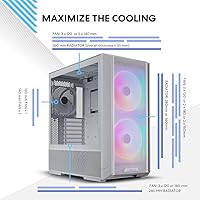
  • Fan Support: The case supports up to three 120mm or two 140mm fans at the top, two 120mm or two 160mm fans at the front, and one 120mm or 140mm fan at the rear.
  • Radiator Support: A 360mm or 280mm radiator can be mounted at the top, and a 240mm or 280mm radiator is supported at the front intake position.
  • GPU Clearance: In air-cooling mode, the case accommodates graphics cards up to 392mm in length and 180mm in height, covering current-generation flagship GPUs.
  • Motherboard Fit: E-ATX boards are supported up to 280mm in width; standard ATX, Micro-ATX, and Mini-ITX boards all fit without modification.
  • Storage Bays: The case provides dedicated mounts for two 3.5-inch HDDs and six 2.5-inch SSDs, offering ample storage expansion for most builds.
  • Front Panel I/O: The front I/O includes one USB 2.0 port, two USB 3.0 ports, and a combined 3.5mm audio/microphone jack; no USB-C port is present.
  • PSU Mount: The power supply mounts at the bottom of the case with a standard bottom-mount orientation, hidden behind a full-length PSU shroud.
  • Airflow Design: Fine mesh panels cover the front intake, top exhaust area, and the side of the PSU shroud, promoting unrestricted airflow throughout the chassis.
  • Rear PCIe Bracket: An innovative rear PCIe fan bracket is included, allowing an additional fan to be mounted at the rear to direct airflow directly across the GPU.
  • Cable Management: Cable routing is assisted by velcro straps, a grommet bar, and small integrated clips, with a symmetrical secondary chamber that keeps the rear tidy.
  • Radiator Seal Plate: A seal plate on the top radiator bracket prevents pressure leaks when a radiator or fan array smaller than 360mm is installed at the top position.
  • Modular I/O Tray: The motherboard I/O panel bracket is modular and repositionable, letting builders shift the motherboard to a higher or lower position based on their cooling configuration.

Related Reviews
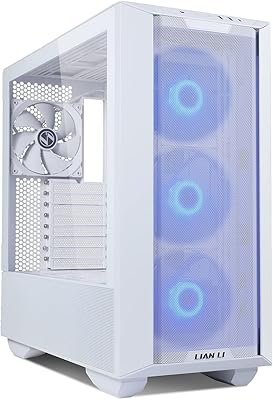
Lian Li Lancool III RGB White Mid-Tower Case
88%
94%
Cooling Performance
88%
Build Quality
92%
Design and Aesthetics
85%
Ease of Installation
91%
Airflow Optimization
More
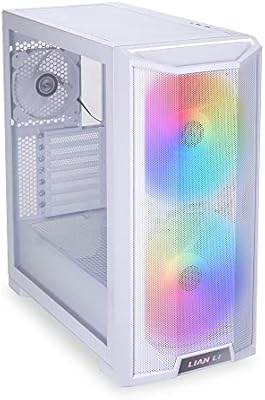
Lian Li LANCOOL 215 X White Mid Tower Case
84%
89%
Cooling Performance
92%
Build Quality
88%
Aesthetic Appeal
75%
Cable Management
91%
Motherboard Compatibility
More
Lian Li LANCOOL 217
Lian Li LANCOOL 217
81%
91%
Airflow Performance
88%
Noise Levels
93%
Build Quality
94%
Aesthetic Design
86%
Cable Management
More
Lian Li O11 Vision Compact
80%
91%
Build Quality
94%
Aesthetic Design
89%
Back-Connect Motherboard Support
86%
Cooling Performance
74%
Cable Management
More
SAMA V60 Mid Tower PC Case
80%
93%
Out-of-Box Cooling Value
78%
Airflow Performance
91%
AIO & Radiator Flexibility
88%
Tempered Glass & Aesthetics
71%
Build Quality & Materials
More
Zalman S4 Mid-Tower ATX PC Case

75%
72%
Build Quality
88%
Value for Money
91%
Ease of Assembly
67%
Airflow Performance
63%
Cable Management
More
Corsair FRAME 4000D RS Mid-Tower Case
82%
91%
Airflow Performance
88%
Build Quality
86%
Modularity & Upgradability
83%
Fan Mounting System
78%
GPU Compatibility
More
Corsair 3000D Airflow Mid-Tower PC Case
81%
93%
Airflow Performance
88%
Build Quality & Materials
91%
Thermal Management Design
84%
Cable Management
61%
Included Fans Quality
More
Zalman S2 ATX Mid-Tower PC Case
76%
88%
Airflow Performance
63%
Build Quality
91%
Value for Money
86%
Ease of Assembly
84%
Cooling Expandability
More
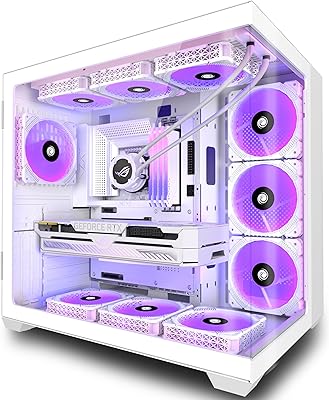
darkFlash DS900 ATX Mid-Tower PC Case
75%
76%
Build Quality
83%
Cooling Potential
91%
Aesthetics & Visibility
88%
Value for Money
74%
Cable Management
More

FAQ

Yes, in air-cooling mode the LANCOOL 216 supports GPUs up to 392mm long and 180mm tall, which covers the RTX 4090 and virtually every other current-generation card. No bracket removal or modification is needed for standard dual or triple-fan versions of those cards.

It is something to plan for. The 160mm format is non-standard, and you won't find replacement options at every retailer. Lian Li sells compatible fans, and a handful of other brands make 160mm units, but your selection is narrower than it would be with 120mm or 140mm fans. If you already have a preferred fan brand, check availability before committing.

Noticeably loud, honestly. The all-mesh design that helps keep temperatures down also does nothing to dampen fan noise, so when the pre-installed fans ramp up under load, you will hear them. If you're coming from a semi-sealed case, the difference will be apparent. Noise-sensitive builders may want to swap the fans for quieter aftermarket options or run a more conservative fan curve.

Yes, a 360mm radiator fits at the top of the case. The included seal plate ensures that if you install a smaller radiator or fan configuration at the top, there's no pressure gap left open — a small but useful design detail that most cases ignore.

It does, up to 280mm in width. That covers the vast majority of E-ATX boards on the market, but if you have an especially wide or non-standard EATX board, measure it before assuming it will fit. Standard ATX, Micro-ATX, and Mini-ITX boards all have plenty of room.

It's genuinely better than average. The secondary chamber behind the motherboard tray has a symmetrical layout that gives you real routing room, and the combination of velcro straps, a grommet bar, and small clips means you have options rather than just hoping cables stay tucked. Buyers who have built in tighter cases consistently call this out as a positive surprise.

You get two 3.5-inch HDD bays and six 2.5-inch SSD mounting points. All have dedicated mounts rather than improvised solutions, which keeps drives secure and organized. For most gaming or workstation builds, that's more than enough room.

No, and that is a real omission worth knowing about upfront. The front I/O has one USB 2.0, two USB 3.0, and a combined audio jack, but no USB-C. If USB-C on the front panel matters to you — and for modern peripheral users it increasingly does — this chassis falls short there.

It's a small bracket that mounts at the rear of the case and lets you add a fan positioned to blow air across the GPU from the side or rear. For air-cooled builds with high-end cards that throw a lot of heat into the case, this can meaningfully help. It's the kind of feature you'd normally only find on cases that cost significantly more.

The trade-off with full mesh designs is that air moves freely in both directions — including dust. This chassis does include filters, but the open nature of the mesh means you'll likely clean filters more often than you would with a sealed or semi-sealed case. If you're in a dusty environment, factor in a regular cleaning schedule. That said, the improved airflow and temperature benefits tend to outweigh the extra maintenance for most builders.

Where to Buy