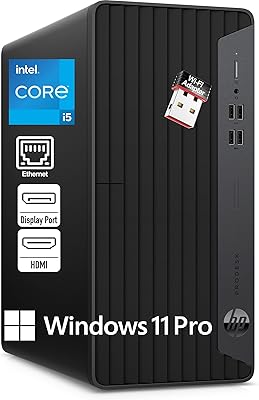
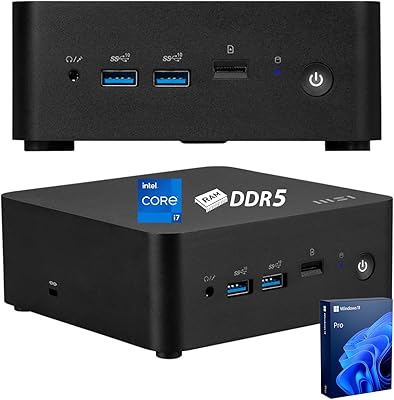
Lenovo ThinkCentre Neo 50t Tower Desktop, Intel Core i7-13700, 32GB RAM, 1TB SSD
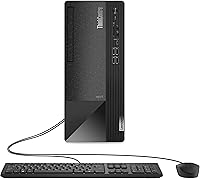
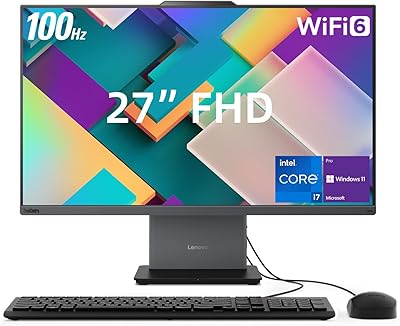
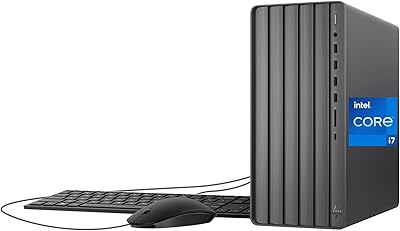
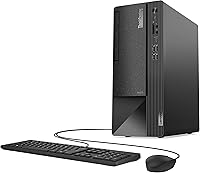
Lenovo ThinkCentre Neo 50t Tower Desktop, Intel Core i7-13700, 32GB RAM, 1TB SSD — image 1
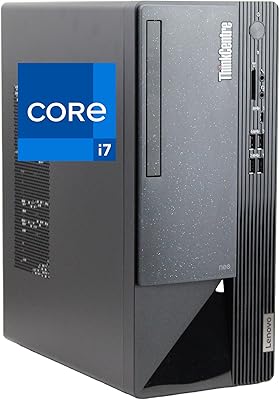
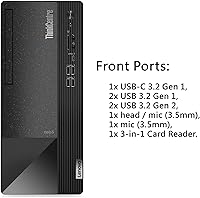
Lenovo ThinkCentre Neo 50t Tower Desktop, Intel Core i7-13700, 32GB RAM, 1TB SSD — image 2
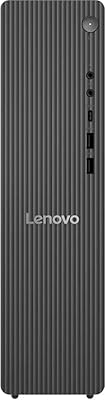
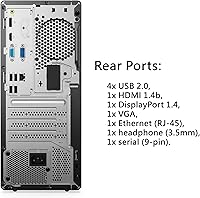
Lenovo ThinkCentre Neo 50t Tower Desktop, Intel Core i7-13700, 32GB RAM, 1TB SSD — image 3
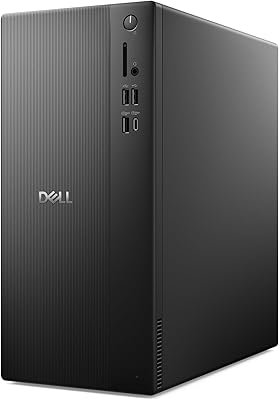
Lenovo ThinkCentre Neo 50t Tower Desktop, Intel Core i7-13700, 32GB RAM, 1TB SSD — image 4

Lenovo ThinkCentre Neo 50t Tower Desktop, Intel Core i7-13700, 32GB RAM, 1TB SSD — image 5

Lenovo ThinkCentre Neo 50t Tower Desktop, Intel Core i7-13700, 32GB RAM, 1TB SSD — image 6
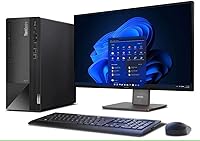
Lenovo ThinkCentre Neo 50t Tower Desktop, Intel Core i7-13700, 32GB RAM, 1TB SSD — image 7
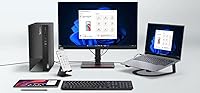
Lenovo ThinkCentre Neo 50t Tower Desktop, Intel Core i7-13700, 32GB RAM, 1TB SSD — image 8
Lenovo ThinkCentre Neo 50t Tower Desktop, Intel Core i7-13700, 32GB RAM, 1TB SSD — image 9
87%

Overview

The Lenovo ThinkCentre Neo 50t Tower Desktop, Intel Core i7-13700, 32GB RAM, 1TB SSD is a solid option for both personal and business users. This compact, space-saving desktop is designed to handle everything from everyday tasks to more demanding workflows. Powered by a 16-core Intel Core i7-13700 processor, it ensures smooth performance across multiple applications. The 32GB of RAM and 1TB SSD combine for fast speeds and ample storage, while the inclusion of Windows 11 Pro provides the latest OS features, making it easy to get started right out of the box.

Features & Benefits

Equipped with a powerful 16-core Intel Core i7 processor, this desktop excels at multitasking and running resource-intensive applications. The 32GB RAM ensures that even demanding programs run smoothly, making this machine ideal for professionals who need reliability. With a 1TB SSD, it offers quick access to files and ample space for data storage. Additionally, the three monitor outputs (DisplayPort, HDMI, VGA) enable seamless multi-display setups, and connectivity options like Wi-Fi 5, USB-C, and various USB ports cater to a range of needs.

Best For

This desktop is best suited for businesses looking for reliable desktop performance and home offices where space is limited but power is needed. Its powerful configuration makes it ideal for users who run multiple applications simultaneously or professionals who rely on multiple displays for productivity. The Lenovo ThinkCentre is also an excellent choice for those needing a high-performance space-saving machine that can handle everything from office tasks to light multimedia editing, without taking up too much desk space.

User Feedback

Users appreciate the overall quiet operation and smooth performance of this desktop for day-to-day tasks. Many highlight its ease of setup, particularly the convenience of having Windows 11 Pro pre-installed. However, some users mention that the upgrade options, especially for graphics, are somewhat limited. While the desktop handles multitasking well, a few users have pointed out that those needing a high-end GPU might find it lacking. Overall, it’s regarded as a reliable and well-built machine for professional use.

Pros

  • This desktop delivers fast performance, making it ideal for multitasking and demanding business applications.
  • The 32GB of RAM ensures smooth handling of large files and intensive tasks.
  • Its 1TB SSD offers fast storage with plenty of room for files and programs.
  • With multiple monitor outputs, it supports enhanced productivity in a multi-display setup.
  • Windows 11 Pro comes pre-installed, making setup straightforward and user-friendly.
  • Compact design is space-saving, making it suitable for both home offices and professional environments.

Cons

  • The integrated graphics may not meet the needs of users requiring high-end graphical performance.
  • Some users have noted that it lacks dedicated GPU upgrade options for future-proofing.
  • The device can be a bit bulky for users looking for ultra-compact or portable solutions.
  • Though it’s efficient, the machine may not be necessary for casual home users with basic needs.
  • The quiet operation might not be sufficient for users needing a more powerful cooling system for intensive tasks.
  • Limited upgrade potential for users who want to expand the system with specialized components.

Ratings

The Lenovo ThinkCentre Neo 50t Tower Desktop, Intel Core i7-13700, 32GB RAM, 1TB SSD has garnered strong feedback across a variety of global sources, including reviews from different languages and platforms. After filtering out spam, incentivized, and low-quality reviews, the aggregated scores reflect both the device's strengths and some areas for improvement. The desktop is appreciated for its performance and ease of use, though some users have noted its limited upgrade options, especially regarding graphics. Overall, it stands out as a reliable choice for business and home office environments, with minor caveats related to graphics and upgrade potential.

Overall Performance
91%
Many users are impressed with the smooth and responsive performance of this device. The 16-core Intel processor and 32GB of RAM allow for seamless multitasking and fast execution of everyday tasks, even with multiple apps running at once.
Some users note that while the performance is strong, it can feel less future-proof for certain high-end applications, especially in fields like video editing or 3D modeling. A few users expected more power for tasks beyond regular office work.
Multitasking Capability
94%
The combination of the 16-core processor and 32GB RAM allows this desktop to handle multiple applications at once with ease. Users find it perfect for productivity tasks like data analysis, spreadsheet management, and multitasking with a smooth experience.
Some users report that heavy multitasking, especially with graphics-intensive tasks, can occasionally cause the desktop to lag. While great for most office use, it may not be the best for those working with complex creative software on a daily basis.
Setup Process
88%
Several users appreciate the simplicity of the setup process. With Windows 11 Pro pre-installed, it's just a matter of plugging in the device and getting started. The overall process is quick and efficient, which is ideal for users who want minimal hassle.
A few users mention that they experienced minor difficulties when configuring the device for specific networks or software, though these issues seem to be rare. Some also wished for more detailed user documentation.
Build Quality
85%
The desktop’s build quality is praised for its sturdiness and reliability. Users often comment on the solid construction and premium feel of the tower, which adds to its professional appearance and ensures it can handle daily use without issues.
While the build is solid, a small number of users have pointed out that the design feels a bit bulky compared to other compact desktops. It's not the sleekest option for those who prefer a more minimalistic look for their workspace.
Operating System Experience
89%
Users enjoy the smooth experience provided by Windows 11 Pro, which is pre-installed on this desktop. The operating system enhances overall performance, making it easy to navigate and manage work efficiently. It’s a good fit for business users and home office setups alike.
A few users have mentioned that certain legacy software isn’t fully compatible with Windows 11 yet, which could pose a challenge for businesses reliant on older applications. However, this is an issue that’s likely to improve with future updates.
Storage Speed
92%
The 1TB PCIe M.2 SSD offers blazing-fast storage speeds, enabling quick boot times and swift access to files. Users appreciate how this boosts the overall speed and efficiency of their workflow, especially when working with large files.
While the storage is fast and spacious, some users would have preferred a larger capacity SSD, especially for users with heavy storage needs. However, the 1TB drive is sufficient for most users’ day-to-day tasks.
Connectivity & Ports
86%
With a wide array of ports, including multiple USB-A and USB-C options, this desktop ensures excellent connectivity for various devices. Users enjoy the flexibility of connecting a wide range of peripherals without needing additional adapters.
A handful of users feel that the limited number of DisplayPort and HDMI outputs could be restrictive for those needing to connect more than a few monitors. Despite the 3 monitor support, it's not quite as versatile as some other workstations in terms of display expansion.
Display & Multi-Monitor Setup
82%
18%
The three monitor outputs make it an appealing choice for professionals who require multiple screens for their work. Users with dual or triple monitor setups report smooth transitions between displays and seamless productivity.
However, some users mentioned that the integrated graphics could limit performance when using multiple high-resolution monitors. Those needing more graphics power for design or video work may feel limited by this configuration.
Noise Level
90%
Users have generally praised the low noise levels of this desktop, which is great for environments where quiet operation is essential. Even under load, the desktop operates with minimal sound, allowing for a more comfortable and focused work atmosphere.
There are a few reports from users who noticed slight fan noise during heavy use, but this is not a common complaint. The noise isn’t intrusive, but it may be noticeable in very quiet work environments.
Graphics Upgradeability
65%
35%
Many users appreciate that the desktop’s integrated graphics can handle basic tasks and business applications without issues. For most users, the graphics performance is sufficient for office-related tasks, video streaming, and browsing.
However, several users have expressed frustration with the limited upgrade options for graphics. This is a key limitation for those looking to use the system for more demanding creative or gaming tasks, as the integrated graphics are not suitable for high-end graphics work.
Reliability
93%
The desktop’s reliability is one of its strongest points. Users have found that it runs consistently well over extended periods without overheating or crashing. It’s a trusted choice for business environments where downtime is costly.
There were a few isolated complaints about occasional software glitches or hardware issues, but these instances appear to be rare. Overall, the device has garnered a strong reputation for stability.
Value for Money
92%
Users feel that the combination of performance, reliability, and features makes this desktop a great value. The price is considered fair for the power and capabilities it offers, particularly for users in business and home office settings.
A few users feel that the price could be a bit high for casual users or those who don’t need the extra processing power and RAM. While great for professional environments, it may be overkill for basic home use.
Customer Support
78%
22%
When users need help, Lenovo’s customer support is generally responsive and offers helpful solutions. Many users have reported positive experiences with warranty services and tech support when issues arise.
On the flip side, some users have mentioned delays in response times and difficulty getting precise answers to more complex issues. This has led to some frustration, particularly for those needing urgent support for business-critical systems.

Suitable for:

The Lenovo ThinkCentre Neo 50t Tower Desktop, Intel Core i7-13700, 32GB RAM, 1TB SSD is an excellent choice for businesses and professionals who need reliable and powerful computing in a compact form. It excels in multitasking, making it ideal for users running multiple applications simultaneously, such as in data analysis, software development, or office environments. Home office users will also appreciate its ability to handle demanding tasks while saving space. With its pre-installed Windows 11 Pro, this desktop is ready to use right out of the box, perfect for those who want a hassle-free setup without worrying about operating system installation.

Not suitable for:

While this desktop offers excellent performance for a variety of professional tasks, it may not be the best choice for users who require advanced graphics performance. Creatives working with video editing, 3D rendering, or gaming may find its integrated graphics limiting, as it lacks the upgradeability for dedicated GPUs. Additionally, casual home users who only need basic computing might find this device overpowered and unnecessary, as its features and price point may not align with their more modest needs. Finally, users looking for the smallest and most portable solution might find this tower a bit bulky and better suited for fixed workspaces.

Specifications

  • Processor: Equipped with an Intel Core i7-13700 processor featuring 16 cores and 24 threads for robust multitasking and high performance.
  • Memory: Comes with 32GB of DDR4 RAM, ensuring efficient handling of demanding applications and multitasking workloads.
  • Storage: Includes a 1TB PCIe M.2 SSD for fast data access and ample storage capacity for files and software.
  • Graphics: Features integrated graphics, suitable for everyday tasks, light video editing, and office applications.
  • Operating System: Pre-installed with Windows 11 Pro, providing a modern, secure, and user-friendly operating environment.
  • Connectivity: Supports Wi-Fi 5 and Bluetooth 5, ensuring reliable wireless connections for internet and peripheral devices.
  • USB Ports: Offers 9 USB ports: 4x USB-A 3.2, 4x USB-A 2.0, and 1x USB-C 3.2 for flexible peripheral connectivity.
  • Monitor Outputs: Supports three display outputs: DisplayPort, HDMI, and VGA, enabling connection to multiple monitors for enhanced productivity.
  • Ethernet: Includes an RJ-45 Ethernet port for wired network connections, ideal for stable, high-speed internet access.
  • Dimensions: Compact size with dimensions of 11.57 x 5.71 x 13.39 inches, making it suitable for space-constrained work environments.
  • Weight: Weighs 15 pounds, offering a stable and durable design while still being relatively lightweight for a tower PC.
  • Form Factor: Tower form factor, providing a balance of space-saving design with sufficient room for internal components and airflow.
  • Peripherals: Comes with a wired keyboard and mouse, making it ready for use immediately after setup.
  • Warranty: Typically comes with a 1-year limited warranty, covering hardware defects and issues under normal use.
  • Audio: Equipped with integrated audio for standard sound output; suitable for general office tasks and video conferencing.
  • Expansion: Supports expansion with available PCIe slots for adding additional components like graphics cards or network cards.
  • Power Supply: Standard power supply for reliable performance, with energy-efficient features to support long-term use.
  • Bluetooth: Features Bluetooth 5, enabling seamless connection to wireless peripherals like speakers, headphones, and printers.
  • Security Features: Supports security features like Windows 11 Pro’s BitLocker encryption and other business-focused security tools.

FAQ

The Lenovo ThinkCentre Neo 50t Tower Desktop, Intel Core i7-13700, 32GB RAM, 1TB SSD is designed for business environments with its high-performance Intel Core i7 processor, ample memory, and fast storage. It supports multitasking across several applications and handles demanding tasks smoothly, making it a reliable option for offices, home businesses, or professional setups.

Setting up this desktop is simple, as it comes pre-installed with Windows 11 Pro, allowing for an immediate start. Once plugged in and powered on, you’ll just need to follow a few on-screen prompts to complete the initial setup. The included wired keyboard and mouse make the process even easier.

The 16-core Intel Core i7-13700 processor provides powerful performance for multitasking and handling demanding workloads. Whether you're running multiple applications, editing large files, or handling business software, this processor ensures smooth operation and quick responsiveness.

The Lenovo ThinkCentre Neo 50t comes with integrated graphics, which work well for standard office tasks, video streaming, and light gaming. However, there are no dedicated GPU options for significant graphics upgrades, which may limit performance for more graphics-intensive applications such as gaming or high-end video editing.

This desktop supports up to three monitors via its DisplayPort, HDMI, and VGA outputs. This is ideal for users who need multiple displays for productivity or work-related tasks such as managing large datasets, financial modeling, or content creation.

This desktop includes Wi-Fi 5, Bluetooth 5, and a variety of USB ports (USB-A 3.2, USB-A 2.0, USB-C 3.2), ensuring versatile connectivity for peripherals, internet access, and external devices. These features make it well-suited for both business and home office environments.

Users have praised the desktop for its quiet operation, even during intensive tasks. The cooling system is designed to minimize noise while maintaining optimal temperatures, making it a good choice for environments where a quiet workspace is important.

While this desktop excels in general productivity and business tasks, it has limitations in terms of graphics performance and upgrade potential. The integrated graphics won't support heavy gaming or high-end creative work, and users may find the upgrade options somewhat restricted, especially for those looking for specialized components.

Yes, the compact size of this desktop makes it a great fit for home offices. It offers powerful performance for multitasking and business applications without taking up much desk space. It’s an excellent choice for professionals working from home who need a reliable, space-saving solution.

Lenovo typically offers a 1-year limited warranty with this desktop, which covers hardware issues. Customer support is available through online resources, phone support, and service centers. For extended coverage or more comprehensive support, users can opt for Lenovo’s extended warranty plans.