
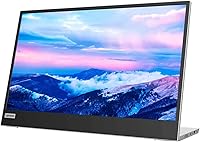
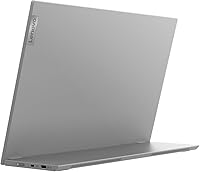
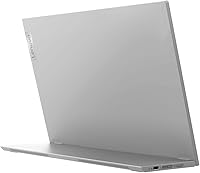
Overview

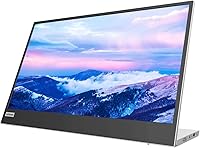
The Lenovo L15 15.6-inch Portable Monitor enters a crowded mid-range space with a clear pitch: a genuinely portable IPS display that doesn't cut corners on ergonomics. Most budget rivals ship with a folding case that doubles as a stand — functional, barely. This travel-friendly display takes a different approach, offering a real height-adjustable stand that alone separates it from typical flimsy alternatives. The IPS panel with full HD resolution delivers sharp, accurate visuals for spreadsheets, video calls, and general productivity work. Expectations matter here: this isn't built for color grading or competitive gaming. It's a solid everyday workhorse aimed squarely at people who need a reliable second screen away from the desk.

Features & Benefits

The dual USB-C ports are probably the first thing you'll appreciate in everyday use — plug in a compatible laptop and you're up and running without hunting for adapters. The IPS panel holds up well for text-heavy tasks and video calls, with viewing angles wide enough that color stays consistent even from the side. At just under two pounds, this portable monitor disappears into a bag without meaningful added bulk. The height-adjustable stand lets you set a comfortable eye level, which matters considerably after a few hours. One honest caveat: the glossy screen surface can catch reflections near windows, so room positioning is something to plan around before you commit.

Best For

If you regularly work from coffee shops, hotel rooms, or co-working spaces, the Lenovo L15 is worth serious consideration as a second screen option. It's particularly well-suited to professionals running modern USB-C laptops — the plug-and-play setup means no dongles, no hunting through a drawer for the right cable. Students fitting a dual-monitor workspace into a small dorm room will find it practical too, and the adjustable stand means it works at a real desk height rather than just whatever angle a case prop allows. It's worth stating plainly what this travel-friendly display is not: it won't satisfy anyone doing serious photo editing or high-refresh gaming. For focused work on the road, it holds up well.

User Feedback

With a 4.6-star average across roughly 185 ratings, buyer satisfaction sits firmly on the positive side. The most frequent praise focuses on how quickly the display comes out of the box ready to use, and the real adjustable stand earns specific mentions — people notice when a portable monitor actually has one. On the other side, the glossy panel in daylight is the most consistent gripe: users working near windows find glare a genuine problem, not just a mild inconvenience. A subset of buyers has flagged USB-C compatibility issues with older devices that don't output video over that port. Build quality over time draws mixed comments in lower-rated reviews, suggesting it's worth keeping in mind for heavy travel use.

Pros

  • Single-cable USB-C setup gets you a second screen in under a minute on compatible laptops.
  • The height-adjustable stand is a genuine rarity among portable monitors at this price point.
  • IPS panel delivers consistent color and wide viewing angles for everyday productivity work.
  • At under two pounds, this portable monitor fits into a standard laptop bag without meaningful added weight.
  • Flicker-free technology makes extended writing or coding sessions noticeably easier on the eyes.
  • Full HD resolution on a 15.6-inch screen keeps text sharp and documents easy to read.
  • Setup requires no driver installation on most operating systems — just plug in and work.
  • Build quality feels a step above no-name alternatives, with a stand that does not wobble during use.
  • Screen real estate comfortably fits two document windows side by side for multitasking.

Cons

  • Glossy screen causes distracting reflections in bright rooms or near sunlit windows.
  • Brightness is adequate indoors but insufficient for outdoor or high-ambient-light environments.
  • USB-C compatibility varies — older devices without video-over-USB-C support will need an adapter.
  • Power delivery to connected laptops can be slower than expected when routed through the monitor.
  • The stand does not tilt or rotate, which limits positioning flexibility on some desk setups.
  • Long-term durability questions appear in lower-rated reviews from users who travel with it heavily.
  • No variable refresh rate support makes it a poor fit for any kind of gaming use case.
  • The stand cannot fully detach for packing, leaving a slightly bulkier profile than the weight suggests.

Ratings

The Lenovo L15 15.6-inch Portable Monitor has been evaluated by our AI rating system after analyzing verified buyer reviews from global markets, with spam, bot-generated, and incentivized feedback actively filtered out. The scores below reflect a balanced picture — where this travel-friendly display genuinely delivers and where real users have run into friction. Strengths and recurring pain points are both represented transparently.

Display Quality
83%
The IPS panel produces consistent, accurate colors across a wide viewing angle, which matters when you're sitting slightly off-center in a cramped coffee shop or presenting to someone beside you. Text sharpness at full HD on a 15.6-inch screen is more than adequate for reading-heavy work tasks.
The glossy surface is a real liability in bright rooms — users near windows frequently report distracting reflections that interrupt focus. It is not a panel designed for outdoor or high-ambient-light environments, and brightness headroom is limited enough that sunlit settings are genuinely uncomfortable.
Portability
91%
At under two pounds, this portable monitor earns its label without asterisks. Most users report it slips into a standard laptop bag without noticeable added weight, making it a practical daily carry for commuters and frequent flyers alike.
The stand, while useful, does add a small amount of bulk compared to ultra-slim rivals that fold flat. A handful of users noted the overall footprint in a bag is slightly larger than expected given the stated weight.
Stand & Ergonomics
88%
The height-adjustable stand is the feature buyers mention most positively — and with good reason. Most portable monitors at this tier arrive with a case that folds into a prop, which offers almost no real height control. Having a dedicated stand changes the experience meaningfully for desk and hotel-table setups.
The stand adjustment range, while genuinely useful, does not tilt or rotate, which limits positioning flexibility for some desk arrangements. A few taller users found the maximum height still required them to look slightly downward over long sessions.
Connectivity
86%
Dual USB-C ports deliver genuine plug-and-play convenience for modern laptops — one cable handles both video signal and power delivery without any adapter hunting. This is particularly valued by MacBook and recent Windows laptop users who live in a USB-C world.
Compatibility with older devices or laptops that have USB-C ports not configured for video output is an issue that catches some buyers off guard. A small but consistent group of reviewers reported needing an additional adapter or discovering their device simply would not drive the display over USB-C.
Setup & Ease of Use
93%
Reviewers consistently describe unboxing to working in under five minutes. There are no drivers to install for most operating systems, and the dual-port design means there is rarely ambiguity about which cable to use or which port to plug into.
The included documentation is minimal, which creates confusion for users whose devices need specific USB-C configurations. Those who hit compatibility issues had little guidance from the manual and relied on community forums to troubleshoot.
Brightness & Visibility
67%
33%
For standard indoor environments — offices, home desks, hotel rooms with controlled lighting — the brightness level is sufficient for comfortable all-day use. Users working in dim or moderately lit spaces report no issues reading text or viewing content.
Step outside or sit near a sunny window and the brightness becomes a real limitation. Multiple reviewers flagged that working in bright cafes or near uncovered windows required awkward repositioning rather than simply adjusting settings. Outdoor use is effectively impractical.
Build Quality
79%
21%
The overall construction feels sturdy enough for regular travel use, and the materials do not feel cheap compared to no-name portable monitors at lower price points. The stand mechanism in particular feels solid and does not wobble during use.
Lower-rated reviews raise durability questions after extended travel use — some users noted the hinge or stand showing wear after several months of frequent packing and unpacking. It is not fragile, but it is not built to take abuse either.
Color Accuracy
74%
26%
For productivity tasks, video calls, and general content consumption, color reproduction is accurate and consistent enough that most users will not notice any deficiency. Wide viewing angles mean color does not shift dramatically when the screen is viewed from off-axis positions.
Creative professionals or anyone doing color-sensitive work will find the panel falls short of what dedicated content creation displays offer. It covers a reasonable color gamut but does not claim or deliver the accuracy needed for photo editing or video production work.
Value for Money
82%
18%
In the context of what comparable portable monitors with adjustable stands typically cost, this display lands in a reasonable spot. The stand alone justifies paying slightly more than the absolute cheapest alternatives, and the IPS panel quality holds up against pricier rivals.
Budget-focused buyers can find lighter, cheaper options if ergonomics are not a priority. The price reflects the stand and panel combination, but buyers who never use the height adjustment may feel they are paying for a feature they do not need.
Eye Comfort
84%
Flicker-free operation is something users doing long writing or coding sessions genuinely notice in a positive way — reduced eye fatigue after multi-hour stretches is a commonly cited benefit among remote workers using this as their primary away-from-desk screen.
The glossy panel somewhat undermines the flicker-free benefit in bright environments, since dealing with glare creates its own form of visual strain. The two features work at cross-purposes depending on where you are using the display.
Weight & Dimensions
89%
The physical footprint works well for standard laptop bags, and the weight is low enough that it does not materially change how a bag feels on the shoulder over a long transit day. Travelers specifically call this out as a deciding factor in their purchase.
The dimensions, once the stand is attached, make it slightly harder to fit in slim or minimalist bags. A few buyers wished the stand detached completely for packing, rather than folding into a more compact but still present profile.
Refresh Rate & Motion
71%
29%
For the target use case — documents, spreadsheets, video calls, and casual streaming — the 60Hz refresh rate is perfectly adequate. Video playback looks smooth and scrolling through text feels responsive during normal productivity work.
Anyone hoping to use this as a gaming display will find the refresh rate a clear ceiling. Even light gaming that benefits from higher frame rates will feel noticeably less fluid compared to dedicated gaming monitors, and there is no variable refresh rate support.
USB-C Power Delivery
72%
28%
When it works, the power delivery over USB-C is convenient — it can charge compatible devices while simultaneously driving the display, which reduces cable clutter on a hotel desk or small cafe table meaningfully.
Power delivery performance varies depending on the connected device, and some users found their laptop charged more slowly than expected when routed through the monitor. The inconsistency is not universal, but it is common enough to be a known friction point.
Screen Size Practicality
87%
The 15.6-inch size hits a practical middle ground — large enough to comfortably display two document windows side by side, but not so large that carrying it feels like lugging a second laptop. It closely mirrors what most users already have as their primary laptop screen.
For users coming from larger desktop monitors, the step down in real estate can feel limiting at first. Those accustomed to 24-inch or 27-inch displays at their main desk may find the portable format requires more scrolling and window switching than they would prefer.

Suitable for:

The Lenovo L15 15.6-inch Portable Monitor is built for people whose office changes daily — remote workers hopping between cafes, hotel rooms, and co-working spaces will find it a genuinely practical second screen that doesn't require hauling a separate bag. Business travelers who depend on USB-C laptops will appreciate that a single cable is usually all that stands between them and a dual-screen setup, without any adapter rummaging. Students working in dorms or shared apartments get a real productivity upgrade without dedicating a large footprint to a traditional desktop monitor. The height-adjustable stand makes a meaningful difference for anyone spending several hours a day in front of it, since proper eye-level positioning reduces the neck and shoulder fatigue that a propped-up case alternative simply cannot address. If your primary needs are document editing, video calls, spreadsheets, or casual streaming away from a main desk, this travel-friendly display covers those bases reliably and without fuss.

Not suitable for:

The Lenovo L15 15.6-inch Portable Monitor is not the right call for buyers who work frequently near bright windows or outdoors, because the glossy panel and moderate brightness cap mean glare becomes a persistent, workflow-disrupting problem rather than an occasional nuisance. Photographers, video editors, or anyone whose work depends on color accuracy will find the panel simply does not deliver the precision or gamut coverage that dedicated content creation monitors offer, regardless of how convenient the portability is. Gamers looking for a travel display should look elsewhere — the 60Hz refresh rate and absence of any adaptive sync technology make fast-paced gaming noticeably less smooth compared to purpose-built options. Buyers with older laptops or devices that have USB-C ports not wired for video output may face compatibility headaches that no amount of cable swapping will resolve without an additional adapter. Finally, anyone who travels with a minimalist slim bag and needs a truly flat-packing display may find the stand adds more bulk than expected once the whole kit is packed up.

Specifications

  • Screen Size: The display measures 15.6 inches diagonally, offering a screen area comparable to most standard laptops, which makes the transition to a dual-screen setup feel natural.
  • Resolution: Native resolution is 1920x1080 (Full HD 1080p), delivering sharp, clear text and crisp image detail suitable for productivity and general media consumption.
  • Panel Type: An IPS (In-Plane Switching) panel is used, providing wide viewing angles and more consistent color reproduction compared to TN panels common in lower-cost alternatives.
  • Aspect Ratio: The screen uses a standard 16:9 widescreen aspect ratio, compatible with virtually all modern video content, presentation formats, and productivity layouts.
  • Brightness: Maximum brightness is rated at 250 nits, which is adequate for typical indoor environments but falls short in high-ambient-light or outdoor settings.
  • Refresh Rate: The panel operates at 60Hz, which is standard for productivity-focused displays and sufficient for smooth document scrolling and video playback.
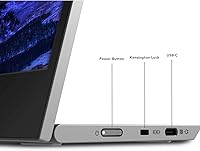
  • Connectivity: Two USB-C ports are included, supporting video signal input and power delivery, enabling a single-cable connection to compatible modern laptops and tablets.
  • Screen Surface: The panel uses a glossy screen surface, which enhances color vibrancy in controlled lighting but increases reflections and glare near bright light sources.
  • Flicker-Free: The display incorporates flicker-free backlight technology, reducing the invisible screen flicker that can contribute to eye strain during extended use sessions.
  • Weight: The monitor weighs 1.9 lbs (approximately 0.86 kg), making it light enough to carry daily inside a standard laptop bag without significant added burden.
  • Stand Design: A dedicated height-adjustable stand is included, allowing users to set a comfortable eye-level viewing position rather than relying on a fixed-angle case or prop.
  • Color: The unit is available in a Black and Grey colorway, giving it a professional, understated appearance consistent with Lenovo's ThinkPad-influenced design language.
  • Model Number: The official model identifier is 66E4UCC1US, which should be referenced when checking warranty status, driver downloads, or compatibility documentation on Lenovo's support site.
  • Brand & Series: Manufactured by Lenovo under the L-series portable monitor lineup, a range positioned toward business users and mobile professionals rather than creative or gaming audiences.
  • Release Date: The product was first made available in June 2022, making it a relatively established option in the portable monitor category with a meaningful base of real-world user feedback.
  • Dimensions: Overall product dimensions are approximately 9.66 x 14.17 inches in height and width, with a depth that varies depending on stand position during use.

Related Reviews

Topmonitor P15.6/2.5K Portable Monitor 15.6-inch 2560×1680
86%
94%
Display Quality
90%
Portability/Size/Weight
91%
Color Accuracy
87%
Connectivity (USB-C, HDMI)
85%
Build Quality
More
InnoView INVPM406 15.6-inch Portable Monitor
75%
91%
Ease of Setup
83%
Display Clarity
78%
Portability & Build
62%
USB-C Compatibility
88%
Value for Money
More
CAPERAVE 15.6-inch Portable Monitor
85%
88%
Display Quality
92%
Portability
93%
Setup and Ease of Use
90%
Compatibility
80%
Gaming Performance
More
LUMIPIX 15.6-Inch Portable Monitor
84%
91%
Portability
89%
Display Quality
93%
Ease of Setup
87%
Connectivity
84%
Build Quality
More
HotYeah 15.6-inch Portable Monitor
86%
91%
Display Quality
95%
Portability & Weight
88%
Compatibility & Connectivity
89%
Ease of Use & Setup
60%
Speaker Quality
More
Anyuse PM1561P 15.6-inch Portable Monitor

74%
91%
Portability & Form Factor
84%
Image Clarity
72%
Setup & Compatibility
74%
Build Quality & Durability
61%
Brightness & Outdoor Usability
More
Westinghouse 15.6 Inch Portable Monitor

82%
88%
Display Quality
92%
Portability
86%
Connectivity Options
94%
Ease of Setup
80%
Build Quality
More
VILVA V156F1 15.6-inch Portable Monitor
69%
74%
Display Quality
61%
Portability
82%
Connectivity & Compatibility
67%
Build Quality
83%
Value for Money
More
VILVA 15.6-inch 4K Portable Monitor
75%
91%
Display Sharpness
88%
Color Accuracy
93%
Portability
86%
Value for Money
67%
USB-C Compatibility
More
KYY K3 15.6-inch Portable Monitor
79%
93%
Portability
81%
Display Quality
94%
Setup & Ease of Use
74%
Build Quality
88%
Connectivity & Compatibility
More

FAQ

Yes, in most cases a single USB-C cable handles both video output and power delivery when connected to a compatible MacBook. That said, some MacBook models may require the display to be powered separately depending on how the USB-C port negotiates power — it is worth checking Lenovo's compatibility list for your specific MacBook generation before assuming a one-cable setup will work out of the box.

Honestly, yes — this is the most common complaint from real buyers. If your workspace has a window directly in front of or behind you, the reflections on the glossy panel can be genuinely distracting rather than just mildly annoying. Repositioning the monitor or using a room with more controlled lighting tends to resolve it, but if you primarily work in bright or sunlit environments, a matte-panel alternative would serve you better.

It can work with phones and tablets that support video output over USB-C — specifically devices that support DisplayPort Alt Mode over USB-C. However, not every phone or tablet with a USB-C port supports this, so you need to check your device's specs before assuming it will connect. Android flagships and recent iPads with USB-C tend to work; budget Android devices often do not.

The stand holds up well in normal desktop use — it does not wobble noticeably when typing or using a touchpad nearby. The adjustment mechanism feels solid during regular positioning. That said, some users who travel heavily report the hinge showing wear over many months of repeated packing and unpacking, so it is worth handling it carefully rather than treating it as indestructible.

For the vast majority of users on Windows, macOS, and ChromeOS, no driver installation is needed — the display is plug-and-play. You connect the cable, and the operating system detects it as a secondary display within a few seconds. Driver installation may be relevant only in very specific edge cases or older operating system versions.

Not really, and it is worth being upfront about that. The 60Hz refresh rate and absence of any adaptive sync technology mean fast-paced or competitive gaming will feel noticeably less smooth compared to monitors built for that purpose. It will technically run games, but anyone who cares about frame rates or low latency should look at a monitor designed specifically for gaming use.

For most standard indoor settings — a home desk, a hotel room, a typical cafe with overhead lighting — the brightness is comfortable for all-day use. Where it struggles is in bright spaces with lots of natural light coming in, particularly from windows. If your cafe of choice has floor-to-ceiling windows and you like sitting near them, you may find yourself hunting for a darker corner.

The monitor typically ships with a USB-C cable and the height-adjustable stand. In most cases you will not need to purchase a separate cable for basic setup, though if your laptop's USB-C port does not support video output you would need a separate adapter or a different cable type entirely. Always verify what is in the retail box at purchase, as accessories can occasionally vary by region.

Yes, it works with Windows 11 laptops that have a USB-C port supporting DisplayPort Alt Mode or a full-function Thunderbolt port. Windows 11 detects it as a standard external display, and you can configure it through the standard display settings panel — extend, mirror, or use it as the primary display. There is nothing specific to Windows 11 that creates compatibility issues.

At 15.6 inches, this portable monitor closely mirrors the screen size of many standard laptops, so it feels like a natural extension rather than a dramatically larger canvas. The real benefit is not gaining a much bigger screen but gaining a second screen — being able to keep a reference document, messaging app, or dashboard visible while working in your primary window is the genuine workflow improvement most buyers experience.

Where to Buy