
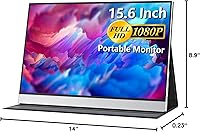
Overview

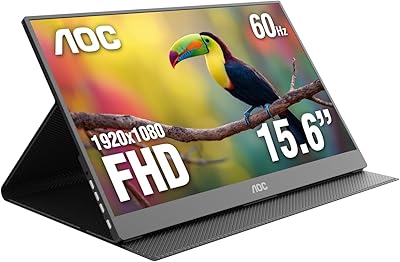
The cocopar 15.6-inch FHD Portable Monitor is a slim, no-fuss second screen built for people who work across multiple locations and can't afford to compromise on display quality away from their desk. The 15.6-inch IPS panel with a matte finish handles glare better than glossy alternatives, and the 1080p resolution keeps text sharp enough for long, document-heavy workdays. What genuinely stands out at this price tier is the included magnetic cover that folds into a stand — a small detail that eliminates the need for a separate accessory. This review focuses on real-world usability: daily performance, connectivity requirements, and how it holds up against a crowded field of similarly priced rivals.

Features & Benefits

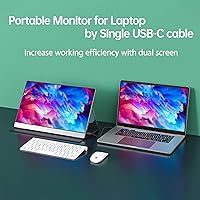
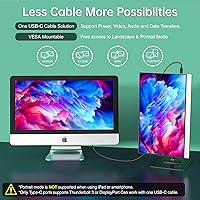
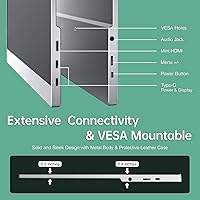
Before anything else, buyers need to know: single-cable USB-C only works if your laptop supports Thunderbolt 3 or DP Alt-Mode. That caveat aside, the dual full-feature USB-C ports are genuinely practical — one cable carries both power and video, which means less clutter in a coffee shop or hotel room. A mini HDMI port extends compatibility to PS5, Xbox, and older laptops that lack USB-C entirely. The IPS panel's 178-degree viewing angle and wide color gamut make it usable for photo editing and presentations, not just spreadsheets. FreeSync keeps casual gaming smooth, and two VESA holes mean this travel display can live permanently on a monitor arm at your desk when you're not traveling.

Best For

This portable monitor makes most sense for people who move between locations and need a reliable second screen without carrying heavy gear. Hybrid workers running MacBooks, Dell XPS, or Surface devices will appreciate the plug-and-play USB-C setup — assuming their port is compatible. Students gain a real productivity boost in libraries or shared spaces, especially when juggling multiple apps on a tight desk. Traveling console gamers can connect a PS5 or Xbox via HDMI for a decent-sized display in a hotel room without much hassle. Developers and analysts who prefer portrait-mode layouts will also find value here, since VESA support makes vertical mounting on a desk arm both easy and stable.

User Feedback

Owners of the cocopar screen generally praise how quickly it gets up and running with modern USB-C laptops — most report connecting within minutes and appreciating the slim, lightweight build. The magnetic cover-stand earns consistent appreciation for feeling solid rather than cheap. On the critical side, the most common frustration involves the single-cable setup failing on USB-C ports that lack DP Alt-Mode support; a few buyers discovered this the hard way after purchase. Brightness is occasionally flagged as adequate but not exceptional in very bright environments. Built-in speakers work fine for a quick video call — don't expect more than that. Overall, the consensus leans positive: most buyers feel this travel display delivers reliable value for everyday use.

Pros

  • Single-cable USB-C connectivity keeps your desk or travel setup clean and simple on compatible laptops.
  • The matte IPS panel reduces glare noticeably compared to glossy screens in mixed-lighting environments.
  • Mini HDMI port makes the cocopar screen genuinely useful with PS5, Xbox, and older USB-C-free laptops.
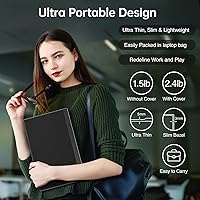
  • At 1.6 pounds, this travel display slips into a bag without adding meaningful weight to your daily carry.
  • VESA mounting holes give it real desk longevity — not just a travel accessory you use twice a year.
  • The magnetic cover doubling as a multi-angle stand removes the need for a separate accessory purchase.
  • FreeSync support keeps casual gaming visuals smooth on compatible devices without extra configuration.
  • 178-degree viewing angle makes sharing the screen with a colleague or client in a meeting surprisingly easy.
  • Blue light filter is a practical inclusion for people logging long hours in front of the display daily.
  • Portrait-mode VESA support is a genuine benefit for developers and data-heavy workflows that prefer vertical layouts.

Cons

  • Single-cable USB-C convenience fails entirely if your laptop does not support Thunderbolt 3 or DP Alt-Mode.
  • Built-in speakers are thin and low-volume — barely adequate for a video call, not much beyond that.
  • Brightness levels may struggle in very bright rooms or near windows with direct sunlight.
  • The magnetic cover hinge shows wear in some long-term owner reports, raising questions about multi-year durability.
  • No included USB-A adapter means users without a USB-C port have fewer plug-and-play options out of the box.
  • Color accuracy is decent for general use but not calibrated well enough for professional color-critical work.
  • The mini HDMI port requires a separate cable that is not always included, adding a small but real extra cost.
  • No on-screen display controls or dedicated brightness buttons — adjustments can feel less intuitive than expected.

Ratings

The scores below for the cocopar 15.6-inch FHD Portable Monitor were generated by our AI system after analyzing verified buyer reviews from global markets, with spam, bot submissions, and incentivized feedback actively filtered out. Each category reflects a honest synthesis of what real users praised and where they ran into friction — nothing is glossed over. Strengths and recurring pain points are weighted equally so you can make a genuinely informed decision.

Display Quality
83%
Most users are pleasantly surprised by the IPS panel's color reproduction and sharpness for everyday tasks like document editing, web browsing, and casual photo review. The matte finish earns consistent praise from people working in offices or near windows, where glossy screens become a frustrating mirror.
Brightness is the most common complaint — in well-lit rooms or near sunlit windows, the panel can feel underwhelming. A small number of users also noted slight backlight bleed in the corners, which becomes visible during dark-scene gaming or movie watching.
Portability
91%
At 1.6 pounds and under a quarter-inch thick, this travel display genuinely disappears into a laptop bag without adding noticeable bulk. Remote workers who move between offices, coffee shops, and home report it being one of the few second-screen options they actually take with them regularly.
The 15.6-inch size, while ideal for productivity, does push the limits of what fits comfortably in a slim laptop sleeve alongside a 15-inch notebook. Buyers with smaller bags occasionally note it requires its own dedicated compartment.
USB-C Connectivity
72%
28%
On laptops with proper Thunderbolt 3 or DisplayPort Alt-Mode support, the single-cable setup works exactly as advertised — power and video through one port, no adapter required. MacBook Pro and Dell XPS users in particular report the setup taking under a minute.
This is the single biggest source of buyer frustration: the requirement for DP Alt-Mode is not always clearly understood at purchase, and users with older or budget USB-C laptops find the headline feature completely unavailable. Several reviewers specifically mentioned returning the unit over this mismatch.
Build Quality
76%
24%
The chassis feels solid for its price tier — there is minimal flex in the panel itself, and the overall finish gives a professional impression that holds up well on a desk or in a meeting room. Most users report no creaking or rattling even after months of regular travel use.
The magnetic cover hinge shows up repeatedly in longer-term reviews as a durability concern, with some owners noting loosening after six to twelve months of daily open-and-close cycles. The cover itself feels premium at first but may not hold up to heavy road-warrior use indefinitely.
Stand & Cover Design
81%
19%
The included magnetic leather cover doubling as a stand is one of the most consistently praised elements across buyer reviews — it removes the need for a separate accessory and offers a few usable viewing angles that work well for both desk and lap use. Travelers particularly appreciate not carrying extra gear.
The stand does not offer fine-grained angle adjustment; you are largely limited to a few preset positions depending on how you fold the cover. Users who prefer a more upright viewing angle for ergonomic reasons find the options a bit shallow.
HDMI Compatibility
84%
The mini HDMI port meaningfully expands who can use this monitor, covering console gamers connecting a PS5 or Xbox in a hotel room, Raspberry Pi tinkerers, and anyone with an older laptop lacking USB-C video output. Console users in particular report the connection as stable and reliable.
Mini HDMI cables are not universally included in the box, which catches some buyers off guard. It is a minor but real added cost and inconvenience, especially for users who assumed all necessary cables would be provided.
Color Accuracy
74%
26%
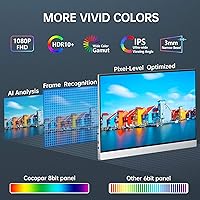
For general-purpose work — presentations, light photo sorting, video calls — the wide color gamut IPS panel performs well above what buyers at this price tier typically expect. Colors look vibrant and natural rather than washed out, which is a genuine step up from cheaper TN-panel competitors.
Color accuracy out of the box is inconsistent enough that professional photo editors and print designers notice the gap fairly quickly. Without calibration tools, the panel tends to run slightly warm, which is fine for casual use but problematic for color-critical workflows.
Viewing Angle
88%
The 178-degree IPS viewing angle holds up impressively well in real-world situations — presenting to a small group, sharing research with a colleague seated beside you, or watching a video with someone next to you all work without noticeable color shift or contrast degradation.
Very few users find fault here specifically, though some note that extreme off-axis viewing in portrait mode when mounted vertically can show minor shifts in brightness uniformity. It is a marginal issue rather than a meaningful limitation for most buyers.
Speaker Quality
47%
53%
Having any built-in audio at all is a convenience some buyers appreciate, particularly for quick video calls or unmuting a notification when headphones are not at hand. Users who set expectations appropriately find the speakers a useful backup rather than a disappointment.
The speakers are thin, quiet, and lacking any real low-end presence — essentially every reviewer who comments on audio treats them as an afterthought. Anyone planning to use this display for media consumption, gaming audio, or anything beyond bare-minimum sound output will want external speakers or headphones.
Setup & Ease of Use
87%
For buyers with a compatible USB-C laptop, the out-of-box experience is genuinely fast — plug in, the display is recognized within seconds, and extend or mirror mode is accessible through standard OS display settings without any driver installation. Students and hybrid workers consistently call setup one of the highlights.
The experience diverges sharply for users whose laptops require HDMI, where cable sourcing and port configuration add friction. On-screen display controls are also less intuitive than some competitors, and new users occasionally spend more time than expected adjusting brightness and input settings.
Gaming Performance
71%
29%
FreeSync support genuinely reduces screen tearing on compatible systems, and casual gamers using this screen with an Xbox or PS5 via HDMI report a smooth enough experience for most single-player titles and adventure games. The 1080p resolution looks clean on a 15.6-inch panel at normal viewing distances.
There is no high refresh rate option — buyers expecting 120Hz or 144Hz for competitive gaming will be let down. Input lag is acceptable for casual play but noticeable enough in fast-paced competitive titles that serious gamers should look elsewhere.
Value for Money
79%
21%
Taken as a complete package — IPS panel, matte finish, dual USB-C, HDMI, VESA support, and an included cover-stand — the price-to-feature ratio holds up well against direct competitors. Most satisfied buyers feel they got more than they expected at this segment of the portable monitor market.
A few buyers who experienced USB-C compatibility issues or early cover wear feel the value proposition weakens significantly once the headline features stop working as expected. The monitor earns its price when everything functions well, but the margin for error on compatibility is slim.
Brightness
63%
37%
For standard indoor office and home environments with controlled lighting, the panel's brightness is adequate for comfortable extended use. Users in dim or moderately lit spaces — home offices, libraries, hotel rooms — report no issues spending long sessions in front of it.
In brighter environments the display struggles noticeably, and several buyers who planned to use it near windows or in open-plan offices with overhead fluorescent lighting describe the brightness as a persistent limitation. It is the most frequently mentioned spec shortcoming in critical reviews.
Blue Light & Eye Comfort
82%
18%
The built-in blue light filter and flicker-free backlight are appreciated by users who spend four or more hours a day in front of screens. Remote workers and students report noticeably less eye fatigue during long sessions compared to monitors without these features at a similar price.
The blue light filter introduces a slight warm tint that some users find mild but noticeable on white backgrounds. It cannot be independently toggled on some firmware versions without affecting overall color temperature, which mildly frustrates users who want accurate white balance alongside eye protection.

Suitable for:

The cocopar 15.6-inch FHD Portable Monitor is a strong fit for hybrid workers and frequent travelers who need a reliable second screen without adding significant weight to their bag. If you carry a modern USB-C laptop — a MacBook, Dell XPS, Surface, or similar — the single-cable setup is genuinely convenient and keeps your workspace tidy whether you are at a client site, a co-working space, or a hotel room. Students working in libraries or cramped dorms will also get real mileage out of the 15.6-inch IPS panel, which offers enough screen real estate to keep two windows open comfortably. Console gamers who travel can take advantage of the mini HDMI port to connect a PS5 or Xbox without hunting for adapter compatibility. Developers and analysts who prefer a vertical layout will appreciate the VESA support, which allows portrait-mode mounting on a desk arm — making this travel display a practical dual-purpose screen at home and on the road.

Not suitable for:

The cocopar 15.6-inch FHD Portable Monitor will disappoint buyers who assume any USB-C port will work for single-cable operation — it strictly requires Thunderbolt 3 or DP Alt-Mode support, and older or budget laptops often lack this, making the headline convenience feature unavailable without an HDMI cable fallback. Users who prioritize peak brightness — whether for outdoor use or very bright office environments — may find the display adequate but not exceptional under harsh lighting conditions. Creative professionals with demanding color-accuracy requirements, such as video editors or print designers, would be better served by a purpose-built color-calibrated monitor rather than relying on this screen as their primary working display. Anyone expecting genuinely useful built-in audio will likely be underwhelmed; the speakers handle basic notification sounds and video calls, but they are not suitable for media consumption where audio quality matters. Finally, buyers needing a larger canvas — 17 inches or above — will find the 15.6-inch panel limiting for side-by-side multitasking with dense content.

Specifications

  • Screen Size: The display measures 15.6 inches diagonally, offering a comfortable viewing area for productivity and media without being too bulky to carry.
  • Resolution: Native resolution is 1920x1080 FHD, delivering sharp text and clear visuals suitable for everyday work, presentations, and casual media consumption.
  • Panel Type: An A-grade IPS panel is used, which provides consistent color reproduction and wide viewing angles compared to TN alternatives at a similar price point.
  • Screen Surface: The matte screen coating reduces reflections and glare, making the display more comfortable to use under mixed or uneven lighting conditions.
  • Viewing Angle: The panel supports a 178-degree viewing angle both horizontally and vertically, so colors and contrast hold up well even when viewed from the side.
  • Connectivity: The monitor includes two full-feature USB-C ports and one mini HDMI port, covering a wide range of host devices without requiring additional adapters in most cases.
  • USB-C Requirement: Single-cable USB-C operation for both power and video requires the host device to support Thunderbolt 3 or DisplayPort Alt-Mode; standard USB-C charging ports will not carry a video signal.
  • Display Features: The panel supports FreeSync, HDR, and a built-in blue light filter, with flicker-free technology to reduce eye fatigue during extended use.
  • Built-in Audio: Two built-in speakers are integrated into the chassis, providing basic audio output suitable for calls and notifications rather than immersive media playback.
  • VESA Support: The monitor includes two VESA mounting holes, supporting both landscape and portrait orientation on compatible monitor arms and wall mounts.
  • Weight: The unit weighs 1.6 pounds without accessories, making it light enough to carry daily in a laptop bag alongside a standard notebook.
  • Dimensions: Physical dimensions are approximately 0.2 x 14.12 x 8.8 inches, keeping the footprint compact while still delivering a 15.6-inch viewing area.
  • Included Stand: A magnetic leather cover is included in the box and doubles as a foldable multi-angle stand, eliminating the need for a separate stand purchase.
  • Compatible Devices: Verified compatible devices include MacBooks, Windows laptops with DP Alt-Mode, PS4, PS5, Xbox consoles, Raspberry Pi, and most modern PCs via HDMI or USB-C.
  • Aspect Ratio: The display uses a standard 16:9 widescreen aspect ratio, aligning with the format used by most laptops, consoles, and streaming content.
  • Color: The chassis is finished in silver, giving the monitor a neutral, professional look that pairs well with most modern laptop designs.
  • Model Number: The official model number is Y156FH7XD, which can be referenced when contacting support or searching for compatible accessories.
  • Availability: According to manufacturer information, this product has not been discontinued and remains in active production as of the available listing data.

Related Reviews
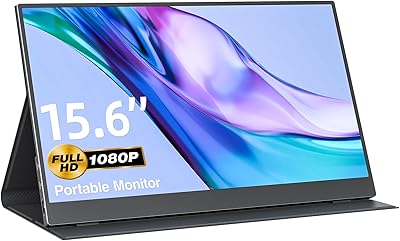
VisionOwl Portable Monitor 15.6-inch FHD
86%
89%
Display Quality
91%
Portability
88%
Ease of Setup
85%
Compatibility
92%
Connectivity Options
More
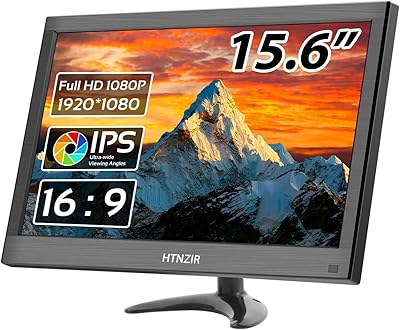
HTNZIR 15.6 Inch FHD Portable Monitor
81%
86%
Display Quality
92%
Portability & Size
80%
Build Quality
88%
Response Time (Gaming)
85%
Connectivity Options
More
MNN 15.6-inch Portable Monitor
74%
91%
Value for Money
89%
Portability & Weight
74%
Display Quality
61%
Brightness & Visibility
78%
USB-C Connectivity
More
AOC 16T20 Portable Monitor 15.6-inch FHD
85%
92%
Portability & Weight
89%
Display Quality
88%
Ease of Setup
90%
Viewing Angles
85%
Compatibility with Devices
More
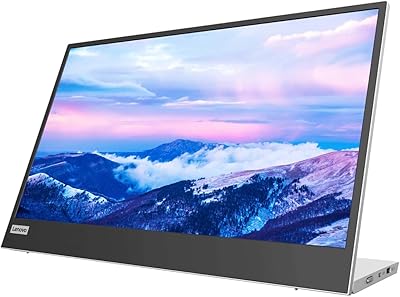
Lenovo L15 15.6-inch Portable Monitor
82%
83%
Display Quality
91%
Portability
88%
Stand & Ergonomics
86%
Connectivity
93%
Setup & Ease of Use
More
KOORUI 15.6-inch Portable Monitor 1080P FHD
83%
93%
Portability
89%
Display Quality
88%
Setup Ease
56%
Audio Quality
81%
Battery Life
More
Ingnok YN02D 15.6-inch Portable Monitor
76%
93%
Portability & Form Factor
81%
Display Clarity
62%
Brightness & Visibility
89%
Setup & Plug-and-Play Experience
71%
Color Accuracy
More
Kado K165W-FP 15.6-Inch Portable Monitor
79%
83%
Display Quality
91%
Portability & Weight
71%
Build Quality
74%
Kickstand Design
86%
Connectivity
More
QQH Z12-3 Portable Monitor 15.6 Inch FHD 1080P
85%
91%
Display Quality
89%
Portability
95%
Ease of Setup
84%
Build Quality
70%
Brightness
More
Topmonitor P15.6/2.5K Portable Monitor 15.6-inch 2560×1680
86%
94%
Display Quality
90%
Portability/Size/Weight
91%
Color Accuracy
87%
Connectivity (USB-C, HDMI)
85%
Build Quality
More

FAQ

It depends on which MacBook you have. If your MacBook supports Thunderbolt 3 or DisplayPort Alt-Mode over USB-C — which most MacBook Pro and MacBook Air models from 2018 onward do — then yes, a single USB-C cable will handle both power and video. If you are unsure, check your laptop specs before assuming single-cable setup will work.

Yes, the mini HDMI port makes console connection straightforward. You will need a mini HDMI to standard HDMI cable, which is not always included in the box, so factor that into your purchase. Once connected, the display works as a standard external screen for your console.

It comes with a magnetic leather cover that folds into a stand, so no separate purchase is needed for basic use. The stand supports multiple viewing angles, which is practical for both desk and travel setups. If you want to mount it on a monitor arm, the VESA holes on the back make that possible too.

It handles indoor lighting reasonably well, especially with the matte finish cutting down on reflections. In very bright rooms with direct sunlight nearby, you may find the brightness a little lacking. It is best suited for indoor environments rather than outdoor or high-ambient-light situations.

Basic USB-C charging ports without DisplayPort Alt-Mode support cannot carry a video signal, so single-cable operation will not work in that case. Your best fallback is the mini HDMI port, which works independently of USB-C capabilities and will handle the video signal reliably.

They are serviceable for a video call or background audio, but do not expect much beyond that. Most owners treat them as a convenient bonus rather than a real audio solution. If sound quality matters to you, plan to use external speakers or headphones.

Yes, the VESA mounting holes support both landscape and portrait orientations when mounted on a compatible monitor arm. The magnetic cover stand, however, is designed for landscape use only, so portrait mode requires a separate arm or mount.

The wide color gamut IPS panel is a step above basic TN screens and handles everyday color work well. For casual photo editing or presentation prep it is quite capable. Professional colorists or video editors who need precise, calibrated color output would want a dedicated color-accurate display rather than relying on this travel screen.

Most users report the cover feeling solid initially, but some longer-term owners have noted the magnetic hinge showing wear after extended daily use. It holds up well under normal travel conditions, but it is worth handling it carefully if you plan to open and close it multiple times a day for years.

In most cases, no. The monitor is plug-and-play with modern operating systems including Windows, macOS, and Chrome OS. Occasionally, display settings like refresh rate or resolution may need a quick manual adjustment in your system display preferences, but driver installation is generally not required.