Overview

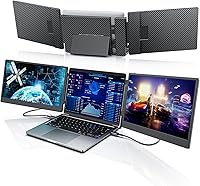
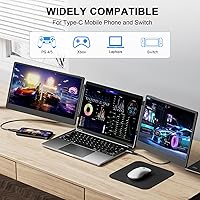
The Laptomo S3 14-inch Triple Portable Monitor represents a practical answer to the growing need for multi-screen productivity away from a fixed desk setup. Remote workers, freelancers, and travelers have been pushing for setups that don't require a dedicated office, and this triple-screen extender sits in a reasonable middle ground — not bargain-bin cheap, not enterprise-grade expensive. Setup is genuinely straightforward: plug into a compatible USB-C port and you're largely ready to go. One critical caveat to flag before anything else: if you're running a MacBook with an M1, M2, or M3 chip, this portable monitor setup is simply not compatible. Laptomo focuses specifically on laptop accessories, and the S3 reflects that niche focus clearly.

Features & Benefits

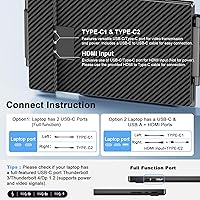
Each of the two extended panels runs at a full 1920x1080 resolution on an IPS panel. At 300 nits of brightness, images look crisp indoors and in moderately lit spaces, but a bright café window or direct sunlight will wash things out noticeably — a real limitation worth knowing. The glossy screen surface compounds this in high-glare environments. Connectivity relies on either a full-function USB-C port — not just any USB-C — or a combination of USB-C and HDMI. Many laptops have USB-C ports that don't support DisplayPort output, which trips people up. The included carrying bag and clamshell form factor are practical touches, though the combined 8-lb weight means this portable monitor setup suits car travel better than a carry-on backpack.

Best For

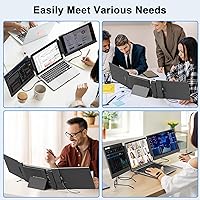
This triple-screen extender is a strong match for Windows and ChromeOS laptop users who regularly work from cafés, co-working spaces, or hotel rooms and want instant multi-window real estate without lugging a bag of cables. Coders juggling documentation, terminal windows, and a browser will find the side-by-side layout genuinely useful. Finance professionals tracking spreadsheets across multiple views benefit similarly. It also doubles as a solid display option for Nintendo Switch users who want a bigger screen without committing to a full external monitor. That said, anyone working in color-sensitive fields — photography, design, video — should look elsewhere. And again, Apple M-chip MacBooks are simply not supported, so there is no workaround to consider.

User Feedback

Buyers consistently praise how quickly the Laptomo S3 gets up and running — most report being fully operational within minutes of unboxing, and the carrying case earns particular appreciation from frequent travelers. On the other side, screen glare is the most common complaint, especially for anyone who works near windows or in bright rooms. A meaningful subset of buyers also hit snags with USB-C compatibility before realizing their port lacked full DisplayPort support — frustration that a little pre-purchase research could avoid. The weight draws mixed reactions: some find it acceptable for what it delivers, others consider 8 lbs surprisingly heavy for a portable device. Most buyers at this price tier feel the productivity gains justify the trade-offs.

Pros

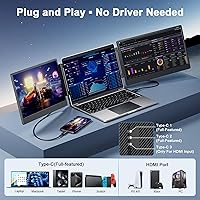
  • Plug-and-play USB-C setup gets most users running in under five minutes with no driver headaches.
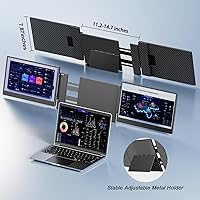
  • Two additional 14-inch IPS screens at full 1080p resolution offer a real productivity boost for multi-tasking workflows.
  • The included carrying bag keeps everything organized and travel-ready without needing extra accessories.
  • Compatible with a wide range of Windows and ChromeOS laptops sized between 13 and 16.5 inches.
  • Works as an extended display for Nintendo Switch and PS5, adding unexpected versatility beyond laptop use.
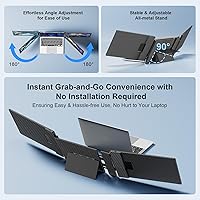
  • The clamshell design clips onto most laptops securely and holds steady during regular desk use.
  • A one-year warranty with a promised 24-hour support response provides reasonable post-purchase confidence.
  • The USB-C plus HDMI combo option gives users with mixed port setups a fallback connection path.

Cons

  • Glossy panels reflect glare heavily in bright rooms or near windows, making outdoor use impractical.
  • At just over 8 lbs total, the Laptomo S3 14-inch Triple Portable Monitor is noticeably heavier than most single portable monitors.
  • Full-function USB-C port requirement catches many buyers off guard — standard USB-C ports without DisplayPort will not work.
  • Completely incompatible with Apple M1, M2, and M3 MacBooks, with no supported workaround available.
  • 300-nit brightness, while adequate in dim indoor settings, falls short for well-lit or mixed-light environments.
  • The glossy screen surface tends to show fingerprints and smudges more readily than matte alternatives.
  • No support for resolutions above 1080p means users coming from higher-resolution laptop displays may notice a visible quality step-down.
  • Connectivity setup can be confusing for less technical users unfamiliar with DisplayPort-over-USB-C requirements.

Ratings

Our scores for the Laptomo S3 14-inch Triple Portable Monitor were generated by AI after analyzing thousands of verified global user reviews, with automated filtering applied to remove incentivized, bot-driven, and duplicate submissions. The results reflect a balanced and transparent picture — where this portable monitor setup genuinely impresses, the scores show it, and where real buyers ran into recurring frustration, those pain points are represented with equal honesty.

Setup & Ease of Use
88%
The plug-and-play experience on Windows and ChromeOS is one of the most consistently praised aspects of this portable monitor setup. Most users report going from unboxing to fully operational in under five minutes with no driver installation required — a meaningful advantage for professionals who need to set up quickly at client sites or co-working spaces.
The USB-C port requirement trips up a meaningful number of buyers who assume any USB-C port will do the job. Those without a full-function USB-C port featuring DisplayPort support find themselves stuck, and the product documentation does not always make this critical distinction clear enough for non-technical users.
Productivity Value
84%
For multi-tasking professionals — coders keeping documentation open alongside a terminal, finance workers running parallel spreadsheets, or editors reviewing source material next to their working file — the jump from one to three screens delivers a real and immediate workflow improvement that most buyers feel justifies the purchase quickly.
The productivity gains are real but come with conditions attached. Users in color-sensitive creative fields report the display accuracy is insufficient for professional-grade work, and anyone hoping to use this setup for serious photo or video editing will need a purpose-built alternative with better calibration and higher sustained brightness.
Brightness & Glare
53%
47%
In dimly lit or controlled indoor environments — like a home office with blinds drawn or a low-light meeting room — the 300-nit panels produce a reasonably comfortable viewing experience. Colors appear punchy and contrast is acceptable when ambient light is actively managed.
Step into any environment with natural light and the glossy panels become a significant problem — reflections wash out content and force constant repositioning. The 300-nit ceiling means there is no way to compensate for glare, making outdoor use or sunny office settings genuinely impractical for sustained work sessions.
Compatibility
67%
33%
For Windows and ChromeOS users, compatibility is broad and largely reliable across a wide range of 13 to 16.5-inch laptops. The setup also doubles as a useful display for Nintendo Switch and PS5 owners who want a bigger screen without investing in a dedicated external monitor.
The explicit exclusion of Apple M1, M2, and M3 MacBooks immediately eliminates a large and growing segment of laptop users with no supported workaround. Beyond that, USB-C compatibility confusion persists — buyers discover too late that their port lacks DisplayPort support, leading to preventable returns and frustration.
Portability & Weight
61%
39%
The clamshell design is genuinely clever — it clips around most laptops securely and the included carrying bag means everything travels together in one organized package. For car commuters or users setting up at a hotel desk, the all-in-one carry solution works reasonably well in practice.
At just over 8 pounds, this triple-screen extender crosses a threshold where calling it truly portable starts to feel generous. Frequent flyers and daily commuters who already carry a laptop, charger, and accessories consistently report that the added weight becomes a real physical burden over the course of a day.
Display Quality
78%
22%
Users working in dim offices or during evening home sessions consistently report that the IPS panels look sharp and vibrant for everyday tasks like spreadsheets, coding, and casual video streaming. Text renders cleanly at 1080p and color consistency across viewing angles holds up well compared to cheaper TN-based alternatives.
The glossy screen surface is a recurring frustration for anyone working near windows or under overhead fluorescent lights — reflections are hard to ignore and can contribute to eye strain over long sessions. Brightness at 300 nits also limits where this setup realistically delivers a comfortable viewing experience.
Connectivity Options
71%
29%
The dual-path connection option — either a single full-function USB-C or a USB-C plus HDMI combination — gives users with mixed port configurations a fallback that genuinely helps. For laptops that have HDMI but a non-DisplayPort USB-C, the combination approach works reliably and expands the compatible device pool meaningfully.
The absence of any pass-through ports on the unit means users lose a USB-C slot entirely while connected — a real inconvenience on ultrabooks and laptops with limited port options. The full-function USB-C requirement also remains a persistent source of buyer confusion that the setup process does not adequately address.
Build Quality
74%
26%
The panels and clamshell housing feel solid enough for regular desk use, with no significant flex or looseness reported under normal conditions. The hinge holds its position reliably throughout typical work sessions and the carrying bag provides adequate protection against everyday transit wear.
At this price tier, the materials feel functional rather than premium — the plastic housing shows fingerprints easily and the glossy screens attract smudges with routine handling. A subset of users report minor creaking from the hinge assembly after extended use, though outright structural failures appear uncommon within the warranty period.
Stand Stability
72%
28%
On a flat, stable desk surface the flexible stand holds the screens in position throughout a normal workday without significant drift or wobble. Users working from hotel desks and co-working tables report the setup stays put and requires minimal readjustment once properly positioned.
The stand is not designed for uneven or vibrating surfaces — on a train tray table or any shifting surface, the screens will move and need frequent resetting. Some users also note the clamshell grip feels slightly loose on thinner ultrabook-style laptops, creating minor but noticeable instability during active use.
Carrying Case
82%
18%
The included carrying bag is one of the most appreciated extras across user reviews — it fits both the monitor extender and most 14 to 15-inch laptops together, simplifying packing and keeping everything organized in one place. For frequent travelers, it removes the need to source a separate sleeve or case.
The bag is functional rather than durable — the material feels basic and the zipper quality has drawn criticism for feeling flimsy under daily use. Users carrying the combined weight regularly report the handles show wear relatively quickly, suggesting it is designed for convenience over long-term resilience.
Color Accuracy
58%
42%
For everyday productivity tasks — reading documents, browsing the web, managing spreadsheets, or watching casual video — the IPS panels deliver color that looks natural and consistent enough that most users will not notice significant issues during their typical daily workflow.
Anyone needing accurate color reproduction for professional creative work will find the panels fall short — the glossy coating introduces color shifts under ambient light, and no factory calibration data is provided. Graphic designers, photographers, and video editors report visible discrepancies that make this setup unsuitable for color-critical tasks.
Multi-Device Versatility
77%
23%
The ability to connect to Nintendo Switch, PS5, and select tablets alongside standard laptops gives this portable monitor setup a versatility advantage that single-purpose portable displays lack. Switch owners in particular value the large-screen gaming option while traveling, without the bulk of a separate TV or full external monitor.
The versatility has real limits — PS5 and tablet connectivity depends on specific port configurations that not all devices share, and the M-chip Mac exclusion removes a large user group entirely. The setup works best within a defined hardware ecosystem and struggles to be the universal solution its marketing implies.
Value for Money
76%
24%
For compatible Windows and ChromeOS users, the price-to-functionality ratio holds up reasonably well. Getting two additional FHD IPS panels, a carrying bag, and a plug-and-play connection in a single package represents solid value compared to purchasing two separate portable monitors with equivalent individual specs.
The value proposition weakens considerably once compatibility limitations enter the picture — buyers with Apple silicon Macs or non-DisplayPort USB-C ports are paying for a product they cannot fully use. The 8-lb weight also undermines some of the portability convenience that helps justify the asking price for on-the-go users.
Warranty & Support
69%
31%
The one-year warranty provides a reasonable baseline of purchase protection, and the stated commitment to a 24-hour support response is a positive signal for a brand at this price point. Users who have contacted support for missing accessories generally report receiving a workable resolution.
Real-world support experiences are inconsistent — some users report prompt helpful responses while others describe longer waits and less satisfying outcomes. The 24-hour claim appears to cover initial contact rather than full resolution, and the brand's overall support infrastructure feels less mature than that of established monitor manufacturers.

Suitable for:

The Laptomo S3 14-inch Triple Portable Monitor was built with a specific kind of user in mind: someone who works across multiple windows, switches between tasks constantly, and does a lot of that work away from a permanent desk. Windows and ChromeOS laptop users who spend time in co-working spaces, hotels, or client offices will get the most out of this portable monitor setup — the quick USB-C connection and included carrying bag make it genuinely easy to pack up and go. Coders who need a reference panel open while they work, finance professionals running parallel spreadsheets, and content editors who like keeping a timeline, inbox, and browser visible at once are all strong fits. Nintendo Switch owners looking to enjoy their games on a noticeably larger screen without hauling a full monitor will also find real value here. If your workflow regularly suffers because one laptop screen just isn't enough, this triple-screen extender addresses that problem directly.

Not suitable for:

There is one dealbreaker that has to come first: if your laptop runs on an Apple M1, M2, or M3 chip, this portable monitor setup does not work, and no adapter or workaround changes that. Beyond the Mac issue, anyone who works extensively outdoors or near bright windows will likely find the glossy panels frustrating — 300 nits simply does not fight glare well enough in those conditions. Professionals who depend on color accuracy for photography, video grading, or graphic design should look at purpose-built calibrated displays instead; the IPS panels here are solid for productivity but not for critical color work. The 8-lb combined weight is also worth taking seriously — if you are a frequent flyer who watches every ounce in a carry-on bag, this triple-screen extender may feel like more of a burden than a benefit. Finally, anyone whose laptop only has a standard USB-C port without DisplayPort support — which is more common than people realize — may face connectivity issues that require additional hardware to resolve.

Specifications

  • Screen Size: Each of the two extended panels measures 14 inches diagonally, giving users a total of three screens including their laptop display.
  • Resolution: Both extended panels render at 1920×1080 pixels (Full HD), delivering crisp text and clear imagery suited to productivity and general media use.
  • Panel Type: IPS technology is used on both screens, offering wider viewing angles and more consistent color reproduction than standard TN panels.
  • Brightness: Peak brightness is rated at 300 nits, which performs well in typical indoor settings but struggles against glare in sunlit or high-ambient-light environments.
  • Screen Surface: Both panels feature a glossy finish that enhances color vibrancy in controlled lighting but produces noticeable reflections near windows or under overhead lighting.
  • Aspect Ratio: Each panel uses a standard 16:9 widescreen format, consistent with most modern laptop displays for a visually uniform three-screen workspace.
  • Connectivity: The unit requires either one full-function USB-C port with DisplayPort support, or a combination of one USB-C and one HDMI port on the host device.
  • Power Input: Powered entirely via USB-C at 5 volts, drawing electricity directly from the connected laptop without requiring a separate wall adapter.
  • USB Ports: The unit includes one USB-C port for data and power connection to the host device, with no additional pass-through ports.
  • Compatible OS: Fully supports Windows and ChromeOS; explicitly incompatible with macOS running on Apple M1, M2, or M3 silicon chips.
  • Compatible Devices: Designed for laptops with a width between 11.2 and 14.7 inches (typically 13 to 16.5-inch models), and also supports Nintendo Switch, PS5, and select tablets.
  • Dimensions: The folded unit measures 13.9 × 8.15 × 1.5 inches, designed to sit alongside a laptop in its clamshell configuration.
  • Weight: Total unit weight is 8.03 pounds, which is substantially heavier than most single-panel portable monitors and worth factoring into any travel use case.
  • Included Accessories: Comes with a dedicated carrying bag sized to hold the monitor extender and a laptop together, eliminating the need for a separate sleeve or case.
  • Warranty: Covered by a one-year manufacturer warranty, with Laptomo claiming a 24-hour turnaround on support requests submitted via contact details in the packaging.
  • Model Number: Officially designated as model S3, manufactured by Shenzhen Baijiayoupu Technology Co., Ltd. under the Laptomo brand.

Related Reviews

Dell P1424H 14-inch Portable Monitor
79%
93%
Portability
91%
Setup & Ease of Use
88%
Display Clarity
61%
Brightness & Visibility
58%
Stand & Adjustability
More
Magedok 14-Inch 4K Portable Monitor

85%
93%
Display Quality
88%
Portability
90%
Ease of Setup
91%
Color Accuracy
58%
Sound Quality
More
Lrtzcbi 14-inch Portable Touchscreen Monitor
74%
88%
Value for Money
79%
Image Quality
72%
Touch Responsiveness
91%
Portability
58%
Kickstand Stability
More
KEEPTIME P142 14-inch Portable Monitor
75%
88%
Display Sharpness
83%
Color Accuracy
93%
Portability
86%
Connectivity
61%
Brightness & Glare
More
KYY X90A 14-inch Laptop Screen Extender
71%
58%
Setup & Installation
78%
Display Quality
72%
Build Quality
67%
Portability
74%
Ease of Daily Use
More
Magedok MG140-FT02 14-Inch Portable Touchscreen Monitor
74%
91%
Portability
74%
Display Quality
77%
Color Accuracy
63%
Touchscreen Responsiveness
79%
Connectivity & Compatibility
More
G-STORY 14-inch Portable Monitor FHD 1080P
84%
94%
Portability & Size
86%
Display Quality
91%
Ease of Setup
85%
Build Quality
88%
Connectivity
More
Haiway 15.6-inch 1080P Portable Monitor
68%
79%
Image Quality
83%
Portability & Build
69%
Connectivity
84%
Value for Money
74%
Stand & Ergonomics
More
InnoView 14-inch OLED Portable Monitor 4K UHD
85%
92%
Display Quality
88%
Portability
90%
Color Accuracy
94%
Response Time (Gaming)
85%
Build Quality
More
ASUS ZenScreen MB14AC 14-inch Portable Monitor
82%
93%
Portability
91%
Setup & Compatibility
82%
Display Quality
61%
Brightness
88%
Build Quality
More

FAQ

If your MacBook runs on an M1, M2, or M3 chip, then no — this portable monitor setup is explicitly incompatible with Apple silicon Macs. There is no adapter or software workaround that resolves this. If you have an older Intel-based MacBook, compatibility may be possible, but you should verify your port capabilities carefully before buying.

It depends on what that port can actually do. A standard USB-C port used only for charging or data transfer will not work. You need a USB-C port that supports DisplayPort Alternate Mode (often called a full-function USB-C port). If you are unsure, check your laptop manufacturer's spec sheet for the term DisplayPort or DP Alt Mode listed under your USB-C port description.

For most Windows and ChromeOS laptops, the setup is plug-and-play — connect the cable and your system should detect the extended screens automatically. Occasionally, Windows will need a moment to configure display settings, but dedicated driver installation is generally not required.

At just over 8 pounds total, the Laptomo S3 14-inch Triple Portable Monitor is noticeably heavier than a standard single portable display. For daily commuters or frequent flyers watching their bag weight, it may feel like a meaningful addition. It is a more practical fit for car commuters or people who set up at a fixed remote location rather than those hopping between transit and cafés.

Yes, in most cases you can configure your display settings to extend or mirror to just one of the panels if you prefer. This can be useful in tight spaces or when you want to conserve power draw on your laptop.

Honestly, the glossy panels and 300-nit brightness are adequate for dim-to-moderate indoor lighting, but a sunny café window or bright overhead light will cause noticeable glare and some washout. If most of your work happens in well-lit or mixed environments, this is a genuine limitation to factor in.

Yes, the Nintendo Switch is among the supported devices. You would connect it via HDMI or USB-C depending on your dock setup, and the panels function as an extended display. It is a practical option for Switch users who want a larger screen at home or while traveling without investing in a separate TV or monitor.

The flexible stand mechanism is designed to hold the screens in place during normal desk use, and most users report it stays stable. That said, it is not built to withstand bumps or being jostled — on a shaky train table or a wobbly surface, the screens may shift. It performs best on a stable, flat desk.

Based on current product information, this particular model comes with a glossy screen finish only. If glare is a serious concern for your work environment, it is worth exploring other portable monitor options that specifically offer a matte or anti-glare coating.

Laptomo offers a one-year warranty and claims to respond to support inquiries within 24 hours. Contact details are included in the packaging and user manual. For missing accessories specifically, they state they will resolve the issue — just make sure to reach out promptly after unboxing so any claims are well within the warranty window.