Overview

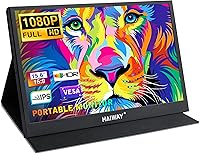
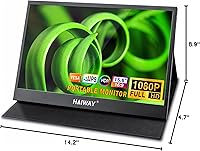
The Haiway 15.6-inch 1080P Portable Monitor enters a crowded budget category with a clear pitch: a thin, versatile second screen that fits in your bag and works with almost anything you own. At just 12mm thick, the slim profile is genuinely travel-friendly, and the origami-style folding cover that doubles as a stand is a thoughtful touch you don't always find at this price point. It connects to laptops, phones, and consoles without fuss. With a 3.9 out of 5 rating across 69 reviews, early impressions are positive — but not without reservations worth knowing before you buy.
Features & Benefits

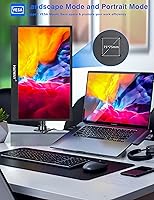
The IPS panel delivers 1920x1080 resolution with a 178-degree viewing angle, which means image quality holds up whether you're watching from the side or sharing the screen with someone. At 300 nits, brightness is adequate for indoor use but can struggle in well-lit rooms or near windows — something to factor in if you work in a bright space. FreeSync and HDR support are genuine bonuses for casual gaming. The dual USB-C and Mini HDMI ports make setup quick with no driver installation required, and the ability to flip into portrait mode is genuinely useful for reading code or long documents. Built-in speakers and a headphone jack round things out nicely.

Best For

This portable display really earns its keep as a travel companion for laptop users who need a second screen in a hotel room or co-working space. It's also a solid pick for console gamers — the Switch, PS4/5, and Xbox all connect without much hassle, giving you a dedicated screen wherever you are. Students and remote workers running a tight budget will find the dual-monitor workflow surprisingly capable. Writers and developers stand to benefit most from portrait mode. That said, anyone doing color-sensitive design work should look elsewhere — the 72% color gamut simply isn't built for that.

User Feedback

Among the buyers who've weighed in so far — and it's worth noting there are only around 69 reviews at this point — the most consistent praise lands on image clarity for the price and how straightforward setup actually is. The folding stand gets mentions for being more stable than expected. On the flip side, the USB-C compatibility issue trips people up: not every device with a Type-C port outputs video, and some buyers discovered that the hard way. Brightness in sunlit environments draws some complaints. The built-in speakers get a pass for occasional use but aren't a substitute for headphones. A few buyers also flagged inconsistent cable quality in the box.

Pros

  • Plug-and-play setup works instantly with no driver installation needed.
  • The integrated folding cover doubles as a stable stand, with no separate accessory required.
  • FreeSync and HDR support punch above the price point for casual gaming use.
  • Portrait mode makes this portable display genuinely useful for coders and document-heavy workflows.
  • At 12mm thin and 3.34 pounds, it slides into a bag without adding serious bulk.
  • Mini HDMI and dual USB-C ports cover a wide range of devices and connection scenarios.
  • Built-in speakers and a headphone jack mean you don't always need to pack external audio gear.
  • VESA mount compatibility lets you attach it to a monitor arm for a cleaner, more permanent desk setup.
  • The IPS panel holds up well from wide angles, which is handy when sharing a screen.
  • Early buyers consistently highlight image clarity as impressive relative to the price tier.

Cons

  • USB-C compatibility is not universal — verify your device supports full video output before purchasing.
  • At 300 nits, the screen struggles noticeably in bright rooms or near sunlit windows.
  • With only 69 reviews available, long-term reliability data is still quite limited.
  • The 72% NTSC color gamut rules it out for any color-accurate or professional creative work.
  • Several buyers reported that the included cables feel flimsy and may need replacing early.
  • Built-in speakers are a convenience feature at best — audio quality won't satisfy serious listeners.
  • No touchscreen support limits usefulness for tablet-style or interactive touch-based workflows.
  • The glossy screen surface picks up glare and reflections in less-than-ideal lighting conditions.
  • iOS users require an additional Lightning-to-HDMI adapter, adding cost and an extra cable to manage.

Ratings

The Haiway 15.6-inch 1080P Portable Monitor has been evaluated across 13 scored categories by our AI rating system, which processed verified global purchase reviews while actively filtering out bot submissions, incentivized responses, and suspected fake feedback. Each score is grounded in patterns drawn from real buyer experiences — spanning portability and gaming to cable durability and color accuracy. Both the genuine strengths and the documented pain points are reflected transparently, giving you an honest picture of where this display earns its price and where it asks for compromise.
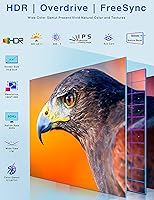
Image Quality
79%
21%
The 1920x1080 IPS panel consistently impresses buyers for its price tier — text is sharp enough for extended coding sessions, and the 178-degree viewing angle means the picture stays accurate even when shared with a colleague or viewed slightly off-axis on a cramped hotel desk.
HDR and FreeSync add some gaming appeal, but the 72% NTSC color gamut limits how vivid the image really looks — a shortcoming that becomes more obvious when watching color-rich content or comparing the output side by side with a higher-end panel.
Portability & Build
83%
At 12mm thin and just over three pounds, this portable display genuinely fits inside a standard laptop sleeve without adding noticeable bulk to a carry-on bag. Travelers and commuters who move between desks report that the slim form factor alone justifies the purchase.
A few early buyers noted the plastic casing shows fingerprints easily and feels less premium than the slim dimensions might suggest. The glossy screen surface is also prone to picking up scratches inside a busy bag if not packed carefully with the protective cover fully closed.
Connectivity
69%
31%
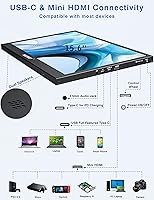
The combination of Mini HDMI and two USB-C ports covers a wide range of devices — consoles, laptops, and phones — without needing a hub in most cases. Plug-and-play detection works reliably across Windows and macOS, and buyers consistently appreciate not having to deal with driver installation.
USB-C compatibility is the single most reported frustration — many buyers discover too late that their device's Type-C port does not support video output. iOS users face an additional hurdle, needing a separate Lightning-to-HDMI adapter just to connect, which adds both cost and extra cable clutter.
Value for Money
84%
For buyers building a portable dual-monitor workflow on a student or remote-work budget, the Haiway monitor delivers a lot of hardware for the asking price. FHD resolution, FreeSync, HDR, and portrait mode support together at this price tier would be hard to replicate with competing options.
Value perception drops if you factor in needing to replace the included cables or purchase a separate adapter for your device. Buyers who arrived expecting premium construction from the price tag tended to feel underwhelmed by the plastic build quality once the unit was in their hands.
Stand & Ergonomics
74%
26%
The origami-style cover stand is one of the more thoughtful inclusions at this price point — it attaches directly to the rear of the display via screws, so it does not shift the way clip-on alternatives often do. Most buyers found it stable enough for hotel desks and co-working tables.
The stand offers limited angle adjustment compared to a proper monitor stand — you cannot tilt or swivel freely, so positioning depends entirely on the surface you place it on. On uneven or glass surfaces, several buyers reported the cover shifting noticeably when the desk is bumped.
Brightness & Visibility
56%
44%
In a controlled indoor environment — a dim café, a hotel room, or an airplane tray table — 300 nits is enough to work comfortably for extended periods. Early buyers who use it exclusively indoors rarely cite brightness as a meaningful limitation.
The screen washes out noticeably in any environment with strong ambient light — near windows during the day or under bright overhead fluorescents, legibility suffers considerably. Buyers who regularly work in open-plan offices or take their setup anywhere near natural daylight should expect real frustration.
Color Accuracy
51%
49%
For everyday tasks like spreadsheets, web browsing, video calls, and streaming standard content, the color rendering is perfectly acceptable and does not produce noticeably dull or distorted images. Casual users and students are unlikely to register the gamut limitations during typical daily use.
At 72% NTSC, colors lack the saturation and depth needed for photo editing, video grading, or any work where reproduction accuracy matters. Photographers and designers who connected this travel-friendly screen expecting sRGB-level fidelity were consistently disappointed once real images appeared on screen.
Gaming Performance
73%
27%
FreeSync support visibly reduces screen tearing during fast-moving games when paired with a compatible device, and the wide IPS viewing angle keeps the action looking clear even from slightly off-center seating. For Switch and Xbox gamers playing on the go, the display performs well above expectations at this tier.
There is no published refresh rate above 60Hz, which limits appeal for competitive players who rely on higher frame rates. The average brightness also undercuts the visual impact of HDR-enabled titles, making the HDR feature feel more like a specification checkbox than a meaningful visual upgrade.
Audio Quality
44%
56%
The dual built-in speakers handle video calls and low-volume background audio without needing anything external — a genuine convenience when you are already managing cables on a temporary desk setup. The 3.5mm headphone jack works reliably and remains the smarter path for any serious audio use.
Output volume is low and the sound is thin — buyers who tried the speakers for music, movies, or gaming audio found them underwhelming in any environment with background noise. Most feedback positions them as a fallback option rather than a functional audio solution worth relying on.
Setup & Compatibility
67%
33%
For users on Windows or macOS laptops with Thunderbolt-equipped USB-C ports, setup takes under two minutes with no software involved whatsoever. Console users connecting via Mini HDMI reported equally painless first-time experiences — plug in, power on, and the display is immediately recognized.
USB-C device compatibility remains the biggest setup minefield — users with phones or older laptops that have limited Type-C ports often spend more time troubleshooting than actually working. Portrait mode also requires a manual rotation adjustment in display settings, which first-time users frequently miss entirely.
Portrait Mode
77%
23%
Developers and writers who put portrait mode to work for long code files, terminal windows, or reading lengthy documentation found it a practical and genuinely underappreciated feature. Flipping the display vertical makes long-scroll sessions noticeably less tiring over an extended work session.
Activating portrait mode requires manually rotating the output in your OS display settings — not immediately obvious for users unfamiliar with multi-monitor configuration. The stand also provides limited fine-tuning of tilt in vertical orientation, which can make dialing in the ideal viewing angle more fiddly than expected.
Versatility
81%
19%
Laptop, console, and phone compatibility within a single display makes this portable display one of the more genuinely multi-purpose accessories in its price range. Remote workers who carry a single bag for work and leisure especially valued not needing separate output devices for different scenarios.
Managing two cables simultaneously for power and display output can get messy on a small desk — some USB-C setups require both ports occupied, leaving no spare connection available. Buyers who wanted a clean single-cable solution from a non-powered USB-C port sometimes found it fell short.
Cable Quality
49%
51%
The included cable bundle is complete enough for most buyers to get started immediately without purchasing extras — the HDMI and USB-C cables cover the most common connection scenarios right out of the box, which removes at least one initial friction point.
Multiple early buyers flagged the included cables as a weak point — the USB-C cable in particular felt thin and less durable than expected, with a few reporting intermittent connection dropouts after light daily use. For frequent travelers, having a quality replacement cable on standby is strongly advisable.

Suitable for:

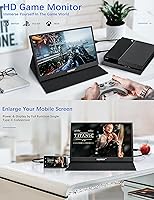
The Haiway 15.6-inch 1080P Portable Monitor is a strong fit for anyone who regularly works or travels away from a fixed desk and wants a capable second screen without hauling extra weight. Business travelers who set up temporary workstations in hotel rooms will appreciate how quickly it connects and how the integrated folding stand keeps things stable on any flat surface. Remote workers and students on a tight budget get a genuine dual-monitor workflow without a heavy financial commitment. Console gamers who want to bring their Switch, PS4/5, or Xbox experience somewhere without a TV will find it connects without much fuss. Developers and writers who work in portrait mode — scrolling through long code files or reading documents — get real practical value from that added flexibility. If you want one accessory that bridges your laptop, phone, and gaming console, this travel-friendly screen covers a surprisingly wide range of use cases at its price point.
Not suitable for:

Anyone who needs reliable color accuracy should steer clear of the Haiway 15.6-inch 1080P Portable Monitor — the 72% NTSC color gamut falls well short of what photographers, graphic designers, or video editors require for meaningful creative work. At 300 nits, the display is workable in dim or controlled indoor lighting but will frustrate users who regularly work near bright windows or in outdoor settings. Buyers whose USB-C device does not support full audio and video signal output over that port will hit a compatibility wall right out of the box, and that is not always easy to diagnose without research. Anyone expecting a high-refresh, performance-grade gaming panel should also temper expectations — this is an entry-level display priced accordingly. If your workflow depends on color-critical accuracy, sustained brightness, or long-term reliability data backed by a large review pool, this portable display is not the right choice.
Specifications

  • Screen Size: The display measures 15.6 inches diagonally, providing a usable working area well-suited to side-by-side productivity layouts or media playback.
  • Panel Type: An IPS (In-Plane Switching) panel is used, delivering consistent color accuracy and clarity across its full 178-degree viewing angle.
  • Resolution: Native resolution is 1920x1080 Full HD, producing sharp text and clear detail for everyday productivity, document work, and casual gaming.
  • Brightness: Peak brightness is rated at 300 cd/m², which handles typical indoor environments adequately but may fall short in sunlit or brightly lit spaces.
  • Color Gamut: Color coverage reaches 72% of the NTSC color space, sufficient for general and productivity use but below the threshold needed for color-accurate creative work.
  • Viewing Angle: The IPS panel supports a 178-degree viewing angle both horizontally and vertically, making shared viewing practical with minimal color shift.
  • HDR Support: HDR (High Dynamic Range) is supported, enabling improved contrast and tonal range during compatible video and gaming content.
  • FreeSync: AMD FreeSync is supported, reducing screen tearing during gaming when paired with a compatible device running a supported GPU.
  • Aspect Ratio: The display uses a standard 16:9 widescreen aspect ratio, compatible with the vast majority of video content, applications, and gaming layouts.
  • Ports: Connectivity includes one Mini HDMI port and two USB-C ports; at least one USB-C port supports full audio and video signal transmission.
  • Audio Output: A pair of built-in stereo speakers and a 3.5mm headphone jack are included, providing basic audio without requiring separate external accessories.
  • Thickness: The monitor body measures approximately 12mm at its slimmest point, allowing it to lie flat inside most laptop bags and slim travel sleeves.
  • Weight: The unit weighs 3.34 pounds inclusive of the protective folding cover, which is typical for a 15.6-inch portable display in this category.
  • Orientation: Both landscape and portrait orientations are supported, making the display adaptable for coding environments, document reading, and vertical content viewing.
  • Stand Design: The protective cover attaches to the rear of the monitor via screws and folds into an origami-style stand, eliminating the need for a separate stand accessory.
  • VESA Mount: The rear panel includes 75x75mm VESA-compatible mounting holes for use with third-party monitor arms or wall mounts, which are not included.
  • Driver Support: No driver or software installation is required; the monitor operates as a plug-and-play device recognized automatically by supported operating systems upon connection.

Related Reviews

MNN 15.6-inch Portable Monitor
74%
91%
Value for Money
89%
Portability & Weight
74%
Display Quality
61%
Brightness & Visibility
78%
USB-C Connectivity
More
KOORUI 15.6-inch Portable Monitor 1080P FHD
83%
93%
Portability
89%
Display Quality
88%
Setup Ease
56%
Audio Quality
81%
Battery Life
More
QQH Z12 15.6-inch Portable Monitor
71%
91%
Portability
83%
Build Quality
76%
Display Quality
93%
Setup & Ease of Use
62%
Stand & Viewing Angles
More
Topmonitor P15.6/2.5K 15.6-inch Portable Monitor
77%
91%
Image Sharpness
87%
Color Accuracy
93%
Portability
82%
Connectivity
88%
Value for Money
More
CAPERAVE CF15 15.6-inch Portable Monitor
70%
83%
Portability & Build
76%
Display Quality
51%
Brightness
91%
Setup & Ease of Use
82%
Value for Money
More
HotYeah 15.6-inch 1080P Portable Monitor


76%
83%
Display Quality
62%
Brightness & Visibility
91%
Portability & Design
88%
Value for Money
93%
Setup & Ease of Use
More
Anyuse PM1561P 15.6-inch Portable Monitor
74%
91%
Portability & Form Factor
84%
Image Clarity
72%
Setup & Compatibility
74%
Build Quality & Durability
61%
Brightness & Outdoor Usability
More
InnoView INVPM406 15.6-inch Portable Monitor
75%
91%
Ease of Setup
83%
Display Clarity
78%
Portability & Build
62%
USB-C Compatibility
88%
Value for Money
More
LUMIPIX Magic-001 15.6-inch Portable Monitor
76%
78%
Display Quality
91%
Portability
72%
Connectivity
61%
Stand Stability
79%
Value for Money
More
Westinghouse 15.6 Inch Portable Monitor
82%
88%
Display Quality
92%
Portability
86%
Connectivity Options
94%
Ease of Setup
80%
Build Quality
More
VILVA V156F1 15.6-inch Portable Monitor

69%
74%
Display Quality
61%
Portability
82%
Connectivity & Compatibility
67%
Build Quality
83%
Value for Money
More

FAQ

It should work with most MacBooks that have a Thunderbolt 3 or Thunderbolt 4 port, as those support full video output over USB-C. That said, not every USB-C port on every laptop is wired for display output, so it's worth confirming your specific model supports it before purchasing. A quick check of your laptop's spec sheet under USB-C or Thunderbolt capabilities will tell you what you need to know.

Yes — when the Switch is docked, you can connect it via the Mini HDMI port using a standard HDMI to Mini HDMI cable. Some users also connect directly using a USB-C cable if their dock or adapter supports video output over that port. Either way, it is one of the more practical use cases for this display.

No, nothing to install. This portable display uses standard plug-and-play detection, so Windows, macOS, and most other systems will recognize it automatically the moment you plug it in. It is one of the more hassle-free parts of the setup experience.

Yes, portrait mode is supported. Physically rotating the monitor is straightforward — just adjust the folding stand accordingly. On the software side, you will need to go into your display settings and manually rotate the output: on Windows, right-click the desktop and open Display Settings; on macOS, go to System Settings and look under Displays. It takes about thirty seconds once you know where to look.

At 300 nits, this travel-friendly screen handles dim-to-moderate indoor lighting without much trouble, but it starts to wash out when there is direct sunlight or a bright window in your line of sight. It is not built for outdoor use. If you frequently work in a very bright office or near a large window, you may find yourself squinting more than you would like.

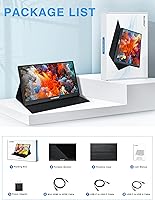
The package typically includes a USB-C to USB-C cable, a Mini HDMI to HDMI cable, and a USB-C power cable. For most laptop and console setups, that covers what you need. A handful of buyers have mentioned the bundled cables feel a bit lightweight in quality, so having a sturdier backup cable on hand is not a bad idea, especially for travel.

Not without an adapter. iPhones use Lightning or USB-C depending on the model, and neither connects directly to this monitor without a separate Lightning-to-HDMI or USB-C adapter. That adapter is not included and will need to be purchased separately. Worth factoring in if iPhone use is your main goal.

Early buyers tend to report the stand holds up better than expected for a budget portable display. Because the cover screws directly onto the back of the monitor rather than clipping on, it does not shift the way some clip-based stands can. On a flat, stable surface it is reasonably solid — though a sharp knock to the desk will move it, so do not expect the rigidity of a full desktop monitor stand.

Yes. The rear panel includes 75x75mm VESA mounting holes, so it will attach to any standard VESA-compatible arm or wall bracket. This is a useful option if you want to use the Haiway monitor as a semi-permanent second screen at your desk rather than just a travel accessory. The arm or bracket itself is not included.

They are fine for light duty — a video call, background audio, or casual video watching. Do not expect deep bass or room-filling volume. For anything that needs real audio quality, the 3.5mm headphone jack is the smarter option. Think of the built-in speakers as a convenience rather than a feature you will rely on heavily.