Overview

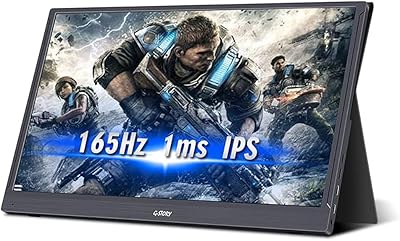
The G-STORY GS140H0 14-inch Portable Monitor is built for people who need a second screen that actually travels well. At just under two pounds, it slips into a bag without adding much bulk, and the slim profile means it doesn't feel like an afterthought bolted onto your setup. The panel itself is a 1080p IPS display, which keeps colors consistent even if you're glancing at it from an angle on a cramped coffee shop table. Connectivity covers both USB-C and USB-A, so it plays nice with most modern laptops, and the included smart cover folds back into a stand. It's a thoughtful touch that saves you from hunting for a separate prop or stand.

Features & Benefits

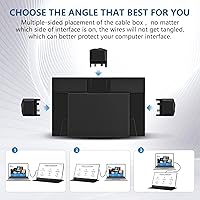
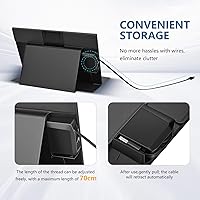
Picture quality on this travel display holds up well for everyday tasks, thanks to the anti-glare matte finish and wide viewing angles typical of IPS panels. At 1920x1080 resolution with a 16:9 ratio, text stays sharp and windows don't feel cramped even when you're running two apps side by side. One detail that stands out is the hidden cable box on the back, which lets you route the cord in three different directions instead of leaving it dangling. The cable itself retracts and extends up to 70cm, so you're not stuck with a fixed length. Built-in speakers mean you can skip headphones for quick calls, and this laptop screen extender even supports daisy-chaining additional monitors off a single USB-A port.

Best For

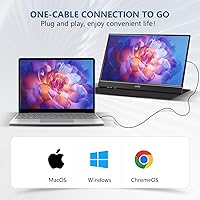
This setup makes the most sense for remote workers and freelancers who bounce between coffee shops, coworking spaces, and home offices and want consistent screen real estate wherever they land. If you're tired of squinting at a single laptop display during video calls or spreadsheet work, adding this travel display gives you breathing room without hauling a full external monitor. It's compatible with Mac, Windows, and Chromebook machines, so cross-platform users aren't left out. Frequent presenters will also appreciate how quickly it sets up as a mirrored or secondary display. That said, it's better suited to light productivity and media use than color-critical design work, where a more specialized panel would serve you better.

User Feedback

Owners generally seem happy with how crisp the screen looks for typical office work, and the color reproduction gets specific praise for being more accurate than expected at this size. The compact build and included cover also come up often, with people noting it feels durable enough for regular bag use. On the flip side, a handful of buyers mention needing to install the bundled driver software before this portable monitor would recognize their laptop, which adds a small extra step compared to true plug-and-play displays. A few also note that managing the cable, while improved by the hidden box design, still takes a bit of trial and error to get tangle-free.

Pros

  • Lightweight build makes it easy to toss into a laptop bag
  • IPS panel delivers solid color and wide viewing angles for the price
  • Hidden cable box keeps wiring tidy instead of dangling loose
  • Retractable cord up to 70cm adds flexibility for awkward desk setups
  • Built-in speakers mean you can skip carrying headphones for quick calls
  • Smart cover doubles as a stand, saving you from extra accessories
  • Works across Mac, Windows, and Chromebook without much hassle
  • Daisy-chaining support lets you add more screens through one USB-A port
  • The G-STORY GS140H0 14-inch Portable Monitor feels sturdy despite its slim profile

Cons

  • Requires driver installation on first connect, which slows down setup
  • Single USB-A port limits how many peripherals you can connect at once
  • Cable management still takes some getting used to despite the hidden box
  • Brightness may feel limited in direct sunlight or very bright rooms
  • Stand cover offers fewer adjustment angles than a dedicated monitor arm
  • Not ideal for color-critical editing work needing precise calibration
  • Speakers are functional but won't replace dedicated audio for media use
  • Some users may find the matte finish slightly dulls vibrant colors

Ratings

Our scores for the G-STORY GS140H0 14-inch Portable Monitor are generated by AI after analyzing verified user reviews from buyers worldwide, with spam, bot activity, and incentivized feedback filtered out before scoring. The breakdown below reflects both the genuine strengths people rave about and the real pain points that show up once this travel display gets daily use.

Display Clarity
86%
Users consistently mention crisp text and sharp visuals during everyday tasks like browsing, spreadsheets, and document review. The IPS panel holds detail well even on smaller windows, which matters when running side-by-side apps during a workday.
A few buyers note that fine detail in dense photo work doesn't quite match dedicated editing monitors. Under very bright lighting, some report needing to angle the screen slightly to avoid washed-out visibility.
Color Accuracy
79%
21%
Colors look noticeably better than expected for casual browsing, video calls, and watching content during travel downtime. Several reviewers specifically called out accuracy as a pleasant surprise at this size and price point.
It isn't calibrated for color-critical tasks, so designers and photo editors report visible drift compared to professional-grade panels. Some also mention slight muting from the matte coating under certain lighting.
Portability
91%
At under two pounds, frequent travelers and remote workers praise how easily this portable monitor slips into a laptop bag alongside a charger and cables. The slim build doesn't add noticeable bulk during commutes or flights.
A handful of users wish the included cover added more rigid protection during rougher travel, like checked luggage. The size, while convenient, also means less screen real estate than larger external monitors.
Build Quality
81%
19%
The PU leather cover and overall construction feel sturdier than expected for the price, with several owners noting it survives daily backpack use without scuffing easily. The hinge on the stand cover holds position reliably during use.
A few reviewers mention the plastic housing around the ports feels a bit thin compared to the rest of the build. Long-term durability after a year of heavy travel remains less reported on.
Setup & Connectivity
68%
32%
Users on newer laptops with USB-C report true plug-and-play behavior with no extra steps required. The dual USB-C and USB-A options also mean broader device compatibility than monitors locked to a single connection type.
Multiple buyers mention needing to install the bundled driver after seeing a waiting for computer connect message, which adds friction on first use. This step trips up less tech-savvy users more than they expected.
Cable Management
74%
26%
The hidden, multi-directional cable box earns praise for keeping cords from tangling in a bag, with the 70cm retractable length offering flexibility for different desk arrangements. Several users mention it feels more thought-out than typical portable monitors.
A learning curve exists for smoothly retracting and extending the cable without snagging. A few users note the mechanism feels slightly fiddly compared to a simple fixed cable.
Audio Quality
61%
39%
The built-in dual speakers are handy in a pinch for quick video calls or casual audio without digging out headphones. Reviewers traveling light appreciate not needing a separate speaker for basic tasks.
Sound quality is described as thin and lacking depth for music or movies. Most reviewers treat it strictly as a backup option rather than a primary audio solution.
Multi-Monitor Support
77%
23%
The daisy-chain feature through a single USB-A port appeals to users building multi-screen setups for presentations or trading-style workflows. Reviewers running two units together call it a convenient space-saver.
Some report inconsistent performance depending on the host laptop's USB output, with occasional lag when chaining additional displays. This feature seems to work best when paired with newer, higher-output laptops.
Cross-Platform Compatibility
84%
Mac, Windows, and Chromebook users all report successful connections, making this laptop screen extender a flexible pick for households or offices with mixed device ecosystems. Switching between personal and work laptops is mentioned as hassle-free once set up.
Some Chromebook users mention occasional display scaling quirks that require manual adjustment in settings. A small number of older laptop models reportedly need extra troubleshooting beyond the included driver.
Value for Money
83%
Many buyers feel the feature set, including the smart cover, speakers, and cable design, justifies the price compared to competing portable monitors. It's frequently recommended to remote workers on a budget who still want solid functionality.
A few reviewers feel the driver installation hassle slightly undercuts the otherwise strong value proposition. Buyers expecting premium-tier color accuracy at this price report mild disappointment.
Stand & Cover Design
88%
The PU leather smart cover doubling as a stand draws consistent praise for eliminating the need for a separate prop or case. Users like that protection and functionality are combined into one accessory.
The stand offers only a fixed viewing angle rather than multiple adjustment positions. A few users wish it tilted further back for ergonomic comfort during long sessions.
Ease of Use for Remote Work
85%
Remote workers consistently highlight how quickly this travel display becomes part of their daily routine, especially for video calls and multitasking across coworking spaces. The extra screen real estate is described as genuinely improving focus and workflow.
First-time setup friction from driver installation is the most repeated complaint among this group. A few also mention missing a true plug-and-play experience compared to higher-end alternatives.

Suitable for:

The G-STORY GS140H0 14-inch Portable Monitor fits naturally into the life of a remote worker who hops between coffee shops, client offices, and home setups and wants more screen space without packing a heavy monitor. Freelancers juggling spreadsheets, design mockups, or research tabs will appreciate having a second display that slides into a laptop bag instead of staying chained to a desk. It also suits frequent presenters who need a quick mirrored screen for showing clients work without fumbling with cables under pressure. Mac, Windows, and Chromebook users get straightforward plug-and-play access, which matters for people who switch devices often. Anyone tired of squinting at a single laptop screen during long video calls will likely find this travel display a welcome upgrade.

Not suitable for:

Buyers doing color-critical work like professional photo editing or video grading should look elsewhere, since the G-STORY GS140H0 14-inch Portable Monitor is built for everyday productivity rather than precision color accuracy. Anyone who dreads installing extra drivers on first setup may find the initial connection process more fiddly than a true plug-and-play display. People who travel with multiple devices and need several display connections simultaneously might also feel limited by the single USB port. If you're hoping for a permanent desk monitor with a stand that adjusts heavily for ergonomics, this portable monitor's lightweight stand cover won't replace a dedicated arm-mounted setup. Gamers chasing high refresh rates should also pass, since this panel is tuned for office work, not fast-motion visuals.

Specifications

  • Screen Size: The display measures 14 inches diagonally, sized for portability without feeling cramped.
  • Resolution: It runs at a Full HD resolution of 1920x1080 pixels.
  • Panel Type: An IPS panel is used to provide wide viewing angles and consistent color.
  • Surface Finish: The screen has a matte, anti-glare coating to reduce reflections.
  • Aspect Ratio: The display has a 16:9 aspect ratio, standard for widescreen content.
  • Brightness: Image brightness is rated at 300 nits.
  • Connectivity: It connects via USB-C and USB-A inputs for broad device compatibility.
  • Audio: Two built-in speakers are included for basic sound output.
  • Protective Cover: A PU leather smart cover is included and folds into a stand.
  • Cable Design: A hidden, multi-directional cable box stores and routes the cord on the back of the monitor.
  • Cable Length: The retractable cable extends up to 70cm and can be adjusted as needed.
  • Multi-Monitor Support: Multiple units can be daisy-chained together using a single USB-A connection.
  • Weight: The monitor weighs 1.8 pounds.
  • Dimensions: Product dimensions are listed at 15 x 10 x 6 inches including packaging.
  • USB Ports: The monitor includes one total USB port for primary connection.
  • Compatibility: It works with Mac, Windows, and Chromebook devices.
  • Model Number: The item model number is GS140H0.

Related Reviews
G-STORY 15.6-inch 2K 120Hz Portable Monitor
73%
84%
Display Quality
79%
Refresh Rate
81%
Portability & Design
67%
Build Quality
61%
PS5 Compatibility
More
Dell P1424H 14-inch Portable Monitor
79%
93%
Portability
91%
Setup & Ease of Use
88%
Display Clarity
61%
Brightness & Visibility
58%
Stand & Adjustability
More
Magedok 14-Inch 4K Portable Monitor
85%
93%
Display Quality
88%
Portability
90%
Ease of Setup
91%
Color Accuracy
58%
Sound Quality
More
KEEPTIME P142 14-inch Portable Monitor
75%
88%
Display Sharpness
83%
Color Accuracy
93%
Portability
86%
Connectivity
61%
Brightness & Glare
More
Lrtzcbi 14-inch Portable Touchscreen Monitor
74%
88%
Value for Money
79%
Image Quality
72%
Touch Responsiveness
91%
Portability
58%
Kickstand Stability
More
Magedok MG140-FT02 14-Inch Portable Touchscreen Monitor
74%
91%
Portability
74%
Display Quality
77%
Color Accuracy
63%
Touchscreen Responsiveness
79%
Connectivity & Compatibility
More
KYY X90A 14-inch Laptop Screen Extender
71%
58%
Setup & Installation
78%
Display Quality
72%
Build Quality
67%
Portability
74%
Ease of Daily Use
More
InnoView 14-inch OLED Portable Monitor 4K UHD
85%
92%
Display Quality
88%
Portability
90%
Color Accuracy
94%
Response Time (Gaming)
85%
Build Quality
More
G-STORY GST56 15.6″ Portable Gaming Monitor
73%
88%
Refresh Rate Performance
81%
Image & Color Quality
84%
Response Time
76%
Portability & Form Factor
52%
Setup & Power Requirements
More
ASUS ZenScreen MB14AC 14-inch Portable Monitor
82%
93%
Portability
91%
Setup & Compatibility
82%
Display Quality
61%
Brightness
88%
Build Quality
More

FAQ

If your MacBook has a USB-C port, you can usually connect directly without needing extra adapters. Older MacBooks with only USB-A ports will also work fine using the included USB-A cable. Just keep in mind some older MacBook models may need the driver installed for the connection to be recognized properly.

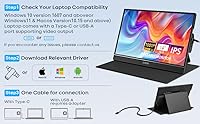
This usually means the necessary driver hasn't been installed yet on your laptop. The package includes a USB drive with the driver, so plugging that in and running the installer should resolve it. Once installed, the monitor should connect automatically going forward.

The hardware itself doesn't have a built-in rotation mechanism, but many users adjust orientation through their laptop's display settings instead. The smart cover stand is primarily designed to support landscape use though, so portrait mode may require improvising your own prop.

The PU leather smart cover folds into a stand that holds the screen at a fixed angle, and most users find it stable enough for desk or table use. It's not as adjustable as a dedicated monitor arm, so don't expect multiple viewing angles. For casual travel use, though, it does the job well.

The hidden cable box on the back does help a lot compared to a loose dangling cord, and you can route it in three directions depending on your setup. It takes a little practice to get used to retracting and extending it smoothly. Once you get the hang of it, cable clutter is noticeably reduced.

Yes, this travel display supports daisy-chaining, meaning you can connect multiple units in series through a single USB-A port. This is handy if you want a multi-monitor setup without using up several ports on your laptop. Just be aware that performance may vary depending on your laptop's USB output capabilities.

It's a solid panel for everyday tasks like browsing, writing, and spreadsheets, and colors look reasonably accurate for casual use. That said, it isn't calibrated for color-critical work like professional photo or video editing. If precise color accuracy is essential to your work, a specialized monitor would serve you better.

No, this portable monitor draws power directly through the USB connection to your laptop, so there's no separate battery to charge. As long as your laptop has enough power output, the screen should run without issues. This also means battery life isn't really a factor to worry about.

The built-in speakers are functional for quick video calls or casual listening, but they won't replace dedicated external speakers or headphones for serious audio use. Think of them as a convenient backup rather than a primary audio source. For music or movies, plugging in headphones will give you noticeably better sound.

Yes, at under two pounds and with a built-in protective cover, it's designed to slip into a laptop bag or backpack without adding much bulk. The slim profile and included cover help protect the screen during transport. Many users specifically choose it because of how easily it travels compared to a standard monitor.