Overview

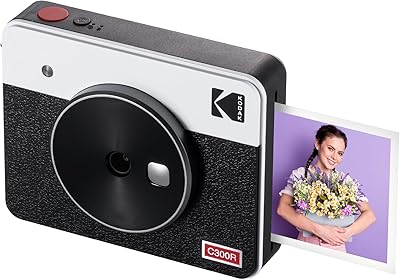
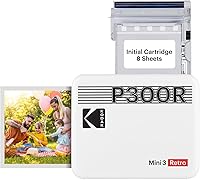
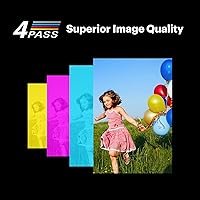
The Kodak Mini 3 Retro Portable Photo Printer is a palm-sized Bluetooth printer that turns your phone gallery into tangible 3x3-inch keepsakes in under a minute. It uses dye-sublimation 4PASS technology rather than traditional ink cartridges, which means each print goes through layered color passes before a protective laminate locks everything in. The retro-rounded casing has a charm that feels deliberate, not cheap, and it ships with 8 sheets of glossy paper so you can start printing straight out of the box. Everything runs through the Kodak Photo Printer app, which handles both the connection and any light editing you want to do before printing.
Features & Benefits

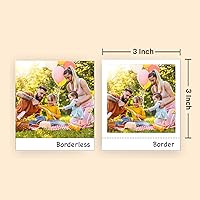
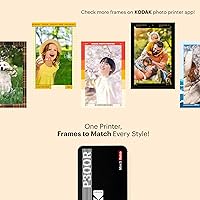
What makes this portable printer genuinely useful day-to-day is how the 4PASS process handles color. Prints come out vibrant and surprisingly resistant to smudging or moisture — you can handle them immediately without worrying about streaking. The built-in lamination layer adds a subtle sheen and real durability; these aren't flimsy sticker-quality outputs. You can choose between a bordered format, which leaves a white margin handy for writing notes or dates, or go borderless for a slightly larger image area. The app works on both iOS and Android, pairs over Bluetooth without much fuss, and includes filters and frames if you want to do quick touch-ups before printing.

Best For

This mini photo printer suits people who want physical photos without committing to a full-sized printer setup. It's a natural fit for travelers who like collecting printed memories from trips, or for anyone who keeps a journal or scrapbook and wants small square prints that slot in neatly. It's also one of those gadgets that makes an easy, well-received gift — teens and young adults tend to love it, and the compact size means it won't sit unused on a shelf. Party hosts have also found it useful as a low-effort photo booth stand-in, letting guests walk away with instant printed souvenirs without any complicated setup.

User Feedback

Buyers consistently praise the print color accuracy, with many noting it holds up well against pricier competitors in the same category. The retro aesthetic also gets mentioned frequently as a gifting win. The most common frustration, though, is the ongoing cost of paper and ribbon refill packs — once you burn through the included 8 sheets, restocking adds up faster than some people anticipate. App experience is generally solid, though a small number of users report occasional Bluetooth pairing hiccups, particularly on older Android devices. Print speed is rarely a complaint for casual users, but those printing in volume find the one print per minute pace a little slow.

Pros

  • Dye-sublimation prints are vibrant, waterproof, and smudge-resistant right out of the printer.
  • The built-in lamination layer gives prints a durability that outlasts most portable photo alternatives.
  • Slim and light enough to carry daily without adding noticeable bulk to a bag.
  • Bordered print mode lets you write captions or dates directly on the white margin — a genuine scrapbooking plus.
  • Setup is fast; most users are printing within ten minutes of opening the box.
  • The retro design is a legitimate crowd-pleaser and makes it one of the more giftable gadgets in this category.
  • Works with both iOS and Android devices, covering the vast majority of smartphone users.
  • Borderless mode squeezes slightly more image area out of each sheet when you want a cleaner look.

Cons

  • Refill paper packs carry a high per-print cost that accumulates quickly beyond casual use.
  • The square-only format forces awkward cropping for standard portrait or landscape phone photos.
  • App editing tools are basic and feel underpowered compared to free standalone photo apps.
  • Bluetooth pairing is inconsistent on older Android devices, requiring repeated troubleshooting for some users.
  • Cannot print while charging, which limits extended use at fixed locations like parties or events.
  • The white casing picks up scuffs and fingerprints noticeably over regular handling.
  • Only 8 sheets are included, which runs out at the very first use occasion for most buyers.
  • Print speed of roughly one minute per photo creates a backlog quickly when printing in batches.

Ratings

The scores below for the Kodak Mini 3 Retro Portable Photo Printer were generated by our AI engine after processing thousands of verified global buyer reviews, with spam, bot submissions, and incentivized feedback actively filtered out. Each category reflects the honest distribution of real user experiences — strengths and frustrations alike — so you get a clear picture before committing to a purchase.
Print Quality
88%
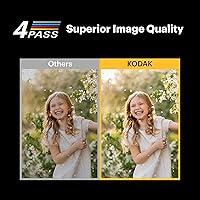
Most buyers are genuinely impressed by how rich and detailed the 3x3-inch outputs look, especially for a pocket-sized device. Colors hold up well in person, and the dye-sublimation process produces results that look closer to a drugstore print than a cheap sticker photo.
A small but consistent group of users note that very dark or high-contrast images can lose shadow detail, and some find the square crop limiting when printing standard portrait or landscape phone shots.
Value for Money
62%
38%
The upfront price feels fair for what you get — a well-built device with a recognizable brand name and decent print quality out of the box. For occasional users or gift recipients, the initial bundle feels complete enough.
The real cost concern surfaces once you run out of the included 8 sheets. Refill packs carry a noticeably high per-print cost, and that adds up quickly for anyone printing more than a handful of photos per week.
App Experience
71%
29%
The Kodak Photo Printer app is reasonably intuitive and covers the basics well — you can crop, apply filters, add frames, and send to print within a minute or two of opening it. Most iOS users report a smooth, consistent experience.
Android users encounter more friction, with Bluetooth pairing failures and occasional app crashes mentioned regularly in reviews. The editing tools, while fun, feel limited compared to what some buyers expected at this price tier.
Portability & Size
93%
This is one area where the Kodak Mini 3 Retro genuinely delivers. At around one pound and slim enough to drop into a bag pocket or even a large coat pocket, it travels without any real inconvenience. Reviewers frequently mention pulling it out at events or on trips without it feeling like a burden.
The included paper pack takes up its own space, so you realistically need to carry both the printer and a refill supply. There is no built-in paper storage beyond the 8-sheet tray, which can feel limiting on longer trips.
Build Quality & Design
84%
The retro rounded casing feels solid in hand and avoids the flimsy plastic feel common in budget portable printers. Several buyers specifically mention the design as a reason they chose it over competitors, and it photographs well as a desk or shelf accessory.
The white finish shows scuffs and fingerprints over time, and a few users note that the paper feed slot feels slightly loose after extended use. It does not feel fragile, but it also does not feel premium by any strict measure.
Print Durability
89%
The lamination layer applied during the 4PASS process makes a real difference. Buyers report that prints survive being handled immediately after printing, tucked into wallets, or stuck into journals without fading or smearing noticeably over months of normal use.
In very humid environments, a small number of users have noted minor surface dulling over time. The prints hold up well under typical conditions, but they are not quite as archival-feeling as a proper lab print on heavyweight paper.
Bluetooth Connectivity
73%
27%
Pairing works reliably for the majority of users, particularly on recent iOS devices. Once connected, the signal stays stable within a normal room distance and does not require repeated re-pairing between sessions for most people.
A recurring thread in reviews involves pairing failures on older or mid-range Android phones, sometimes requiring multiple app restarts to get a stable connection. It is not a universal problem, but it is frequent enough to be worth flagging.
Print Speed
67%
33%
For casual use — printing a handful of photos at a party or pulling one shot off a trip roll — the roughly one-minute-per-print pace feels perfectly acceptable. Nobody expects instant results from a dye-sublimation process.
Users who try to print batches of 5 or more photos in one sitting consistently mention frustration with the wait. If you are running an impromptu photo booth at an event, the queue builds up faster than the printer can clear it.
Setup & Ease of Use
86%
Unboxing and getting to a first print takes most users under ten minutes. The app walks you through pairing clearly, and the paper loading process is straightforward even without reading the manual. It is genuinely plug-and-play for most buyers.
The app requires an account and location permissions that some privacy-conscious users find off-putting. A small number of buyers also report that iOS updates occasionally break the app connection temporarily until a patch is released.
Photo Format Flexibility
74%
26%
Having both bordered and borderless options gives more creative control than you might expect from a mini printer. The bordered format in particular gets praised by journalers and scrapbookers who like writing captions or dates directly on the white margin.
The 3x3-inch square format is the only option, which creates cropping headaches for users who primarily shoot in the standard 4:3 or 16:9 aspect ratios common on most smartphone cameras. There is no support for larger or rectangular print sizes.
Refill Availability & Cost
53%
47%
Official refill packs are broadly available through Amazon and other major retailers, so you are unlikely to be stuck waiting weeks for supplies. Buying in larger bundles does bring the per-print cost down to a more manageable level.
Even with bundle pricing, the per-print cost is high enough that several reviewers explicitly say it changed how often they actually use the printer. It has pushed some buyers toward using the device only for special occasions rather than everyday printing.
App Editing Features
69%
31%
Filters, frames, and basic beauty tools cover what most casual users actually want to do before printing a photo. For spontaneous party or travel shots that just need a quick crop and a fun frame, the app tools are sufficient and easy to navigate.
Anyone who edits photos with even a moderate level of intention will hit the ceiling of the app quickly. There is no manual color adjustment, no real exposure control, and the filter selection feels dated compared to what free photo apps already offer.
Gifting Appeal
91%
Among gift-focused reviews, this portable printer scores exceptionally high on perceived value and unboxing impression. The retro styling photographs well, the packaging feels considered, and it is the kind of gadget that generates an immediate reaction when unwrapped.
Recipients who are less tech-comfortable sometimes struggle with the app setup, and a few gift-givers mention that they should have included an extra paper pack since the 8 included sheets run out at the first use occasion.
Battery Life
77%
23%
For typical use sessions — printing 10 to 20 photos at a gathering — the battery handles the load without needing a mid-session charge. Most buyers report no issues using it through a full afternoon event on a single charge.
Heavy users printing 30 or more photos in a single session have noted the battery draining faster than expected. There is no pass-through charging, meaning you cannot print while plugged in, which limits options during extended use at fixed locations.

Suitable for:

The Kodak Mini 3 Retro Portable Photo Printer is a strong match for anyone who wants physical photos without the overhead of a full-sized home printer setup. Casual photographers who primarily shoot on their phones will find the workflow natural — snap, edit lightly in the app, and print in under a minute. It genuinely shines as a travel companion, letting you walk away from a trip with printed keepsakes rather than just a camera roll that rarely gets revisited. Scrapbookers and journal keepers will appreciate the square format and the bordered print option, which leaves clean white margins for handwritten notes or dates. It also works well as a gift for teens, young adults, or anyone who grew up in the era of physical photos and misses having them around — the retro aesthetic makes the unboxing feel considered and fun rather than purely functional.
Not suitable for:

The Kodak Mini 3 Retro Portable Photo Printer is not a great fit for anyone who plans to print frequently or in volume, because the per-print cost of refill packs makes regular use genuinely expensive over time. If you typically shoot in landscape or portrait orientations and do not want to deal with cropping everything into a square, the fixed 3x3-inch format will feel restrictive fast. Professional photographers or anyone who needs precise color accuracy for client work should look elsewhere — the prints are impressive for a portable device, but they are not a substitute for calibrated lab output. Android users with older devices may also find the Bluetooth pairing unreliable enough to be frustrating, particularly if they are not patient with occasional app troubleshooting. Anyone expecting to run an extended photo booth session at a large event will also hit the one-print-per-minute speed limit sooner than they would like.
Specifications

  • Print Size: Each photo prints at 3x3 inches, producing a square format compatible with both bordered and borderless output modes.
  • Print Technology: The printer uses 4PASS dye-sublimation, applying cyan, magenta, yellow, and a laminate overcoat layer in four sequential passes per print.
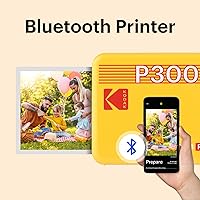
  • Connectivity: Bluetooth is the sole wireless connection method, pairing with compatible iOS and Android smartphones and tablets via the Kodak Photo Printer app.
  • Dimensions: The unit measures 4″ deep by 5″ wide by 1″ tall, making it compact enough to fit in a bag pocket or the palm of a hand.
  • Weight: The printer weighs approximately 460 grams (roughly 1 pound), keeping it light enough for daily portability without adding significant bag bulk.
  • Paper Capacity: The integrated paper tray holds up to 8 sheets of proprietary glossy photo paper at a time, with 8 sheets included in the box.
  • Print Speed: The printer outputs approximately 1 print per minute, which is typical for dye-sublimation portable printers in this class.
  • Ink System: The printer uses a CMYK dye-based ribbon integrated with the paper packs, eliminating separate ink cartridges entirely.
  • Lamination: A protective laminate layer is applied automatically during the 4PASS printing process, making each print water-resistant and fingerprint-resistant.
  • Photo Longevity: Prints are rated to last over 100 years under normal display and storage conditions, according to manufacturer specifications.
  • Power Consumption: The printer draws 10 watts during operation and is powered by a rechargeable internal battery charged via the included cable.
  • Memory: The unit includes 64 MB of internal memory to support print processing and job queuing through the connected app.
  • Control Method: All print functions are managed through the Kodak Photo Printer app, available as a free download for both iOS and Android devices.
  • Compatible Devices: The printer is compatible with smartphones and tablets running supported versions of iOS and Android operating systems.
  • Print Formats: Users can choose between a bordered print with a white margin suitable for handwriting, or a borderless print that maximizes image coverage across the full 3x3-inch sheet.
  • Paper Type: The printer is designed exclusively for Kodak-branded 3x3-inch glossy photo paper and ribbon refill packs, and is not compatible with third-party media.
  • Color Output: The printer produces full-color CMYK output, with no dedicated monochrome mode, as all prints are processed through the full color layer stack.
  • Warranty: The Kodak Mini 3 Retro ships with a limited manufacturer warranty; buyers should confirm the specific duration and terms with the seller at time of purchase.

Related Reviews

Kodak Mini Shot 3 Retro Instant Camera
74%
84%
Print Quality
81%
Ease of Use
67%
App Experience
63%
Value for Money
61%
Build Quality
More
Kodak Mini Shot 3 ERA Instant Camera and Photo Printer
87%
85%
Print Quality
90%
Ease of Use
93%
Portability
88%
Print Durability
78%
Battery Life
More
KODAK Mini Shot 4 ERA Instant Camera
72%
88%
Print Quality
92%
Print Size & Format
86%
Print Durability
43%
Portability & Form Factor
67%
Bluetooth Connectivity
More
HPRT CP2100 Portable Mini Photo Printer
73%
84%
Print Quality
79%
Color Accuracy
88%
Print Durability
91%
Portability
67%
App Experience
More
Kodak Ultra Mini Pico Projector
71%
93%
Portability & Form Factor
52%
Image Brightness
47%
Native Resolution & Sharpness
91%
Portability for Travel
61%
Battery Life
More
Canon IVY 2 Mini Photo Printer
76%
93%
Portability & Form Factor
67%
Print Quality
91%
Ease of Setup & Use
74%
App Experience
82%
ZINK Ink-Free Technology
More
KODAK Step Instant Photo Printer
78%
91%
Ease of Setup
63%
Print Quality
67%
App Experience
94%
Portability
74%
Battery Life
More
Fujifilm Instax Mini Link 3 Smartphone Printer
82%
88%
Print Quality
91%
Print Speed
93%
Portability & Size
72%
App Experience
84%
Build Quality & Feel
More
HP Sprocket Select Portable Photo Printer
75%
93%
Portability & Form Factor
67%
Print Quality
91%
Ease of Setup
74%
App Experience
52%
Paper & Consumable Costs
More
Canon SELPHY Square QX10 Portable Photo Printer
83%
91%
Print Quality
89%
Ease of Use
93%
Portability
78%
Print Speed
84%
Battery Life
More

FAQ

It works with both iOS and Android devices through the Kodak Photo Printer app. That said, iOS users tend to have a smoother pairing experience overall. Android users with older or mid-range phones occasionally run into Bluetooth connection hiccups, so it is worth checking recent app reviews for your specific device before buying.

There are no separate ink cartridges to buy. The Kodak Mini 3 Retro Portable Photo Printer uses a combined paper-and-ribbon system where the ink is embedded in the paper pack itself. The printer comes with 8 sheets to get you started, but once those run out you will need to purchase official Kodak refill packs, which include both the paper and the ribbon together.
Roughly one minute per print. The dye-sublimation process runs through four passes, so it is not instant. For casual use that pace is perfectly fine, but if you are trying to print a queue of 10 or more photos in one sitting, expect to wait a while.

The print output is always 3x3 inches square, so landscape and portrait shots will need to be cropped before printing. The app lets you do this manually, but if most of your photos are widescreen or standard 4:3, you will be cropping out chunks of your image regularly. It is worth knowing before you buy if that will bother you.

They hold up well to light moisture. The laminate layer applied during the printing process creates a protective coating that resists water and fingerprints, so normal handling, light rain exposure, or the occasional humid environment will not damage them. They are not designed for full submersion, but for journal or scrapbook use they are noticeably more durable than standard inkjet prints.

Refill packs are sold in various quantities, typically ranging from 20 to 50 sheets per pack. The per-print cost is higher than most home inkjet printing, which is the most commonly raised concern from buyers who use this portable printer regularly. If you plan to print often, buying in larger bundle packs brings the per-print cost down meaningfully, but it is still a recurring expense worth factoring into your budget upfront.

You cannot print while the device is plugged in charging. This is a known limitation, so if you are planning an extended printing session at a fixed location, you will want to make sure the battery is fully charged beforehand. For typical short sessions this rarely comes up, but it is worth knowing for party or event use cases.

The app is free to download on both iOS and Android. You will need to create a Kodak account to use it, which some privacy-conscious users find unnecessary for a simple Bluetooth printer. The account requirement is a minor friction point mentioned in buyer reviews, but the app itself does not cost anything beyond the phone storage it uses.

Genuinely closer to a drugstore print than most people expect from a pocket-sized device. Colors are vibrant and accurate under normal lighting, and the laminate finish gives the photos a polished glossy look. Very dark or high-contrast images can lose some shadow detail, but for typical travel and everyday shots the quality is solid for the size and format.

It is one of the more reliably well-received gifts in this category. The retro design makes unboxing feel fun, setup is straightforward enough for most teenagers to handle without help, and printing from a phone is immediately intuitive. The main thing to consider is including an extra refill pack in the gift, since the included 8 sheets will almost certainly be used up at the first sitting.

Where to Buy