Overview

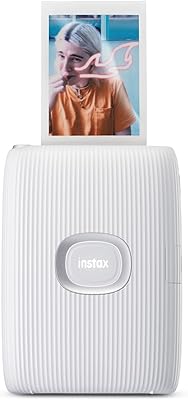
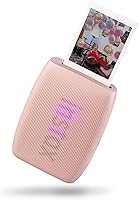
The Fujifilm Instax Mini Link 3 Smartphone Printer is Fujifilm's third crack at a pocket-sized Bluetooth printer, and it shows a brand that knows its audience well. Released in mid-2024, it slots in as a modest but meaningful refresh of the Link 2, keeping the same compact form while tightening the overall experience. The textured body fits comfortably in one hand — genuinely easy to grip at a party or festival without babying it. It holds up to 10 sheets of instax Mini film, charges via USB-C, and spits out a 2×3-inch glossy print in about 15 seconds flat.
Features & Benefits

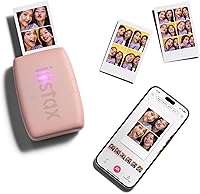
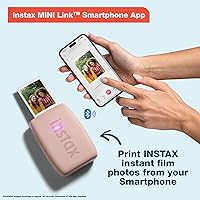
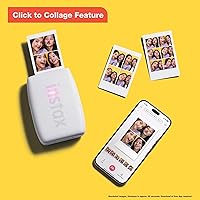
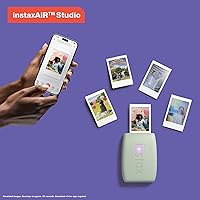
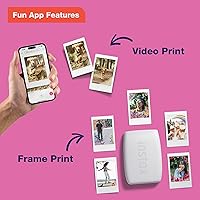
Everything about this mini printer is built around speed and simplicity. Connect it to your phone over Bluetooth, open the free instax app, and you can choose from filters, collage layouts, and playful print modes before sending the image. The print itself takes around 15 seconds — fast enough that nobody loses interest waiting. At just 1.6 oz, this pocket photo printer genuinely disappears in a bag or coat pocket. The USB-C charging port is a small but welcome detail that older instax printers lacked. Everything is app-driven, so there are no physical buttons to learn or accidentally press.

Best For

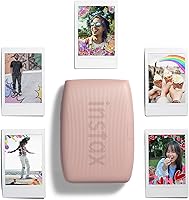
This pocket photo printer really hits its stride with a specific kind of user. Teens and young adults printing at birthday parties, concerts, or weekend trips will get the most out of it — the fast turnaround and fun app features suit that social energy perfectly. It also makes a genuinely strong gift: it comes ready to use with obvious appeal and no learning curve. Scrapbookers and journal keepers who want physical photo mementos from their phones will appreciate how easy it is to drop a memory onto film. If you already buy instax Mini film for a camera, the Link 3 fits right into that routine.

User Feedback

Early buyers have responded warmly — the Link 3 holds a 4.8-star average from its initial wave of reviews, which is a solid signal. Most praise centers on print quality and speed, with people noting the colors come out vibrant and the short wait feels genuinely fast in a group setting. Portability comes up repeatedly; buyers describe it as small enough to forget it is in their bag. The honest downside is recurring film cost — instax Mini packs are not cheap, and that adds up over time. Some users also mention occasional Bluetooth pairing hiccups with the app. Those upgrading from the Link 2 generally say the improvements are real, but incremental.

Pros

  • Prints a glossy, wallet-sized photo in roughly 15 seconds — fast enough for a crowd.
  • Weighs just 1.6 oz, so this pocket photo printer genuinely disappears in a bag.
  • USB-C charging puts it in line with modern devices and eliminates adapter hunting.
  • The instax app adds collages, filters, and fun frames that basic printers simply cannot match.
  • Textured grip makes the Link 3 comfortable and secure to hold with one hand.
  • Vibrant color output consistently impresses users who expect worse from a compact format.
  • Setup is quick enough that most people are printing within minutes of opening the box.
  • Strong gifting appeal — the packaging and instant-print concept land well as a present.
  • Works with any iOS or Android smartphone, keeping the barrier to entry low.

Cons

  • instax Mini film costs add up fast — budget for ongoing packs before committing to the purchase.
  • Bluetooth pairing failures on Android are a recurring complaint that disrupts sessions at the worst times.
  • The 10-sheet tray runs out quickly at busy events, requiring extra film packs on hand.
  • App-only control means the printer is completely useless if your phone battery dies.
  • Some prints look noticeably soft or washed out in low-light or high-contrast scenes.
  • The plastic body picks up scuffs with regular pocket use faster than expected.
  • No option to print larger than 2×3 inches, regardless of the photo quality on your phone.
  • Creative mode navigation in the app can feel sluggish when you just want a quick print.
  • Battery cannot be used while charging via USB-C, which limits options during longer events.

Ratings

The Fujifilm Instax Mini Link 3 Smartphone Printer has been scored by our AI system after analyzing verified buyer reviews from multiple global markets, with spam, bot activity, and incentivized feedback actively filtered out. Across thousands of real user experiences, this pocket photo printer earns strong marks in most areas — but a few honest pain points, particularly around ongoing film costs and app reliability, are reflected transparently in the scores below.
Print Quality
88%
Buyers consistently describe the glossy instax Mini prints as punchy and colorful, with skin tones that look natural rather than oversaturated. For a wallet-sized format, the detail holds up well — people often mention being surprised by how sharp portraits turn out at parties or on trips.
A small but vocal group notes that prints can look slightly washed out in low-light or high-contrast scenes. The 800×600 dpi color resolution has a ceiling, and users who compare prints to digital screens sometimes find the output softer than expected.
Print Speed
91%
The roughly 15-second print time is one of the most praised aspects across all reviews. At a birthday party or group hangout, that pace keeps the energy up — nobody is standing around waiting, and the printer rarely becomes a bottleneck in the fun.
A handful of users note that the first print after powering on can take a few extra seconds to initialize. It is a minor gripe, but worth knowing if you are expecting instant output the moment you hit the button.
Portability & Size
93%
At 1.6 oz and small enough to slip into a jacket pocket, this mini printer genuinely travels without fuss. Reviewers who brought it to concerts, weekend getaways, and festivals consistently say they forgot it was in their bag until they wanted to use it.
The 10-sheet film tray capacity means you can run through a full load surprisingly fast at a busy event. Carrying extra film packs solves this, but it does add a little bulk to what is otherwise a very light kit.
App Experience
72%
28%
The free instax app offers collage layouts, filters, and creative print modes that genuinely add value beyond just sending a photo to print. Users who take time to explore it tend to enjoy the creative flexibility it unlocks, especially the fun frame options.
Bluetooth pairing issues and occasional app crashes are a recurring complaint, particularly on Android devices. Some users report needing to disconnect and reconnect multiple times before a print session works smoothly, which disrupts the experience at exactly the wrong moment.
Build Quality & Feel
84%
The textured exterior gives the Link 3 a confident, grippy feel in hand — it does not feel like a toy, even though it is clearly designed with a younger audience in mind. Multiple buyers specifically call out the build as feeling more premium than they anticipated at this price point.
The plastic chassis, while well-finished, does show minor scuffs after regular pocket use. A few reviewers noted the film door feels a touch flimsy compared to the main body, though no reports of it actually breaking have surfaced in early reviews.
Value for Money
67%
33%
As a one-time purchase, the Link 3 feels reasonably priced for what it delivers — a fast, well-designed printer that works reliably out of the box. Gift-givers in particular seem satisfied with the perceived quality-to-cost ratio when the box is opened.
The real cost of ownership is ongoing film expenses, and that is where some buyers feel the pinch. instax Mini film packs typically run a meaningful cost per print, and regular users find that adds up quickly — a frustration mentioned frequently in longer-term reviews.
Ease of Setup
89%
Most buyers report having the Link 3 paired to their phone and printing within a few minutes of unboxing. The process is intuitive enough that even less tech-savvy users — parents, grandparents gifting it, first-time instax users — rarely needed to consult instructions.
The requirement to use the instax app means users without smartphones or those with older OS versions may hit a wall. A small number of reviewers on dated Android versions reported the app refusing to install or crashing on launch.
Battery Life
78%
22%
For a casual session — say, printing 20 to 30 photos at a party — the built-in lithium-ion battery holds up without needing a recharge mid-event. Buyers who use it socially a few times a week rarely report running out of charge unexpectedly.
Heavy users who go through multiple film packs in a single outing occasionally find the battery draining faster than expected. The fact that you cannot use the printer while it is charging via USB-C is a limitation that a few buyers flagged as inconvenient.
Film Compatibility
82%
18%
Using the widely available instax Mini format means film is easy to find in stores and online, and buyers already using instax cameras can share packs across devices. The glossy finish is consistent and gives prints a polished, photo-booth quality look.
The printer is locked to instax Mini film only — there is no flexibility to experiment with other formats or third-party media. Users hoping for a larger print size will need to look at a different product entirely, as the 2×3-inch format is the hard ceiling here.
Upgrade Value from Link 2
69%
31%
For buyers coming fresh to the instax ecosystem, the Link 3 is an easy recommendation with no caveats. Those who never owned a Link 2 get a modern, USB-C charging, app-polished experience that feels current and well-rounded.
Existing Link 2 owners are divided — the improvements are real but incremental. Better app features and USB-C are the headline changes, and for many Link 2 users those differences do not justify the cost of switching, especially with film expenses already factored in.
Connectivity Reliability
71%
29%
When the Bluetooth connection works, it is fast and stable — most users in iOS-heavy households report a smooth, consistent pairing experience from session to session. The short-range connection rarely drops mid-print once established.
Android users report a higher rate of pairing failures and reconnection loops compared to iOS users. This inconsistency across platforms is a meaningful weak point for a device that is entirely dependent on a wireless app connection to function.
Creative Features
81%
19%
The app-driven creative tools — collage modes, fun frames, and filter options — are a genuine differentiator that basic Bluetooth printers lack. Users printing for journals, scrapbooks, or party favors appreciate having options beyond a straight photo dump.
Some of the more playful features, like animated template selection, can feel slow to navigate mid-session when you just want a quick print. A few reviewers also noted that certain creative modes slightly degrade sharpness, which is noticeable on portrait shots.
Gifting Appeal
92%
Few products in this category are as immediately giftable — the packaging, the color options, and the instant-gratification premise all land well as a present. Buyers who purchased it as a gift repeatedly report enthusiastic reactions, especially for birthdays and holidays.
Gifting the printer without including extra film packs can leave recipients without enough to explore the experience fully. The starter film included is minimal, and some gift-givers mention feeling obligated to spend more to make the gift feel complete.
Weight & One-Handed Use
90%
The combination of low weight and a textured grip makes the Link 3 genuinely comfortable to hold and operate solo. Users at events mention being able to hold a drink in one hand and queue up a print in the other without fumbling.
The light weight, while a portability win, does make the printer feel slightly less substantial than some buyers expect when they first pick it up. It is not a dealbreaker, but a few reviewers admit their first impression was that it felt cheaper than it actually is.

Suitable for:

The Fujifilm Instax Mini Link 3 Smartphone Printer is a natural fit for teens, young adults, and socially active people who want physical memories from their phone without lugging around a dedicated camera. If your life involves parties, concerts, weekend trips, or group hangouts where sharing a printed photo feels more meaningful than sending a digital file, this pocket photo printer slots right into that routine. Scrapbookers and journal keepers who already curate their lives visually will find it particularly useful — it bridges the gap between a phone gallery and a physical keepsake in about 15 seconds. It also makes an excellent gift for someone entering the instax ecosystem for the first time, since setup is fast and the experience is immediately rewarding. Anyone already buying instax Mini film for a camera gets extra mileage out of their film stock by adding this mini printer to the mix.
Not suitable for:

The Fujifilm Instax Mini Link 3 Smartphone Printer is not the right tool for anyone who wants large, high-resolution prints or needs a workhorse printer for regular document or photo output. The 2×3-inch format is charming but limited — if you want prints you can frame or display, you will need a different device entirely. Buyers on a tight ongoing budget should think carefully before committing, because instax Mini film is a recurring cost that adds up fast, especially for heavy users. People with older Android phones or those who dislike app-dependent devices may find the experience frustrating, since the printer is completely non-functional without the instax app and a stable Bluetooth connection. Existing Link 2 owners who are happy with their current setup will likely find the improvements here too incremental to justify buying again.
Specifications

  • Connectivity: The printer connects to smartphones exclusively via Bluetooth, with no Wi-Fi or wired printing option.
  • Print Size: Each print measures 2×3 inches, using the standard instax Mini film format.
  • Print Speed: A single print takes approximately 15 seconds from the moment the image is sent from the app.
  • Film Type: Compatible only with instax Mini glossy film packs, which are sold separately.
  • Tray Capacity: The film tray holds up to 10 sheets of instax Mini film per load.
  • Color Resolution: Maximum color print resolution is 800×600 dpi, with mono resolution reaching 1200 dpi.
  • Charging Port: The printer charges via USB-C, with a lithium-ion battery included in the box.
  • Weight: The unit weighs 1.6 oz, making it one of the lightest printers in its category.
  • Dimensions: The printer measures 1.47″ deep, 3.54″ wide, and 4.92″ tall.
  • Control Method: All print functions are managed exclusively through the free instax smartphone app — there are no physical control buttons.
  • Compatible Devices: Works with iOS and Android smartphones that support the current version of the instax app.
  • Print Output: The printer produces color prints only; monochrome output is not supported as a standalone mode.
  • Memory: The printer has 64 MB of internal memory for managing print jobs and app data.
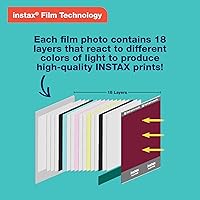
  • Printing Technology: Uses Fujifilm's photographic dye-diffusion thermal transfer process via instax Mini film.
  • Generation: This is the third iteration in the instax Mini Link series, released in mid-2024.
  • Duplex Printing: The printer supports simplex (single-sided) printing only; dual-sided output is not available.
  • Hardware Interface: One USB Type-C port is included, used solely for charging the internal battery.
  • Warranty: Covered by a Fujifilm limited warranty; specific terms and duration vary by region and point of purchase.

Related Reviews

Fujifilm Instax Mini Link 2 Smartphone Printer
80%
93%
Ease of Setup
88%
Print Quality
86%
App Experience
91%
Portability & Design
82%
INSTAXAiR Feature
More
Fujifilm Instax Link Wide Printer
84%
91%
Print Quality
88%
Ease of Use
85%
App Functionality
92%
Portability
78%
Print Speed
More
Fujifilm Instax Mini 40 Instant Camera
78%
93%
Design & Aesthetics
91%
Ease of Use
71%
Auto Exposure Performance
74%
Print Quality
78%
Build Quality & Durability
More
Fujifilm Instax Mini 12
78%
94%
Ease of Use
83%
Photo Quality in Good Light
61%
Low-Light Performance
81%
Selfie & Close-Up Capability
78%
Build Quality & Design
More
Fujifilm Instax Mini EVO
81%
88%
Image Quality
91%
Creative Effects & Versatility
83%
Smartphone Integration
86%
Build Quality & Design
71%
Value for Money
More
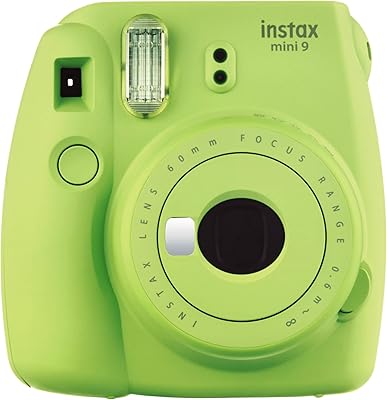
Fujifilm Instax Mini 9
75%
93%
Ease of Use
67%
Image Quality
74%
Build Quality
61%
Value for Money
71%
Selfie & Portrait Performance
More
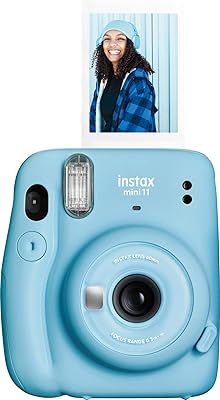
Fujifilm Instax Mini 11 Instant Camera
77%
93%
Ease of Use
74%
Build Quality
67%
Print Quality
71%
Value for Money
78%
Selfie Mode
More
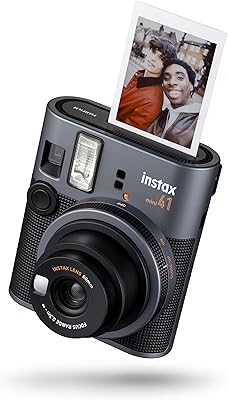
Instax mini 41 Instant Camera
78%
93%
Ease of Use
88%
Design & Aesthetics
74%
Print Quality
86%
Selfie Experience
67%
Value for Money
More
Fujifilm Instax Mini 99
79%
91%
Build Quality
84%
Print Quality
78%
Creative Shooting Modes
73%
Color Effects
71%
Ease of Use
More
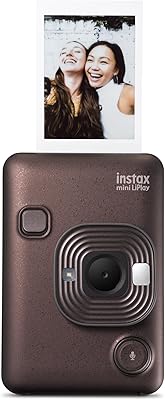
Fujifilm INSTAX Mini LIPLAY Hybrid Instant Camera
79%
93%
Fun Factor & Experience
74%
Print Quality
88%
LCD Preview Screen
79%
Sound Mode & QR Feature
63%
Bluetooth & App Connectivity
More

FAQ

The Link 3 typically ships with a small starter pack of instax Mini film, but it is not enough for extended use. You will want to pick up extra packs before your first big event — film is widely available online and in most electronics or photo retailers.

The Fujifilm Instax Mini Link 3 Smartphone Printer is compatible with both iOS and Android devices, as long as your phone supports the current version of the instax app. Older phones running outdated operating systems may have trouble installing or running the app reliably, so it is worth checking compatibility before buying.
Download the free instax app, turn on the printer, and follow the in-app Bluetooth pairing instructions — most people are up and running within a few minutes. Just make sure Bluetooth is enabled on your phone and that you are within close range of the printer during setup.

No — the printer requires the instax app for every print job. There is no way to send a photo directly from your camera roll or gallery without going through the app first. It is a deliberate design choice that keeps the experience app-centric.

Battery life varies with usage, but most buyers report comfortably printing 30 to 40 photos on a single charge during normal social use. Heavy sessions with back-to-back prints will drain it faster, so bringing a USB-C cable to a long event is a smart precaution.

Fujifilm officially supports only genuine instax Mini film, and third-party alternatives can produce inconsistent results or cause feed errors. Sticking to official film packs is the safest way to get reliable, good-looking prints every time.

Honestly, it depends on how much the improvements matter to you. The Link 3 adds USB-C charging and a refined app experience, but the core print quality and format are essentially the same. If your Link 2 is working fine, upgrading is hard to justify purely on performance grounds — the new features are convenient rather than transformative.

This is probably the most important question to ask before buying. instax Mini film typically costs anywhere from around 50 cents to over a dollar per print depending on where you buy it and in what quantity. If you print frequently, those costs accumulate quickly, so factoring film expenses into your budget upfront is genuinely important.

Start by closing and reopening the instax app, then toggle Bluetooth off and back on. If that does not help, delete the printer from your paired devices list and re-pair from scratch — this fixes the issue for most people. Android users tend to encounter this more often than iOS users, and keeping the app updated usually reduces the frequency of connection problems.

Yes, but only one phone can be actively connected at a time. At a party, you would need to hand off the connection to each person or have one designated person manage the print queue through their phone. It is workable for small groups, though it can slow things down if everyone wants to print their own photos in quick succession.

Where to Buy