Overview

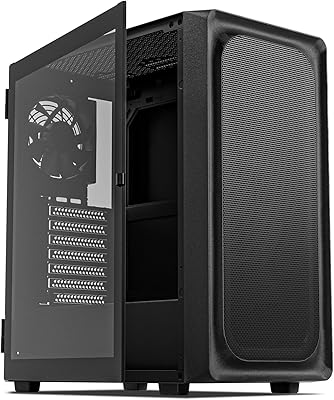
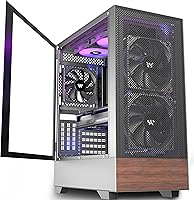
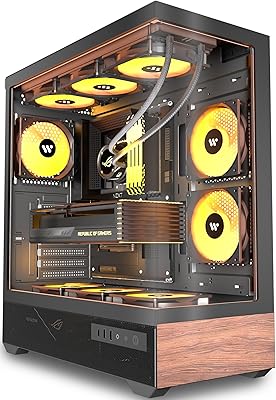
The KEDIERS H3 Mid Tower ATX PC Case arrived on the market in mid-2025 and has already cracked the top 1,000 in Amazon's Computer Cases category — not bad for a brand that most builders outside enthusiast circles hadn't heard of a year ago. KEDIERS has been quietly carving out a niche for value-focused enclosures, and the H3 is their clearest pitch yet: a tempered glass mid tower that adds printed walnut wood-grain panels when every competitor at this price point looks nearly identical. It is squarely aimed at first-time builders and mid-range upgraders who want their rig to look considered without stretching the parts budget thin.

Features & Benefits

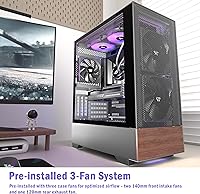
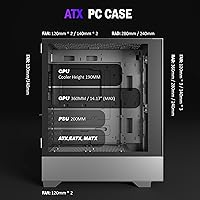
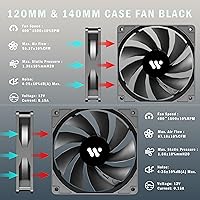
Out of the box, the KEDIERS H3 ships with three pre-installed fans — two 140mm units pulling air in from the front and a 120mm exhausting at the rear — a genuine convenience that saves an immediate trip back to the parts store. The hinged tempered glass panel swings open for easy interior access rather than requiring a screwdriver every time. Compatibility is broad: ATX, Micro-ATX, and Mini-ITX boards all fit, GPU clearance reaches 360mm, and 360mm radiator support keeps a future watercooling loop on the table. One real caveat — PSU length tops out at 200mm, so double-check your power supply specs if you are running a longer modular unit before you order.

Best For

This mid tower case makes the most sense for first-time PC builders who want a complete-looking build from day one without buying additional fans separately. The wood-grain aesthetic also lands differently from a typical RGB-everything gaming chassis — if you are setting up in a living room, home office, or shared space where subtle, nature-inspired styling fits better than aggressive angles and blinking lights, this wood-accent gaming case genuinely stands out. Watercooling enthusiasts on a budget will appreciate the 360mm radiator headroom. Just keep expectations calibrated: the stock fans are a reasonable starting point, but real-world temperatures depend entirely on your components and how carefully you route airflow.

User Feedback

Across 136 ratings, the KEDIERS H3 holds a 4.2-star average — solid for a case this new at this price tier. Buyers consistently highlight how straightforward assembly is and how the wood-grain panels look better in person than in product photos, with the finish earning genuine compliments. Pre-installed fans are frequently mentioned as a practical value add. On the downside, some reviewers flag that cable management is tighter than expected behind the motherboard tray, and a handful note that plastic accent pieces feel noticeably cheaper than the metal body. A few buyers also report PSU fitment running snug near the 200mm ceiling. The general consensus: it punches above its weight visually, even if the finer construction details reflect where costs were trimmed.

Pros

  • Three fans come pre-installed, saving an immediate follow-up purchase most budget cases require.
  • The wood-grain panel aesthetic genuinely stands out on a desk — no other case at this price looks quite like it.
  • Hinged tempered glass side panel opens tool-free, making component installs and reseating noticeably less frustrating.
  • Supports ATX, Micro-ATX, and Mini-ITX boards in a single enclosure, giving real flexibility for different build sizes.
  • 360mm radiator support keeps a future AIO or custom loop upgrade viable without replacing the case.
  • GPU clearance up to 360mm comfortably fits most modern triple-fan graphics cards without compromises.
  • Assembly process is beginner-friendly, with most buyers completing their first build in this case without major difficulty.
  • The overall visual package — glass panel, wood accent, clean black finish — looks noticeably more intentional than most rivals at this price tier.
  • HDD and SSD mounting brackets are included, reducing the total accessory spend for a basic storage setup.

Cons

  • Cable management space behind the motherboard tray is tighter than expected and frustrates builders with bulkier wiring.
  • PSU length is capped at 200mm, which rules out several popular fully modular power supplies without warning.
  • Plastic accent trim pieces feel cheap relative to the metal chassis and are the most common build-quality complaint.
  • Only one USB 3.0 port on the front I/O feels limiting for anyone regularly connecting high-speed peripherals or drives.
  • No USB-C port on the front panel is a noticeable omission as more devices shift to that connector standard.
  • Stock fans are adequate for light to moderate builds but are not a substitute for a proper aftermarket cooling setup under sustained loads.
  • Accessory hardware ships in a single unlabeled bag, which slows down meticulous builders who like to sort before starting.
  • Minor cosmetic scratches on the wood-grain panels have been reported by some buyers, suggesting protective film quality could be better.
  • The printed wood-grain texture looks clearly artificial up close, which may disappoint buyers expecting a more premium tactile finish.

Ratings

The KEDIERS H3 Mid Tower ATX PC Case has been scored across 12 specific categories by our AI rating engine, which analyzed verified global buyer reviews while actively filtering out incentivized, bot-generated, and spam feedback. The scores below reflect a transparent synthesis of real builder experiences — strengths and frustrations weighted equally — so you get an honest picture before committing to a purchase.

Aesthetic Design
88%
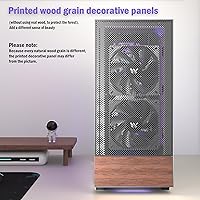
The printed walnut wood-grain panels genuinely surprise most buyers — it photographs well but looks even better on a desk, especially in home office or living room setups where typical aggressive gaming aesthetics feel out of place. Paired with the tempered glass window, the overall visual package stands out clearly at this price tier.
A minority of buyers note that up close, the printed grain pattern on metal looks noticeably artificial compared to real wood veneer, which some found slightly disappointing after seeing marketing images. Those expecting a premium tactile surface will want to temper expectations before unboxing.
Build Quality
71%
29%
The main steel chassis feels reasonably solid for a budget mid tower — panels sit flush without obvious flex, and the tempered glass side panel is thick enough to inspire confidence during routine maintenance. Most builders found the overall rigidity acceptable for the price bracket.
Plastic accent pieces and trim sections are a recurring complaint, feeling noticeably cheaper than the metal body they attach to. A handful of buyers reported minor panel alignment issues out of the box, and the thinner steel in spots can feel slightly tinny when installing components.
Cooling Performance
74%
26%
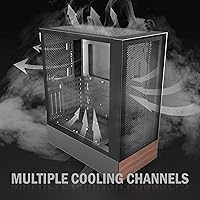
Having two 140mm front intake fans and a 120mm rear exhaust pre-installed means most mid-range builds can run adequately cooled from day one without any additional spend. The large front fans move a healthy volume of air for everyday gaming workloads.
The stock fans are functional but unremarkable — builders pairing this case with higher-end GPUs or overclocked CPUs often find themselves wanting at least one additional exhaust fan relatively quickly. Real-world thermals vary significantly depending on component layout and cable routing inside the case.
Fan Noise Level
67%
33%
At low to moderate system loads, the pre-installed fans operate at a background hum that most users found unobtrusive during everyday tasks and light gaming sessions. Buyers in quieter home office environments generally reported acceptable ambient noise.
Under sustained gaming loads the fans ramp up noticeably, and a few buyers described the acoustic profile as slightly coarse compared to aftermarket options at similar RPMs. Those sensitive to fan noise building in a quiet bedroom setup should plan to swap to quieter fans eventually.
Cable Management
59%
41%
The case includes a dedicated rear compartment and routing holes positioned well enough to keep a tidy build achievable with some patience. Builders using shorter, non-modular power supplies generally reported acceptable results with careful planning.
Behind the motherboard tray, clearance is tighter than many rivals at this price, making it genuinely difficult to close the rear panel cleanly with bulkier cable runs. Fully modular PSU users and those building with thick sleeved cables flagged this as the most frustrating part of the assembly process.
Component Compatibility
83%
Support for ATX, Micro-ATX, and Mini-ITX boards in a single enclosure gives buyers real flexibility, and the 360mm GPU clearance comfortably accommodates most current high-end graphics cards including triple-fan models. The 190mm CPU cooler height limit covers virtually all popular air coolers on the market.
The 200mm PSU length ceiling is a genuine limitation that catches some buyers off guard, particularly those using longer fully modular units from brands like Corsair or Seasonic. It is worth double-checking your power supply dimensions before ordering rather than discovering the issue mid-build.
Watercooling Support
79%
21%
360mm radiator support at this price point is a real differentiator, giving builders a credible upgrade path without needing to replace the case down the line. Buyers who installed 240mm and 280mm AIOs reported the process was straightforward with enough clearance to spare.
Mounting hardware for radiators is minimal and instructions are sparse, meaning first-time watercooling builders will likely need to cross-reference external guides. Fitting a full custom loop within the space is technically possible but would require careful planning given the mid-tower internal volume.
Ease of Assembly
84%
The hinged tempered glass panel is consistently praised as one of the most practical design decisions — swinging it open for GPU installation or reseating RAM takes seconds and requires no tools at all. Most buyers described the overall build process as smooth even for those assembling their first PC.
Screw quality is basic and a few buyers stripped standoff threads when overtightening, so a gentle touch is recommended. The manual is thin on detail and omits guidance on some mounting configurations, which means occasional trips to YouTube for first-time builders.
I/O Panel Usability
66%
34%
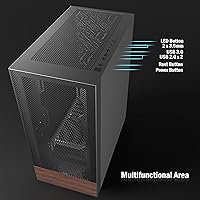
Having both USB 3.0 and dual USB 2.0 ports on the front panel covers most peripheral needs for everyday use, and the HD audio jack works cleanly with standard headsets. The LED toggle button for fans is a small but appreciated convenience for users who prefer disabling lighting during work hours.
Only a single USB 3.0 port feels limiting for builders who regularly transfer large files or connect multiple high-speed peripherals simultaneously. There is no USB-C port on the I/O panel, which is a noticeable omission as more peripherals and storage devices move to that standard.
Storage Options
72%
28%
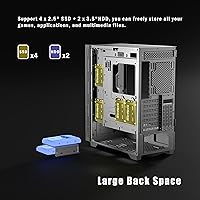
Bundled HDD and SSD brackets keep basic storage configurations tidy without requiring additional purchases, and most users building a standard single-drive or two-drive setup found the mounting system functional and secure. SSD placement behind the motherboard tray helps keep the visible interior clean.
Expansion for multiple HDDs or a larger NAS-style storage configuration feels cramped, and the drive brackets themselves are on the flimsier side of the quality spectrum. Power users planning to run four or more drives will find the available real estate frustratingly limited.
Value for Money
86%
Three pre-installed fans, a hinged tempered glass panel, broad motherboard compatibility, and a genuinely distinctive visual design at this price point represent a strong overall package that most comparable cases at the same tier simply do not match. For first-time builders especially, the out-of-box readiness reduces initial build cost meaningfully.
The value equation holds up only if you are not immediately doing a heavy cable management build or running a high-wattage modular PSU. Buyers who end up replacing fans, sourcing additional standoffs, or working around the PSU length limit may find the net savings narrower than expected.
Packaging & Unboxing
77%
23%
The case arrives well-padded with foam inserts on all corners, and the majority of buyers reported receiving the tempered glass panel without damage. Pre-installed fans arriving already seated and wired saves meaningful setup time straight out of the box.
Accessory organization inside the box is fairly basic — screws and small hardware are loosely grouped in a single bag with minimal labeling, which slows down builders who like to sort components before starting. A few buyers also reported minor cosmetic scratches on the wood-grain panels attributable to thin protective film quality.

Suitable for:

The KEDIERS H3 Mid Tower ATX PC Case is a strong fit for first-time PC builders who want a finished-looking rig without buying additional fans or spending extra on aesthetics upgrades. If you are putting together a mid-range gaming build on a tight budget and want tempered glass visibility alongside a look that is genuinely distinctive — rather than another all-black box with RGB strips — this case delivers that in a way few rivals at this price point match. It also works well for home office setups and living room builds where the wood-grain paneling reads as tasteful and understated rather than aggressively gamer-focused. Builders already eyeing a future watercooling loop will appreciate that 360mm radiator support is already baked in, so the case will not be the bottleneck when upgrade time comes. Students, young professionals, and budget-conscious enthusiasts who want their first build to look intentional rather than purely utilitarian will find this mid tower case a genuinely satisfying starting point.

Not suitable for:

The KEDIERS H3 Mid Tower ATX PC Case is not the right choice for experienced builders who prioritize cable management above all else — the clearance behind the motherboard tray is genuinely tight, and running a fully modular PSU with thick sleeved cables through this case will test your patience. Speaking of PSUs, the 200mm length ceiling is a real constraint: if you already own or plan to buy a longer high-wattage modular unit from brands like Corsair or Seasonic, check that measurement carefully before ordering or you may find yourself with a compatibility problem mid-build. Builders chasing serious thermal performance for overclocked or high-TDP systems should also look elsewhere — the stock fans are a reasonable baseline, not a cooling powerhouse, and upgrading them somewhat defeats the value proposition. Users who need USB-C on the front I/O, or who regularly run four or more storage drives, will find this wood-accent gaming case limiting on both fronts. And if the idea of printed wood grain on metal rather than a genuine wood surface bothers you aesthetically, it is worth knowing upfront that the material is decorative metalwork — well executed, but not the real thing.

Specifications

  • Case Type: Mid Tower form factor designed for standard desktop builds with ATX, Micro-ATX, and Mini-ITX motherboard compatibility.
  • Dimensions: The case measures 15.55″ deep, 8.66″ wide, and 19.29″ tall, placing it within the typical mid tower footprint.
  • Weight: Shipping weight comes in at 14.92 pounds, reflecting a steel chassis construction with tempered glass side panel.
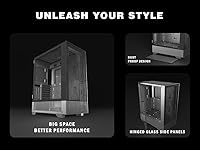
  • Side Panel: A hinged tempered glass panel covers the left side of the case and swings open without tools for interior access.
  • Panel Material: Outer panels are steel with a printed walnut wood-grain decorative finish applied directly to the metal surface — no real wood is used.
  • Pre-installed Fans: Three fans ship installed: two 140mm intake fans positioned at the front and one 120mm exhaust fan mounted at the rear.
  • Max Fan Capacity: The case supports up to nine 120mm fans across all available mounting positions when fully populated.
  • Radiator Support: A 360mm radiator can be mounted at the front, accommodating triple-fan AIO coolers and custom loop radiators.
  • GPU Clearance: Graphics cards up to 360mm in length fit without modification, covering most current dual and triple-fan GPU designs.
  • CPU Cooler Height: Air coolers up to 190mm tall are supported, which is sufficient for virtually all mainstream tower coolers currently available.
  • PSU Clearance: The bottom-mounted ATX power supply bay accommodates units up to 200mm in length — verify your PSU dimensions before purchasing.
  • Expansion Slots: Ten total expansion slots are provided: seven standard horizontal slots plus three additional vertical or supplemental positions.
  • Storage Support: Dedicated mounting brackets for both 3.5″ HDDs and 2.5″ SSDs are included in the box at no additional cost.
  • Front I/O Ports: The I/O panel provides one USB 3.0 port, two USB 2.0 ports, and one HD audio combo jack for headset connectivity.
  • Front I/O Controls: Physical buttons on the front panel include power, reset, and an LED toggle for controlling installed fan lighting independently.
  • Color: The case ships in black as the sole available color option, with the wood-grain accent panels providing the primary visual contrast.
  • Motherboard Support: Compatible with standard ATX, Micro-ATX, and Mini-ITX motherboards using the same set of pre-installed standoff positions.
  • PSU Mount: Power supply is bottom-mounted with an ATX orientation, which helps lower the center of gravity and keeps cabling away from the motherboard area.

Related Reviews

KEDIERS K4 ATX Mid Tower PC Case
80%
91%
Value for Money
93%
Aesthetic Design
74%
Build Quality
72%
Cooling Performance
84%
Ease of Assembly
More
KEDIERS P6 Mid Tower ATX PC Case

75%
88%
Aesthetic Design
71%
Build Quality
84%
Included Fans & Lighting
78%
Airflow & Thermal Performance
81%
Radiator & Cooling Support
More
Zalman S3 ATX Mid-Tower PC Case
74%
83%
Value for Money
71%
Build Quality
58%
Airflow & Cooling Performance
86%
Ease of Assembly
67%
Acrylic Side Panel
More
SAMA S40 Mid Tower ATX PC Case
79%
88%
Airflow Performance
83%
Included Fan Quality
79%
Build Quality & Finish
92%
GPU Compatibility
61%
Cable Management
More
Zalman S2 ATX Mid-Tower PC Case
83%
88%
Cooling Performance
80%
Build Quality
85%
Ease of Setup
70%
Cable Management
92%
Value for Money
More
Zalman S4 Mid-Tower ATX PC Case
81%
88%
Airflow and Cooling
80%
Build Quality and Materials
92%
Ease of Installation
60%
Acrylic Panel Durability
70%
Cable Management
More
SZSKYING ATX Mid-Tower PC Gaming Case
85%
92%
Cooling Performance
85%
Build Quality
88%
Aesthetic Design
74%
Cable Management
78%
Ease of Setup
More
Vetroo AL800 Mid Tower ATX PC Case
76%
78%
Build Quality
84%
Tempered Glass Panel
76%
Airflow Performance
61%
Fan Included & Expandability
69%
Cable Management
More
darkFlash DS900 ATX Mid-Tower PC Case

84%
89%
Cooling Performance
88%
Build Quality
91%
Ease of Installation
85%
Design & Aesthetics
92%
Value for Money
More
DARKROCK EC2 ATX Mid Tower PC Case
77%
88%
Airflow Performance
91%
Cooling Headroom
67%
Build Quality
84%
GPU Compatibility
86%
Ease of Assembly
More

FAQ

Probably not without checking first. The PSU bay maxes out at 200mm in length, and many popular fully modular units from Corsair, Seasonic, and EVGA push past that. Measure your power supply before ordering — this is one of the more common compatibility surprises buyers run into with this mid tower case.

It is a printed decorative finish applied to the steel panels — there is no real wood involved. That said, most buyers find it looks better in person than they expected. Whether that matters to you is a personal call, but going in with accurate expectations helps avoid disappointment on unboxing day.

Yes, the front of the case can accommodate a 360mm radiator, which means triple-fan AIO units fit without issue. Just keep in mind you will likely need to remove or reposition the pre-installed front intake fans to mount the radiator there, since they occupy the same space.

It is manageable but not generous. The space behind the motherboard tray is on the tighter side, which makes routing thick or sleeved cables a bit of a puzzle. Builders using a compact non-modular or semi-modular PSU tend to get cleaner results than those with heavy modular cable runs. Plan your routing before you start rather than figuring it out mid-build.

Yes, standard ATX boards fit without issue — that is the primary supported form factor. The case also works with Micro-ATX and Mini-ITX boards, though ATX is where it really fills out the interior properly.

At idle or light use, most buyers describe them as a quiet background hum that blends into room noise. Under sustained gaming load they spin up and become noticeably more audible — not disruptive for most people, but those who are particularly noise-sensitive in a quiet bedroom setup may want to eventually swap them for quieter aftermarket options.

GPU clearance goes up to 360mm in length, which covers the vast majority of current graphics cards including large triple-fan models like the RTX 4080 Super and RX 7900 XTX. Width clearance is standard for a mid tower, so thick three-slot cards should be fine too.

No, it does not. The front panel has one USB 3.0 and two USB 2.0 ports alongside the HD audio jack — no USB-C. If front-panel USB-C is a must-have for your build, this is a genuine gap worth factoring into your decision.

Just the three pre-installed fans — two 140mm at the front and one 120mm at the rear. There is no additional RGB lighting system included. The case can support up to nine 120mm fans total, so there is plenty of room to expand the cooling setup later if you want more airflow or lighting effects.

It is actually quite beginner-friendly. The hinged glass panel, pre-installed fans, and included storage brackets reduce the number of steps a first-timer needs to figure out. Assembly is straightforward for most standard builds, and the included manual covers the basics. The one area where experience helps is cable management — a tighter rear compartment rewards patience and planning, which newer builders should keep in mind.