J-Tech Digital JTECH-MV41A 4x1 HDMI Multi-Viewer
Overview
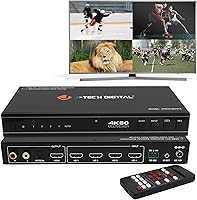
The J-Tech Digital JTECH-MV41A 4x1 HDMI Multi-Viewer sits in a practical middle ground — not a flimsy budget splitter, but far more accessible than enterprise matrix switches that cost several times as much. The core appeal is straightforward: connect four HDMI sources and watch all of them on a single display without ever touching a cable. J-Tech Digital has built a solid reputation in the AV accessories space, and their US-based support team adds a layer of confidence that many competing brands simply don't offer. For home office users, AV enthusiasts, and small broadcast setups alike, this quad-view unit addresses a real, recurring frustration.
Features & Benefits
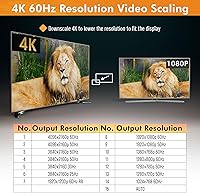
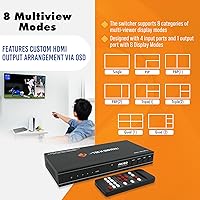
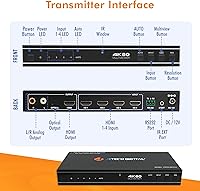
What sets this HDMI multi-viewer apart from basic switchers is the breadth of layout options. Eight display modes — including picture-in-picture, side-by-side, triple, and quad configurations — let you arrange sources to suit the task rather than forcing a one-size layout. The 4K 60Hz output means you're not trading resolution for convenience, which matters on larger modern displays. Switching between sources happens without the black-screen dropout you'd experience with cheaper hardware. Audio extraction to RCA or optical is genuinely useful for routing sound to an external receiver. For rack installations or automation, RS232 control alongside the IR remote and OSD gives real flexibility in how the unit is managed.
Best For
This quad-view unit fits a specific kind of buyer well. Security and surveillance operators who need constant visibility across multiple camera feeds will find the quad layout immediately practical. Content creators running a PC, gaming console, and capture card simultaneously can monitor everything without constant input swapping. IT professionals setting up conference rooms or AV racks will appreciate the RS232 integration and aspect ratio controls. Home theater enthusiasts managing multiple streaming boxes or Blu-ray players also benefit. That said, this isn't the right pick for someone who only occasionally needs to switch between two sources — simpler, cheaper hardware would serve them better.
User Feedback
With a 4.2-star average across roughly 150 ratings, the J-Tech switcher has earned mostly positive marks. Buyers consistently praise the build quality and the flexibility of the display modes, noting that the hardware feels solid relative to its price tier. The lack of switching delay gets called out positively, especially by users coming from budget alternatives. On the downside, the OSD menu has a real learning curve, and several first-time users found initial setup less intuitive than expected. Audio extraction works well for most, though a handful of buyers reported compatibility hiccups with certain AV receivers. The lifetime tech support from J-Tech's Texas team draws frequent positive mentions.
Pros
- Eight display modes give genuine flexibility for surveillance, streaming, and multi-source home theater setups.
- Switching between inputs happens without any black-screen interruption, which makes a real difference in fast-paced workflows.
- 4K 60Hz output in full-screen mode holds up well on modern large-format displays.
- The metal chassis feels durable and rack-appropriate, not like a cheap plastic consumer gadget.
- Audio extraction via both RCA and optical means you can route sound to a proper receiver without an extra device.
- RS232 serial control makes this HDMI multi-viewer a realistic option for conference room AV automation.
- The US-based support team receives consistently positive feedback for providing technically informed, helpful responses.
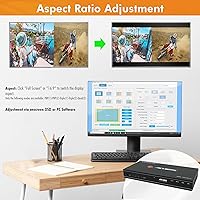
- Aspect ratio adjustment prevents the distorted or cropped images that commonly plague multi-view setups with mixed-resolution sources.
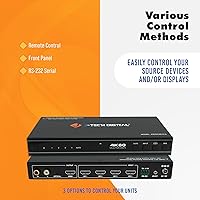
- Front-panel buttons, IR remote, and OSD all work independently, so you are never locked into one control method.
- Compact form factor and clean finish integrate easily into existing desk or rack setups without dominating the space.
Cons
- The OSD menu navigation is non-intuitive and takes multiple sessions to learn for most first-time users.
- Documentation does not adequately explain multi-mode configuration, leaving buyers to figure out complex layouts through trial and error.
- Aspect ratio control is restricted to specific display modes rather than being universally available across all eight layouts.
- HDCP-protected streaming content can cause handshake failures in split-view modes, a limitation not clearly flagged in the listing.
- The unit runs noticeably warm during extended 4K operation, which raises concerns for enclosed rack installations without active airflow.
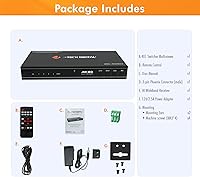
- Rack-mounting ears are not included, requiring a separate purchase for proper rack installation.
- Audio source switching can produce brief sync delays or dropouts with certain AV receivers during input changes.
- Support is only available on weekdays during Central business hours, which is inconvenient for international buyers or evening troubleshooting.
- The IR remote lacks backlighting and requires precise aiming in some mounting positions, making it awkward in dim environments.
- Per-panel image quality in quad mode softens considerably on screens 55 inches and larger, which surprises buyers expecting uniform 4K sharpness.
Ratings
The J-Tech Digital JTECH-MV41A 4x1 HDMI Multi-Viewer has been evaluated through a structured AI analysis of verified global buyer reviews, with spam, incentivized, and bot-generated feedback actively filtered out before scoring. Ratings reflect the real-world experiences of home office users, AV integrators, streamers, and surveillance operators who rely on this unit daily. Both the standout strengths and the friction points that frustrate buyers are transparently represented in every score below.
Display Mode Versatility
Switching Performance
4K Resolution Handling
Audio Extraction
Build Quality
Setup & Initial Configuration
OSD Menu Usability
RS232 & Automation Control
Remote Control Experience
Value for Money
Compatibility & Source Support
Technical Support Quality
Aspect Ratio Flexibility
Physical Footprint & Installation
Suitable for:
The J-Tech Digital JTECH-MV41A 4x1 HDMI Multi-Viewer is purpose-built for anyone who regularly juggles multiple HDMI sources and finds cable-swapping genuinely disruptive to their workflow. Security and surveillance operators get the most immediate value, since the quad-view layout lets them monitor four camera feeds simultaneously without needing a dedicated multi-monitor setup. Content creators and streamers benefit just as much — being able to keep a gaming console, capture card, and PC all visible at once removes a constant friction point during live production. IT professionals and AV integrators setting up conference rooms or command centers will appreciate the RS232 serial control, which allows the unit to slot into existing automation systems cleanly. Home theater enthusiasts who have accumulated multiple streaming boxes or media players and want to consolidate them onto a single display — while still routing audio to a proper receiver via optical out — will also find this quad-view unit hits a practical sweet spot that cheaper alternatives simply cannot reach.
Not suitable for:
The J-Tech Digital JTECH-MV41A 4x1 HDMI Multi-Viewer is not the right call for buyers who just need a simple two-input switcher and have no interest in multi-view layouts — there are far less expensive and easier-to-use options for that scenario. Anyone expecting plug-and-play simplicity out of the box may find the OSD menu navigation and initial configuration frustrating enough to regret the purchase, particularly if they have limited experience with AV hardware. Users planning to display HDCP-protected streaming content in split-view modes should be aware that DRM handshake failures are a documented risk, making this a poor fit for that specific use case. Buyers who need true per-window 4K clarity across all four simultaneous sources will also be disappointed — the resolution per panel in quad mode drops significantly, which becomes visually apparent on larger screens. Finally, anyone who needs 24-hour support availability or expects instant responses should factor in that the support team operates on weekday business hours in Central time only.
Specifications
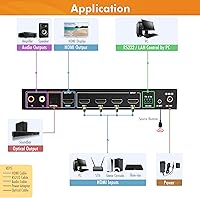
- Inputs: The unit accepts four HDMI sources simultaneously via four HDMI 19-pin Type-A input ports on the rear panel.
- Outputs: A single HDMI 19-pin Type-A output port delivers the combined or switched video signal to the connected display.
- Max Resolution: Maximum supported output resolution is 4K at 60Hz, applicable in full-screen single-source viewing mode.
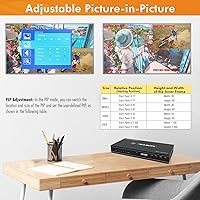
- Display Modes: Eight configurable display modes are available, including picture-in-picture, picture-by-picture, triple-view, quad-view, and full-screen layouts.
- Audio Output: Audio can be extracted from any HDMI input and sent to external systems via one RCA stereo output or one optical TOSLINK output.
- Control Methods: The unit supports four independent control methods: front-panel buttons, IR remote control, on-screen display menu, and RS232 serial interface.
- Aspect Ratio: Aspect ratio adjustment is available in select PBP and triple or quad viewing modes to prevent image stretching or letterboxing.
- Dimensions: The device measures 8.66 inches long by 3.93 inches wide by 1.18 inches tall, making it suitable for shelf or rack placement.
- Weight: The unit weighs 2.4 pounds, making it lightweight enough for easy repositioning or shelf mounting without additional support hardware.
- Chassis Color: The enclosure is finished in matte black, which integrates cleanly into most AV rack and home theater environments.
- Connector Count: A total of five HDMI 19-pin connectors are present on the unit: four inputs and one output.
- Compatible Sources: Confirmed compatible source types include personal computers, Blu-ray players, DVD players, televisions, and set-top boxes with standard HDMI output.
- Warranty: J-Tech Digital provides a one-year manufacturer replacement warranty covering hardware defects under normal operating conditions.
- Technical Support: Free lifetime technical support is included and provided by a US-based team located in Stafford, TX, available Monday through Friday, 9AM to 6PM CST.
- Brand Origin: The device is manufactured and sold by J-Tech Digital, an AV accessories brand with US-based operations and customer support infrastructure.
- Model Number: The official model number is JTECH-MV41A, and the Amazon ASIN assigned to this product is B0CDYLY2YH.
- Availability Date: This product was first made available for purchase on August 7, 2023.
- Market Rank: At the time of evaluation, this unit held a Best Sellers Rank of number 181 in the Audio and Video Selector Boxes category on Amazon.
Related Reviews
J-Tech Digital WEX200V3 Wireless HDMI Extender
J-Tech Digital HDBaseT HDMI Extender
J-Tech Digital JTECH-KVE2 KVM HDMI Extender
J-Tech Digital V638
Tiny Tech 64GB Digital Voice Recorder
OREI UHDS-401A
Andonstar AD246S-P 3-Lens Digital Microscope
RCA ANT1052F Indoor HDTV Antenna
SatLink ST-7000 HDMI to RF Modulator