Overview

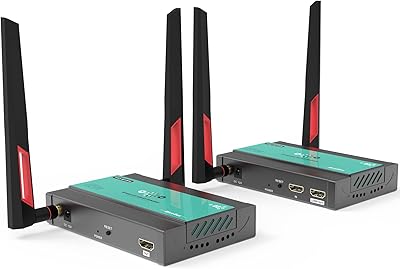
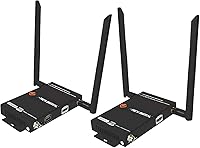
The J-Tech Digital WEX200V3 Wireless HDMI Extender was built for one practical purpose: getting a video signal from point A to point B without pulling cable through walls. It runs on its own dedicated 5GHz wireless band — not your home router — which means less interference and a more predictable connection. The transmitter also includes an HDMI loop output, so your local display stays active while the signal broadcasts to remote screens. You can even pair one transmitter with two receivers simultaneously, which is genuinely rare at this price point. Just know upfront: this is a streaming device, not a low-latency link for gaming or interactive use.
Features & Benefits

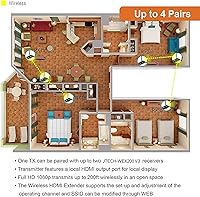
The spec sheet claims up to 200 feet, and in a single-story open layout, that holds up reasonably well. Push through multiple drywall partitions or add a floor change, and expect that number to shrink noticeably. Video quality tops out at 1080p at 60Hz — not 4K, but plenty sharp for TV viewing or digital signage. The IR passthrough is a genuinely useful touch: you can point your remote at the receiver-side sensor and still control the source device in another room. For environments running multiple extender sets, each WEX200V3 pair supports a customizable SSID and 5GHz channel, so four pairs can operate side by side without stepping on each other. HDCP 1.4 means most streaming services and Blu-ray content will pass through without issue.

Best For

This wireless HDMI extender fits a pretty specific niche, and knowing whether you fall into it saves a lot of frustration. It shines for homeowners who want to push a cable box or streaming player's signal to a bedroom or patio TV without touching a single wall stud. Small retail spaces running the same promotional video on two screens will also find it effective. Conference rooms and classrooms where a laptop or media player needs to feed a projector wirelessly are solid candidates too. Security camera relay to a secondary monitor is another valid application. Where it does not belong: PC gaming setups, fast-paced interactive kiosks, or anywhere the 0.1–0.3 second latency would create a visible disconnect between action and reaction.

User Feedback

With a 3.8 out of 5 rating across 134 reviews, the WEX200V3 sits in honest territory — solid when used correctly, frustrating when expectations don't match reality. Buyers who set it up in single-floor open spaces tend to report clean, reliable signals and appreciate how quickly the kit comes out of the box ready to use. Setup is straightforward enough that most people have it running in minutes. On the other side, users in older homes with denser walls or multi-story setups regularly find the effective range disappoints. Signal dropouts in Wi-Fi-heavy environments are a recurring complaint too. The bright spot in negative reviews, though, is J-Tech's support team — multiple buyers mention getting actual help from a real person, which isn't something you can say about most budget-tier alternatives.

Pros

  • Plug-and-play setup gets most users running in minutes with no technical background required.
  • One transmitter feeding two remote receivers simultaneously is a genuinely rare feature at this price point.
  • The dedicated 5GHz band operates independently of your home router, reducing interference from everyday network traffic.
  • IR passthrough lets you control the source device with your remote from the receiving room, no backtracking needed.
  • An HDMI loop output keeps a local display fully active at the transmitter end while broadcasting to remote screens.
  • Up to four extender pairs can share the same space with customizable SSIDs and channels, making multi-room deployments practical.
  • HDCP 1.4 compliance ensures most streaming services and disc-based content pass through without copy-protection issues.
  • U.S.-based support team in Houston is responsive and consistently praised by buyers who ran into real setup problems.
  • A one-year warranty plus lifetime technical support offers meaningful long-term peace of mind over generic off-brand alternatives.

Cons

  • Real-world range often falls noticeably short of the advertised 200 feet once multiple walls or floor changes enter the picture.
  • The 0.1–0.3 second latency is a firm dealbreaker for gaming, interactive kiosks, or any live-response application.
  • No 4K support caps the signal at 1080p, which limits how future-proof this investment actually is.
  • Occasional signal dropouts in RF-congested environments have been reported consistently enough across reviews to flag as a real risk.
  • Older buildings with dense or irregular wall materials can reduce effective transmission range dramatically compared to spec.
  • Each extender set is locked to two remote receivers — growing beyond that means purchasing and managing additional units.
  • Receiver units are only compatible with the same JTECH-WEX200V3 model, ruling out any mixing with other brands or generations.
  • The physical build feels utilitarian relative to the asking price, which may matter in polished commercial or hospitality environments.

Ratings

The scores and insights below are generated by our AI review engine after analyzing verified buyer feedback for the J-Tech Digital WEX200V3 Wireless HDMI Extender from global sources, with spam, bot activity, and incentivized submissions actively filtered out. Each category reflects the genuine balance of praise and frustration found across real purchase experiences — no score has been inflated to flatter the product, and no weakness has been glossed over. What you will find here is an honest, data-grounded picture of where this kit delivers and where it asks for real compromise.
Signal Stability
71%
29%
In open-plan living spaces and single-floor layouts, users consistently report a stable, clean connection during extended movie marathons or continuous digital signage runs. The dedicated 5GHz band — independent of any home router — keeps interference from other household devices at a manageable level for most passive streaming scenarios.
Multi-story homes and apartments with overlapping wireless networks expose real limitations, with users reporting periodic dropouts that interrupt playback without warning. Repositioning the units helps in some cases, but heavily saturated RF environments can leave the signal fundamentally inconsistent regardless of physical placement.
Setup & Installation
86%
The transmitter and receiver arrive factory-paired, so the majority of buyers plug in both units, connect their HDMI cables, and have a working link in under 15 minutes — no apps, accounts, or configuration menus required. This genuinely hands-off first-run experience is one of the most frequently praised aspects across the verified review pool.
Users who need to customize channel settings or assign a unique SSID for a multi-pair environment report a steeper learning curve than the basic setup implies. The documentation covering these advanced configurations is thin, and a number of buyers needed to contact support directly to navigate the channel-switching process without error.
Transmission Range
58%
42%
In best-case conditions — a ground-floor open layout with standard interior drywall — the WEX200V3 delivers a usable signal across genuinely long distances, making cable runs between adjacent rooms or out to a covered patio receiver viable without any physical installation work.
The advertised 200-foot ceiling is a spec-sheet maximum, not a reliable planning figure for most homes. Buyers in multi-story builds, older construction with brick or concrete partitions, or layouts requiring diagonal transmission across floors consistently report functional range falling to 60–100 feet before quality degrades or drops entirely.
Video Quality
79%
21%
For the primary use cases this kit targets — cable TV, streaming players, and security feeds on 1080p displays — picture quality holds up very well. Colors stay consistent, motion in standard broadcast content looks smooth at 60Hz, and the H.264 compression does not introduce visible artifacts under normal, everyday viewing conditions.
There is a hard ceiling at 1080p, meaning buyers with 4K televisions will see their source content downscaled, and the wireless compression layer does introduce a subtle softness compared to a direct wired HDMI run at the same resolution. Anyone expecting native 4K sharpness or HDR output will be disappointed immediately.
Latency
47%
53%
For passive content viewing — watching a film, monitoring a security camera feed, or running a retail display loop — the 0.1–0.3 second delay is effectively invisible to the human eye. Users in these scenarios routinely describe the experience as indistinguishable from a direct wired connection during normal playback.
The moment any interactive element enters the picture, that same latency becomes a serious liability. Gamers, presenters advancing live slides, or operators running interactive kiosks will notice the gap between input and screen response immediately, and several buyers who purchased without fully understanding this limitation left one-star reviews specifically citing this issue.
IR Passthrough
78%
22%
Being able to point a cable box or Blu-ray remote at the TV in the receiving room and control the source device down the hall is something buyers appreciate far more once they are using it daily. It works reliably with the vast majority of standard infrared remotes, covering most cable boxes, players, and streaming sticks.
The IR system is limited to standard infrared signals, which means Bluetooth remotes — increasingly common with newer Roku and Apple TV hardware — and RF-based controls are simply not supported. Buyers who discover after purchase that their specific remote type is incompatible have flagged this as an unexpected and frustrating friction point.
Audio Performance
73%
27%
Stereo and 5.1 surround sound both pass through the wireless link without additional configuration, making the WEX200V3 a workable option for living room setups where the receiving display is connected to a surround sound system. Users report that audio sync with the video feed holds steady under stable signal conditions.
There is no support for lossless audio formats like Dolby TrueHD or DTS-HD Master Audio, which limits appeal for audiophiles with premium AV receiver setups. The HDMI 1.4 standard underlying this kit simply cannot carry those higher-bandwidth audio streams, making it a meaningful compromise for dedicated home theater enthusiasts.
Build Quality
62%
38%
Both units are compact enough to sit unobtrusively behind a television or on an equipment shelf, and the connectivity ports feel secure under normal everyday cable handling. For a mid-range product in a category heavily populated by no-name hardware, the overall construction clears a basic adequacy bar without embarrassing itself.
The lightweight plastic housing feels noticeably utilitarian for the price bracket, and a number of buyers mention the units running warmer than expected during continuous extended operation. Nothing in the physical build signals a premium product, and in commercial environments where presentation matters, the appearance may feel out of place.
Value for Money
67%
33%
When the kit works as intended — delivering a stable 1080p signal across a single-floor layout to two simultaneous screens — the feature-to-price ratio is defensible compared to competitors that lack the dual-receiver configuration or IR passthrough. Lifetime technical support adds genuine long-term value that off-brand alternatives rarely provide.
Buyers who encounter range limitations or signal instability in their specific environment frequently feel the price was not justified given the real-world performance shortfall. The gap between the spec-sheet promise and lived experience is wide enough that several users cited this mismatch as the primary reason for their negative rating.
Multi-Room Scalability
74%
26%
The ability to run up to four independent extender pairs in a single building — each with a customizable 5GHz channel and SSID — adds real deployment flexibility for small businesses, schools, or larger homes wanting multiple independent video zones without mutual interference between running sets.
Scaling beyond two remote receivers requires purchasing and configuring additional complete transmitter units, adding both cost and complexity. The system is also locked to WEX200V3-to-WEX200V3 pairing only, meaning you cannot supplement with receivers from other compatible brands or mix hardware generations as your setup evolves.
Interference Resistance
54%
46%
Manual control over the operating frequency and SSID lets technically confident users scan for less congested channels, and in moderately busy environments this channel-selection step resolves most intermittent dropout issues without requiring any hardware changes or professional assistance.
In densely populated urban apartments or tech-heavy offices where the 5GHz band is already saturated, the WEX200V3 struggles to maintain consistency even after channel optimization. This is a recurring complaint from city-dwelling buyers who simply do not have access to a clean RF environment regardless of how they configure the unit.
HDCP Compatibility
81%
19%
HDCP 1.4 compliance covers the content protection requirements of the vast majority of streaming platforms — Netflix, Disney+, Amazon Prime, and standard Blu-ray discs all pass through without triggering copy-protection errors in typical home setups, which keeps the experience friction-free for everyday entertainment use.
The 1.4 compliance ceiling means that content requiring HDCP 2.2 — tied to certain protected 4K streams and newer disc formats — will not pass through correctly. While this edge case rarely affects users given the kit's 1080p video ceiling, it is a technical constraint worth flagging for anyone in a specialized playback environment.
Customer Support
84%
J-Tech's Houston-based support team is one of the most consistently praised aspects of ownership across the verified review pool. Buyers who ran into persistent setup or signal problems frequently describe reaching a knowledgeable human who worked through the issue with them — a standard noticeably above most competing brands at this price point.
Support availability is limited to weekday business hours, leaving weekend buyers or international customers in different time zones without immediate assistance. A small number of users also note that while responses were helpful, resolving complex multi-unit installation problems required several back-and-forth exchanges, extending the troubleshooting timeline meaningfully.
Warranty Coverage
77%
23%
The pairing of a one-year manufacturer warranty with lifetime technical support is a meaningful commitment in a product category where many brands offer 30-day return windows and nothing more. Having indefinite access to post-purchase help gives buyers reasonable confidence when treating this as a longer-term infrastructure investment.
The one-year hardware warranty period itself is fairly standard and does not stand out meaningfully from mid-range competitors in terms of physical coverage duration. Buyers who experience hardware failure after the 12-month window have no path to a covered replacement, which carries some weight given the reports of units running hot during extended use.

Suitable for:

The J-Tech Digital WEX200V3 Wireless HDMI Extender is a practical solution for anyone who needs to deliver a 1080p video signal from one room to another without drilling holes or snaking cable through walls. It fits particularly well in homes where a cable box, Blu-ray player, or streaming device needs to feed a second TV in a bedroom, guest room, or covered patio without any physical installation work. Small businesses running digital signage or promotional content will appreciate the ability to push one source to two screens at once — a configuration that typically costs considerably more with competing hardware. Conference rooms and classrooms where a laptop or media player needs to connect wirelessly to a projector or wall-mounted display are also strong fits, especially when a tidy, cable-free appearance matters. Security monitoring setups that need to relay camera footage to a secondary viewing station round out the most common real-world applications where this kit genuinely earns its place.
Not suitable for:

The J-Tech Digital WEX200V3 Wireless HDMI Extender is the wrong choice if you need 4K resolution, near-zero latency, or a reliable signal through thick concrete, brick, or multi-story construction. The 0.1–0.3 second delay is barely noticeable during passive video playback, but anyone gaming, operating an interactive kiosk, or running live presentations will find it immediately disruptive. Buyers in older buildings with metal-reinforced walls or dense materials should also manage expectations carefully — the 200-foot spec reflects ideal open-space conditions, and real-world range through multiple obstructions is often substantially shorter. Homes and offices in dense urban environments with heavily congested 5GHz wireless bands may also experience intermittent dropouts that repositioning alone will not resolve. If you are already invested in a 4K source and display setup, the signal will be hard-capped at 1080p, which is a limitation worth weighing carefully before purchasing.
Specifications

  • Model: This kit carries the model designation JTECH-WEX200V3, manufactured by J-Tech Digital Inc.
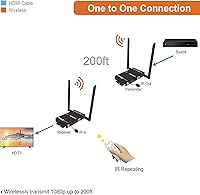
  • Max Range: The system is rated for wireless transmission up to 200 feet (61 meters) through standard interior drywall under ideal, unobstructed conditions.
  • Video Resolution: Supports Full HD output up to 1080p at 60Hz, with additional compatibility for 1080i, 720p, 576p, 576i, 480p, and 480i formats.
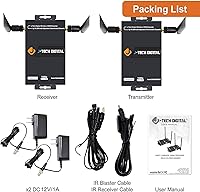
  • Configuration: Each kit includes one transmitter (TX) unit that can simultaneously feed up to two separate receiver (RX) units.
  • Wireless Frequency: Operates on a dedicated 5GHz wireless band that functions independently of any home or office router.
  • Latency: End-to-end signal latency is rated at 0.1–0.3 seconds, making it suitable for passive video playback but not for real-time interactive applications.
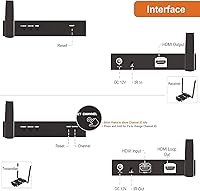
  • Loop Output: The transmitter unit includes an HDMI loop output port, allowing a local display to remain active simultaneously with any connected remote receivers.
  • IR Passthrough: An infrared passthrough system allows standard IR remote controls to operate the source device from the receiver location in another room.
  • HDCP Version: The system complies with HDCP 1.4, covering copy-protected content from the majority of streaming services and Blu-ray disc sources.
  • HDMI Standard: Both transmitter and receiver units conform to HDMI 1.4, which supports the full range of 1080p resolutions and standard audio formats.
  • Video Encoding: Wireless video compression uses H.264 and MPEG-2 encoding to maintain picture quality across the transmission link.
  • Audio Support: The system passes stereo and up to 5.1 surround sound audio through the wireless link without requiring a separate audio connection.
  • Max Pairs: Up to four independent JTECH-WEX200V3 extender pairs can operate simultaneously in the same environment by assigning each a unique SSID and 5GHz channel.
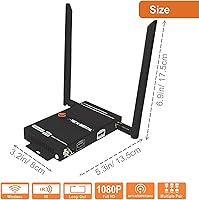
  • Dimensions: The hardware measures 6.9 × 5.3 × 3.2 inches, covering both the transmitter and receiver units combined in the packaged configuration.
  • Weight: The total kit weight is 2.29 pounds, encompassing both the transmitter and receiver hardware.
  • Warranty: J-Tech Digital provides a one-year manufacturer warranty covering defects in materials and workmanship from the date of purchase.
  • Tech Support: Lifetime technical support is included at no additional cost, delivered by a U.S.-based team in Houston, Texas, available Monday through Friday, 9AM–6PM CST.

Related Reviews

J-Tech Digital HDBaseT HDMI Extender
80%
91%
Signal Reliability at 1080p
67%
4K Performance
58%
Cable Quality Dependency
88%
HDCP 2.2 Compatibility
84%
Ease of Setup
More
J-Tech Digital 4K USB KVM HDMI Extender
85%
89%
Performance
93%
Ease of Installation
88%
Long-Distance Signal Quality
60%
USB Port Compatibility
91%
Video Resolution
More
J-Tech Digital V638
J-Tech Digital V638
71%
83%
Ergonomic Comfort
61%
Build Quality
72%
Palm Rest Design
78%
Wireless Performance
81%
Battery Life
More
J-Tech Digital JTECH-MV41A 4x1 HDMI Multi-Viewer
77%
88%
Display Mode Versatility
91%
Switching Performance
83%
4K Resolution Handling
74%
Audio Extraction
86%
Build Quality
More
Weeryyi Wireless HDMI Extender Receiver
83%
91%
Value for Money
88%
Ease of Setup
85%
Signal Stability
83%
Range Performance
70%
Latency
More
Mirabox HSV8113W Wireless HDMI Extender Kit
74%
78%
Signal Stability
62%
Range Performance
71%
Multi-Screen Expandability
83%
Setup & Ease of Use
69%
Latency
More
Mirabox HDMI Extender 400ft
85%
94%
Signal Quality
85%
Ease of Setup
90%
Build Quality
91%
Transmission Range
89%
Audio Performance
More
DxInvb Wireless HDMI Transmitter and Receiver Kit
75%
91%
Ease of Setup
58%
Device Compatibility
74%
Wireless Range & Stability
69%
Video Quality
83%
Build Quality & Portability
More
OREI EX-500IR HDMI Extender
88%
94%
Transmission Distance
92%
Signal Quality
89%
Ease of Installation
85%
Build Quality
88%
Power over Cable (PoC) Functionality
More
AGPTEK LKV373A 1080P HDMI Extender
86%
93%
Signal Reliability
88%
Installation Ease
89%
Compatibility with Devices
85%
Build Quality
91%
Value for Money
More

FAQ

The 200-foot figure is a maximum measured in ideal conditions — think a single open floor with standard drywall and minimal obstructions. Add multiple wall layers, a floor-ceiling assembly, or dense materials like concrete or brick, and the practical range drops noticeably. Most users in typical residential layouts report consistently clean signals somewhere in the 50–100 foot range. It is worth designing your setup around that more realistic figure rather than assuming you will hit the spec-sheet maximum.

No — the WEX200V3 operates on its own dedicated 5GHz wireless channel and does not route any signal through your router or internet connection. Your broadband speed has no bearing on picture quality whatsoever. That said, if your home already has many active 5GHz devices, there can be some frequency overlap, which is why the kit lets you manually choose your operating channel to find a quieter slice of spectrum.

This is not a good fit for gaming. The signal carries a built-in delay of 0.1–0.3 seconds, which creates a visible lag between controller input and on-screen response — noticeable enough in any action-oriented title to break the experience. For passive viewing like movies, live TV, or security feeds, that same delay is essentially imperceptible and causes no real-world issues.

No, the maximum supported output is 1080p at 60Hz. If your source device outputs 4K, the signal may not transmit correctly depending on how the source handles downscaling. Buyers who have already invested in a 4K display and 4K source setup should look for a different solution that can handle that resolution natively.

Each transmitter supports a maximum of two remote receivers. To reach a third or fourth display, you would need to add another transmitter-receiver set. The good news is that up to four complete extender pairs can coexist in the same space without stepping on each other, as long as each pair is assigned its own channel and SSID during setup.

It works reliably with standard infrared remotes, which covers most cable boxes, Blu-ray players, Apple TV, Fire Stick, and similar devices. It will not work with Bluetooth remotes or RF-based controls, since those signals operate on completely different transmission technologies and are not picked up by the IR sensor. If your device ships with a typical TV-style infrared remote, you should be in good shape.

Setup is notably straightforward. The transmitter and receiver units come pre-paired from the factory, so in most cases you simply power both units, connect your HDMI cables at each end, and the link is established automatically — no app, no software, no account needed. Configuring a custom SSID or switching channels for a multi-pair environment takes a few extra steps but is still a one-time process that most users complete in under 20 minutes.

It can, and this is one of the more common pain points reported by real users. The J-Tech Digital WEX200V3 Wireless HDMI Extender does give you control over which 5GHz channel it uses, so scanning for a less congested frequency often reduces or eliminates dropouts. However, in extremely saturated RF environments — think a high-rise with dozens of overlapping networks — there is no absolute guarantee of a perfectly stable signal, and that is worth factoring into your decision.

Yes, in most cases. The WEX200V3 supports HDCP 1.4, which is sufficient to pass copy-protected content from the major streaming platforms and standard Blu-ray discs. The only scenario where you might hit a wall is with content requiring HDCP 2.2 — but since this kit tops out at 1080p anyway, that situation is unlikely to come up in practice.

J-Tech backs this kit with a one-year manufacturer warranty and lifetime technical support at no extra cost, handled by a U.S.-based team in Houston. Support runs weekdays during regular business hours, and buyers frequently note in their reviews that they actually reached a knowledgeable person rather than an automated response system — which is a meaningful differentiator compared to the many off-brand alternatives in this category.

Where to Buy