Overview

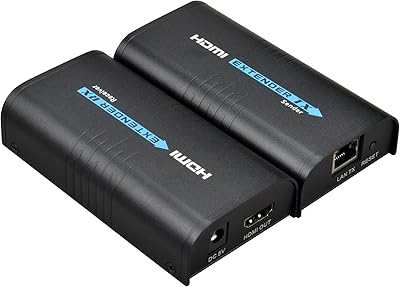
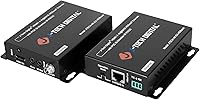
The J-Tech Digital HDBaseT HDMI Extender has been a steady presence in the mid-range AV market since its release in late 2016, and its staying power says something. Unlike fiber or compressed-signal alternatives, this HDBaseT extender pushes uncompressed video over ordinary Cat5e or Cat6 ethernet cable — the kind most buildings already have in the walls. At 1080p, you can stretch the signal across a serious distance; at 4K, the range is shorter but still practical for many room layouts. With nearly 900 ratings accumulated over the years, it has earned the kind of track record that matters to AV installers and home theater builders alike.
Features & Benefits

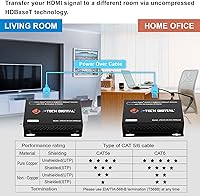
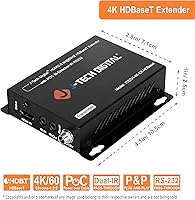
The core advantage of this ethernet-based HDMI extender is that it transmits video without compression. That matters more than it sounds — compressed extenders can introduce latency, artifacts, or color degradation, especially on high-contrast content. HDCP 2.2 compliance means it works with modern 4K streaming sticks and Blu-ray players without handshake headaches. The bi-directional IR passthrough lets you control your source device from the display end of the run, which is genuinely useful when the two are in different rooms. RS232 support opens integration with professional control systems. And Power over Cable is a practical win — only one power adapter is needed, since the transmitter powers the receiver unit automatically.

Best For

This HDBaseT extender fits well in a few specific scenarios. Home theater setups where the media server or player lives in a closet or equipment rack — while the TV is across the house — are exactly where it shines. The same logic applies to commercial installs: conference rooms, hotel lobbies, retail displays, anywhere a long cable run is unavoidable. If your building already has Cat6 pulled through the walls, this unit can save a significant amount of money compared to re-running dedicated HDMI cable. AV integrators will appreciate the RS232 port for control system integration. Anyone who needs IR remote passthrough without buying a separate kit will also find real value here.

User Feedback

Buyers consistently praise the J-Tech unit for how straightforward it is to get running at 1080p distances — most report a true plug-and-play experience. The Power over Cable feature gets specific callouts for keeping installations tidy. On the critical side, 4K performance generates more mixed results. Several buyers found that the advertised 4K range is only achievable with solid-core copper Cat6 — CCA (copper-clad aluminum) cable regularly causes signal issues or outright failure at those distances. Long-term durability appears solid for most users, though a handful mention the units running warm during extended operation. Customer support from J-Tech receives generally favorable mentions, with responsive replies noted in several reviews.

Pros

  • Transmits fully uncompressed video, avoiding the artifacts and latency that plague cheaper compressed alternatives.
  • HDCP 2.2 compliance means modern 4K streaming devices and UHD Blu-ray players connect without content protection conflicts.
  • Power over Cable eliminates the need for a second power outlet at the receiver end, keeping installations clean.
  • Plug-and-play setup at 1080p distances is fast and reliable — most users report a working signal in minutes.
  • Built-in bi-directional IR passthrough removes the need for a separate remote control extension kit.
  • RS232 port enables integration with professional control systems, making it viable in commercial AV environments.
  • Supports lossless audio formats including Dolby TrueHD and DTS-HD, preserving full home theater audio quality.
  • Compact metal enclosure with included mounting ears suits rack, wall, or ceiling installation without additional hardware.
  • Nearly a decade of market presence and close to 900 verified ratings provide a meaningful real-world reliability baseline.
  • J-Tech Digital support is generally responsive to basic compatibility and setup questions through Amazon and direct channels.

Cons

  • 4K signal quality is highly sensitive to cable type — copper-clad aluminum wire frequently causes failures at longer runs.
  • Achieving the rated 4K distance requires near-ideal cable conditions that many existing installations simply do not meet.
  • Units run noticeably warm during continuous operation, which warrants attention in enclosed or poorly ventilated equipment racks.
  • IR emitter and receiver cable placement requires trial and error; some remote frequencies do not transmit reliably.
  • RS232 documentation is sparse, and integrators often need community resources or direct support to get control strings working.
  • The product has not been significantly updated since 2016, and newer competitors now match or exceed its specs at similar prices.
  • Occasional HDCP handshake failures occur when mixing older legacy equipment with newer 4K devices in the same signal chain.
  • Power-up sequencing delays between the transmitter and receiver can complicate automated control system timing.
  • No built-in diagnostic indicators beyond basic LED power status, making signal troubleshooting harder without additional test equipment.

Ratings

The J-Tech Digital HDBaseT HDMI Extender has accumulated a substantial body of verified buyer feedback since its 2016 launch, and our AI rating engine has processed that global data — actively filtering out incentivized, bot-generated, and outlier reviews — to produce the scores below. Each category reflects the honest distribution of real installer and home theater experiences, meaning both the genuine strengths and the friction points are weighted transparently. You will find this unit scores well where it matters most, but also where it falls short of perfection.
Signal Reliability at 1080p
91%
For standard HD runs, this HDBaseT extender is about as dependable as the category gets. Installers running cable through walls in homes and offices consistently report rock-solid sync with no dropouts, even when the cable path includes bends and junction points. The uncompressed transmission method is a clear contributor to this stability.
A small but consistent group of buyers report occasional handshake delays on initial power-up, requiring them to cycle the source device. This is rarely a dealbreaker but can be frustrating in professional installs where reliability on first boot is expected.
4K Performance
67%
33%
When conditions are right — meaning quality solid-copper Cat6 and a clean, direct cable run — the J-Tech unit delivers watchable 4K content at distances that genuinely impress for the price tier. Users in purpose-built home theaters with new Cat6 runs have reported clean images with no visible compression artifacts.
4K performance is the most contested aspect of this extender. Multiple buyers found that the maximum 4K range is sensitive to cable quality, and results vary noticeably with cable-clad aluminum wire. Real-world performance at the upper end of the 4K distance rating is hit-or-miss enough that it warrants caution.
Cable Quality Dependency
58%
42%
Buyers who went in prepared — purchasing solid-core copper Cat6 alongside the unit — generally had smooth experiences. J-Tech's own guidance on cable selection is available, and users who followed it report achieving the rated distances reliably.
This is the single most common source of negative reviews. Buyers using whatever Cat5e or CCA cable was already in their walls often run into signal degradation or complete failure, particularly at 4K. The extender's performance ceiling is tightly coupled to cable infrastructure in a way that is not always obvious at purchase.
HDCP 2.2 Compatibility
88%
Compatibility with HDCP 2.2 is a genuine differentiator at this price point, and buyers using modern 4K streaming devices and UHD Blu-ray players report that content protection handshakes resolve quickly and consistently. This removes a major headache that cheaper extenders frequently cause.
A handful of buyers encountered HDCP negotiation failures when mixing older and newer devices in the signal chain. These cases appear to be edge cases involving legacy equipment, but they do occur and can be difficult to diagnose without a second extender to test against.
Ease of Setup
84%
The plug-and-play experience at 1080p is genuinely one of this unit's strongest qualities. Most buyers report connecting both ends, powering up, and getting a working signal in under five minutes. No software configuration is required for basic operation, which makes it accessible even for non-technical users.
Setup complexity increases when IR passthrough or RS232 control is involved. A few buyers found the IR emitter and receiver cable configuration confusing without clearer labeling on the unit itself. The manual helps, but only marginally.
IR Passthrough Functionality
76%
24%
Bi-directional IR support is a thoughtful inclusion that saves buyers from purchasing a separate IR extension kit. Users controlling Blu-ray players or cable boxes from the TV end of a long run found it functional and responsive across a realistic range of remote frequencies.
IR reliability is not universal. Some buyers found that their specific remote frequencies did not transmit cleanly, and the emitter placement requires some trial and error to get right. It works well when it works, but it is not as foolproof as a dedicated IR extension system.
Power over Cable (PoC)
89%
The ability for the transmitter to power the receiver unit over the same Cat6 cable is consistently praised in buyer feedback. In wall-mounted or ceiling-installed display setups, eliminating the need for a second power outlet at the receiver end is a practical and meaningful advantage.
A small number of buyers report that the PoC function adds a slight delay to the receiver powering up after the transmitter is switched on. In automated AV systems where timing matters, this can require minor sequencing adjustments in the control system logic.
Audio Format Support
86%
Support for lossless audio formats including Dolby TrueHD and DTS-HD Master Audio is a real asset for home theater installations. Buyers running the unit as part of a full AV chain — with an AV receiver handling audio decoding — confirm that bitstream audio passes through without degradation.
A few buyers using simpler stereo setups reported audio sync delays in specific source and display combinations. This appears to be a handshake timing issue rather than a format incompatibility, but it required adjusting AV receiver settings to resolve.
Build Quality
79%
21%
The metal enclosure feels appropriately solid for a commercial-grade AV component, and the inclusion of mounting ears is a practical touch for rack or wall installation. The compact footprint makes placement flexible in tight equipment closets or behind displays.
Several longer-term users note that the units run noticeably warm during extended operation. While no widespread failure reports are linked to heat, it is worth ensuring adequate ventilation in enclosed equipment racks, particularly in warmer climates or high-ambient-temperature environments.
RS232 Control Integration
82%
18%
The Phoenix-style RS232 port gives AV integrators a proper control interface for use with systems like Crestron, AMX, or Extron. Installers working on professional projects appreciate that this feature is present at all in a product at this market tier, as it enables full automation without workarounds.
RS232 configuration requires familiarity with control system programming, and J-Tech's documentation on command strings is considered sparse by some integrators. First-time users may need to contact support or rely on community forums to get the control side fully operational.
Value for Money
83%
Measured against the feature set — uncompressed video, HDCP 2.2, PoC, bi-directional IR, and RS232 — the J-Tech unit offers a compelling package for its price bracket. Buyers comparing it to bare-bones alternatives or significantly pricier commercial brands consistently find it competitive.
The market has matured since this unit launched in 2016, and newer competitors now offer similar or better specifications at comparable or lower prices. Buyers doing fresh research should compare actively rather than defaulting to this model based on its review volume alone.
Long-Term Durability
77%
23%
A meaningful portion of the review base includes buyers who have been running the J-Tech unit continuously for multiple years. Reports of unit failure are relatively uncommon in this cohort, suggesting the hardware holds up reasonably well under sustained AV workloads in both home and light commercial contexts.
The warm operating temperature noted by some users creates a degree of uncertainty around very long-term reliability, particularly in installations where the unit is never powered down. Thermal longevity data for this specific product is limited, so some caution is reasonable for mission-critical deployments.
Customer Support
74%
26%
J-Tech Digital receives above-average marks for support responsiveness compared to many competing brands in the category. Buyers who reached out with compatibility or configuration questions report receiving helpful replies within a reasonable timeframe, and the brand maintains an active presence in Amazon Q&A.
Support quality appears inconsistent depending on the complexity of the issue. Straightforward questions tend to get fast answers, but more technical problems involving RS232 control or mixed-device HDCP chains have left some buyers without a full resolution.

Suitable for:

The J-Tech Digital HDBaseT HDMI Extender is a strong fit for anyone who needs to move a high-quality video signal across a meaningful distance without re-running dedicated HDMI cable. AV integrators working on commercial installs — conference rooms, hotel lobbies, retail digital signage — will particularly appreciate the RS232 port for control system integration and the HDCP 2.2 compliance that prevents headaches with copy-protected content. Home theater enthusiasts who have already invested in Cat6 infrastructure can put that existing cabling to work and avoid the cost and disruption of pulling new HDMI runs through finished walls. The Power over Cable design is a genuine convenience in ceiling and wall-mount scenarios where running a second power line to the receiver would be impractical. Anyone who needs remote control passthrough between separated rooms will also find the built-in bi-directional IR a worthwhile inclusion that saves them sourcing a separate kit.
Not suitable for:

Buyers expecting reliable 4K performance should approach the J-Tech Digital HDBaseT HDMI Extender with realistic expectations, particularly if their existing cable infrastructure uses copper-clad aluminum rather than solid-core copper Cat6. The 4K distance ceiling is the unit's rated maximum under ideal conditions, and real-world performance at that range varies enough that it is not a safe assumption for critical installations. Casual users looking for a simple, short-run solution to connect a laptop to a nearby TV will find this unit overengineered and overpriced for that purpose. Buyers on a tight budget who need a plug-and-play fix for a basic 1080p setup within a single room would be better served by a simpler, cheaper extender. This is also not the right choice for anyone unwilling to invest in proper solid-core copper ethernet cable, since skimping there directly undermines the performance the unit is capable of delivering.
Specifications

  • Max Resolution: Supports up to 4K at 60Hz using 4:2:0 chroma subsampling, with full 1080p at 60Hz also supported across all standard HD resolutions.
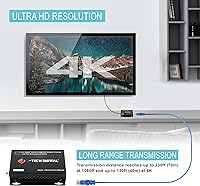
  • 1080p Range: Transmits uncompressed 1080p video over Cat5e or Cat6 UTP cable at distances up to 230ft (approximately 70 meters).
  • 4K Range: Extends 4K@60Hz (4:2:0) signals up to 130ft (approximately 40 meters) under optimal cable conditions using solid-core copper Cat6.
  • Cable Type: Compatible with Cat5e and Cat6 UTP (unshielded twisted pair) ethernet cable; solid-core copper construction strongly recommended for maximum performance.
  • HDCP Compliance: Fully compliant with both HDCP 2.2 and HDCP 1.4, ensuring compatibility with modern copy-protected 4K and legacy HD content sources.
  • IR Passthrough: Supports bi-directional infrared signal transmission in the 20–60kHz frequency range, allowing remote control use from either end of the cable run.
  • RS232 Port: Includes a Phoenix-style RS232 connector for firmware updates and integration with third-party control systems such as Crestron or AMX.
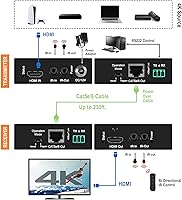
  • Power over Cable: The transmitter unit supplies power to the receiver unit over the same Cat5e/6 cable, requiring only one power adapter for the entire setup.
  • Audio Formats: Passes through LPCM stereo and multichannel audio, as well as lossless formats including DTS-HD Master Audio and Dolby TrueHD for full AV receiver compatibility.
  • 3D Support: Supports 1080p 3D video transmission, making it compatible with 3D-capable displays and Blu-ray sources over the same Cat5e/6 infrastructure.
  • ESD Protection: Built-in electrostatic discharge protection is integrated into the chipset to guard against signal damage from static in installation environments.
  • Dimensions: Each unit measures 4.1 x 2.8 x 1 inches, with a compact metal enclosure suited for rack mounting, wall installation, or placement behind displays.
  • Mounting: Mounting ears are included in the package, allowing the transmitter and receiver to be fixed to racks, walls, or other surfaces without additional hardware.
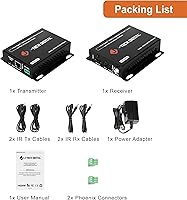
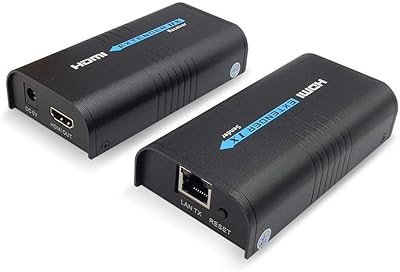
  • In Box Contents: Package includes the transmitter unit, receiver unit, two IR transmitter cables, two IR receiver cables, one power adapter, a mount kit, and a user manual.
  • Transmission Method: Uses HDBaseT technology to send fully uncompressed HDMI video over ethernet cable, avoiding the quality compromises associated with compressed extender alternatives.
  • LED Indicators: Both transmitter and receiver units feature LED status indicators to confirm power state and assist with basic connectivity troubleshooting during installation.
  • HDMI Version: Based on HDMI 1.4 specification for 4K 60Hz YUV420 transmission, with broad backward compatibility across connected source and display devices.
  • First Available: This product was first made available in November 2016, making it one of the longer-tenured HDBaseT extenders still actively sold in its category.

Related Reviews
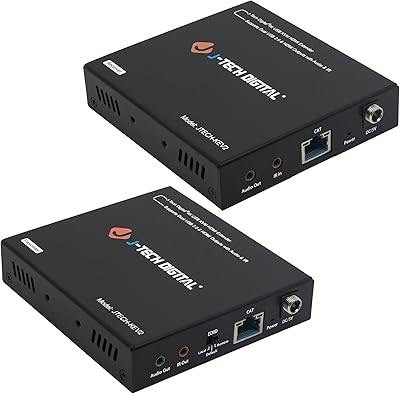
J-Tech Digital 4K USB KVM HDMI Extender
85%
89%
Performance
93%
Ease of Installation
88%
Long-Distance Signal Quality
60%
USB Port Compatibility
91%
Video Resolution
More
J-Tech Digital Wireless HDMI Extender 1X2 (JTECH-WEX200V3)
85%
91%
Value for Money
95%
Setup & Installation
88%
Signal Strength
92%
Latency for Video Playback
80%
Range Performance
More
J-Tech Digital JTECH-MV41A 4x1 HDMI Multi-Viewer
77%
88%
Display Mode Versatility
91%
Switching Performance
83%
4K Resolution Handling
74%
Audio Extraction
86%
Build Quality
More
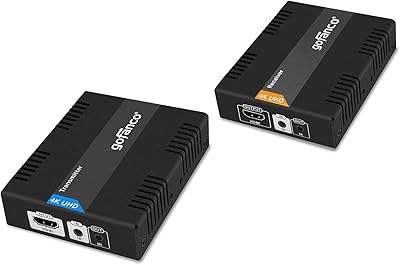
gofanco HDBaseT HDMI Extender 4K 60Hz
86%
88%
Video Performance
91%
Installation Ease
80%
Signal Reliability
75%
Range at 4K
95%
Range at 1080p
More
J-Tech Digital V638
J-Tech Digital V638
71%
83%
Ergonomic Comfort
61%
Build Quality
72%
Palm Rest Design
78%
Wireless Performance
81%
Battery Life
More
Mirabox HDMI Extender 400ft
85%
94%
Signal Quality
85%
Ease of Setup
90%
Build Quality
91%
Transmission Range
89%
Audio Performance
More
TESmart HKE12MMA20 HDMI KVM Extender
71%
78%
Signal Stability
74%
Video Quality
71%
Multipoint Topology Support
83%
Build Quality
63%
IR Pass-Through Reliability
More
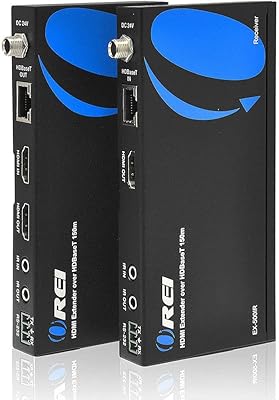
OREI EX-500IR HDMI Extender
88%
94%
Transmission Distance
92%
Signal Quality
89%
Ease of Installation
85%
Build Quality
88%
Power over Cable (PoC) Functionality
More
AGPTEK LKV373A 1080P HDMI Extender
86%
93%
Signal Reliability
88%
Installation Ease
89%
Compatibility with Devices
85%
Build Quality
91%
Value for Money
More
Weeryyi Wireless HDMI Extender Receiver
83%
91%
Value for Money
88%
Ease of Setup
85%
Signal Stability
83%
Range Performance
70%
Latency
More

FAQ

It depends on the cable type, not just the category rating. If your existing run uses solid-core copper conductors, you have a good chance of achieving the rated distances. If it is copper-clad aluminum (CCA), which is common in budget pre-installed cable, you may see signal issues especially at 4K. Testing with a short known-good cable first is always worth doing before committing to a wall run.

Yes, and the HDCP 2.2 compliance is specifically what makes that possible. Modern streaming devices encrypt their 4K output using HDCP 2.2, and extenders that only support the older 1.4 standard will fail with them. This unit handles both, so content from streaming sticks, UHD Blu-ray players, and game consoles should pass through without triggering copy protection errors.

It ships as a complete pair — one transmitter (TX) and one receiver (RX) — along with the IR cables, power adapter, and mounting hardware. You connect one end to your source device and the other to your display, run a single Cat5e or Cat6 cable between them, and power up the transmitter. The PoC feature means the receiver draws its power from the same cable, so no second outlet is needed at the display end.

Yes, that is exactly what the bi-directional IR passthrough is designed for. The included IR emitter and receiver cables let you point your remote at the display end and control the source device at the other end of the run. It works well for most standard remotes, though users with devices that use unusual IR frequencies outside the 20–60kHz range may find it less reliable and should verify compatibility with their specific remote first.

Yes, the Phoenix RS232 port is included specifically for this purpose. You can use it to integrate the extender into a professional control system for automated switching, firmware updates, or signal management. The documentation on RS232 command strings is limited, so integrators may need to contact J-Tech support or consult community resources for the specific control codes.

In many cases it will still work at shorter distances or at 1080p, but you are rolling the dice on 4K performance at any meaningful length. CCA cable has higher resistance than solid copper, and HDBaseT is sensitive enough to that difference that the signal can degrade or drop entirely before you reach the rated distance. Solid-core copper Cat6 is not optional if you want reliable 4K — it is effectively a requirement.

Both units do run warm, which is normal for HDBaseT hardware operating continuously. The metal enclosure helps dissipate heat, but you should avoid stacking other equipment directly on top of the units and ensure there is some airflow around them, especially in enclosed AV racks. No widespread thermal failure issues have been documented, but proper ventilation is a reasonable precaution for 24/7 installations.

It needs a direct point-to-point cable run between the transmitter and receiver. HDBaseT does not work over network switches, routers, or active patch panels — it is not an IP-based system. The signal travels as an analog-style transmission over the physical cable, so any active network equipment in the path will break the connection. Passive punch-down patch panels in a structured wiring setup can sometimes work, but they add signal loss and should be tested carefully.

No, ARC and eARC are features of the HDMI connection between a TV and an audio device, and they are not part of what an HDBaseT extender transmits. This unit passes audio from the source to the display through the extended HDMI signal, but it does not create or relay an ARC pathway back from the TV. If your setup relies on ARC for a soundbar, you would need to handle that connection directly at the TV rather than through the extender.

Both units have LED indicators that confirm power status — if both light up as expected, the hardware is at least functioning. For signal confirmation, your display will simply show the source image if the connection is working. If you get no image or a flickering signal, the first things to check are cable quality, cable length, and whether the HDCP handshake between your source and display is completing. Swapping in a shorter test cable between the two units is the fastest way to isolate whether the issue is the extender or the installed cable run.

Where to Buy