Overview

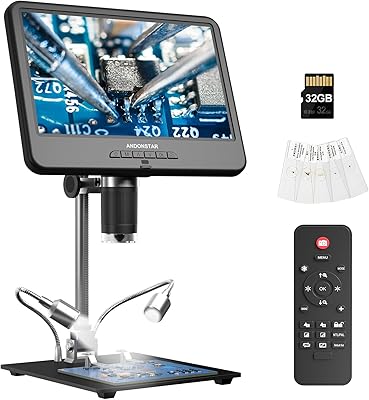
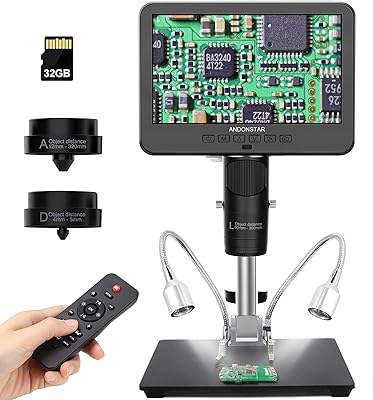
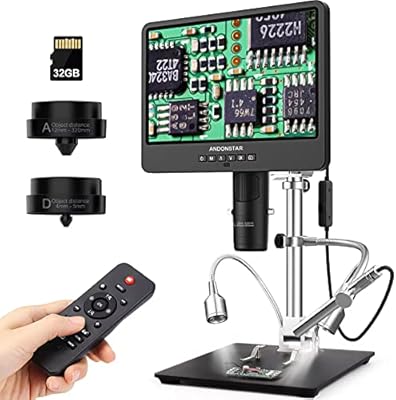
The Andonstar AD407 Pro Digital Soldering Microscope sits comfortably in the mid-to-premium tier of inspection tools, targeting electronics hobbyists and semi-professional repair technicians who need more than a basic USB scope can offer. What immediately sets it apart from most competitors in this price range is its all-metal construction — no plastic wobble, no flimsy joints. The 7-inch IPS screen handles most close-up work on its own, but the HDMI dual-output means you can push the feed to a larger monitor when needed. Add in a built-in UV filter designed specifically for soldering environments, and it's clear this isn't just a repurposed general-purpose microscope. Since its late 2022 launch, it has built a solid reputation with over 500 verified ratings.
Features & Benefits

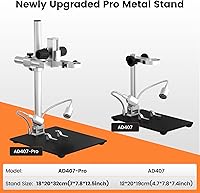
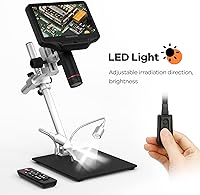
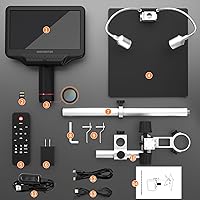
The 4MP UHD sensor is where this digital inspection scope earns its keep — at up to 270x magnification, fine SMD pads and tiny component markings come through with genuine clarity rather than the muddy, over-sharpened look common in cheaper options. The pro metal stand rotates a full 360° horizontally and adjusts front-to-rear, so finding a comfortable viewing angle for awkward boards isn't a guessing game. Eight levels of LED lighting with bendable arms let you dial in exactly the right brightness without harsh reflections on shiny pads. The wireless remote control is a small but practical touch — capturing a still or recording a repair clip without reaching over and nudging the board is genuinely useful. Video recording tops out at 2160P, which is more than adequate for documentation or instructional use.

Best For

The AD407 Pro is most at home on a repair bench where phone motherboards, fine-pitch SMD work, or PCB debugging are daily tasks. It's a natural fit for phone repair technicians who need to inspect tiny solder joints up close without straining over a magnifying lamp. The dual-screen capability makes it well-suited for shop environments where you're walking a customer or apprentice through a repair — the HDMI feed to a second display handles that without extra effort. DIY makers stepping up from a basic clip-on USB scope will notice the difference in build quality and image stability right away. If you regularly document repairs or shoot instructional content, the reliable video output and remote capture offer a practical workflow that cheaper scopes simply can't match.

User Feedback

Among verified buyers, image sharpness and overall stand rigidity draw consistent praise — most are pleasantly surprised that the stand feels as solid as advertised during extended soldering sessions. The UV filter gets specific mentions from professionals who appreciate not worrying about smoke residue clouding the lens over time. On the critical side, a handful of users note the focus wheel has a steeper learning curve than expected, particularly when switching magnification levels quickly. A few have flagged minor software interface quirks and limited accessory compatibility. Compared to budget options from brands like Jiusion, most reviewers agree the step up in build quality is noticeable, though anyone expecting a full professional lab instrument may find the feature set just slightly short of that bar.

Pros

  • All-metal construction feels substantially more durable than plastic-bodied competitors at a similar price point.
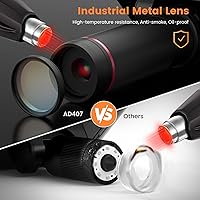
  • The built-in UV filter actively protects the lens from soldering smoke and debris, extending its usable lifespan.
  • 4MP UHD sensor resolves fine SMD component detail with clarity that genuinely aids fault diagnosis.
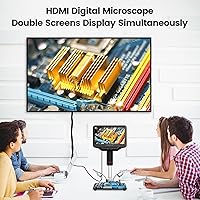
  • HDMI dual-output lets you mirror the feed to a larger monitor without interrupting the built-in screen.
  • 360-degree stand rotation and front-to-rear tilt make repositioning for awkward boards fast and intuitive.
  • Eight LED intensity levels with bendable arms give precise control over lighting angle and glare reduction.
  • The wireless remote enables shake-free image capture during high-magnification documentation work.
  • 2160P video recording produces footage clean enough for training content or client-facing repair walkthroughs.
  • Stand stability holds up during extended soldering sessions without developing drift or looseness over time.
  • Buyers upgrading from entry-level USB scopes consistently report the image quality difference as immediately noticeable.

Cons

  • The onscreen menu interface feels outdated and takes real time to navigate, especially for less common settings.
  • Instruction manual quality is poor — setup guidance for HDMI configuration and LED optimization is notably thin.
  • Maximum advertised magnification is misleading; digital zoom beyond the optical range degrades image quality significantly.
  • The base occupies substantial bench space, which creates problems in compact or shared workstation environments.
  • Wireless remote connectivity is inconsistent in environments with other wireless devices operating nearby.
  • Focus wheel has a steeper learning curve than expected, particularly when switching magnification quickly mid-repair.
  • HDMI output compatibility with certain older monitors is inconsistent, occasionally requiring adapters or cable swaps.
  • LED color temperature skews warm, which can slightly affect accuracy when identifying color-coded components.
  • No clear firmware update path makes it hard to address software issues or improve interface behavior post-purchase.
  • Onboard video file management is unintuitive, and some longer recordings require re-encoding before editing software handles them cleanly.

Ratings

The Andonstar AD407 Pro Digital Soldering Microscope has been scored by our AI system after processing hundreds of verified global buyer reviews, with spam, bot activity, and incentivized feedback actively filtered out before any score was calculated. The ratings below reflect how real users — from phone repair professionals to seasoned hobbyists — actually experience this digital inspection scope day-to-day. Both the standout strengths and the recurring frustrations are represented transparently across every category.
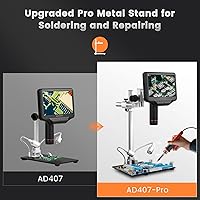
Image Clarity
91%
Users working on fine-pitch SMD components consistently report that the 4MP UHD sensor resolves detail they couldn't see clearly with cheaper scopes. Solder bridges, lifted pads, and tiny component markings are all distinguishable without straining, which makes a genuine difference during fault diagnosis on dense phone motherboards.
At the upper end of the magnification range, some users notice a slight softening toward the edges of the frame. It's rarely a dealbreaker for repair work, but users expecting perfectly uniform sharpness across the full 270x field may find it slightly underwhelming compared to lab-grade optics.
Build Quality
93%
The all-metal construction earns near-universal praise. Buyers repeatedly note how different the AD407 Pro feels compared to plastic-bodied competitors — the focusing barrel has a satisfying, precise action, and the stand doesn't develop looseness or drift after weeks of daily use at a busy repair bench.
A small number of users report that certain knobs and adjustment points, while metal, have tolerances that feel slightly over-tightened out of the box and require a break-in period before movement feels smooth. This is a minor issue but worth noting for first-time setup.
Stand Stability & Adjustability
89%
The pro metal stand is one of the most appreciated aspects across all reviewer segments. Its 360° horizontal rotation and front-to-rear tilt make it easy to reposition for oddly shaped boards or awkward component locations without losing the image entirely and having to refocus from scratch.
The stand's footprint, while sturdy, is notable — at roughly 7.8 by 7 inches at the base, it occupies meaningful bench space. Technicians with compact workstations have flagged that fitting it alongside a soldering station and other tools can feel cramped in tighter setups.
UV Filter & Lens Protection
88%
Long-term users specifically mention the UV filter as a feature that pays off over time. Several professional repair techs note that previous scopes without this protection developed hazy lenses after months of soldering smoke exposure, making this a genuinely practical feature rather than a marketing point.
The UV filter is fixed in position and cannot be easily removed for use cases where maximum light transmission matters more than protection. Users doing non-soldering inspection tasks like component sorting or general PCB review occasionally feel the filter marginally affects image brightness at lower magnification levels.
Display Quality
86%
The 7-inch IPS panel draws consistent praise for its viewing angles and color accuracy. Buyers who use the scope for extended repair sessions appreciate that the screen remains comfortable to look at for an hour or more, with none of the washed-out look common on cheaper TN-type panels used in budget microscopes.
Brightness at maximum setting is adequate indoors but a handful of users in brightly lit workshops or near windows report some glare on the screen surface. A matte screen coating or adjustable brightness beyond the current maximum would address this for the minority affected.
HDMI Dual-Display Output
84%
The ability to output simultaneously to both the built-in screen and an external monitor is genuinely useful in shop environments. Repair shop owners mention using this to walk customers through exactly what the technician is seeing, which adds a professional dimension to client interactions without any extra hardware.
A few users note that the HDMI output resolution, while functional, doesn't always match what they expected from a 2160P-capable device when connected to certain monitors. Compatibility with some older HDMI displays has been flagged as inconsistent, requiring a cable swap or adapter to resolve.
LED Lighting System
82%
18%
Eight adjustable intensity levels with arms that physically bend and hold their position is more practical than it sounds. Users doing reflective surface work — like inspecting shiny solder joints on a fresh reflow — find that repositioning the light arms to an oblique angle dramatically reduces glare without needing additional diffusers.
The LED lights, while flexible, have a relatively warm color temperature that some users find slightly less accurate for color-critical component identification. A cooler or daylight-balanced option would be welcome. Also, the arms can loosen over time with repeated repositioning, requiring occasional re-tightening.
Wireless Remote Control
77%
23%
For users who regularly capture repair documentation or shoot instructional videos, the wireless remote is a practical add-on that works better than expected. Triggering a photo capture without touching the scope body eliminates the micro-vibration that often blurs high-magnification stills.
The remote's range is adequate but not generous, and a few buyers report intermittent connectivity when working in environments with other wireless devices nearby. The function set is also limited — it handles capture and basic zoom, but deeper menu navigation still requires touching the screen directly.
Video Recording Quality
81%
19%
2160P video recording is a strong spec at this tier and holds up in practice. Users who document repairs for YouTube tutorials or internal training materials report that the footage is clear and stable enough to serve professional purposes without post-processing to compensate for resolution deficiencies.
The onboard storage and file management system receives mixed feedback. Some users find the video file naming and folder structure unintuitive, and a few report that long recording sessions occasionally produce files that require re-encoding before editing software handles them cleanly.
Focusing Mechanism
74%
26%
The metal focusing wheel has a smooth, well-damped feel that experienced users appreciate — it allows fine adjustments without the jump-and-overshoot behavior found in cheaper all-plastic mechanisms. Once you find the right focal distance for a given magnification, holding that position is reliable.
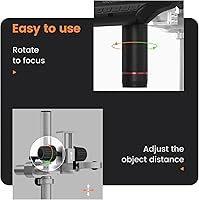
The learning curve for new users is steeper than expected. Several reviewers note it takes multiple sessions before the relationship between the focus wheel and the bracket knob feels intuitive, particularly when switching between magnification levels quickly during a repair. There is no depth-of-field indicator to assist calibration.
Software & Onscreen Interface
63%
37%
Basic functions — capturing images, switching between display modes, and adjusting settings — are accessible enough for most users after a short familiarization period. The interface is functional and gets the job done for everyday repair documentation without requiring any companion app or PC software.
This is arguably the weakest area of the AD407 Pro. The menu structure feels dated and several users describe it as unintuitive, especially for accessing less common settings. Localization quality in the English menus draws criticism, and there is no firmware update mechanism that users find straightforward to use.
Magnification Range & Versatility
83%
The practical magnification range covers the sweet spot for most electronics repair tasks comfortably. At lower settings, users can frame an entire phone motherboard for orientation, and stepping up to the higher end reveals individual solder ball details on BGA-adjacent components with useful clarity.
At maximum digital magnification, image quality degrades noticeably — most experienced users cap practical use well below the advertised 270x ceiling. The optical zoom range without digital enhancement is what most buyers actually use, and communicating this expectation upfront would prevent disappointment for newcomers.
Setup & Ease of Use
78%
22%
Most buyers report getting a usable image within minutes of unboxing, which matters on a busy bench. The physical setup — attaching the scope head to the stand and routing cables — is straightforward, and the included accessories cover the basics needed to get started immediately.
The instruction manual quality is a recurring complaint. Non-native English speakers and first-time microscope buyers frequently mention that the documentation lacks detail for configuring the HDMI output or optimizing the LED positioning for specific tasks, leading to unnecessary trial and error early on.
Value for Money
85%
Given the all-metal build, UV lens protection, dual-screen output, and 4MP sensor in a single package, the vast majority of verified buyers conclude that the AD407 Pro delivers strong value for its price tier. Compared to similarly priced plastic-bodied alternatives, the durability advantage alone justifies the cost for daily professional use.
Budget-focused buyers occasionally feel the price is slightly high for a tool with software and documentation shortcomings. Those who only need occasional inspection rather than daily professional use may find the investment harder to justify when cheaper options handle lighter workloads adequately.
Portability & Footprint
67%
33%
At just over 4.6 pounds, the scope head and stand combination is manageable enough to move between workstations when needed. Users who operate from a single fixed bench rarely cite weight or size as a concern, and the solid base actually adds confidence during precise work.
This is not a portable tool in any practical sense. The base occupies a significant portion of a standard repair bench, and the overall assembly is not something most users break down and rebuild between uses. Field repair technicians or those with very limited bench space will likely find it impractical.

Suitable for:

The Andonstar AD407 Pro Digital Soldering Microscope is built for people who spend real time at a repair bench — phone repair technicians, electronics hobbyists, and semi-professional makers who regularly work with fine-pitch SMD components, BGA-adjacent pads, or densely packed phone motherboards. If your current setup involves squinting under a magnifying lamp or fighting the blurry output of a basic USB scope, the step up in image quality and stand rigidity here will make an immediate, practical difference. Repair shop owners who want to show customers exactly what's being worked on will find the HDMI dual-output genuinely useful for that purpose — no extra hardware required. It also suits anyone who documents their work for training videos, YouTube content, or internal records, since the 2160P video output is more than adequate for professional-looking results. People working in environments where soldering smoke is a constant presence will particularly appreciate having a UV filter built in from the start rather than treating lens damage as an eventual inevitability.
Not suitable for:

The Andonstar AD407 Pro Digital Soldering Microscope is not the right tool for everyone, and it's worth being honest about where it falls short. If you only occasionally need to inspect a component a few times a month, the investment is difficult to justify — lighter-use scenarios don't demand this level of hardware, and less expensive options will cover that ground without the bench footprint. The onscreen software interface is functional but genuinely dated, so anyone who values a polished, intuitive digital experience will find themselves frustrated by the menu structure before long. Buyers expecting clean, lab-grade optics at maximum magnification should recalibrate expectations — the practical upper limit of useful optical zoom falls well below the advertised maximum, and digital magnification beyond that introduces visible quality degradation. This is also not a portable instrument by any stretch; at over four pounds with a base spanning nearly eight inches, it lives on one bench and stays there. Finally, technicians who rely on detailed written documentation for setup and advanced configuration will find the included manual thin on useful guidance.
Specifications

  • Brand: Manufactured by Andonstar, a brand operated by ShenZhen Andonstar Technology Co., Ltd.
  • Model Number: The official model designation for this unit is AD407-Pro-JP.
  • Sensor Resolution: The camera uses a 4MP UHD sensor capable of capturing video at up to 2160P resolution.
  • Max Magnification: Maximum magnification reaches 270x, though practical optical magnification for clear results is lower than the advertised ceiling.
  • Screen Size: The built-in display is a 7-inch IPS LCD panel with wide viewing angles and comfortable extended-use brightness.
  • Video Output: Supports simultaneous HDMI output to an external TV or monitor while the built-in screen remains active.
  • Stand Material: The pro stand and base are constructed from industrial-grade metal, rated for high-temperature environments including active soldering workspaces.
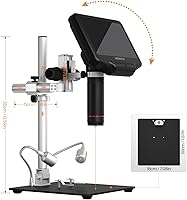
  • Stand Rotation: The stand arm supports full 360° horizontal rotation and front-to-rear angular tilt for flexible positioning.
  • Dimensions: The assembled unit measures approximately 7.8″ x 7″ x 13″ (length x width x height).
  • Weight: Total unit weight is 4.66 pounds, combining the scope head and the pro metal stand.
  • LED Lighting: Two side-mounted metal LED lights offer 8 adjustable intensity levels with physically bendable arms for directional control.
  • UV Filter: A UV filter is integrated in front of the metal lens barrel to block heat, smoke, and airborne debris during soldering.
  • Remote Control: A wireless remote is included, supporting hands-free photo capture, video recording, digital zoom, and image discoloration functions.
  • Focusing Mechanism: Focusing is performed via a metal rotating wheel, with a secondary bracket knob for fine working-distance adjustment.
  • Voltage: Rated for 240V operation; buyers in regions using 110–120V should verify power adapter compatibility before use.
  • Real Angle of View: The optical system provides a real angle of view of 178 degrees across the available magnification range.
  • Compatible Devices: HDMI output is compatible with televisions and monitors that accept a standard HDMI input signal.
  • Date Available: The product was first made available for purchase in September 2022.

Related Reviews
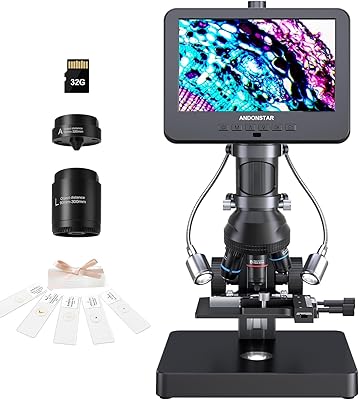
Andonstar AD266S 7-Inch 5-Lens Digital Microscope
74%
83%
Image Clarity
88%
Lens Versatility
81%
Build Quality
79%
Value for Money
76%
LCD Display
More
Andonstar AD246S-M 7″ 3-Lens Digital Microscope
80%
83%
Image Clarity
88%
Lens Versatility
91%
Stand & Build Quality
89%
Ease of Setup
58%
Lens Swap Workflow
More
TOMLOV DM9 Pro Digital Microscope
83%
88%
Magnification Performance
92%
Image Quality
86%
Lighting Adjustability
84%
Build Quality
79%
Ease of Setup
More
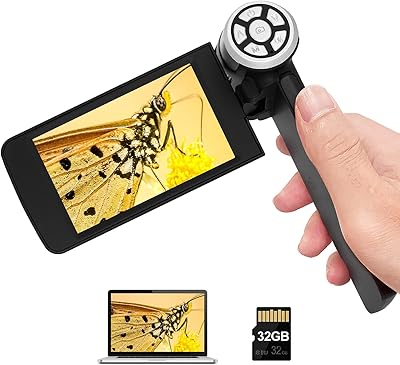
Andonstar AD203 Handheld Digital Microscope
83%
89%
Value for Money
93%
Portability & Ease of Use
82%
Magnification Quality
85%
Image & Video Quality
80%
Battery Life
More
Andonstar AD246S-P HDMI Digital Microscope
83%
92%
Value for Money
89%
Image Quality
86%
Ease of Use
78%
Build Quality
90%
HDMI Connectivity
More
Andonstar AD210 10.1 Inch Digital Microscope
83%
91%
Image Quality & Magnification
82%
Usability & Ergonomics
95%
Display Clarity & Viewing Angle
88%
Value for Money
85%
Build Quality
More
Andonstar AD249S-M 3 Lens HDMI Digital Microscope
85%
92%
Image Clarity
89%
Magnification Range
88%
Build Quality
85%
LED Lighting
78%
Stand Stability
More
TOMLOV TM3K-3D Digital Microscope
80%
88%
Image Clarity
79%
3D Viewing Mode
91%
Lens Swap System
86%
Display Quality
83%
Build Quality
More
National Geographic Kids Digital Handheld Microscope
81%
88%
Ease of Use for Kids
83%
Image & Screen Quality
71%
Magnification Performance
79%
Battery Life
91%
Kit Completeness & Value
More
MAXLAPTER Pocket 100X Digital Microscope
74%
91%
Portability & Form Factor
88%
Ease of Use
63%
Image & Optical Quality
71%
Screen Quality
74%
UV Light Performance
More

FAQ

Both run simultaneously — you don't have to toggle between them. The built-in 7-inch screen and whatever external display you connect via HDMI will both show the live feed at the same time, which is genuinely useful if you want a personal view up close while a student or customer watches on a larger screen nearby.

When you're soldering regularly, smoke residue and fine airborne particles gradually coat the lens and degrade image quality over time. The UV filter sits in front of the metal lens barrel and intercepts that debris before it reaches the optical elements. Users who've owned unprotected scopes before tend to notice the difference after several months of heavy use — lens clarity holds up much better.

For most users in a standard workshop setting it works consistently well. The main caveat is environments with a lot of competing wireless signals — a few buyers have noted occasional dropouts when several other devices are active nearby. For everyday capture and zoom functions in a normal repair setup, it's dependable enough to be genuinely useful rather than a gimmick.

Most experienced users settle well below the 270x ceiling for practical work. The optical magnification range is where image quality stays clean and detail is actually usable; the digital zoom beyond that introduces visible softening. For SMD soldering and phone board repair, you'll likely find a comfortable working range somewhere in the mid-magnification zone rather than pushing to the maximum.

The physical focusing wheel is smooth and well-made, but there are two adjustments to manage — the focus wheel itself and the bracket knob that controls working distance — and getting them to work together intuitively takes a few sessions. First-time microscope users in particular mention spending a bit of time figuring out the right sequence. After a few hours of use, it becomes second nature.

The pro metal stand was specifically designed with a larger base and extended working distance to accommodate bigger boards. You can position a full-size motherboard or a larger PCB under the scope without the stand getting in the way. It's one of the practical improvements over the previous stand design that existing Andonstar users have noted.

It records video and saves images to a memory card — the scope typically supports standard SD cards, though you should verify capacity limits in the included documentation. The onboard file management system is functional but basic, and some users report that long video recordings occasionally need re-encoding before certain editing applications handle them cleanly.

The stand provides enough vertical clearance for the vast majority of repair work, including boards with taller capacitors or connectors. The combination of the rotating arm and the front-to-rear tilt gives you enough repositioning flexibility that height limitations rarely become a practical problem in normal bench work.

The most immediate difference most users notice is build quality — the all-metal construction versus the plastic-heavy bodies of many budget scopes means there's no wobble, drift, or flex during use. Image quality at comparable magnification levels also tends to be noticeably better. That said, those budget options are lighter on the bench and easier on the budget, so for light occasional use the gap in real-world value narrows considerably.

Most modern displays connect without any issues. A small number of buyers have reported inconsistencies with older HDMI-equipped monitors, typically resolved by trying a different cable or using an adapter. If your external display is relatively current, you're unlikely to encounter problems, but it's worth having a spare HDMI cable on hand during first setup just in case.