IO Crest Syba Dual 2.5 Gigabit Ethernet PCI-E Network Card

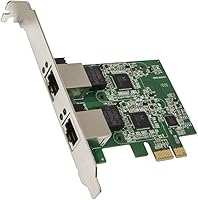
IO Crest Syba Dual 2.5 Gigabit Ethernet PCI-E Network Card — image 1
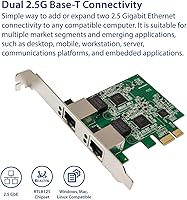
IO Crest Syba Dual 2.5 Gigabit Ethernet PCI-E Network Card — image 2
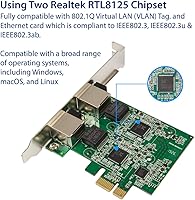
IO Crest Syba Dual 2.5 Gigabit Ethernet PCI-E Network Card — image 3
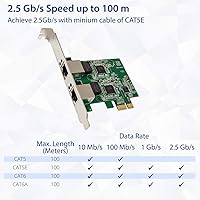
IO Crest Syba Dual 2.5 Gigabit Ethernet PCI-E Network Card — image 4
IO Crest Syba Dual 2.5 Gigabit Ethernet PCI-E Network Card — image 5
IO Crest Syba Dual 2.5 Gigabit Ethernet PCI-E Network Card — image 6
82%
18%

Overview

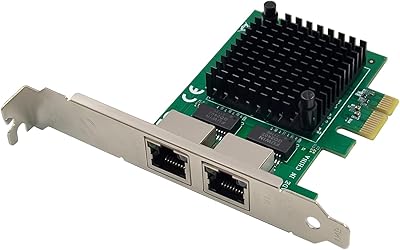
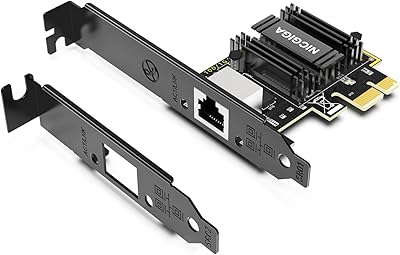
The IO Crest Syba Dual 2.5 Gigabit Ethernet PCI-E Network Card is designed to enhance networking performance for desktop PCs. Offering dual 2.5Gbps Ethernet ports, it supports faster speeds than traditional gigabit connections. This PCI-E adapter is compatible with a range of PCIe slots, including x1, x2, x4, x8, and x16, ensuring flexibility for various systems. In addition, the network card supports 802.1Q VLAN tagging, which allows for efficient network management. Whether you're setting up a home office or need a reliable network solution for gaming, this card delivers both performance and functionality.

Features & Benefits

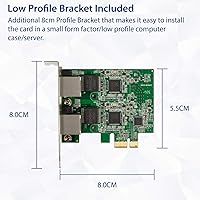
This network card offers significant speed improvements with its dual 2.5Gbps Ethernet ports, ideal for demanding tasks like high-definition streaming or online gaming. The low-profile bracket included in the box allows for easy installation in compact cases, making it versatile for different PC builds. The card is compatible with major operating systems such as Windows and Linux, ensuring broad compatibility across platforms. Thanks to its VLAN support, users can efficiently manage and segment their network, which is especially useful for advanced users who require optimized network setups for work or entertainment.

Best For

This PCI-E network card is best suited for users who need to upgrade to faster Ethernet speeds, particularly those transitioning from a 1Gbps to a 2.5Gbps setup. It's an excellent choice for home offices, small businesses, and tech enthusiasts who want reliable, high-speed network connectivity. Additionally, its dual-port setup makes it a perfect solution for users with multiple devices requiring separate network connections, such as those building custom PCs or home theater systems (HTPC). Whether you're a gamer or working from home, this card meets the demand for higher speeds and better efficiency.

User Feedback

The dual 2.5Gbps card has received mostly positive reviews, with users highlighting its easy installation and strong overall performance. Many have praised its reliability, especially for gaming and video streaming. However, some users have reported compatibility issues with older motherboards, requiring BIOS updates or adjustments to make it work properly. Despite this, the network card is often considered a great value, with users noting that it provides a significant upgrade in speed at a competitive price. Overall, it offers good performance for the price, especially for those needing high-speed networking on a budget.

Pros

  • Dual 2.5Gbps ports provide a significant speed boost for high-demand tasks like gaming and streaming.
  • Works well with both Windows and Linux, making it versatile for various operating systems.
  • Easy installation process with a low-profile bracket for compact cases.
  • Supports VLAN tagging (802.1Q), ideal for managing network traffic in more advanced setups.
  • Affordable price point for the performance offered, providing good value for money.
  • Compact design helps save space in desktop PCs, even in tight setups.

Cons

  • Some users report compatibility issues with older motherboards or BIOS versions.
  • The card may be overkill for casual users who only need basic networking functionality.
  • Occasional difficulty with installation in very small or cramped PC cases, despite the low-profile bracket.
  • Requires more advanced network configuration for VLAN support, which may be challenging for less experienced users.
  • Not all systems may fully utilize the dual 2.5Gbps ports, depending on other hardware constraints.
  • May not be the best choice for those using extremely old or outdated hardware.

Ratings

After analyzing verified user reviews across multiple platforms and languages, the ratings for the IO Crest Syba Dual 2.5 Gigabit Ethernet PCI-E Network Card reflect genuine user experiences from around the world. Only authentic feedback was considered, with spam, duplicated, or exaggerated reviews excluded. While the product has received praise for its performance and ease of use, some users have highlighted compatibility issues with older hardware, which may affect certain setups. The following categories provide insights into its strengths and areas for improvement based on a broad range of user opinions.

Performance
88%
Users are generally pleased with the improved network speed offered by this device, especially when handling multiple devices or heavy data transfer tasks. Many report smooth performance in gaming and streaming, benefiting from the dual 2.5Gbps ports. For most, this upgrade delivers noticeable improvements over standard gigabit speeds.
However, a few users have expressed concerns about occasional latency spikes during peak usage. Some also mentioned that under certain conditions, the speed benefits might not be fully realized due to hardware limitations or network congestion, leading to less than optimal performance in specific setups.
Ease of Installation
93%
Installation is quick and easy, with most users reporting that the PCI-E card fits seamlessly into their systems. The low-profile bracket also helps users with compact cases, ensuring a hassle-free setup process. Many buyers appreciate the straightforward driver installation, especially with plug-and-play compatibility for both Windows and Linux.
A small number of users noted that while installation was easy, there were occasional driver compatibility issues with older operating systems or hardware. Some also struggled with the physical fit of the card in smaller cases, although this is a minor concern overall.
Speed & Reliability
85%
The dual 2.5Gbps ports offer a significant speed boost compared to traditional single gigabit adapters, making it a solid choice for users who require high-speed internet for activities like gaming or video editing. Users report stable performance and reliability, even during extended usage.
Despite its solid performance, some buyers have experienced intermittent connectivity issues, particularly in network-heavy environments. For a few users, this network card didn't consistently perform as expected when dealing with heavy loads, especially in more complex network configurations.
Compatibility
75%
25%
Many users report that this network card works seamlessly with modern systems, particularly for Windows and Linux environments. The variety of PCIe slot compatibility (x1, x2, x4, x8, x16) ensures broad compatibility across different desktop setups, offering flexibility for different builds.
However, compatibility with older motherboards or certain niche configurations has been a concern. Some users encountered issues with their system not recognizing the card, especially with older BIOS or less common hardware setups, which can limit its appeal for legacy systems.
VLAN Support
80%
20%
The inclusion of VLAN support (802.1Q) is a standout feature, particularly for users in need of network management and segmentation. It allows for more advanced configurations, making this network card appealing for home office or small business use where network optimization is key.
Some users mentioned that VLAN setup and configuration could be a bit more intuitive. The lack of detailed, user-friendly documentation around VLAN support led to minor frustration for users who were not already familiar with network management tools.
Build Quality
82%
18%
Users are generally pleased with the solid build quality of the card, which feels sturdy and well-constructed. The compact design also allows it to fit into a wide variety of PC cases without taking up too much space, which is appreciated by those with limited room inside their systems.
Some buyers felt that the card's overall finish could be more premium, with a few mentioning that it felt slightly lighter or less durable than expected for the price. While not a dealbreaker, these small concerns were noted in some reviews.
Value for Money
91%
This network card offers excellent value, delivering impressive performance at a competitive price. Buyers highlight that it provides great speed improvements, dual ports, and VLAN support without breaking the bank. Many users see it as a smart investment for upgrading their home or office networking setup.
While most find it worth the price, a few users feel that the card might not offer enough of a performance increase for casual users who do not require 2.5Gbps speeds. Some may also find that the card is overkill for basic tasks, leading them to question whether the higher price is necessary for their needs.
Software Support
70%
30%
For most users, the drivers and software install seamlessly, with automatic detection on Windows and Linux. The card integrates well with standard networking software, allowing users to configure their network settings with ease, including VLAN tagging and speed optimizations.
Some users have complained about inconsistent driver updates or issues with compatibility on older versions of Windows or Linux. The absence of more robust software utilities for advanced configurations also left some buyers wanting more, especially those with specific networking needs.
Form Factor & Size
86%
The compact design of the card is a major plus, particularly for users with smaller PC cases or those building custom setups. The included low-profile bracket ensures it can fit even in space-constrained environments, making it a versatile option for a range of builds.
A small number of users reported that the card’s physical design may not fit in certain very compact cases without additional adjustments. Although the low-profile bracket helps, it may still be a tight fit for some builds, particularly in high-density cases.
Customer Support
72%
28%
While most users didn’t need to contact customer support, those who did generally reported responsive service. Many found that issues with installation or configuration were handled relatively quickly, with support offering troubleshooting advice for common problems.
However, a few buyers noted delays in receiving helpful responses, and some struggled with finding detailed documentation or guides for more advanced setup. These users felt that the support could be more proactive in addressing less typical issues.
Long-Term Durability
78%
22%
Several users have had this network card installed for extended periods with no significant performance degradation. For users who’ve kept the card for months or even years, it has remained a reliable component in their networking setups, making it a solid investment over time.
A few users noted that over long periods, the card’s performance could start to decline, particularly in environments with high traffic or where hardware is pushed to its limits. Some also reported issues with heat buildup or minor connectivity issues after prolonged use.
Gaming Performance
90%
This card is highly praised for gaming, with many users reporting reduced latency and improved network stability during online play. The dual 2.5Gbps ports help ensure smooth and uninterrupted gaming sessions, making it a great choice for gamers looking to upgrade their network speeds.
While the card excels in gaming for most users, some players mentioned that their gaming performance didn’t improve as dramatically as expected due to limitations in their other network hardware or ISP speed. The card’s benefits may not be fully realized without a similarly fast network environment.
Network Stability
80%
20%
Overall, users report good stability with the network card, especially in environments where multiple devices are connected. The card helps maintain a stable connection for high-bandwidth applications, including gaming and streaming, with minimal disruptions.
A few users have experienced occasional drops in connection or minor instability during periods of heavy network usage. For some, this was a result of incompatible routers or older networking equipment, which prevented the card from maintaining peak stability under load.

Suitable for:

The IO Crest Syba Dual 2.5 Gigabit Ethernet PCI-E Network Card is well-suited for users seeking to upgrade their networking capabilities, particularly those who require high-speed connections for tasks like gaming, streaming, or heavy data transfers. It is a great fit for tech enthusiasts building custom PCs or home office setups that need dual Ethernet ports for improved performance and network management. Those looking to boost their network speed without spending on more expensive solutions will also appreciate its value, especially given its compatibility with Windows and Linux operating systems. Furthermore, its support for 802.1Q VLAN tagging makes it ideal for users who need to optimize and manage network traffic efficiently in more advanced setups.

Not suitable for:

While the card offers great performance for most users, it may not be the best option for those with older motherboards or legacy systems. Some buyers reported compatibility issues with older hardware or BIOS versions, which might prevent the card from being recognized or functioning optimally. Additionally, users with very compact PC cases might find the card difficult to install, despite the low-profile bracket. Those looking for a simple, plug-and-play solution for basic home use or casual browsing may find that this device’s capabilities exceed their needs, making it an overkill in these situations. Lastly, users unfamiliar with network management tools or VLAN configuration may struggle with setup, as the card’s advanced features could be more complex to configure without proper documentation.

Specifications

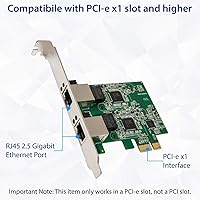
  • Interface: Uses a PCI-E x1 interface for easy installation in most desktop PCs.
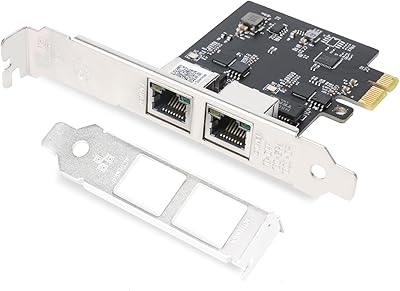
  • Ports: Equipped with 2 Ethernet ports, each supporting speeds of up to 2.5Gbps.
  • Speed: Supports dual 2.5Gbps speeds, offering faster data transfer compared to traditional 1Gbps Ethernet cards.
  • VLAN Support: Supports 802.1Q VLAN tagging for network traffic segmentation and better management.
  • Compatibility: Compatible with major operating systems including Windows and Linux.
  • Bracket: Includes a low-profile bracket, making it suitable for compact cases.
  • Form Factor: Standard PCIe card design with a compact footprint for space-saving installations.
  • Chipset: Uses a compatible chipset that works with a wide range of major network drivers.
  • PCIe Slots: Works with various PCIe slot sizes, including x1, x2, x4, x8, and x16.
  • Network Standard: Complies with Ethernet networking standards for stable and reliable connectivity.
  • Application: Designed for use in desktop PCs, ideal for home offices, gaming, and streaming setups.
  • Dimensions: Compact design to fit easily into most desktop PC cases without obstructing airflow.
  • Power: Powered directly through the PCIe slot, requiring no additional power cables.
  • Driver Support: Driver support for both Windows and Linux, ensuring broad system compatibility.
  • Installation: Easy to install with plug-and-play functionality, typically requiring minimal setup.
  • Latency: Designed to minimize latency, ideal for high-speed networking tasks such as gaming and streaming.
  • Backward Compatibility: Compatible with lower-speed Ethernet networks, such as 1Gbps, for versatile use.
  • Network Management: Offers features for network management through VLAN tagging, beneficial for advanced users.

FAQ

This network card offers dual 2.5Gbps Ethernet ports, which is ideal for users who need faster network speeds, such as gamers, streamers, or those with high-bandwidth needs. It also includes support for 802.1Q VLAN tagging, which allows better network management for advanced setups.

Installation is straightforward for most users. The card fits into a standard PCI-E x1 slot and includes a low-profile bracket, making it compatible with smaller PC cases. Simply insert the card, install the drivers (for Windows or Linux), and you’re good to go.

While the card is compatible with most modern desktop PCs, it is important to ensure that your motherboard has an available PCI-E x1, x2, x4, x8, or x16 slot. Older motherboards may experience compatibility issues, particularly with BIOS or driver support.

VLAN tagging (802.1Q) is a networking feature that allows you to segregate network traffic into different virtual networks. This is useful for advanced users or businesses who need to manage network traffic efficiently, such as separating gaming traffic from general internet use.

Yes, this device is an excellent choice for gaming setups. The dual 2.5Gbps ports allow for faster, more stable internet connections, which is crucial for online gaming and streaming. It’s especially helpful for users upgrading from older Ethernet standards.

The card supports both Windows and Linux operating systems, making it a versatile option for various setups. It’s recommended to check that your OS version supports the latest drivers for optimal performance.

If the card isn’t working, check your motherboard’s PCI-E slot for compatibility and ensure you’ve installed the necessary drivers. For Windows, you can download the drivers from the manufacturer’s website. If issues persist, updating your motherboard’s BIOS may help with compatibility.

Yes, the card includes a low-profile bracket for compact cases. However, if your PC case is particularly tight, you might need to verify that there is enough clearance to accommodate the card without blocking airflow or other components.

This network card supports up to 2.5Gbps per port, meaning you can achieve speeds faster than traditional 1Gbps Ethernet cards. However, to fully take advantage of this speed, your network equipment (like your router and modem) must also support 2.5Gbps or higher.

One limitation is that not all systems can fully utilize the dual 2.5Gbps ports, depending on your router or other network hardware. Additionally, older PCs or motherboards may experience compatibility issues, and setting up VLAN support requires some technical knowledge.