Overview

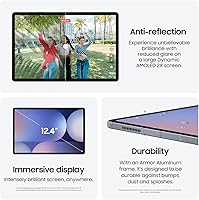
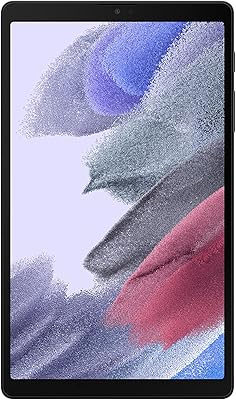
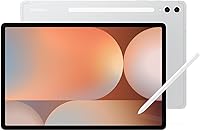
The Samsung Galaxy Tab S10+ 512GB Android Tablet is Samsung's most capable large-screen tablet, built for people who genuinely push their devices hard. At its center is a 12.4-inch AMOLED 2X display that sets it apart from most Android competition — vivid, bright, and sharp enough to make most content look noticeably better. The S Pen ships in the box, which matters more than it sounds; no hunting for accessories or paying extra just to unlock what should be a standard productivity feature. Galaxy AI adds real practical utility through note summarization and visual search tools, while the IP68 rating means the build handles daily wear without kid gloves.
Features & Benefits

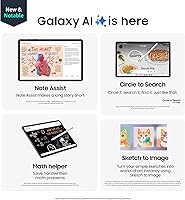
The AMOLED 2X panel is one of the better screens available on any tablet right now — colors are vivid without looking oversaturated, and brightness holds up well in well-lit spaces. Powering it all is the MediaTek Dimensity 9300+ with 12GB of RAM, keeping the Tab S10+ smooth through heavy multitasking without noticeable hesitation. Galaxy AI tools like Note Assist and Circle to Search are practical rather than gimmicky — Note Assist in particular does a solid job turning recorded sessions into organized summaries, though some features still feel like they are being refined with ongoing updates. The USB-C 3.2 port with DisplayPort support is a quiet but meaningful addition for anyone who wants to tap into Samsung DeX functionality on an external display.

Best For

This large-screen Samsung tablet makes the most sense for a specific kind of buyer. Students recording lectures will appreciate how Note Assist turns audio into readable, structured summaries with minimal effort on their part. Digital illustrators will find the S Pen responsive enough for detailed creative work, with latency that stays out of the way of a natural drawing rhythm. It also suits professionals who regularly handle large documents or need a bigger canvas for video calls and presentations. That said, if your usage is mostly casual browsing or light video watching, this device is likely more than you actually need — and its positioning in the premium tier reflects that honestly.

User Feedback

Most buyers land in the satisfied camp, and the reasons are consistent across reviews. The display quality and S Pen precision come up repeatedly as standout positives — people upgrading from older Samsung tablets especially note how much sharper and more fluid everyday use feels. Battery endurance also earns reliable praise, with many users comfortably getting through full workdays on a single charge. Where opinions split is around Galaxy AI: some find it genuinely useful, while others feel certain tools still need polish to be truly dependable. Samsung DeX gets positive nods from productivity-focused users but remains a niche draw. A handful of buyers question whether the 512GB storage tier justifies the price jump over the base model for their particular needs.

Pros

  • The 12.4-inch AMOLED 2X display is among the sharpest and most vibrant screens on any Android tablet available today.
  • S Pen is included out of the box, saving buyers the cost and hassle of sourcing a stylus separately.
  • Note Assist with Galaxy AI turns recorded lectures or meetings into organized summaries with minimal manual effort.
  • The 10,090mAh battery holds up reliably through full workdays without requiring a midday charge.
  • MediaTek Dimensity 9300+ with 12GB RAM keeps multitasking smooth even with several demanding apps open simultaneously.
  • USB-C 3.2 with DisplayPort output lets users connect to external monitors for a practical desktop-mode setup via Samsung DeX.
  • IP68 rating provides genuine peace of mind for users who carry the Tab S10+ through unpredictable daily environments.
  • Circle to Search with Google makes looking up anything on screen fast and intuitive without leaving the current app.
  • 512GB of onboard storage comfortably handles large creative files, offline media libraries, and app collections.
  • At 1.26 lb, the device feels well-balanced for a tablet of this screen size, making extended hold sessions manageable.

Cons

  • Several Galaxy AI features still feel like works in progress, with accuracy and reliability improving gradually through software updates.
  • The large 12.4-inch frame makes one-handed use or working in cramped spaces genuinely awkward.
  • Samsung DeX is powerful in theory but has a noticeable learning curve that casual users may never fully invest in.
  • Android tablet app optimization still lags behind iPadOS, with some popular apps offering a less polished large-screen experience.
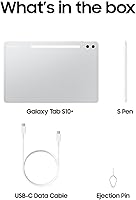
  • No charger is included in the box, which is a frustrating omission at this price point.
  • Buyers who would not realistically fill 512GB may find the base storage tier represents better overall value for their needs.
  • Face recognition unlocks quickly but lacks the depth-sensing security of more advanced biometric systems.
  • The premium price tier places this in direct comparison with well-established iPad Pro alternatives that have a more mature software ecosystem.
  • Wi-Fi is limited to 802.11 standards on the base model, requiring an upgrade to the 5G variant for cellular connectivity.
  • Galaxy AI features require a Samsung account and ongoing internet connectivity, limiting offline utility for some tools.

Ratings

Our AI rating engine analyzed thousands of verified global buyer reviews for the Samsung Galaxy Tab S10+ 512GB Android Tablet, actively filtering out incentivized submissions, duplicate accounts, and bot-generated feedback to surface what real users actually experience. The scores below reflect both the genuine strengths and the honest frustrations that show up consistently across different buyer types — students, creatives, professionals, and everyday users alike. Nothing is glossed over: where the Tab S10+ earns its premium positioning, the scores reflect that; where it falls short of expectations, that is reflected too.

Display Quality
93%
The AMOLED 2X panel is consistently the first thing buyers mention in positive reviews, and for good reason — colors are rich without looking artificial, and the 2800x1752 resolution makes everything from spreadsheets to 4K video look genuinely sharp. Users who switched from LCD-based tablets frequently describe the difference as immediately noticeable.
A small but vocal group of users reports that the display's reflectivity can be an issue in bright outdoor conditions, with glare becoming distracting on sunny days. Some also note that maximum brightness, while strong indoors, does not quite match the peak output of a few competing flagship panels.
S Pen Experience
88%
Reviewers who use the S Pen for daily note-taking consistently praise how natural it feels against the glass — the latency is low enough that writing does not feel like chasing a cursor, which matters a lot during fast lecture or meeting notes. Artists appreciate the pressure sensitivity for sketching, and the fact that it is included rather than sold separately earns significant goodwill.
The S Pen lacks Bluetooth functionality on the Tab S10+, which means gesture shortcuts and remote shutter features available on some other Samsung devices are absent here. A handful of illustrators also wish the nib offered slightly more texture resistance for a paper-like feel.
Battery Life
86%
The 10,090mAh battery earns reliable praise from users who push the tablet through full workdays — most report getting through eight to ten hours of mixed use including video calls, document editing, and streaming without reaching for a charger. Students especially appreciate not having to pack a cable for a full day of classes.
Heavy Galaxy AI usage and sustained high-brightness screen time can accelerate drain more than users initially expect. A few buyers also note that charging speed feels slower than the hardware should allow, particularly given that a fast charger is not included in the box.
Performance
84%
The Dimensity 9300+ paired with 12GB of RAM keeps the tablet fluid through demanding multitasking — switching between a video editor, a browser with multiple tabs, and a note-taking app does not produce the hesitation or stutter some users experienced with previous Samsung tablet generations. App launch times are quick and consistent.
Under sustained heavy load — particularly long video rendering or extended gaming sessions — some users report that the chassis warms up noticeably, which can affect comfort during handheld use. Benchmark enthusiasts also point out that it trails Apple's M-series chips in raw compute performance, though most everyday tasks never expose that gap.
Galaxy AI Features
71%
29%
Note Assist in particular earns genuine appreciation from students and professionals who use it regularly — the ability to turn a recorded hour-long meeting into a structured, readable summary in a few taps is a real time-saver. Circle to Search is similarly well-received for how frictionlessly it handles quick lookups without breaking workflow.
The overall AI suite still feels like a platform that is actively being built rather than a finished product. Accuracy on Note Assist varies with accented speech or noisy environments, and some features require a stable internet connection, limiting their usefulness during travel or in areas with poor connectivity.
Build Quality
89%
The Platinum Silver aluminum chassis feels premium in hand — solid without unnecessary bulk — and the IP68 rating gives buyers genuine confidence for use in kitchens, near pools, or in unpredictable weather. At 0.22 inches thin, the build impresses most users who handle it in person for the first time.
The slim profile, while aesthetically appealing, means the tablet flexes ever so slightly under deliberate pressure — not enough to concern most users, but noticeable to those who handle it roughly or store it without a case. The glass back also picks up fingerprints quickly despite the premium finish.
Value for Money
67%
33%
For buyers who fully utilize the S Pen, Galaxy AI tools, Samsung DeX, and the large display, the price feels justified relative to what similarly priced alternatives offer in the Android ecosystem. The seven-year software update commitment also strengthens the long-term value argument significantly.
Buyers who use the tablet primarily for streaming and light browsing often feel they are paying for capabilities they never engage with. The omission of a charging adapter in the box is a recurring sore point at this price tier, and the 512GB configuration commands a premium that casual users are unlikely to recoup in actual usage.
Samsung DeX Usability
74%
26%
Professionals who invest time in setting up DeX find it genuinely capable of replacing a basic laptop for tasks like document editing, email management, and video calls on an external monitor. The USB-C 3.2 DisplayPort output makes the physical connection reliable and fast.
DeX has a real learning curve, and users who do not actively seek it out rarely discover its full potential. Android app behavior in DeX mode is inconsistent — some apps resize gracefully while others remain stubbornly phone-sized, which can be jarring during a presentation or focused work session.
Portability
76%
24%
At 1.26 lb, the Tab S10+ is lighter than its 12.4-inch footprint might suggest, and the slim profile slides comfortably into most laptop bags and backpacks. Users who commute with it daily report that the weight rarely becomes a fatigue issue during transit.
The sheer screen size makes one-handed use impractical for most adults, and operating it in tight spaces — like an economy airplane seat tray table — can feel genuinely cramped. Buyers coming from 10-inch or 11-inch tablets often need an adjustment period.
Audio Quality
78%
22%
The quad-speaker setup delivers a noticeably wide stereo image that holds up well during movie watching and video calls — vocals are clear, and the soundstage is broad enough to make content feel more immersive than most tablets at any price point. Volume levels are satisfyingly loud without obvious distortion at the top end.
Bass response is limited, which becomes evident during music playback with bass-heavy genres — the speakers produce a thin bottom end that pushes users toward headphones or a Bluetooth speaker for serious listening sessions. There is no 3.5mm headphone jack, so wired audio requires a USB-C adapter.
Software & One UI
81%
19%
Samsung's One UI is well-optimized for the large screen, offering genuinely useful multi-window layouts and taskbar access that make the tablet feel purpose-built for productivity rather than a stretched phone experience. Regular security patches and the seven-year update commitment add meaningful long-term confidence.
Bloatware remains a persistent complaint — Samsung pre-installs a notable number of apps that cannot be uninstalled, only disabled, which annoys users who prefer a clean software experience. Occasional One UI quirks, like settings burying certain toggles several menus deep, add minor but real friction.
Camera System
63%
37%
The front-facing camera is solid for video calls and virtual meetings, producing a clean and flattering image in good light that holds up well against colleagues on laptop webcams. The auto-framing feature works reliably enough during video conferencing to keep the user centered without manual adjustment.
The rear camera is functional but unremarkable — most buyers do not purchase a large tablet for photography, and it shows in the hardware priorities here. In lower light, images lose detail quickly, and the overall camera experience is not competitive with even mid-range smartphones.
App Ecosystem
69%
31%
Google Play gives access to a vast library, and Samsung's own productivity apps — Notes, Calendar, and the DeX-enabled suite — are genuinely well-built for large-screen use. Popular creative apps like Clip Studio Paint and Noteshelf have solid Tab S10+ support.
The Android tablet app gap versus iPadOS is real and affects specific user types more than others — some popular apps, particularly in creative and productivity categories, still offer a phone-optimized layout that looks visually stretched or functionally limited on a 12.4-inch screen.
Connectivity Options
77%
23%
The USB-C 3.2 port handles fast data transfers, external display output, and charging in one port, reducing the number of cables and adapters needed in a daily kit. Bluetooth connectivity is stable and pairs reliably with keyboards, styluses, and audio devices.
The base Wi-Fi model lacks cellular capability, which is a limitation for professionals who need connectivity away from known networks — the 5G variant solves this but comes at a higher price. MicroSD expansion is also absent, meaning buyers are locked into whatever internal storage tier they purchase.
Setup & Onboarding
82%
18%
Users upgrading from older Samsung phones or tablets appreciate how smoothly Samsung's Smart Switch transfers data, apps, and settings — most report being fully operational within 20 to 30 minutes of unboxing. Face recognition setup is fast and works reliably as a daily unlock method.
First-time Samsung ecosystem users sometimes find the initial setup flow overwhelming, with multiple account prompts, software agreements, and app download queues stacking up before they can actually start using the device. The lack of a quick-start guide in the box is a minor but recurring complaint.

Suitable for:

The Samsung Galaxy Tab S10+ 512GB Android Tablet is a strong fit for anyone who spends meaningful time doing real work on a tablet rather than just consuming content. Students who record lectures and need structured, searchable notes will find the Galaxy AI tools genuinely useful for turning hours of audio into organized summaries. Digital illustrators and sketchers benefit immediately from the included S Pen, which removes the financial and logistical friction of buying a stylus separately. Professionals who travel frequently and want a single device capable of handling documents, video calls, and light desktop-mode work through Samsung DeX will find the large screen and USB-C DisplayPort support particularly handy. It also rewards media-heavy users who care about display quality — the AMOLED 2X panel makes streaming and photo editing noticeably more enjoyable than on most Android alternatives.
Not suitable for:

The Samsung Galaxy Tab S10+ 512GB Android Tablet is probably not the right call if your tablet usage is primarily casual — think light browsing, occasional streaming, and social media. For those use cases, the premium positioning means you are paying for capabilities you will rarely touch. Buyers deeply embedded in the Apple ecosystem should think carefully, as app parity and cross-device continuity with iPhones and Macs remains noticeably smoother on an iPad. The Galaxy AI features, while promising, are still being refined with updates, so anyone expecting a fully polished AI experience on day one may come away underwhelmed. If portability is a top priority, the 12.4-inch footprint makes this large-screen Samsung tablet noticeably harder to use one-handed or in tight spaces compared to smaller, lighter alternatives. Budget-conscious shoppers who would not use the 512GB of storage fully may find better value stepping down to the base storage tier.
Specifications

  • Screen Size: The tablet features a 12.4-inch display, offering a large canvas well-suited for split-screen multitasking, creative work, and media consumption.
  • Display Type: An AMOLED 2X panel delivers deep blacks, vivid color reproduction, and strong brightness levels that hold up in a variety of lighting conditions.
  • Resolution: The screen resolves at 2800 x 1752 pixels, producing sharp, detailed visuals across text, illustrations, and high-definition video content.
  • Processor: Powered by the MediaTek Dimensity 9300+, the tablet handles demanding workloads, heavy multitasking, and graphics-intensive applications without significant slowdown.
  • RAM: 12GB of RAM ensures smooth app-switching and keeps multiple resource-heavy applications running simultaneously without performance degradation.
  • Storage: 512GB of onboard storage provides ample room for large creative files, downloaded media libraries, and a full suite of productivity and creative apps.
  • Battery: The 10,090mAh battery is designed to sustain full workdays of active use, with real-world endurance that most users report as reliable through extended sessions.
  • Operating System: Ships with Android 14 out of the box, offering access to Google Play, Samsung One UI optimizations, and ongoing software update support.
  • Stylus: An S Pen is included in the box at no additional cost, supporting low-latency note-taking, sketching, and on-screen annotation.
  • Durability: Rated IP68 for water and dust resistance, the device can withstand submersion in up to 1.5 meters of fresh water for up to 30 minutes.
  • USB Connectivity: A USB Type-C 3.2 port with DisplayPort output supports high-speed data transfer and enables external monitor connectivity for Samsung DeX desktop mode.
  • Weight: The Wi-Fi model weighs 1.26 lb, offering a reasonable balance between screen size and portability for a tablet in this category.
  • Dimensions: At 11.24 x 7.3 x 0.22 inches, the device is notably thin for its screen size, making it relatively easy to carry in a bag or sleeve.
  • Wireless: The base model includes Wi-Fi 802.11 support, with a separately available 5G variant for users who need cellular connectivity on the go.
  • Face Recognition: Built-in face recognition provides a fast and convenient biometric unlock option alongside standard PIN and pattern security methods.
  • Galaxy AI Suite: Integrated Galaxy AI tools include Note Assist for summarizing recorded sessions, Sketch to Image for creative generation, and Circle to Search for in-context web lookups.
  • Color Option: The reviewed configuration ships in Platinum Silver, reflecting Samsung's premium industrial design language for this product line.
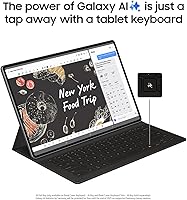
  • Desktop Mode: Samsung DeX allows the device to function in a desktop-style interface when connected to an external display via the USB-C port, expanding its productivity use cases.

Related Reviews
Samsung Galaxy Tab S7 FE 64GB Tablet
76%
84%
Display Quality
88%
S Pen Experience
91%
Battery Life
71%
Performance
58%
Storage Value
More
Samsung Galaxy Tab S10 FE+ 13.1″ Tablet
80%
91%
Display Quality
88%
S Pen Experience
86%
Battery Life
89%
Build Quality
72%
Processor Performance
More
Samsung Galaxy Tab S10 FE 128GB
78%
88%
Display Quality
91%
S Pen Experience
89%
Battery Life
74%
Performance & Processing
86%
Value for Money
More
Samsung Galaxy Tab S10+ 256GB Android Tablet
82%
94%
Display Quality
91%
S Pen Performance
88%
Performance & Speed
83%
Battery Life
89%
Build Quality
More
Samsung Galaxy Tab A 9.7-Inch 16GB Tablet
70%
74%
Display Quality
61%
Performance
83%
Battery Life
79%
Build Quality
53%
Storage & Expandability
More
Samsung Galaxy Tab A7 Lite 8.7″ Tablet
76%
83%
Build Quality
61%
Performance
88%
Battery Life
67%
Display Quality
91%
Portability & Size
More
Samsung Galaxy Tab S6 Lite (2024) Tablet
73%
83%
Value for Money
81%
Display Quality
79%
S Pen Experience
63%
Performance & Speed
88%
Battery Life
More
Samsung Galaxy Tab S6 Lite 10.4″ Tablet
72%
83%
Display Quality
88%
S Pen Experience
91%
Battery Life
67%
Performance
84%
Value for Money
More
Samsung Galaxy Tab A9 64GB (SM-X110)
77%
83%
Build Quality
91%
Portability
87%
Value for Money
63%
Display Clarity
76%
System Performance
More
Samsung Galaxy Tab A9+ 11″ 128GB Tablet
76%
76%
Display Quality
88%
Audio Performance
71%
Performance & Speed
67%
Battery Life
63%
Build & Design
More

FAQ

It comes in the box, which is one of the more practical decisions Samsung made here. You do not need to purchase anything extra to start writing or sketching right away. The S Pen stores magnetically on the side of the tablet.

It is genuinely well-suited for that use case. The Note Assist feature within Galaxy AI can transcribe and summarize recorded audio, which saves a lot of manual note organization. Just keep in mind that AI accuracy on fast or accented speech can vary, so it is worth reviewing summaries before relying on them entirely.

Both are capable premium tablets, but the choice often comes down to ecosystem. If you are already using an iPhone and a Mac, iPad Pro will feel more cohesive day to day. If you are on Android and prefer Google services, the Tab S10+ integrates more naturally and offers Samsung DeX as a desktop-mode option that Apple does not have a direct equivalent for.

Yes. The USB-C 3.2 port supports DisplayPort output, which means you can connect to a compatible monitor and use Samsung DeX to get a desktop-style experience with windowed apps. You will need a USB-C to DisplayPort cable or a compatible hub, neither of which is included.

That really depends on how you use it. If you store large video projects, high-resolution artwork files, or a big offline media library, 512GB fills up faster than you might expect. For general productivity and streaming, the lower storage tier may serve most users just fine and at a noticeably better price.

The IP68 rating means it can handle splashes, brief submersion, and accidental water exposure without issue. Using it near a pool or with wet hands in the kitchen is generally fine. Full submersion for extended periods or exposure to saltwater or chlorinated water is not recommended, as those conditions can degrade the seals over time.

Most of them do, yes. Features like Note Assist and Circle to Search rely on cloud processing, so they will not function fully in offline environments. Samsung has been expanding on-device AI capabilities with software updates, but for now, a reliable internet connection is generally needed for the best experience.

Samsung DeX is a desktop-mode interface that activates when you connect this large-screen Samsung tablet to an external display. It gives you a taskbar, resizable windows, and a more PC-like workflow. For most casual users it is not essential, but if you regularly switch between tablet and desk-based work, it can replace a basic laptop setup for light tasks.

Samsung has committed to providing seven years of OS and security updates for the Tab S10 series, which is one of the strongest software support commitments available on any Android device. That makes the long-term value proposition noticeably more competitive than it has historically been for Android tablets.

No, a charging adapter is not included. Samsung ships the tablet with a USB-C cable but no wall adapter. You will need to supply your own charger — Samsung recommends a 45W USB-C adapter for the fastest charging speeds, though the tablet will charge at slower rates with lower-wattage adapters.