Overview

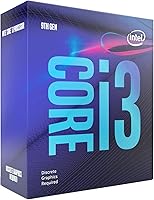
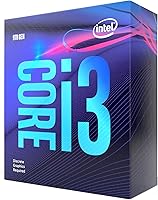
The Intel Core i3-9100F Desktop Processor is Intel's 9th-generation Coffee Lake answer to budget builders who want a capable quad-core without paying for features they don't need. It sits at a price point where every dollar counts, and it earns its place by delivering solid single-core performance that punches above its weight for everyday tasks and light gaming. One thing to know upfront: this chip has no integrated graphics, so a discrete GPU isn't optional — it's required. It slots into the LGA1151 socket and works with 300-series chipset boards, making it a reasonable starting point for anyone building or upgrading on a tight budget.

Features & Benefits

The i3-9100F runs at a 3.6 GHz base clock with a boost up to 4.2 GHz across its four cores, and in single-threaded workloads that headroom genuinely shows. The 65W thermal envelope keeps heat manageable, which matters when you're working inside a compact case with limited airflow. Since there's no integrated GPU, the chip doesn't share resources with a display engine, leaving a cleaner pipeline for processing tasks. It pairs naturally with mainstream DDR4 memory and B360 or H310 boards. One practical heads-up: older Z370 motherboards may need a BIOS update before the system even posts, so check compatibility before you build.

Best For

This quad-core chip makes the most sense for first-time PC builders who already have a graphics card in the plan or are picking one up alongside it. It handles 1080p gaming in lighter titles — MOBAs, older shooters, and similar — without much trouble, and for office work or general web use it's more than capable. Small form factor builders will appreciate the modest power draw and low thermals. It's also a practical upgrade path for anyone still running an older dual-core on a compatible LGA1151 board. Just keep expectations grounded: heavy multi-threaded workloads like video rendering will push this budget desktop CPU to its ceiling quickly.

User Feedback

Buyers consistently highlight the value for entry-level builds as the chip's strongest selling point — most feel they got solid performance relative to what they spent. The complaints worth noting: the processor ships without a cooler, so factor in the cost of even a basic aftermarket solution. A number of users also reported needing a BIOS flash on older boards before the system would recognize the chip, which is fixable but catches new builders off guard. Temperatures stay impressively low under light loads once everything is running. The negative reviews largely come from users who pushed it toward demanding workloads, which falls outside what this chip was ever built to handle.

Pros

  • Boost clocks up to 4.2 GHz deliver strong single-core performance that benefits gaming and everyday computing noticeably.
  • The 65W thermal design keeps temperatures in check, making it friendly for compact builds with limited cooling headroom.
  • Fits existing LGA1151 300-series boards, giving upgraders a cost-effective performance bump without a full platform swap.
  • Runs cool and quiet under light workloads when paired with even a modest aftermarket cooler.
  • Consistent real-world praise for its price-to-performance ratio among entry-level gaming builds.
  • Works reliably with mainstream B360 and H310 motherboards, keeping total platform costs low.
  • Absence of integrated graphics means no shared resources — the chip dedicates itself fully to processing tasks.
  • Well-suited for 1080p gaming in less demanding titles where single-core speed matters most.

Cons

  • No cooler is included in the box, adding an overlooked but necessary cost to the total build budget.
  • Older motherboards may require a BIOS update before the system will even recognize the chip — a stumbling block for new builders.
  • Four threads create a hard ceiling under multi-threaded workloads; CPU-heavy tasks like rendering expose this limitation quickly.
  • A discrete GPU is non-negotiable, which increases the minimum entry cost of any build using this chip.
  • The i3-9100F launched in 2019, meaning the platform and socket are aging with limited long-term upgrade paths.
  • Competing chips from AMD offered more cores and threads at similar price points, giving buyers a real alternative to weigh.
  • No support for PCIe 4.0 or newer memory standards limits future-proofing for users planning incremental upgrades.
  • Performance drops noticeably under sustained multi-tasking when background applications compete for the limited thread count.

Ratings

The Intel Core i3-9100F Desktop Processor scores below are generated by our AI rating engine after analyzing thousands of verified global buyer reviews, with spam, bot submissions, and incentivized feedback actively filtered out before scoring. The results reflect a balanced picture — where this quad-core chip genuinely delivers, and where real users ran into friction. Both strengths and honest pain points are factored into every score you see here.

Value for Money
88%
Among budget builders, the price-to-performance ratio is the most consistently praised aspect of the i3-9100F. Buyers assembling a first gaming rig repeatedly note that no other chip at this price tier delivered comparable single-core speed on an Intel platform, making it a smart spend when paired with an existing LGA1151 board.
Its value proposition has weakened over time as competing chips from AMD have offered more threads at similar or lower prices. Buyers starting a new platform from scratch today may find that factoring in a discrete GPU — which is mandatory — tips the total build cost into territory where a slightly pricier alternative makes more financial sense.
Gaming Performance
83%
For 1080p gaming in titles that lean on single-core speed — MOBAs, CS2, older shooters — this quad-core chip holds its own confidently. Users consistently report smooth, responsive gameplay in these genres, and the 4.2 GHz boost clock provides a genuine edge over slower budget processors in fast-paced, latency-sensitive titles.
Modern open-world and CPU-intensive games expose the four-thread ceiling fairly quickly, with users noting stutters and frame drops when background processes compete for resources. It is not a chip that ages gracefully into heavier gaming workloads, so buyers hoping to run demanding new releases at high settings should temper expectations accordingly.
Thermal Performance
84%
At idle and under light workloads, the i3-9100F runs impressively cool — users in compact SFF builds frequently comment on how quiet and efficient it is during everyday tasks. The 65W TDP means even a mid-range aftermarket cooler keeps temperatures comfortably under control during extended gaming sessions.
No cooler ships in the box, which means out-of-the-box thermal performance is entirely dependent on what the buyer adds separately. A few users who paired it with undersized or low-quality coolers reported higher-than-expected temperatures under sustained load, which is less a chip problem and more a build planning oversight.
Multi-Threaded Workloads
51%
49%
For light multi-tasking — a browser with multiple tabs, a music app, and a productivity suite running simultaneously — this budget desktop CPU manages without noticeable slowdown. Users with modest, everyday computing demands rarely bump into its thread limitations in normal desktop use.
Four threads is a genuine bottleneck the moment workloads scale up. Video rendering, batch photo editing, and any form of simultaneous streaming and gaming expose the ceiling fast, with users reporting long export queues and choppy performance. This is the single most common frustration expressed by buyers who misjudged their workload requirements.
Platform Compatibility
74%
26%
For upgraders already sitting on a 300-series LGA1151 board, dropping in the i3-9100F is a straightforward, low-friction upgrade. Compatibility with B360, H310, H370, and Z390 boards gives buyers flexibility, and users who did their homework ahead of time reported clean, trouble-free installs.
Older Z370 motherboards frequently require a BIOS flash before the system even recognizes the chip, which catches new builders off guard — especially those who cannot access the BIOS without a compatible CPU already installed. This extra setup step generated a meaningful share of frustrated one-star reviews from users who were not warned in advance.
Single-Core Speed
86%
The 4.2 GHz boost clock translates into real-world snappiness that users notice in everyday use — application launches feel quick, web browsing is responsive, and the chip does not feel sluggish in the tasks most desktop users actually perform day to day.
Single-core performance is strong for the segment but not class-leading when compared to newer architecture chips at comparable prices. As applications increasingly leverage multiple threads, the advantage of raw single-core speed becomes a narrower benefit over time.
Power Efficiency
81%
19%
The 65W TDP is a genuine selling point for compact and budget builds where every watt matters for thermal management and PSU sizing. Users in small form factor cases particularly appreciated that the chip did not demand expensive high-wattage cooling or power delivery setups to run stably.
Efficiency is only one side of the equation — users still need to account for the power draw of a discrete GPU, which is non-negotiable with this chip and adds meaningfully to total system power consumption. The chip itself is efficient; the mandatory GPU requirement partially offsets those savings.
Ease of Installation
79%
21%
The standard LGA1151 installation process is well-documented, and experienced builders report a completely uneventful drop-in experience on compatible boards. The chip itself presents no unusual challenges during physical installation.
The absent cooler and the potential BIOS update requirement add friction that less experienced builders did not anticipate. A handful of reviews described a frustrating first boot experience on older boards where the system simply refused to post until a firmware update was applied.
Cooler Inclusion
38%
62%
The processor itself performs as expected regardless of cooler choice, and the low TDP means buyers are not forced into expensive cooling solutions to get stable performance. A basic budget air cooler is sufficient for most use cases.
The complete absence of a stock cooler is the most consistently flagged complaint across buyer reviews, and for first-time builders, it represents a surprise extra cost that was not factored into their initial budget. It is a meaningful omission at this price tier, especially when comparable AMD processors have historically included serviceable coolers in the box.
Future-Proofing
42%
58%
For buyers with a short upgrade horizon — say, two to three years of light gaming and productivity — the i3-9100F fulfills its role without obsolescence becoming an immediate concern. Users who bought it with limited expectations are largely satisfied within that window.
The LGA1151 platform has reached the end of its upgrade path, meaning there is no meaningful CPU upgrade available within the same socket after this generation. Buyers who want room to grow their platform without a full motherboard replacement will find themselves at a dead end relatively quickly with this chip.
Out-of-Box Setup Experience
67%
33%
For builders on supported boards with up-to-date firmware, the setup experience is clean and fast. Users on H310 and B360 boards in particular report a straightforward experience with no unexpected complications during the initial build process.
The BIOS update requirement on certain boards — and the lack of any cooler — means the out-of-box experience is inconsistent across different build configurations. New builders without a second CPU on hand to perform a BIOS flash found themselves stuck at the first hurdle, which drove disproportionate negative feedback relative to the chip's actual performance.
Noise Levels
78%
22%
Paired with a quality aftermarket cooler, the i3-9100F runs whisper-quiet during everyday use — a point that comes up frequently among home office and HTPC users who prioritize acoustic comfort over raw processing power. The low TDP naturally keeps fan speeds relaxed under typical loads.
Noise levels are entirely dependent on the cooler the buyer chooses, since nothing ships in the box. Users who picked an undersized or cheaply built cooler reported fans spinning up more aggressively than expected under load, which underscores how important the cooler selection decision is with this chip.
Chipset Ecosystem
72%
28%
The 300-series Intel platform is mature and well-supported, with a wide range of motherboard options at various price points. Budget-oriented B360 and H310 boards that pair naturally with this chip are widely available and well-reviewed, keeping the total platform cost reasonable.
The ecosystem, while broad, is aging — 300-series boards offer limited PCIe lane configurations and do not support newer connectivity standards. Builders who want NVMe storage or faster GPU bandwidth will need to check board specifications carefully, as not all budget 300-series options deliver the same feature set.

Suitable for:

The Intel Core i3-9100F Desktop Processor is a practical pick for budget-conscious builders who have realistic expectations about what a quad-core chip at this price can do. It's particularly well-matched for first-time builders assembling an entry-level gaming rig around a mid-range discrete GPU — the kind of setup targeting smooth 1080p performance in MOBAs, CS2, or older open-world titles rather than maxing out the latest AAA releases. Upgraders coming from aging dual-core systems on compatible LGA1151 boards will feel a genuine performance lift without needing to replace their entire platform. It also fits naturally into compact or small form factor builds where keeping power draw and heat output low is a priority. For straightforward office work, web browsing, and general home productivity, this chip handles daily tasks without hesitation.

Not suitable for:

The Intel Core i3-9100F Desktop Processor is a poor fit for anyone planning to push their machine into heavily multi-threaded territory. Content creators who regularly encode video, stream while gaming, or run CPU-intensive production software will find four threads a real bottleneck — this chip simply wasn't designed for those workloads, and no amount of fast DDR4 or a quality cooler changes that ceiling. Buyers who don't already own or budget for a discrete GPU should also look elsewhere, since there is no integrated graphics fallback on this chip whatsoever. If you're building a platform intended to last five or more years with room to grow into more demanding tasks, a chip with higher core and thread counts — even at a modest premium — will serve you better in the long run. Those on platforms other than LGA1151 will also find no compatibility path here.

Specifications

  • Brand: Manufactured and sold by Intel under the Core i3 product line.
  • Model Number: The official model designation is i3-9100F, part of Intel's 9th-generation Coffee Lake Refresh family.
  • Core Count: This chip features 4 physical cores and 4 threads, with no Hyper-Threading support.
  • Base Clock: The processor runs at a base frequency of 3.6 GHz under sustained load.
  • Boost Clock: Single-core boost frequency reaches up to 4.2 GHz when thermal and power headroom allow.
  • TDP: Rated at 65W thermal design power, making it suitable for standard air cooling solutions.
  • Socket: Uses the LGA1151 socket, compatible with Intel 300-series chipset motherboards including B360, H310, H370, and Z390.
  • Integrated Graphics: No integrated GPU is present; a discrete graphics card is required for any display output.
  • Memory Support: Supports DDR4 memory in dual-channel configuration; exact speed support depends on the paired motherboard.
  • Chipset Compatibility: Designed for Intel 300-series chipset platforms; older boards may require a BIOS update before the processor is recognized.
  • Generation: Belongs to Intel's 9th-generation Coffee Lake Refresh lineup, launched in March 2019.
  • Manufacturing Process: Built on Intel's 14nm++ process node, a refined version of the architecture used across the 8th and 9th gen families.
  • Cooler Included: No CPU cooler is included in the retail package; a compatible aftermarket or third-party cooler must be purchased separately.
  • Item Weight: The processor weighs 8.8 ounces as packaged for retail shipment.
  • PCIe Support: Supports PCIe 3.0 lanes for discrete GPU and storage connectivity via the motherboard.
  • Thermal Material: Uses Intel's standard integrated heat spreader (IHS) design for contact with the CPU cooler.
  • Overclocking: The i3-9100F is not an unlocked processor and does not support CPU frequency overclocking, even on Z-series boards.
  • ECC Memory: ECC memory is not officially supported on this processor.

Related Reviews

Intel Core i5-13400F 2.5GHz 10-Core Desktop Processor
87%
88%
Performance
92%
Value for Money
84%
Gaming Performance
89%
Multi-core Efficiency
91%
Ease of Installation
More
Intel Core i5-9500 Desktop Processor

72%
88%
Everyday Performance
81%
Gaming Capability
91%
Thermal Management
58%
Multi-threaded Workloads
83%
Platform Compatibility
More
Intel Core i5-8600 Desktop Processor
71%
83%
Single-Core Performance
61%
Multithreaded Performance
74%
Gaming Performance
71%
Value for Money
88%
Thermal Efficiency
More
Intel Core i9-11900K Desktop Processor
70%
91%
Gaming Performance
93%
Single-Core Speed
67%
Multi-Threaded Performance
54%
Thermal Performance
84%
Overclocking Capability
More
Intel Core i3-13100F Desktop Processor
75%
91%
Value for Money
74%
Gaming Performance
88%
Everyday Productivity
83%
Thermal Performance
61%
Bundled Cooler Quality
More
Intel Core i3-10100 Desktop Processor
72%
88%
Everyday Performance
74%
Multi-Core Throughput
77%
Gaming Capability
71%
Thermal Management
61%
Stock Cooler Quality
More
Intel Core i3-9100 Desktop Processor
74%
83%
Single-Core Performance
54%
Multi-Core Performance
71%
Value for Money
63%
Gaming Performance
86%
Everyday Computing
More
Intel Core i7-12700 Desktop Processor
81%
92%
Multi-threaded Performance
89%
Gaming Performance
83%
Value for Money
71%
Thermal Management
68%
Platform Compatibility
More
Intel Core i9-12900KS Desktop Processor
75%
94%
Raw Processing Performance
92%
Gaming Performance
58%
Thermal Management
54%
Power Consumption
91%
Out-of-Box Clock Speed
More
Intel Core i5-11600KF Desktop Processor
67%
84%
Gaming Performance
81%
Overclocking Headroom
58%
Thermal Management
79%
Value for Money
43%
Platform Longevity
More

FAQ

Yes, without exception. The i3-9100F has no integrated graphics, so your system will not produce any display output without a discrete GPU installed. This applies during setup too — you cannot even get into the BIOS without a graphics card plugged in.

Any Intel 300-series motherboard with an LGA1151 socket should work — that includes B360, H310, H370, Z370, and Z390 boards. If you're using an older board, check your manufacturer's website for a BIOS update, as some boards shipped before this CPU existed and need a firmware update to recognize it.

No, Intel does not include a cooler with the Intel Core i3-9100F Desktop Processor. You'll need to budget for an aftermarket option separately. Given the 65W TDP, a basic air cooler in the budget range handles it comfortably — you don't need anything expensive.

For a lot of popular titles, yes. Games like CS2, League of Legends, Valorant, and similarly CPU-light games run well. More demanding modern titles may show frame drops, especially in open-world games that rely heavily on CPU throughput. Pairing it with a capable GPU makes a significant difference.

Probably, but you may need to flash the BIOS first. Z370 boards were designed before 9th-gen chips launched, so many need a firmware update to recognize the processor. Some boards require you to install an 8th-gen CPU temporarily to perform the update — check your board manufacturer's support page before buying.

It can technically run editing software, but four threads is a real constraint for anything beyond basic cuts and exports. Encoding video, running a live stream, or doing both at once will push this chip hard and result in slow export times and dropped frames. For that kind of work, a chip with more threads is a smarter investment.

Under typical gaming or everyday workloads, temperatures are quite manageable — most users report staying well under 70°C with a decent air cooler. At idle it runs impressively cool. Pushing it with sustained heavy workloads brings temps up, but the 65W TDP means it's not a particularly hot chip by any standard.

Absolutely. For web browsing, document editing, video calls, and general productivity, this quad-core chip handles everything without complaint. It's not doing anything exciting in that context, but it runs reliably and quietly, which is exactly what a home office machine needs.

No — the i3-9100F does not have an unlocked multiplier, so traditional overclocking is off the table even on a Z390 board. What you get is the base and boost clock as-is. If overclocking matters to you, look at Intel's unlocked K-series chips or AMD's Ryzen lineup, which tends to offer more flexibility at similar price points.

It's a close and honest fight. AMD's Ryzen 3 3100, for example, offers 4 cores with 8 threads at a similar price, which gives it an edge in multi-threaded tasks. The i3-9100F counters with competitive single-core speeds and mature platform support. If you already have an LGA1151 board, this chip is a natural fit. If you're starting fresh, it's worth comparing both platforms before committing.

Where to Buy