Overview

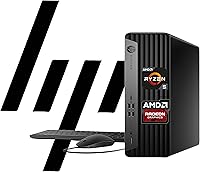
The HP EliteDesk 805 G9 SFF Desktop Computer occupies a practical sweet spot in HP's business lineup — compact enough to sit beside a monitor without dominating a desk, yet specced to handle real enterprise workloads. This compact business desktop runs on AMD's Ryzen 5 8500G, a six-core processor with integrated Radeon 740M graphics, giving it a clear efficiency edge over older Intel-based alternatives in day-to-day office tasks. Windows 11 Pro comes pre-installed alongside HP Wolf Security, making it a credible choice for IT-managed fleets. Set expectations early, though: this is a productivity-first machine, not a workstation built for video rendering or gaming.
Features & Benefits

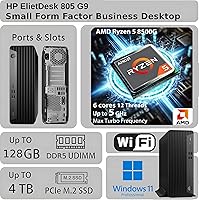
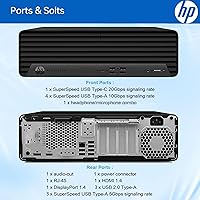
The EliteDesk 805 G9 handles multi-threaded workloads confidently — think simultaneous video calls, large spreadsheets, and browser-heavy workflows without slowdowns, courtesy of the Ryzen 5 8500G. The standard 32GB of DDR5 RAM is already generous for most business use, and the option to expand to 64GB gives IT teams room to plan ahead. Boot times are sharp thanks to the 1TB PCIe NVMe SSD. For display flexibility, dual 4K output is supported via two DisplayPort 1.4a connections and an HDMI port — a genuine advantage for professionals running multi-monitor setups. The port selection is notably broad for such a small chassis, including a 20Gbps USB-C, multiple USB-A options, and both wired Ethernet and Wi-Fi.

Best For

This HP SFF machine makes the most sense for office and remote workers who want a dependable, space-saving desktop that won't demand constant hands-on maintenance. IT administrators will appreciate the standardized Windows 11 Pro image and built-in TPM 2.0, which simplifies fleet management and compliance. It's also a strong pick for anyone stepping up from a five-year-old Intel box — the Ryzen 8500G delivers a noticeable jump in both speed and power efficiency. If your work revolves around spreadsheets, video conferencing, document management, or light data tasks, this compact business desktop covers the ground well without forcing you to overspend on workstation-tier hardware.

User Feedback

Buyers consistently highlight quick out-of-box setup and quiet fan operation as standout positives, with several noting the build quality feels more substantial than the price tier typically delivers. The port variety — particularly having fast USB-C alongside multiple USB-A options — comes up frequently as a practical edge over slimmer competitors. On the downside, the integrated-only graphics draw the most criticism: users hoping to dabble in photo editing or casual gaming find it limiting. A handful of buyers flagged interest in adding a dedicated GPU but noted the SFF chassis restricts that path. HP's support gets mixed marks — generally solid for enterprise accounts, but less consistent for individual buyers navigating warranty claims.

Pros

  • The AMD Ryzen 5 8500G handles heavy multitasking without breaking a sweat in typical office environments.
  • 32GB of DDR5 RAM as a baseline is genuinely generous and keeps the machine future-ready.
  • Boot times and application load speeds are sharp thanks to the PCIe NVMe SSD.
  • Dual 4K monitor support from a chassis this small is a rare and practical advantage.
  • The port selection is exceptionally broad, including a fast 20Gbps USB-C alongside numerous USB-A options.
  • Built-in HP Wolf Security and TPM 2.0 reduce the IT overhead of securing and managing the machine.
  • Windows 11 Pro comes pre-installed, which matters for businesses that need Pro-tier management features.
  • The compact footprint frees up meaningful desk space without forcing any real performance trade-offs for office work.
  • Quiet fan operation makes it comfortable in shared or open-plan office environments.
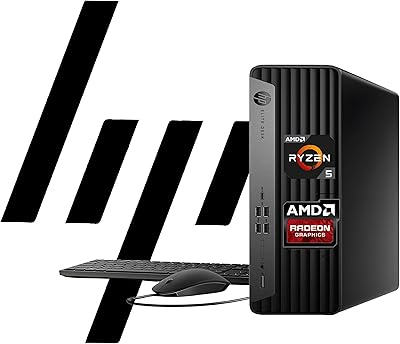
  • Wired keyboard and mouse are included, so the machine is genuinely ready to use out of the box.

Cons

  • Integrated-only graphics make this HP SFF machine a non-starter for any GPU-intensive creative or gaming work.
  • The SFF chassis leaves no practical upgrade path for adding a dedicated graphics card later.
  • HP customer support quality is inconsistent for individual buyers outside enterprise support agreements.
  • The HDMI port is version 1.4b, which limits bandwidth compared to the DisplayPort outputs.
  • RAM upgrades beyond the base configuration typically require purchasing directly from HP or a specialist, which can be costly.
  • No USB4 or Thunderbolt support, which may frustrate users with high-speed external storage or dock setups.
  • The EliteDesk 805 G9 ships with a basic wired keyboard and mouse that most professionals will want to replace.
  • Wi-Fi is included but the specific standard is not prominently disclosed, which may concern users in bandwidth-heavy environments.
  • For sole traders or home users, the Windows 11 Pro licensing cost is baked into the price even if Pro features go unused.

Ratings

Our editorial team used AI to analyze thousands of verified buyer reviews for the HP EliteDesk 805 G9 SFF Desktop Computer sourced from global markets, actively filtering out incentivized, bot-generated, and duplicate submissions to surface genuine user sentiment. The scores below reflect both what real buyers consistently praised and the friction points that surfaced repeatedly across different use cases and deployment contexts. Nothing has been smoothed over — strengths and shortcomings are weighted equally to give you an honest picture before you buy.
Overall Performance
88%
The Ryzen 5 8500G handles the kind of workloads most office environments throw at it — simultaneous video calls, large Excel files, browser sessions with dozens of tabs open — without any meaningful slowdown. Buyers upgrading from older Intel Core i5 or i7 machines from the 10th and 11th generation consistently noted a clear and immediate difference in responsiveness.
Performance headroom starts to thin when tasks become genuinely CPU-intensive over long sustained periods, such as batch data processing or compiling large codebases. Users pushing the machine beyond typical office workloads occasionally reported thermal throttling under prolonged heavy load.
Multitasking Capability
91%
With 32GB of DDR5 RAM standard, the EliteDesk 805 G9 genuinely handles demanding multitasking scenarios without hesitation — running a CRM, a video conference, a browser with multiple tabs, and a local database simultaneously is well within its comfort zone. IT teams deploying this at scale noted that end users rarely complained about slowdowns even in busy, multi-application environments.
While the base 32GB is solid, users who push into virtualization or run multiple heavy developer tools concurrently found themselves brushing against limits faster than expected. Expanding to 64GB is possible but adds cost, and sourcing compatible DDR5 SO-DIMMs outside of HP's own ecosystem can introduce compatibility uncertainty.
Build Quality
84%
The chassis feels noticeably sturdier than many similarly priced consumer-grade desktops — the plastic panels have minimal flex, and the overall fit and finish aligns with what you would expect from HP's commercial lineup. Buyers who had used previous EliteDesk generations felt the G9 maintained that legacy of solid, no-nonsense construction.
A handful of users noted that the chassis shows minor cosmetic wear over time in high-traffic environments, particularly around the front panel ports. The build does not feel quite as premium as HP's ZBook or Z-series workstation line, though that gap is expected at this price tier.
Value for Money
86%
For a machine that ships with Windows 11 Pro, 32GB DDR5, a 1TB NVMe SSD, and enterprise security features pre-configured, the price-to-spec ratio stands up well against comparable business desktops from Dell and Lenovo. Small business owners and IT managers buying in small batches frequently cited this as one of the more justifiable purchases at this configuration level.
The value equation tilts less favorably if you compare it to DIY builds or consumer desktop alternatives with similar raw specs but without the Windows Pro licensing premium baked in. Some individual buyers who did not need the Pro OS or enterprise security features felt they were partly paying for capabilities they would never use.
Graphics & Display Output
63%
37%
For office-oriented use, the integrated Radeon 740M performs reliably — it drives dual 4K monitors without issue, handles smooth video playback, and manages basic image viewing comfortably. The dual DisplayPort 1.4a outputs are a genuine highlight, giving multi-monitor professionals a practical and stable setup without needing a discrete card.
Anyone who strays beyond office tasks runs into the integrated GPU's hard limits quickly — video editing, 3D work, and even moderately demanding creative applications expose the Radeon 740M's constraints. The HDMI port being version 1.4b rather than 2.0 or 2.1 also frustrated users trying to run a third monitor or push higher refresh rates on a 4K display.
Port Selection & Connectivity
89%
The port variety on this HP SFF machine is one of its most frequently praised practical advantages — having a 20Gbps USB-C port, multiple tiers of USB-A, RJ-45 Ethernet, and Wi-Fi on a chassis this compact is genuinely unusual at this price point. Users with docking stations, external drives, and multiple peripherals found they rarely needed a hub.
The absence of Thunderbolt 4 or USB4 support was a sticking point for users who rely on high-bandwidth external storage arrays or advanced dock setups. A small number of buyers also noted that the rear-heavy port layout made cable management trickier when the unit was positioned in a tight desk enclosure.
Setup & Out-of-Box Experience
92%
First-boot experience is consistently praised — Windows 11 Pro is pre-installed and ready to configure within minutes, and the included keyboard and mouse mean you need nothing extra to get started. IT administrators setting up multiple units appreciated how predictable and repeatable the setup process was across each machine.
HP's pre-installed software bundle includes some bloatware that business users found annoying to remove during initial provisioning. While not excessive, the unwanted applications added a cleanup step that IT teams deploying at scale found mildly time-consuming.
Noise & Thermal Management
83%
Under typical business workloads, this compact business desktop runs quietly enough that most users in open-plan offices reported it was effectively inaudible at arm's length. The thermal design is efficient enough that the system rarely needs to ramp its fan noticeably during standard office use.
Under sustained CPU load — extended compilations, large file compressions, or prolonged video encoding — the fan becomes clearly audible and some users reported warm air exhaust that could be uncomfortable in a small enclosed desk setup. Thermal performance is adequate but not exceptional for a six-core processor.
Security Features
87%
TPM 2.0 and HP Wolf Security together make this one of the better-equipped business desktops at this tier from a hardware security standpoint — IT administrators managing compliance-sensitive environments cited both features as reasons they chose the EliteDesk over competing options. BitLocker integration via Windows 11 Pro works cleanly out of the box.
HP Wolf Security's full feature set requires an active subscription beyond the trial period, which some smaller business buyers overlooked during purchase. Users managing machines outside HP's enterprise support contracts also found the security portal less intuitive to configure than HP's marketing materials implied.
Upgradeability
57%
43%
RAM expansion up to 64GB is supported, and the M.2 storage slot can accept a higher-capacity drive, which gives the machine a reasonable storage upgrade path. For businesses planning to extend the useful life of the hardware over four or five years, the memory headroom is a genuine asset.
The SFF chassis makes any meaningful hardware upgrade beyond RAM and storage impractical — there is no room for a discrete GPU, and PCIe expansion options are severely constrained. Buyers who anticipated tinkering with the hardware or adding components found the upgrade ceiling much lower than they had hoped.
Form Factor & Desk Footprint
88%
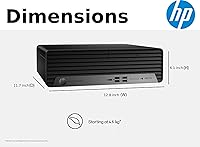
At roughly 11.7 x 6.1 x 12.8 inches, this HP SFF machine fits comfortably alongside a monitor, on a shelf, or in a desk enclosure without demanding attention. Users in space-constrained home offices and shared hot-desk environments specifically called out the compact size as a primary reason they chose this over a mid-tower alternative.
The SFF design, while excellent for space saving, means heat has fewer places to go under load, and cable routing in very tight spaces can become awkward with multiple rear-panel connections in use. A handful of users also noted the machine cannot be laid flat horizontally without affecting airflow.
Software & OS Experience
81%
19%
Windows 11 Pro arrives pre-activated and properly licensed for business use, covering domain join, Remote Desktop, and Group Policy management without any additional steps. For IT teams managing a standardized Windows environment, this is straightforward to onboard into existing management infrastructure.
Some individual buyers who primarily needed Windows 11 Home functionality felt the Pro edition's added cost — baked into the unit price — was hard to justify for personal use. A small number of users also reported that HP's initial Windows configuration included some unnecessary startup applications that slowed first-boot time slightly.
Customer Support & Warranty
66%
34%
Business account holders and IT departments with HP enterprise agreements reported generally positive support experiences, with responsive technical assistance and clear warranty processes. The standard one-year commercial warranty is a reasonable baseline, and HP's extended service options are available for buyers who want longer coverage.
Individual buyers and small businesses without an enterprise support contract reported noticeably less consistent experiences — with some describing long wait times and inconsistent advice from first-line support. A recurring theme in feedback was frustration with warranty claim navigation when purchased through third-party sellers rather than directly through HP.

Suitable for:

The HP EliteDesk 805 G9 SFF Desktop Computer is a strong fit for office professionals, remote workers, and small-to-medium businesses that need a dependable, manageable machine without paying workstation prices. IT teams deploying standardized desktops at scale will appreciate the Windows 11 Pro foundation, built-in TPM 2.0, and HP Wolf Security — features that reduce setup friction and simplify compliance. Anyone currently running a machine from the Intel Core 10th or 11th generation era will notice a real, tangible step up in both processing speed and day-to-day responsiveness. Multi-monitor users benefit especially well here, since dual 4K output from such a compact chassis is genuinely uncommon at this price tier. If your daily workload involves video conferencing, spreadsheets, browser-heavy research, document management, or light data work, this compact business desktop delivers more than enough headroom to do all of it simultaneously without complaint.
Not suitable for:

Anyone hoping to use the HP EliteDesk 805 G9 SFF Desktop Computer for GPU-intensive tasks should look elsewhere — the integrated Radeon 740M handles office visuals and dual 4K display output capably, but it is not designed for 3D rendering, serious video editing, or any form of gaming beyond casual browser titles. The small form factor chassis, while a genuine space-saver, also limits hardware upgrade paths: adding a dedicated graphics card is not a practical option here. Creative professionals working with tools like DaVinci Resolve, Blender, or Adobe Premiere will find the machine frustratingly underpowered for their needs. Power users who frequently push CPU and RAM simultaneously across very demanding workloads — think large-scale data processing or software compilation — may also hit a ceiling over time. If you need a machine that can double as a light gaming or multimedia production rig, the EliteDesk 805 G9 is simply not built for that role.
Specifications

  • Processor: AMD Ryzen 5 8500G with 6 cores, 12 threads, 16MB L3 cache, and a boost clock reaching up to 5.0GHz.
  • RAM: 32GB DDR5 memory is included as standard, with the system configurable up to 64GB for heavier workloads.
  • Storage: 1TB PCIe NVMe M.2 SSD provides fast read and write speeds for quick boot times and responsive file access.
  • Graphics: Integrated AMD Radeon 740M GPU handles office visuals, light media playback, and dual 4K display output without a discrete card.
  • Display Output: Two DisplayPort 1.4a ports and one HDMI 1.4b port allow simultaneous connection of up to two 4K monitors.
  • USB Connectivity: One USB-C at 20Gbps, four USB-A at 10Gbps, three USB-A at 5Gbps, and three USB 2.0 Type-A ports are available.
  • Networking: Gigabit RJ-45 Ethernet and integrated Wi-Fi provide both wired and wireless network connectivity options.
  • Audio: A headphone and microphone combo jack plus a separate audio line-in and line-out are included on the chassis.
  • Operating System: Windows 11 Pro comes pre-installed, ready for domain joining, BitLocker encryption, and enterprise management tools.
  • Security: Hardware-level TPM 2.0 and HP Wolf Security provide endpoint protection and platform integrity monitoring out of the box.
  • Form Factor: Small Form Factor (SFF) tower design measures 11.7 x 6.1 x 12.8 inches, making it suitable for space-constrained desks.
  • Weight: The unit weighs approximately 11 lbs, keeping it easy to reposition or transport between workstations if needed.
  • In the Box: A wired USB keyboard and wired USB mouse are included, so the system is ready to use without additional peripherals.
  • Power: The system uses a standard internal power connector suited to the SFF chassis thermal and wattage requirements.
  • Brand & Series: Manufactured by HP under the EliteDesk commercial desktop line, G9 generation, model 805.
  • Availability: This configuration became available in March 2025 and is ranked among the top 100 in Tower Computers on Amazon.

Related Reviews
HP EliteDesk 805 G9 SFF Desktop
81%
88%
Performance for Productivity
54%
Graphics Capability
82%
Dual Monitor Support
91%
Storage Speed
79%
RAM Headroom
More
HP ProDesk 400 G9 SFF (32GB RAM, 1TB SSD)
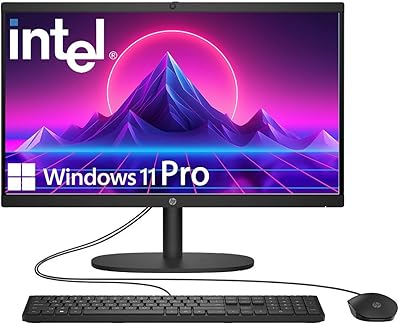
79%
74%
Value for Money
53%
Processing Performance
88%
Storage Speed
82%
RAM & Upgradeability
81%
Build Quality & Design
More
HP 22″ All-in-One Desktop (N100, 8GB DDR5, 128GB)
71%
78%
Value for Money
83%
Display Quality
67%
Performance / Everyday Speed
44%
Storage Capacity
91%
Setup & Ease of Use
More
HP ENVY Desktop Computer i7-9700, 16GB RAM, 512GB SSD, 1TB HDD
86%
88%
Performance
92%
Multitasking
75%
Gaming Performance
84%
Build Quality
90%
Storage Flexibility
More
HP 21.5″ All-in-One Desktop (64GB RAM, 2.5TB Storage)
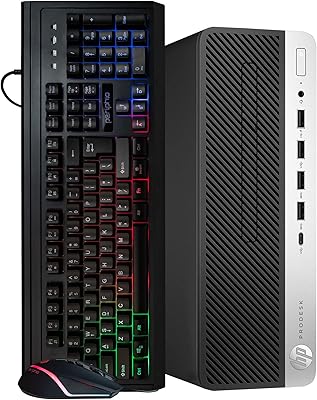
87%
92%
Multitasking Efficiency
96%
Storage Capacity
94%
Software Value
89%
Space Efficiency
83%
Display Quality
More
HP ProDesk 600 G4 Desktop Computer | Intel Core i5 | 16GB RAM | 500GB SSD
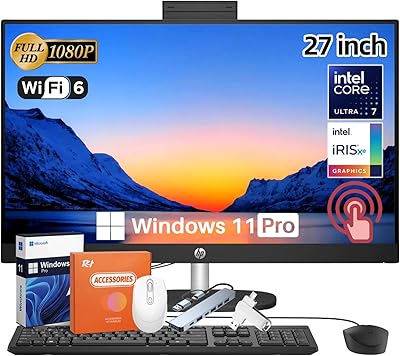
84%
89%
Performance for Everyday Tasks
92%
Boot Time and SSD Performance
63%
Graphics Performance
87%
Build Quality
84%
Reliability
More
HP 27-inch All-in-One Desktop (Intel Ultra 7 155U, 64GB, 1TB)
86%
94%
Multitasking Performance
86%
Display Quality
89%
Video Conferencing
91%
Design & Space Efficiency
83%
Value for Money
More
HP Pro Tower 290 G9 Desktop PC, Intel Core i3-13100, 16GB RAM, 512GB SSD
83%
85%
Performance
92%
Value for Money
81%
Build Quality
88%
Usability & Ergonomics
89%
Software/OS Experience
More
HP Pro Tower 290 G9 Desktop
76%
83%
Value for Money
74%
CPU Performance
91%
RAM & Multitasking
87%
Storage Speed
57%
Graphics & Display
More
HP 22-DG0024 21.5-inch All-in-One Desktop
68%
62%
Everyday Performance
88%
RAM & Multitasking
84%
Storage Speed & Capacity
67%
Display Quality
71%
Value for Money
More

FAQ

Yes, the EliteDesk 805 G9 supports dual 4K output simultaneously using the two DisplayPort 1.4a ports on the back. The HDMI port is also present but runs at version 1.4b, which has lower bandwidth, so using both DisplayPort connections is the better choice for 4K at higher refresh rates.

The system is configurable up to 64GB of DDR5 RAM, so there is room to expand. That said, SFF desktops can have limited DIMM slots, so it is worth confirming the slot count and supported memory speeds before purchasing third-party upgrades. HP-certified memory is the safest route to avoid compatibility issues.

Realistically, no. The compact SFF chassis does not provide the physical space or power headroom for a standard discrete GPU. If dedicated graphics are important to you now or in the future, you would be better served by a full-tower or mid-tower build rather than this HP SFF machine.

Under typical office workloads — browsing, documents, video calls — buyers consistently report the system runs very quietly. The fan is audible under sustained CPU load, but for day-to-day business use it is unlikely to be disruptive in a shared office environment.

It ships with Windows 11 Pro pre-installed, which includes BitLocker drive encryption, Remote Desktop, domain join capabilities, and Hyper-V virtualization. For business and IT-managed deployments, this is a meaningful difference from Home-edition machines.

Wi-Fi is built directly into the HP EliteDesk 805 G9 SFF Desktop Computer, so no adapter is needed. Wired Ethernet via the RJ-45 port is also available if you prefer a more stable connection for video conferencing or large file transfers.

In multi-threaded office tasks, the Ryzen 5 8500G holds up well against older Intel Core i7-11700 era systems, generally offering competitive or better performance alongside improved power efficiency. For most business workloads — spreadsheets, web-based apps, video calls, document editing — the difference in day-to-day responsiveness will be noticeable if you are upgrading from a machine that is four or more years old.

The compact business desktop includes TPM 2.0 at the hardware level, which supports BitLocker and Windows Hello. HP Wolf Security is also pre-loaded, providing threat containment and endpoint monitoring. For most business deployments, this is a solid foundation, though organizations with specific compliance requirements may still layer their preferred endpoint security platform on top.

The bundled keyboard and mouse are basic wired USB peripherals — functional for getting started, but not particularly comfortable for long workdays. Most professionals who spend hours typing will want to replace them with an ergonomic set. Think of the included accessories as temporary rather than permanent.

HP typically covers EliteDesk commercial desktops with a one-year limited warranty including parts and labor, though terms can vary by region and seller. For business buyers, HP also offers extended warranty and next-business-day on-site service options worth considering, especially for fleet deployments where downtime has a real cost. Always verify the specific warranty terms at point of purchase.

Where to Buy