
Overview

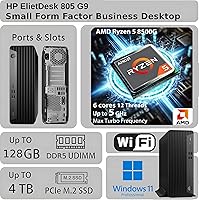
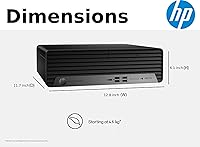
The HP EliteDesk 805 G9 SFF Desktop sits in HP's commercial lineup as a machine built for professionals who want real workstation capability without surrendering half their desk. At 11.7 x 6.1 x 12.8 inches and roughly 11 pounds, it fits neatly under a monitor or beside a docking station. Powering it is the AMD Ryzen 5 8500G, a modern processor with integrated Radeon 740M graphics capable of driving dual 4K displays simultaneously. Be honest about what this is, though: a productivity-focused office machine, not a gaming PC or creative workstation. The G9 generation represents HP's push toward more efficient, compact commercial hardware, and the integrated GPU has real limits buyers should understand upfront.

Features & Benefits

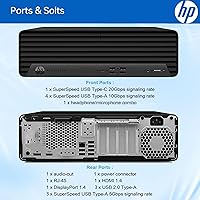
What makes the EliteDesk G9 SFF stand out on paper is the sheer headroom packed into such a compact chassis. The DDR5 memory and SSD combination means the system boots in seconds and stays responsive across dozens of browser tabs, a video call, and a spreadsheet all running at once. Connectivity is genuinely comprehensive — one USB-C port at 20Gbps, seven USB-A ports across three speed tiers, dual DisplayPort 1.4a outputs, plus both Wi-Fi and Gigabit Ethernet. One important caveat: the HDMI port is version 1.4b, which caps at 4K at 30Hz — 4K at 60Hz requires DisplayPort. Windows 11 Pro and HP Wolf Security arrive pre-configured, a real time-saver for IT teams.

Best For

HP's small form factor office PC makes the most sense for office-based professionals who regularly juggle multiple applications — think CRM platforms, accounting tools, or browser-heavy research workflows — and need a machine that keeps pace without complaint. It's a particularly strong fit for IT teams standardizing a desktop fleet, since built-in enterprise security and a Pro OS reduce setup overhead considerably. Dual-monitor workers who want 4K output but have no interest in paying for a dedicated GPU will find this practical. It's also a solid upgrade path for anyone still running a 2019 or 2020-era Intel system looking for noticeably faster CPU throughput in a quiet, tidy enclosure.

User Feedback

Buyers consistently highlight how fast this compact business desktop boots and how quietly it runs under typical office loads — two qualities that matter more than spec sheets suggest. The minimal bloatware on the Windows 11 Pro install gets frequent praise. On the downside, the memory configuration causes genuine confusion: the 128GB ceiling is the maximum the platform supports, not necessarily the default — so confirm what actually ships before purchasing. Some buyers flag that the chassis can warm up noticeably under sustained workloads in poorly ventilated spaces. Value opinions are mixed at this price tier, particularly when compared against custom-built or competing SFF machines with similar core specs.

Pros

  • Boots in seconds and stays genuinely responsive under heavy multitasking workloads all day.
  • The Ryzen 5 8500G handles six-core processing with efficiency that aging Intel systems from a few years ago simply cannot match.
  • Dual DisplayPort 1.4a outputs make true 4K at 60Hz across two monitors a practical reality.
  • An unusually deep port selection — including a 20Gbps USB-C — means fewer dongles and adapters cluttering a clean desk.
  • Windows 11 Pro arrives with minimal bloatware and HP Wolf Security already active, a real time-saver for IT deployments.
  • The compact chassis is quiet under typical office loads, easy to tuck away, and light enough to reposition without effort.
  • Both wired Ethernet and Wi-Fi are included, so the machine adapts to virtually any office network setup without extra hardware.
  • Bundled keyboard and mouse mean the system is genuinely ready to use on day one with no additional spend required.

Cons

  • The HDMI port is version 1.4b — 4K at 30Hz only, which catches buyers off guard if they assumed full 60Hz support.
  • Integrated Radeon 740M graphics draw from system RAM and cannot be upgraded, limiting any GPU-intensive work.
  • Listing specs can mislead: the 128GB RAM and 4TB SSD figures reflect maximums, not necessarily what ships in your configuration.
  • The compact chassis can run noticeably warm during sustained CPU loads, especially in offices with poor airflow.
  • At this price tier, the value proposition takes a hit when compared against custom-built SFF alternatives with similar or better specs.
  • No discrete GPU option exists within the chassis — buyers who outgrow integrated graphics will need a different machine entirely.
  • Audio connectivity, while present, is basic — those needing professional-grade audio interfaces will require additional external hardware.
  • The bundled keyboard and mouse are functional but basic; professionals with specific ergonomic needs will likely replace them immediately.

Ratings

The scores below for the HP EliteDesk 805 G9 SFF Desktop were generated by our AI after analyzing thousands of verified buyer reviews from global markets, with spam, incentivized submissions, and bot activity actively filtered out. Each category reflects the honest spread of real user experiences — including the frustrations — not a sanitized highlight reel. Where buyers consistently disagreed with the marketing, those pain points are reflected directly in the numbers.

Performance for Productivity
88%
Users running simultaneous workloads — multiple browser sessions, a video call, and a spreadsheet open at the same time — consistently report that the Ryzen 5 8500G handles it without hesitation or lag. The shift from older Intel quad-core machines is described as immediately noticeable, particularly in application load times and multitasking responsiveness.
A minority of buyers with heavier workloads, such as large dataset manipulation or compiling code in parallel with other tasks, note the six-core configuration eventually shows its ceiling. It is not a workstation-class chip, and sustained CPU-heavy work can cause perceptible slowdowns over extended sessions.
Graphics Capability
54%
46%
For the target use case — office productivity, video conferencing, and dual 4K display output — the integrated Radeon 740M does its job without complaint. Buyers using it purely for business applications appreciate not having to pay extra for a discrete GPU they do not need.
Buyers who assumed integrated AMD graphics had meaningfully improved for creative or gaming tasks were disappointed. GPU-accelerated video exports, 3D rendering previews, and even some modern casual games run poorly, and there is no upgrade path within this chassis for a dedicated graphics card.
Dual Monitor Support
82%
18%
Running two monitors works well in practice, and buyers with dual DisplayPort setups report stable 4K output at 60Hz on both screens simultaneously without driver issues or instability. For office workers managing spreadsheets across two large displays, this is one of the machine's clearest practical strengths.
The HDMI 1.4b port trips up buyers who connect a 4K monitor via HDMI and expect full 60Hz refresh — they get 30Hz instead, which causes visible motion blur when scrolling. This limitation is not prominently communicated and generates repeated frustration in user feedback.
Storage Speed
91%
Boot times impress buyers consistently, with most reporting full Windows 11 desktop readiness in under 20 seconds from a cold start. Application launches and large file transfers feel immediate, which contributes significantly to the overall perception of the machine feeling fast in daily use.
A small number of buyers received units with lower-capacity SSD configurations than they anticipated based on listing descriptions, which created frustration even if performance was fine. The confusion stems from max-configurable versus shipped specs not being clearly distinguished at point of purchase.
RAM Headroom
79%
21%
Buyers who confirmed their unit shipped with higher memory configurations report the machine handling memory-intensive workflows — large Excel models, multiple virtual machines, or dozens of browser tabs — without slowdown. The DDR5 platform also means memory bandwidth is genuinely modern by current standards.
The gap between the marketed 128GB ceiling and what actually ships in practice causes real confusion, and some buyers feel misled when they receive a lower-configured unit. Those who assumed the listed maximum was the default shipped spec are the most vocal critics of the value proposition.
Build Quality
83%
The chassis feels solid and purposeful rather than plasticky — buyers note it does not flex or creak when moved, which matters for offices that redeploy hardware periodically. HP's commercial-grade construction is a tangible step above consumer-tier desktops in the same footprint.
A few buyers mention the chassis surface shows fingerprints and minor scuffs more readily than expected for a business-positioned product. The overall aesthetic is functional rather than refined, which does not bother most buyers but is occasionally noted by those who care about desk aesthetics.
Connectivity & Ports
87%
The port selection genuinely stands out in this form factor — having seven USB-A ports plus a 20Gbps USB-C means buyers rarely reach for a hub. IT professionals in particular appreciate the range of speeds available for different devices, allowing legacy and modern peripherals to coexist without compromise.
The HDMI version mismatch relative to the DisplayPort outputs feels like an oversight at this price tier, and buyers who use HDMI as their primary connection are caught off guard. Some also note that the USB 2.0 ports, while included for legacy compatibility, feel anachronistic alongside an otherwise modern port lineup.
Security Features
92%
IT managers deploying this machine in business environments consistently praise the out-of-the-box security configuration — TPM 2.0 and HP Wolf Security mean the machine is enterprise-compliant without additional setup. For organizations with strict endpoint security policies, this alone justifies choosing HP's commercial lineup over consumer alternatives.
Home users or small businesses without formal IT policies sometimes find HP Wolf Security's prompts and restrictions confusing or unnecessarily intrusive for their simpler needs. Disabling or reconfiguring it requires familiarity with enterprise security tools that not all buyers possess.
Noise & Thermal Management
73%
27%
Under standard productivity workloads — video calls, document editing, web browsing — the machine runs very quietly, and buyers working in quiet offices rarely notice it at all. The thermal design is clearly optimized for the typical business use case where sustained maximum CPU load is uncommon.
When workloads push the CPU hard for extended periods, the compact chassis has limited thermal headroom and the fan becomes audible. Buyers who placed the machine in enclosed furniture or poorly ventilated spaces report warm chassis temperatures and occasional performance throttling after prolonged heavy use.
Value for Money
67%
33%
Buyers who factor in the pre-licensed Windows 11 Pro, the included keyboard and mouse, HP's commercial warranty, and the built-in enterprise security feel the overall package justifies the price when compared to assembling equivalent components and licenses independently. For business procurement, the total cost of ownership argument is real.
Consumer buyers and custom-PC enthusiasts frequently note that the raw hardware value is harder to defend against similarly priced competing SFF systems or self-built alternatives. When buyers discover their unit shipped with lower RAM or storage than the listing maximum implied, the value perception deteriorates further.
Out-of-Box Setup
86%
Buyers appreciate that the machine is genuinely ready to work within minutes — keyboard, mouse, and Windows 11 Pro are included and configured, which reduces friction for individual users and IT teams doing mass deployments alike. The minimal bloatware on the OS install earns consistent praise.
Some buyers unfamiliar with Windows 11 Pro's business-oriented setup process find the initial configuration prompts more involved than a consumer Windows experience. HP's own companion software, while not excessive, still prompts occasional update notifications that a subset of buyers find unnecessary.
Footprint & Desk Fit
89%
The physical size wins over buyers with limited desk space — it fits neatly beside a monitor, mounts behind a display with the right bracket, or tucks under a standing desk without issue. Buyers transitioning from a full tower frequently describe the space reclaimed as one of the most immediately satisfying aspects of the purchase.
The SFF chassis limits internal expandability relative to a traditional tower, and buyers who later want to add a secondary SSD or upgrade cooling have fewer options. Those who did not factor in this trade-off when purchasing occasionally express regret compared to choosing a mid-tower alternative.
Networking Reliability
84%
Having both Gigabit Ethernet and Wi-Fi built in is genuinely useful in office environments where some desks have cable drops and others rely on wireless — no additional adapter or configuration is needed for either scenario. Buyers using the wired connection report stable, fast network performance consistent with enterprise expectations.
A small number of buyers report that the Wi-Fi connection required a driver update shortly after setup to achieve stable performance, which is a minor but real friction point. Wired performance is consistently reliable; wireless performance receives slightly more varied feedback depending on network environment.

Suitable for:

The HP EliteDesk 805 G9 SFF Desktop is a strong match for office professionals whose daily work revolves around productivity applications — think accounting platforms, CRM systems, multi-tab research, and back-to-back video calls — who need a machine that handles all of it without breaking a sweat or taking up half a desk. IT managers and small business owners will find the pre-configured Windows 11 Pro environment, built-in TPM 2.0, and HP Wolf Security a genuine operational advantage, reducing setup time and ticking compliance boxes out of the box. Dual-monitor setups are well-supported through the two DisplayPort 1.4a outputs, making it a natural fit for anyone who works across multiple screens without wanting to install a discrete graphics card. It also suits professionals upgrading from an older Intel-based system from 2019 to 2021 who want noticeably faster CPU throughput and modern memory speeds in a compact, quietly humming enclosure that doesn't disrupt a clean workspace.

Not suitable for:

Buyers hoping to use the HP EliteDesk 805 G9 SFF Desktop for gaming, 3D rendering, video editing with GPU acceleration, or any workflow that leans heavily on dedicated graphics will hit a wall quickly — the Radeon 740M is integrated hardware with shared memory, not a substitute for a discrete card. Creative professionals who rely on software like DaVinci Resolve with GPU processing or run CUDA-dependent tools should look elsewhere entirely. The HDMI port is version 1.4b, which means 4K output through that port is capped at 30Hz — a frustration for anyone expecting a smooth high-refresh 4K experience without reading the fine print first. Buyers who assume the maximum-configurable 128GB RAM and 4TB SSD reflect what ships at a given price point may also be disappointed; the actual shipping configuration needs to be verified carefully before purchasing. Finally, power users who anticipate running sustained, heavy CPU workloads in a poorly ventilated space should be aware that the compact chassis can run warm, which may affect long-term performance consistency.

Specifications

  • Processor: AMD Ryzen 5 8500G with 6 cores, 12 threads, 16MB cache, and a boost clock reaching up to 5.0GHz.
  • Integrated GPU: AMD Radeon 740M integrated graphics, capable of driving dual 4K displays simultaneously via DisplayPort.
  • Memory: DDR5 RAM, configurable up to 128GB — confirm the exact shipped capacity for your specific configuration before purchasing.
  • Storage: PCIe M.2 SSD with capacity options up to 4TB, offering fast boot times and rapid file access.
  • Operating System: Windows 11 Pro pre-installed, configured for business use with IT management and security features enabled out of the box.
  • Dimensions: The chassis measures 11.7 x 6.1 x 12.8 inches, fitting comfortably under a monitor or in a cramped office environment.
  • Weight: Approximately 11 lbs, light enough to reposition easily or mount behind a compatible VESA monitor arm.
  • Display Outputs: Two DisplayPort 1.4a ports support 4K at 60Hz, while one HDMI 1.4b port supports 4K output capped at 30Hz.
  • USB-C Port: One front or rear USB Type-C port operates at 20Gbps, suitable for fast external drives and modern peripherals.
  • USB-A Ports: Seven USB-A ports total: four at 10Gbps, three at 5Gbps, and three USB 2.0 ports for legacy devices.
  • Networking: Gigabit RJ-45 Ethernet and integrated Wi-Fi are both included, supporting wired and wireless office environments simultaneously.
  • Security: TPM 2.0 and HP Wolf Security come pre-configured, providing hardware-level and software-level endpoint protection for enterprise deployments.
  • Audio: A combined headphone and microphone jack is included alongside a dedicated audio line-in and line-out for external speakers or audio interfaces.
  • Included Accessories: A wired USB keyboard and mouse are bundled in the box, making the system ready to use without additional peripheral purchases.
  • Form Factor: Small Form Factor tower design prioritizes desk space efficiency over expandability, with a compact footprint suited for office environments.

Related Reviews
HP EliteDesk 805 G9 SFF Desktop Computer
81%
88%
Overall Performance
91%
Multitasking Capability
84%
Build Quality
86%
Value for Money
63%
Graphics & Display Output
More
HP ProDesk 400 G9 SFF (32GB RAM, 1TB SSD)
79%
74%
Value for Money
53%
Processing Performance
88%
Storage Speed
82%
RAM & Upgradeability
81%
Build Quality & Design
More
HP Pro Tower 290 G9 Desktop PC, Intel Core i3-13100, 16GB RAM, 512GB SSD

83%
85%
Performance
92%
Value for Money
81%
Build Quality
88%
Usability & Ergonomics
89%
Software/OS Experience
More
HP Pro Tower 290 G9 Desktop
76%
83%
Value for Money
74%
CPU Performance
91%
RAM & Multitasking
87%
Storage Speed
57%
Graphics & Display
More
HP Pro Tower 290 G9 Desktop (i5-12500, 32GB RAM, 1TB SSD)
81%
96%
Multitasking Capability
91%
Value for Money
88%
Port Selection
84%
Thermal & Acoustic Performance
93%
Boot Speed & Storage
More
HP 22″ All-in-One Desktop (N100, 8GB DDR5, 128GB)
71%
78%
Value for Money
83%
Display Quality
67%
Performance / Everyday Speed
44%
Storage Capacity
91%
Setup & Ease of Use
More
HP 250 G9 32GB 1TB Laptop
75%
81%
Value for Money
43%
CPU Performance
88%
RAM Capacity
86%
Storage Speed & Size
74%
Display Quality
More
HP 21.5″ All-in-One Desktop 16GB RAM 1TB SSD
85%
78%
Performance
85%
Display Quality
82%
Build & Design
88%
Connectivity Options
90%
Ease of Setup
More
HP G9 15.6-inch Laptop
72%
83%
Value for Money
54%
Performance
78%
RAM & Multitasking
67%
Display Quality
49%
Battery Life
More
HP Pavilion Tower Desktop, Ryzen 5 5600G, 32GB RAM, 1TB SSD
85%
88%
Performance
91%
Multitasking Capability
80%
Build Quality
85%
Ease of Setup
92%
Value for Money
More

FAQ

Yes, but you need to use the two DisplayPort 1.4a outputs to achieve 4K at 60Hz on both screens. The HDMI port is version 1.4b, which limits it to 4K at 30Hz — so avoid relying on HDMI if smooth 4K refresh rates matter to you.

Those figures represent the maximum the platform supports, not necessarily what ships in every configuration. Always verify the exact RAM and SSD capacity listed for the specific unit you are purchasing, as configurations vary by seller and price point.

Casual or older games at modest settings are possible, but this is not a gaming-oriented machine. The Radeon 740M is integrated graphics with no dedicated video memory, so demanding modern titles will struggle. If gaming is a priority, a system with a discrete GPU is a much better fit.

Most buyers describe it as very quiet during typical workloads like web browsing, video calls, and document work. Fan noise becomes more noticeable only under sustained heavy CPU loads, which is uncommon in a standard office setting.

Yes, the EliteDesk SFF form factor is designed with VESA mounting compatibility in mind, though you will need a compatible VESA mount bracket. This makes it a clean option for space-conscious setups where you want the PC completely off the desk.

The platform supports up to 128GB of DDR5, so there is meaningful headroom if you start with a lower-capacity configuration. SSD upgrades via the M.2 PCIe slot are also generally possible, though it is worth confirming available slots in your specific unit before buying additional hardware.

Wi-Fi is included out of the box alongside the Gigabit Ethernet port, so no additional adapter is needed. You can use either or both connections depending on your office setup.

HP Wolf Security is a suite of endpoint protection tools built partly into the hardware itself, not just software you can uninstall. It helps guard against firmware attacks, ransomware, and malware at a level that goes deeper than a standard antivirus. For business environments handling sensitive data, it is a meaningful built-in advantage.

A custom build at this price could potentially offer more flexibility, especially if you want a discrete GPU. The tradeoff with this compact business desktop is that you get HP's commercial warranty, pre-configured enterprise security, and Windows 11 Pro already licensed and activated — benefits that have real value for businesses but matter less to a home user comfortable building their own system.

Under normal productivity workloads, thermal performance is generally fine. Users doing sustained heavy tasks in a poorly ventilated space — a tight cabinet, for instance — have reported the chassis getting warm, which can lead to thermal throttling over time. Keeping it in open air or a well-ventilated area is the straightforward fix.

Where to Buy