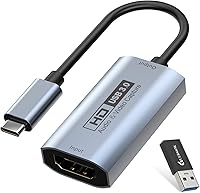
Guermok GVC-HDMI-USB3-4K30 HDMI Capture Card
Guermok GVC-HDMI-USB3-4K30 HDMI Capture Card — image 1
Guermok GVC-HDMI-USB3-4K30 HDMI Capture Card — image 2
Guermok GVC-HDMI-USB3-4K30 HDMI Capture Card — image 3
Guermok GVC-HDMI-USB3-4K30 HDMI Capture Card — image 4
Guermok GVC-HDMI-USB3-4K30 HDMI Capture Card — image 5
Guermok GVC-HDMI-USB3-4K30 HDMI Capture Card — image 6
Guermok GVC-HDMI-USB3-4K30 HDMI Capture Card — image 7
Guermok GVC-HDMI-USB3-4K30 HDMI Capture Card — image 8
78%
22%

Overview

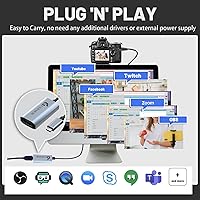
The Guermok GVC-HDMI-USB3-4K30 HDMI Capture Card is a compact, no-frills device built for streamers, remote workers, and content creators who want capable video capture without a heavy investment. It fits in the palm of your hand — just over an ounce, with dimensions closer to a large USB stick than a traditional capture box. The aluminum alloy housing feels solid enough for daily use and handles heat passively, which matters during longer recording sessions. There are no drivers to hunt down, no external power brick to carry. Plug it in and your computer recognizes it almost immediately, which is genuinely refreshing in a category that often makes setup far harder than it needs to be.

Features & Benefits

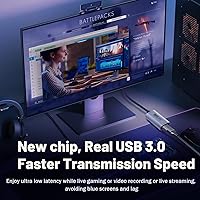
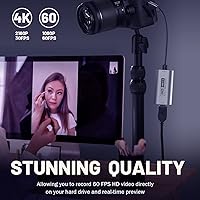
The USB 3.0 interface is where this capture card pulls ahead of cheaper alternatives — faster data transfer translates to noticeably lower latency when monitoring a live feed. Output tops out at 2K at 30fps or 1080P at 60fps, which covers the vast majority of streaming and recording needs; just know that while the input can accept a 4K signal, the output does not pass it through at full resolution. Software compatibility is broad: OBS Studio, Zoom, VLC, and Potplayer all work without configuration headaches. The included USB-C adapter means iPad users and owners of newer laptops can plug straight in without hunting for separate accessories. Genuinely pocketable.

Best For

This HDMI capture dongle makes the most sense for first-time streamers and casual content creators who want to get started without overcomplicating things. If you teach remotely and need to display a PS5 or Switch feed during a Zoom call, this handles it cleanly. Travel creators will appreciate the small footprint — it slips into a jacket pocket alongside a cable and you barely notice the weight. Meta Quest 3 owners trying to capture mixed-reality footage to a PC will find it works reliably. Where it starts to feel limited is for anyone needing true 4K output or ultra-low latency for competitive play — at that point, a more purpose-built card makes more sense.

User Feedback

Buyers consistently point to ease of setup and image quality as the strongest positives — most report being up and running in under five minutes, which is exactly what you want from a plug-and-play device. The aluminum shell draws occasional praise for feeling sturdier than its price suggests. On the downside, a recurring issue involves the card being detected as USB 2.0 through certain hubs or adapters; flipping the dongle and reconnecting typically resolves it, but it is an annoyance. The bigger gotcha is an OBS audio quirk: you must restart OBS after completing audio setup, otherwise you get silence. Some buyers also find the included adapter less reliable than a dedicated USB-C cable.

Pros

  • Plug-and-play setup works immediately on Windows, Mac, Linux, and Android with zero driver installation.
  • At just over one ounce, this capture card is genuinely pocketable and easy to carry anywhere.
  • Supports 1080P at 60fps output, which is fully sufficient for Twitch, YouTube, and most streaming platforms.
  • Works reliably with OBS Studio, Zoom, VLC, and Potplayer without any extra configuration steps.
  • Aluminum alloy casing feels noticeably sturdier than typical plastic dongles at this price tier.
  • The included USB-C adapter means iPad and newer laptop users can connect without buying additional accessories.
  • Compatible with a wide range of devices including PS5, Xbox, Nintendo Switch, DSLR cameras, and Meta Quest 3.
  • No external power supply is needed, keeping your desk and travel bag clutter-free.
  • USB 3.0 interface delivers lower latency and faster transfer speeds compared to older USB 2.0 capture devices.

Cons

  • Output is capped at 2K at 30fps despite accepting 4K input — true 4K passthrough is not supported.
  • Some units are detected as USB 2.0 through hubs or adapters, requiring manual reconnection to restore full speed.
  • OBS users must fully restart the software after audio setup or risk getting no sound output at all.
  • The included USB-A to USB-C adapter feels less reliable than a dedicated cable and may cause detection issues.
  • Not suitable for latency-sensitive competitive gaming due to the inherent delay of entry-level capture hardware.
  • Audio sync issues have been reported by a subset of buyers, particularly in longer recording sessions.
  • Build quality, while decent, stops short of feeling truly premium — more functional than refined.
  • No 4K output limits long-term usefulness as streaming standards gradually shift toward higher resolutions.

Ratings

The scores below for the Guermok GVC-HDMI-USB3-4K30 HDMI Capture Card were generated by our AI system after analyzing thousands of verified buyer reviews from global markets, with spam, bot-submitted, and incentivized feedback actively filtered out. Each category reflects a balanced synthesis of real-world praise and genuine frustration — nothing has been softened or inflated. Where users ran into consistent problems, the scores show it honestly.

Ease of Setup
92%
Buyers repeatedly describe plugging this capture dongle in and having it recognized within seconds, no driver downloads, no system restarts. Remote educators especially appreciated being able to set it up mid-session on an unfamiliar laptop without any technical friction whatsoever.
A smaller subset of users — particularly those connecting through USB hubs — found the device occasionally failed to register on the first attempt, requiring a reconnect or port switch. Not a dealbreaker, but it breaks the otherwise smooth out-of-box experience.
Video Quality
83%
At 1080P 60fps, the output is crisp and fluid enough for Twitch and YouTube streams where most viewers are watching at 1080P anyway. Switch and PS5 footage in particular looks clean, with good color reproduction and no obvious compression artifacts during normal gameplay.
Users expecting true 4K output discovered the hard way that the card caps its output regardless of the input signal quality. The gap between what the device accepts and what it actually delivers can feel misleading to first-time buyers who did not read the specs carefully.
Audio Performance
61%
39%
When audio is working correctly, the captured sound is clear and well-synced with the video feed, which is adequate for commentary-style streams, video calls, and online teaching scenarios where studio-grade audio is not the priority.
The mandatory OBS restart after audio configuration trips up a significant number of users who spend time troubleshooting silence before discovering the workaround. Some buyers also report intermittent sync drift during longer recording sessions, which is disruptive for post-production editing.
Build Quality
78%
22%
The aluminum alloy shell feels noticeably more substantial than the flimsy plastic housings found on cheaper alternatives at a similar price point. During extended use, the passive heat dissipation keeps the device from getting uncomfortably warm, which is a real concern with budget capture hardware.
While the casing impresses relative to the price tier, it still falls short of feeling truly premium — edges are slightly sharp on some units and the overall finish lacks the refinement of more established brands. Long-term durability under daily travel conditions remains an open question for some buyers.
Compatibility
88%
The breadth of device support here is genuinely one of the card's strongest selling points. PS5, Xbox, Nintendo Switch, Meta Quest 3, DSLR cameras, and most webcams all work without any extra configuration, and the OS coverage spanning Windows, Mac, Linux, and Android is unusually wide for this category.
Linux and Android users occasionally report less consistent behavior compared to Windows and Mac, particularly around audio device recognition. A handful of buyers using older iPad Pro models also noted compatibility hiccups that required additional adapters beyond what is included in the box.
USB Detection Reliability
64%
36%
When connected directly to a USB 3.0 port on the host machine, the capture dongle is reliably detected at full USB 3.0 speeds the vast majority of the time. Most desktop users with accessible rear ports report zero connection issues across weeks of regular use.
Through USB hubs, docking stations, or with the included USB-A adapter, the device frequently falls back to USB 2.0 speeds, which frustrates users who had no other connection option. The manual workaround of flipping the card works, but it feels like a hardware inconsistency rather than an intended feature.
Latency
74%
26%
For non-competitive use cases — streaming, recording tutorials, sharing a screen on Zoom — the latency is low enough that it is not noticeably disruptive. Educators and casual streamers rarely mention it as a problem in their workflows.
Competitive gamers using the live preview feed for active play will find the delay problematic. The latency is inherent to entry-level USB capture hardware and is not something firmware or software can fully resolve, which means this segment of buyers will need a different solution.
Software Compatibility
86%
OBS Studio, Zoom, VLC, and Potplayer all detect this HDMI capture dongle without manual configuration, which covers the overwhelming majority of use cases buyers bring to it. Streaming directly to Twitch or YouTube through OBS works reliably once the audio restart quirk is addressed.
The OBS audio restart requirement is the one consistent friction point that software compatibility cannot fully redeem. A small number of users also report that VLC requires a manual video source selection rather than auto-detecting the card on launch, adding a minor extra step.
Portability
94%
Weighing just over an ounce and small enough to drop into a shirt pocket alongside a short HDMI cable, this capture card is about as portable as the category gets. Travel creators and mobile educators consistently cite size and weight as a major reason they chose it over bulkier alternatives.
The compact form factor means the USB port connections can feel slightly wobbly when cables are plugged in at an angle, which is a minor but real concern when using it on a desk with cable tension. A carrying pouch or protective sleeve would have been a worthwhile addition to the package.
Value for Money
89%
For casual streamers, first-time content creators, and remote workers who need a functional capture solution without a serious financial commitment, this Guermok capture card delivers well above what the price suggests. The aluminum build and USB 3.0 speeds are genuine differentiators at this market tier.
Buyers who push the device toward its limits — expecting 4K output, rock-solid hub connectivity, or zero audio quirks — will feel the value proposition erode quickly. For those users, the savings are not worth the workflow compromises, and stepping up to mid-range hardware makes more financial sense.
Included Accessories
58%
42%
Including a USB-C adapter in the box is a thoughtful touch that saves most users from needing an immediate extra purchase. iPad users and MacBook owners in particular benefit from having that adapter ready to go on day one.
The quality of the included adapter draws consistent criticism — it feels cheap compared to the card itself, and several buyers report it as the first point of failure. Many experienced users recommend replacing it with a dedicated USB-C cable almost immediately after unboxing.
Thermal Management
81%
19%
The aluminum housing doubles as a passive heat sink, and during typical streaming or recording sessions of an hour or two, the card stays warm but never uncomfortably hot. This is a practical advantage over plastic-bodied competitors that can become noticeably hot to the touch.
During very extended sessions of three or more hours, some users notice the card becoming quite warm, which raises questions about long-term component longevity. Active cooling is obviously not an option at this size, but it is worth monitoring in sustained-use scenarios.
Documentation
67%
33%
The included English manual is brief but covers the essential setup steps clearly enough for most users to get running without needing to search online for help. The OBS audio restart instruction is technically documented, even if it is easy to overlook.
The manual is thin and does not address the USB 2.0 detection issue or hub compatibility in any meaningful way, leaving users to troubleshoot those problems through forum posts and community threads. Multilingual support is also limited, which is a gap for international buyers.

Suitable for:

The Guermok GVC-HDMI-USB3-4K30 HDMI Capture Card is a strong fit for anyone entering the world of streaming or recording who wants a device that just works without a steep learning curve or a significant upfront cost. Remote educators who need to display a game console, DSLR, or external camera feed during Zoom calls will find it handles that task without any driver installation or complicated configuration. Nintendo Switch and PS5 players taking their first steps into content creation get a capable starting point — 1080P at 60fps is more than adequate for most streaming platforms. Meta Quest 3 owners trying to pipe mixed-reality footage to a PC will also appreciate how broadly compatible this little dongle is. Traveling creators who need something that slips into a jacket pocket alongside a single cable will find the compact, lightweight build genuinely practical rather than just a marketing talking point.

Not suitable for:

The Guermok GVC-HDMI-USB3-4K30 HDMI Capture Card is not the right tool for creators who need true 4K output — the device accepts a 4K input signal but caps its output at 2K at 30fps or 1080P at 60fps, so shooters expecting a full 4K passthrough will be disappointed. Competitive gamers who rely on near-zero latency monitoring during live play should also look elsewhere, as entry-level capture hardware like this introduces enough delay to be disruptive in fast-paced scenarios. Professional broadcasters or anyone running a multi-source production setup will quickly outgrow what this capture dongle can offer in terms of reliability and throughput. Users who depend heavily on USB hubs or docking stations may run into USB 2.0 detection issues that require manual troubleshooting, which becomes tedious in a production environment. If audio precision in OBS is critical to your workflow, the mandatory software restart after audio configuration adds an unnecessary friction point that more polished, higher-end hardware avoids entirely.

Specifications

  • Interface: Connects to your computer via a USB 3.0 port for faster data transfer and reduced latency compared to USB 2.0 alternatives.
  • Output Connector: The device-side connector is USB-C, with a USB-A to USB-C adapter included in the box for standard ports.
  • Max Input: Accepts HDMI input signals at up to 4K at 30fps from consoles, cameras, and other HDMI sources.
  • Max Output: Outputs captured video at a maximum of 2K at 30fps or 1080P at 60fps depending on the selected mode.
  • Video Formats: Supports MJPEG and YUV422 encoding formats to ensure compatibility with a wide range of capture and streaming software.
  • Housing Material: The outer shell is constructed from aluminum alloy, which provides passive heat dissipation and a more durable feel than plastic alternatives.
  • Weight: The unit weighs 1.06 ounces, making it light enough to carry in a pocket or small bag without noticeable bulk.
  • Dimensions: Package dimensions measure 3.98 x 2.52 x 0.67 inches, giving you a sense of just how compact the overall form factor is.
  • Driver Requirement: No additional drivers need to be installed; the device is recognized automatically by the host operating system upon connection.
  • Power Source: Draws power entirely through the USB connection, so no external power adapter or separate cable is required.
  • OS Compatibility: Works with Windows 7, 8, and 10, Mac OS, Linux, and Android operating systems without additional software configuration.
  • Software Support: Compatible with OBS Studio, Zoom, VLC, Potplayer, and most major streaming platforms including Twitch, YouTube, and Facebook Live.
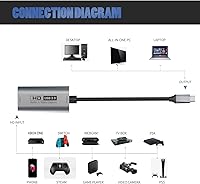
  • Device Compatibility: Supports capture from PS3, PS4, PS5, Xbox One, Nintendo Switch, DSLR cameras, webcams, and Meta Quest 3 and 3s headsets.
  • Included Accessories: The package contains the capture card itself, one USB 3.0 to USB-C adapter, and a printed English user manual.
  • Color: Available in gray with a matte aluminum finish that keeps fingerprints and smudges less visible during regular handling.

Related Reviews
Bytebridges 4K HDMI Capture Card (affd05f3)
88%
94%
Ease of Setup
88%
Build Quality
91%
Video Fluidity
87%
Input Latency
83%
Audio Versatility
More
Qonakism Dual HDMI Capture Card with Switcher

76%
88%
Ease of Setup
83%
Dual-Source Switching
76%
Video Quality
71%
Layout Modes
84%
Latency Performance
More
Narvitech NJ300
Narvitech NJ300
85%
94%
Initial Setup Ease
88%
Recording Stability
92%
Passthrough Latency
86%
Party Chat Integration
67%
Thermal Management
More
DiamondTiger YZ-F019 HDMI Capture Card
88%
94%
Video Quality
90%
Low Latency Performance
92%
Ease of Setup
85%
Device Compatibility
88%
Build Quality
More
Cenmate 7324HVC-4K60 Capture Card
88%
93%
Build Quality
89%
Pass-Through Performance
84%
Capture Image Quality
91%
Thermal Management
94%
Setup & Ease of Use
More
HeavenBird 4K HDMI Video Capture Card
75%
91%
Ease of Setup
78%
Video Output Quality
74%
4K Passthrough Performance
69%
Audio Functionality
82%
Build Quality
More
PACOXI Capture Card
PACOXI Capture Card
82%
93%
Ease of Setup
74%
Video Capture Quality
88%
HDMI Passthrough
79%
Audio Functionality
86%
Device Compatibility
More
Rybozen V316B-FR Capture Card
84%
88%
Build Durability
93%
Setup Simplicity
84%
Video Capture Fidelity
89%
Passthrough Performance
81%
Thermal Management
More
NearStream CCD10 HDMI Capture Card
89%
96%
Setup Simplicity
92%
Passthrough Performance
89%
Input Latency
93%
Value for Money
84%
Audio Integration
More
Swudloe C7-01 HDMI Video Capture Card
78%
93%
Ease of Setup
78%
Capture Quality
74%
4K Passthrough
61%
Audio Capture
88%
Platform Compatibility
More

FAQ

No, you do not. The Guermok GVC-HDMI-USB3-4K30 HDMI Capture Card is fully plug-and-play on Windows, Mac, Linux, and Android. Just connect it and your system should recognize it within a few seconds, no software downloads required.

This is a known quirk with this capture dongle and OBS Studio specifically. After you configure your audio source inside OBS, you need to fully close and restart the software before sound will come through. It is easy to miss in the manual, but doing that one restart almost always resolves the silence issue.

Not quite. The capture card can accept a 4K 30fps signal from your source device, but the output it sends to your computer tops out at 2K at 30fps or 1080P at 60fps. So true 4K recording is not supported on the output side, even though the input handles it.

Yes, the Guermok capture card is compatible with Meta Quest 3 and 3s. You can use it to pipe your headset output to a PC and record or stream through OBS or similar software without any special configuration.

This happens with certain USB hubs and adapters. Try plugging the capture card directly into a USB 3.0 port on your computer rather than through a hub. If it still registers as USB 2.0, try flipping the capture card and reconnecting — the USB-C side of the included adapter sometimes makes a difference in how the device is detected.

Yes, the included USB-A to USB-C adapter allows you to connect this HDMI capture dongle to iPads with a USB-C port. It also works with newer MacBooks and Windows laptops that only have USB-C ports available.

The build quality is solid for the price tier. The aluminum shell feels noticeably sturdier than comparable plastic dongles, and it handles heat passively during longer sessions. It is not a rugged industrial tool, but it is well-made enough to hold up to regular travel and daily use without feeling like it will break apart.

Absolutely. The capture card works well as a way to bring in an external camera or console feed as a video source in Zoom, Teams, or any other conferencing app that recognizes standard video capture devices. Remote educators find it particularly useful for this exact scenario.

The included adapter works fine for most users, but some buyers report occasional detection issues with it, especially when connecting through hubs. If you are finding unreliable connections, a dedicated high-quality USB-C to USB-A cable tends to be more consistent and is worth the small extra cost.

Yes, it works well with the Nintendo Switch when the console is docked. Connect the Switch dock HDMI output to the capture card, plug it into your laptop or desktop, open OBS, and your Switch feed should appear as a video source. It handles 1080P at 60fps output, which is more than sufficient for streaming on both platforms.