Overview

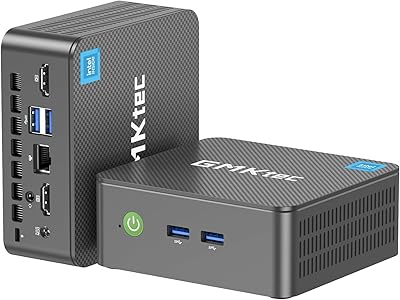
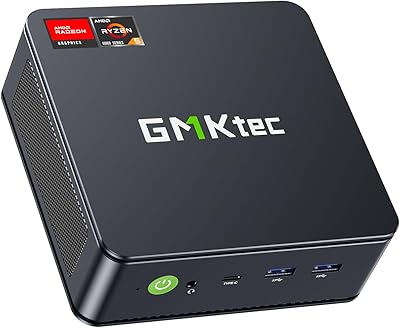
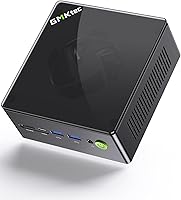
The GMKtec Nucbox K8 Plus Mini PC enters a crowded market with a confident spec sheet and a form factor small enough to sit behind your monitor on a VESA mount. Powered by AMD's Ryzen 7 8845HS, it punches firmly into mid-to-high-range mini PC territory, competing directly with offerings from Beelink, Minisforum, and ASUS's PN series. It ships with Windows 11 Pro pre-installed and a 2TB NVMe SSD already inside — so you're not spending your first afternoon configuring storage or hunting for an OS license. GMKtec's Hyper Ice Chamber 2.0 dual-fan cooling is worth watching under sustained load, as real-world thermal behavior often tells a different story than marketing language suggests.
Features & Benefits

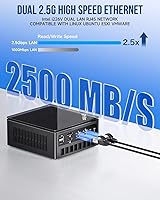
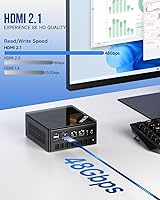
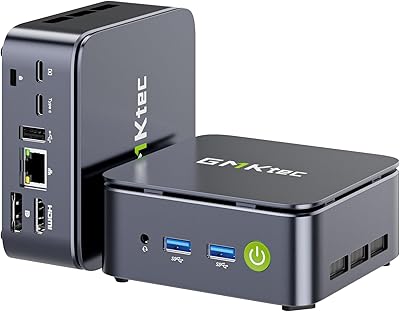
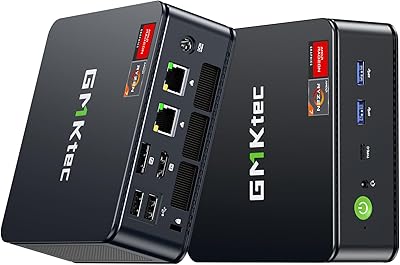
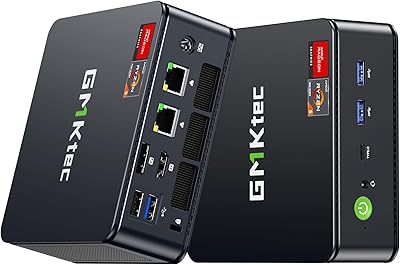
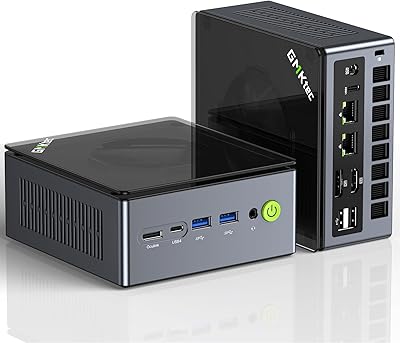
The Ryzen 7 8845HS drives this compact desktop harder than you might expect from something this size — 8 cores and 16 threads handle video editing, multitasking, and daily workloads without obvious hesitation. The Radeon 780M iGPU is capable enough for indie titles and older games at 1080p, though demanding modern releases will need lowered settings to stay playable. What really stands out is the connectivity: dual 2.5Gbps Ethernet ports make it genuinely useful for home lab builds or NAS setups. The OcuLink port theoretically opens the door to an external GPU, though eGPU enclosures add real cost and aren't widely available. Quad display output, including HDMI 2.1 and two USB4 Type-C ports, rounds out a surprisingly complete package.

Best For

This mini PC makes the most sense for a few specific types of buyers. Casual gamers and those building a living room PC will appreciate the quiet footprint and respectable integrated graphics without dragging a tower into their setup. Home lab enthusiasts get dual 2.5G LAN and confirmed Linux compatibility — that combination alone justifies serious attention. Light content creators who need fast storage and ample RAM for photo editing or short-form video work will find it capable. Remote workers wanting a tidy, powerful desk setup are well served here too. Tech-forward buyers eyeing an eGPU upgrade should factor in additional enclosure costs before banking on that future expansion path.

User Feedback

Buyers generally agree that the value-per-spec ratio is hard to argue with at this price point — the raw hardware beats similarly priced rivals in several key areas. Real-world gaming performance lands roughly where you'd expect from an integrated GPU, which most users accept once expectations are set honestly. Fan noise under sustained gaming or encoding sessions draws some complaints, with a handful of buyers noting the fans ramp up noticeably during heavy workloads. The included VESA mount and pre-activated Windows 11 Pro receive consistent praise. A few users found the BIOS VRAM adjustment useful but initially confusing without clear documentation. Linux compatibility reports are largely positive, with only isolated mentions of minor activation hiccups on first boot.

Pros

  • Dual 2.5Gbps Ethernet ports are a rare and genuinely useful feature at this price point.
  • Ships with Windows 11 Pro and a 2TB NVMe SSD already installed, so setup is fast and friction-free.
  • 32GB of DDR5 dual-channel RAM handles multitasking and light creative workloads with room to spare.
  • The Ryzen 7 8845HS is a powerful CPU that outpaces older-generation mini PC chips in sustained tasks.
  • Quad display output, including two USB4 Type-C ports, covers most multi-monitor setups without adapters.
  • VESA mount is included in the box, making cable-free desk or monitor mounting easy from day one.
  • RAM is expandable to 96GB and storage to 8TB, giving this mini PC a meaningful upgrade runway.
  • Linux compatibility is broadly confirmed by users, making it viable for home lab and server use cases.
  • The BIOS allows VRAM adjustment, giving technically inclined users more control over integrated GPU allocation.
  • Wake on LAN and Auto Power On support make it practical for always-on or remotely managed deployments.

Cons

  • Fan noise ramps up noticeably during gaming or encoding sessions, which can be distracting in quiet rooms.
  • The Radeon 780M struggles with modern AAA titles even at low settings, limiting its appeal to serious gamers.
  • OcuLink eGPU support is real on paper but impractical for most buyers due to enclosure cost and scarcity.
  • Thermal performance under sustained heavy loads needs scrutiny — marketing claims do not always reflect real-world behavior.
  • The BIOS VRAM adjustment feature, while useful, has a learning curve that average users may find confusing.
  • GMKtec is a smaller brand with less established long-term support and warranty track record than Beelink or ASUS.
  • At just under four pounds and roughly 7 inches square, portability is limited compared to truly ultra-compact options.
  • Some buyers have reported occasional driver hiccups or Windows activation issues on first boot.
  • The 120W power adapter is fairly bulky relative to the machine itself, adding desk clutter.
  • No Thunderbolt certification on the USB4 ports means compatibility with some Thunderbolt-specific peripherals is not guaranteed.

Ratings

The scores below for the GMKtec Nucbox K8 Plus Mini PC were generated by our AI system after analyzing verified buyer reviews from global markets, with spam, bot activity, and incentivized feedback actively filtered out. Each category reflects the honest distribution of user sentiment — where this compact desktop genuinely impresses and where real buyers have run into friction. Both strengths and pain points are weighted transparently so you can make a clear-eyed purchase decision.

Value for Money
84%
Most buyers feel the hardware-to-price ratio is difficult to beat at this tier, especially when comparing the included 2TB SSD, 32GB DDR5 RAM, and Windows 11 Pro against rivals that charge more for equivalent specs. Home lab users in particular consistently call it one of the better-value dual-NIC mini PCs available.
A handful of buyers feel the pricing is hard to justify when factoring in that the integrated GPU limits gaming ambitions, and some note that competing units from Beelink occasionally go on sale at lower prices with comparable processors.
CPU Performance
91%
The Ryzen 7 8845HS handles multitasking, light video editing, and productivity workloads with headroom to spare — users running virtual machines, Docker containers, or multiple browser-intensive workflows report smooth daily performance without thermal throttling under typical loads.
Under prolonged stress testing or sustained encoding sessions, a subset of users noted that the chip does pull back clock speeds once the chassis heats up, suggesting the cooling solution has limits when the CPU is pushed continuously for extended periods.
Gaming Performance
67%
33%
For casual and indie gaming, the Radeon 780M delivers a genuinely enjoyable experience — titles like Stardew Valley, Hades, and older competitive shooters run smoothly at 1080p, and less demanding esports titles are comfortable at higher settings. Users building a living room media and gaming PC find it sufficient for their library.
Buyers expecting to run modern AAA titles at comfortable settings are routinely disappointed — Cyberpunk 2077, for example, requires aggressive quality reductions to reach playable framerates. The iGPU ceiling is real, and users who were misled by vague marketing language about gaming capability express the most dissatisfaction.
Connectivity & Ports
93%
The port selection is one of the most praised aspects across user reviews — dual 2.5Gbps Ethernet alone sets it apart from most rivals, and having two USB4 Type-C ports with DisplayPort and Power Delivery support means fewer adapters and dongles cluttering the desk. Network-focused users call it exceptional for the form factor.
A few users note that the USB 2.0 ports feel out of place on a machine at this price and spec level, and the physical layout of the rear ports can feel cramped when multiple thick cables are plugged in simultaneously, especially near the OcuLink connector.
Thermal Management
69%
31%
Under light to moderate workloads — office tasks, web browsing, streaming, or light coding — the Hyper Ice Chamber 2.0 cooling keeps temperatures well in check and the unit runs quietly enough to ignore entirely. The BIOS fan curve control is appreciated by users who prefer tuning the balance themselves.
Under gaming sessions or sustained CPU-heavy workloads, the fans ramp to an audible level that several users describe as distracting in quiet home environments. A minority of buyers also report that chassis surface temperatures rise noticeably during extended stress, raising questions about long-term thermal headroom.
Build Quality
77%
23%
The overall chassis feels solid and dense for a mini PC, and most buyers note that the unit does not feel cheap or plasticky on a desk. The matte black finish picks up minimal dust and fingerprints, and the VESA mount attachment point is sturdy enough for monitor-back installation without wobble.
Some buyers who have handled higher-end Beelink or ASUS mini PCs note that the fit and finish of the Nucbox K8 Plus feels slightly less refined, with minor flex detectable on the top panel. Long-term durability data is limited given the relatively recent launch.
Storage Speed
89%
The PCIe 4.0 NVMe SSD delivers fast real-world read and write speeds that users immediately notice during OS boot, application launches, and large file transfers. Video editors working with high-bitrate footage and users transferring large datasets over the 2.5G LAN praise the storage throughput as a practical daily benefit.
The drive included varies by production batch according to some buyers, meaning sequential performance figures can differ slightly from unit to unit — most are fast, but a small number of users have benchmarked results on the lower end of PCIe 4.0 expectations.
RAM & Expandability
86%
Shipping with 32GB of dual-channel DDR5 at 5600MHz satisfies the majority of buyers without any immediate upgrade need, and the dual SO-DIMM slots give professionals a clear path to 96GB if workloads demand it. Users running Proxmox or memory-intensive development environments find the upgrade ceiling genuinely useful.
The RAM slots are accessible but require full disassembly of the unit, which some less experienced buyers find intimidating without a clear teardown guide. A few users also note that not all third-party DDR5 SO-DIMM kits are recognized cleanly on the first boot.
Display Output
88%
Quad-display support across HDMI 2.1, DisplayPort 2.1, and two USB4 Type-C ports covers virtually every multi-monitor setup users could want, and buyers running three or four screens for trading, development, or creative work report it works without configuration hassle straight from the desktop.
A small number of users found that running all four displays simultaneously at high resolutions introduced minor frame pacing inconsistencies on the integrated GPU, particularly when a gaming window was active alongside productivity displays.
Wireless Connectivity
78%
22%
WiFi 6 delivers fast and stable wireless performance for users in environments where running an Ethernet cable is impractical, and Bluetooth 5.2 pairs reliably with modern peripherals including wireless headsets, keyboards, and game controllers without noticeable latency.
A few buyers in dense apartment environments reported occasional WiFi signal inconsistency under heavy network congestion, and the antenna placement inside the compact chassis means wireless range is not as strong as a larger desktop with external antennas.
Software & OS Experience
81%
19%
Pre-installed and pre-activated Windows 11 Pro is a genuine convenience that buyers appreciate — no license hunting, no installation media, just a clean setup screen on first boot. Linux users also report smooth installation experiences with recent kernel versions covering the key hardware components.
A minority of buyers encountered Windows activation errors or driver conflicts on initial setup, requiring support contact or manual driver installation. The included user manual is sparse and does not adequately guide less technical users through BIOS features like VRAM allocation.
OcuLink & eGPU Potential
53%
47%
For technically motivated buyers who already own or plan to purchase an OcuLink-compatible eGPU enclosure, the port opens up meaningful GPU upgrade possibilities that most mini PCs at this price simply do not offer. Early adopters who have pursued this path report solid bandwidth and real gaming performance gains.
The reality for most buyers is that compatible OcuLink eGPU enclosures are expensive, limited in availability, and require additional research and investment that the product marketing does not clearly communicate. As a practical day-one feature, very few users actually use it.
Noise Level
63%
37%
During everyday computing — browsing, document work, video playback, and light applications — the unit is quiet enough that most users completely forget the fans exist. The BIOS allows fan profile adjustments, which quieter-environment users take advantage of with good results under moderate loads.
Gaming and sustained CPU workloads push the fans into a range that buyers in quiet home offices or bedrooms find genuinely intrusive. Several reviews specifically mention that fan noise was their biggest post-purchase complaint after initial enthusiasm wore off.
Setup & Out-of-Box Experience
87%
The included accessories — HDMI cable, VESA mount, and power adapter — mean most users are up and running within fifteen minutes of opening the box. Pre-activated Windows 11 Pro removes a common friction point that plagues some competing mini PCs shipped with unlicensed or trial OS installations.
The physical documentation is minimal, and buyers unfamiliar with BIOS navigation may struggle to unlock useful features like VRAM adjustment or fan curve tuning without resorting to community forums or third-party guides for assistance.
Long-Term Support & Brand Trust
61%
39%
GMKtec has built a growing community presence and responds to product feedback more actively than some anonymous white-label competitors, with firmware updates pushed for several of their mini PC lines. Buyers who have contacted support for warranty issues generally report adequate resolution timelines.
As a relatively young brand without the established reputation of Beelink or ASUS, some buyers remain cautious about long-term parts availability, warranty enforcement reliability, and whether driver support will continue past the initial product lifecycle.

Suitable for:

The GMKtec Nucbox K8 Plus Mini PC is a strong fit for buyers who want genuine desktop horsepower packed into something small enough to mount behind a monitor or tuck under a TV. Casual and indie gamers who are tired of managing a full tower will find the Radeon 780M capable enough for a solid library of titles at 1080p, without the bulk or noise of a traditional gaming rig. Home lab enthusiasts and self-hosters are arguably the most natural audience here — dual 2.5Gbps Ethernet is genuinely rare at this price tier and opens up real possibilities for running pfSense, Proxmox, or multi-NIC networking tasks. Content creators handling photo editing, light video work, or streaming setups will benefit from the fast NVMe storage and generous RAM headroom. Remote workers who want a clean, capable desk machine that does not dominate their workspace will also feel right at home with this compact desktop.

Not suitable for:

Serious PC gamers expecting smooth framerates on modern AAA titles should look elsewhere — the Radeon 780M is an integrated GPU, and no amount of BIOS tuning changes that fundamental ceiling. The OcuLink port sounds promising for eGPU expansion, but the enclosures required are expensive, not universally available, and add complexity that most buyers will never pursue, making it a theoretical benefit rather than a practical one. Buyers sensitive to fan noise should be cautious, as the Nucbox K8 Plus runs its cooling fans audibly louder under sustained workloads like gaming or video encoding. Anyone expecting plug-and-play simplicity with Linux may encounter occasional driver or activation quirks that require some troubleshooting patience. Finally, if your workflow demands a discrete GPU from day one — video production at high resolutions, 3D rendering, or machine learning tasks — this compact desktop simply was not designed for that workload.

Specifications

  • Processor: AMD Ryzen 7 8845HS with 8 cores and 16 threads, boosting up to 5.1GHz, built on a 4nm process node with a 16MB L3 cache.
  • Integrated GPU: AMD Radeon 780M with 12 compute units clocked up to 2800MHz, based on the RDNA 3 architecture for improved iGPU gaming performance.
  • RAM: 32GB DDR5 dual-channel memory running at 5600MHz across two SO-DIMM slots, expandable up to 96GB.
  • Storage: 2TB PCIe 4.0 NVMe M.2 2280 SSD installed, with a second M.2 slot available for expansion up to 8TB total.
  • Display Output: Quad-display capable via one HDMI 2.1 port, one DisplayPort 2.1, and two USB4 Type-C ports, all supporting up to 8K resolution.
  • Networking: Dual Intel i226V 2.5Gbps Ethernet ports, WiFi 6 supporting 2.4GHz and 5GHz bands, and Bluetooth 5.2.
  • USB Ports: Two USB4 ports with Power Delivery and DisplayPort support, two USB 3.2 Gen2 ports at 10Gbps, and two USB 2.0 ports.
  • OcuLink Port: One OcuLink port enabling external GPU or high-speed peripheral connections with significantly higher bandwidth than USB-based alternatives.
  • Audio: One 3.5mm combo headphone and microphone jack, plus built-in digital microphone support.
  • Power Supply: 120W external power adapter with DC input at 19V and 6.32A, accepting universal AC input from 100–240V at 50/60Hz.
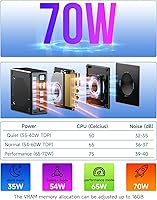
  • TDP Range: Processor TDP is configurable between 35W and 54W, with full system power consumption reaching up to 65W under load.
  • Operating System: Windows 11 Pro 64-bit comes pre-installed and pre-activated, requiring no additional OS purchase or installation.
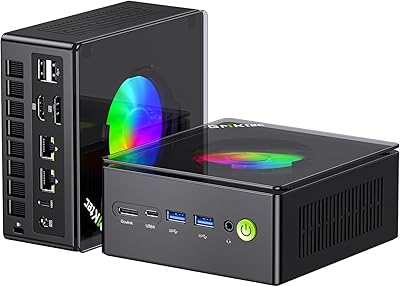
  • Cooling System: GMKtec Hyper Ice Chamber 2.0 dual active cooling fans manage thermals, with fan speed adjustable through BIOS settings.
  • Dimensions: The unit measures 7.25 x 7.25 x 4.75 inches and weighs approximately 3.99 lbs including the chassis.
  • VRAM Adjustment: Integrated GPU VRAM allocation can be adjusted directly in the BIOS, allowing users to dedicate more shared memory to graphics workloads.
  • Additional Features: Supports Wake on LAN, Auto Power On, and PXE boot, making it suitable for remotely managed or always-on deployment scenarios.
  • Included Accessories: Package includes one power adapter, one HDMI cable, one VESA mount with screws, and a printed user manual.
  • Operating Environment: Rated for operation between -10°C and 45°C with relative humidity between 30% and 85%, non-condensing.

Related Reviews
GMKtec Nucbox G2 Plus Mini PC Intel N150 12GB RAM 256GB SSD
85%
88%
Performance for Everyday Use
91%
Connectivity Options
93%
Multi-Display Support
94%
Energy Efficiency
85%
Size & Portability
More
GMKtec G9 Plus Mini PC NAS
82%
86%
Performance
92%
Ease of Setup
88%
Storage Expansion Flexibility
91%
Network Speed
84%
Cooling & Thermal Management
More
GMKtec Nucbox G5 Mini PC Intel N97 12GB RAM 512GB SSD
85%
85%
Performance
94%
Compact Design
88%
Connectivity Options
90%
4K Display Support
91%
Noise Level
More
GMKtec Nucbox M6 Ryzen 6600H Mini PC, 32GB RAM, 1TB SSD
86%
90%
Performance for Office Tasks
75%
Gaming Performance (Casual)
84%
Build Quality
91%
Compact Design
89%
Storage Speed (SSD)
More
GMKtec Nucbox G10 Ryzen 5 Mini PC
75%
83%
Value for Money
74%
Performance
88%
Connectivity & Ports
86%
Display Output
67%
Thermal Management
More
GMKtec Nucbox M5 Ultra Mini PC Ryzen 7 7730U 16GB RAM 512GB SSD
84%
89%
Performance
85%
Build Quality
91%
Multi-Display Support
90%
Networking/Connectivity
88%
Size/Portability
More
GMKtec Nucbox K11 (Ryzen 9 8945HS, 32GB, 2TB)
89%
94%
CPU Performance
96%
Expansion & Upgradability
92%
Connectivity & Ports
87%
Thermal Management
89%
Build Quality
More
GMKtec NucBox K7 Plus 32GB/2TB
80%
88%
Processing Performance
63%
Thermal Management & Cooling
91%
Memory & Storage Configuration
94%
Networking — Dual 2.5G LAN
84%
Display Output & Multi-Monitor Support
More
GMKtec Nucbox K6 Mini Gaming PC AMD Ryzen 7 7840HS 1TB SSD 16GB RAM
83%
89%
Gaming Performance
88%
Multitasking Ability
82%
Build Quality
90%
Network Performance
72%
Cooling System
More
GMKtec Nucbox K9 Mini PC Intel Core Ultra 5 125H 32GB RAM 1TB SSD
85%
89%
Performance
85%
Build Quality
90%
Energy Efficiency
88%
Connectivity Options
87%
Display Support
More

FAQ

Honestly, it depends on what you mean by modern. The Radeon 780M is the best integrated GPU AMD currently puts in a mini PC chip, and it handles lighter titles, indie games, and older releases at 1080p quite well. For demanding AAA games like Cyberpunk 2077 or Alan Wake 2, you are looking at low settings and sometimes reduced resolution to stay above playable framerates. It is a capable iGPU, but it is not a substitute for a dedicated graphics card.

Technically yes, but practically it is more complicated than it sounds. You need a compatible eGPU enclosure that supports OcuLink, and those enclosures are not cheap or easy to find. If you are planning your purchase around this feature, factor in the additional cost and research enclosure availability before committing. For most buyers, it is better treated as a future option than a day-one plan.

Under light tasks the unit is fairly quiet, but sustained gaming sessions or video encoding will spin the fans up to a noticeable level. It is not uncomfortably loud, but you will hear it in a quiet room. GMKtec does allow fan curve adjustments in the BIOS, so you have some control over the balance between noise and thermal headroom.

Both are fully upgradeable. There are two SO-DIMM slots for RAM, supporting up to 96GB total, and two M.2 2280 slots for storage, supporting up to 8TB. The unit ships with both slots occupied by the included 32GB and 2TB configuration, so you would be replacing rather than adding if you want to upgrade.

Linux compatibility is broadly reported as good by users running Debian-based and Arch-based distributions. Most hardware components, including the network adapters and GPU, are well-supported by recent kernels. A small number of users have mentioned needing to address minor driver or firmware quirks, but nothing that would stop a competent Linux user from getting it running smoothly.

Having two separate 2.5Gbps ports opens up some genuinely useful scenarios beyond just fast internet. You can use the unit as a router or firewall appliance with software like pfSense or OPNsense, bond the two ports for increased throughput to a NAS, or run a small virtualization environment with isolated network segments. For home lab users, this is one of the standout features that separates it from most competing mini PCs.

Not at all. Windows 11 Pro is pre-installed and activated, and the 2TB SSD is already formatted and ready to go. You plug in a monitor, keyboard, and mouse, connect power, and you are at the Windows setup screen within minutes. The included HDMI cable and VESA mount mean you have what you need to get started without extra purchases.

All three are competitive, and the right choice depends on your priorities. This compact desktop stands out with its dual 2.5G Ethernet and OcuLink port, which neither the SER8 nor most Minisforum models match at this tier. Beelink has a longer track record for reliability and after-sales support, which some buyers weigh heavily. On raw specs, they are largely comparable since they often share the same AMD processor platform.

Yes, and it is one of the more useful features for gaming and GPU-intensive tasks. You can enter the BIOS and manually allocate more shared system RAM to the Radeon 780M, which can improve performance in GPU-limited scenarios. The default allocation is conservative, so bumping it up is worth doing if gaming performance is a priority for you.

GMKtec typically offers a one-year warranty on their mini PCs, with support handled through email and their official website. Response times and service quality are generally considered acceptable for a smaller brand, though they do not have the same established support infrastructure as Lenovo or ASUS. It is worth registering your unit and keeping purchase documentation handy in case you need to make a claim.