Overview

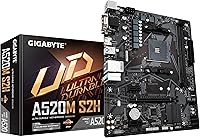
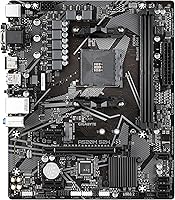
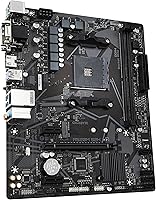
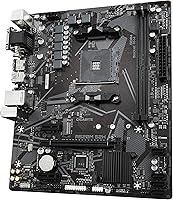
The GIGABYTE A520M S2H AM4 Motherboard is exactly what it looks like: a straightforward, budget AM4 platform built for everyday PC builds rather than enthusiast rigs. Based on AMD's A520 chipset, it covers a wide processor range — Ryzen 3000, 4000G, 5000, and 5000G series — giving builders solid flexibility without the premium price tag of B550 or X570 boards. The Micro-ATX form factor keeps things compact, fitting smaller cases without sacrificing core functionality. There is no CPU overclocking support here, and that is fine — the A520M S2H is not pretending to be something it is not. If you need a reliable, no-frills foundation for a home office or everyday build, the value is genuinely reasonable.

Features & Benefits

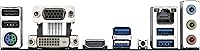
The A520M S2H ships with a 4+3 phase Pure Digital VRM — not the most robust configuration on the market, but entirely adequate for stock-speed Ryzen 5 and Ryzen 7 processors running within their rated TDP. Pushing a Ryzen 9 chip at stock may expose thermal headroom limits, so keep that in mind. The single M.2 slot supports PCIe 3.0 x4 NVMe drives, handling fast SSD storage without relying on SATA. Memory runs dual-channel DDR4, with OC profiles pushing up to 5100MHz, though the 2-DIMM slot limit means you hit a RAM ceiling faster than you might expect. The triple display outputs — HDMI, DVI-D, and D-Sub — are genuinely practical for G-series APU users running multi-monitor setups without a discrete GPU, and the onboard GbE LAN controller handles wired networking reliably.

Best For

This budget AM4 board hits a practical sweet spot for a very specific kind of builder. If you are putting together a first-time build around a Ryzen 5 5600 or a similar mid-range chip, this is a sensible, low-stress choice. It suits home office machines well too, where stability matters far more than raw expandability — nobody writing documents and joining video calls needs a feature-loaded B550 board. Users pairing it with Ryzen G-series APUs will appreciate those three display outputs, making multi-monitor use without a dedicated GPU much easier. Upgraders refreshing an older AM4 system can slot in this Micro-ATX motherboard without buying into an entirely new platform. Where it falls short is for power users or anyone planning aggressive memory configurations.

User Feedback

Buyers have responded quite positively to the A520M S2H, with many praising the straightforward BIOS experience and the consistent, reliable day-to-day performance. GIGABYTE's build quality draws frequent compliments, especially given the price tier. The recurring complaint, though, is hard to dismiss: two DIMM slots cap RAM expansion faster than buyers anticipate, which frustrates those planning memory upgrades down the road. A handful of users also flagged limited fan headers and a lean rear I/O panel as genuine friction points once their builds became more demanding. Ryzen 5000 compatibility required a BIOS update for some early buyers, which is a known quirk of the A520 platform rather than a board-specific flaw. Overall, buyers who go in with calibrated expectations tend to walk away satisfied.

Pros

  • Wide Ryzen CPU compatibility spans the 3000, 4000G, 5000, and 5000G series from a single platform.
  • The NVMe M.2 slot keeps fast SSD storage accessible without sacrificing SATA ports for everyday builds.
  • Three display outputs — HDMI, DVI-D, and D-Sub — make multi-monitor setups practical with G-series APUs and no discrete GPU.
  • GIGABYTE's build quality earns consistent praise from buyers, especially given the entry-level price point.
  • The BIOS is regularly highlighted by first-time builders as intuitive, clean, and easy to navigate.
  • Dual-channel DDR4 support with OC profiles up to 5100MHz provides more memory headroom than the price suggests.
  • RGB Fusion 2.0 with an addressable LED header adds aesthetic flexibility that is rare at this budget tier.
  • The 8118 GbE LAN controller delivers reliable, stable wired networking well-suited to home office use.
  • Daily performance is consistently stable, with buyers reporting solid reliability over extended periods.
  • The Micro-ATX footprint fits compact cases cleanly, making it ideal for space-conscious or cost-efficient builds.

Cons

  • Only two DIMM slots mean RAM expansion hits a hard ceiling sooner than most builders would like.
  • No CPU overclocking support rules this board out entirely for anyone wanting to push beyond stock speeds.
  • A BIOS update is required before Ryzen 5000 CPUs are recognized, which is awkward without a compatible older processor on hand.
  • Limited fan headers complicate thermal management in builds with multiple cooling components or case fans.
  • The rear I/O panel feels lean, leaving users short on USB ports for peripheral-heavy desk setups.
  • The VRM is not rated for high-TDP processors like the Ryzen 9 series under sustained, heavy workloads.
  • No onboard Wi-Fi or Bluetooth means adding wireless connectivity requires a separate adapter and an open slot.
  • A single M.2 slot limits storage expansion for users who want more than one NVMe drive running simultaneously.

Ratings

The GIGABYTE A520M S2H AM4 Motherboard earns a strong overall reception from real buyers, and every score below was generated by our AI after analyzing thousands of verified global purchases — with spam, incentivized reviews, and bot activity actively filtered out. The results honestly reflect both the genuine strengths that make this a popular budget AM4 platform and the real-world limitations that affect specific builder profiles. Strengths and pain points are represented with equal weight so you can make a fully informed decision.

Value for Money
84%
Buyers consistently point to this board as one of the most cost-effective ways to build a capable Ryzen 5000 system. For the price, you get a stable platform, NVMe storage support, triple display outputs, and a reputable brand — a combination that is hard to match at this budget tier.
The value equation weakens if you later need more than 32GB of RAM or decide you want CPU overclocking, since either scenario requires a different board entirely rather than a simple upgrade. Users who initially thought they were future-proofing often found the platform's ceiling arrived sooner than expected.
CPU Compatibility
88%
The breadth of supported processors — from Ryzen 3000 all the way through the full 5000G lineup — makes this a flexible foundation for a wide range of builds. Builders pairing it with a Ryzen 5 5600 or Ryzen 7 5700X consistently report rock-solid compatibility and stable operation with no unexpected issues.
Ryzen 5000 CPU support requires a BIOS update on boards shipped with older firmware, creating a frustrating chicken-and-egg problem if no compatible older processor is available to trigger the flash. A notable number of buyers were caught off guard by this and had to borrow a chip or negotiate a pre-flashed unit with the retailer.
Memory Support
58%
42%
Dual-channel DDR4 operation works reliably, and XMP OC profiles allow fast kits to run at their rated speeds up to 5100MHz — a genuine plus for productivity workloads that benefit from higher memory bandwidth without any fiddly manual configuration.
Two DIMM slots is the single most cited limitation across all buyer feedback, and the frustration is justified — the capacity ceiling lands at 32GB with no path to expand beyond that without replacing both sticks entirely. Anyone planning memory-intensive work or wanting flexibility for future upgrades should weigh this constraint very carefully before committing.
VRM Performance
67%
33%
For stock-speed Ryzen 5 and Ryzen 7 processors operating within their rated TDP, the 4+3 phase VRM handles daily and productivity workloads without thermal throttling or instability. Home office users running mainstream CPUs will genuinely never run into a problem here under normal conditions.
Push a high-TDP processor like the Ryzen 9 5900X through sustained tasks such as video encoding or heavy 3D rendering, and the VRM's limitations surface through elevated temperatures and potential performance throttling. This is clearly not a board for builders planning to pair it with an eight-core or higher chip under prolonged load.
Overclocking Potential
22%
78%
Memory overclocking via XMP profiles is supported, letting faster DDR4 kits run at their rated speeds up to 5100MHz — a useful capability that allows builders to extract at least some performance benefit from higher-frequency kits without needing a more expensive platform.
CPU overclocking is entirely off the table — this is a hard, chipset-level restriction of the A520 platform with no workaround or hidden setting to unlock. Builders wanting to push any unlocked Ryzen processor beyond stock speeds must move to a B550 or X570 board, with no exceptions.
Build Quality
81%
19%
GIGABYTE's component selection draws consistent praise, with buyers noting the board feels solid and well-assembled for its price bracket. The PCB quality, capacitor layout, and general fit of connectors all hold up well through installation and extended daily use.
Heatsink coverage is minimal compared to mid-range boards, which can become a concern in warmer cases or builds with restricted airflow. The limited component count is visually apparent and serves as a clear reminder that this is an entry-level design making deliberate cost trade-offs.
BIOS Experience
83%
The BIOS interface on the A520M S2H is repeatedly praised by first-time builders for being clean, well-organized, and easy to navigate without prior experience. Setting up XMP profiles, adjusting boot order, and enabling fTPM for Windows 11 compatibility are all accessible even for complete beginners.
Power users expecting granular voltage and timing controls will find the BIOS options notably limited compared to B550 or X570 equivalents. The occasional necessity of flashing the BIOS before a Ryzen 5000 CPU is recognized adds an unexpected step that stalls builds for buyers who were not warned in advance.
Storage Options
71%
29%
Having a PCIe 3.0 x4 NVMe M.2 slot at this price point is a genuine differentiator, letting builders skip SATA SSDs entirely and run a fast, cable-free boot drive. Combined with available SATA ports for secondary storage, day-to-day storage performance is meaningfully better than what older budget boards offered.
A single M.2 slot means builders wanting two NVMe drives — a common setup for separating operating system and work data — must fall back to SATA for the second drive and accept the speed trade-off. The absence of PCIe 4.0 support also limits the ceiling for future NVMe drive upgrades.
Display Connectivity
79%
21%
Having HDMI, DVI-D, and D-Sub all on the rear panel in a single budget board is genuinely practical for G-series APU builds, covering both modern and legacy monitor connections without adapters. Home and office setups running dual monitors on integrated graphics will find most common display combinations covered.
In practice, most Ryzen APUs support only two simultaneous display outputs regardless of how many ports are physically present, which makes the triple-output listing mildly misleading. The HDMI output is also version-limited in a way that constrains refresh rates on higher-resolution displays, which can disappoint users expecting full high-refresh performance.
Networking
76%
24%
The GIGABYTE 8118 GbE LAN controller delivers stable, consistent wired Ethernet that home office users and remote workers genuinely appreciate, with the bandwidth management feature helping to prioritize traffic sensibly during video calls or large file transfers.
The complete absence of onboard Wi-Fi and Bluetooth is a limitation that costs extra money and occupies either a PCIe slot or a USB port to resolve, which feels increasingly out of step with modern home build expectations. Buyers in fully wired setups will not notice, but many home builders find themselves adding an adapter shortly after.
Connectivity & I/O
54%
46%
USB 3.2 Gen 1 rear ports are sufficient for a basic peripheral setup, and the internal headers cover standard front-panel connections in most mainstream cases. For a focused home office rig with a modest peripheral count, the available ports handle the workload adequately day to day.
The rear I/O panel feels noticeably thin compared to even modestly priced B550 boards, and the limited USB port count becomes a real friction point as peripherals accumulate on a desk. This is one of the most consistently mentioned frustrations among buyers who eventually outgrow the basic setup they originally planned.
Thermal Management
61%
39%
For a compact build running a mainstream Ryzen CPU with a decent aftermarket cooler and reasonable case airflow, thermal performance is adequate and operating temperatures stay within comfortable limits under typical daily use. The board does not introduce unnecessary thermal constraints for its intended workload.
The limited number of fan headers restricts how precisely you can manage airflow across the system, making it harder to tune a quiet or aggressive cooling profile with multiple case fans. Builders running the system in warmer environments or tighter enclosures often find a fan hub is a necessary add-on rather than an optional one.
Setup & Installation
82%
18%
First-time builders consistently describe the A520M S2H as one of the more approachable boards to assemble, with clearly labeled headers, a logical layout, and enough breathing room between connectors to avoid frustrating installation moments. The included manual covers the essentials well enough for complete newcomers to follow independently.
The BIOS flash requirement for Ryzen 5000 compatibility is the one setup hurdle that genuinely catches buyers off guard, adding a step that can stall an entire build if no spare CPU is on hand. More experienced builders may also find the limited header count and stripped-back BIOS feel restrictive compared to boards they have worked with before.
Software & Drivers
74%
26%
GIGABYTE's driver support for the A520 platform is well-maintained, and sourcing compatible drivers for Windows 10 and Windows 11 is a consistently straightforward process. RGB Fusion 2.0 works reliably for users who want addressable LED control without navigating an overly complex software environment.
The GIGABYTE APP Center suite carries a mixed reputation for software bloat and occasional background stability issues that some users find irritating to manage over time. Those who prefer a clean installation approach are better off skipping the bundled software entirely and pulling individual drivers directly from GIGABYTE's official support pages.

Suitable for:

The GIGABYTE A520M S2H AM4 Motherboard is a genuinely solid pick for anyone who wants a dependable, no-fuss foundation for a budget AMD build without paying for features they will never use. First-time builders pairing it with a Ryzen 5 5600 or Ryzen 7 5700X get a stable, well-supported platform that is straightforward to set up and forgiving to work with. Home office users who need a reliable workhorse — something that boots consistently, handles daily productivity tasks, and does not require constant tinkering — will find it fits the brief well. It also makes strong sense for Ryzen G-series APU builds, since the three display outputs allow multi-monitor configurations without a discrete graphics card. Upgraders on the AM4 platform who want to slot in a Ryzen 5000 CPU without migrating to a new socket will find this board a cost-effective, low-risk way to extend their existing investment.

Not suitable for:

The GIGABYTE A520M S2H AM4 Motherboard is not the right choice for builders with ambitions beyond a basic, stock-speed system. The A520 chipset does not support CPU overclocking, so anyone planning to push a Ryzen 5 5600X or higher beyond its rated speeds should be looking at B550 or X570 boards instead. The two-DIMM configuration caps total RAM, which becomes a real ceiling for users who anticipate needing 64GB or who want to start small and expand aggressively later. The VRM, while adequate for mainstream Ryzen chips, is not suited to sustained loads from power-hungry processors like the Ryzen 9 5900X or 5950X. Builders who need a richer rear I/O, multiple fan headers for complex cooling setups, or onboard wireless connectivity will find this Micro-ATX motherboard runs out of runway fairly quickly.

Specifications

  • Form Factor: Micro-ATX (mATX) layout measuring 8.07 x 9.61 inches, compatible with standard mATX and full ATX cases.
  • CPU Socket: AMD AM4 socket with broad support across Ryzen 3000, 4000G, 5000, and 5000G series processors.
  • Chipset: AMD A520 entry-level chipset provides a stable, reliable platform for locked Ryzen processors without CPU overclocking support.
  • Memory Slots: Two DDR4 DIMM slots support dual-channel operation with ECC and Non-ECC unbuffered memory modules.
  • Memory Speed: Native DDR4 frequencies are supported alongside XMP overclocking profiles reaching up to 5100MHz.
  • VRM Design: 4+3 phase Pure Digital VRM with low RDS(on) MOSFETs, rated for mainstream Ryzen CPUs operating at stock speeds.
  • Storage: One M.2 slot supports PCIe 3.0 x4 NVMe drives in the 2280 form factor alongside standard SATA ports for additional drives.
  • Display Outputs: Rear panel provides HDMI, DVI-D, and D-Sub video outputs for use with AMD Ryzen G-series APU integrated graphics.
  • Networking: GIGABYTE 8118 Gaming GbE LAN controller delivers wired Gigabit Ethernet with integrated bandwidth management.
  • USB Ports: Rear I/O includes USB 3.2 Gen 1 ports and two USB 2.0 ports, with additional internal headers for front-panel connections.
  • RGB Support: RGB Fusion 2.0 software controls an onboard addressable LED header and a standard RGB LED strip header independently.
  • Overclocking: CPU overclocking is not supported on the A520 chipset, though memory XMP profiles and base clock adjustments remain available.
  • PCIe Slots: One PCIe 3.0 x16 slot accommodates discrete graphics cards, with additional PCIe slots available for expansion cards.
  • Dimensions: The board measures 8.07 x 9.61 inches (approximately 205 x 244mm), consistent with the standard Micro-ATX specification.
  • Weight: Board weight is approximately 1.01 pounds (around 458g), typical for a Micro-ATX motherboard without a heatsink-heavy design.

Related Reviews
GIGABYTE A520M K V2 Motherboard
73%
91%
Value for Money
86%
CPU Compatibility
88%
Ease of Installation
79%
BIOS Experience
84%
Stability & Reliability
More
GIGABYTE H610M S2H V2 DDR4 Motherboard
68%
83%
Value for Money
71%
Build Quality
88%
BIOS Experience
86%
CPU Compatibility
47%
Memory Expandability
More
GIGABYTE B550M Motherboard
87%
89%
Performance
91%
Ease of Installation
85%
Build Quality
92%
Storage Performance (PCIe 4.0 & M.2 Slots)
87%
Compatibility with Ryzen Processors
More
Gigabyte B450M DS3H Micro-ATX Motherboard
70%
88%
Value for Money
91%
Ease of Installation
87%
BIOS Experience
52%
VRM & Power Delivery
84%
Stability & Reliability
More
GIGABYTE Z390 UD ATX Intel Motherboard
72%
92%
PCIe Expansion
88%
Value for Money
86%
Long-term Reliability
83%
Build Quality
74%
VRM & Power Delivery
More
GIGABYTE A620I AX Mini-ITX Motherboard
74%
83%
Value for Money
79%
Build Quality
88%
BIOS Experience
86%
Connectivity & Networking
67%
Thermal & VRM Performance
More
Gigabyte B550M DS3H Motherboard
85%
91%
Value for Money
87%
Performance in Gaming
90%
Stability and Reliability
89%
Power Delivery (VRM)
94%
LAN Connectivity (Speed & Stability)
More
GIGABYTE B850M DS3H mATX Motherboard
77%
88%
Value for Money
79%
Build Quality
91%
Ease of Installation
67%
BIOS Experience
83%
CPU Compatibility
More
Gigabyte A520I AC Mini-ITX Motherboard
71%
88%
Value for Money
84%
Wireless Connectivity
79%
Build Quality
86%
BIOS Experience
77%
Thermal Performance
More
GIGABYTE X570 UD Motherboard
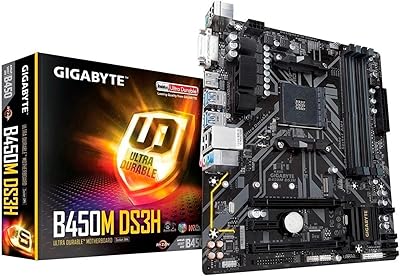
86%
87%
Performance
91%
Value for Money
88%
Build Quality
90%
Power Delivery
83%
Cooling Efficiency
More

FAQ

It depends on the BIOS version the board shipped with. Units manufactured after mid-2021 often come pre-flashed with Ryzen 5000 support, but older stock may require a BIOS update first using a compatible Ryzen 3000-series CPU. If you do not have an older chip to use, it is worth contacting the retailer to confirm the board ships with an updated BIOS before you buy.

Yes — two 16GB DDR4 sticks will get you to 32GB in dual-channel mode, and that is the practical ceiling here. With only two DIMM slots, upgrading beyond 32GB would require replacing both sticks entirely, so if you think you may need 64GB down the road, that two-slot limitation is worth factoring into your decision now.

No, and that is an AMD chipset-level restriction rather than a GIGABYTE decision. The A520 platform does not permit CPU multiplier overclocking. Memory overclocking via XMP profiles is supported though, so faster RAM kits can still run at their rated speeds. If CPU overclocking matters to you, a B550 or X570 board is the right path.

For a straightforward Ryzen 5 or Ryzen 7 productivity build where overclocking is off the table, it remains a solid value. B550 adds CPU overclocking support, PCIe 4.0 bandwidth, and generally richer connectivity, so if any of those matter to your build, the modest price difference for B550 is justified. For a no-frills home office or first-time build, this board still earns its place.

No, neither Wi-Fi nor Bluetooth is included. If wireless connectivity is essential, you will need to add a PCIe Wi-Fi card or a USB Wi-Fi adapter separately. For setups with access to a wired Ethernet run, the onboard GbE LAN handles networking reliably without any add-ons.

The board offers three physical video outputs — HDMI, DVI-D, and D-Sub — but most Ryzen G-series APUs support only two simultaneous displays regardless of how many ports are present. You can mix and match whichever two outputs suit your monitors, but all three active at once generally requires a discrete GPU.

The M.2 slot is designed for PCIe 3.0 x4 NVMe drives in the standard 2280 (80mm) form factor, which covers the vast majority of mainstream NVMe SSDs on the market. Make sure you buy an NVMe drive rather than a SATA M.2 drive — both use the same physical slot, but PCIe NVMe is considerably faster and is what this slot is optimized for.

The A520M S2H provides a CPU fan header, a CPU optional header, and one or two system fan headers — enough for a basic build, but potentially limiting once you add multiple case fans and a tower cooler. If you are planning a build with three or more case fans, a PWM fan hub is a practical and inexpensive way to stay within the available headers.

Yes, when paired with a Ryzen 5000 or supported Ryzen 4000G processor, which meets Microsoft’s CPU and TPM 2.0 requirements for Windows 11. The board supports firmware TPM (fTPM) through the BIOS, which handles the TPM requirement without needing a physical module. Ryzen 3000 series chips fall outside Microsoft’s official Windows 11 CPU support list, though they may run it with certain workarounds.

It can handle light-duty home server use — notably, it does support ECC unbuffered RAM, which is a useful data integrity feature at this price point. That said, the limited storage ports and lean I/O make it a poor fit for a storage-heavy NAS. For a simple file server or low-traffic home lab machine it is adequate, but purpose-built server hardware makes more sense for anything demanding.

Where to Buy