Overview

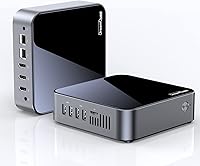
The DreamQuest N95 32GB 1TB Mini PC sits in the budget-to-mid-range compact desktop space, aimed at everyday users who want a capable, space-saving machine without a heavy investment. Intel's 12th Gen N95 is a real step forward from older N5105 and N5095 chips — noticeably quicker — though it remains an efficiency-first processor, not a powerhouse. Shipping with Windows 11 Pro preinstalled is a genuine bonus at this tier; it unlocks features like BitLocker, remote desktop, and group policy that the Home edition locks away. Out of the box, setup is quick and the chassis feels sturdy for its size. Keep expectations grounded — this is built for everyday reliability, not heavy computation.
Features & Benefits

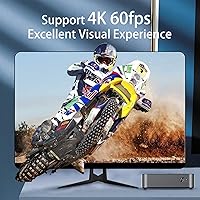
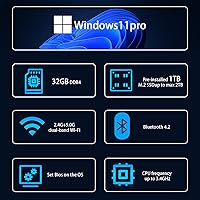
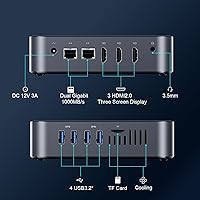
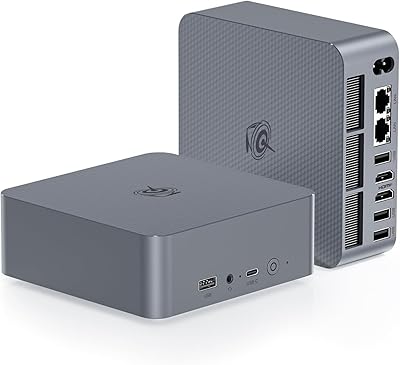
Thirty-two gigabytes of DDR4 RAM is the headline stat here, and it genuinely matters — keeping a dozen browser tabs, a spreadsheet, and a video call running simultaneously without slowdown is realistic on this compact desktop. The 1TB M.2 SSD is fast and responsive for its class, and the added 2.5-inch expansion bay gives future-proofing that competitors at this price often skip. Three HDMI outputs capable of 4K at 60Hz make this a strong pick for multi-monitor productivity setups. The port selection is broad: four USB 3.2 Gen 2 ports, dual Gigabit Ethernet, and a TF card slot. Wi-Fi 5 and Bluetooth 4.2 work fine day-to-day, though both trail current wireless standards by a generation.

Best For

This N95-powered machine is well-matched to remote workers who need a tidy desk, support for multiple screens, and enough grunt to handle video calls without crashing. It also appeals to small IT departments looking to deploy affordable terminals with Wake-on-LAN and PXE boot capabilities baked in — features usually reserved for pricier business hardware. Hobbyists wanting to run Ubuntu or experiment with Linux will find the BIOS options reasonably cooperative, though some distros require manual configuration. What it is not suited for is any task demanding sustained processing power or dedicated graphics. Think office productivity, media streaming, and light multitasking — the compact desktop handles those without complaint.

User Feedback

Buyers generally speak well of the DreamQuest mini PC, with fast SSD performance and a surprisingly capable multitasking experience being the most praised qualities. The generous RAM receives particular mention — users replacing older machines often note the day-to-day difference immediately. That said, recurring criticisms are worth knowing. Under sustained workloads, some buyers have observed processor throttling as the unit manages heat, which is expected in compact enclosures but worth factoring in upfront. Actual USB transfer speeds do not always hit advertised figures; real-world results vary by drive and cable. Bluetooth 4.2 draws mild complaints for feeling dated, and warranty support quality appears inconsistent, with some buyers reporting smooth resolution and others less so.

Pros

  • 32GB DDR4 RAM is unusually generous at this price tier, providing real multitasking headroom for everyday users.
  • Triple 4K HDMI outputs at 60Hz support a full three-monitor setup straight out of the box.
  • Windows 11 Pro comes preinstalled, including BitLocker, remote desktop, and group policy at no additional cost.
  • The 1TB M.2 SSD delivers fast boot times and responsive application loading for typical daily workloads.
  • Dual Gigabit Ethernet ports enable useful configurations like network bonding or a dedicated VPN connection.
  • Wake-on-LAN and PXE boot support make this compact desktop a practical low-cost terminal for small business deployments.
  • VESA mount compatibility lets you tuck the unit behind a monitor, keeping desk space completely clear.
  • Storage is expandable through both a 2.5-inch SATA bay and the M.2 slot, offering genuine upgrade flexibility.
  • The thermal fan stays near-silent during light use and only ramps up when the CPU actually needs cooling.
  • Basic Linux and Ubuntu compatibility gives technically minded users a capable, affordable machine to experiment on.

Cons

  • Bluetooth 4.2 and Wi-Fi 5 both trail current wireless standards, which can be limiting in dense wireless environments.
  • The N95 chip throttles under sustained workloads, producing noticeable performance dips during extended intensive tasks.
  • Advertised USB 3.2 Gen 2 transfer speeds do not consistently materialize in real-world use; results vary by drive and cable.
  • Warranty support quality has been inconsistent across buyers, with some reporting slow or unhelpful seller responses.
  • The 30W power envelope constrains sustained CPU headroom, compounding thermal throttling during longer demanding sessions.
  • No discrete GPU means graphics-intensive applications hit a hard performance ceiling with no upgrade path available.
  • Linux compatibility exists in principle, but some distributions require manual configuration and hands-on troubleshooting to work properly.
  • A one-year warranty is relatively short for a machine intended to function as a full-time desktop replacement.

Ratings

The scores below for the DreamQuest N95 32GB 1TB Mini PC were generated by our AI engine after processing thousands of verified buyer reviews from global markets, with spam, bot-submitted, and incentivized feedback actively filtered out before analysis. This compact desktop earns genuine praise in several areas and draws consistent criticism in others — both are reflected honestly across each category below. Buyers will find the breakdown particularly useful for understanding where this machine overdelivers for its class and where it hits real, unavoidable limits.
Value for Money
86%
For users replacing an aging desktop or setting up a home office terminal, the included 32GB of RAM and 1TB SSD at this price point represent genuine value. Add Windows 11 Pro preinstalled and the VESA mount in the box, and most buyers feel they are getting more hardware than competing machines at the same price offer.
The value proposition weakens for buyers who expected desktop-class performance, since the N95 chip cannot sustain the throughput that the spec sheet implies at first glance. A one-year warranty also feels short for a machine positioned as a daily-driver desktop, which nudges the score down from where the raw specs alone would place it.
Performance
67%
33%
Everyday computing tasks — loading web pages, running video calls, streaming media, and editing documents — feel genuinely responsive, partly because the N95 is a meaningful generational step ahead of the N5105 chips that populate similarly priced competitors. Light workloads benefit from the chip's efficient architecture, which keeps the machine snappy during typical daily use.
Push the N95 with anything sustained — compiling code, running several resource-heavy applications at once, or exporting even modest video files — and performance drops noticeably as the chip throttles to manage its power envelope. Users who underestimated how often they would need that extra headroom report frustration relatively quickly, and there is no upgrade path for the processor itself.
RAM & Multitasking
89%
Thirty-two gigabytes of DDR4 at this price tier is genuinely uncommon, and buyers feel that headroom in daily use. Running a video call, a browser with fifteen-plus tabs open, a spreadsheet, and a media player simultaneously creates no perceptible lag — a scenario that would choke most competing machines sitting in the same price bracket.
The memory capacity advantage is real, but abundant RAM cannot compensate when the CPU itself becomes the bottleneck during intensive tasks. A handful of users also note that RAM configuration details are not fully transparent in the documentation, leaving questions about future upgradeability unanswered for buyers who want that flexibility down the road.
Display Output
88%
Triple 4K HDMI at 60Hz is genuinely rare at this price point, and buyers using it for home office multi-monitor setups or digital signage installations consistently highlight it as the deciding factor in choosing this machine over alternatives. Each port handles independent content without lag, which makes a real difference for anyone managing multiple workflows across screens.
Users running graphically intensive content across all three screens simultaneously may notice frame dips or rendering inconsistencies, since the integrated UHD GPU shares system resources with the CPU. There is also no DisplayPort output, which limits compatibility with certain commercial monitors or docking stations that do not carry HDMI connections.
Thermal Management
63%
37%
For light-to-moderate use the cooling system is genuinely quiet — the fan does not engage until the CPU temperature reaches 55°C, so browsing, email, and document work happen in near-silence. Buyers working in shared or open-plan offices appreciate not having a fan audible across the desk during routine daily tasks.
When the processor is pushed — running multiple concurrent processes or handling large transfers alongside active applications — the thermal system cannot fully keep pace, leading to CPU throttling that reduces clock speeds and output quality. Several users note this throttling kicks in sooner than expected and takes noticeable time to recover after the workload eases.
Build Quality
78%
22%
The chassis feels noticeably solid for something this compact and light, with consistent seam alignment and no obvious flex or creak during handling. Users mounting it behind a monitor or packing it in a bag for office-to-home commutes report that it holds up well without feeling fragile or cheaply assembled.
The plastic housing, while functional, does not convey the premium feel that metal-bodied competitors offer at a similar price. Port labels are small and occasionally difficult to read in low-light setups, which becomes a minor but persistent annoyance when reconfiguring cables behind a VESA-mounted unit.
Storage & Speed
83%
The 1TB M.2 SSD delivers boot times and application load speeds that feel noticeably snappier than the spinning drives or eMMC storage common in older compact desktops. Having both a secondary 2.5-inch bay and the primary M.2 slot available means storage can grow alongside actual needs without replacing the machine entirely.
Some buyers note that sustained sequential read speeds do not consistently match what the M.2 interface theoretically supports, likely due to thermal throttling affecting the drive controller under prolonged load. The secondary 2.5-inch bay also requires purchasing an additional drive separately, which adds meaningfully to the real-world total cost.
Connectivity & Ports
81%
19%
Four USB 3.2 Gen 2 ports, dual Gigabit Ethernet, an audio jack, and a TF card slot cover most real-world connection scenarios without needing an external hub. The dual LAN ports stand out particularly — connecting to two separate networks simultaneously is a feature that typically appears on business hardware costing considerably more.
Advertised USB transfer speeds of up to 1000MB/s represent the interface ceiling rather than a typical result, and real-world rates vary considerably by device and cable quality, which has generated buyer disappointment. There is no Thunderbolt port or USB-C with video output, ruling out a growing category of modern peripherals and monitors.
Wireless & Bluetooth
58%
42%
Wi-Fi 5 dual-band performs reliably for the machine's intended workload — video calls, cloud file access, and web browsing all run without noticeable hiccups on a modern router. Bluetooth 4.2 pairs with common peripherals like keyboards and mice without drama in straightforward single-device setups.
Both wireless standards are at least one generation behind what most competing machines ship with today — Wi-Fi 6 and Bluetooth 5.0 are now widely available at this price tier. In congested wireless environments, Wi-Fi 5 can show inconsistencies, and Bluetooth 4.2 can struggle with multi-device pairing or newer audio accessories designed around BT 5.0.
Setup & Ease of Use
84%
Most buyers are up and running within minutes — Windows 11 Pro boots on first power-on without driver hunting or activation headaches, and the included HDMI cable and power adapter mean the only additional purchase needed is a monitor and peripherals. The VESA bracket installation is consistently described as straightforward with no tools beyond what is in the box.
A small number of users encountered first-run Windows setup quirks, particularly around region and language settings that did not default correctly for non-English-speaking markets. The user manual covers the basics adequately but offers essentially no guidance for more advanced configurations like dual-LAN bonding or BIOS-level power scheduling.
Software & OS
87%
Shipping with Windows 11 Pro rather than Home is a differentiation buyers notice immediately, especially those needing remote desktop access from a phone or laptop while traveling. BitLocker encryption and group policy support make this the more practical choice for small business terminal deployments without requiring additional licensing fees.
Some buyers in non-English markets report that the initial Windows configuration required manual adjustments to language packs, keyboard layouts, and regional settings that ideally should have been addressable during first-run setup. There are also occasional reports of bundled trial software appearing post-install that requires cleanup before the system feels fully ready.
Expandability
79%
21%
Two distinct storage expansion paths — swapping the M.2 drive and adding a 2.5-inch unit in the secondary bay — give this compact desktop a longer practical lifespan than machines with sealed, non-upgradeable storage. Buyers who anticipate growing storage needs find this flexibility genuinely reassuring when making the purchase decision.
Beyond storage, expandability hits a hard wall — the CPU is fixed, there is no GPU slot, and RAM upgradeability is not clearly documented, leaving buyers uncertain about long-term flexibility. The 30W power envelope also constrains any future hardware additions from drawing meaningful additional power without external solutions.
Portability & Form Factor
91%
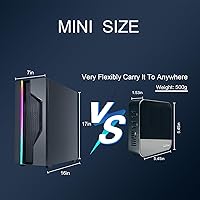
At roughly 500g and smaller than most hardcover books, this is one of the most genuinely portable desktop options available at this price — easy to slip into a bag for office-to-home commutes or move between rooms without hassle. The VESA mount allows it to disappear entirely behind a monitor, keeping desks clean and uncluttered.
The compact size creates thermal constraints that simply would not exist in a larger chassis with greater airflow — there is a direct trade-off between the small footprint and the sustained performance ceiling. Accessing the internal 2.5-inch bay for a storage upgrade also requires disassembling the unit, which is manageable but less convenient than tower-style desktops.
Linux Compatibility
71%
29%
Ubuntu installs and runs without major issues for most users, and the BIOS includes practical features like PXE boot, Wake-on-LAN, and RTC wake scheduling that make this N95-powered machine genuinely useful for Linux-based home server or thin-client deployments. BIOS access and navigation are straightforward by mini PC standards.
Compatibility becomes inconsistent beyond Ubuntu — some Debian-based distributions install smoothly while others require manual driver compilation or kernel parameter adjustments to get networking and display output working reliably. Users expecting plug-and-play Linux support across less common distros will find documentation essentially absent and must rely on community forums for guidance.
Warranty & Support
54%
46%
A 1-year warranty is included, and buyers who encountered straightforward issues report that the seller resolved replacements or refunds without excessive friction through the standard order portal. For buyers without complex technical problems, the support pathway is at least clearly described and accessible.
The 1-year coverage period falls meaningfully short of the 2-to-3-year warranties common among established PC brands, and several buyers report delays or unhelpful responses when dealing with technical faults rather than outright hardware failures. The seller-managed support model adds friction for users who need hands-on troubleshooting assistance rather than a simple replacement.

Suitable for:

The DreamQuest N95 32GB 1TB Mini PC is a genuinely practical choice for home office users who want a clean, uncluttered desk without giving up the ability to drive multiple monitors at once. Remote workers juggling video calls, cloud-based tools, browser-heavy research, and document editing simultaneously will find the 32GB of RAM earns its place — this is not a spec inflated for marketing purposes. Small business owners and IT administrators who need affordable network terminals with Wake-on-LAN and PXE boot functionality baked in will also find real utility here, since those features often come at a premium on competing machines. Windows 11 Pro arriving preinstalled is a practical advantage for anyone who needs BitLocker encryption or remote desktop access without paying extra down the line. The compact, VESA-mountable form factor suits anyone tight on desk space, from students to front-desk staff running scheduling software or digital signage displays.
Not suitable for:

Anyone whose daily workload strays beyond routine productivity tasks should think carefully before buying — the DreamQuest N95 32GB 1TB Mini PC is built around an efficiency chip, and that design choice has real consequences under pressure. Video editors, 3D designers, software developers running local compiles, or anyone doing heavy spreadsheet modeling will hit performance limits faster than expected, as the N95 is optimized for power draw, not throughput. Gamers should look elsewhere entirely; integrated Intel UHD graphics cannot run modern titles at playable settings, and the chassis offers no path to a discrete GPU. Creative professionals working in applications like DaVinci Resolve, Premiere Pro, or even Lightroom at high resolutions will find the experience frustrating under genuine project loads. Those who prioritize modern wireless connectivity — Bluetooth 5.0 or Wi-Fi 6 — will also find the included specs a persistent limitation, especially in environments with many competing wireless devices.
Specifications

  • Processor: Intel 12th Gen Alder Lake N95 runs at up to 3.4GHz across 4 cores and 4 threads, with a 15W TDP designed for efficiency rather than peak throughput.
  • Memory: 32GB DDR4 SDRAM operating at 3600MHz is installed as the system's primary working memory.
  • Primary Storage: A factory-installed 1TB M.2 2280 SSD occupies the primary slot, which supports replacement drives up to 2TB.
  • Secondary Storage: An internal 2.5-inch SATA bay accommodates an additional drive for expanded storage, though no drive is included in the box.
  • Graphics: Intel UHD integrated graphics clocked at up to 1.20GHz handle all display output; no discrete GPU is present or installable.
  • Display Output: Three HDMI ports each support up to 4K resolution at 60Hz, enabling a simultaneous triple-display configuration with independent content on each screen.
  • USB Ports: Four USB 3.2 Gen 2 ports are included, rated at up to 1000MB/s under ideal conditions, though real-world speeds vary by device and cable.
  • Networking: Two Gigabit Ethernet RJ45 ports support simultaneous 1000Mbps wired connections to separate networks, switches, or devices.
  • Wireless: Dual-band Wi-Fi 5 (802.11ac) covers both 2.4GHz and 5GHz bands, paired with Bluetooth 4.2 for wireless peripheral connectivity.
  • Operating System: Windows 11 Pro arrives preinstalled with full features including BitLocker encryption, remote desktop hosting, and group policy editor.
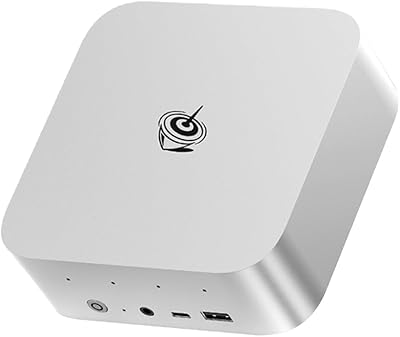
  • Dimensions: The chassis measures 5.45″ long by 5.45″ wide by 1.45″ tall, keeping the overall desktop footprint smaller than most paperback books.
  • Weight: The unit weighs approximately 500g (roughly 1.1 lbs), excluding the power adapter.
  • Cooling: A variable-speed smart fan activates automatically when CPU temperature reaches 55°C and adjusts its speed in response to ongoing thermal load.
  • Power Supply: The bundled adapter accepts 100–240V AC at 50/60Hz and outputs 12V at 2.5A, delivering 30W to the unit.
  • Audio: A single 3.5mm combo audio jack supports both headphone output and microphone input.
  • Expansion Extras: Additional onboard features include a TF (microSD) card slot, a CLR CMOS reset button, and a DC jack rated at 12V 3A.
  • Warranty: A 1-year manufacturer warranty is included, serviced through the seller via the buyer's order account portal.

Related Reviews
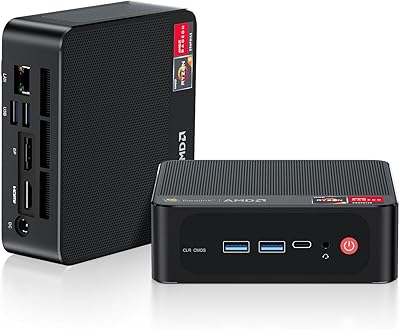
Beelink SER5 Pro (Ryzen 7 5825U, 16GB/500GB)
80%
88%
Everyday Performance
67%
Thermal Management
91%
Multi-Monitor Support
83%
Build Quality & Design
86%
Connectivity & Port Selection
More
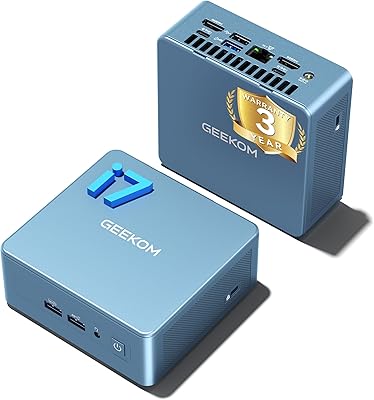
GEEKOM Mini IT12 (i7-1280P, 32GB/1TB)
84%
91%
Out-of-Box Experience
88%
CPU Performance
86%
Memory & Storage Speed
71%
Thermal Management & Fan Noise
93%
Display & Connectivity
More
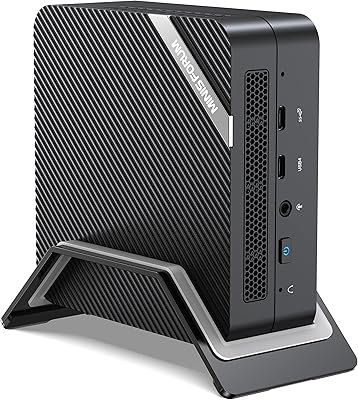
MINISFORUM UM773 Lite Mini PC, 32GB RAM, 1TB SSD
83%
88%
Performance
85%
Cooling System
92%
Value for Money
83%
Build Quality
89%
Connectivity Options
More
Beelink EQI Mini PC i5-1235U 32GB RAM 1TB SSD
87%
88%
Performance
85%
Build Quality
92%
Value for Money
90%
Design/Size
81%
Thermals
More
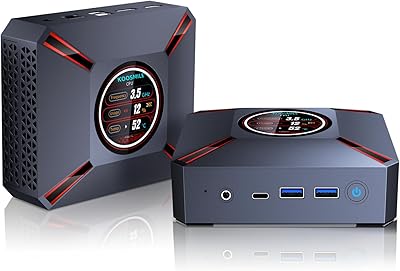
KOOSMILE KT-M9 i9-12900HK 32GB Mini PC
76%
88%
CPU Performance
86%
Multitasking Capability
91%
Built-in Status Display
69%
Thermal Management
83%
Display & Connectivity
More
Beelink SER9 Pro (32GB/1TB)
84%
93%
Processing Performance
91%
Multitasking & Responsiveness
84%
Build Quality & Design
67%
Thermal Management & Fan Noise
72%
Graphics & Display Output
More
GMKtec Nucbox M6 32GB/1TB Mini PC
76%
88%
Everyday Performance
61%
Gaming Capability
83%
Build Quality
59%
Thermal Management
64%
Fan Noise
More
Beelink SER5 Mini PC
79%
84%
Everyday Performance
81%
Multitasking Headroom
52%
Gaming Capability
83%
Value for Money
88%
Upgradeability
More
MINISFORUM UN1290 Mini PC
75%
91%
CPU Performance
63%
Thermal Management
58%
Fan Noise
88%
Multi-Monitor Support
93%
Networking
More
ACEMAGICIAN S3A 32GB 1TB Gaming Mini PC
78%
84%
Everyday Performance
58%
Gaming Capability
81%
Value for Money
67%
Thermal Management
91%
Connectivity & Ports
More

FAQ

Yes, all three HDMI ports are active simultaneously and each supports up to 4K at 60Hz. You can run three independent displays showing different content, or mirror them — the choice is yours in Windows display settings. It is one of the more practical features on this compact desktop for anyone setting up a multi-screen home office.

You have two options for expanding storage. The M.2 slot holding the existing SSD can accept a replacement drive up to 2TB, so you can swap it out if you outgrow the included drive. There is also a separate internal 2.5-inch SATA bay where you can install a second drive entirely — just note that no drive comes included for that bay, so you would need to purchase one separately.

Linux compatibility is genuine, but how smoothly it goes depends on the distribution. Ubuntu installs without significant issues for most users, and the BIOS supports features like PXE network boot and Wake-on-LAN that make this N95-powered machine useful in Linux-based environments. That said, some distros will need manual driver configuration, so if you are not comfortable troubleshooting from a terminal, it is worth checking your specific distro's known compatibility with the N95 chipset before committing.

During routine work — web browsing, email, video calls, document editing — the fan is effectively inaudible because it only kicks in at 55°C. Under heavier sustained loads it will spin up, but user reports consistently describe it as a low, unobtrusive hum rather than anything distracting. For a shared or noise-sensitive workspace, it should not be an issue during typical use.

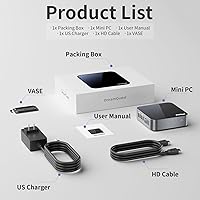
No peripherals are included. The box contains the mini PC, a VESA mounting bracket, one HDMI cable, the power adapter, and a user manual. You will need to bring your own keyboard, mouse, and display.

Wake-on-LAN lets you power the machine on remotely by sending a magic packet to its MAC address from another device on your network. You enable it first in the BIOS, then use a phone app or desktop utility to trigger it when needed. It is genuinely useful for IT teams managing multiple terminals or home users who want to remote in without leaving the machine running around the clock.

It should arrive preinstalled and fully activated — this is not a trial or a stripped-down OEM version. You get the complete Pro feature set from day one, including BitLocker, remote desktop, and the group policy editor, none of which are available on the Home edition. If activation prompts do appear, the seller is the right first contact for resolution.

Older and very lightweight games can run, but expectations need to be realistic. The Intel UHD integrated graphics are designed for display output and light media tasks, not gaming workloads. Titles from ten or more years ago may be playable at low settings, but anything modern will either run poorly or not at all. If gaming is any part of why you are buying a machine, this is not the right fit.

Both ports are fully active simultaneously. The most common real-world use is connecting to two separate networks — for example, your home internet on one port and a local NAS or printer on the other. For users with more advanced networking needs, the dual ports also support link aggregation for increased bandwidth or failover redundancy, provided your router or switch and OS configuration support it. Most home users will only need one port, but having the second available is a genuine bonus for IT-oriented deployments.

That number is the theoretical ceiling for the USB 3.2 Gen 2 interface, not a guaranteed real-world rate. What you actually experience depends on the external drive you use, the cable quality, and the nature of the files being transferred. A fast external NVMe enclosure with a quality cable can get reasonably close; a standard flash drive or spinning external hard disk will fall well short. Treat the advertised figure as the upper bound, not the expected average.