Overview

The Cyseed WiFi Extender entered the market in mid-2025 as a practical option for households struggling with dead zones across larger floor plans. It advertises coverage up to 10,000 square feet — an ambitious figure that applies to best-case, open-layout conditions rather than the average home packed with walls and interference. Worth noting: despite the dual-band spec listing, real-world performance leans heavily on the 2.4 GHz band, which trades raw speed for range. As a newer brand with limited long-term track record, expectations should be grounded. This range booster is built to solve a specific problem — patchy signal — not to replace a high-performance router.

Features & Benefits

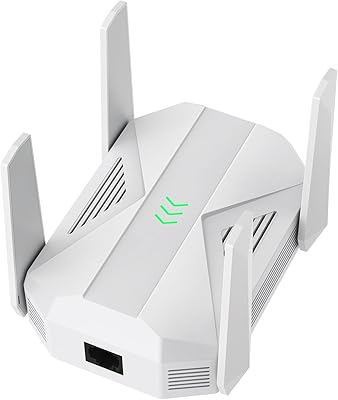
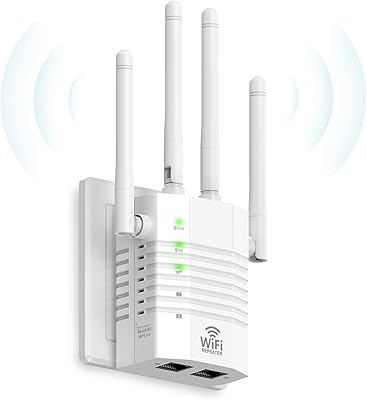
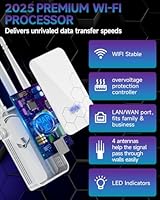
Four external antennas give this network repeater a clear physical advantage in pushing signal through walls and around corners compared to compact, antenna-free alternatives. The five operating modes — Repeater, Client, AP, Bridge, and Router — add genuine versatility; the AP mode alone makes it useful for converting a wired ethernet connection into a wireless network, which is a practical setup for basement offices or detached garages. The WPS one-tap setup works as advertised for most users — press the button, wait a few seconds, done. An onboard ethernet port rounds things out for anyone who prefers a wired connection to a nearby device for lower latency.

Best For

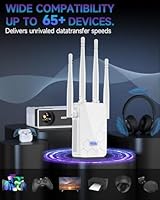
This range booster suits large single-story homes, open-plan apartments, or any space where the router simply can't reach a far corner. It's a strong fit for non-technical users who want something that installs without logging into a router admin panel or reading a manual. Renters with no control over their router hardware will appreciate the plug-and-play approach. Families running a mix of smart home gadgets, IP cameras, and streaming devices will find the 65-plus device capacity useful. Anyone specifically needing AP mode to go from wired to wireless in a secondary space gets real practical flexibility here.

User Feedback

Early buyers consistently highlight how fast and painless the setup process is — a recurring theme across short-term reviews. Where opinions split is on the actual coverage range: several users in larger or multi-story homes report the real-world reach falls noticeably short of the advertised figure, which is common territory for repeaters as a category. Speed drop-off after the signal hop is another honest limitation buyers mention, particularly for bandwidth-heavy tasks like 4K streaming or video calls. Long-term stability data is still thin given the product's recent launch. On balance, users in the right use case — mid-sized home, light-to-moderate usage — report solid value for the price.

Pros

  • One-tap WPS pairing gets most users online in under two minutes with zero technical knowledge required.
  • Five operating modes, including AP and Bridge, give this range booster real versatility beyond simple repeating.
  • Works with virtually any router brand out of the box — compatibility is rarely an issue in practice.
  • The built-in ethernet port lets you hardwire a nearby TV or console, bypassing wireless speed loss entirely.
  • Handles 60-plus connected devices without visibly choking under typical household load.
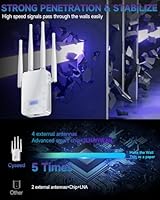
  • Four external antennas push signal through walls more effectively than compact, antenna-free alternatives.
  • Compact enough to sit on a shelf or desk without dominating the space around it.
  • No app installation or account creation required — fully offline setup keeps the process friction-free.
  • At its price point, the feature set is broader than most single-purpose extenders in the same tier.

Cons

  • Real-world coverage falls noticeably short of the 10,000 sq ft headline figure in most typical home layouts.
  • Speed degradation after the wireless hop makes it unreliable for 4K streaming or video calls from the extended zone.
  • No WPA3 support is a meaningful gap for anyone who has upgraded their primary router to modern security standards.
  • Some users report the device needing a manual reboot after one to two weeks of continuous operation.
  • The instruction guide is thin — anything beyond basic WPS setup requires hunting for answers online.
  • Long-term reliability is an open question; the product has too short a history to assess durability confidently.
  • Only a single ethernet port limits wired connectivity to one device at a time.
  • Performance under heavy simultaneous load from high-bandwidth devices is inconsistent and below the advertised ceiling.
  • Indicator lights provide no useful feedback on whether the chosen placement spot is receiving a strong enough signal.

Ratings

The Cyseed WiFi Extender has been evaluated by our AI system after parsing verified purchase reviews from buyers worldwide, with spam, bot activity, and incentivized feedback actively filtered out. Scores reflect the honest spread of real user experiences — the wins and the frustrations alike. Both standout strengths and recurring pain points are represented transparently across each category below.

Ease of Setup
91%
The WPS one-tap pairing is consistently the most praised aspect across early buyer reviews. Most users report being fully connected within a couple of minutes, with no app downloads or router login required — a genuine relief for anyone who dreads networking tasks.
A small number of users with older or less common router models found the WPS button pairing unreliable and had to fall back on manual configuration, which is less intuitive and not well-documented in the included materials.
Signal Coverage
67%
33%
In open single-story layouts, this range booster delivers a meaningful improvement — users report previously dead corners of the home picking up usable signal for the first time, particularly helpful for smart home devices and security cameras stationed far from the main router.
The 10,000 sq ft advertised figure is a ceiling, not a typical result. Buyers in multi-story homes or spaces with thick concrete or brick walls frequently report the actual usable range falling well short, sometimes covering less than half the advertised area.
Speed Performance
62%
38%
For light tasks like browsing, checking email, or streaming standard-definition content, the extended signal holds up reasonably well. Users running smart home sensors or basic IoT devices on the fringes of their network report consistent enough connectivity for those low-demand applications.
Speed degradation after the signal hop is a real and recurring complaint. Users trying to stream 4K content or join video calls from the extended network report noticeable lag and buffering — a fundamental limitation of the single-band 2.4 GHz architecture that no firmware update can fully fix.
Device Capacity
74%
26%
Households juggling a mix of smartphones, tablets, smart TVs, IP cameras, and voice assistants report that this network repeater handles the load without visibly choking under the pressure of simultaneous connections — a practical plus for busy family environments.
While 65-plus devices is the marketed figure, performance under that ceiling is uneven. Power users who stress-tested the device with many high-bandwidth devices active simultaneously noticed stability dips that suggest the real comfortable ceiling is lower than advertised.
Operating Mode Flexibility
83%
The five operating modes are a genuine differentiator at this price point. AP mode in particular earns praise from users who needed to convert a wired ethernet drop in a basement or garage into a wireless access point — a use case most basic extenders simply cannot serve.
Switching between modes requires some comfort with basic networking concepts, and the instruction guide does not walk users through each scenario with enough clarity. A couple of reviewers got stuck trying to activate Bridge or Client mode without additional online research.
Build Quality
71%
29%
The four external antennas give this range booster a sturdy, planted feel on a desk or shelf. The plastic housing feels reasonably solid for the price tier, and the unit does not run hot even after extended use — a reassuring sign for always-on devices.
The overall aesthetic is purely functional, and the plastic finish picks up fingerprints and scuffs easily. A few buyers noted the antenna joints feel slightly loose out of the box, raising minor questions about longevity with repeated repositioning.
Connection Stability
64%
36%
For users who set it up in a stable location and leave it running, the connection holds reasonably well over several days. Smart home devices that simply need to stay online — rather than demand speed — tend to remain connected without frequent drops.
Some buyers report the device needing a reboot after a week or two of continuous use, with signal dropping unexpectedly overnight. Long-term stability data is still limited given the product only launched in mid-2025, so the full picture is not yet clear.
Ethernet Port Utility
78%
22%
The onboard ethernet port is a quiet but useful addition. Users who placed this network repeater near a smart TV or gaming console were able to run a wired connection directly from the unit, sidestepping the speed penalty of wireless entirely for that one device.
The ethernet port only supports a single wired connection, which limits its usefulness in setups where multiple nearby devices could benefit from a direct cable. A dual-port configuration would have made this feature substantially more practical.
Router Compatibility
86%
The compatibility claim holds up well in practice. Buyers using equipment from major brands — TP-Link, Netgear, ASUS, Xfinity, and similar — report no pairing issues. The WPS handshake works across a wide variety of router firmware versions without requiring any manual adjustments.
Users on ISP-supplied combination modem-router units occasionally hit snags, particularly with providers that disable WPS by default on their hardware. This is an edge case, but worth noting for renters or users who cannot access their ISP gateway settings.
Security Features
72%
28%
WPA/WPA2 encryption is standard and adequate for most home networks. Users appreciate that the device does not require them to create a separate secondary network — it can broadcast under the same SSID as the main router, keeping the home network feeling unified.
There is no WPA3 support, which is increasingly the baseline expectation for new networking hardware in 2025. Security-conscious buyers who have already upgraded their primary router to WPA3 will find this a step backward in the extended coverage zone.
Value for Money
77%
23%
Compared to mesh systems or premium extenders that cost two to three times as much, this range booster offers a reasonable feature set at an accessible price. For users with modest needs — eliminating one or two dead zones in a mid-sized home — the cost-to-benefit ratio holds up.
Buyers who purchased expecting premium-tier speed and rock-solid reliability felt the value proposition weaken quickly. At this price point the trade-offs are real, and a few reviewers noted they ended up spending more shortly after on a mesh node that performed more consistently.
Package & Documentation
58%
42%
The box includes the essentials without excess clutter, and the physical setup card is simple enough to get most users through the WPS pairing process without any confusion. The product arrives ready to use without any mandatory account creation or app installation.
The documentation quality drops sharply once basic WPS setup is complete. Instructions for alternate modes, troubleshooting dropped connections, or configuring the device manually are sparse and vague — leaving users to search for answers on third-party forums.
Indicator Lights & Placement Guidance
61%
39%
LED status indicators do give useful feedback during the pairing process — a solid light clearly signals a successful connection, which removes the guesswork that plagues some competing units. Placement suggestions on the packaging point users toward the router midpoint as a starting location.
Beyond the basic pairing confirmation, the indicator light system is limited. There is no visual feedback to help users determine whether their chosen placement spot is actually receiving an optimal signal strength, which can mean subpar performance that goes unnoticed.

Suitable for:

The Cyseed WiFi Extender is a practical pick for anyone dealing with dead zones in a larger single-story home, open-plan apartment, or spread-out ranch-style layout where the main router simply cannot reach every corner. Renters are a particularly good fit here — there is no need to log into a router admin panel or call an ISP, just a WPS button press and the device is live. Families running a mix of smart speakers, IP cameras, streaming sticks, and connected appliances will appreciate the generous device capacity, since the network rarely feels starved even when everyone is online at once. The AP mode makes it genuinely useful beyond basic repeating — if you have an ethernet port in a detached garage, basement office, or back bedroom, this range booster can turn that wired drop into a usable wireless signal without any complicated setup. For buyers who want something affordable and functional that installs in minutes without reading a manual, this network repeater hits a sweet spot that more expensive solutions often overlook.

Not suitable for:

The Cyseed WiFi Extender is not the right tool for buyers who need fast, consistent speeds throughout a multi-story home or a space with thick concrete or brick construction — the 2.4 GHz band prioritizes range over throughput, and walls compound that limitation quickly. Anyone who regularly streams 4K content, relies on video conferencing, or plays online games from an extended zone will likely find the speed drop-off after the wireless hop genuinely frustrating rather than just a minor inconvenience. The device is also a poor match for security-minded users who have already standardized on WPA3 across their network, since this range booster tops out at WPA2. Because the product only launched in mid-2025, buyers who need proven long-term reliability data before committing should be cautious — the track record simply does not exist yet to confirm how it performs after six to twelve months of continuous use. Users hoping to wire up multiple nearby devices will also find the single ethernet port limiting compared to alternatives with multi-port switches built in.

Specifications

  • Brand: Manufactured and sold under the Cyseed brand, launched into the market in June 2025.
  • Dimensions: The unit measures 10.28 x 3.66 x 2.13 inches, making it compact enough to sit on a shelf or desk without occupying much space.
  • Weight: At 7.4 ounces, this range booster is lightweight and easy to reposition around the home as needed.
  • Frequency Bands: Operates on both 2.4 GHz and 5 GHz frequency bands, though real-world extended coverage relies primarily on the 2.4 GHz band for range.
  • Antennas: Equipped with four external antennas designed to improve signal spread across multiple directions and improve penetration through walls and floors.
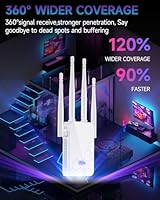
  • Coverage Area: Advertised maximum coverage reaches up to 10,000 sq ft under optimal, open-layout conditions — real-world results in typical homes will vary.
  • Max Devices: Supports up to 65 simultaneous connected devices via an onboard smart IC chip managing network traffic distribution.
  • Operating Modes: Offers five configurable modes — Repeater, Client, AP, Bridge, and Router — to accommodate a range of home and small-office network configurations.
  • Setup Method: Primary setup is accomplished via a single WPS button press, requiring no app, browser login, or technical configuration for most users.
  • Ethernet Port: Includes one RJ45 ethernet port, allowing a single wired device to connect directly to the extender for lower-latency performance.
  • Security Protocols: Supports WPA and WPA2 wireless security encryption standards; WPA3 is not supported on this device.
  • Router Compatibility: Designed to work with approximately 99% of consumer router brands and models available on the market.
  • Processor: Powered by a 2.4 GHz ultra-core processor intended to manage simultaneous device connections and maintain signal stability under load.
  • ASIN: Amazon Standard Identification Number for this product is B0FC636RWV.
  • BSR Ranking: Holds a Best Sellers Rank of number 17 in the Repeaters category on Amazon at the time of listing.
  • Launch Date: This network repeater was first made available for purchase on June 6, 2025.
  • Color: Available in white, with a standard plastic housing finish.
  • Package Contents: The package includes the extender unit with four attached external antennas and basic setup documentation.

Related Reviews
WAVLINK AX3000 WiFi 6 Outdoor WiFi Extender
87%
94%
Outdoor Coverage
89%
WiFi Performance
90%
Weatherproof Build
86%
Installation Ease
88%
Signal Penetration
More
Hyzom WiFi Extender
Hyzom WiFi Extender
83%
89%
Coverage Range
85%
Signal Stability
83%
Device Capacity
91%
Setup & Installation
78%
Build Quality
More
Xilkoze WiFi Extender
86%
91%
Setup and Installation
88%
WiFi Coverage
84%
Performance (Speed and Stability)
92%
Compatibility with Devices
78%
Signal Range in Large Homes
More
HMTYQNB AC2100 WiFi Extender
83%
87%
Performance
92%
Value for Money
91%
Setup & Installation
88%
Range & Coverage
84%
WiFi Speed & Stability
More
Reyee REX12 WiFi Extender
86%
88%
Wi-Fi Coverage
94%
Setup & Installation
83%
Signal Stability
79%
Data Transfer Rate
85%
Build Quality
More
YKMBFEQC 300Mbps WiFi Extender
83%
93%
Ease of Setup
85%
WiFi Coverage Range
88%
Dual-Band Performance
80%
Signal Stability
87%
Compatibility with Devices
More
Speedwave WiFi Extender 2025
84%
91%
WiFi Coverage
94%
Ease of Setup
88%
Dual-Band Performance
85%
Connection Stability
74%
Speed Consistency
More
MIKKOA WiFi Extender 1200Mbps
85%
91%
WiFi Range and Coverage
88%
Setup and Installation
85%
Performance and Speed
82%
Build Quality and Durability
90%
Compatibility with Devices
More
AOOEPU WiFi Extender 1200Mbps
85%
88%
WiFi Coverage
94%
Ease of Setup
85%
Speed & Performance
80%
Reliability
82%
Device Capacity Support
More
rockspace AC2100 WiFi Extender
85%
88%
Performance
91%
Setup Process
80%
WiFi Coverage
87%
Device Connectivity
85%
Build Quality
More

FAQ

It is broadly compatible with the vast majority of consumer routers — TP-Link, Netgear, ASUS, Linksys, and ISP-supplied hardware included. The WPS pairing method handles most connections automatically. The only real edge case is ISP-supplied modem-router combos where WPS has been disabled by the provider, which can require a workaround.

Treat that number as a best-case ceiling, not a typical result. In a wide-open, single-story layout with minimal walls, you might approach it. In a normal home with interior walls, furniture, and floors between levels, expect the effective range to be noticeably lower. Placing the extender at the midpoint between your router and the dead zone will get you the best realistic result.

Yes, to some degree — that is a fundamental characteristic of all WiFi repeaters, not a flaw specific to this device. When a repeater receives and retransmits a signal wirelessly, you typically lose a portion of throughput. For light browsing, smart home devices, and standard-definition streaming it is rarely noticeable, but for 4K video or video calls the speed drop can become frustrating.

Genuinely, yes. The WPS setup is about as close to plug-and-play as home networking gets — you press the WPS button on your existing router, then press the button on this range booster, and within about 30 seconds they pair automatically. No passwords to type, no browser configuration pages to navigate. Most users with zero networking experience report being fully set up in under two minutes.

AP mode lets you plug an ethernet cable into the extender and broadcast that wired connection as a wireless network. It is useful if you have a cable outlet or ethernet drop in a room that currently has no wireless coverage — a basement, a detached garage, or a back bedroom. If you are just trying to boost an existing wireless signal, you do not need AP mode and the standard Repeater mode will serve you better.

You can configure the Cyseed WiFi Extender to broadcast under the same SSID as your main router, which keeps your home network feeling unified. Your devices will connect to whichever signal is strongest without you needing to manually switch networks as you move through the house.

The 65-device figure is the theoretical maximum. In practice, the comfortable operational ceiling tends to be lower, particularly if those devices are doing anything bandwidth-heavy simultaneously. For a typical household running smart home gadgets, phones, laptops, and a couple of streaming devices, you are unlikely to hit any capacity wall. Where things can get shaky is when many high-demand devices are all actively transferring data at the same time.

It requires a constant power connection to operate — there is no built-in battery. You will need to position it near a power outlet, which is worth factoring into your placement decisions when trying to find the optimal spot between your router and the dead zone.

Yes, it is designed for always-on operation. Users report that the unit does not run particularly hot even after extended continuous use, which is a reasonable sign for long-term reliability. That said, since the product only launched in mid-2025, there is not yet a meaningful body of evidence covering performance beyond several months of sustained use.

If the WPS pairing fails — which can happen with certain older routers or ISP gateways — you can fall back on manual configuration through the device's web interface by connecting directly to its temporary network and logging into the admin page. The included documentation covers this only briefly, so you may need to consult the manufacturer's website or online resources for a step-by-step walkthrough of the manual method.