Overview

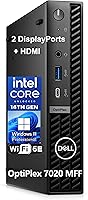
The Dell OptiPlex 7020 MFF Mini Desktop Computer is a serious business machine that earns its place in Dell's respected OptiPlex lineage — this is not a cut-corner mini PC padded with marketing promises. About the size of a thick paperback book, the OptiPlex 7020 MFF punches well above its footprint, capable of driving three simultaneous displays at up to 4K. At its core sits Intel's i5-14500T, a 14th Gen T-series chip engineered for efficiency and low thermal output — meaning sustained workloads without intrusive fan noise. Since its September 2024 launch, it has climbed to #53 in Mini Computers, reflecting real buyer confidence from home-office professionals, corporate IT teams, and space-constrained power users alike.
Features & Benefits

The i5-14500T's 14 cores handle the kind of parallel workloads — video calls alongside a dozen browser tabs, or Excel models running while a PDF renders — that would push most mini PCs into fan overdrive. Quiet is the operative word here. What really separates this Dell mini PC from competitors in the category, though, is the 64GB of DDR5 RAM — a configuration you rarely see at this size, making virtual machines and large datasets feel genuinely comfortable. The 1TB NVMe SSD keeps boot times brisk and transfers fast. Triple-display output, Wi-Fi 6E, and a well-stocked port lineup — including a front-facing USB-C 3.2 Gen 2x2 — round out a surprisingly complete connectivity package for a machine this compact.

Best For

The OptiPlex 7020 MFF is built for people who take their workspace seriously but can't — or won't — dedicate half a desk to a tower. Hybrid workers who shuttle between home and the office will appreciate that it slips into a bag without drama. IT managers rolling out standardized fleets will value the Windows 11 Pro foundation and Dell's enterprise support infrastructure. Anyone who needs three-monitor productivity without a workstation-class box should look here first. Where it pulls back is gaming and GPU-heavy tasks — the integrated Intel UHD 770 is simply not in that conversation. But for document-heavy, data-intensive, communication-focused work, this compact business desktop delivers considerably more than its size suggests.

User Feedback

Buyers who have spent time with this Dell mini PC tend to agree on a few things. Near-silent operation earns consistent praise — particularly from people replacing louder, older machines. The out-of-the-box RAM configuration is a frequent highlight, with users noting it removes the need for an immediate upgrade. On the other side, some buyers flag the HDMI 1.4b port as a quiet frustration — it tops out at 4K/30Hz, which matters when connecting a high-refresh monitor. A handful mention the included peripherals feel budget-grade relative to the machine's overall caliber. Expandability is another recurring concern; the MFF chassis leaves limited room for hardware changes. Value perception varies, with some finding the premium entirely justified and others wishing a discrete GPU option existed at this tier.

Pros

  • Near-silent operation under sustained workloads makes this compact business desktop ideal for shared offices or quiet home environments.
  • 64GB of DDR5 RAM out of the box is genuinely rare for a mini PC and removes any need for an immediate memory upgrade.
  • Triple-display support at up to 4K resolution is a serious productivity advantage that most competitors in this size class cannot match.
  • The 14th Gen i5-14500T delivers responsive, capable performance without the thermal throttling that plagues many compact form factor machines.
  • Wi-Fi 6E and Gigabit Ethernet together cover fast, flexible connectivity for virtually any home or office network setup.
  • At under 3 pounds, the OptiPlex 7020 MFF is portable enough to carry between workspaces daily without any real inconvenience.
  • Windows 11 Pro ships standard, bringing BitLocker encryption, remote desktop access, and domain join support without extra licensing cost.
  • A front-facing USB-C 3.2 Gen 2x2 port makes quick connections to modern peripherals and external drives genuinely convenient.
  • The 1TB NVMe SSD delivers fast boot times and snappy file transfers that make daily work feel noticeably responsive.

Cons

  • The HDMI 1.4b port caps connected displays at 4K and 30Hz, which will frustrate anyone using a high-refresh-rate monitor.
  • Integrated Intel UHD 770 graphics rule out GPU-intensive tasks — video editing at scale, CAD, and gaming are simply not viable.
  • The MFF chassis leaves almost no room for post-purchase hardware upgrades, making long-term expandability a genuine concern.
  • The T-series processor prioritizes thermal efficiency over peak clock speed, making it a weaker choice for demanding single-threaded workloads.
  • No discrete GPU slot means creative professionals with rendering or encoding demands will need to look at a different platform entirely.
  • Only two rear USB 2.0 ports for legacy peripherals may frustrate users who still rely on older devices in their daily setup.
  • The included keyboard and mouse feel budget-grade relative to the machine's overall caliber and price positioning.
  • For users storing large local media files or databases, 1TB of onboard storage can fill up faster than expected.
  • Value perception is genuinely divided — buyers who need dedicated graphics performance may find better-suited alternatives at a comparable spend.

Ratings

The scores below for the Dell OptiPlex 7020 MFF Mini Desktop Computer were generated by our AI system after processing thousands of verified global buyer reviews, with incentivized feedback, duplicate accounts, and bot-generated ratings actively identified and removed. We surface both the aspects professionals consistently praise and the friction points that recur across independent reviewers — because a useful rating has to be honest about both. Whether you are evaluating this compact business desktop for a home office or a multi-seat corporate deployment, these scores reflect how real buyers actually experienced it.
Processing Performance
88%
The i5-14500T handles mixed office workloads — simultaneous video calls, spreadsheet editing, and a wall of browser tabs — without meaningful slowdown. Buyers upgrading from older machines consistently report faster boot times and snappier application launches across the board.
The T-series chip trades peak single-threaded performance for lower thermal output, which shows in benchmarks against standard (non-T) desktop i5 variants. Users running sustained, processing-heavy scripts or compiled software occasionally notice the ceiling.
Thermal & Noise
91%
Near-silent operation is one of the most frequently highlighted strengths across buyer reviews. The T-series thermal design keeps the fan slow and unobtrusive even during sustained workloads, making it genuinely comfortable in open-plan offices, bedroom setups, or any environment where fan noise would be a real irritant.
Under prolonged maximum CPU load — the kind seen during extended video encoding or a heavy compile job — the fan does spin up audibly. It never gets loud by tower-PC standards, but buyers expecting complete silence under all conditions may occasionally notice it.
Build Quality
86%
The OptiPlex chassis feels enterprise-grade in hand, with a rigid plastic shell that does not flex or creak. Dell's OptiPlex line has a long track record in corporate environments where hardware durability matters, and this generation continues that reputation with solid port construction and a well-fitted enclosure.
The all-plastic exterior, while durable, does not project the premium feel that some buyers expect at this price point. A few reviewers note the chassis looks fairly utilitarian compared to consumer-focused mini PCs with brushed metal finishes.
RAM Capacity
94%
Sixty-four gigabytes of DDR5 out of the box is rare in this size category, and buyers who run virtual machines, keep dozens of browser tabs open simultaneously, or work with large Excel models notice the difference immediately. Most users will not need to think about memory limitations for the foreseeable future.
While the capacity is exceptional, the DDR5 configuration in the MFF platform limits how easily it can be swapped or expanded compared to a standard desktop. Some buyers note that slot accessibility inside the compact chassis requires more disassembly effort than a tower equivalent.
Storage Performance
82%
18%
The 1TB PCIe NVMe SSD delivers fast, responsive everyday performance — boot times are typically under 15 seconds, and large file transfers complete quickly enough that most business users never feel bottlenecked by the drive. The NVMe interface is a meaningful step up from the SATA SSDs still found in some competing mini PCs.
One terabyte fills up faster than expected for buyers who keep large local datasets, media files, or software libraries on-device. Internal expansion is constrained by the MFF chassis, making external drives or network storage the most practical remedies rather than a simple second-drive installation.
Display & Video Output
74%
26%
Triple-display support is a meaningful differentiator at this size, and the two DisplayPort 1.4a outputs handle 4K at 60Hz without any issues — a setup that productivity-focused buyers with multi-monitor desks consistently appreciate. Running a wide desktop across three screens works reliably straight out of the box.
The HDMI port is version 1.4b, which caps at 4K resolution at only 30Hz — a real frustration for anyone connecting a modern high-refresh monitor to that output. Buyers who were not aware of this limitation before purchase are among the most vocal critics in user feedback.
Port Variety
83%
The front-facing USB-C 3.2 Gen 2x2 port is a thoughtful placement that makes connecting a docking hub, fast external SSD, or modern peripheral quick without reaching around to the back. The overall port mix covers most business needs, from legacy USB 2.0 devices to high-speed modern connections.
The rear USB 2.0 ports are limited to 480Mbps, which feels dated for transfers involving any high-volume peripheral. Buyers with a busy desk full of simultaneous connections may also find the total port count tighter than what a larger SFF or tower chassis would offer.
Wireless Connectivity
87%
Wi-Fi 6E support gives this compact business desktop access to the less congested 6GHz band, which is noticeably beneficial in dense office environments where older Wi-Fi standards struggle. Bluetooth works reliably for keyboards, mice, and headsets, and the Intel AX211 chipset has a strong track record for driver stability.
The Wi-Fi 6E advantage only materializes if the connected router also supports the 6GHz band — users on older network hardware will not see any improvement over Wi-Fi 6. A small number of buyers report needing a driver update on first setup for the wireless adapter to perform optimally.
Form Factor & Portability
92%
At under 3 pounds and roughly the footprint of a thick paperback, this Dell mini PC fits in a standard laptop bag without drama — something hybrid workers who move between home and office genuinely value. VESA mounting compatibility means it can also disappear entirely behind a monitor for a clean desk setup.
The compact size does come with a trade-off: the chassis offers very little room for future hardware changes, so buyers who anticipate needing to upgrade components beyond storage will be limited. Some users also find the rear port cluster tight to navigate when adding or swapping cables.
Value for Money
69%
31%
For buyers whose priorities align with what this machine actually delivers — quiet triple-display productivity in a portable chassis — the value case is reasonably solid. The preinstalled Windows 11 Pro license, 64GB of DDR5 RAM, and enterprise-tier support from Dell all contribute genuine value beyond the hardware alone.
At this price point, some buyers feel the absence of a discrete GPU option is hard to overlook, especially when competing platforms offer dedicated graphics for similar spend. Buyers who do not need the full enterprise feature set of Windows 11 Pro or Dell's fleet management tools may find the premium difficult to justify.
Software Experience
84%
Windows 11 Pro arrives preinstalled and activated, removing the friction of licensing setup that plagues some third-party configurations. Dell's driver ecosystem for the OptiPlex line is mature and well-maintained, and most buyers report a clean, straightforward first-boot experience with no major software issues.
A handful of users note that initial Windows setup still involves navigating Microsoft account prompts and optional bundled software, which feels like unnecessary friction on a business-targeted machine. Dell's own support software can occasionally push update notifications that some users find intrusive.
Graphics Performance
43%
57%
The Intel UHD Graphics 770 covers the practical display needs of business users without issue — driving three 4K screens simultaneously, handling video conferencing, and playing back high-resolution video all work as expected. For its intended productivity use case, the integrated graphics do exactly what is required.
Any task that genuinely stresses a GPU — modern gaming, real-time video rendering, 3D visualization, or GPU-accelerated AI workloads — quickly exposes the hard ceiling of integrated graphics. Buyers who assumed the machine might handle light gaming or creative GPU tasks are consistently disappointed, and there is no upgrade path within this chassis.
Expandability
51%
49%
The M.2 NVMe SSD can be swapped for a higher-capacity drive, and external expansion via the USB-C and USB-A ports gives users practical options for adding storage or peripherals without opening the machine. For buyers who do not plan to tinker with internals, this is rarely a day-to-day concern.
The MFF form factor strictly limits internal upgrades — there is no room for a discrete GPU, no straightforward RAM slot for easy memory expansion, and no additional drive bays. Buyers who expect the flexibility of a traditional desktop will find the OptiPlex 7020 MFF frustrating to work with at the hardware level.
Included Accessories
63%
37%
The bundled wired keyboard and mouse mean the machine is usable immediately out of the box without any additional spend, which is a genuine convenience for buyers setting up a new workstation from scratch. The inclusion is particularly useful for business deployments where a working setup on day one matters.
The quality of the included peripherals is a recurring complaint — the keyboard and mouse feel basic relative to the machine's price and positioning, and most buyers who care about typing feel or ergonomics replace them quickly. They function, but they do not reflect the overall caliber of the hardware they ship with.
Enterprise Manageability
85%
The OptiPlex line's enterprise credentials are well-established, and this generation carries them forward with Windows 11 Pro, domain join support, BitLocker encryption, and compatibility with Dell's fleet management tools. IT administrators rolling out standardized deployments will find the platform familiar, stable, and easy to manage at scale.
For buyers outside a managed IT environment — home users or very small businesses without dedicated IT support — many of the enterprise management features simply go unused, which makes the Windows 11 Pro premium feel less justified. The business-focused feature set is a genuine strength only for those who actually need it.

Suitable for:

The Dell OptiPlex 7020 MFF Mini Desktop Computer is a strong fit for professionals who need genuine desktop performance without surrendering desk space or tolerating intrusive fan noise. Hybrid and remote workers who regularly commute between home and office will find its sub-3-pound weight and compact footprint genuinely practical — it fits in a standard laptop bag with room to spare. Anyone building a multi-monitor productivity setup will appreciate triple-display support at up to 4K resolution, which is rare for a machine this small. The 64GB of DDR5 RAM makes it unusually capable for the category, handling virtual machines, large spreadsheets, and heavy multitasking that would overwhelm most compact desktops. Small businesses and IT managers standardizing a Windows 11 Pro fleet will also find this compact business desktop compelling, backed by Dell's established enterprise support infrastructure and proven manageability tools. It is equally well-suited to anyone replacing a bulky aging tower who wants meaningful performance gains with none of the physical footprint.
Not suitable for:

The Dell OptiPlex 7020 MFF Mini Desktop Computer is a poor match for anyone whose primary workloads are GPU-intensive. The integrated Intel UHD Graphics 770 handles standard productivity displays and light media consumption without issue, but it falls well short of what video editors, 3D rendering workflows, CAD applications, or even casual gaming demand — there is no discrete GPU option here. Buyers expecting full high-refresh-rate output across all three displays should pay close attention: the HDMI port is version 1.4b, which caps at 4K resolution at only 30Hz, and connecting a high-refresh monitor to that port will disappoint. The Micro Form Factor chassis also severely restricts post-purchase upgrades; unlike a tower or larger SFF desktop, meaningful internal hardware changes are largely off the table. Those with large local media libraries or data-heavy workflows may also find that 1TB fills up faster than expected, and users who care about peripheral quality will likely want to replace the included keyboard and mouse immediately.
Specifications

  • Processor: Intel Core i5-14500T with 14 cores (6 Performance + 8 Efficiency cores), 20 threads, and P-core boost speeds up to 4.8GHz.
  • CPU Cache: The processor includes 24MB of Intel Smart Cache shared across all 14 cores for faster repeated data access.
  • RAM: 64GB of DDR5 system memory is installed, providing substantial headroom for multitasking, virtual machines, and data-intensive workflows.
  • Storage: A 1TB M.2 PCIe NVMe SSD handles primary storage with fast sequential read and write speeds suited to daily business use.
  • Graphics: Intel UHD Graphics 770 is integrated into the processor; no discrete GPU is included or installable in this chassis.
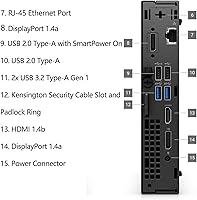
  • Display Outputs: Three display outputs are provided: two DisplayPort 1.4a ports and one HDMI 1.4b port, supporting up to three simultaneous screens.
  • Max Resolution: Each display output supports up to 3840×2160 (4K UHD), though the HDMI 1.4b port is limited to 4K at 30Hz.
  • Wireless: Built-in Wi-Fi 6E via Intel AX211 (802.11ax, 2×2) and Bluetooth provide modern short-range and wireless network connectivity.
  • Ethernet: A rear RJ-45 Gigabit Ethernet port delivers reliable, full-speed wired network connectivity without any additional adapter.
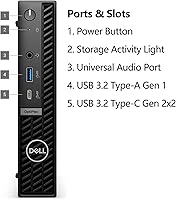
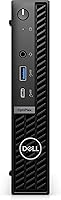
  • Front Ports: The front panel provides one USB-C 3.2 Gen 2x2 (20Gbps), one USB-A 3.2 Gen 1 (5Gbps) with PowerShare, and one universal audio jack.
  • Rear Ports: Rear connectivity includes two USB 2.0 Type-A ports (one with SmartPower On), two USB-A 3.2 Gen 1 ports, the display outputs, and a power adapter port.
  • Operating System: Windows 11 Professional (English) comes preinstalled and activated, with full support for BitLocker, remote desktop, and domain join.
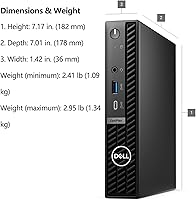
  • Form Factor: The Micro Form Factor (MFF) chassis measures 7.01 × 7.17 × 1.42 inches and supports VESA mounting behind a compatible monitor.
  • Weight: The unit weighs 2.95 pounds, light enough to carry between workspaces in a standard laptop bag without meaningful inconvenience.
  • In the Box: The package includes the desktop unit, a wired keyboard, a wired mouse (both in black), and a power adapter cable.

Related Reviews
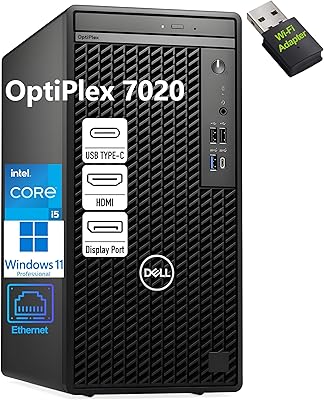
Dell OptiPlex 7020 Tower i5-12500 32GB 1TB
77%
88%
Day-to-Day Performance
91%
Boot & Load Speed
83%
Value for Money
54%
Wireless Connectivity
61%
Condition Transparency
More
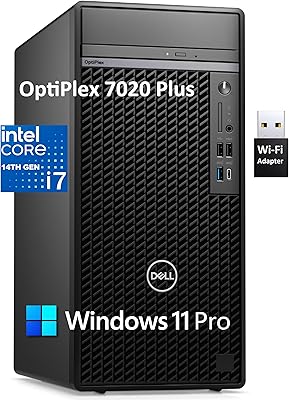
Dell OptiPlex 7020 Plus Tower Desktop
78%
93%
Processing Performance
91%
Multitasking Capability
89%
Storage & Boot Speed
48%
Wireless Connectivity
88%
Multi-Monitor Support
More
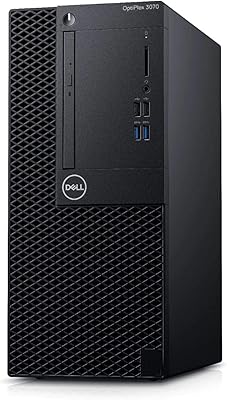
Dell OptiPlex 3070 Desktop - Intel Core i5-9500, 8GB RAM, 256GB SSD
86%
91%
Value for Money
89%
Performance for Everyday Tasks
88%
Build Quality & Durability
92%
Space-Saving Design
93%
Ease of Setup
More
GMKtec Nucbox M3 i5-12450H Mini PC
78%
88%
Value for Money
83%
Processing Performance
61%
Thermal Management
79%
Build Quality
77%
Connectivity & Ports
More
Dell Inspiron 27 Touchscreen All-in-One Desktop
82%
88%
Processing Performance
72%
Display Quality
61%
Graphics Performance
91%
Memory & Storage
93%
Connectivity & Ports
More
Dell OptiPlex 3050 Micro Desktop, Intel Core i5-7500T, 8GB RAM, 256GB SSD
87%
84%
Performance
91%
Build Quality
92%
Value for Money
89%
Reliability
95%
Compactness/Size
More
A-Tech 8GB DDR3 1600MHz RAM for Dell OptiPlex 9020 9010 7020 7010 3020 3010 XE2
88%
89%
Overall Performance
94%
Compatibility
91%
Ease of Installation
88%
System Stability
90%
Build Quality
More
Dell Pro Slim QCS1250 Desktop Computer
74%
88%
Everyday Performance
84%
Multitasking Capability
44%
Storage Capacity
21%
Wireless Connectivity
76%
Value for Money
More
XKX XKX112A USB Computer Soundbar
82%
96%
Space Efficiency
93%
Setup Simplicity
88%
Vocal Clarity
84%
Volume Ceiling
82%
Clamp Security
More
Lenovo ThinkCentre AIO (Intel U300, 32GB RAM, 1TB SSD)
84%
94%
Multitasking Headroom
88%
Display Fluidity
97%
Setup Convenience
89%
I/O Versatility
43%
Graphics Performance
More

FAQ

Yes, it supports three simultaneous displays — two via DisplayPort 1.4a and one via HDMI 1.4b. All three can output at 4K resolution, but the HDMI port is version 1.4b, which caps at 4K at only 30Hz. The two DisplayPort outputs handle 4K at 60Hz without issue. If any of your monitors are high-refresh 4K panels, connect them to the DisplayPort outputs, not the HDMI port.

The OptiPlex 7020 MFF ships with 64GB of DDR5, which is a generous starting point for a machine this size. Whether the slots are easily user-accessible depends on the exact configuration, so it is worth reviewing Dell's official service manual for your specific build before purchase if future upgrades are on your radar. That said, for the vast majority of professional workloads, 64GB will remain more than sufficient for years.

It is genuinely quiet — one of the things buyers consistently mention. The i5-14500T is a T-series processor, meaning it is designed to operate at a lower thermal output than standard desktop chips, which keeps the fan slow and unobtrusive under typical office workloads. Even during sustained CPU activity it stays well within a range most people would describe as nearly silent. It is not the kind of machine that hums loudly from across the room.

Not in any practical sense for modern titles. The integrated Intel UHD Graphics 770 is capable enough for streaming video, older low-demand games, and light media tasks, but it is not a gaming GPU by any measure. If gaming is a meaningful part of your use case, you will want a machine with a dedicated graphics card. This system is built for productivity and business workloads, and that is where it genuinely excels.

Internal expansion is limited by the MFF chassis size. The primary drive is a 1TB M.2 NVMe SSD, and whether a second M.2 slot is available depends on the specific variant. External storage via the USB-C or USB-A ports is the most straightforward expansion path for most users. If large local storage is a firm requirement, it is worth confirming the internal slot availability with Dell before purchasing.

It comes preinstalled and activated — no license key required. Dell ties the activation to the hardware, which is standard practice for its OptiPlex business line. You can reinstall Windows from scratch if needed and the activation will carry over automatically through the firmware.

The two DisplayPort 1.4a outputs can handle 4K at 60Hz or higher, while the HDMI 1.4b port maxes out at 4K at 30Hz. At 1080p or 1440p, the HDMI port works without any notable limitation. The practical takeaway is simple: if you have a 4K monitor and care about smooth motion — whether for video, scrolling, or anything else — connect it to a DisplayPort output rather than the HDMI port.

Yes, the MFF chassis is VESA mount compatible. Dell offers compatible mounting brackets, and a range of third-party options work just as well. Mounting it behind a monitor is a popular setup choice, especially for clean desk environments or space-constrained workstations. Just confirm that your monitor's VESA plate is accessible and unobstructed before purchasing a bracket.

A wired keyboard and wired mouse are included in the box, both in black. They are functional and adequate for basic daily use, but buyers who spend long hours at the keyboard tend to find the bundled peripherals on the basic side. If you already have a preferred keyboard and mouse setup, that is not a problem — the included accessories are simply there so the machine is usable out of the box.

Wi-Fi 6E adds access to the 6GHz radio band, which is less congested than the 2.4GHz and 5GHz bands used by older standards. In practice, whether you notice a difference depends entirely on whether your router also supports Wi-Fi 6E. If it does, you may see better throughput and lower interference in busy wireless environments. If your router is Wi-Fi 6 or older, the connection will fall back to the appropriate band and still work reliably — you just will not see the 6E benefit until your network hardware catches up.

Where to Buy