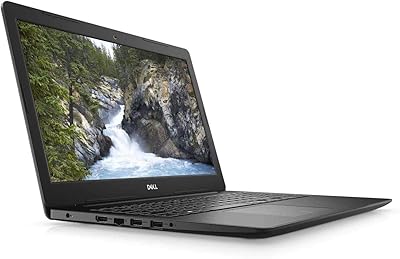
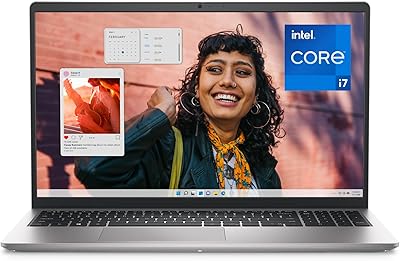
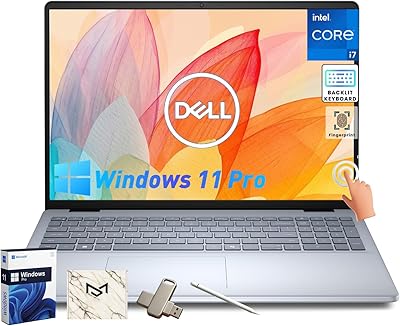
Dell Inspiron 15 3535 Touchscreen Laptop

Dell Inspiron 15 3535 Touchscreen Laptop — image 1
Dell Inspiron 15 3535 Touchscreen Laptop — image 2
Dell Inspiron 15 3535 Touchscreen Laptop — image 3
Dell Inspiron 15 3535 Touchscreen Laptop — image 4
Dell Inspiron 15 3535 Touchscreen Laptop — image 5
Dell Inspiron 15 3535 Touchscreen Laptop — image 6
73%
27%

Overview

The Dell Inspiron 15 3535 Touchscreen Laptop is one of Dell's more practical additions to the refreshed 3000 series, arriving in late 2024 with a clear focus on students and everyday office users. Powered by AMD's Ryzen 5 7530U, it covers the bases you'd expect from a capable daily driver without pushing into premium territory. At under 3.6 pounds and less than an inch thick, this Dell Inspiron travels well enough for a commute or a long day on campus. What actually adds value here is the included Windows 11 Pro and a lifetime Office license — not a trial or a subscription, making it a more complete package out of the box.

Features & Benefits

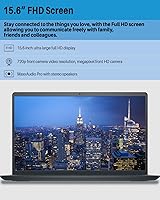
The 15.6-inch full HD touchscreen is the most distinctive aspect of this Inspiron 15 3535 relative to non-touch rivals at this price. Sharp enough for documents, video streaming, and casual photo viewing, the touch layer adds a natural way to scroll and interact, especially in tablet-style workflows. With 16GB of RAM, you can juggle browser tabs, spreadsheets, and video calls simultaneously without the kind of slowdown that plagues budget machines. The 1TB NVMe SSD boots quickly and handles large file libraries with ease. Connectivity is practical — two USB 3.0 ports, one USB 2.0, and Wi-Fi — and the numeric keypad is a thoughtful inclusion for number-heavy work.

Best For

This touchscreen laptop is most at home in the hands of college students who need a reliable all-rounder for writing, research, and the occasional video lecture. Remote and hybrid workers will find the bundled Office suite a genuine time-saver — having everything installed permanently from day one removes one recurring cost from the equation. It also works well as a shared family machine, where the larger display and touch interface make it accessible across different ages. If you're coming from an older laptop with a spinning hard drive, the speed difference you'll notice from the NVMe SSD alone makes the upgrade feel worthwhile. Light multitaskers will feel right at home; heavy creatives or gamers will want to look elsewhere.

User Feedback

User reviews paint a generally positive picture for everyday use, with display clarity and touch responsiveness among the more praised aspects. The keyboard draws reasonable marks, though the trackpad gets occasional criticism for inconsistency under heavier use. Battery life is where opinions diverge most — light users tend to get through a full day, while those taxing the CPU more heavily often reach for the charger by mid-afternoon. The 720p webcam is the most repeated complaint; it gets the job done for basic calls but won't satisfy anyone prioritizing video quality. Build quality and hinge durability are generally considered solid for the price point, nothing remarkable but nothing worrying either.

Pros

  • The lifetime Microsoft Office license is a genuine long-term saving that most rivals at this tier do not include.
  • A full terabyte of NVMe SSD storage means most users will never need an external drive for everyday files.
  • The touchscreen adds real flexibility for navigation, sketching notes, and casual browsing beyond what non-touch rivals offer.
  • Sixteen gigabytes of RAM handles everyday multitasking — browsers, documents, video calls — without noticeable slowdown.
  • Windows 11 Pro is a step above the Home edition that usually ships on budget machines, adding useful security and management tools.
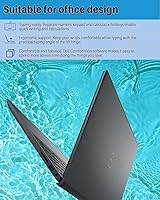
  • The numeric keypad is a practical bonus that saves time for anyone doing financial or data-entry work regularly.
  • Boot times are fast and the system feels responsive from the moment you open it up.
  • At under 3.6 pounds, this Dell Inspiron is light enough for a backpack without being a burden on longer commutes.
  • Build quality feels solid for the price range, with no obvious flex or flimsiness in daily handling.
  • The 15.6-inch display size strikes a good balance between screen real estate and portability for most users.

Cons

  • The 720p webcam produces soft, grainy footage that falls short of what most users now expect for video calls.
  • Battery life under heavier workloads can be disappointing, often requiring a charger well before the end of a full day.
  • The trackpad has drawn consistent criticism for inconsistent responsiveness, especially during more precise cursor work.
  • Integrated graphics mean this machine is simply not equipped for any GPU-intensive software or modern gaming titles.
  • Wi-Fi is limited to 802.11ac, meaning it will not take full advantage of faster Wi-Fi 6 or 6E home networks.
  • The display, while clear, can struggle with glare and brightness in outdoor or brightly lit environments.
  • Only one USB 2.0 port and two USB 3.0 ports leave little room for users who regularly connect multiple peripherals.
  • There is no optical drive, which remains a genuine inconvenience for users who still work with physical media.
  • The plastic chassis, while adequate, does not convey the durability that more demanding users might want from a daily machine.
  • RAM is DDR4 rather than the faster DDR5 found in newer competing platforms, which may matter to performance-conscious buyers.

Ratings

The Dell Inspiron 15 3535 Touchscreen Laptop scores below are generated by AI after analyzing thousands of verified global buyer reviews, with spam, bot activity, and incentivized feedback actively filtered out. The results reflect a balanced picture — genuine strengths and real frustrations — drawn from users across student, home office, and family use cases. Where this machine earns praise and where it falls short are both represented transparently in each category below.

Value for Money
83%
Buyers consistently point to the lifetime Office license and Windows 11 Pro as meaningful extras that push the perceived value well above similarly priced competitors. For students and home users who would otherwise pay for productivity software separately, the bundled software alone offsets a noticeable chunk of the cost.
Some buyers feel the webcam and battery life do not quite match what the price point implies, and a handful of reviewers noted that competing brands offer faster Wi-Fi standards or brighter displays for a similar outlay. The value equation holds up well for software-focused buyers but less so for hardware purists.
Performance
78%
22%
For everyday multitasking — running a browser with a dozen tabs open alongside a spreadsheet and a video call — the Inspiron 15 3535 handles things without breaking a sweat. Students writing papers, remote workers jumping between apps, and families streaming content all report a responsive and fluid experience under typical loads.
Push the processor into more demanding territory — extended video exports, large photo libraries, or running multiple resource-heavy applications simultaneously — and throttling becomes noticeable. Users who expected this machine to double as a light workstation occasionally found it less capable than the spec sheet implied.
Display Quality
76%
24%
The full HD resolution looks clean and sharp for document work, YouTube, and casual video streaming, and most users find the screen comfortable for extended study or work sessions. The touch layer is responsive and adds genuine utility for scrolling, tapping through presentations, and casual note navigation.
Brightness is a recurring complaint, particularly among users trying to work near windows or in well-lit rooms. Color accuracy is adequate but not impressive, and buyers who use their laptop for photo editing or design work found the display somewhat washed out compared to IPS panels in a similar price bracket.
Battery Life
61%
39%
Under genuinely light use — reading documents, taking notes, or watching video at modest brightness — the battery gets a reasonable number of hours and satisfies users who have predictable, low-demand routines. Occasional users who charge nightly and do not push the machine hard rarely flag battery as a concern.
Anyone running the CPU at sustained loads, streaming at full brightness, or using it through a full day of university classes or back-to-back work meetings will likely need a charger by mid-afternoon. This is probably the most consistently mentioned real-world disappointment across buyer reviews, and it is hard to overlook.
Keyboard & Trackpad
71%
29%
The keyboard layout is comfortable for extended typing sessions, and the inclusion of a numeric keypad is a practical bonus that data-entry users and number-crunchers genuinely appreciate. Key travel feels adequate, and most users find the typing experience easy to settle into after a short adjustment period.
The trackpad draws more mixed feedback — precision suffers during fine cursor movements, and some users report inconsistent tap-to-click sensitivity. A few reviewers noted the surface feels less premium than competitors at a comparable price, and those coming from higher-end laptops noticed the difference immediately.
Build Quality
69%
31%
The chassis holds together well under daily carry and general handling, and most users report no concerning flex or structural weakness after months of regular use. The hinge feels solid through typical open-and-close cycles, which matters a lot for students packing and unpacking the laptop multiple times a day.
The all-plastic construction is functional but does not inspire confidence in its long-term durability for heavier-handed users. A handful of reviewers noted minor creaking in the chassis over time, and the overall finish picks up scratches more readily than aluminum-bodied alternatives.
Webcam Quality
44%
56%
The webcam functions well enough for casual family video calls where image quality is not a priority, and the microphone picks up voice clearly in quiet environments. For low-stakes communication, most users find it gets the job done without needing an immediate workaround.
The 720p resolution is the single most polarizing aspect of this laptop according to reviewer feedback. In anything other than excellent lighting, the image turns soft and grainy, and remote professionals who rely on polished video presence overwhelmingly recommend budgeting for an external webcam from day one.
Storage & Speed
89%
The NVMe SSD makes an immediately tangible difference — boot times are fast, applications launch quickly, and large file transfers happen without the agonizing waits associated with older hard-drive-based machines. Users upgrading from HDD laptops consistently describe the speed improvement as one of the most satisfying aspects of the switch.
While a full terabyte covers most users comfortably, there is no easy cloud storage integration out of the box beyond what Windows 11 provides, and power users working with large media libraries may eventually feel the pinch. The storage itself is excellent; the ecosystem around it is unremarkable.
Multitasking
81%
19%
Sixteen gigabytes of RAM gives this machine a comfortable ceiling for the way most students and office workers actually use a laptop — multiple browser tabs, a video call, Office apps, and a music player running simultaneously without any meaningful slowdown. It handles context-switching well throughout a typical workday.
When workloads spike — running software installations in the background while video conferencing, for example — the system occasionally hesitates before settling back into a steady rhythm. Heavy multitaskers who regularly push ten or more demanding applications at once may notice the ceiling more than average users.
Portability
74%
26%
At under 3.6 pounds and less than an inch thick, this touchscreen laptop is easy enough to drop into a backpack for daily commutes or campus trips. The slim profile means it slides into most laptop sleeves and bags without the bulk that plagued older 15-inch machines.
Compared to ultrabooks and 13-inch form factors, it is still a relatively large and moderately heavy machine for users prioritizing true portability. Those who commute long distances or travel frequently may find the size and weight accumulate over time, especially when carrying other gear.
Software Bundle
86%
The combination of Windows 11 Pro and a lifetime Office license is one of the most frequently praised aspects in buyer reviews, particularly among students and small business users who recognize the real-world cost savings. Having productivity tools permanently available without managing subscription renewals removes a practical headache from day one.
A small number of tech-savvy buyers noted that the lifetime Office version does not receive ongoing feature updates the way Microsoft 365 does, meaning it may feel dated as newer Office features roll out over the coming years. For most everyday users this is a non-issue, but it is worth being aware of.
Connectivity
67%
33%
The dual USB 3.0 ports handle most everyday peripheral needs without issue, and Wi-Fi performs reliably at typical home and office network speeds. Users who only connect a mouse and an occasional external drive find the port selection more than adequate.
Wi-Fi 802.11ac (Wi-Fi 5) is behind the curve at a time when Wi-Fi 6 routers are common in homes and offices, meaning users will not realize the full potential of a faster network. The port count is also limiting for anyone who regularly uses multiple external monitors, drives, or wired peripherals simultaneously.
Display Touchscreen
73%
27%
The touch functionality earns real appreciation from users who annotate documents, scroll through long web pages, or simply prefer tapping over using the trackpad. It adds a layer of interaction that makes the machine feel more versatile, particularly in casual and educational contexts.
There is no active stylus support included, which limits the utility of the touchscreen for precision tasks like handwriting or detailed sketching. Users hoping to use it as a note-taking canvas with a pen will need to purchase a compatible stylus separately, and the experience is still not on par with dedicated pen-input displays.
Thermal Management
65%
35%
Under everyday workloads the laptop stays quiet and the surface temperature remains comfortable, making it a non-issue for the majority of typical use sessions involving documents, browsing, and media.
When the processor is pushed harder — during software updates, large file operations, or sustained multitasking — the fan becomes audible and the underside warms up considerably. Using it on a soft surface like a bed or couch can restrict airflow and accelerate this heating, which is a real concern for the student demographic most likely to buy it.

Suitable for:

The Dell Inspiron 15 3535 Touchscreen Laptop is a strong fit for college students who need a dependable, do-everything machine without overspending. The combination of a responsive touchscreen, ample RAM for multitasking, and a fast SSD covers the full range of coursework demands — from writing papers to joining video lectures. Remote and hybrid workers will also find it practical, particularly because the bundled lifetime Microsoft Office license removes one ongoing software cost that quietly adds up over time. Families in need of a shared home laptop benefit from the large, touch-friendly display that feels accessible to users of different ages and tech comfort levels. Anyone still running an older laptop with a traditional hard drive will notice an immediate and meaningful speed improvement the first time they boot this machine up.

Not suitable for:

Buyers with serious creative or gaming ambitions should look elsewhere — the integrated AMD Radeon graphics in the Inspiron 15 3535 are capable enough for casual media and light workloads, but they are not built for video editing, 3D rendering, or modern gaming titles at decent settings. The 720p webcam is another real limitation for anyone who frequently hosts professional video calls or records content, as it simply does not deliver the image quality that has become a baseline expectation in remote work environments. Users who prioritize display brightness or color accuracy for photo and design work may find the screen underwhelming compared to IPS or OLED panels found on more specialized machines. Those needing a highly portable travel companion may also want to reconsider — at just under 3.6 pounds, it is manageable but not among the lightest options at this price point. Power users who routinely push a machine hard through long work sessions should also temper expectations around battery longevity.

Specifications

  • Display: 15.6-inch full HD touchscreen with 1920x1080 resolution and LED backlighting for clear, sharp visuals in everyday use.
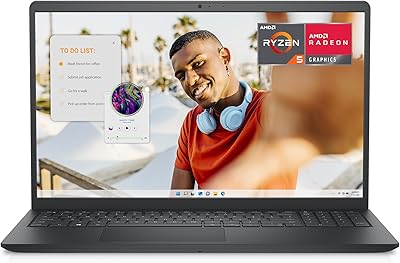
  • Processor: AMD Ryzen 5 7530U with 6 cores, 12 threads, and a boost clock up to 4.5GHz for responsive multitasking and moderate workloads.
  • RAM: 16GB DDR4 SDRAM at 3.9GHz provides enough headroom for running multiple applications simultaneously without significant slowdown.
  • Storage: 1TB M.2 PCIe NVMe SSD delivers fast boot times and broad file storage capacity without relying on slower mechanical drives.
  • Graphics: AMD Radeon integrated graphics handle everyday media playback, web browsing, and light casual gaming at modest settings.
  • Operating System: Windows 11 Pro comes pre-installed, offering enhanced security features and management tools beyond the standard Home edition.
  • Office Suite: A lifetime license for Microsoft Office is included, providing permanent access to core productivity apps without ongoing subscription fees.
  • Webcam: 720p front-facing HD camera with approximately 920,000-pixel resolution is suitable for basic video calls but limited for professional streaming.
  • Wireless: Wi-Fi 802.11ac (Wi-Fi 5) is supported for wireless connectivity, compatible with most modern home and office routers.
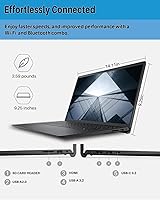
  • Ports: Two USB 3.0 ports and one USB 2.0 port provide standard wired connectivity for peripherals, drives, and accessories.
  • Keyboard: Full-size keyboard includes a dedicated numeric keypad, a feature that is often absent on competing 15-inch machines in this category.
  • Weight: The laptop weighs 3.59 lbs, making it manageable for daily transport between home, class, or office environments.
  • Dimensions: Chassis measures 14.11 x 9.25 x 0.75 inches, maintaining a slim profile that fits standard laptop bags and backpacks comfortably.
  • Optical Drive: No optical drive is included, which is standard for modern slim laptops but worth noting for users who still use physical disc media.
  • Color: Available in Black, offering a professional and understated appearance suitable for both academic and workplace settings.

Related Reviews
Dell Inspiron 15 3535

68%
83%
Value for Money
76%
Performance & Speed
78%
Display Quality
81%
Keyboard & Typing Experience
58%
Battery Life
More
Dell Inspiron 15 3520 Laptop
74%
76%
Performance & Speed
81%
Display Quality
83%
Touchscreen Responsiveness
89%
Storage & Memory
62%
Battery Life
More
Dell Inspiron 3593 15.6-inch Laptop
68%
74%
Everyday Performance
81%
SSD Speed & Storage
52%
Display Quality
63%
Battery Life
57%
Build Quality
More
Dell Inspiron 15 3511 Laptop, 32GB RAM, 1TB SSD
80%
88%
Performance
85%
Display Quality
70%
Battery Life
92%
Multitasking Capability
80%
Build Quality
More
Dell Inspiron 15 Ryzen 7 7730U 32GB/1TB Touchscreen
74%
84%
Performance & Multitasking
91%
RAM & Memory Headroom
88%
Storage Speed & Capacity
79%
Touchscreen Display
63%
Build Quality & Chassis
More
Dell Inspiron 15 Laptop, Intel Core i3, 64GB RAM, 2TB SSD
85%
92%
Performance
91%
Storage Capacity
88%
Display Quality
94%
Multitasking
58%
Battery Life
More
Dell Inspiron 15 3530 1TB Touchscreen Laptop
72%
83%
Everyday Performance
79%
Display Quality
71%
Touchscreen Responsiveness
91%
Storage & Speed
58%
Battery Life
More
Dell Inspiron 16 64GB 2TB Touchscreen Laptop
77%
88%
Display Quality
84%
Performance & Speed
93%
RAM & Multitasking
91%
Storage & Speed
79%
Touchscreen Responsiveness
More
Dell Inspiron 15 3525 15.6″ Laptop
71%
88%
Value for Money
84%
Everyday Performance
79%
Display Quality
91%
SSD Speed & Responsiveness
57%
Battery Life
More
Dell Inspiron 15 5505 Laptop, Ryzen 7 4700U, 16GB RAM, 512GB SSD
81%
88%
Performance
75%
Battery Life
85%
Build Quality
81%
Display Quality
90%
Portability
More

FAQ

It genuinely suits most student needs well. The combination of fast storage, plenty of RAM for multitasking, and a bundled Office suite means you can handle coursework, research, and presentations without needing to buy extra software. The touchscreen also comes in handy for annotating PDFs or navigating quickly. It is not a powerhouse, but for everyday academic tasks it holds up well.

This depends on the specific configuration of your unit. Some Inspiron 3000-series models allow RAM upgrades via accessible SODIMM slots, while others have partially soldered memory. It is worth checking Dell's official service manual for the 3535 before purchasing if upgradeability is important to you. The SSD, being M.2, is generally easier to swap out down the road.

Expect somewhere in the range of 5 to 7 hours under typical mixed use — browsing, document editing, and the occasional video. If you are streaming video continuously or running the CPU harder, that number drops noticeably. It is not a laptop you can reliably take through a full day of heavy use without a charger nearby, so students with back-to-back classes should plan accordingly.

The touchscreen on the Inspiron 15 3535 is genuinely useful rather than a marketing afterthought. Touch input registers well for scrolling, tapping, and basic navigation. It is not a precision pen-input display, so handwriting with a fingertip is imprecise, but for everyday touch interaction it performs as expected. Users who do a lot of note-taking would benefit more from pairing it with a stylus.

It is honestly one of the weaker points of this machine. The 720p camera produces usable video for quick check-in calls, but the image quality is noticeably soft and struggles in lower light conditions. If you are a student taking the occasional Zoom class, it will do the job. If you are presenting professionally or recording yourself regularly, you will probably want an external webcam.

The listing specifies a lifetime Microsoft Office license, which means it is a one-time installation tied to the device rather than a recurring subscription. This typically covers the core Office applications including Word, Excel, and PowerPoint. It is worth verifying the exact version included at the time of purchase, as lifetime licenses are usually tied to a specific version rather than receiving ongoing feature updates like Microsoft 365 does.

It can handle older or less demanding titles at reduced settings — think casual games, indie titles, or older strategy games. The integrated AMD Radeon graphics are not designed for modern AAA gaming, so do not expect smooth performance in graphically intensive titles. If gaming is even a secondary priority for you, a laptop with a dedicated GPU would serve you much better in this price range.

Under light to moderate workloads, the Inspiron 15 3535 runs at comfortable temperatures. When the CPU is pushed harder — such as during software installation, video conversion, or prolonged browser-heavy sessions — the fan becomes audible and the bottom of the chassis warms up. It is normal behavior for a laptop in this class and not cause for concern, though using it on a hard flat surface helps maintain airflow.

Most users find the keyboard comfortable enough for extended writing. Key travel is adequate, and the layout is sensible with the added convenience of a numeric keypad on the right side. The trackpad is functional but has received mixed feedback for precision during fine cursor work, so if you do a lot of detailed navigation you may prefer using a mouse. Overall, it is a solid typing experience for a mainstream laptop.

Yes, the hardware is more than capable of running video conferencing software without performance hiccups — the processor and RAM handle these applications easily. The limiting factor is the webcam quality rather than processing power. Audio from the built-in microphone is adequate for calls in a quiet environment. For a better overall video call experience, an external webcam and headset would make a noticeable difference.